Interface IStatusBar
- Namespace
- ESRI.ArcGIS.esriSystem
- Assembly
- ESRI.Server.System.dll
Provides access to members that define the application statusbar.
[Guid("828100C1-CC80-11D0-8380-080009B996CC")]
[InterfaceType(ComInterfaceType.InterfaceIsIUnknown)]
public interface IStatusBar
Remarks
The status bar is divided into sections called panes. The Panes property specifies which panes of the status bar are currently visible.
The ProgressBar property and the HideProgressBar, ShowProgressBar, and StepProgressBar methods are used to control the step progress bar on the status bar.
The ProgressAnimation property and the HideProgressAnimation, ShowProgressAnimation, and PlayProgressAnimation methods control the animation progressor (spinning globe) on the status bar. The animation progressor displays in the animation pane. You can use the default spinning globe for the animation progressor or specify your own animation file (.avi).
Properties
Message[int]
The message displayed by one of the status bar panes.
string Message[int pane] { get; set; }Parameters
paneint
Property Value
Remarks
The Message property allows you to display text in the status bar. Most commonly, the main pane (esriStatusMain, value 0) is used for the display of messages; however, any pane can be used.
Panes
Indicates which standard panes are shown by the status bar. Use a combination of esriStatusBarPanes constants.
int Panes { get; set; }Property Value
Remarks
The status bar is divided into sections called panes. The Panes property specifies which panes of the status bar are currently visible.
The esriStatusBarPanes constants define which panes are shown. The Panes property is a bit field; this means that you can use a combination of the esriStatusBarPanes constants. Add up the values of the panes you want shown and set the Panes property to the total.
Although, the esriStatusBarPanes enumeration is only available to developers with ArcGIS for Desktop, all developers can work with this property as a long.
The default value of Panes is 7; this means that the main (0), animation (1), position (2), and page position (4) panes are visible (0 + 1 + 2 + 4 = 7).

You can set the Panes property to 255 to show all panes.

ProgressAnimation
The progress animation object on the statusbar.
IAnimationProgressor ProgressAnimation { get; }Property Value
Remarks
The ProgressAnimation property controls the animation progressor (spinning globe) on the status that displays in the animation pane.
ProgressBar
The progress bar object on the statusbar.
IStepProgressor ProgressBar { get; }Property Value
Remarks
Use the ProgressBar property to get access to the step progress bar. The step progress bar is the blue moving line that displays the percentage of completeness.
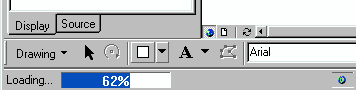
The ProgressBar property and the HideProgressBar, ShowProgressBar, and StepProgressBar methods are used to control the step progress bar on the status bar. The step progress bar displays in the main status bar pane.
Visible
Indicates if the statusbar is visible.
bool Visible { get; set; }Property Value
Remarks
The Visible property indicates whether the status bar is visible in the ArcGIS application window, providing information about the current state of the application.
Methods
HideProgressAnimation()
Hides the progress animation.
void HideProgressAnimation()Remarks
Hides the animation progressor. Use the ShowProgressAnimation method to show the animation progressor and the PlayProgressAnimation method to start or stop the animation.
HideProgressBar()
Hides the progress bar.
void HideProgressBar()Remarks
The ProgressBar property and the HideProgressBar, ShowProgressBar, and StepProgressBar methods are used to control the step progress bar on the status bar.
PlayProgressAnimation(bool)
Plays the progress animation if the parameter is true; otherwise stops it.
void PlayProgressAnimation(bool playAnim)Parameters
playAnimbool
Remarks
The PlayProgressAnimation method starts or stops playing the animation. Pass True to start playing the animation and False to stop playing the animation.
ShowProgressAnimation(string, string)
Makes the progress animation visible.
void ShowProgressAnimation(string Message, string animationPath)Parameters
Remarks
The ShowProgressAnimation method provides shortcuts to the properties of the animation progressor. This method allows you to set the message, and the animation file to be played.
ShowProgressBar(string, int, int, int, bool)
Makes the progress bar visible.
void ShowProgressBar(string Message, int min, int max, int Step, bool onePanel)Parameters
Remarks
The ShowProgressBar method provides shortcuts to the properties of the step progress bar (IStepProgressor). This method allows you to set the message, minimum and maximum values, and the step size of the step progress bar and also display the step progress bar.
StepProgressBar()
Steps the progress bar to the next position.
void StepProgressBar()Remarks
The ProgressBar property and the HideProgressBar, ShowProgressBar, and StepProgressBar methods are used to control the step progress bar on the status bar.