This topic covers the Esri attribution and data attribution requirements for applications that do not display a map but use Esri technology.
Esri attribution
Esri attribution
Display requirements
Requirements
- The text must be clearly displayed in the application or in a window that is accessible from a menu or button.
- The text must not be covered or obstructed by other UI elements.
- The text must be easily discoverable.
Recommendations
- The word Esri should be linked to https://www.esri.com.
- Use Esri's data attribution design:
- Font family:
"Avenir Next W00"," Helvetica Neue", Helvetica, Arial,sans-serif; - Font color:
#323232(100% opacity) - Background color:
#ffffff(65% opacity) - Font size: 12px or larger.
- Font family:
Examples
The following are acceptable examples of displaying Esri attribution in applications that do not contain a map:
| In a control | In the app |
|---|---|

|

|
| From a menu | From a button |
|---|---|

|

|
Code examples
The following examples show how to correctly display Esri attribution in an application with no map. The steps required depend on the API you are using.
Display attribution when not using a map
ArcGIS REST JS
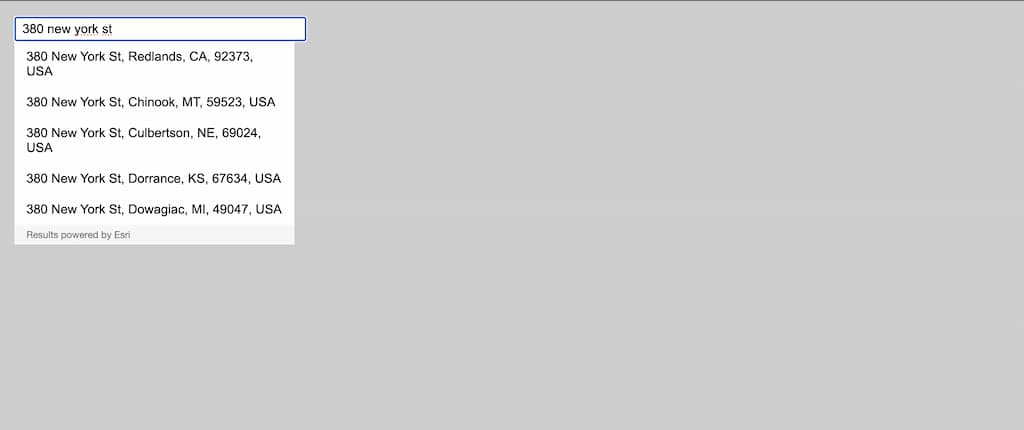
This example uses the autosuggest feature from suggest(). To provide Esri attribution, you can the Results powered by Esri text manually to the control.

Autosuggest results with "Results powered by Esri" text.
const div = document.createElement("div")
div.textContent = "Results powered by Esri"
div.className = "esri-attribution"
suggestionsList.appendChild(div)