Class EnvelopeClass
[Guid("30707212-52D5-11D0-A8F2-00608C85EDE5")]
[ClassInterface(ClassInterfaceType.None)]
public class EnvelopeClass : Envelope, IEnvelopeGEN, IEnvelope2, IEnvelope, IEnvelope4, IMAware, IZAware, IGeometry5, IGeometry4, IGeometry3, IGeometry2, IGeometry, IArea, IArea3D, IVolume, IProximityOperator, ITransform2D, IRelationalOperator2, IRelationalOperator, IHitTest, IHitTest3D, ISupportErrorInfo, IPersistStream, IPersist, IClone, IXMLSerialize, IProximityOperator3D, IRelationalOperator3D2, IRelationalOperator3D, IEnvelope3D- Inheritance
-
EnvelopeClass
- Implements
- Inherited Members
Constructors
EnvelopeClass()
public EnvelopeClass()Properties
IEnvelope2_MinMaxAttributes
public virtual IntPtr IEnvelope2_MinMaxAttributes { get; set; }Property Value
IEnvelope_MinMaxAttributes
public virtual IntPtr IEnvelope_MinMaxAttributes { get; set; }Property Value
MinMaxAttributes
public virtual IntPtr MinMaxAttributes { get; set; }Property Value
Explicit Interface Implementations
Area
The area.
virtual double Area { get; }Returns
Remarks

Area3D
The 3D surface area.
virtual double Area3D { get; }Returns
Remarks
If Patches comprising a MultiPatch geometry have improperly ordered vertices such that positive faces are not pointing outwards, a negative 3D surface area will be returned. To ensure proper orientation, add vertices in a clockwise manner relative to an observer situated outside of the MultiPatch geometry.

public static void CalculateArea3D()
{
IGeometry
IArea3D area3D
= multiPatchGeometry as
IArea3D;
double calculatedArea3D =
area3D.Area3D;
//calculatedArea3D
= 480
}
Assign(IClone)
Assigns the properties of src to the receiver.
virtual void Assign(IClone src)Parameters
srcIClone
CenterAt(IPoint)
Moves this envelope so it is centered at p.
virtual void CenterAt(IPoint p)Parameters
pIPoint
Centroid
The center of gravity (centroid).
virtual IPoint Centroid { get; }Returns
Remarks
The Centroid does not always occur inside the Area of the geometry. The Centroid is not the same as the center of the geometry or the Envelope binding the geometry (but it may be if and only if that is also the center of the weighted area).

Centroid3D
A 3D point whose XY coordinates are set to the center of gravity of the shape'ss 2D footprint and Z set to the shape's ZMax.
virtual IPoint Centroid3D { get; }Returns
CentroidEx
The center of gravity (centroid).
virtual IPoint CentroidEx { get; }Returns
Changed
Indicates if a geometry has been changed (edited, projected, etc).
virtual bool Changed { get; set; }Returns
Clone()
Clones the receiver and assigns the result to *clone.
virtual IClone Clone()Returns
Contains(IGeometry)
Indicates if this geometry contains the other geometry.
virtual bool Contains(IGeometry other)Parameters
otherIGeometry
Returns
Remarks
Only geometries that support the IRelationalOperator interface can be used as input geometries.
If geometry1 Contains geometry2, then geometry2 is Within geometry1.
An empty geometry does not contain another geometry. On the other hand, an empty geometry is contained in another geometry, unless the other geometry is empty.
Contains examples. Only "true" relationships are showed in this picture.

ContainsEx(IGeometry, esriSpatialRelationExEnum)
Indicates if this geometry contains the other geometry, optionally using Celementini's definition.
virtual bool ContainsEx(IGeometry pOther, esriSpatialRelationExEnum Relation)Parameters
pOtherIGeometryRelationesriSpatialRelationExEnum
Returns
Crosses(IGeometry)
Indicates if the two geometries intersect in a geometry of lesser dimension.
virtual bool Crosses(IGeometry other)Parameters
otherIGeometry
Returns
Remarks
Only geometries that support the IRelationalOperator interface can be used as input geometries.
Cross only applies to polyline/polyline, polyline/polygon, or polygon/polyline relations.
If either one of the geometries is empty, the geometries do not cross.
Crosses examples. Only "true" relationships are showed in this picture.

DefineFromPoints(ref IPoint[])
Defines the envelope to cover all the points.
virtual void DefineFromPoints(ref IPoint[] Points)Parameters
PointsIPoint[]
DefineFromPoints(int, ref IPoint)
Defines the envelope to cover all the points.
virtual void DefineFromPoints(int Count, ref IPoint Points)Parameters
Remarks
This is similar to getting the Envelope of a Multipoint.
Note: It is also possible to define a degenerate point Envelope by passing a single Point as an argument. The IPoint parameter accepts both a single IPoint object and an array of IPoints. To use an array, pass the desired starting element of the array as the input argument.
DefineFromWKSPoints(ref WKSPoint[])
Defines the envelope to cover all the points.
virtual void DefineFromWKSPoints(ref WKSPoint[] wksPoints)Parameters
wksPointsWKSPoint[]
DefineFromWKSPoints(int, ref WKSPoint)
Defines the envelope to cover all the points.
virtual void DefineFromWKSPoints(int Count, ref WKSPoint Points)Parameters
Depth
The depth of the envelope.
virtual double Depth { get; set; }Returns
Deserialize(IXMLSerializeData)
Deserializes an object from XML.
virtual void Deserialize(IXMLSerializeData data)Parameters
dataIXMLSerializeData
Dimension
virtual esriGeometryDimension Dimension { get; }Returns
Disjoint(IGeometry)
Indicates if the two geometries share no points in common. Negate this result to compute the Intersect relation.
virtual bool Disjoint(IGeometry other)Parameters
otherIGeometry
Returns
Remarks
Only geometries that support the IRelationalOperator interface can be used as input geometries.
Two geometries are disjoint if either one is empty.
Disjoint example. Only "true" relationships are showed in this picture.

Disjoint3D(IGeometry)
Indicates if the two geometries share no points in common. Negate this result to compute the Intersect relation.
virtual bool Disjoint3D(IGeometry pOther)Parameters
pOtherIGeometry
Returns
DropMs()
Sets all the M values to a non-valid number (NaN).
virtual void DropMs()DropZs()
Sets all the Z values to a non-valid number (NaN).
virtual void DropZs()Envelope
virtual IEnvelope Envelope { get; }Returns
Equals(IGeometry)
Indicates if the two geometries are of the same type and define the same set of points in the plane.
virtual bool Equals(IGeometry other)Parameters
otherIGeometry
Returns
Remarks
Only geometries that support the IRelationalOperator interface can be used as input geometries. GeometryBags are not supported. IRelationalOperator::Equals delegates to ITopologicalOperatorSymmetricDifference and returns true when that method returns an empty geometry; M's and Z's are ignored. Please use IClone::IsEqual if M's and Z's need to be compared.
IClone::IsEqual simply iterates over each segment in each geometry, in index order, and compares their types and coordinates (but using the spatial reference's cluster tolerances to determine equality of coordinates).
Only "true" relationships are showed in this picture.

The RCW for the IRelationalOperator inherits from System.Object, as do all reference types in .NET. The System.Object type has a method called Equals, which results in the IRelationalOperator RCW having two overloaded versions of the Equals method. Ensure that you are not using the Equals method inherited from the System.Object class by mistake, by making sure you pass in an IGeometry reference to the Equals method. For example, the following extract of code from a C# console application demonstrates calling Equals correctly.
ESRI.ArcGIS.Geometry.IPoint pt1 = new ESRI.ArcGIS.Geometry.PointClass();
pt1.PutCoords(5, 5);
ESRI.ArcGIS.Geometry.IPoint pt2 = new ESRI.ArcGIS.Geometry.PointClass();
pt2.PutCoords(5, 5);
ESRI.ArcGIS.Geometry.IRelationalOperator rel1 = pt1 as ESRI.ArcGIS.Geometry.IRelationalOperator;
ESRI.ArcGIS.Geometry.IGeometry geom2 = pt2 as ESRI.ArcGIS.Geometry.IGeometry;
bool relEqual = rel1.Equals(pt2); //calling IRelationalOperator::Equals
Console.WriteLine("Equal: " + relEqual.ToString());
bool netEqual =  rel1.Equals(pt2 as object);  //calling Object::Equals
Console.WriteLine("Equal: " + netEqual.ToString());
Expand(double, double, bool)
Moves the X and Y coordinates of the sides toward or away from each other.
virtual void Expand(double dx, double dy, bool asRatio)Parameters
ExpandM(double, bool)
Moves the measure of the sides toward or away from each other.
virtual void ExpandM(double dm, bool asRatio)Parameters
ExpandZ(double, bool)
Moves the Z attribute of the sides toward or away from each other.
virtual void ExpandZ(double dz, bool asRatio)Parameters
GeoNormalize()
virtual void GeoNormalize()GeoNormalizeFromLongitude(double)
virtual void GeoNormalizeFromLongitude(double Longitude)Parameters
Longitudedouble
GeometryType
virtual esriGeometryType GeometryType { get; }Returns
GetClassID(out Guid)
virtual void GetClassID(out Guid pClassID)Parameters
pClassIDGuid
GetSizeMax(out _ULARGE_INTEGER)
virtual void GetSizeMax(out _ULARGE_INTEGER pcbSize)Parameters
pcbSize_ULARGE_INTEGER
Height
The height of the envelope.
virtual double Height { get; set; }Returns
HitTest(IPoint, double, esriGeometryHitPartType, IPoint, ref double, ref int, ref int, ref bool)
Locates a part of a geometry closest to a query point. Any located part must be within searchRadius units from the query point.
virtual bool HitTest(IPoint QueryPoint, double searchRadius, esriGeometryHitPartType geometryPart, IPoint hitPoint, ref double hitDistance, ref int hitPartIndex, ref int hitSegmentIndex, ref bool bRightSide)Parameters
QueryPointIPointsearchRadiusdoublegeometryPartesriGeometryHitPartTypehitPointIPointhitDistancedoublehitPartIndexinthitSegmentIndexintbRightSidebool
Returns
Remarks
The segment index returned has different meanings depending on the esriGeometryHitPartType used (Please see the example for more details).
EsriGeometryPartVertex: returns a vertex index
EsriGeometryPartBoundary, esriGeometryPartMidpoint and esriGeometryPartEndpoint: return a segment index
EsriGeometryPartCentroid: Always returns 0 for the part index and the segment index.
brightside: Indicates if the input point is on the right side of the input geometry
Note: The distance units use in this method are the units of the input geometry. No conversion is performed. esriGeometryHitPartType parameter cannot be a combination of several esriGeometryHitPartTypes.
HitTest3D(IPoint, double, esriGeometryHitPartType, IPoint, ref double, ref int, ref int)
Locates a part of a geometry closest to a query point. Any located part must be within searchRadius units from the query point.
virtual bool HitTest3D(IPoint QueryPoint, double searchRadius, esriGeometryHitPartType geometryPart, IPoint hitPoint, ref double hitDistance, ref int hitPartIndex, ref int hitSegmentIndex)Parameters
QueryPointIPointsearchRadiusdoublegeometryPartesriGeometryHitPartTypehitPointIPointhitDistancedoublehitPartIndexinthitSegmentIndexint
Returns
HitTestCone(IRay, double, esriGeometryHitPartType, IPoint, ref double, ref int, ref int)
Locates a part of a geometry closest to a query ray.
virtual bool HitTestCone(IRay pQueryRay, double minAngle, esriGeometryHitPartType geometryPart, IPoint pHitPoint, ref double pHitDistance, ref int pHitPartIndex, ref int pHitSegmentIndex)Parameters
pQueryRayIRayminAngledoublegeometryPartesriGeometryHitPartTypepHitPointIPointpHitDistancedoublepHitPartIndexintpHitSegmentIndexint
Returns
IEnvelope2_CenterAt(IPoint)
virtual void IEnvelope2_CenterAt(IPoint p)Parameters
pIPoint
IEnvelope2_DefineFromPoints(int, ref IPoint)
virtual void IEnvelope2_DefineFromPoints(int Count, ref IPoint Points)Parameters
IEnvelope2_DefineFromWKSPoints(int, ref WKSPoint)
virtual void IEnvelope2_DefineFromWKSPoints(int Count, ref WKSPoint Points)Parameters
IEnvelope2_Depth
virtual double IEnvelope2_Depth { get; set; }Returns
IEnvelope2_Dimension
virtual esriGeometryDimension IEnvelope2_Dimension { get; }Returns
IEnvelope2_Envelope
virtual IEnvelope IEnvelope2_Envelope { get; }Returns
IEnvelope2_Expand(double, double, bool)
virtual void IEnvelope2_Expand(double dx, double dy, bool asRatio)Parameters
IEnvelope2_ExpandM(double, bool)
virtual void IEnvelope2_ExpandM(double dm, bool asRatio)Parameters
IEnvelope2_ExpandZ(double, bool)
virtual void IEnvelope2_ExpandZ(double dz, bool asRatio)Parameters
IEnvelope2_GeoNormalize()
virtual void IEnvelope2_GeoNormalize()IEnvelope2_GeoNormalizeFromLongitude(double)
virtual void IEnvelope2_GeoNormalizeFromLongitude(double Longitude)Parameters
Longitudedouble
IEnvelope2_GeometryType
virtual esriGeometryType IEnvelope2_GeometryType { get; }Returns
IEnvelope2_Height
virtual double IEnvelope2_Height { get; set; }Returns
IEnvelope2_Intersect(IEnvelope)
virtual void IEnvelope2_Intersect(IEnvelope inEnvelope)Parameters
inEnvelopeIEnvelope
IEnvelope2_IsEmpty
virtual bool IEnvelope2_IsEmpty { get; }Returns
IEnvelope2_LowerLeft
virtual IPoint IEnvelope2_LowerLeft { get; set; }Returns
IEnvelope2_LowerRight
virtual IPoint IEnvelope2_LowerRight { get; set; }Returns
IEnvelope2_MMax
virtual double IEnvelope2_MMax { get; set; }Returns
IEnvelope2_MMin
virtual double IEnvelope2_MMin { get; set; }Returns
IEnvelope2_Offset(double, double)
virtual void IEnvelope2_Offset(double X, double Y)Parameters
IEnvelope2_OffsetM(double)
virtual void IEnvelope2_OffsetM(double M)Parameters
Mdouble
IEnvelope2_OffsetZ(double)
virtual void IEnvelope2_OffsetZ(double Z)Parameters
Zdouble
IEnvelope2_Project(ISpatialReference)
virtual void IEnvelope2_Project(ISpatialReference newReferenceSystem)Parameters
newReferenceSystemISpatialReference
IEnvelope2_PutCoords(double, double, double, double)
virtual void IEnvelope2_PutCoords(double XMin, double YMin, double XMax, double YMax)Parameters
IEnvelope2_PutWKSCoords(ref WKSEnvelope)
virtual void IEnvelope2_PutWKSCoords(ref WKSEnvelope e)Parameters
IEnvelope2_QueryCoords(out double, out double, out double, out double)
virtual void IEnvelope2_QueryCoords(out double XMin, out double YMin, out double XMax, out double YMax)Parameters
IEnvelope2_QueryEnvelope(IEnvelope)
virtual void IEnvelope2_QueryEnvelope(IEnvelope outEnvelope)Parameters
outEnvelopeIEnvelope
IEnvelope2_QueryWKSCoords(out WKSEnvelope)
virtual void IEnvelope2_QueryWKSCoords(out WKSEnvelope e)Parameters
IEnvelope2_SetEmpty()
virtual void IEnvelope2_SetEmpty()IEnvelope2_SnapToSpatialReference()
virtual void IEnvelope2_SnapToSpatialReference()IEnvelope2_SpatialReference
virtual ISpatialReference IEnvelope2_SpatialReference { get; set; }Returns
IEnvelope2_Union(IEnvelope)
virtual void IEnvelope2_Union(IEnvelope inEnvelope)Parameters
inEnvelopeIEnvelope
IEnvelope2_UpperLeft
virtual IPoint IEnvelope2_UpperLeft { get; set; }Returns
IEnvelope2_UpperRight
virtual IPoint IEnvelope2_UpperRight { get; set; }Returns
IEnvelope2_Width
virtual double IEnvelope2_Width { get; set; }Returns
IEnvelope2_XMax
virtual double IEnvelope2_XMax { get; set; }Returns
IEnvelope2_XMin
virtual double IEnvelope2_XMin { get; set; }Returns
IEnvelope2_YMax
virtual double IEnvelope2_YMax { get; set; }Returns
IEnvelope2_YMin
virtual double IEnvelope2_YMin { get; set; }Returns
IEnvelope2_ZMax
virtual double IEnvelope2_ZMax { get; set; }Returns
IEnvelope2_ZMin
virtual double IEnvelope2_ZMin { get; set; }Returns
IEnvelope2_get_MinMaxAttributes()
virtual IntPtr IEnvelope2_get_MinMaxAttributes()Returns
IEnvelope2_set_MinMaxAttributes(ref esriPointAttributes)
virtual void IEnvelope2_set_MinMaxAttributes(ref esriPointAttributes MinMaxAttributes)Parameters
MinMaxAttributesesriPointAttributes
IEnvelope_CenterAt(IPoint)
Moves this envelope so it is centered at p.
virtual void IEnvelope_CenterAt(IPoint p)Parameters
pIPoint
Remarks
The Center Point occurs at: ((XMin + XMax) / 2, (YMin + YMax) / 2).
private void ReCenterEnvelope()
{
IEnvelope envelope = new EnvelopeClass();
envelope.PutCoords(100, 100, 200, 200);
String report1 = "Envelope: \n" +
"LowerLeft X = " + envelope.LowerLeft.X + "\n" +
"LowerLeft Y = " + envelope.LowerLeft.Y + "\n\n" +
"LowerRight X = " + envelope.LowerRight.X + "\n" +
"LowerRight Y = " + envelope.LowerRight.Y + "\n\n" +
"UpperLeft X = " + envelope.UpperLeft.X + "\n" +
"UpperLeft Y = " + envelope.UpperLeft.Y + "\n\n" +
"UpperRight X = " + envelope.UpperRight.X + "\n" +
"UpperRight Y = " + envelope.UpperRight.Y; System.Windows.Forms.MessageBox.Show(report1);
//re-center
IPoint centerPoint = new PointClass();
centerPoint.PutCoords(0, 0);
envelope.CenterAt(centerPoint);
String report2 = "Re-cetered Envelope: \n" +
"LowerLeft X = " + envelope.LowerLeft.X + "\n" +
"LowerLeft Y = " + envelope.LowerLeft.Y + "\n\n" +
"LowerRight X = " + envelope.LowerRight.X + "\n" +
"LowerRight Y = " + envelope.LowerRight.Y + "\n\n" +
"UpperLeft X = " + envelope.UpperLeft.X + "\n" +
"UpperLeft Y = " + envelope.UpperLeft.Y + "\n\n" +
"UpperRight X = " + envelope.UpperRight.X + "\n" +
"UpperRight Y = " + envelope.UpperRight.Y; System.Windows.Forms.MessageBox.Show(report2);
}
Public Sub t_EnvCenterAt()
Dim pEnv1 As IEnvelope
Dim pPoint As IPoint
pEnv1 = New Envelope
pPoint = New Point
pEnv1.PutCoords(100, 100, 200, 200)
pPoint.PutCoords(0, 0)
pEnv1.CenterAt(pPoint)
Dim dXmin As Double, dYmin As Double, dXmax As Double, dYmax As Double
pEnv1.QueryCoords(dXmin, dYmin, dXmax, dYmax)
If pEnv1.IsEmpty Then
MsgBox("envelope is empty")
Else
MsgBox(dXmin & "," & dYmin & "," & dXmax & "," & dYmax)
End If
End Sub
IEnvelope_Depth
The depth of the envelope.
virtual double IEnvelope_Depth { get; set; }Returns
Remarks

IEnvelope_Expand(double, double, bool)
Moves the X and Y coordinates of the sides toward or away from each other.
virtual void IEnvelope_Expand(double dx, double dy, bool asRatio)Parameters
Remarks

// The example shows how to expand the Envelope by using a asRatio factor.
private void Expand()
{
IEnvelope envelope = new EnvelopeClass();
envelope.PutCoords(100, 100, 200, 200);
String report1 = "Envelope before expanding: \n" +
"LowerLeft X = " + envelope.LowerLeft.X + "\n" +
"LowerLeft Y = " + envelope.LowerLeft.Y + "\n\n" +
"LowerRight X = " + envelope.LowerRight.X + "\n" +
"LowerRight Y = " + envelope.LowerRight.Y + "\n\n" +
"UpperLeft X = " + envelope.UpperLeft.X + "\n" +
"UpperLeft Y = " + envelope.UpperLeft.Y + "\n\n" +
"UpperRight X = " + envelope.UpperRight.X + "\n" +
"UpperRight Y = " + envelope.UpperRight.Y;
System.Windows.Forms.MessageBox.Show(report1);
//expand
envelope.Expand(0.5, 0.5, true);
String report2 = "Envelope after expanding: \n" +
"LowerLeft X = " + envelope.LowerLeft.X + "\n" +
"LowerLeft Y = " + envelope.LowerLeft.Y + "\n\n" +
"LowerRight X = " + envelope.LowerRight.X + "\n" +
"LowerRight Y = " + envelope.LowerRight.Y + "\n\n" +
"UpperLeft X = " + envelope.UpperLeft.X + "\n" +
"UpperLeft Y = " + envelope.UpperLeft.Y + "\n\n" +
"UpperRight X = " + envelope.UpperRight.X + "\n" +
"UpperRight Y = " + envelope.UpperRight.Y;
System.Windows.Forms.MessageBox.Show(report2);
}
' The example shows how to expand the Envelope pEnv1 by using a
' asRatio factor. In this case the target Envelope is 50% of the
' original size.
Public Sub t_EnvExpand()
Dim pEnv1 As IEnvelope
pEnv1 = New Envelope
pEnv1.PutCoords(100, 100, 200, 200)
pEnv1.Expand(0.5, 0.5, True)
Dim dXmin As Double, dYmin As Double, dXmax As Double, dYmax As Double
pEnv1.QueryCoords(dXmin, dYmin, dXmax, dYmax)
If pEnv1.IsEmpty Then
MsgBox("envelope is empty")
Else
MsgBox(dXmin & "," & dYmin & "," & dXmax & "," & dYmax)
End If
End Sub
IEnvelope_ExpandM(double, bool)
Moves the measure of the sides toward or away from each other.
virtual void IEnvelope_ExpandM(double dm, bool asRatio)Parameters
IEnvelope_ExpandZ(double, bool)
Moves the Z attribute of the sides toward or away from each other.
virtual void IEnvelope_ExpandZ(double dz, bool asRatio)Parameters
IEnvelope_Height
The height of the envelope.
virtual double IEnvelope_Height { get; set; }Returns
Remarks

IEnvelope_Intersect(IEnvelope)
Adjusts to include only the area also included by inEnvelope.
virtual void IEnvelope_Intersect(IEnvelope inEnvelope)Parameters
inEnvelopeIEnvelope
Remarks
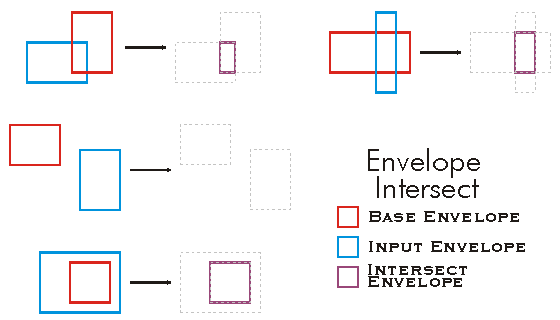
public void Intersect()
{
IEnvelope envelope1 = new EnvelopeClass();
IEnvelope envelope2 = new EnvelopeClass();
envelope1.PutCoords(100, 100, 200, 200);
envelope2.PutCoords(150, 150, 250, 250);
envelope1.Intersect(envelope2);
IPoint lowerLeft = envelope1.LowerLeft;
IPoint lowerRight = envelope1.LowerRight;
IPoint upperLeft = envelope1.UpperLeft;
IPoint upperRight = envelope1.UpperRight;
String report = "LowerLeft X = " + lowerLeft.X + "\n" +
"LowerLeft Y = " + lowerLeft.Y + "\n\n" +
"LowerRight X = " + lowerRight.X + "\n" +
"LowerRight Y = " + lowerRight.Y + "\n\n" +
"UpperLeft X = " + upperLeft.X + "\n" +
"UpperLeft Y = " + upperLeft.Y + "\n\n" +
"UpperRight X = " + upperRight.X + "\n" +
"UpperRight Y = " + upperRight.Y;
System.Windows.Forms.MessageBox.Show(report);
}
'The example shows how to intersect 2 envelopes. The result is put in the first envelope.
Public Sub t_EnvIntersect()
Dim pEnv1 As IEnvelope
Dim pEnv2 As IEnvelope
pEnv1 = New Envelope
pEnv2 = New Envelope
pEnv1.PutCoords(100, 100, 200, 200)
pEnv2.PutCoords(150, 150, 250, 250)
pEnv1.Intersect(pEnv2)
Dim dXmin As Double, dYmin As Double, dXmax As Double, dYmax As Double
pEnv1.QueryCoords(dXmin, dYmin, dXmax, dYmax)
If pEnv1.IsEmpty Then
MsgBox("envelope is empty")
Else
MsgBox(dXmin & "," & dYmin & "," & dXmax & "," & dYmax)
End If
End Sub
IEnvelope_LowerLeft
The lower left corner.
virtual IPoint IEnvelope_LowerLeft { get; set; }Returns
Remarks
Returns or sets the LowerLeft point of an Envelope .
private void printEnvelope(IEnvelope envelope)
{
IPoint lowerLeft = envelope.LowerLeft;
IPoint lowerRight = envelope.LowerRight;
IPoint upperLeft = envelope.UpperLeft;
IPoint upperRight = envelope.UpperRight;
String report = "LowerLeft X = " + lowerLeft.X + "\n" +
"LowerLeft Y = " + lowerLeft.Y + "\n\n" +
"LowerRight X = " + lowerRight.X + "\n" +
"LowerRight Y = " + lowerRight.Y + "\n\n" +
"UpperLeft X = " + upperLeft.X + "\n" +
"UpperLeft Y = " + upperLeft.Y + "\n\n" +
"UpperRight X = " + upperRight.X + "\n" +
"UpperRight Y = " + upperRight.Y;
System.Windows.Forms.MessageBox.Show(report);
}
IEnvelope_LowerRight
The lower right corner.
virtual IPoint IEnvelope_LowerRight { get; set; }Returns
Remarks
Returns or sets the LowerRight point of an Envelope .
public void Driver()
{
IEnvelope envelope = new EnvelopeClass();
envelope.XMin = 0;
envelope.YMin = 10;
envelope.XMax = 20;
envelope.YMax = 30;
printEnvelope(envelope);
}
private void printEnvelope(IEnvelope envelope)
{
IPoint lowerLeft = envelope.LowerLeft;
IPoint lowerRight = envelope.LowerRight;
IPoint upperLeft = envelope.UpperLeft;
IPoint upperRight = envelope.UpperRight;
String report = "LowerLeft X = " + lowerLeft.X + "\n" +
"LowerLeft Y = " + lowerLeft.Y + "\n\n" +
"LowerRight X = "+ lowerRight.X + "\n" +
"LowerRight Y = " + lowerRight.Y + "\n\n" +
"UpperLeft X = " + upperLeft.X + "\n" +
"UpperLeft Y = " + upperLeft.Y + "\n\n" +
"UpperRight X = "+ upperRight.X + "\n" +
"UpperRight Y = "+ upperRight.Y;
System.Windows.Forms.MessageBox.Show(report);
}
IEnvelope_MMax
The maximum measure value in the area of the envelope.
virtual double IEnvelope_MMax { get; set; }Returns
IEnvelope_MMin
The minimum measure value in the area of the envelope.
virtual double IEnvelope_MMin { get; set; }Returns
IEnvelope_Offset(double, double)
Moves the sides x units horizontally and y units vertically.
virtual void IEnvelope_Offset(double X, double Y)Parameters
Remarks
The new position of the Envelope is as follows:
new XMin= old XMin + X
new YMin = old YMin + Y
new XMax = old XMax + X
new YMax = old YMax + Y
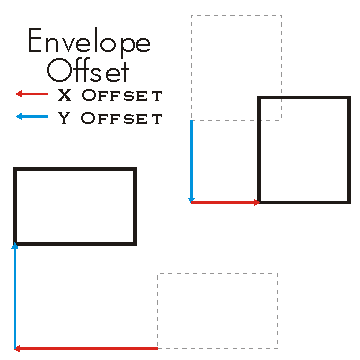
private void SetOffset()
{
IEnvelope envelope = new EnvelopeClass();
envelope.PutCoords(100, 100, 200, 200);
String report1 = "Envelope before setting offset: \n" +
"LowerLeft X = " + envelope.LowerLeft.X + "\n" +
"LowerLeft Y = " + envelope.LowerLeft.Y + "\n\n" +
"LowerRight X = " + envelope.LowerRight.X + "\n" +
"LowerRight Y = " + envelope.LowerRight.Y + "\n\n" +
"UpperLeft X = " + envelope.UpperLeft.X + "\n" +
"UpperLeft Y = " + envelope.UpperLeft.Y + "\n\n" +
"UpperRight X = " + envelope.UpperRight.X + "\n" +
"UpperRight Y = " + envelope.UpperRight.Y;
System.Windows.Forms.MessageBox.Show(report1);
//offsets envelope by 10 units in the X direction and 20 in the Y direction.
envelope.Offset(10, 20);
String report2 = "Envelope after setting offset: \n" +
"LowerLeft X = " + envelope.LowerLeft.X + "\n" +
"LowerLeft Y = " + envelope.LowerLeft.Y + "\n\n" +
"LowerRight X = " + envelope.LowerRight.X + "\n" +
"LowerRight Y = " + envelope.LowerRight.Y + "\n\n" +
"UpperLeft X = " + envelope.UpperLeft.X + "\n" +
"UpperLeft Y = " + envelope.UpperLeft.Y + "\n\n" +
"UpperRight X = " + envelope.UpperRight.X + "\n" +
"UpperRight Y = " + envelope.UpperRight.Y;
System.Windows.Forms.MessageBox.Show(report2);
}
Dim env As ESRI.ArcGIS.Geometry.IEnvelope
env = New ESRI.ArcGIS.Geometry.Envelope
env.PutCoords(100, 100, 200, 200)
env.Offset(10, 20)
IEnvelope_OffsetM(double)
Moves the sides m units.
virtual void IEnvelope_OffsetM(double M)Parameters
Mdouble
Remarks
IEnvelope_OffsetZ(double)
Moves the sides z units.
virtual void IEnvelope_OffsetZ(double Z)Parameters
Zdouble
Remarks
new ZMin = old ZMin + Z
new ZMax = old ZMax + Z
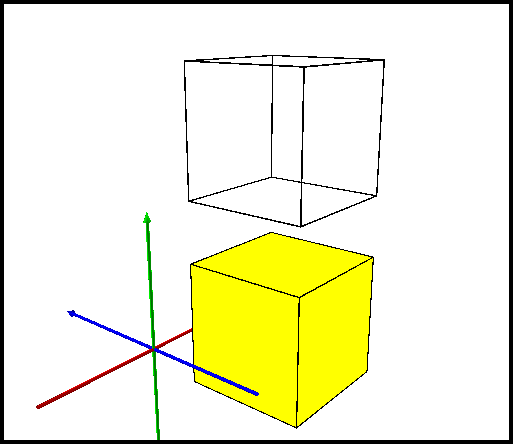
public static void TestOffsetZ()
{
const double Offset = 14.928;
IEnvelope2 envelope = GetEnvelopeGeometry() as IEnvelope2;
double beforeXMin, beforeXMax, beforeYMin, beforeYMax;
envelope.QueryCoords(out beforeXMin, out beforeYMin, out beforeXMax, out beforeYMax);
double beforeZMin, beforeZMax;
envelope.QueryZCoords(out beforeZMin, out beforeZMax);
envelope.OffsetZ(Offset);
double afterXMin, afterXMax, afterYMin, afterYMax;
envelope.QueryCoords(out afterXMin, out afterYMin, out afterXMax, out afterYMax);
double afterZMin, afterZMax;
envelope.QueryZCoords(out afterZMin, out afterZMax);
//beforeXMin = 3.33
//beforeXMax = 13.33
//beforeYMin = -10.864
//beforeYMax = -0.864
//beforeZMin = -3.972
//beforeZMax = 6.028
//afterXMin = 3.33
//afterXMax = 13.33
//afterYMin = -10.864
//afterYMax = -0.864
//afterZMin = 10.956
//afterZMax = 20.956
}
IEnvelope_PutCoords(double, double, double, double)
Constructs an envelope from the coordinate values of lower, left and upper, right corners.
virtual void IEnvelope_PutCoords(double XMin, double YMin, double XMax, double YMax)Parameters
Remarks
private void PutCoordinates()
{
IEnvelope envelope = new EnvelopeClass();
envelope.PutCoords(100, 100, 200, 200);
String report = "Envelope\n" +
"LowerLeft X = " + envelope.LowerLeft.X + "\n" +
"LowerLeft Y = " + envelope.LowerLeft.Y + "\n\n" +
"LowerRight X = " + envelope.LowerRight.X + "\n" +
"LowerRight Y = " + envelope.LowerRight.Y + "\n\n" +
"UpperLeft X = " + envelope.UpperLeft.X + "\n" +
"UpperLeft Y = " + envelope.UpperLeft.Y + "\n\n" +
"UpperRight X = " + envelope.UpperRight.X + "\n" +
"UpperRight Y = " + envelope.UpperRight.Y;
System.Windows.Forms.MessageBox.Show(report);
}
' The example shows how to move an Envelope to a new
' center point (pPoint).
'This example demonstrates how to use the IEnvelope::PutCoords method
Public Function CreateEnvXY(ByVal dblXMin As Double, ByVal dblYMin As Double, _
ByVal dblXMax As Double, ByVal dblYMax As Double) As IEnvelope
CreateEnvXY = New Envelope
CreateEnvXY.PutCoords(dblXMin, dblYMin, dblXMax, dblYMax)
End Function
IEnvelope_PutWKSCoords(ref WKSEnvelope)
Copies e's dimensions into this envelope.
virtual void IEnvelope_PutWKSCoords(ref WKSEnvelope e)Parameters
IEnvelope_QueryCoords(out double, out double, out double, out double)
Returns the coordinates of lower, left and upper, right corners.
virtual void IEnvelope_QueryCoords(out double XMin, out double YMin, out double XMax, out double YMax)Parameters
IEnvelope_QueryWKSCoords(out WKSEnvelope)
Copies the left, bottom, right and top sides into e.
virtual void IEnvelope_QueryWKSCoords(out WKSEnvelope e)Parameters
IEnvelope_Union(IEnvelope)
Adjusts to overlap inEnvelope.
virtual void IEnvelope_Union(IEnvelope inEnvelope)Parameters
inEnvelopeIEnvelope
Remarks

public void Union()
{
IEnvelope envelope1 = new EnvelopeClass();
IEnvelope envelope2 = new EnvelopeClass();
envelope1.PutCoords(100, 100, 200, 200);
envelope2.PutCoords(150, 150, 250, 250);
envelope1.Union(envelope2);
IPoint lowerLeft = envelope1.LowerLeft;
IPoint lowerRight = envelope1.LowerRight;
IPoint upperLeft = envelope1.UpperLeft;
IPoint upperRight = envelope1.UpperRight;
String report = "LowerLeft X = " + lowerLeft.X + "\n" +
"LowerLeft Y = " + lowerLeft.Y + "\n\n" +
"LowerRight X = " + lowerRight.X + "\n" +
"LowerRight Y = " + lowerRight.Y + "\n\n" +
"UpperLeft X = " + upperLeft.X + "\n" +
"UpperLeft Y = " + upperLeft.Y + "\n\n" +
"UpperRight X = " + upperRight.X + "\n" +
"UpperRight Y = " + upperRight.Y;
System.Windows.Forms.MessageBox.Show(report);
}
' The example shows a union of 2 envelopes. The result is put in the first
' envelope and it will have the extent of both envelopes (100,100,250,250).
Public Sub t_EnvUnion()
Dim pEnv1 As IEnvelope
Dim pEnv2 As IEnvelope
pEnv1 = New Envelope
pEnv2 = New Envelope
pEnv1.PutCoords(100, 100, 200, 200)
pEnv2.PutCoords(150, 150, 250, 250)
pEnv1.Union(pEnv2)
Dim dXmin As Double, dYmin As Double, dXmax As Double, dYmax As Double
pEnv1.QueryCoords(dXmin, dYmin, dXmax, dYmax)
End Sub
IEnvelope_UpperLeft
The upper left corner.
virtual IPoint IEnvelope_UpperLeft { get; set; }Returns
Remarks
Returns or sets the UpperLeft point of an Envelope .
private void printEnvelope(IEnvelope envelope)
{
IPoint lowerLeft = envelope.LowerLeft;
IPoint lowerRight = envelope.LowerRight;
IPoint upperLeft = envelope.UpperLeft;
IPoint upperRight = envelope.UpperRight;
String report = "LowerLeft X = " + lowerLeft.X + "\n" +
"LowerLeft Y = " + lowerLeft.Y + "\n\n" +
"LowerRight X = " + lowerRight.X + "\n" +
"LowerRight Y = " + lowerRight.Y + "\n\n" +
"UpperLeft X = " + upperLeft.X + "\n" +
"UpperLeft Y = " + upperLeft.Y + "\n\n" +
"UpperRight X = " + upperRight.X + "\n" +
"UpperRight Y = " + upperRight.Y;
System.Windows.Forms.MessageBox.Show(report);
}
IEnvelope_UpperRight
The upper right corner.
virtual IPoint IEnvelope_UpperRight { get; set; }Returns
Remarks
Returns or sets the UpperRight point of an Envelope .
public void Driver()
{
IEnvelope envelope = new EnvelopeClass();
envelope.XMin = 0;
envelope.YMin = 10;
envelope.XMax = 20;
envelope.YMax = 30;
printEnvelope(envelope);
}
private void printEnvelope(IEnvelope envelope)
{
IPoint lowerLeft = envelope.LowerLeft;
IPoint lowerRight = envelope.LowerRight;
IPoint upperLeft = envelope.UpperLeft;
IPoint upperRight = envelope.UpperRight;
String report = "LowerLeft X = " + lowerLeft.X + "\n" +
"LowerLeft Y = " + lowerLeft.Y + "\n\n" +
"LowerRight X = "+ lowerRight.X + "\n" +
"LowerRight Y = " + lowerRight.Y + "\n\n" +
"UpperLeft X = " + upperLeft.X + "\n" +
"UpperLeft Y = " + upperLeft.Y + "\n\n" +
"UpperRight X = "+ upperRight.X + "\n" +
"UpperRight Y = "+ upperRight.Y;
System.Windows.Forms.MessageBox.Show(report);
}
IEnvelope_Width
The width of the envelope.
virtual double IEnvelope_Width { get; set; }Returns
Remarks
IEnvelope_XMax
The position of the right side.
virtual double IEnvelope_XMax { get; set; }Returns
Remarks
Setting Xmax to a value smaller than Xmin will reverse Xmin and Xmax. Use PutCoords to avoid this behavior.
The following C# code shows how to get the XMax property from an envelope:
xMax = env.XMax;
IEnvelope_XMin
The position of the left side.
virtual double IEnvelope_XMin { get; set; }Returns
Remarks
Setting Xmin to a value larger than Xmax will reverse Xmin and Xmax. Use PutCoords to avoid this behavior.
The following C# code shows how to get the XMin property from an envelope:
xMin = env.XMin;
IEnvelope_YMax
The position of the top.
virtual double IEnvelope_YMax { get; set; }Returns
Remarks
Setting Ymax to a value smaller than Ymin will reverse Ymin and Ymax. Use PutCoords to avoid this behavior.
The following C# code shows how to get the YMax property from an envelope:
yMax = env.YMax;
IEnvelope_YMin
The position of the bottom.
virtual double IEnvelope_YMin { get; set; }Returns
Remarks
Setting Ymin to a value larger than Ymax will reverse Ymin and Ymax. Use PutCoords to avoid this behavior.
The following C# code shows how to get the YMin property of an envelope:
yMin = env.YMin;
IEnvelope_ZMax
The maximum Z value in the area of the envelope.
virtual double IEnvelope_ZMax { get; set; }Returns
Remarks
The following C# code shows how to read and write the ZMax value:
IEnvelope env = new EnvelopeClass() as IEnvelope;
env.ZMax = 2;
double zMax;
zMax = env.ZMax;
IEnvelope_ZMin
The minimum Z value in the area of the envelope.
virtual double IEnvelope_ZMin { get; set; }Returns
Remarks
The following C# code shows how to read and write the ZMin value:
IEnvelope env = new EnvelopeClass() as IEnvelope;
env.ZMin = 2;
double zMin;
zMin = env.ZMin;
IEnvelope_get_MinMaxAttributes()
virtual IntPtr IEnvelope_get_MinMaxAttributes()Returns
IEnvelope_set_MinMaxAttributes(ref esriPointAttributes)
virtual void IEnvelope_set_MinMaxAttributes(ref esriPointAttributes MinMaxAttributes)Parameters
MinMaxAttributesesriPointAttributes
IGeometry2_Dimension
virtual esriGeometryDimension IGeometry2_Dimension { get; }Returns
IGeometry2_Envelope
virtual IEnvelope IGeometry2_Envelope { get; }Returns
IGeometry2_GeoNormalize()
virtual void IGeometry2_GeoNormalize()IGeometry2_GeoNormalizeFromLongitude(double)
virtual void IGeometry2_GeoNormalizeFromLongitude(double Longitude)Parameters
Longitudedouble
IGeometry2_GeometryType
virtual esriGeometryType IGeometry2_GeometryType { get; }Returns
IGeometry2_IsEmpty
virtual bool IGeometry2_IsEmpty { get; }Returns
IGeometry2_Project(ISpatialReference)
virtual void IGeometry2_Project(ISpatialReference newReferenceSystem)Parameters
newReferenceSystemISpatialReference
IGeometry2_QueryEnvelope(IEnvelope)
virtual void IGeometry2_QueryEnvelope(IEnvelope outEnvelope)Parameters
outEnvelopeIEnvelope
IGeometry2_SetEmpty()
virtual void IGeometry2_SetEmpty()IGeometry2_SnapToSpatialReference()
virtual void IGeometry2_SnapToSpatialReference()IGeometry2_SpatialReference
virtual ISpatialReference IGeometry2_SpatialReference { get; set; }Returns
IGeometry3_Dimension
virtual esriGeometryDimension IGeometry3_Dimension { get; }Returns
IGeometry3_Envelope
virtual IEnvelope IGeometry3_Envelope { get; }Returns
IGeometry3_GeoNormalize()
virtual void IGeometry3_GeoNormalize()IGeometry3_GeoNormalizeFromLongitude(double)
virtual void IGeometry3_GeoNormalizeFromLongitude(double Longitude)Parameters
Longitudedouble
IGeometry3_GeometryType
virtual esriGeometryType IGeometry3_GeometryType { get; }Returns
IGeometry3_IsEmpty
virtual bool IGeometry3_IsEmpty { get; }Returns
IGeometry3_Project(ISpatialReference)
virtual void IGeometry3_Project(ISpatialReference newReferenceSystem)Parameters
newReferenceSystemISpatialReference
IGeometry3_ProjectEx(ISpatialReference, esriTransformDirection, IGeoTransformation, bool, double, double)
virtual void IGeometry3_ProjectEx(ISpatialReference newReferenceSystem, esriTransformDirection Direction, IGeoTransformation GeoTransformation, bool bAngularDensify, double maxSegmentLength, double maxDeviation)Parameters
newReferenceSystemISpatialReferenceDirectionesriTransformDirectionGeoTransformationIGeoTransformationbAngularDensifyboolmaxSegmentLengthdoublemaxDeviationdouble
IGeometry3_QueryEnvelope(IEnvelope)
virtual void IGeometry3_QueryEnvelope(IEnvelope outEnvelope)Parameters
outEnvelopeIEnvelope
IGeometry3_SetEmpty()
virtual void IGeometry3_SetEmpty()IGeometry3_SnapToSpatialReference()
virtual void IGeometry3_SnapToSpatialReference()IGeometry3_SpatialReference
virtual ISpatialReference IGeometry3_SpatialReference { get; set; }Returns
IGeometry4_Dimension
virtual esriGeometryDimension IGeometry4_Dimension { get; }Returns
IGeometry4_Envelope
virtual IEnvelope IGeometry4_Envelope { get; }Returns
IGeometry4_GeoNormalize()
virtual void IGeometry4_GeoNormalize()IGeometry4_GeoNormalizeFromLongitude(double)
virtual void IGeometry4_GeoNormalizeFromLongitude(double Longitude)Parameters
Longitudedouble
IGeometry4_GeometryType
virtual esriGeometryType IGeometry4_GeometryType { get; }Returns
IGeometry4_IsEmpty
virtual bool IGeometry4_IsEmpty { get; }Returns
IGeometry4_Project(ISpatialReference)
virtual void IGeometry4_Project(ISpatialReference newReferenceSystem)Parameters
newReferenceSystemISpatialReference
IGeometry4_ProjectEx(ISpatialReference, esriTransformDirection, IGeoTransformation, bool, double, double)
virtual void IGeometry4_ProjectEx(ISpatialReference newReferenceSystem, esriTransformDirection Direction, IGeoTransformation GeoTransformation, bool bAngularDensify, double maxSegmentLength, double maxDeviation)Parameters
newReferenceSystemISpatialReferenceDirectionesriTransformDirectionGeoTransformationIGeoTransformationbAngularDensifyboolmaxSegmentLengthdoublemaxDeviationdouble
IGeometry4_QueryEnvelope(IEnvelope)
virtual void IGeometry4_QueryEnvelope(IEnvelope outEnvelope)Parameters
outEnvelopeIEnvelope
IGeometry4_QueryWKSEnvelope(out WKSEnvelope)
virtual void IGeometry4_QueryWKSEnvelope(out WKSEnvelope e)Parameters
IGeometry4_SetEmpty()
virtual void IGeometry4_SetEmpty()IGeometry4_SnapToSpatialReference()
virtual void IGeometry4_SnapToSpatialReference()IGeometry4_SpatialReference
virtual ISpatialReference IGeometry4_SpatialReference { get; set; }Returns
IGeometry5_Changed
virtual bool IGeometry5_Changed { get; set; }Returns
IGeometry5_Dimension
virtual esriGeometryDimension IGeometry5_Dimension { get; }Returns
IGeometry5_Envelope
virtual IEnvelope IGeometry5_Envelope { get; }Returns
IGeometry5_GeoNormalize()
virtual void IGeometry5_GeoNormalize()IGeometry5_GeoNormalizeFromLongitude(double)
virtual void IGeometry5_GeoNormalizeFromLongitude(double Longitude)Parameters
Longitudedouble
IGeometry5_GeometryType
virtual esriGeometryType IGeometry5_GeometryType { get; }Returns
IGeometry5_IsEmpty
virtual bool IGeometry5_IsEmpty { get; }Returns
IGeometry5_Project(ISpatialReference)
virtual void IGeometry5_Project(ISpatialReference newReferenceSystem)Parameters
newReferenceSystemISpatialReference
IGeometry5_ProjectEx(ISpatialReference, esriTransformDirection, IGeoTransformation, bool, double, double)
virtual void IGeometry5_ProjectEx(ISpatialReference newReferenceSystem, esriTransformDirection Direction, IGeoTransformation GeoTransformation, bool bAngularDensify, double maxSegmentLength, double maxDeviation)Parameters
newReferenceSystemISpatialReferenceDirectionesriTransformDirectionGeoTransformationIGeoTransformationbAngularDensifyboolmaxSegmentLengthdoublemaxDeviationdouble
IGeometry5_QueryEnvelope(IEnvelope)
virtual void IGeometry5_QueryEnvelope(IEnvelope outEnvelope)Parameters
outEnvelopeIEnvelope
IGeometry5_QueryWKSEnvelope(out WKSEnvelope)
virtual void IGeometry5_QueryWKSEnvelope(out WKSEnvelope e)Parameters
IGeometry5_SetEmpty()
virtual void IGeometry5_SetEmpty()IGeometry5_SnapToSpatialReference()
virtual void IGeometry5_SnapToSpatialReference()IGeometry5_SpatialReference
virtual ISpatialReference IGeometry5_SpatialReference { get; set; }Returns
IGeometry_Dimension
The topological dimension of this geometry.
virtual esriGeometryDimension IGeometry_Dimension { get; }Returns
Remarks
Note: At 9.0, Multipatches are now considered as two dimensional geometry. esriGeometry3Dimension will be used for an upcoming new geometry type.
-1 esriGeometryNoDimension
1 esriGeometry0Dimension
2 esriGeometry1Dimension
4 esriGeometry2Dimension
5 esriGeometry25Dimension
6 esriGeometry3Dimension

IGeometry_Envelope
Creates a copy of this geometry's envelope and returns it.
virtual IEnvelope IGeometry_Envelope { get; }Returns
Examples
<p class="MsoNormal" style=
"MARGIN: 0in 0in 0pt; LINE-HEIGHT: normal; mso-layout-grid-align: none">
<span style=
"FONT-SIZE: 10pt; FONT-FAMILY: 'Courier New'; mso-no-proof: yes"><span style="mso-spacerun: yes">
<img src="./bitmaps/envelope.gif" align=
"baseline"></span></span></p>
<p class="MsoNormal" style=
"MARGIN: 0in 0in 0pt; LINE-HEIGHT: normal; mso-layout-grid-align: none">
 </p>
<p class="MsoNormal" style=
"MARGIN: 0in 0in 0pt; LINE-HEIGHT: normal; mso-layout-grid-align: none">
<span style=
"FONT-SIZE: 10pt; FONT-FAMILY: 'Courier New'; mso-no-proof: yes"><span style="mso-spacerun: yes">
       </span> <span style=
"COLOR: blue">public</span> <span style="COLOR: blue">static</span>
<span style="COLOR: teal">IGeometry</span>
GetEnvelopeGeometry()</span></p>
<p class="MsoNormal" style=
"MARGIN: 0in 0in 0pt; LINE-HEIGHT: normal; mso-layout-grid-align: none">
<span style=
"FONT-SIZE: 10pt; FONT-FAMILY: 'Courier New'; mso-no-proof: yes"><span style="mso-spacerun: yes">
       </span> {</span></p>
<p class="MsoNormal" style=
"MARGIN: 0in 0in 0pt; LINE-HEIGHT: normal; mso-layout-grid-align: none">
<span style=
"FONT-SIZE: 10pt; FONT-FAMILY: 'Courier New'; mso-no-proof: yes"><span style="mso-spacerun: yes">
           </span>
<span style="COLOR: blue">const</span> <span style=
"COLOR: blue">double</span> DeltaX = 2.5;</span></p>
<p class="MsoNormal" style=
"MARGIN: 0in 0in 0pt; LINE-HEIGHT: normal; mso-layout-grid-align: none">
<span style=
"FONT-SIZE: 10pt; FONT-FAMILY: 'Courier New'; mso-no-proof: yes"><span style="mso-spacerun: yes">
           </span>
<span style="COLOR: blue">const</span> <span style=
"COLOR: blue">double</span> DeltaY = 2.5;</span></p>
<p class="MsoNormal" style=
"MARGIN: 0in 0in 0pt; LINE-HEIGHT: normal; mso-layout-grid-align: none">
<span style=
"FONT-SIZE: 10pt; FONT-FAMILY: 'Courier New'; mso-no-proof: yes"><span style="mso-spacerun: yes">
           </span>
<span style="COLOR: blue">const</span> <span style=
"COLOR: blue">double</span> DeltaZ = 2.5;</span></p>
<p class="MsoNormal" style=
"MARGIN: 0in 0in 0pt; LINE-HEIGHT: normal; mso-layout-grid-align: none">
<span style=
"FONT-SIZE: 10pt; FONT-FAMILY: 'Courier New'; mso-no-proof: yes"> </span></p>
<p class="MsoNormal" style=
"MARGIN: 0in 0in 0pt; LINE-HEIGHT: normal; mso-layout-grid-align: none">
<span style=
"FONT-SIZE: 10pt; FONT-FAMILY: 'Courier New'; mso-no-proof: yes"><span style="mso-spacerun: yes">
           </span>
<span style="COLOR: teal">IPoint</span> centerPoint =
GetPoint();</span></p>
<p class="MsoNormal" style=
"MARGIN: 0in 0in 0pt; LINE-HEIGHT: normal; mso-layout-grid-align: none">
<span style=
"FONT-SIZE: 10pt; FONT-FAMILY: 'Courier New'; mso-no-proof: yes"> </span></p>
<p class="MsoNormal" style=
"MARGIN: 0in 0in 0pt; LINE-HEIGHT: normal; mso-layout-grid-align: none">
<span style=
"FONT-SIZE: 10pt; FONT-FAMILY: 'Courier New'; mso-no-proof: yes"><span style="mso-spacerun: yes">
           </span>
<span style="COLOR: teal">IEnvelope</span> envelope = <span style=
"COLOR: blue">new</span> <span style=
"COLOR: teal">EnvelopeClass</span>();</span></p>
<p class="MsoNormal" style=
"MARGIN: 0in 0in 0pt; LINE-HEIGHT: normal; mso-layout-grid-align: none">
<span style=
"FONT-SIZE: 10pt; FONT-FAMILY: 'Courier New'; mso-no-proof: yes"><span style="mso-spacerun: yes">
           </span>
envelope.XMin = centerPoint.X - DeltaX;</span></p>
<p class="MsoNormal" style=
"MARGIN: 0in 0in 0pt; LINE-HEIGHT: normal; mso-layout-grid-align: none">
<span style=
"FONT-SIZE: 10pt; FONT-FAMILY: 'Courier New'; mso-no-proof: yes"><span style="mso-spacerun: yes">
           </span>
envelope.XMax = centerPoint.X + DeltaX;</span></p>
<p class="MsoNormal" style=
"MARGIN: 0in 0in 0pt; LINE-HEIGHT: normal; mso-layout-grid-align: none">
<span style=
"FONT-SIZE: 10pt; FONT-FAMILY: 'Courier New'; mso-no-proof: yes"><span style="mso-spacerun: yes">
           </span>
envelope.YMin = centerPoint.Y - DeltaY;</span></p>
<p class="MsoNormal" style=
"MARGIN: 0in 0in 0pt; LINE-HEIGHT: normal; mso-layout-grid-align: none">
<span style=
"FONT-SIZE: 10pt; FONT-FAMILY: 'Courier New'; mso-no-proof: yes"><span style="mso-spacerun: yes">
           </span>
envelope.YMax = centerPoint.Y + DeltaY;</span></p>
<p class="MsoNormal" style=
"MARGIN: 0in 0in 0pt; LINE-HEIGHT: normal; mso-layout-grid-align: none">
<span style=
"FONT-SIZE: 10pt; FONT-FAMILY: 'Courier New'; mso-no-proof: yes"><span style="mso-spacerun: yes">
           </span>
envelope.ZMin = centerPoint.Z - DeltaZ;</span></p>
<p class="MsoNormal" style=
"MARGIN: 0in 0in 0pt; LINE-HEIGHT: normal; mso-layout-grid-align: none">
<span style=
"FONT-SIZE: 10pt; FONT-FAMILY: 'Courier New'; mso-no-proof: yes"><span style="mso-spacerun: yes">
           </span>
envelope.ZMax = centerPoint.Z + DeltaZ;</span></p>
<p class="MsoNormal" style=
"MARGIN: 0in 0in 0pt; LINE-HEIGHT: normal; mso-layout-grid-align: none">
<span style=
"FONT-SIZE: 10pt; FONT-FAMILY: 'Courier New'; mso-no-proof: yes"> </span></p>
<p class="MsoNormal" style=
"MARGIN: 0in 0in 0pt; LINE-HEIGHT: normal; mso-layout-grid-align: none">
<span style=
"FONT-SIZE: 10pt; FONT-FAMILY: 'Courier New'; mso-no-proof: yes"><span style="mso-spacerun: yes">
           </span>
MakeZAware(envelope <span style="COLOR: blue">as</span>
<span style="COLOR: teal">IGeometry</span>);</span></p>
<p class="MsoNormal" style=
"MARGIN: 0in 0in 0pt; LINE-HEIGHT: normal; mso-layout-grid-align: none">
<span style=
"FONT-SIZE: 10pt; FONT-FAMILY: 'Courier New'; mso-no-proof: yes"> </span></p>
<p class="MsoNormal" style=
"MARGIN: 0in 0in 0pt; LINE-HEIGHT: normal; mso-layout-grid-align: none">
<span style=
"FONT-SIZE: 10pt; FONT-FAMILY: 'Courier New'; mso-no-proof: yes"><span style="mso-spacerun: yes">
           </span>
<span style="COLOR: blue">return</span> envelope <span style=
"COLOR: blue">as</span> <span style=
"COLOR: teal">IGeometry</span>;</span></p>
<p class="MsoNormal" style="MARGIN: 0in 0in 10pt"><span style=
"FONT-SIZE: 10pt; LINE-HEIGHT: 115%; FONT-FAMILY: 'Courier New'; mso-no-proof: yes">
<span style=
"mso-spacerun: yes">       </span>
}</span></p>
<p class="MsoNormal" style=
"MARGIN: 0in 0in 0pt; LINE-HEIGHT: normal; mso-layout-grid-align: none">
<span style=
"FONT-SIZE: 10pt; FONT-FAMILY: 'Courier New'; mso-no-proof: yes"><span style="mso-spacerun: yes">
       </span> <span style=
"COLOR: blue">private</span> <span style=
"COLOR: blue">static</span> <span style="COLOR: teal">IPoint</span>
GetPoint()</span></p>
<p class="MsoNormal" style=
"MARGIN: 0in 0in 0pt; LINE-HEIGHT: normal; mso-layout-grid-align: none">
<span style=
"FONT-SIZE: 10pt; FONT-FAMILY: 'Courier New'; mso-no-proof: yes"><span style="mso-spacerun: yes">
       </span> {</span></p>
<p class="MsoNormal" style=
"MARGIN: 0in 0in 0pt; LINE-HEIGHT: normal; mso-layout-grid-align: none">
<span style=
"FONT-SIZE: 10pt; FONT-FAMILY: 'Courier New'; mso-no-proof: yes"><span style="mso-spacerun: yes">
           </span>
<span style="COLOR: blue">const</span> <span style=
"COLOR: blue">double</span> Min = -10;</span></p>
<p class="MsoNormal" style=
"MARGIN: 0in 0in 0pt; LINE-HEIGHT: normal; mso-layout-grid-align: none">
<span style=
"FONT-SIZE: 10pt; FONT-FAMILY: 'Courier New'; mso-no-proof: yes"><span style="mso-spacerun: yes">
           </span>
<span style="COLOR: blue">const</span> <span style=
"COLOR: blue">double</span> Max = 10;</span></p>
<p class="MsoNormal" style=
"MARGIN: 0in 0in 0pt; LINE-HEIGHT: normal; mso-layout-grid-align: none">
<span style=
"FONT-SIZE: 10pt; FONT-FAMILY: 'Courier New'; mso-no-proof: yes"> </span></p>
<p class="MsoNormal" style=
"MARGIN: 0in 0in 0pt; LINE-HEIGHT: normal; mso-layout-grid-align: none">
<span style=
"FONT-SIZE: 10pt; FONT-FAMILY: 'Courier New'; mso-no-proof: yes"><span style="mso-spacerun: yes">
           </span>
<span style="COLOR: teal">Random</span> random = <span style=
"COLOR: blue">new</span> <span style=
"COLOR: teal">Random</span>();</span></p>
<p class="MsoNormal" style=
"MARGIN: 0in 0in 0pt; LINE-HEIGHT: normal; mso-layout-grid-align: none">
<span style=
"FONT-SIZE: 10pt; FONT-FAMILY: 'Courier New'; mso-no-proof: yes"> </span></p>
<p class="MsoNormal" style=
"MARGIN: 0in 0in 0pt; LINE-HEIGHT: normal; mso-layout-grid-align: none">
<span style=
"FONT-SIZE: 10pt; FONT-FAMILY: 'Courier New'; mso-no-proof: yes"><span style="mso-spacerun: yes">
           </span>
<span style="COLOR: blue">double</span> x = Min + (Max - Min) *
random.NextDouble();</span></p>
<p class="MsoNormal" style=
"MARGIN: 0in 0in 0pt; LINE-HEIGHT: normal; mso-layout-grid-align: none">
<span style=
"FONT-SIZE: 10pt; FONT-FAMILY: 'Courier New'; mso-no-proof: yes"><span style="mso-spacerun: yes">
           </span>
<span style="COLOR: blue">double</span> y = Min + (Max - Min) *
random.NextDouble();</span></p>
<p class="MsoNormal" style=
"MARGIN: 0in 0in 0pt; LINE-HEIGHT: normal; mso-layout-grid-align: none">
<span style=
"FONT-SIZE: 10pt; FONT-FAMILY: 'Courier New'; mso-no-proof: yes"><span style="mso-spacerun: yes">
           </span>
<span style="COLOR: blue">double</span> z = Min + (Max - Min) *
random.NextDouble();</span></p>
<p class="MsoNormal" style=
"MARGIN: 0in 0in 0pt; LINE-HEIGHT: normal; mso-layout-grid-align: none">
<span style=
"FONT-SIZE: 10pt; FONT-FAMILY: 'Courier New'; mso-no-proof: yes"> </span></p>
<p class="MsoNormal" style=
"MARGIN: 0in 0in 0pt; LINE-HEIGHT: normal; mso-layout-grid-align: none">
<span style=
"FONT-SIZE: 10pt; FONT-FAMILY: 'Courier New'; mso-no-proof: yes"><span style="mso-spacerun: yes">
           </span>
<span style="COLOR: blue">return</span> ConstructPoint3D(x, y,
z);</span></p>
<p class="MsoNormal" style=
"MARGIN: 0in 0in 0pt; LINE-HEIGHT: normal; mso-layout-grid-align: none">
<span style=
"FONT-SIZE: 10pt; FONT-FAMILY: 'Courier New'; mso-no-proof: yes"><span style="mso-spacerun: yes">
       </span> }</span></p>
<p class="MsoNormal" style=
"MARGIN: 0in 0in 0pt; LINE-HEIGHT: normal; mso-layout-grid-align: none">
<span style=
"FONT-SIZE: 10pt; FONT-FAMILY: 'Courier New'; mso-no-proof: yes"> </span></p>
<p class="MsoNormal" style=
"MARGIN: 0in 0in 0pt; LINE-HEIGHT: normal; mso-layout-grid-align: none">
<span style=
"FONT-SIZE: 10pt; COLOR: black; FONT-FAMILY: 'Courier New'; mso-no-proof: yes; mso-fareast-font-family: 'Times New Roman'">
<span style=
"mso-spacerun: yes">       </span></span>
<span style=
"FONT-SIZE: 10pt; COLOR: blue; FONT-FAMILY: 'Courier New'; mso-no-proof: yes; mso-fareast-font-family: 'Times New Roman'">
private</span> <span style=
"FONT-SIZE: 10pt; COLOR: blue; FONT-FAMILY: 'Courier New'; mso-no-proof: yes; mso-fareast-font-family: 'Times New Roman'">
static</span> <span style=
"FONT-SIZE: 10pt; COLOR: teal; FONT-FAMILY: 'Courier New'; mso-no-proof: yes; mso-fareast-font-family: 'Times New Roman'">
IPoint</span> <span style=
"FONT-SIZE: 10pt; COLOR: black; FONT-FAMILY: 'Courier New'; mso-no-proof: yes; mso-fareast-font-family: 'Times New Roman'">
ConstructPoint3D(</span><span style=
"FONT-SIZE: 10pt; COLOR: blue; FONT-FAMILY: 'Courier New'; mso-no-proof: yes; mso-fareast-font-family: 'Times New Roman'">double</span>
<span style=
"FONT-SIZE: 10pt; COLOR: black; FONT-FAMILY: 'Courier New'; mso-no-proof: yes; mso-fareast-font-family: 'Times New Roman'">
x,</span> <span style=
"FONT-SIZE: 10pt; COLOR: blue; FONT-FAMILY: 'Courier New'; mso-no-proof: yes; mso-fareast-font-family: 'Times New Roman'">
double</span> <span style=
"FONT-SIZE: 10pt; COLOR: black; FONT-FAMILY: 'Courier New'; mso-no-proof: yes; mso-fareast-font-family: 'Times New Roman'">
y,</span> <span style=
"FONT-SIZE: 10pt; COLOR: blue; FONT-FAMILY: 'Courier New'; mso-no-proof: yes; mso-fareast-font-family: 'Times New Roman'">
double</span> <span style=
"FONT-SIZE: 10pt; COLOR: black; FONT-FAMILY: 'Courier New'; mso-no-proof: yes; mso-fareast-font-family: 'Times New Roman'">
z)</span></p>
<p class="MsoNormal" style=
"MARGIN: 0in 0in 0pt; LINE-HEIGHT: normal; mso-layout-grid-align: none">
<span style=
"FONT-SIZE: 10pt; COLOR: black; FONT-FAMILY: 'Courier New'; mso-no-proof: yes; mso-fareast-font-family: 'Times New Roman'">
<span style=
"mso-spacerun: yes">       </span>
{</span></p>
<p class="MsoNormal" style=
"MARGIN: 0in 0in 0pt; LINE-HEIGHT: normal; mso-layout-grid-align: none">
<span style=
"FONT-SIZE: 10pt; COLOR: black; FONT-FAMILY: 'Courier New'; mso-no-proof: yes; mso-fareast-font-family: 'Times New Roman'">
<span style=
"mso-spacerun: yes">           </span></span>
<span style=
"FONT-SIZE: 10pt; COLOR: teal; FONT-FAMILY: 'Courier New'; mso-no-proof: yes; mso-fareast-font-family: 'Times New Roman'">
IPoint</span> <span style=
"FONT-SIZE: 10pt; COLOR: black; FONT-FAMILY: 'Courier New'; mso-no-proof: yes; mso-fareast-font-family: 'Times New Roman'">
point = ConstructPoint2D(x, y);</span></p>
<p class="MsoNormal" style=
"MARGIN: 0in 0in 0pt; LINE-HEIGHT: normal; mso-layout-grid-align: none">
<span style=
"FONT-SIZE: 10pt; COLOR: black; FONT-FAMILY: 'Courier New'; mso-no-proof: yes; mso-fareast-font-family: 'Times New Roman'">
<span style=
"mso-spacerun: yes">           </span>
point.Z = z;<br>
<br>
<span style=
"mso-spacerun: yes">           </span></span>
<span style=
"FONT-SIZE: 10pt; COLOR: blue; FONT-FAMILY: 'Courier New'; mso-no-proof: yes; mso-fareast-font-family: 'Times New Roman'">
return</span> <span style=
"FONT-SIZE: 10pt; COLOR: black; FONT-FAMILY: 'Courier New'; mso-no-proof: yes; mso-fareast-font-family: 'Times New Roman'">
point;</span></p>
<p class="MsoNormal" style=
"MARGIN: 0in 0in 0pt; LINE-HEIGHT: normal; mso-layout-grid-align: none">
<span style=
"FONT-SIZE: 10pt; COLOR: black; FONT-FAMILY: 'Courier New'; mso-no-proof: yes; mso-fareast-font-family: 'Times New Roman'">
<span style=
"mso-spacerun: yes">       </span>
}<br>
<br style="mso-special-character: line-break">
<br style="mso-special-character: line-break"></span></p>
<p class="MsoNormal" style=
"MARGIN: 0in 0in 0pt; LINE-HEIGHT: normal; mso-layout-grid-align: none">
<span style=
"FONT-SIZE: 10pt; COLOR: black; FONT-FAMILY: 'Courier New'; mso-no-proof: yes; mso-fareast-font-family: 'Times New Roman'">
<span style=
"mso-spacerun: yes">       </span></span>
<span style=
"FONT-SIZE: 10pt; COLOR: blue; FONT-FAMILY: 'Courier New'; mso-no-proof: yes; mso-fareast-font-family: 'Times New Roman'">
private</span> <span style=
"FONT-SIZE: 10pt; COLOR: blue; FONT-FAMILY: 'Courier New'; mso-no-proof: yes; mso-fareast-font-family: 'Times New Roman'">
static</span> <span style=
"FONT-SIZE: 10pt; COLOR: teal; FONT-FAMILY: 'Courier New'; mso-no-proof: yes; mso-fareast-font-family: 'Times New Roman'">
IPoint</span> <span style=
"FONT-SIZE: 10pt; COLOR: black; FONT-FAMILY: 'Courier New'; mso-no-proof: yes; mso-fareast-font-family: 'Times New Roman'">
ConstructPoint2D(</span><span style=
"FONT-SIZE: 10pt; COLOR: blue; FONT-FAMILY: 'Courier New'; mso-no-proof: yes; mso-fareast-font-family: 'Times New Roman'">double</span>
<span style=
"FONT-SIZE: 10pt; COLOR: black; FONT-FAMILY: 'Courier New'; mso-no-proof: yes; mso-fareast-font-family: 'Times New Roman'">
x,</span> <span style=
"FONT-SIZE: 10pt; COLOR: blue; FONT-FAMILY: 'Courier New'; mso-no-proof: yes; mso-fareast-font-family: 'Times New Roman'">
double</span> <span style=
"FONT-SIZE: 10pt; COLOR: black; FONT-FAMILY: 'Courier New'; mso-no-proof: yes; mso-fareast-font-family: 'Times New Roman'">
y)</span></p>
<p class="MsoNormal" style=
"MARGIN: 0in 0in 0pt; LINE-HEIGHT: normal; mso-layout-grid-align: none">
<span style=
"FONT-SIZE: 10pt; COLOR: black; FONT-FAMILY: 'Courier New'; mso-no-proof: yes; mso-fareast-font-family: 'Times New Roman'">
<span style=
"mso-spacerun: yes">       </span>
{</span></p>
<p class="MsoNormal" style=
"MARGIN: 0in 0in 0pt; LINE-HEIGHT: normal; mso-layout-grid-align: none">
<span style=
"FONT-SIZE: 10pt; COLOR: black; FONT-FAMILY: 'Courier New'; mso-no-proof: yes; mso-fareast-font-family: 'Times New Roman'">
<span style=
"mso-spacerun: yes">           </span></span>
<span style=
"FONT-SIZE: 10pt; COLOR: teal; FONT-FAMILY: 'Courier New'; mso-no-proof: yes; mso-fareast-font-family: 'Times New Roman'">
IPoint</span> <span style=
"FONT-SIZE: 10pt; COLOR: black; FONT-FAMILY: 'Courier New'; mso-no-proof: yes; mso-fareast-font-family: 'Times New Roman'">
point =</span> <span style=
"FONT-SIZE: 10pt; COLOR: blue; FONT-FAMILY: 'Courier New'; mso-no-proof: yes; mso-fareast-font-family: 'Times New Roman'">
new</span> <span style=
"FONT-SIZE: 10pt; COLOR: teal; FONT-FAMILY: 'Courier New'; mso-no-proof: yes; mso-fareast-font-family: 'Times New Roman'">
PointClass</span><span style=
"FONT-SIZE: 10pt; COLOR: black; FONT-FAMILY: 'Courier New'; mso-no-proof: yes; mso-fareast-font-family: 'Times New Roman'">();</span></p>
<p class="MsoNormal" style=
"MARGIN: 0in 0in 0pt; LINE-HEIGHT: normal; mso-layout-grid-align: none">
<span style=
"FONT-SIZE: 10pt; COLOR: black; FONT-FAMILY: 'Courier New'; mso-no-proof: yes; mso-fareast-font-family: 'Times New Roman'">
<span style=
"mso-spacerun: yes">           </span>
point.PutCoords(x, y);<br>
<span style="mso-spacerun: yes"> </span></span></p>
<p class="MsoNormal" style=
"MARGIN: 0in 0in 0pt; LINE-HEIGHT: normal; mso-layout-grid-align: none">
<span style=
"FONT-SIZE: 10pt; COLOR: black; FONT-FAMILY: 'Courier New'; mso-no-proof: yes; mso-fareast-font-family: 'Times New Roman'">
<span style=
"mso-spacerun: yes">           </span></span>
<span style=
"FONT-SIZE: 10pt; COLOR: blue; FONT-FAMILY: 'Courier New'; mso-no-proof: yes; mso-fareast-font-family: 'Times New Roman'">
return</span> <span style=
"FONT-SIZE: 10pt; COLOR: black; FONT-FAMILY: 'Courier New'; mso-no-proof: yes; mso-fareast-font-family: 'Times New Roman'">
point;</span></p>
<p class="MsoNormal" style=
"MARGIN: 0in 0in 10pt; LINE-HEIGHT: normal"><span style=
"FONT-SIZE: 10pt; COLOR: black; FONT-FAMILY: 'Courier New'; mso-no-proof: yes; mso-fareast-font-family: 'Times New Roman'">
<span style=
"mso-spacerun: yes">       </span>
}</span></p>
<p class="MsoNormal" style=
"MARGIN: 0in 0in 0pt; LINE-HEIGHT: normal; mso-layout-grid-align: none">
<span style=
"FONT-SIZE: 10pt; FONT-FAMILY: 'Courier New'; mso-no-proof: yes"><span style="mso-spacerun: yes">
       </span> <span style=
"COLOR: blue">private</span> <span style=
"COLOR: blue">static</span> <span style="COLOR: blue">void</span>
MakeZAware(<span style="COLOR: teal">IGeometry</span>
geometry)</span></p>
<p class="MsoNormal" style=
"MARGIN: 0in 0in 0pt; LINE-HEIGHT: normal; mso-layout-grid-align: none">
<span style=
"FONT-SIZE: 10pt; FONT-FAMILY: 'Courier New'; mso-no-proof: yes"><span style="mso-spacerun: yes">
       </span> {</span></p>
<p class="MsoNormal" style=
"MARGIN: 0in 0in 0pt; LINE-HEIGHT: normal; mso-layout-grid-align: none">
<span style=
"FONT-SIZE: 10pt; FONT-FAMILY: 'Courier New'; mso-no-proof: yes"><span style="mso-spacerun: yes">
           </span>
<span style="COLOR: teal">IZAware</span> zAware = geometry
<span style="COLOR: blue">as</span> <span style=
"COLOR: teal">IZAware</span>;</span></p>
<p class="MsoNormal" style=
"MARGIN: 0in 0in 0pt; LINE-HEIGHT: normal; mso-layout-grid-align: none">
<span style=
"FONT-SIZE: 10pt; FONT-FAMILY: 'Courier New'; mso-no-proof: yes"><span style="mso-spacerun: yes">
           </span>
zAware.ZAware = <span style="COLOR: blue">true</span>;</span></p>
<p class="MsoNormal" style=
"MARGIN: 0in 0in 0pt; LINE-HEIGHT: normal; mso-layout-grid-align: none">
<span style=
"FONT-SIZE: 10pt; FONT-FAMILY: 'Courier New'; mso-no-proof: yes"><span style="mso-spacerun: yes">
       </span> }</span></p>
Remarks

IGeometry_GeoNormalize()
Shifts longitudes, if need be, into a continuous range of 360 degrees.
virtual void IGeometry_GeoNormalize()Remarks
IGeometry_GeoNormalizeFromLongitude(double)
Normalizes longitudes into a continuous range containing the longitude. This method is obsolete.
virtual void IGeometry_GeoNormalizeFromLongitude(double Longitude)Parameters
Longitudedouble
Remarks
IGeometry_GeometryType
The type of this geometry.
virtual esriGeometryType IGeometry_GeometryType { get; }Returns
Remarks
esriGeometryNull          = 0
esriGeometryPoint         = 1
esriGeometryMultipoint    = 2
esriGeometryPolyline      = 3
esriGeometryPolygon       = 4
esriGeometryEnvelope      = 5
esriGeometryPath          = 6
esriGeometryAny           = 7
esriGeometryMultiPatch    = 9
esriGeometryRing          = 11
esriGeometryLine          = 13
esriGeometryCircularArc   = 14
esriGeometryBezier3Curve  = 15
esriGeometryEllipticArc   = 16
esriGeometryBag           = 17
esriGeometryTriangleStrip = 18
esriGeometryTriangleFan   = 19
esriGeometryRay           = 20
esriGeometrySphere        = 21

IGeometry_IsEmpty
Indicates whether this geometry contains any points.
virtual bool IGeometry_IsEmpty { get; }Returns
IGeometry_Project(ISpatialReference)
Projects this geometry into a new spatial reference.
virtual void IGeometry_Project(ISpatialReference newReferenceSystem)Parameters
newReferenceSystemISpatialReference
Remarks
Note: This method can only be called upon the top level geometries (Points, Multipoints, Polylines and Polygons). If the from/to spatial references have different geographic coordinate systems, the Project method looks for a GeoTransformationsOperationSet. If the set of Geotransformations is present in memory, Project will use it to perform a geographic/datum Transformation. To use a specific geotransformation, use the IGeometry2::ProjectEx method.
//Create Spatial Reference Factory
ISpatialReferenceFactory srFactory = new SpatialReferenceEnvironmentClass();
ISpatialReference sr1;
//GCS to project from
IGeographicCoordinateSystem gcs = srFactory.CreateGeographicCoordinateSystem((int)esriSRGeoCSType.esriSRGeoCS_NAD1983);
sr1 = gcs;
sr1.SetFalseOriginAndUnits(-180, -90, 1000000);
//Projected Coordinate System to project into
IProjectedCoordinateSystem pcs = srFactory.CreateProjectedCoordinateSystem((int)esriSRProjCSType.esriSRProjCS_NAD1983N_AmericaLambert);
pcs.SetFalseOriginAndUnits(0, 0, 1000);
ISpatialReference sr2;
sr2 = pcs;
//Point to project
IPoint point = new PointClass() as IPoint;
point.PutCoords(-117.17, 34.06);
//Geometry Interface to do actual project
IGeometry geometry;
geometry = point;
geometry.SpatialReference = sr1;
geometry.Project(sr2);
point = geometry as IPoint;
double x;
double y;
point.QueryCoords(out x, out y);
Debug.Print("X: " + x.ToString());
Debug.Print("Y: " + y.ToString());
IGeometry_QueryEnvelope(IEnvelope)
Copies this geometry's envelope properties into the specified envelope.
virtual void IGeometry_QueryEnvelope(IEnvelope outEnvelope)Parameters
outEnvelopeIEnvelope
Remarks
Note: The output geometry must be co-created prior to the query. The output geometry is not co-created by the method; it is populated. This can be used in performance critical situations. For example, creating the geometry only once outside a loop and use the query method could improve performance.
IGeometry_SetEmpty()
Removes all points from this geometry.
virtual void IGeometry_SetEmpty()Remarks
Use the SetEmpty method to clear geometries and release memory. For example, a polygon with 100 rings will have an internal array of 100 pointers to ring objects. That array will go away and Release will be called on each ring. If that polygon had the only reference on those rings, then they'll go away, which releases all their segments, which may also then go away.
{
geometry.SetEmpty();
return geometry.IsEmpty;
}
IGeometry_SnapToSpatialReference()
Moves points of this geometry so that they can be represented in the precision of the geometry's associated spatial reference system.
virtual void IGeometry_SnapToSpatialReference()Remarks
IGeometry_SpatialReference
The spatial reference associated with this geometry.
virtual ISpatialReference IGeometry_SpatialReference { get; set; }Returns
IPersistStream_GetClassID(out Guid)
virtual void IPersistStream_GetClassID(out Guid pClassID)Parameters
pClassIDGuid
IRelationalOperator2_Contains(IGeometry)
virtual bool IRelationalOperator2_Contains(IGeometry other)Parameters
otherIGeometry
Returns
IRelationalOperator2_Crosses(IGeometry)
virtual bool IRelationalOperator2_Crosses(IGeometry other)Parameters
otherIGeometry
Returns
IRelationalOperator2_Disjoint(IGeometry)
virtual bool IRelationalOperator2_Disjoint(IGeometry other)Parameters
otherIGeometry
Returns
IRelationalOperator2_Equals(IGeometry)
virtual bool IRelationalOperator2_Equals(IGeometry other)Parameters
otherIGeometry
Returns
IRelationalOperator2_Overlaps(IGeometry)
virtual bool IRelationalOperator2_Overlaps(IGeometry other)Parameters
otherIGeometry
Returns
IRelationalOperator2_Relation(IGeometry, string)
virtual bool IRelationalOperator2_Relation(IGeometry other, string relationDescription)Parameters
Returns
IRelationalOperator2_Touches(IGeometry)
virtual bool IRelationalOperator2_Touches(IGeometry other)Parameters
otherIGeometry
Returns
IRelationalOperator2_Within(IGeometry)
virtual bool IRelationalOperator2_Within(IGeometry other)Parameters
otherIGeometry
Returns
IRelationalOperator3D2_Disjoint3D(IGeometry)
virtual bool IRelationalOperator3D2_Disjoint3D(IGeometry pOther)Parameters
pOtherIGeometry
Returns
InterfaceSupportsErrorInfo(ref Guid)
virtual void InterfaceSupportsErrorInfo(ref Guid riid)Parameters
riidGuid
Intersect(IEnvelope)
Adjusts to include only the area also included by inEnvelope.
virtual void Intersect(IEnvelope inEnvelope)Parameters
inEnvelopeIEnvelope
Intersect3D(IEnvelope)
Adjusts to include only the volume also included by inEnvelope.
virtual void Intersect3D(IEnvelope inEnvelope)Parameters
inEnvelopeIEnvelope
IsDirty()
virtual void IsDirty()IsEmpty
virtual bool IsEmpty { get; }Returns
IsEqual(IClone)
Indicates if the receiver and other have the same properties.
virtual bool IsEqual(IClone other)Parameters
otherIClone
Returns
IsIdentical(IClone)
Indicates if the receiver and other are the same object.
virtual bool IsIdentical(IClone other)Parameters
otherIClone
Returns
IsNear(IGeometry, double)
Indicates if this geometry is within distance from the other geometry.
virtual bool IsNear(IGeometry pOther, double distance)Parameters
Returns
IsNear3D(IGeometry, double)
Indicates if this geometry is within distance from the other geometry; both geometries must have Zs.
virtual bool IsNear3D(IGeometry pOther, double distance)Parameters
Returns
LabelPoint
A point guaranteed to be inside this area.
virtual IPoint LabelPoint { get; }Returns
LabelPoint3D
A point guaranteed to be on this 3D surface area.
virtual IPoint LabelPoint3D { get; }Returns
Load(IStream)
virtual void Load(IStream pstm)Parameters
pstmIStream
LowerLeft
The lower left corner.
virtual IPoint LowerLeft { get; set; }Returns
LowerRight
The lower right corner.
virtual IPoint LowerRight { get; set; }Returns
MAware
Indicates whether or not the geometry is aware of and capable of handling Ms.
virtual bool MAware { get; set; }Returns
MMax
The maximum measure value in the area of the envelope.
virtual double MMax { get; set; }Returns
MMin
The minimum measure value in the area of the envelope.
virtual double MMin { get; set; }Returns
MSimple
Indicates if all the Ms are valid numbers.
virtual bool MSimple { get; }Returns
Move(double, double)
Moves dx units horizontally and dy units vertically.
virtual void Move(double dx, double dy)Parameters
Remarks

MoveVector(ILine)
Moves a direction and distance v. v can be in a different spatial reference than the geometry being moved.
virtual void MoveVector(ILine v)Parameters
vILine
Remarks
Offset(double, double)
Moves the sides x units horizontally and y units vertically.
virtual void Offset(double X, double Y)Parameters
OffsetM(double)
Moves the sides m units.
virtual void OffsetM(double M)Parameters
Mdouble
OffsetZ(double)
Moves the sides z units.
virtual void OffsetZ(double Z)Parameters
Zdouble
Overlaps(IGeometry)
Indicates if the intersection of the two geometries has the same dimension as one of the input geometries.
virtual bool Overlaps(IGeometry other)Parameters
otherIGeometry
Returns
Remarks
Only geometries that support the IRelationalOperator interface can be used as input geometries.
Overlaps only applies to polyline/polyline, polygon/polygon and multipoint/multipoint relations.
Two geometries do not overlap if either one is empty.
Overlaps examples. Only "true" relationships are showed in this picture.

Project(ISpatialReference)
virtual void Project(ISpatialReference newReferenceSystem)Parameters
newReferenceSystemISpatialReference
Project5(ISpatialReference, int)
Same as Project, but with additional parameter projectionHint.
virtual void Project5(ISpatialReference newSpatialReference, int ProjectionHint)Parameters
newSpatialReferenceISpatialReferenceProjectionHintint
ProjectEx(ISpatialReference, esriTransformDirection, IGeoTransformation, bool, double, double)
Projects a geometry, optionally applies a GeoTransformation, and optionally densifies the geometry.
virtual void ProjectEx(ISpatialReference newReferenceSystem, esriTransformDirection Direction, IGeoTransformation GeoTransformation, bool bAngularDensify, double maxSegmentLength, double maxDeviation)Parameters
newReferenceSystemISpatialReferenceDirectionesriTransformDirectionGeoTransformationIGeoTransformationbAngularDensifyboolmaxSegmentLengthdoublemaxDeviationdouble
Remarks
By default, ProjectEx will not densify geometries as they are projected. This can lead to the output geometries not reflecting the 'true' shape in the new coordinate system. A straight line in one coordinate system is not necessarily a straight line in a different coordinate system. Set the bAngularDensify parameter if you want to densify the geometries while they are projected.
//This example demonstrates how to use IGeometry2::ProjectEx
public void ProjectExExample()
{
//Create source spatial reference
ISpatialReferenceFactory spatialReferenceFactory = new SpatialReferenceEnvironmentClass();
ISpatialReference spatialReference = spatialReferenceFactory.CreateGeographicCoordinateSystem((int)esriSRGeoCSType.esriSRGeoCS_WGS1984);
spatialReference.SetFalseOriginAndUnits(-80.0000000232831, 39.9999999767169, 42949672.9);
//Create envelope and define its spatial reference
IEnvelope envelope = new EnvelopeClass();
envelope.PutCoords(-68.6076204314651, 49.6186709634653, -68.5531907607304, 49.6530789785679);
envelope.SpatialReference = spatialReference;
//Destination spatial reference
IProjectedCoordinateSystem projectedCoordinateSystem = spatialReferenceFactory.CreateProjectedCoordinateSystem((int)esriSRProjCSType.esriSRProjCS_NAD1927UTM_19N);
//Define the XYDomain equivalent to SetFalseOriginAndUnits
projectedCoordinateSystem.SetDomain(500000, 600000, 5300000, 5600000);
//Create a Geotransformation (Datum transformation)
IGeoTransformation geoTransformation = spatialReferenceFactory.CreateGeoTransformation((int)esriSRGeoTransformationType.esriSRGeoTransformation_NAD1927_To_WGS1984_12) as IGeoTransformation;
String report = "Print envelope coordinates before projection:\n" +
envelope.XMin + " , " + envelope.YMin + " , " + envelope.XMax + " , " + envelope.YMax + "\n\n\n";
//Project envelope
IGeometry2 geometry = envelope as IGeometry2;
geometry.ProjectEx(projectedCoordinateSystem as ISpatialReference, esriTransformDirection.esriTransformReverse, geoTransformation, false, 0, 0);
report = report + "Print envelope coordinates after projection:\n" +
envelope.XMin + " , " + envelope.YMin + " , " + envelope.XMax + " , " + envelope.YMax;
System.Windows.Forms.MessageBox.Show(report);
}
ProjectEx5(ISpatialReference, esriTransformDirection, ITransformation, bool, double, double, int)
Same as ProjectEx, but with additional parameter projectionHint.
virtual void ProjectEx5(ISpatialReference newReferenceSystem, esriTransformDirection Direction, ITransformation Transformation, bool bAngularDensify, double maxSegmentLength, double maxDeviation, int ProjectionHint)Parameters
newReferenceSystemISpatialReferenceDirectionesriTransformDirectionTransformationITransformationbAngularDensifyboolmaxSegmentLengthdoublemaxDeviationdoubleProjectionHintint
Remarks
By default, ProjectEx will not densify geometries as they are projected. This can lead to the output geometries not reflecting the 'true' shape in the new coordinate system. A straight line in one coordinate system is not necessarily a straight line in a different coordinate system. Set the bAngularDensify parameter if you want to densify the geometries while they are projected.
PutCoords(double, double, double, double)
Constructs an envelope from the coordinate values of lower, left and upper, right corners.
virtual void PutCoords(double XMin, double YMin, double XMax, double YMax)Parameters
PutMCoords(double, double)
Sets the minimum and maximum M values simultaneously.
virtual void PutMCoords(double MMin, double MMax)Parameters
PutWKSCoords(ref WKSEnvelope)
Copies e's dimensions into this envelope.
virtual void PutWKSCoords(ref WKSEnvelope e)Parameters
PutWKSCoordsZ(ref WKSEnvelopeZ)
Copies e's 3D dimensions into this envelope.
virtual void PutWKSCoordsZ(ref WKSEnvelopeZ e)Parameters
PutZCoords(double, double)
Sets the minimum and maximum Z values simultaneously.
virtual void PutZCoords(double ZMin, double ZMax)Parameters
QueryCentroid(IPoint)
Copies the centroid of this area to the specified point.
virtual void QueryCentroid(IPoint Center)Parameters
CenterIPoint
Remarks
The Centroid does not always occur inside the Area of the geometry. The Centroid is not the same as the center of the geometry or the Envelope binding the geometry (but it may be if and only if that is also the center of the weighted area).
Note: The output geometry must be co-created prior to the query. The output geometry is not co-created by the method; it is populated. This can be used in performance critical situations. For example, creating the geometry only once outside a loop and use the query method could improve performance.
QueryCentroid3D(IPoint)
Copies the centroid of this 3D surface area to the specified point.
virtual void QueryCentroid3D(IPoint Center)Parameters
CenterIPoint
QueryCoords(out double, out double, out double, out double)
Returns the coordinates of lower, left and upper, right corners.
virtual void QueryCoords(out double XMin, out double YMin, out double XMax, out double YMax)Parameters
QueryEnvelope(IEnvelope)
virtual void QueryEnvelope(IEnvelope outEnvelope)Parameters
outEnvelopeIEnvelope
QueryLabelPoint(IPoint)
Copies to the input point a point guaranteed to be inside this area.
virtual void QueryLabelPoint(IPoint LabelPoint)Parameters
LabelPointIPoint
Remarks
Note: The output geometry must be co-created prior to the query. The output geometry is not co-created by the method; it is populated. This can be used in performance critical situations. For example, creating the geometry only once outside a loop and use the query method could improve performance.
QueryLabelPoint3D(IPoint)
Copies to the input point a point guaranteed to be on this 3D surface area.
virtual void QueryLabelPoint3D(IPoint LabelPoint)Parameters
LabelPointIPoint
QueryMCoords(out double, out double)
Queries the minimum and maximum M values simultaneously.
virtual void QueryMCoords(out double MMin, out double MMax)Parameters
QueryNearestPoint(IPoint, esriSegmentExtension, IPoint)
Copies into 'nearest' a point on this geometry nearest to the input point.
virtual void QueryNearestPoint(IPoint p, esriSegmentExtension extension, IPoint nearest)Parameters
pIPointextensionesriSegmentExtensionnearestIPoint
Remarks

QueryNearestPoint3D(IPoint, esriSegmentExtension, IPoint)
Copies into 'nearest' a point on this geometry nearest to the input point.
virtual void QueryNearestPoint3D(IPoint pInP, esriSegmentExtension extension, IPoint pNearest)Parameters
pInPIPointextensionesriSegmentExtensionpNearestIPoint
Remarks
If the geometry is an Envelope and the input point is located within the bounds of the Envelope, QueryNearestPoint3D will return a point on the exterior of the Envelope nearest the input point.

public static void QueryNearestPoint3D()
{
IGeometry pointGeometry = GetPointGeometry();
IGeometry envelopeGeometry = GetEnvelopeGeometry();
IProximityOperator3DÂ proximityOperator3D = envelopeGeometry as IProximityOperator3D;
IPoint nearestPoint3D = new PointClass();
proximityOperator3D.QueryNearestPoint3D(pointGeometry as IPoint, esriSegmentExtension.esriNoExtension, nearestPoint3D);
//nearestPoint3D =Â (5.393, -0.583, -6.043)
}
QueryWKSCoords(out WKSEnvelope)
Copies the left, bottom, right and top sides into e.
virtual void QueryWKSCoords(out WKSEnvelope e)Parameters
QueryWKSCoordsZ(out WKSEnvelopeZ)
Defines the specified 3D wksenvelope to be the current extent of this geometry in 3 dimension.
virtual void QueryWKSCoordsZ(out WKSEnvelopeZ e)Parameters
QueryWKSEnvelope(out WKSEnvelope)
Defines the specified wksenvelope to be the current extent of this geometry in the x-y plane.
virtual void QueryWKSEnvelope(out WKSEnvelope e)Parameters
QueryZCoords(out double, out double)
Queries the minimum and maximum Z values simultaneously.
virtual void QueryZCoords(out double ZMin, out double ZMax)Parameters
Relation(IGeometry, string)
Indicates if the defined relationship exists.
virtual bool Relation(IGeometry other, string relationDescription)Parameters
Returns
Remarks
Here is a VBA example of using the "RELATE" function to detect overlapping polylines. It assumes two polyline features are selected. G1 and G2 are placeholders for, in this example, the VBA variables r1 and r2.
Option Explicit
Public Sub overlapstest()
Dim ef As IEnumFeature
Dim d As IMxDocument
Set d = ThisDocument
Set ef = d.FocusMap.FeatureSelection
Dim r1 As IRelationalOperator, r2 As IRelationalOperator
Set r1 = ef.Next.Shape
Set r2 = ef.Next.Shape
Debug.Print "relation:", r1.Relation(r2, "RELATE(G1, G2, ""1********"")")
End Sub
ReturnDistance(IGeometry)
Returns the minimum distance between two geometries.
virtual double ReturnDistance(IGeometry other)Parameters
otherIGeometry
Returns
Remarks

The geometry combinations which can be used with ReturnDistance are:
Point: Point, MultiPoint, Envelope, Polyline, Polygon, Line, CircularArc, EllipticArc, BezierCurve.
Multipoint: Point, MultiPoint, Envelope, Polyline, Polygon.
Envelope: Point, MultiPoint, Envelope, Line, CircularArc, EllipticArc, BezierCurve, PolyLine, Polygon.
PolyLine: Point, Multipoint, Envelope, PolyLine, Polygon.
Polygon: Point, Multipoint, Envelope, PolyLine, Polygon.
Line: Point, Envelope, Line, CircularArc, EllipticArc, BezierCurve.
CircularArc: Point, Envelope, Line, CircularArc, EllipticArc (not implemented yet), BezierCurve.
EllipticArc: Point, Envelope, Line, CircularArc (not implemented yet), EllipticArc (not implemented yet), BezierCurve (not implemented yet).
BezierCurve: Point, Envelope, Line, CircularArc, EllipticArc (not implemented yet), BezierCurve.
Note: To get the distance between a segment (Line, CircularArc, EllipticArc, BezierCurve) and a MultiPoint, PolyLine or Polygon, add that segment to a PolyLine.
ReturnDistance3D(IGeometry)
Returns the minimal distance between two geometries.
virtual double ReturnDistance3D(IGeometry pOther)Parameters
pOtherIGeometry
Returns
ReturnNearestPoint(IPoint, esriSegmentExtension)
Creates and returns a point on this geometry nearest to the input point.
virtual IPoint ReturnNearestPoint(IPoint p, esriSegmentExtension extension)Parameters
pIPointextensionesriSegmentExtension
Returns
Remarks
ReturnNearestPoint3D(IPoint, esriSegmentExtension)
Creates and returns a point on this geometry nearest to the input point.
virtual IPoint ReturnNearestPoint3D(IPoint pInP, esriSegmentExtension extension)Parameters
pInPIPointextensionesriSegmentExtension
Returns
Remarks
If the geometry is an Envelope and the input point is located within the bounds of the Envelope, QueryNearestPoint3D will return a point on the exterior of the Envelope nearest the input point.

public static void ReturnNearestPoint3D()
{
IGeometry
IGeometry
envelopeGeometry =
GetEnvelopeGeometry();
IProximityOperator3D
IPoint
nearestPoint3D = proximityOperator3D.ReturnNearestPoint3D(pointGeometry
as IPoint, esriSegmentExtension.esriNoExtension);
//nearestPoint3D = (5.393, -0.583,
-6.043)
}
Rotate(IPoint, double)
Rotates about the specified origin point. The angle is in radians. The origin can be in a different spatial reference than the geometry being rotated.
virtual void Rotate(IPoint Origin, double rotationAngle)Parameters
Remarks
An Envelope cannot be Rotated.

Save(IStream, int)
virtual void Save(IStream pstm, int fClearDirty)Parameters
Scale(IPoint, double, double)
Scales about the specified origin using seperate horizonal and vertical scales. The origin point can be in a different spatial reference than the geometry being scaled.
virtual void Scale(IPoint Origin, double sx, double sy)Parameters
Remarks
Note: Caution must be taken when scaling a CircularArc or a geometry containing CircularArc segments. Unless Abs(ScaleX) = Abs(ScaleY), the resulting CircularArcs will not retain the characteristics of the original geometry (since they remain CircularArcs).

//Create Point you wish to scale
IPoint startingPoint = new PointClass() as IPoint;
startingPoint.PutCoords(10, 10);
//Create a point to act as origin
IPoint origin = new PointClass() as IPoint;
origin.PutCoords(15, 15);
//Cast the startingPoint into the correct Interface
ITransform2D transformScalePoint = startingPoint as ITransform2D;
//Perform Scale
transformScalePoint.Scale(origin, .5, .5);
double x;
double y;
startingPoint.QueryCoords(out x, out y);
Debug.Print(x.ToString());
Debug.Print(y.ToString());
Serialize(IXMLSerializeData)
Serializes an object to XML.
virtual void Serialize(IXMLSerializeData data)Parameters
dataIXMLSerializeData
SetEmpty()
virtual void SetEmpty()SnapToSpatialReference()
virtual void SnapToSpatialReference()SpatialReference
virtual ISpatialReference SpatialReference { get; set; }Returns
Touches(IGeometry)
Indicates if the boundaries of the geometries intersect.
virtual bool Touches(IGeometry other)Parameters
otherIGeometry
Returns
Remarks
Only geometries that support the IRelationalOperator interface can be used as input geometries.
Touch does not apply for point/point comparison.
If either one of the two geometries is empty, the geometries are not touched.
Transform(esriTransformDirection, ITransformation)
Applies an arbitrary transformation. In particular, the transformation parameter can be either an affine transformation or a geographic transformation (datum shift).
virtual void Transform(esriTransformDirection Direction, ITransformation Transformation)Parameters
DirectionesriTransformDirectionTransformationITransformation
Union(IEnvelope)
Adjusts to overlap inEnvelope.
virtual void Union(IEnvelope inEnvelope)Parameters
inEnvelopeIEnvelope
Union3D(IEnvelope)
Adjusts to encapsulate inEnvelope.
virtual void Union3D(IEnvelope inEnvelope)Parameters
inEnvelopeIEnvelope
UpperLeft
The upper left corner.
virtual IPoint UpperLeft { get; set; }Returns
UpperRight
The upper right corner.
virtual IPoint UpperRight { get; set; }Returns
Volume
The enclosed 3D volume.
virtual double Volume { get; }Returns
Remarks
If Patches comprising a MultiPatch geometry have improperly ordered vertices such that positive faces are not pointing outwards, a negative volume will be returned. To ensure proper orientation, add vertices in a clockwise manner relative to an outside observer.

public static void CalculateVolume()
{
IGeometry
IVolume
double calculatedVolume = volume.Volume;
}
Width
The width of the envelope.
virtual double Width { get; set; }Returns
Within(IGeometry)
Indicates if this geometry is contained (is within) another geometry.
virtual bool Within(IGeometry other)Parameters
otherIGeometry
Returns
Remarks
Only geometries that support the IRelationalOperator interface can be used as input geometries.
If geometry1 is Within geometry2, then geometry2 Contains geometry1.
An empty geometry is within another geometry, unless the other geometry is empty.
Within examples. Only "true" relationships are showed in this picture.

WithinEx(IGeometry, esriSpatialRelationExEnum)
Indicates if this geometry contains the other geometry, optionally using Celementini's definition.
virtual bool WithinEx(IGeometry pOther, esriSpatialRelationExEnum Relation)Parameters
pOtherIGeometryRelationesriSpatialRelationExEnum
Returns
XMax
The position of the right side.
virtual double XMax { get; set; }Returns
XMin
The position of the left side.
virtual double XMin { get; set; }Returns
YMax
The position of the top.
virtual double YMax { get; set; }Returns
YMin
The position of the bottom.
virtual double YMin { get; set; }Returns
ZAware
Indicates whether or not the geometry is aware of and capable of handling Zs.
virtual bool ZAware { get; set; }Returns
Remarks
Use ZAware = True when you want geometries to retain Z values during geometry operations.
private Double getZFromPoint(IPoint
point)
{
return point.Z;
}
ZMax
The maximum Z value in the area of the envelope.
virtual double ZMax { get; set; }Returns
ZMin
The minimum Z value in the area of the envelope.
virtual double ZMin { get; set; }Returns
ZSimple
Indicates if all the Zs are valid numbers.
virtual bool ZSimple { get; }Returns
get_MinMaxAttributes()
virtual IntPtr get_MinMaxAttributes()Returns
set_MinMaxAttributes(ref esriPointAttributes)
virtual void set_MinMaxAttributes(ref esriPointAttributes MinMaxAttributes)Parameters
MinMaxAttributesesriPointAttributes