Interface IEnvelope
Provides access to methods and properties of envelopes.
[InterfaceType(ComInterfaceType.InterfaceIsIUnknown)]
[Guid("1B077914-38C5-11D0-92D2-00805F7C28B0")]
public interface IEnvelope : IGeometry
Properties
Depth
The depth of the envelope.
double Depth { get; set; }Property Value
Remarks

Dimension
esriGeometryDimension Dimension { get; }Property Value
Envelope
IEnvelope Envelope { get; }Property Value
GeometryType
esriGeometryType GeometryType { get; }Property Value
Height
The height of the envelope.
double Height { get; set; }Property Value
Remarks

IsEmpty
bool IsEmpty { get; }Property Value
LowerLeft
The lower left corner.
IPoint LowerLeft { get; set; }Property Value
Remarks
Returns or sets the LowerLeft point of an Envelope .
private void printEnvelope(IEnvelope envelope)
{
IPoint lowerLeft = envelope.LowerLeft;
IPoint lowerRight = envelope.LowerRight;
IPoint upperLeft = envelope.UpperLeft;
IPoint upperRight = envelope.UpperRight;
String report = "LowerLeft X = " + lowerLeft.X + "\n" +
"LowerLeft Y = " + lowerLeft.Y + "\n\n" +
"LowerRight X = " + lowerRight.X + "\n" +
"LowerRight Y = " + lowerRight.Y + "\n\n" +
"UpperLeft X = " + upperLeft.X + "\n" +
"UpperLeft Y = " + upperLeft.Y + "\n\n" +
"UpperRight X = " + upperRight.X + "\n" +
"UpperRight Y = " + upperRight.Y;
System.Windows.Forms.MessageBox.Show(report);
}
LowerRight
The lower right corner.
IPoint LowerRight { get; set; }Property Value
Remarks
Returns or sets the LowerRight point of an Envelope .
public void Driver()
{
IEnvelope envelope = new EnvelopeClass();
envelope.XMin = 0;
envelope.YMin = 10;
envelope.XMax = 20;
envelope.YMax = 30;
printEnvelope(envelope);
}
private void printEnvelope(IEnvelope envelope)
{
IPoint lowerLeft = envelope.LowerLeft;
IPoint lowerRight = envelope.LowerRight;
IPoint upperLeft = envelope.UpperLeft;
IPoint upperRight = envelope.UpperRight;
String report = "LowerLeft X = " + lowerLeft.X + "\n" +
"LowerLeft Y = " + lowerLeft.Y + "\n\n" +
"LowerRight X = "+ lowerRight.X + "\n" +
"LowerRight Y = " + lowerRight.Y + "\n\n" +
"UpperLeft X = " + upperLeft.X + "\n" +
"UpperLeft Y = " + upperLeft.Y + "\n\n" +
"UpperRight X = "+ upperRight.X + "\n" +
"UpperRight Y = "+ upperRight.Y;
System.Windows.Forms.MessageBox.Show(report);
}
MMax
The maximum measure value in the area of the envelope.
double MMax { get; set; }Property Value
MMin
The minimum measure value in the area of the envelope.
double MMin { get; set; }Property Value
MinMaxAttributes
A reference to the attribute structures for this envelope.
IntPtr MinMaxAttributes { get; set; }Property Value
SpatialReference
ISpatialReference SpatialReference { get; set; }Property Value
UpperLeft
The upper left corner.
IPoint UpperLeft { get; set; }Property Value
Remarks
Returns or sets the UpperLeft point of an Envelope .
private void printEnvelope(IEnvelope envelope)
{
IPoint lowerLeft = envelope.LowerLeft;
IPoint lowerRight = envelope.LowerRight;
IPoint upperLeft = envelope.UpperLeft;
IPoint upperRight = envelope.UpperRight;
String report = "LowerLeft X = " + lowerLeft.X + "\n" +
"LowerLeft Y = " + lowerLeft.Y + "\n\n" +
"LowerRight X = " + lowerRight.X + "\n" +
"LowerRight Y = " + lowerRight.Y + "\n\n" +
"UpperLeft X = " + upperLeft.X + "\n" +
"UpperLeft Y = " + upperLeft.Y + "\n\n" +
"UpperRight X = " + upperRight.X + "\n" +
"UpperRight Y = " + upperRight.Y;
System.Windows.Forms.MessageBox.Show(report);
}
UpperRight
The upper right corner.
IPoint UpperRight { get; set; }Property Value
Remarks
Returns or sets the UpperRight point of an Envelope .
public void Driver()
{
IEnvelope envelope = new EnvelopeClass();
envelope.XMin = 0;
envelope.YMin = 10;
envelope.XMax = 20;
envelope.YMax = 30;
printEnvelope(envelope);
}
private void printEnvelope(IEnvelope envelope)
{
IPoint lowerLeft = envelope.LowerLeft;
IPoint lowerRight = envelope.LowerRight;
IPoint upperLeft = envelope.UpperLeft;
IPoint upperRight = envelope.UpperRight;
String report = "LowerLeft X = " + lowerLeft.X + "\n" +
"LowerLeft Y = " + lowerLeft.Y + "\n\n" +
"LowerRight X = "+ lowerRight.X + "\n" +
"LowerRight Y = " + lowerRight.Y + "\n\n" +
"UpperLeft X = " + upperLeft.X + "\n" +
"UpperLeft Y = " + upperLeft.Y + "\n\n" +
"UpperRight X = "+ upperRight.X + "\n" +
"UpperRight Y = "+ upperRight.Y;
System.Windows.Forms.MessageBox.Show(report);
}
Width
The width of the envelope.
double Width { get; set; }Property Value
Remarks
XMax
The position of the right side.
double XMax { get; set; }Property Value
Remarks
Setting Xmax to a value smaller than Xmin will reverse Xmin and Xmax. Use PutCoords to avoid this behavior.
The following C# code shows how to get the XMax property from an envelope:
xMax = env.XMax;
XMin
The position of the left side.
double XMin { get; set; }Property Value
Remarks
Setting Xmin to a value larger than Xmax will reverse Xmin and Xmax. Use PutCoords to avoid this behavior.
The following C# code shows how to get the XMin property from an envelope:
xMin = env.XMin;
YMax
The position of the top.
double YMax { get; set; }Property Value
Remarks
Setting Ymax to a value smaller than Ymin will reverse Ymin and Ymax. Use PutCoords to avoid this behavior.
The following C# code shows how to get the YMax property from an envelope:
yMax = env.YMax;
YMin
The position of the bottom.
double YMin { get; set; }Property Value
Remarks
Setting Ymin to a value larger than Ymax will reverse Ymin and Ymax. Use PutCoords to avoid this behavior.
The following C# code shows how to get the YMin property of an envelope:
yMin = env.YMin;
ZMax
The maximum Z value in the area of the envelope.
double ZMax { get; set; }Property Value
Remarks
The following C# code shows how to read and write the ZMax value:
IEnvelope env = new EnvelopeClass() as IEnvelope;
env.ZMax = 2;
double zMax;
zMax = env.ZMax;
ZMin
The minimum Z value in the area of the envelope.
double ZMin { get; set; }Property Value
Remarks
The following C# code shows how to read and write the ZMin value:
IEnvelope env = new EnvelopeClass() as IEnvelope;
env.ZMin = 2;
double zMin;
zMin = env.ZMin;
Methods
CenterAt(IPoint)
Moves this envelope so it is centered at p.
void CenterAt(IPoint p)Parameters
pIPoint
Remarks
The Center Point occurs at: ((XMin + XMax) / 2, (YMin + YMax) / 2).
private void ReCenterEnvelope()
{
IEnvelope envelope = new EnvelopeClass();
envelope.PutCoords(100, 100, 200, 200);
String report1 = "Envelope: \n" +
"LowerLeft X = " + envelope.LowerLeft.X + "\n" +
"LowerLeft Y = " + envelope.LowerLeft.Y + "\n\n" +
"LowerRight X = " + envelope.LowerRight.X + "\n" +
"LowerRight Y = " + envelope.LowerRight.Y + "\n\n" +
"UpperLeft X = " + envelope.UpperLeft.X + "\n" +
"UpperLeft Y = " + envelope.UpperLeft.Y + "\n\n" +
"UpperRight X = " + envelope.UpperRight.X + "\n" +
"UpperRight Y = " + envelope.UpperRight.Y; System.Windows.Forms.MessageBox.Show(report1);
//re-center
IPoint centerPoint = new PointClass();
centerPoint.PutCoords(0, 0);
envelope.CenterAt(centerPoint);
String report2 = "Re-cetered Envelope: \n" +
"LowerLeft X = " + envelope.LowerLeft.X + "\n" +
"LowerLeft Y = " + envelope.LowerLeft.Y + "\n\n" +
"LowerRight X = " + envelope.LowerRight.X + "\n" +
"LowerRight Y = " + envelope.LowerRight.Y + "\n\n" +
"UpperLeft X = " + envelope.UpperLeft.X + "\n" +
"UpperLeft Y = " + envelope.UpperLeft.Y + "\n\n" +
"UpperRight X = " + envelope.UpperRight.X + "\n" +
"UpperRight Y = " + envelope.UpperRight.Y; System.Windows.Forms.MessageBox.Show(report2);
}
Public Sub t_EnvCenterAt()
Dim pEnv1 As IEnvelope
Dim pPoint As IPoint
pEnv1 = New Envelope
pPoint = New Point
pEnv1.PutCoords(100, 100, 200, 200)
pPoint.PutCoords(0, 0)
pEnv1.CenterAt(pPoint)
Dim dXmin As Double, dYmin As Double, dXmax As Double, dYmax As Double
pEnv1.QueryCoords(dXmin, dYmin, dXmax, dYmax)
If pEnv1.IsEmpty Then
MsgBox("envelope is empty")
Else
MsgBox(dXmin & "," & dYmin & "," & dXmax & "," & dYmax)
End If
End Sub
DefineFromPoints(int, ref IPoint)
Defines the envelope to cover all the points.
void DefineFromPoints(int Count, ref IPoint Points)Parameters
Remarks
This is similar to getting the Envelope of a Multipoint.
Note: It is also possible to define a degenerate point Envelope by passing a single Point as an argument. The IPoint parameter accepts both a single IPoint object and an array of IPoints. To use an array, pass the desired starting element of the array as the input argument.
DefineFromWKSPoints(int, ref WKSPoint)
Defines the envelope to cover all the points.
void DefineFromWKSPoints(int Count, ref WKSPoint Points)Parameters
Expand(double, double, bool)
Moves the X and Y coordinates of the sides toward or away from each other.
void Expand(double dx, double dy, bool asRatio)Parameters
Remarks

// The example shows how to expand the Envelope by using a asRatio factor.
private void Expand()
{
IEnvelope envelope = new EnvelopeClass();
envelope.PutCoords(100, 100, 200, 200);
String report1 = "Envelope before expanding: \n" +
"LowerLeft X = " + envelope.LowerLeft.X + "\n" +
"LowerLeft Y = " + envelope.LowerLeft.Y + "\n\n" +
"LowerRight X = " + envelope.LowerRight.X + "\n" +
"LowerRight Y = " + envelope.LowerRight.Y + "\n\n" +
"UpperLeft X = " + envelope.UpperLeft.X + "\n" +
"UpperLeft Y = " + envelope.UpperLeft.Y + "\n\n" +
"UpperRight X = " + envelope.UpperRight.X + "\n" +
"UpperRight Y = " + envelope.UpperRight.Y;
System.Windows.Forms.MessageBox.Show(report1);
//expand
envelope.Expand(0.5, 0.5, true);
String report2 = "Envelope after expanding: \n" +
"LowerLeft X = " + envelope.LowerLeft.X + "\n" +
"LowerLeft Y = " + envelope.LowerLeft.Y + "\n\n" +
"LowerRight X = " + envelope.LowerRight.X + "\n" +
"LowerRight Y = " + envelope.LowerRight.Y + "\n\n" +
"UpperLeft X = " + envelope.UpperLeft.X + "\n" +
"UpperLeft Y = " + envelope.UpperLeft.Y + "\n\n" +
"UpperRight X = " + envelope.UpperRight.X + "\n" +
"UpperRight Y = " + envelope.UpperRight.Y;
System.Windows.Forms.MessageBox.Show(report2);
}
' The example shows how to expand the Envelope pEnv1 by using a
' asRatio factor. In this case the target Envelope is 50% of the
' original size.
Public Sub t_EnvExpand()
Dim pEnv1 As IEnvelope
pEnv1 = New Envelope
pEnv1.PutCoords(100, 100, 200, 200)
pEnv1.Expand(0.5, 0.5, True)
Dim dXmin As Double, dYmin As Double, dXmax As Double, dYmax As Double
pEnv1.QueryCoords(dXmin, dYmin, dXmax, dYmax)
If pEnv1.IsEmpty Then
MsgBox("envelope is empty")
Else
MsgBox(dXmin & "," & dYmin & "," & dXmax & "," & dYmax)
End If
End Sub
ExpandM(double, bool)
Moves the measure of the sides toward or away from each other.
void ExpandM(double dm, bool asRatio)Parameters
ExpandZ(double, bool)
Moves the Z attribute of the sides toward or away from each other.
void ExpandZ(double dz, bool asRatio)Parameters
GeoNormalize()
void GeoNormalize()GeoNormalizeFromLongitude(double)
void GeoNormalizeFromLongitude(double Longitude)Parameters
Longitudedouble
Intersect(IEnvelope)
Adjusts to include only the area also included by inEnvelope.
void Intersect(IEnvelope inEnvelope)Parameters
inEnvelopeIEnvelope
Remarks
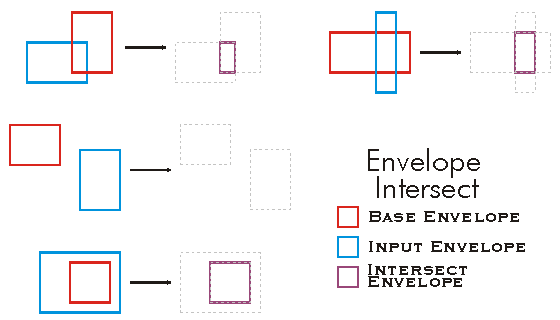
public void Intersect()
{
IEnvelope envelope1 = new EnvelopeClass();
IEnvelope envelope2 = new EnvelopeClass();
envelope1.PutCoords(100, 100, 200, 200);
envelope2.PutCoords(150, 150, 250, 250);
envelope1.Intersect(envelope2);
IPoint lowerLeft = envelope1.LowerLeft;
IPoint lowerRight = envelope1.LowerRight;
IPoint upperLeft = envelope1.UpperLeft;
IPoint upperRight = envelope1.UpperRight;
String report = "LowerLeft X = " + lowerLeft.X + "\n" +
"LowerLeft Y = " + lowerLeft.Y + "\n\n" +
"LowerRight X = " + lowerRight.X + "\n" +
"LowerRight Y = " + lowerRight.Y + "\n\n" +
"UpperLeft X = " + upperLeft.X + "\n" +
"UpperLeft Y = " + upperLeft.Y + "\n\n" +
"UpperRight X = " + upperRight.X + "\n" +
"UpperRight Y = " + upperRight.Y;
System.Windows.Forms.MessageBox.Show(report);
}
'The example shows how to intersect 2 envelopes. The result is put in the first envelope.
Public Sub t_EnvIntersect()
Dim pEnv1 As IEnvelope
Dim pEnv2 As IEnvelope
pEnv1 = New Envelope
pEnv2 = New Envelope
pEnv1.PutCoords(100, 100, 200, 200)
pEnv2.PutCoords(150, 150, 250, 250)
pEnv1.Intersect(pEnv2)
Dim dXmin As Double, dYmin As Double, dXmax As Double, dYmax As Double
pEnv1.QueryCoords(dXmin, dYmin, dXmax, dYmax)
If pEnv1.IsEmpty Then
MsgBox("envelope is empty")
Else
MsgBox(dXmin & "," & dYmin & "," & dXmax & "," & dYmax)
End If
End Sub
Offset(double, double)
Moves the sides x units horizontally and y units vertically.
void Offset(double X, double Y)Parameters
Remarks
The new position of the Envelope is as follows:
new XMin= old XMin + X
new YMin = old YMin + Y
new XMax = old XMax + X
new YMax = old YMax + Y
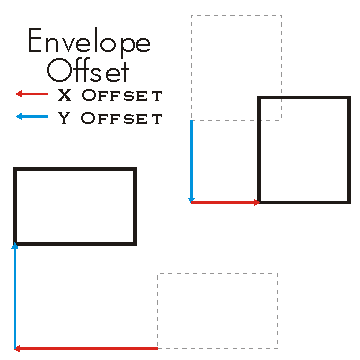
private void SetOffset()
{
IEnvelope envelope = new EnvelopeClass();
envelope.PutCoords(100, 100, 200, 200);
String report1 = "Envelope before setting offset: \n" +
"LowerLeft X = " + envelope.LowerLeft.X + "\n" +
"LowerLeft Y = " + envelope.LowerLeft.Y + "\n\n" +
"LowerRight X = " + envelope.LowerRight.X + "\n" +
"LowerRight Y = " + envelope.LowerRight.Y + "\n\n" +
"UpperLeft X = " + envelope.UpperLeft.X + "\n" +
"UpperLeft Y = " + envelope.UpperLeft.Y + "\n\n" +
"UpperRight X = " + envelope.UpperRight.X + "\n" +
"UpperRight Y = " + envelope.UpperRight.Y;
System.Windows.Forms.MessageBox.Show(report1);
//offsets envelope by 10 units in the X direction and 20 in the Y direction.
envelope.Offset(10, 20);
String report2 = "Envelope after setting offset: \n" +
"LowerLeft X = " + envelope.LowerLeft.X + "\n" +
"LowerLeft Y = " + envelope.LowerLeft.Y + "\n\n" +
"LowerRight X = " + envelope.LowerRight.X + "\n" +
"LowerRight Y = " + envelope.LowerRight.Y + "\n\n" +
"UpperLeft X = " + envelope.UpperLeft.X + "\n" +
"UpperLeft Y = " + envelope.UpperLeft.Y + "\n\n" +
"UpperRight X = " + envelope.UpperRight.X + "\n" +
"UpperRight Y = " + envelope.UpperRight.Y;
System.Windows.Forms.MessageBox.Show(report2);
}
Dim env As ESRI.ArcGIS.Geometry.IEnvelope
env = New ESRI.ArcGIS.Geometry.Envelope
env.PutCoords(100, 100, 200, 200)
env.Offset(10, 20)
OffsetM(double)
Moves the sides m units.
void OffsetM(double M)Parameters
Mdouble
Remarks
OffsetZ(double)
Moves the sides z units.
void OffsetZ(double Z)Parameters
Zdouble
Remarks
new ZMin = old ZMin + Z
new ZMax = old ZMax + Z
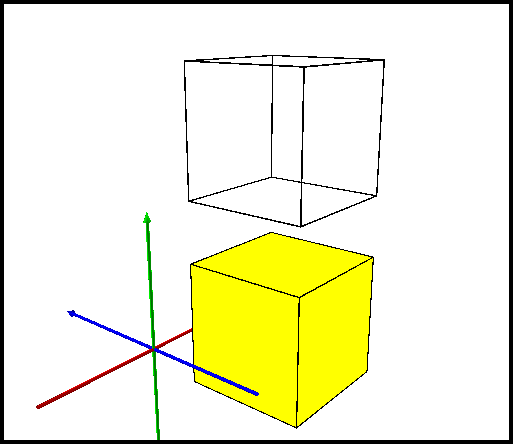
public static void TestOffsetZ()
{
const double Offset = 14.928;
IEnvelope2 envelope = GetEnvelopeGeometry() as IEnvelope2;
double beforeXMin, beforeXMax, beforeYMin, beforeYMax;
envelope.QueryCoords(out beforeXMin, out beforeYMin, out beforeXMax, out beforeYMax);
double beforeZMin, beforeZMax;
envelope.QueryZCoords(out beforeZMin, out beforeZMax);
envelope.OffsetZ(Offset);
double afterXMin, afterXMax, afterYMin, afterYMax;
envelope.QueryCoords(out afterXMin, out afterYMin, out afterXMax, out afterYMax);
double afterZMin, afterZMax;
envelope.QueryZCoords(out afterZMin, out afterZMax);
//beforeXMin = 3.33
//beforeXMax = 13.33
//beforeYMin = -10.864
//beforeYMax = -0.864
//beforeZMin = -3.972
//beforeZMax = 6.028
//afterXMin = 3.33
//afterXMax = 13.33
//afterYMin = -10.864
//afterYMax = -0.864
//afterZMin = 10.956
//afterZMax = 20.956
}
Project(ISpatialReference)
void Project(ISpatialReference newReferenceSystem)Parameters
newReferenceSystemISpatialReference
PutCoords(double, double, double, double)
Constructs an envelope from the coordinate values of lower, left and upper, right corners.
void PutCoords(double XMin, double YMin, double XMax, double YMax)Parameters
Remarks
private void PutCoordinates()
{
IEnvelope envelope = new EnvelopeClass();
envelope.PutCoords(100, 100, 200, 200);
String report = "Envelope\n" +
"LowerLeft X = " + envelope.LowerLeft.X + "\n" +
"LowerLeft Y = " + envelope.LowerLeft.Y + "\n\n" +
"LowerRight X = " + envelope.LowerRight.X + "\n" +
"LowerRight Y = " + envelope.LowerRight.Y + "\n\n" +
"UpperLeft X = " + envelope.UpperLeft.X + "\n" +
"UpperLeft Y = " + envelope.UpperLeft.Y + "\n\n" +
"UpperRight X = " + envelope.UpperRight.X + "\n" +
"UpperRight Y = " + envelope.UpperRight.Y;
System.Windows.Forms.MessageBox.Show(report);
}
' The example shows how to move an Envelope to a new
' center point (pPoint).
'This example demonstrates how to use the IEnvelope::PutCoords method
Public Function CreateEnvXY(ByVal dblXMin As Double, ByVal dblYMin As Double, _
ByVal dblXMax As Double, ByVal dblYMax As Double) As IEnvelope
CreateEnvXY = New Envelope
CreateEnvXY.PutCoords(dblXMin, dblYMin, dblXMax, dblYMax)
End Function
PutWKSCoords(ref WKSEnvelope)
Copies e's dimensions into this envelope.
void PutWKSCoords(ref WKSEnvelope e)Parameters
QueryCoords(out double, out double, out double, out double)
Returns the coordinates of lower, left and upper, right corners.
void QueryCoords(out double XMin, out double YMin, out double XMax, out double YMax)Parameters
QueryEnvelope(IEnvelope)
void QueryEnvelope(IEnvelope outEnvelope)Parameters
outEnvelopeIEnvelope
QueryWKSCoords(out WKSEnvelope)
Copies the left, bottom, right and top sides into e.
void QueryWKSCoords(out WKSEnvelope e)Parameters
SetEmpty()
void SetEmpty()SnapToSpatialReference()
void SnapToSpatialReference()Union(IEnvelope)
Adjusts to overlap inEnvelope.
void Union(IEnvelope inEnvelope)Parameters
inEnvelopeIEnvelope
Remarks

public void Union()
{
IEnvelope envelope1 = new EnvelopeClass();
IEnvelope envelope2 = new EnvelopeClass();
envelope1.PutCoords(100, 100, 200, 200);
envelope2.PutCoords(150, 150, 250, 250);
envelope1.Union(envelope2);
IPoint lowerLeft = envelope1.LowerLeft;
IPoint lowerRight = envelope1.LowerRight;
IPoint upperLeft = envelope1.UpperLeft;
IPoint upperRight = envelope1.UpperRight;
String report = "LowerLeft X = " + lowerLeft.X + "\n" +
"LowerLeft Y = " + lowerLeft.Y + "\n\n" +
"LowerRight X = " + lowerRight.X + "\n" +
"LowerRight Y = " + lowerRight.Y + "\n\n" +
"UpperLeft X = " + upperLeft.X + "\n" +
"UpperLeft Y = " + upperLeft.Y + "\n\n" +
"UpperRight X = " + upperRight.X + "\n" +
"UpperRight Y = " + upperRight.Y;
System.Windows.Forms.MessageBox.Show(report);
}
' The example shows a union of 2 envelopes. The result is put in the first
' envelope and it will have the extent of both envelopes (100,100,250,250).
Public Sub t_EnvUnion()
Dim pEnv1 As IEnvelope
Dim pEnv2 As IEnvelope
pEnv1 = New Envelope
pEnv2 = New Envelope
pEnv1.PutCoords(100, 100, 200, 200)
pEnv2.PutCoords(150, 150, 250, 250)
pEnv1.Union(pEnv2)
Dim dXmin As Double, dYmin As Double, dXmax As Double, dYmax As Double
pEnv1.QueryCoords(dXmin, dYmin, dXmax, dYmax)
End Sub
get_MinMaxAttributes()
IntPtr get_MinMaxAttributes()Returns
set_MinMaxAttributes(ref esriPointAttributes)
void set_MinMaxAttributes(ref esriPointAttributes MinMaxAttributes)Parameters
MinMaxAttributesesriPointAttributes