Take a web map offline.
Use case
Taking a web map offline allows users continued productivity when their network connectivity is poor or nonexistent. For example, by taking a map offline, a field worker inspecting utility lines in remote areas could still access a feature’s location and attribute information.
How to use the sample
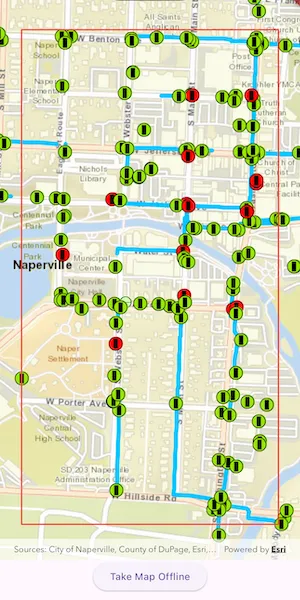
Once the map loads, zoom to the extent you want to take offline. The red border shows the extent that will be downloaded. Tap the “Take Map Offline” button to start the offline map job. The progress indicator will show the job’s progress. When complete, the offline map will replace the online map in the map view.
How it works
- Create an
ArcGISMapwith aPortalItempointing to the web map. - Create
GenerateOfflineMapParametersspecifying the download area geometry, minimum scale, and maximum scale. - Create an
OfflineMapTaskwith the map. - Create the
OfflineMapJobwithOfflineMapTask.generateOfflineMap()and start it withOfflineMapJob.run(). - When the job is done, get the offline map with
GenerateOfflineMapResult.offlineMap.
Relevant API
- GenerateOfflineMapJob
- GenerateOfflineMapParameters
- GenerateOfflineMapResult
- OfflineMapTask
- PortalItem
About the data
The map used in this sample shows the stormwater network within Naperville, IL, USA, with cartography designed for web and mobile devices with offline support.
Additional information
The creation of the offline map can be fine-tuned using parameter overrides for feature layers, or by using local basemaps to achieve more customized results.
Tags
download, offline, save, web map
Sample code
//// Copyright 2024 Esri//// Licensed under the Apache License, Version 2.0 (the "License");// you may not use this file except in compliance with the License.// You may obtain a copy of the License at////   https://www.apache.org/licenses/LICENSE-2.0//// Unless required by applicable law or agreed to in writing, software// distributed under the License is distributed on an "AS IS" BASIS,// WITHOUT WARRANTIES OR CONDITIONS OF ANY KIND, either express or implied.// See the License for the specific language governing permissions and// limitations under the License.//
import 'dart:io';
import 'package:arcgis_maps/arcgis_maps.dart';import 'package:arcgis_maps_sdk_flutter_samples/common/common.dart';import 'package:flutter/material.dart';import 'package:path_provider/path_provider.dart';
class GenerateOfflineMap extends StatefulWidget {  const GenerateOfflineMap({super.key});
  @override  State<GenerateOfflineMap> createState() => _GenerateOfflineMapState();}
class _GenerateOfflineMapState extends State<GenerateOfflineMap>    with SampleStateSupport {  // Create a controller for the map view.  final _mapViewController = ArcGISMapView.createController();  // Declare a map to be loaded later.  late final ArcGISMap _map;  // Declare the OfflineMapTask.  late final OfflineMapTask _offlineMapTask;  // Declare the GenerateOfflineMapJob.  GenerateOfflineMapJob? _generateOfflineMapJob;  // Progress of the GenerateOfflineMapJob.  int? _progress;  // A flag for when the map is viewing offline data.  var _offline = false;  // A flag for when the map view is ready and controls can be used.  var _ready = false;  // Declare global keys to be used when converting screen locations to map coordinates.  final _mapKey = GlobalKey();  final _outlineKey = GlobalKey();
  @override  Widget build(BuildContext context) {    return Scaffold(      body: SafeArea(        top: false,        left: false,        right: false,        child: Stack(          children: [            Column(              children: [                Expanded(                  child: Stack(                    children: [                      // Add a map view to the widget tree and set a controller.                      ArcGISMapView(                        key: _mapKey,                        controllerProvider: () => _mapViewController,                        onMapViewReady: onMapViewReady,                      ),                      // Add a red outline that marks the region to be taken offline.                      Visibility(                        visible: _progress == null && !_offline,                        child: IgnorePointer(                          child: SafeArea(                            child: Container(                              margin: const EdgeInsets.fromLTRB(30, 30, 30, 50),                              child: Container(                                key: _outlineKey,                                decoration: BoxDecoration(                                  border: Border.all(                                    color: Colors.red,                                    width: 2,                                  ),                                ),                              ),                            ),                          ),                        ),                      ),                    ],                  ),                ),                Center(                  // Add a button to take the outlined region offline.                  child: ElevatedButton(                    onPressed: _progress != null || _offline                        ? null                        : takeOffline,                    child: const Text('Take Map Offline'),                  ),                ),              ],            ),            // Display a progress indicator and prevent interaction until state is ready.            LoadingIndicator(visible: !_ready),            // Display a progress indicator and a cancel button during the offline map generation.            Visibility(              visible: _progress != null,              child: Center(                child: Container(                  width: MediaQuery.of(context).size.width / 2,                  padding: const EdgeInsets.all(20),                  decoration: BoxDecoration(                    color: Colors.white,                    borderRadius: BorderRadius.circular(10),                  ),                  child: Column(                    mainAxisSize: MainAxisSize.min,                    spacing: 20,                    children: [                      // Add a progress indicator.                      Text('$_progress%'),                      LinearProgressIndicator(                        value: _progress != null ? _progress! / 100.0 : 0.0,                      ),                      // Add a button to cancel the job.                      ElevatedButton(                        onPressed: () => _generateOfflineMapJob?.cancel(),                        child: const Text('Cancel'),                      ),                    ],                  ),                ),              ),            ),          ],        ),      ),    );  }
  Future<void> onMapViewReady() async {    // Create the map from a portal item.    final portalItem = PortalItem.withPortalAndItemId(      portal: Portal.arcGISOnline(),      itemId: 'acc027394bc84c2fb04d1ed317aac674',    );    _map = ArcGISMap.withItem(portalItem);    _mapViewController.arcGISMap = _map;
    // Offline map generation does not consider rotation, so disable it.    _mapViewController.interactionOptions.rotateEnabled = false;
    // Create an OfflineMapTask for the map.    _offlineMapTask = OfflineMapTask.withOnlineMap(_map);
    setState(() => _ready = true);  }
  // Calculate the Envelope of the outlined region.  Envelope? outlineEnvelope() {    final outlineContext = _outlineKey.currentContext;    final mapContext = _mapKey.currentContext;    if (outlineContext == null || mapContext == null) return null;
    // Get the global screen rect of the outlined region.    final outlineRenderBox = outlineContext.findRenderObject() as RenderBox?;    final outlineGlobalScreenRect =        outlineRenderBox!.localToGlobal(Offset.zero) & outlineRenderBox.size;
    // Convert the global screen rect to a rect local to the map view.    final mapRenderBox = mapContext.findRenderObject() as RenderBox?;    final mapLocalScreenRect = outlineGlobalScreenRect.shift(      -mapRenderBox!.localToGlobal(Offset.zero),    );
    // Convert the local screen rect to map coordinates.    final locationTopLeft = _mapViewController.screenToLocation(      screen: mapLocalScreenRect.topLeft,    );    final locationBottomRight = _mapViewController.screenToLocation(      screen: mapLocalScreenRect.bottomRight,    );    if (locationTopLeft == null || locationBottomRight == null) return null;
    // Create an Envelope from the map coordinates.    return Envelope.fromPoints(locationTopLeft, locationBottomRight);  }
  // Take the selected region offline.  Future<void> takeOffline() async {    // Get the Envelope of the outlined region.    final envelope = outlineEnvelope();    if (envelope == null) return;
    // Cause the progress indicator to appear.    setState(() => _progress = 0);
    // Create parameters specifying the region to take offline.    // Provides a min scale to avoid requesting a huge download. Note maxScale defaults to 0.0.    const minScale = 1e4;    final parameters = await _offlineMapTask        .createDefaultGenerateOfflineMapParameters(          areaOfInterest: envelope,          minScale: minScale,        );    parameters.continueOnErrors = false;
    // Prepare an empty directory to store the offline map.    final documentsUri = (await getApplicationDocumentsDirectory()).uri;    final downloadDirectoryUri = documentsUri.resolve('offline_map');    final downloadDirectory = Directory.fromUri(downloadDirectoryUri);    if (downloadDirectory.existsSync()) {      downloadDirectory.deleteSync(recursive: true);    }    downloadDirectory.createSync();
    // Create a job to generate the offline map.    _generateOfflineMapJob = _offlineMapTask.generateOfflineMap(      parameters: parameters,      downloadDirectoryUri: downloadDirectoryUri,    );
    // Listen for progress updates.    _generateOfflineMapJob!.onProgressChanged.listen((progress) {      setState(() => _progress = progress);    });
    try {      // Run the job.      final result = await _generateOfflineMapJob!.run();
      // Get the offline map and display it.      _mapViewController.arcGISMap = result.offlineMap;      _generateOfflineMapJob = null;    } on ArcGISException catch (e) {      // If an error happens (such as cancellation), reset state.      _generateOfflineMapJob = null;      setState(() => _progress = null);
      // If the exception is not due to user cancellation (code 17), show the details of the error in a dialog.      if (e.errorType != ArcGISExceptionType.commonUserCanceled && mounted) {        await showAlertDialog(context, e.message);      }      return;    }
    // The job was successful and we are now viewing the offline amp.    setState(() {      _progress = null;      _offline = true;    });  }}