Display nautical charts per the ENC specification.
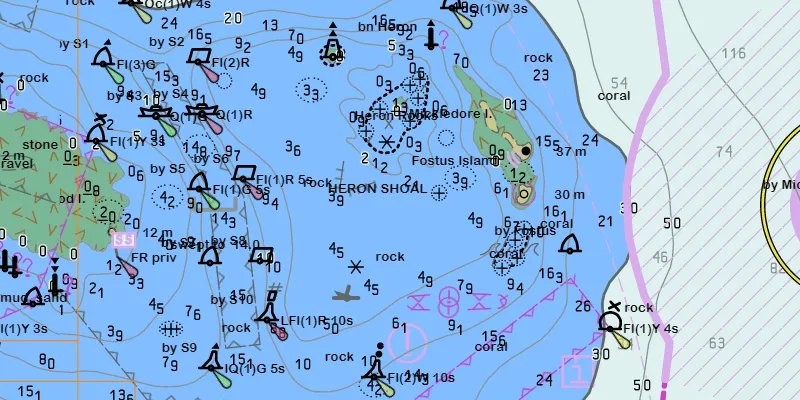
Use case
The ENC specification describes how hydrographic data should be displayed digitally.
An ENC exchange set is a catalog of data files which can be loaded as cells. The cells contain information on how symbols should be displayed in relation to one another, so as to represent information such as depth and obstacles accurately.
How to use the sample
Run the sample and view the ENC data. Pan and zoom around the map. Take note of the high level of detail in the data and the smooth rendering of the layer.
How it works
- Specify the path to a local CATALOG.031 file to create an
EncExchangeSet. - After loading the exchange set, get the
EncDatasetobjects in the exchange set withgetDatasets(). - Create an
EncCellfor each dataset. Then create anEncLayerfor each cell. - Add the ENC layer to a map’s operational layers collection to display it.
Relevant API
- EncCell
- EncDataset
- EncExchangeSet
- EncLayer
Offline data
This sample downloads the ENC Exchange Set without updates item from ArcGIS Online.
Tags
data, ENC, hydrographic, layers, maritime, nautical chart
Sample code
AddEncExchangeSetSample.java
/* * Copyright 2019 Esri. * * Licensed under the Apache License, Version 2.0 (the "License"); you may not * use this file except in compliance with the License. You may obtain a copy of * the License at * * http://www.apache.org/licenses/LICENSE-2.0 * * Unless required by applicable law or agreed to in writing, software * distributed under the License is distributed on an "AS IS" BASIS, WITHOUT * WARRANTIES OR CONDITIONS OF ANY KIND, either express or implied. See the * License for the specific language governing permissions and limitations under * the License. */
package com.esri.samples.add_enc_exchange_set;
import java.io.File;import java.util.Arrays;import java.util.Collections;
import javafx.application.Application;import javafx.scene.Scene;import javafx.scene.control.Alert;import javafx.scene.control.ProgressIndicator;import javafx.scene.layout.StackPane;import javafx.stage.Stage;
import com.esri.arcgisruntime.ArcGISRuntimeEnvironment;import com.esri.arcgisruntime.geometry.Envelope;import com.esri.arcgisruntime.geometry.GeometryEngine;import com.esri.arcgisruntime.hydrography.EncCell;import com.esri.arcgisruntime.hydrography.EncDataset;import com.esri.arcgisruntime.hydrography.EncExchangeSet;import com.esri.arcgisruntime.layers.EncLayer;import com.esri.arcgisruntime.loadable.LoadStatus;import com.esri.arcgisruntime.mapping.ArcGISMap;import com.esri.arcgisruntime.mapping.BasemapStyle;import com.esri.arcgisruntime.mapping.Viewpoint;import com.esri.arcgisruntime.mapping.view.DrawStatus;import com.esri.arcgisruntime.mapping.view.MapView;
public class AddEncExchangeSetSample extends Application {
  private MapView mapView;  private Envelope completeExtent;  // keep loadables in scope to avoid garbage collection  private EncExchangeSet encExchangeSet;  private EncLayer encLayer;
  @Override  public void start(Stage stage) {
    try {      // set the title and width of the stage      stage.setTitle("Add ENC Exchange Set Sample");      stage.setWidth(800);      stage.setHeight(700);
      // create a stack pane and set it as the JavaFX scene's root      StackPane stackPane = new StackPane();      Scene scene = new Scene(stackPane);      stage.setScene(scene);      stage.show();
      // authentication with an API key or named user is required to access basemaps and other location services      String yourAPIKey = System.getProperty("apiKey");      ArcGISRuntimeEnvironment.setApiKey(yourAPIKey);
      // create a map with the oceans basemap style      ArcGISMap map = new ArcGISMap(BasemapStyle.ARCGIS_OCEANS);
      // create a map view and set the map to it      mapView = new MapView();      mapView.setMap(map);
      // show progress indicator when map is drawing      ProgressIndicator progressIndicator = new ProgressIndicator();      progressIndicator.setStyle("-fx-progress-color: white;");      progressIndicator.setMaxSize(25, 25);      progressIndicator.setProgress(ProgressIndicator.INDETERMINATE_PROGRESS);
      // hide progress indicator when map is done drawing      // show the progress indicator when map is drawing      progressIndicator.visibleProperty().bind(mapView.drawStatusProperty().isEqualTo(DrawStatus.IN_PROGRESS));
      // load the ENC exchange set from local data      File encPath = new File(System.getProperty("data.dir"), "./samples-data/enc/ExchangeSetwithoutUpdates/ENC_ROOT/CATALOG.031");      encExchangeSet = new EncExchangeSet(Collections.singletonList(encPath.getAbsolutePath()));      encExchangeSet.loadAsync();      encExchangeSet.addDoneLoadingListener(() -> {        if (encExchangeSet.getLoadStatus() == LoadStatus.LOADED) {          // loop through the individual datasets of the exchange set          for (EncDataset encDataset : encExchangeSet.getDatasets()) {            // create an ENC layer with an ENC cell using the dataset            encLayer = new EncLayer(new EncCell(encDataset));            // add the ENC layer to the map's operational layers to display it            map.getOperationalLayers().add(encLayer);            // combine the extents of each layer after loading to set the viewpoint to their complete extent            encLayer.addDoneLoadingListener(() -> {              if (encLayer.getLoadStatus() == LoadStatus.LOADED) {                Envelope extent = encLayer.getFullExtent();                if (completeExtent == null) {                  completeExtent = extent;                } else {                  completeExtent = GeometryEngine.combineExtents(Arrays.asList(completeExtent, extent));                }                mapView.setViewpoint(new Viewpoint(completeExtent.getCenter(), 60000));              } else {                new Alert(Alert.AlertType.ERROR, "Failed to load ENC layer.").show();              }            });          }        } else {          new Alert(Alert.AlertType.ERROR, "Failed to load ENC exchange set.").show();        }      });
      // add the map view and the progress indicator to the stack pane      stackPane.getChildren().addAll(mapView, progressIndicator);
    } catch (Exception e) {      // on any error, display the stack trace.      e.printStackTrace();    }  }
  /**   * Stops and releases all resources used in application.   */  @Override  public void stop() {
    if (mapView != null) {      mapView.dispose();    }  }
  /**   * Opens and runs application.   *   * @param args arguments passed to this application   */  public static void main(String[] args) {
    Application.launch(args);  }
}