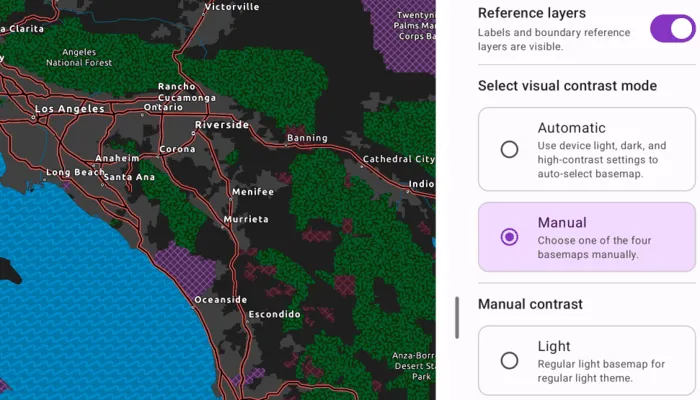
Display a map view that updates between authored light, dark, and high-contrast basemaps.
Use case
Use this pattern when your app needs contrast-responsive basemaps to switch between light, dark, and high-contrast states. This is especially useful with basemaps authored for accessibility, along with reference layers for the associated base layer.
How to use the sample
When the sample is launched, it displays the chosen contrast basemap. When automatic mode is selected for the sample, changing the device appearance in the device system settings between light and dark theme, or turn high contrast on and off, will result in the appropriate basemap being loaded to match settings. Toggle the device settings to see the different basemaps.
Switch to manual mode to choose Light, Dark, High contrast light, or High contrast dark directly. Show or hide the basemap’s reference layers to compare how labels and boundaries read in each contrast appearance mode.
How it works
- Provide four authored basemaps that represent the supported contrast appearances: Light, Dark, High contrast light, and High contrast dark.
- Resolve which contrast appearance should be active based on the current mode and device settings.
- In manual mode, use the appearance selected in the supporting pane.
- In automatic mode, resolve the appearance from the device’s current light, dark, and high-contrast settings. This sample uses a custom
rememberDeviceContrastSettings()Composable.
- Map the resolved appearance to an ArcGIS Online
Basemapor aBasemapStyleand update the map’sbasemap. - Apply the current reference-layer visibility setting to the basemap’s labels and boundary layers.
Relevant API
- Basemap
- BasemapStyle
- Map
About the data
This sample uses four ArcGIS Living Atlas web maps authored for regular light, regular dark, high-contrast light, and high-contrast dark presentation states.
The enhanced contrast web maps are designed for accessibility-focused presentation workflows, and the light and dark canvas maps provide the regular contrast companions. You can use these web maps as a starting reference for your own contrast-specific basemap workflows.
Additional information
For more background information on the cartographic approach behind the enhanced contrast basemaps, see Working with Enhanced Contrast basemaps to improve accessibility.
On Android, automatic mode responds to system light and dark theme changes and to high-contrast settings. Android 14 and later uses UiModeManager, while earlier versions read the accessibility high-text-contrast setting.
Tags
accessibility, accessible, basemap, colorblind, contrast, dark, enhanced, high, inclusive, legibility, light, living atlas, readability, vision, visual impairment, WCAG
Sample code
/* Copyright 2026 Esri * * Licensed under the Apache License, Version 2.0 (the "License"); * you may not use this file except in compliance with the License. * You may obtain a copy of the License at * *    http://www.apache.org/licenses/LICENSE-2.0 * * Unless required by applicable law or agreed to in writing, software * distributed under the License is distributed on an "AS IS" BASIS, * WITHOUT WARRANTIES OR CONDITIONS OF ANY KIND, either express or implied. * See the License for the specific language governing permissions and * limitations under the License. * */
package com.esri.arcgismaps.sample.updatebasemapforcontrastaccessibility.components
import android.app.Applicationimport androidx.lifecycle.AndroidViewModelimport androidx.lifecycle.viewModelScopeimport com.arcgismaps.geometry.SpatialReferenceimport com.arcgismaps.mapping.ArcGISMapimport com.arcgismaps.mapping.Basemapimport com.arcgismaps.mapping.BasemapStyleimport com.arcgismaps.mapping.Viewpointimport com.esri.arcgismaps.sample.sampleslib.components.MessageDialogViewModelimport kotlinx.coroutines.flow.MutableStateFlowimport kotlinx.coroutines.flow.asStateFlowimport kotlinx.coroutines.flow.updateimport kotlinx.coroutines.launch
/** * ViewModel for the UpdateBasemapForContrastAccessibility sample. * * Owns the selected effective contrast appearance, to keep the map synchronized to the contrast basemap type. */class UpdateBasemapForContrastAccessibilityViewModel(app: Application) : AndroidViewModel(app) {
    val arcGISMap = ArcGISMap(spatialReference = SpatialReference.webMercator()).apply {        initialViewpoint = Viewpoint(34.05, -117.19, 2e6)    }
    private val _contrastUiState = MutableStateFlow(ContrastUiState.defaultState)    val contrastUiState = _contrastUiState.asStateFlow()
    val messageDialogVM = MessageDialogViewModel()
    /**     * Ensures the selected [contrast] is in sync with the MapView.     */    fun syncContrast(contrast: ContrastAppearance) {        if (_contrastUiState.value.contrastAppearance == contrast) return        applyContrastBasemap(contrast)    }
    /**     * Applies the contrast-specific basemap to the MapView.     */    private fun applyContrastBasemap(contrast: ContrastAppearance) {        updateContrastAppearance(contrast = contrast)        val isVisible = _contrastUiState.value.isReferenceLayersEnabled        arcGISMap.setBasemap(contrastBasemapFor(contrast))
        viewModelScope.launch {            arcGISMap.load().getOrElse { messageDialogVM.showMessageDialog(it) }            applyReferenceLayersVisibility(map = arcGISMap, isVisible = isVisible)        }    }
    /**     * Applies the current reference-layers [isVisible] flag to the [map].     */    private fun applyReferenceLayersVisibility(map: ArcGISMap, isVisible: Boolean) {        map.basemap.value?.referenceLayers?.forEach { layer ->            layer.isVisible = isVisible        }    }
    /**     * Updates whether the sample resolves the [mode] automatically or uses the manual picker.     */    fun updateContrastMode(mode: ContrastMode) {        _contrastUiState.update { currentState ->            currentState.copy(contrastMode = mode)        }    }
    /**     * Updates the [contrast] appearance while the sample is in manual mode.     */    fun updateContrastAppearance(contrast: ContrastAppearance) {        _contrastUiState.update { currentState ->            currentState.copy(contrastAppearance = contrast)        }    }
    /**     * Update reference layers using [isVisible].     */    fun updateReferenceLayerVisibility(isVisible: Boolean) {        _contrastUiState.update { currentState ->            currentState.copy(isReferenceLayersEnabled = isVisible)        }        applyReferenceLayersVisibility(map = arcGISMap, isVisible = isVisible)    }}
/** * UI states for the controls in the supporting pane to configure the displayed MapView. */data class ContrastUiState(    val contrastMode: ContrastMode,    val contrastAppearance: ContrastAppearance,    val isReferenceLayersEnabled: Boolean) {    companion object {        val defaultState = ContrastUiState(            contrastMode = ContrastMode.Automatic,            contrastAppearance = ContrastAppearance.HighContrastLight,            isReferenceLayersEnabled = true        )    }}
/** * State to track whether appearance comes from device settings or the manual picker. */enum class ContrastMode {    Automatic,    Manual}
/** * State to track the four contrast appearance variants. */enum class ContrastAppearance {    Light,    HighContrastLight,    Dark,    HighContrastDark}
/** * Maps the selected appearance to the contrast accessibility basemaps used by the sample. */private fun contrastBasemapFor(contrast: ContrastAppearance): Basemap {    return when (contrast) {        ContrastAppearance.Light -> Basemap(BasemapStyle.ArcGISLightGray)        ContrastAppearance.Dark -> Basemap(BasemapStyle.ArcGISDarkGray)        ContrastAppearance.HighContrastLight -> Basemap("https://www.arcgis.com/home/item.html?id=084291b0ecad4588b8c8853898d72445")        ContrastAppearance.HighContrastDark -> Basemap("https://www.arcgis.com/home/item.html?id=3e23478909194c54992eaaee78b5f754")    }}
/* Copyright 2026 Esri * * Licensed under the Apache License, Version 2.0 (the "License"); * you may not use this file except in compliance with the License. * You may obtain a copy of the License at * * http://www.apache.org/licenses/LICENSE-2.0 * * Unless required by applicable law or agreed to in writing, software * distributed under the License is distributed on an "AS IS" BASIS, * WITHOUT WARRANTIES OR CONDITIONS OF ANY KIND, either express or implied. * See the License for the specific language governing permissions and * limitations under the License. * */
package com.esri.arcgismaps.sample.updatebasemapforcontrastaccessibility
import android.os.Bundleimport androidx.activity.ComponentActivityimport androidx.activity.compose.setContentimport androidx.activity.enableEdgeToEdgeimport androidx.compose.material3.MaterialThemeimport androidx.compose.material3.Surfaceimport com.esri.arcgismaps.sample.sampleslib.theme.SampleAppThemeimport com.esri.arcgismaps.sample.updatebasemapforcontrastaccessibility.screens.UpdateBasemapForContrastAccessibilityScreen
class MainActivity : ComponentActivity() {
override fun onCreate(savedInstanceState: Bundle?) { super.onCreate(savedInstanceState) enableEdgeToEdge() setContent { SampleAppTheme { Surface(color = MaterialTheme.colorScheme.background) { UpdateBasemapForContrastAccessibilityScreen() } } } }}/* Copyright 2026 Esri * * Licensed under the Apache License, Version 2.0 (the "License"); * you may not use this file except in compliance with the License. * You may obtain a copy of the License at * * http://www.apache.org/licenses/LICENSE-2.0 * * Unless required by applicable law or agreed to in writing, software * distributed under the License is distributed on an "AS IS" BASIS, * WITHOUT WARRANTIES OR CONDITIONS OF ANY KIND, either express or implied. * See the License for the specific language governing permissions and * limitations under the License. * */
package com.esri.arcgismaps.sample.updatebasemapforcontrastaccessibility.screens
import androidx.compose.animation.AnimatedVisibilityimport androidx.compose.foundation.layout.Arrangementimport androidx.compose.foundation.layout.Columnimport androidx.compose.foundation.layout.Rowimport androidx.compose.foundation.layout.fillMaxWidthimport androidx.compose.foundation.layout.paddingimport androidx.compose.foundation.shape.RoundedCornerShapeimport androidx.compose.material3.ButtonDefaultsimport androidx.compose.material3.HorizontalDividerimport androidx.compose.material3.MaterialThemeimport androidx.compose.material3.RadioButtonimport androidx.compose.material3.Surfaceimport androidx.compose.material3.Switchimport androidx.compose.material3.Textimport androidx.compose.runtime.Composableimport androidx.compose.ui.Alignmentimport androidx.compose.ui.Modifierimport androidx.compose.ui.unit.dpimport com.esri.arcgismaps.sample.updatebasemapforcontrastaccessibility.components.ContrastAppearanceimport com.esri.arcgismaps.sample.updatebasemapforcontrastaccessibility.components.ContrastModeimport com.esri.arcgismaps.sample.updatebasemapforcontrastaccessibility.components.ContrastUiState
/** * Shows the sample controls and appearance that drives the displayed MapView. */@Composableinternal fun UpdateBasemapForContrastAccessibilitySupportingPane( contrastUiState: ContrastUiState, onContrastModeChanged: (ContrastMode) -> Unit, onManualContrastChanged: (ContrastAppearance) -> Unit, onReferenceLayerVisibilityChanged: (Boolean) -> Unit) { ReferenceLayerToggleRow( referenceLayersVisible = contrastUiState.isReferenceLayersEnabled, onReferenceLayerVisibilityChanged = onReferenceLayerVisibilityChanged )
HorizontalDivider()
SelectionSection(title = "Select visual contrast mode") { ContrastMode.entries.forEach { mode -> SelectionRow( title = mode.displayName, description = if (mode == ContrastMode.Automatic) { "Use device light, dark, and high-contrast settings to auto-select basemap." } else { "Choose one of the four basemaps manually." }, selected = contrastUiState.contrastMode == mode, onClick = { onContrastModeChanged(mode) } ) } }
AnimatedVisibility(visible = contrastUiState.contrastMode == ContrastMode.Manual) { Column( modifier = Modifier.fillMaxWidth(), verticalArrangement = Arrangement.spacedBy(12.dp), ) { HorizontalDivider() SelectionSection(title = "Manual contrast") { ContrastAppearance.entries.forEach { appearance -> SelectionRow( title = appearance.displayName, description = appearance.description, selected = contrastUiState.contrastAppearance == appearance, onClick = { onManualContrastChanged(appearance) } ) } } } }}
/** * Shows the reference-layer visibility to toggle reference layers. */@Composableprivate fun ReferenceLayerToggleRow( referenceLayersVisible: Boolean, onReferenceLayerVisibilityChanged: (Boolean) -> Unit) { Row( modifier = Modifier.fillMaxWidth(), verticalAlignment = Alignment.CenterVertically, horizontalArrangement = Arrangement.SpaceBetween ) { Column( modifier = Modifier.weight(1f), verticalArrangement = Arrangement.spacedBy(2.dp) ) { Text( text = "Reference layers", style = MaterialTheme.typography.titleMedium ) Text( text = if (referenceLayersVisible) "Labels and boundary reference layers are visible." else "Labels and boundary reference layers are hidden.", style = MaterialTheme.typography.bodySmall, color = MaterialTheme.colorScheme.onSurfaceVariant ) } Switch( checked = referenceLayersVisible, onCheckedChange = onReferenceLayerVisibilityChanged ) }}
@Composableprivate fun SelectionRow( title: String, description: String, selected: Boolean, onClick: () -> Unit,) { Surface( modifier = Modifier.fillMaxWidth(), onClick = onClick, shape = RoundedCornerShape(12.dp), color = if (selected) MaterialTheme.colorScheme.secondaryContainer else MaterialTheme.colorScheme.surface, border = ButtonDefaults.outlinedButtonBorder(enabled = true) ) { Row( modifier = Modifier .fillMaxWidth() .padding(12.dp), horizontalArrangement = Arrangement.spacedBy(8.dp), verticalAlignment = Alignment.CenterVertically ) { RadioButton( selected = selected, onClick = onClick ) Column { Text( text = title, style = MaterialTheme.typography.bodyLarge ) Text( text = description, style = MaterialTheme.typography.bodySmall, color = MaterialTheme.colorScheme.onSurfaceVariant ) } } }}
@Composableprivate fun SelectionSection( title: String, content: @Composable () -> Unit,) { Text( text = title, style = MaterialTheme.typography.titleMedium ) content()}
private val ContrastMode.displayName: String get() = when (this) { ContrastMode.Automatic -> "Automatic" ContrastMode.Manual -> "Manual" }
private val ContrastAppearance.displayName: String get() = when (this) { ContrastAppearance.Light -> "Light" ContrastAppearance.Dark -> "Dark" ContrastAppearance.HighContrastLight -> "High contrast light" ContrastAppearance.HighContrastDark -> "High contrast dark" }
private val ContrastAppearance.description: String get() = when (this) { ContrastAppearance.Light -> "Regular light basemap for regular light theme." ContrastAppearance.Dark -> "Regular dark basemap for regular dark theme." ContrastAppearance.HighContrastLight -> "High-contrast light basemap for enhanced light theme." ContrastAppearance.HighContrastDark -> "High-contrast dark basemap for enhanced dark theme." }/* Copyright 2026 Esri * * Licensed under the Apache License, Version 2.0 (the "License"); * you may not use this file except in compliance with the License. * You may obtain a copy of the License at * * http://www.apache.org/licenses/LICENSE-2.0 * * Unless required by applicable law or agreed to in writing, software * distributed under the License is distributed on an "AS IS" BASIS, * WITHOUT WARRANTIES OR CONDITIONS OF ANY KIND, either express or implied. * See the License for the specific language governing permissions and * limitations under the License. * */
package com.esri.arcgismaps.sample.updatebasemapforcontrastaccessibility.screens
import androidx.compose.animation.animateContentSizeimport androidx.compose.foundation.layout.BoxScopeimport androidx.compose.foundation.layout.fillMaxSizeimport androidx.compose.foundation.layout.paddingimport androidx.compose.material3.Scaffoldimport androidx.compose.runtime.Composableimport androidx.compose.runtime.LaunchedEffectimport androidx.compose.runtime.getValueimport androidx.compose.ui.Modifierimport androidx.compose.ui.res.stringResourceimport androidx.lifecycle.compose.collectAsStateWithLifecycleimport androidx.lifecycle.viewmodel.compose.viewModelimport com.arcgismaps.toolkit.geoviewcompose.MapViewimport com.esri.arcgismaps.sample.sampleslib.components.MessageDialogimport com.esri.arcgismaps.sample.sampleslib.components.SampleDeviceLightDarkPreviewimport com.esri.arcgismaps.sample.sampleslib.components.SamplePreviewSurfaceimport com.esri.arcgismaps.sample.sampleslib.components.SampleTopAppBarimport com.esri.arcgismaps.sample.sampleslib.components.adaptive.AdaptiveThreePaneimport com.esri.arcgismaps.sample.updatebasemapforcontrastaccessibility.Rimport com.esri.arcgismaps.sample.updatebasemapforcontrastaccessibility.components.ContrastAppearanceimport com.esri.arcgismaps.sample.updatebasemapforcontrastaccessibility.components.ContrastModeimport com.esri.arcgismaps.sample.updatebasemapforcontrastaccessibility.components.ContrastUiStateimport com.esri.arcgismaps.sample.updatebasemapforcontrastaccessibility.components.DeviceContrastSettingsimport com.esri.arcgismaps.sample.updatebasemapforcontrastaccessibility.components.UpdateBasemapForContrastAccessibilityViewModelimport com.esri.arcgismaps.sample.updatebasemapforcontrastaccessibility.components.rememberDeviceContrastSettings
/** * Main composable screen for the UpdateBasemapForContrastAccessibility sample. * It owns the ViewModel and passes stateless UI data into the scaffold. */@Composablefun UpdateBasemapForContrastAccessibilityScreen( viewModel: UpdateBasemapForContrastAccessibilityViewModel = viewModel()) { val contrastUiState by viewModel.contrastUiState.collectAsStateWithLifecycle() val deviceContrastSettings = rememberDeviceContrastSettings() val automaticAppearance = deviceContrastSettings.toAppearance() val effectiveAppearance = when (contrastUiState.contrastMode) { ContrastMode.Automatic -> automaticAppearance ContrastMode.Manual -> contrastUiState.contrastAppearance }
LaunchedEffect(effectiveAppearance) { viewModel.syncContrast(effectiveAppearance) }
MainScreenScaffold( contrastUiState = contrastUiState, onContrastModeChanged = viewModel::updateContrastMode, onManualContrastChanged = viewModel::syncContrast, onReferenceLayerVisibilityChanged = viewModel::updateReferenceLayerVisibility, mainPaneContent = { MapView( modifier = Modifier .fillMaxSize() .animateContentSize(), arcGISMap = viewModel.arcGISMap ) } )
viewModel.messageDialogVM.apply { if (dialogStatus) { MessageDialog( title = messageTitle, description = messageDescription, onDismissRequest = ::dismissDialog ) } }}
@Composableprivate fun MainScreenScaffold( contrastUiState: ContrastUiState, onContrastModeChanged: (ContrastMode) -> Unit = {}, onManualContrastChanged: (ContrastAppearance) -> Unit = {}, onReferenceLayerVisibilityChanged: (Boolean) -> Unit = {}, mainPaneContent: @Composable BoxScope.() -> Unit) { Scaffold( topBar = { SampleTopAppBar(title = stringResource(R.string.update_basemap_for_contrast_accessibility_app_name)) }, content = { paddingValues -> AdaptiveThreePane( modifier = Modifier .fillMaxSize() .padding(paddingValues), supportingPaneTitle = "Contrast options", mainPane = { _, _ -> mainPaneContent() }, supportingPane = { _, _ -> UpdateBasemapForContrastAccessibilitySupportingPane( contrastUiState = contrastUiState, onContrastModeChanged = onContrastModeChanged, onManualContrastChanged = onManualContrastChanged, onReferenceLayerVisibilityChanged = onReferenceLayerVisibilityChanged ) } ) } )}
/** * Maps the current device settings snapshot to one of the four contrast appearances. */private fun DeviceContrastSettings.toAppearance(): ContrastAppearance { return when { isHighContrastEnabled && isDarkTheme -> ContrastAppearance.HighContrastDark isHighContrastEnabled -> ContrastAppearance.HighContrastLight isDarkTheme -> ContrastAppearance.Dark else -> ContrastAppearance.Light }}
@SampleDeviceLightDarkPreview@Composablefun MainScreenPreview() { SamplePreviewSurface { MainScreenScaffold( contrastUiState = ContrastUiState.defaultState, mainPaneContent = {} ) }}/* Copyright 2026 Esri * * Licensed under the Apache License, Version 2.0 (the "License"); * you may not use this file except in compliance with the License. * You may obtain a copy of the License at * * http://www.apache.org/licenses/LICENSE-2.0 * * Unless required by applicable law or agreed to in writing, software * distributed under the License is distributed on an "AS IS" BASIS, * WITHOUT WARRANTIES OR CONDITIONS OF ANY KIND, either express or implied. * See the License for the specific language governing permissions and * limitations under the License. * */
package com.esri.arcgismaps.sample.updatebasemapforcontrastaccessibility.components
import android.app.UiModeManagerimport android.content.Contextimport android.content.res.Configurationimport android.database.ContentObserverimport android.net.Uriimport android.os.Buildimport android.os.Handlerimport android.os.Looperimport android.provider.Settingsimport androidx.compose.runtime.Composableimport androidx.compose.runtime.DisposableEffectimport androidx.compose.runtime.LaunchedEffectimport androidx.compose.runtime.getValueimport androidx.compose.runtime.mutableStateOfimport androidx.compose.runtime.rememberimport androidx.compose.runtime.setValueimport androidx.compose.ui.platform.LocalConfigurationimport androidx.compose.ui.platform.LocalContext
/** * Device keys used by Android versions that expose high contrast through accessibility settings. */private val highTextContrastSettings = listOf( "high_text_contrast_enabled", "accessibility_high_text_contrast_enabled")
/** * Snapshot of the device appearance settings that influence automatic contrast selection. * * The sample uses these values to resolve one of four contrast-specific basemaps * without changing the surrounding sample app theme. */data class DeviceContrastSettings( val isDarkTheme: Boolean, val isHighContrastEnabled: Boolean)
/** * Remembers the current device appearance settings and updates * when the device theme or accessibility contrast preferences change. * * On Android 14 and later, contrast changes come from [UiModeManager]. * On earlier versions, fall back to the secure high-text-contrast settings from Android accessibility. */@Composablefun rememberDeviceContrastSettings(): DeviceContrastSettings { val context = LocalContext.current val configuration = LocalConfiguration.current var settings by remember(context) { mutableStateOf(currentDeviceContrastSettings(context)) }
LaunchedEffect(context, configuration) { settings = currentDeviceContrastSettings(context) }
DisposableEffect(context) { val handler = Handler(Looper.getMainLooper()) val observer = object : ContentObserver(handler) { override fun onChange(selfChange: Boolean) { settings = currentDeviceContrastSettings(context) }
override fun onChange(selfChange: Boolean, uri: Uri?) { settings = currentDeviceContrastSettings(context) } }
val uiModeUri = Settings.Secure.getUriFor("ui_night_mode") context.contentResolver.registerContentObserver( /* uri = */ uiModeUri, /* notifyForDescendants = */ false, /* observer = */ observer ) highTextContrastSettings.forEach { key -> context.contentResolver.registerContentObserver( /* uri = */ Settings.Secure.getUriFor(key), /* notifyForDescendants = */ false, /* observer = */ observer ) }
val contrastListener = if (Build.VERSION.SDK_INT >= Build.VERSION_CODES.UPSIDE_DOWN_CAKE) { val uiModeManager = context.getSystemService(UiModeManager::class.java) UiModeManager.ContrastChangeListener { settings = currentDeviceContrastSettings(context) }.also { listener -> uiModeManager.addContrastChangeListener(context.mainExecutor, listener) } } else { null }
onDispose { context.contentResolver.unregisterContentObserver(observer) if (Build.VERSION.SDK_INT >= Build.VERSION_CODES.UPSIDE_DOWN_CAKE) { val uiModeManager = context.getSystemService(UiModeManager::class.java) contrastListener?.let(uiModeManager::removeContrastChangeListener) } } }
return settings}
/** * Returns the current theme and contrast preferences from the device. */private fun currentDeviceContrastSettings(context: Context): DeviceContrastSettings { return DeviceContrastSettings( isDarkTheme = isDarkThemeEnabled(context), isHighContrastEnabled = isHighContrastEnabled(context) )}
/** * Returns `true` when the current configuration resolves to night mode. */private fun isDarkThemeEnabled(context: Context): Boolean { val uiMode = context.resources.configuration.uiMode and Configuration.UI_MODE_NIGHT_MASK return uiMode == Configuration.UI_MODE_NIGHT_YES}
/** * Resolves the active high-contrast preference using the API based on Android version. */private fun isHighContrastEnabled(context: Context): Boolean { return if (Build.VERSION.SDK_INT >= Build.VERSION_CODES.UPSIDE_DOWN_CAKE) { val uiModeManager = context.getSystemService(UiModeManager::class.java) uiModeManager.contrast > 0f } else { highTextContrastSettings.any { key -> Settings.Secure.getInt(context.contentResolver, key, 0) == 1 } }}