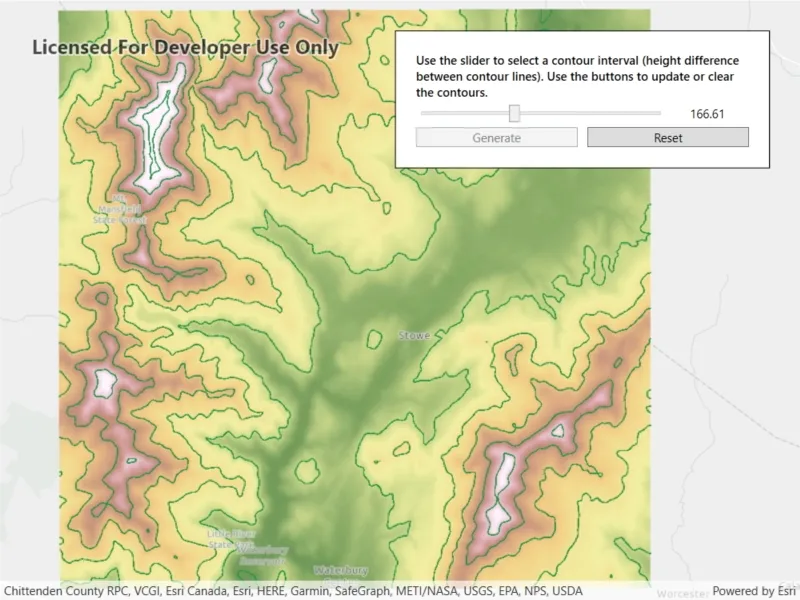
Create contour lines from local raster data using a local geoprocessing package .gpk and the contour geoprocessing tool.
Use case
For executing offline geoprocessing tasks in your apps via an offline (local) server.
How to use the sample
Contour Line Controls (Top Left):
- Interval - Specifies the spacing between contour lines.
- Generate Contours - Adds contour lines to map using interval.
- Clear Results - Removes contour lines from map.
How it works
- Create and run a local server with
LocalServer.Instance. - Start the server asynchronously with
server.StartAsync(). - Start a
LocalGeoprocessingServiceand run aGeoprocessingTask.- Instantiate
LocalGeoprocessingService(Url, ServiceType)to create a local geoprocessing service. - Call
LocalGeoprocessingService.StartAsync()to start the service asynchronously. - Instantiate
GeoprocessingTask(LocalGeoprocessingService.Url + "/Contour")to create a geoprocessing task that uses the contour lines tool.
- Instantiate
- Create an instance of
GeoprocessingParameters.- Instantiate
GeoprocessingParameters(ExecutionType)creates geoprocessing parameters. - Create a parameter using
gpParams.Inputs["ContourInterval"] = new GeoprocessingDoublevalue)using the desired contour value.
- Instantiate
- Create and start a
GeoprocessingJobusing the previous parameters.- Create a geoprocessing job with
GeoprocessingTask.CreateJob(GeoprocessingParameters). - Start the job with
GeoprocessingJob.Start().
- Create a geoprocessing job with
- Add contour lines as an
ArcGISMapImageLayerto the map.- Get url from local geoprocessing service using the
service.Urlproperty. - Get server job id of geoprocessing job using the
GeoprocessingJob.ServerJobIdproperty. - Replace
GPServerfrom url withMapServer/jobs/jobId, to get generate contour lines data. - Create a map image layer from that new url and add that layer to the map.
- Get url from local geoprocessing service using the
Relevant API
- GeoprocessingDouble
- GeoprocessingJob
- GeoprocessingParameter
- GeoprocessingParameters
- GeoprocessingTask
- LocalGeoprocessingService
- LocalGeoprocessingService.ServiceType
- LocalServer
- LocalServerStatus
Offline data
This sample downloads the following items from ArcGIS Online automatically:
- Contour.gpkx - A Geoprocessing Package for generating contour lines.
- RasterHillshade.tpkx - A tile package for the hillshade.
Additional information
ArcGIS Maps SDK for Local Server (Local Server) is deprecated and will be retired in 2030. For more information, see the deprecation announcement.
Tags
geoprocessing, local, offline, parameters, processing, service
Sample code
// Copyright 2021 Esri.//// Licensed under the Apache License, Version 2.0 (the "License"); you may not use this file except in compliance with the License.// You may obtain a copy of the License at: http://www.apache.org/licenses/LICENSE-2.0//// Unless required by applicable law or agreed to in writing, software distributed under the License is distributed on an// "AS IS" BASIS, WITHOUT WARRANTIES OR CONDITIONS OF ANY KIND, either express or implied. See the License for the specific// language governing permissions and limitations under the License.
using ArcGIS.Samples.Managers;using Esri.ArcGISRuntime.LocalServices;using Esri.ArcGISRuntime.Mapping;using Esri.ArcGISRuntime.Tasks;using Esri.ArcGISRuntime.Tasks.Geoprocessing;using System;using System.Diagnostics;using System.IO;using System.Reflection;using System.Threading.Tasks;using System.Windows;using System.Windows.Controls;
namespace ArcGIS.WPF.Samples.LocalServerGeoprocessing{    [ArcGIS.Samples.Shared.Attributes.Sample(        name: "Local server geoprocessing",        category: "Local Server",        description: "Create contour lines from local raster data using a local geoprocessing package `.gpk` and the contour geoprocessing tool.",        instructions: "Contour Line Controls (Top Left):",        tags: new[] { "geoprocessing", "local", "offline", "parameters", "processing", "service" })]    [ArcGIS.Samples.Shared.Attributes.OfflineData("3f38e1ae7c5948cc95334ba3a142a4ec", "a680362d6a7447e8afe2b1eb85fcde30")]    public partial class LocalServerGeoprocessing    {        // Hold a reference to the local geoprocessing service        private LocalGeoprocessingService _gpService;
        // Hold a reference to the task        private GeoprocessingTask _gpTask;
        // Hold a reference to the job        private GeoprocessingJob _gpJob;
        public LocalServerGeoprocessing()        {            InitializeComponent();
            // set up the sample            _ = Initialize();        }
        private async Task Initialize()        {            // Create a map and add it to the view            MyMapView.Map = new Map(BasemapStyle.ArcGISLightGray);
            // Load the tiled layer and get the path            string rasterPath = GetRasterPath();
            // Create a tile cache using the path to the raster            TileCache myTileCache = new TileCache(rasterPath);
            // Create the tiled layer from the tile cache            ArcGISTiledLayer tiledLayer = new ArcGISTiledLayer(myTileCache);
            // Try to load the tiled layer            try            {                // Wait for the layer to load                await tiledLayer.LoadAsync();
                // Zoom to extent of the tiled layer                await MyMapView.SetViewpointGeometryAsync(tiledLayer.FullExtent);            }            catch (Exception)            {                MessageBox.Show("Couldn't load the tile package, ending sample load.");                return;            }
            // Add the layer to the map            MyMapView.Map.OperationalLayers.Add(tiledLayer);
            // Try to start Local Server            try            {                // LocalServer must not be running when setting the data path.                if (LocalServer.Instance.Status == LocalServerStatus.Started)                {                    await LocalServer.Instance.StopAsync();                }
                // Set the local data path - must be done before starting. On most systems, this will be C:\EsriSamples\AppData.                // This path should be kept short to avoid Windows path length limitations.                string tempDataPathRoot = Directory.GetParent(Environment.GetFolderPath(Environment.SpecialFolder.Windows)).FullName;                string tempDataPath = Path.Combine(tempDataPathRoot, "EsriSamples", "AppData");                Directory.CreateDirectory(tempDataPath); // CreateDirectory won't overwrite if it already exists.                LocalServer.Instance.AppDataPath = tempDataPath;
                // Start the local server instance                await LocalServer.Instance.StartAsync();            }            catch (Exception ex)            {                var localServerTypeInfo = typeof(LocalMapService).GetTypeInfo();                var localServerVersion = FileVersionInfo.GetVersionInfo(localServerTypeInfo.Assembly.Location);
                MessageBox.Show($"Please ensure that local server {localServerVersion.FileVersion} is installed prior to using the sample. The download link is in the description. Message: {ex.Message}", "Local Server failed to start");                return;            }
            // Get the path to the geoprocessing task            string gpServiceUrl = GetGpPath();
            // Create the geoprocessing service            _gpService = new LocalGeoprocessingService(gpServiceUrl, GeoprocessingServiceType.AsynchronousSubmitWithMapServiceResult);
            // Take action once the service loads            _gpService.StatusChanged += GpServiceOnStatusChanged;
            // Try to start the service            try            {                // Start the service                await _gpService.StartAsync();            }            catch (Exception)            {                MessageBox.Show("geoprocessing service failed to start.");            }        }
        private async void GpServiceOnStatusChanged(object sender, StatusChangedEventArgs statusChangedEventArgs)        {            // Return if the server hasn't started            if (statusChangedEventArgs.Status != LocalServerStatus.Started) return;
            try            {                // Create the geoprocessing task from the service                _gpTask = await GeoprocessingTask.CreateAsync(new Uri(_gpService.Url + "/Contour"));
                // Update UI                MyUpdateContourButton.IsEnabled = true;                MyLoadingIndicator.Visibility = Visibility.Collapsed;            }            catch (Exception ex)            {                MessageBox.Show(ex.Message);            }        }
        private void GenerateContours()        {            // Show the progress bar            MyLoadingIndicator.Visibility = Visibility.Visible;            MyLoadingIndicator.IsIndeterminate = false;
            // Create the geoprocessing parameters            GeoprocessingParameters gpParams = new GeoprocessingParameters(GeoprocessingExecutionType.AsynchronousSubmit);
            // Add the interval parameter to the geoprocessing parameters            gpParams.Inputs["ContourInterval"] = new GeoprocessingDouble(MyContourSlider.Value);
            // Create the job            _gpJob = _gpTask.CreateJob(gpParams);
            // Update the UI when job progress changes            _gpJob.ProgressChanged += (sender, args) =>             {                 Dispatcher.Invoke(() => { MyLoadingIndicator.Value = _gpJob.Progress; });             };
            // Be notified when the task completes (or other change happens)            _gpJob.StatusChanged += GpJobOnJobChanged;
            // Start the job            _gpJob.Start();        }
        private async void GpJobOnJobChanged(object o, JobStatus e)        {            // Show message if job failed            if (_gpJob.Status == JobStatus.Failed)            {                MessageBox.Show("Job Failed");                return;            }
            // Return if not succeeded            if (_gpJob.Status != JobStatus.Succeeded) { return; }
            // Get the URL to the map service            string gpServiceResultUrl = _gpService.Url.ToString();
            // Get the URL segment for the specific job results            string jobSegment = "MapServer/jobs/" + _gpJob.ServerJobId;
            // Update the URL to point to the specific job from the service            gpServiceResultUrl = gpServiceResultUrl.Replace("GPServer", jobSegment);
            // Create a map image layer to show the results            ArcGISMapImageLayer myMapImageLayer = new ArcGISMapImageLayer(new Uri(gpServiceResultUrl));
            try            {                // Load the layer                await myMapImageLayer.LoadAsync();
                // This is needed because the event comes from outside of the UI thread                Dispatcher.Invoke(() =>                {                    // Add the layer to the map                    MyMapView.Map.OperationalLayers.Add(myMapImageLayer);
                    // Hide the progress bar                    MyLoadingIndicator.Visibility = Visibility.Collapsed;
                    // Disable the generate button                    MyUpdateContourButton.IsEnabled = false;
                    // Enable the reset button                    MyResetButton.IsEnabled = true;                });            }            catch (Exception ex)            {                Debug.WriteLine(ex.Message);            }        }
        private static string GetRasterPath()        {            return DataManager.GetDataFolder("3f38e1ae7c5948cc95334ba3a142a4ec", "RasterHillshade.tpkx");        }
        private static string GetGpPath()        {            return DataManager.GetDataFolder("a680362d6a7447e8afe2b1eb85fcde30", "Contour.gpkx");        }
        private void MyResetButton_OnClick(object sender, RoutedEventArgs e)        {            // Remove the contour            MyMapView.Map.OperationalLayers.RemoveAt(1);
            // Enable the generate button            MyUpdateContourButton.IsEnabled = true;
            // Disable the reset button            MyResetButton.IsEnabled = false;        }
        private void MyUpdateContourButton_OnClick(object sender, RoutedEventArgs e)        {            // Disable the generate button            ((Button)sender).IsEnabled = false;
// Generate the contours GenerateContours(); } }}<UserControl x:Class="ArcGIS.WPF.Samples.LocalServerGeoprocessing.LocalServerGeoprocessing" xmlns="http://schemas.microsoft.com/winfx/2006/xaml/presentation" xmlns:x="http://schemas.microsoft.com/winfx/2006/xaml" xmlns:esri="http://schemas.esri.com/arcgis/runtime/2013"> <Grid> <esri:MapView x:Name="MyMapView" /> <Border Style="{StaticResource BorderStyle}"> <Grid> <Grid.RowDefinitions> <RowDefinition Height="auto" /> <RowDefinition Height="auto" /> <RowDefinition Height="auto" /> <RowDefinition Height="auto" /> </Grid.RowDefinitions> <Grid.ColumnDefinitions> <ColumnDefinition Width="2*" /> <ColumnDefinition Width="*" /> <ColumnDefinition Width="*" /> </Grid.ColumnDefinitions> <TextBlock Grid.Row="0" Grid.Column="0" Grid.ColumnSpan="3" FontWeight="SemiBold" Text="Use the slider to select a contour interval (height difference between contour lines). Use the buttons to update or clear the contours." TextWrapping="Wrap" /> <ProgressBar x:Name="MyLoadingIndicator" Grid.Row="1" Grid.Column="0" Grid.ColumnSpan="3" Height="15" Margin="0,5,0,0" IsIndeterminate="True" /> <Slider x:Name="MyContourSlider" Grid.Row="2" Grid.Column="0" Grid.ColumnSpan="2" Margin="0,5,0,0" VerticalAlignment="Center" Maximum="350" Minimum="50" /> <TextBlock x:Name="MyContourDepthLabel" Grid.Row="2" Grid.Column="2" Margin="0,5,0,0" VerticalAlignment="Center" Text="{Binding Value, ElementName=MyContourSlider, StringFormat=N2}" TextAlignment="Center" /> <Button x:Name="MyUpdateContourButton" Grid.Row="3" Grid.Column="0" Margin="0,5,5,0" Click="MyUpdateContourButton_OnClick" Content="Generate" IsEnabled="False" /> <Button x:Name="MyResetButton" Grid.Row="3" Grid.Column="1" Grid.ColumnSpan="2" Margin="5,5,0,0" Click="MyResetButton_OnClick" Content="Reset" IsEnabled="False" /> </Grid> </Border> </Grid></UserControl>