Find the location for an address.
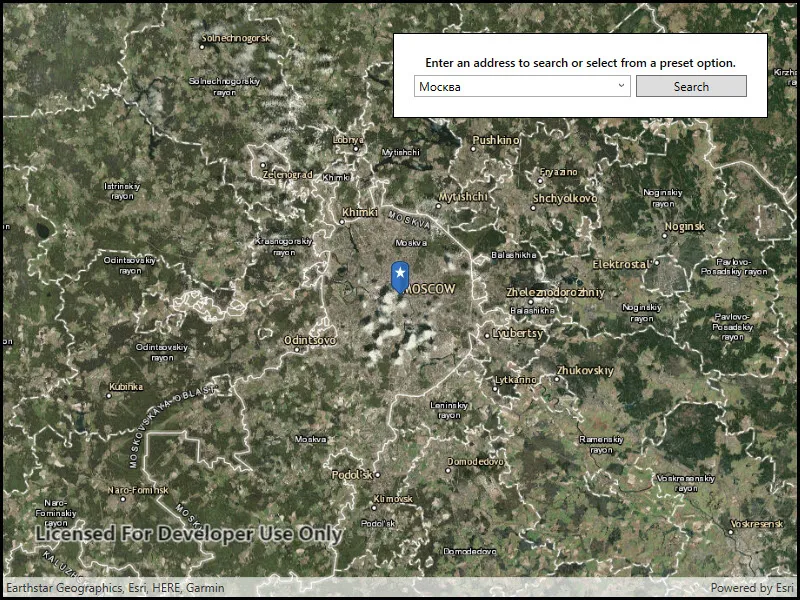
Use case
A user can input a raw address into your app’s search bar and zoom to the address location.
How to use the sample
For simplicity, the sample comes loaded with a set of suggested addresses. Choose an address from the suggestions or submit your own address to show its location on the map in a callout.
How it works
- Create a
LocatorTaskusing the URL to a locator service. - Set the
GeocodeParametersfor the locator task and specify the geocode’s attributes. - Get the matching results from the
GeocodeResultusinglocatorTask.GeocodeAsync(addressString, geocodeParameters). - Create a
Graphicwith the geocode result’s location and store the geocode result’s attributes in the graphic’s attributes. - Show the graphic in a
GraphicsOverlay.
Relevant API
- GeocodeParameters
- GeocodeResult
- LocatorTask
Additional information
This sample uses the World Geocoding Service. For more information, see the Geocoding service help topic on the ArcGIS Developer website.
Tags
address, geocode, locator, search
Sample code
// Copyright 2017 Esri.//// Licensed under the Apache License, Version 2.0 (the "License"); you may not use this file except in compliance with the License.// You may obtain a copy of the License at: http://www.apache.org/licenses/LICENSE-2.0//// Unless required by applicable law or agreed to in writing, software distributed under the License is distributed on an// "AS IS" BASIS, WITHOUT WARRANTIES OR CONDITIONS OF ANY KIND, either express or implied. See the License for the specific// language governing permissions and limitations under the License.
using Esri.ArcGISRuntime.Data;using Esri.ArcGISRuntime.Geometry;using Esri.ArcGISRuntime.Mapping;using Esri.ArcGISRuntime.Symbology;using Esri.ArcGISRuntime.Tasks.Geocoding;using Esri.ArcGISRuntime.UI;using Esri.ArcGISRuntime.UI.Controls;using System;using System.Collections.Generic;using System.IO;using System.Linq;using System.Reflection;using System.Threading.Tasks;using System.Windows;using System.Windows.Controls;
namespace ArcGIS.WPF.Samples.FindAddress{    [ArcGIS.Samples.Shared.Attributes.Sample(        name: "Find address",        category: "Search",        description: "Find the location for an address.",        instructions: "For simplicity, the sample comes loaded with a set of suggested addresses. Choose an address from the suggestions or submit your own address to show its location on the map in a callout.",        tags: new[] { "address", "geocode", "locator", "search" })]    [ArcGIS.Samples.Shared.Attributes.EmbeddedResource(@"PictureMarkerSymbols\pin_star_blue.png")]    public partial class FindAddress    {        // Addresses for suggestion.        private readonly string[] _addresses =        {            "277 N Avenida Caballeros, Palm Springs, CA",            "380 New York St, Redlands, CA 92373",            "Београд",            "Москва",            "北京"        };
        // The LocatorTask provides geocoding services        private LocatorTask _geocoder;
        // Service Uri to be provided to the LocatorTask (geocoder)        private Uri _serviceUri = new Uri("https://geocode-api.arcgis.com/arcgis/rest/services/World/GeocodeServer");
        public FindAddress()        {            InitializeComponent();
            // Setup the control references and execute initialization            _ = Initialize();        }
        private async Task Initialize()        {            // Create new Map with basemap            Map myMap = new Map(BasemapStyle.ArcGISImagery);
            // Provide used Map to the MapView            MyMapView.Map = myMap;
            // Set addresses as items source            SearchBox.ItemsSource = _addresses;
            // Enable tap-for-info pattern on results            MyMapView.GeoViewTapped += MyMapView_GeoViewTapped;
            // Initialize the LocatorTask with the provided service Uri            try            {                _geocoder = await LocatorTask.CreateAsync(_serviceUri);
                // Enable UI controls now that the LocatorTask is ready                SearchBox.IsEnabled = true;                SearchButton.IsEnabled = true;            }            catch (Exception e)            {                MessageBox.Show(e.ToString(), "Error");            }        }
        private async void UpdateSearch()        {            // Get the text in the search bar            string enteredText = SearchBox.Text;
            // Clear existing marker            MyMapView.GraphicsOverlays.Clear();
            // Return gracefully if the textbox is empty or the geocoder isn't ready            if (String.IsNullOrWhiteSpace(enteredText) || _geocoder == null) { return; }
            try            {                // Get suggestions based on the input text                IReadOnlyList<SuggestResult> suggestions = await _geocoder.SuggestAsync(enteredText);
                // Stop gracefully if there are no suggestions                if (suggestions.Count < 1) { return; }
                // Get the full address for the first suggestion                SuggestResult firstSuggestion = suggestions.First();                IReadOnlyList<GeocodeResult> addresses = await _geocoder.GeocodeAsync(firstSuggestion.Label);
                // Stop gracefully if the geocoder does not return a result                if (addresses.Count < 1) { return; }
                // Place a marker on the map - 1. Create the overlay                GraphicsOverlay resultOverlay = new GraphicsOverlay();                // 2. Get the Graphic to display                Graphic point = await GraphicForPoint(addresses.First().DisplayLocation);                // 3. Add the Graphic to the GraphicsOverlay                resultOverlay.Graphics.Add(point);                // 4. Add the GraphicsOverlay to the MapView                MyMapView.GraphicsOverlays.Add(resultOverlay);
                // Update the map extent to show the marker                MyMapView.SetViewpoint(new Viewpoint(addresses.First().Extent));            }            catch (Exception e)            {                MessageBox.Show(e.ToString(), "Error");            }        }
        /// <summary>        /// Creates and returns a Graphic associated with the given MapPoint        /// </summary>        private async Task<Graphic> GraphicForPoint(MapPoint point)        {            // Hold a reference to the picture marker symbol            PictureMarkerSymbol pinSymbol;
            // Get current assembly that contains the image            Assembly currentAssembly = Assembly.GetExecutingAssembly();
            // Get the resource name of the blue pin image            string resourceStreamName = this.GetType().Assembly.GetManifestResourceNames().Single(str => str.EndsWith("pin_star_blue.png"));
            // Load the blue pin resource stream            using (Stream resourceStream = this.GetType().Assembly.                       GetManifestResourceStream(resourceStreamName))            {                // Create new symbol using asynchronous factory method from stream                pinSymbol = await PictureMarkerSymbol.CreateAsync(resourceStream);                pinSymbol.Width = 60;                pinSymbol.Height = 60;                // The image is a pin; offset the image so that the pinpoint                //     is on the point rather than the image's true center                pinSymbol.LeaderOffsetX = 30;                pinSymbol.OffsetY = 14;            }
            return new Graphic(point, pinSymbol);        }
        private void OnSuggestionChosen(object sender, SelectionChangedEventArgs e)        {            // Return if the user is typing.            if (SearchBox.SelectedValue == null)            {                return;            }
            // Update the search            SearchBox.Text = SearchBox.SelectedValue.ToString();            UpdateSearch();        }
        private void Button_Click(object sender, System.Windows.RoutedEventArgs e)        {            UpdateSearch();        }
        /// <summary>        /// Handle tap event on the map; displays callouts showing the address for a tapped search result        /// </summary>        private async void MyMapView_GeoViewTapped(object sender, GeoViewInputEventArgs e)        {            try            {                // Search for the graphics underneath the user's tap                IReadOnlyList<IdentifyGraphicsOverlayResult> results = await MyMapView.IdentifyGraphicsOverlaysAsync(e.Position, 12, false);
                // Return gracefully if there was no result                if (results.Count < 1 || results.First().Graphics.Count < 1) { return; }
                // Reverse geocode to get addresses                IReadOnlyList<GeocodeResult> addresses = await _geocoder.ReverseGeocodeAsync(e.Location);
                // Get the first result                GeocodeResult address = addresses.First();                // Use the city and region for the Callout Title                string calloutTitle = address.Attributes["City"] + ", " + address.Attributes["Region"];                // Use the metro area for the Callout Detail                string calloutDetail = address.Attributes["MetroArea"].ToString();
                // Define the callout                CalloutDefinition calloutBody = new CalloutDefinition(calloutTitle, calloutDetail);
// Show the callout on the map at the tapped location MyMapView.ShowCalloutAt(e.Location, calloutBody); } catch (Exception ex) { MessageBox.Show(ex.ToString(), "Error"); } } }}<UserControl x:Class="ArcGIS.WPF.Samples.FindAddress.FindAddress" xmlns="http://schemas.microsoft.com/winfx/2006/xaml/presentation" xmlns:x="http://schemas.microsoft.com/winfx/2006/xaml" xmlns:esri="http://schemas.esri.com/arcgis/runtime/2013"> <Grid> <esri:MapView x:Name="MyMapView" /> <Border Style="{StaticResource BorderStyle}"> <Grid> <Grid.RowDefinitions> <RowDefinition /> <RowDefinition /> </Grid.RowDefinitions> <Grid.ColumnDefinitions> <ColumnDefinition Width="2*" /> <ColumnDefinition Width="*" /> </Grid.ColumnDefinitions> <TextBlock Grid.Row="0" Grid.Column="0" Grid.ColumnSpan="2" FontWeight="SemiBold" Text="Enter an address to search or select from a preset option." TextAlignment="Center" /> <ComboBox x:Name="SearchBox" Grid.Row="1" Grid.Column="0" Margin="0,5,5,0" IsEditable="True" IsEnabled="False" SelectionChanged="OnSuggestionChosen" /> <Button x:Name="SearchButton" Grid.Row="1" Grid.Column="1" Margin="0,5,0,0" Click="Button_Click" Content="Search" IsEnabled="False" /> </Grid> </Border> </Grid></UserControl>