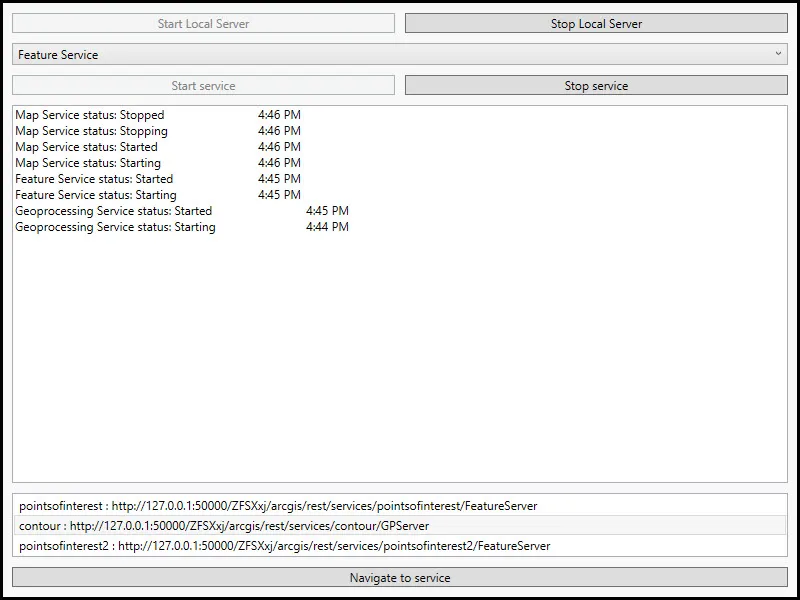
Demonstrates how to start and stop the Local Server and start and stop a local map, feature, and geoprocessing service running on the Local Server.
Use case
For executing offline geoprocessing tasks in your apps via an offline (local) server.
How to use the sample
Click Start Local Server to start the Local Server. Click Stop Local Server to stop the Local Server.
The Map Service control lets you to pick a local service that is available.
After browsing for the desired file, click Start Service to start the selected service.
When the running service’s url appears, select it and click Navigate to service. To stop this running service, click Stop Service.
How it works
To start a LocalServer and attach a LocalService:
- Create and run a local server with
LocalServer.Instance. - Start the server asynchronously with
server.StartAsync(). - Create and run a local service. Here is an example of running a
LocalMapService:- Instantiate
LocalMapService(Url)to create a local map service with the given URL path to map package (mpkormpkxfile). - Start the job with
LocalMapService.StartAsync(). The service is added to theLocalServerautomatically.
- Instantiate
- Stop the local server with
LocalServer.Instance.StopAsync().
Relevant API
- LocalFeatureService
- LocalGeoprocessingService
- LocalMapService
- LocalServer
- LocalServerStatus
- LocalService
Offline data
- Contour.gpkx - A Geoprocessing Package for generating contour lines.
- PointsofInterest.mpkx
- RelationshipID.mpkx
Additional information
ArcGIS Maps SDK for Local Server (Local Server) is deprecated and will be retired in 2030. The last release will be ArcGIS Maps SDK for Local Server 200.8, in Q3 2025. For more information, see the deprecation announcement.
Tags
feature, geoprocessing, local services, map, server, service
Sample code
// Copyright 2021 Esri.//// Licensed under the Apache License, Version 2.0 (the "License"); you may not use this file except in compliance with the License.// You may obtain a copy of the License at: http://www.apache.org/licenses/LICENSE-2.0//// Unless required by applicable law or agreed to in writing, software distributed under the License is distributed on an// "AS IS" BASIS, WITHOUT WARRANTIES OR CONDITIONS OF ANY KIND, either express or implied. See the License for the specific// language governing permissions and limitations under the License.
using ArcGIS.Samples.Managers;using Esri.ArcGISRuntime.LocalServices;using System;using System.Diagnostics;using System.IO;using System.Linq;using System.Reflection;using System.Windows;using System.Windows.Controls;
namespace ArcGIS.WPF.Samples.LocalServerServices{    [ArcGIS.Samples.Shared.Attributes.Sample(        name: "Local server services",        category: "Local Server",        description: "Demonstrates how to start and stop the Local Server and start and stop a local map, feature, and geoprocessing service running on the Local Server.",        instructions: "Click `Start Local Server` to start the Local Server. Click `Stop Local Server` to stop the Local Server.",        tags: new[] { "feature", "geoprocessing", "local services", "map", "server", "service" })]    [ArcGIS.Samples.Shared.Attributes.OfflineData("85c34847bbe1402fa115a1b9b87561ce", "92ca5cdb3ff1461384bf80dc008e297b", "a680362d6a7447e8afe2b1eb85fcde30")]    public partial class LocalServerServices    {        // Hold references to the individual services        private LocalMapService _localMapService;        private LocalFeatureService _localFeatureService;        private LocalGeoprocessingService _localGeoprocessingService;
        // Generic reference to the service selected in the UI        private LocalService _selectedService;
        public LocalServerServices()        {            InitializeComponent();
            // Set up the sample            Initialize();        }
        private void Initialize()        {            try            {                // Subscribe to event notification for the local server instance                LocalServer.Instance.StatusChanged += (o, e) =>                {                    UpdateUiWithServiceUpdate("Local Server", e.Status);                };            }            catch (Exception ex)            {                var localServerTypeInfo = typeof(LocalMapService).GetTypeInfo();                var localServerVersion = FileVersionInfo.GetVersionInfo(localServerTypeInfo.Assembly.Location);
                MessageBox.Show($"Please ensure that local server {localServerVersion.FileVersion} is installed prior to using the sample. The download link is in the description. Message: {ex.Message}", "Local Server failed to start");            }        }
        private void UpdateUiWithServiceUpdate(string server, LocalServerStatus status)        {            // Construct the new status text            string updateStatus = String.Format("{0} status: {1} \t\t {2}\n{3}", server, status,                DateTime.Now.ToShortTimeString(), StatusTextbox.Text);
            // Update the status box text            StatusTextbox.Text = updateStatus;
            // Update the list of running services            ServicesListbox.ItemsSource = LocalServer.Instance.Services.Select(m => m.Name + " : " + m.Url);        }
        private void CreateServices()        {            try            {                // Arrange the data before starting the services                string mapServicePath = GetMpkPath();                string featureServicePath = GetFeatureLayerPath();                string geoprocessingPath = GetGpPath();
                // Create each service but don't start any                _localMapService = new LocalMapService(mapServicePath);                _localFeatureService = new LocalFeatureService(featureServicePath);                _localGeoprocessingService = new LocalGeoprocessingService(geoprocessingPath);
                // Subscribe to status updates for each service                _localMapService.StatusChanged += (o, e) => { UpdateUiWithServiceUpdate("Map Service", e.Status); };                _localFeatureService.StatusChanged += (o, e) => { UpdateUiWithServiceUpdate("Feature Service", e.Status); };                _localGeoprocessingService.StatusChanged += (o, e) => { UpdateUiWithServiceUpdate("Geoprocessing Service", e.Status); };
                // Enable the UI to select services                ServiceSelectionCombo.IsEnabled = true;            }            catch (Exception ex)            {                MessageBox.Show(ex.Message, "Failed to create services");            }        }
        private void Selector_OnSelectionChanged(object sender, SelectionChangedEventArgs e)        {            // Get the text of the selected item            string selection = ((ComboBoxItem)ServiceSelectionCombo.SelectedItem).Content.ToString();
            // Update the selection            switch (selection)            {                case "Map Service":                    _selectedService = _localMapService;                    break;
                case "Feature Service":                    _selectedService = _localFeatureService;                    break;
                case "Geoprocessing Service":                    _selectedService = _localGeoprocessingService;                    break;            }
            // Return if selection is invalid            if (_selectedService == null)            {                return;            }
            // Update the state of the start and stop buttons            UpdateServiceControlUi();        }
        private void UpdateServiceControlUi()        {            if (_selectedService == null)            {                return;            }
            // Update the UI            if (_selectedService.Status == LocalServerStatus.Started)            {                ServiceStopButton.IsEnabled = true;                ServiceStartButton.IsEnabled = false;            }            else            {                ServiceStopButton.IsEnabled = false;                ServiceStartButton.IsEnabled = true;            }        }
        private async void StartServiceButtonClicked(object sender, RoutedEventArgs e)        {            try            {                // Start the selected service                await _selectedService.StartAsync();
                // Update the UI                UpdateServiceControlUi();            }            catch (Exception ex)            {                MessageBox.Show(ex.Message, "Failed to start service");            }        }
        private async void StopServiceButtonClicked(object sender, RoutedEventArgs e)        {            try            {                // Stop the selected service                await _selectedService.StopAsync();
                // Update the UI                UpdateServiceControlUi();            }            catch (Exception ex)            {                MessageBox.Show(ex.Message, "Failed to stop service");            }        }
        private static string GetMpkPath()        {            return DataManager.GetDataFolder("85c34847bbe1402fa115a1b9b87561ce", "RelationshipID.mpkx");        }
        private static string GetFeatureLayerPath()        {            return DataManager.GetDataFolder("92ca5cdb3ff1461384bf80dc008e297b", "PointsOfInterest.mpkx");        }
        private static string GetGpPath()        {            return DataManager.GetDataFolder("a680362d6a7447e8afe2b1eb85fcde30", "Contour.gpkx");        }
        private async void StartServerButtonClicked(object sender, RoutedEventArgs e)        {            try            {                // LocalServer must not be running when setting the data path.                if (LocalServer.Instance.Status == LocalServerStatus.Started)                {                    await LocalServer.Instance.StopAsync();                }
                // Set the local data path - must be done before starting. On most systems, this will be C:\EsriSamples\AppData.                // This path should be kept short to avoid Windows path length limitations.                string tempDataPathRoot = Directory.GetParent(Environment.GetFolderPath(Environment.SpecialFolder.Windows)).FullName;                string tempDataPath = Path.Combine(tempDataPathRoot, "EsriSamples", "AppData");                Directory.CreateDirectory(tempDataPath); // CreateDirectory won't overwrite if it already exists.                LocalServer.Instance.AppDataPath = tempDataPath;
                // Start the server                await LocalServer.Instance.StartAsync();
                // Create the services                CreateServices();            }            catch (Exception ex)            {                var localServerTypeInfo = typeof(LocalMapService).GetTypeInfo();                var localServerVersion = FileVersionInfo.GetVersionInfo(localServerTypeInfo.Assembly.Location);
                MessageBox.Show($"Please ensure that local server {localServerVersion.FileVersion} is installed prior to using the sample. The download link is in the description. Message: {ex.Message}", "Local Server failed to start");            }
            // Update the UI            LocalServerStopButton.IsEnabled = true;            LocalServerStartButton.IsEnabled = false;        }
        private async void StopServerButtonClicked(object sender, RoutedEventArgs e)        {            // Update the UI            ServiceStartButton.IsEnabled = false;            ServiceStopButton.IsEnabled = false;            LocalServerStartButton.IsEnabled = true;            LocalServerStopButton.IsEnabled = false;
            try            {                // Stop the server.                await LocalServer.Instance.StopAsync();            }            catch (Exception ex)            {                MessageBox.Show(ex.Message, "Failed to stop server");            }
            // Clear references to the services            _localFeatureService = null;            _localMapService = null;            _localGeoprocessingService = null;        }
        private void NavigateButtonClicked(object sender, RoutedEventArgs e)        {            // Return if selection is empty            if (ServicesListbox.SelectedItems.Count < 1) { return; }
            try            {                // Get the full text in the selection                string strFullName = ServicesListbox.SelectedItems[0].ToString();
                // Create array of characters to split text by; ':' separates the service name and the URI                char[] splitChars = { ':' };
                // Extract the service URL                string serviceUri = strFullName.Split(splitChars, 2)[1].Trim();
// Navigate to the service Process.Start(new ProcessStartInfo(serviceUri) { UseShellExecute = true }); } catch (Exception ex) { MessageBox.Show(ex.Message, "Couldn't navigate to service"); } } }}<UserControl x:Class="ArcGIS.WPF.Samples.LocalServerServices.LocalServerServices" xmlns="http://schemas.microsoft.com/winfx/2006/xaml/presentation" xmlns:x="http://schemas.microsoft.com/winfx/2006/xaml"> <Grid Margin="5"> <Grid.RowDefinitions> <RowDefinition Height="auto" /> <RowDefinition Height="auto" /> <RowDefinition Height="auto" /> <RowDefinition Height="*" /> <RowDefinition Height="auto" /> <RowDefinition Height="auto" /> </Grid.RowDefinitions> <Grid.ColumnDefinitions> <ColumnDefinition Width="*" /> <ColumnDefinition Width="*" /> </Grid.ColumnDefinitions> <Button x:Name="LocalServerStartButton" Grid.Row="0" Grid.Column="0" Margin="5" Click="StartServerButtonClicked" Content="Start Local Server" /> <Button x:Name="LocalServerStopButton" Grid.Row="0" Grid.Column="1" Margin="5" Click="StopServerButtonClicked" Content="Stop Local Server" IsEnabled="False" /> <ComboBox x:Name="ServiceSelectionCombo" Grid.Row="1" Grid.Column="0" Grid.ColumnSpan="2" Margin="5" IsEnabled="False" SelectionChanged="Selector_OnSelectionChanged"> <ComboBoxItem>Map Service</ComboBoxItem> <ComboBoxItem>Feature Service</ComboBoxItem> <ComboBoxItem>Geoprocessing Service</ComboBoxItem> </ComboBox> <Button x:Name="ServiceStartButton" Grid.Row="2" Grid.Column="0" Margin="5" Click="StartServiceButtonClicked" Content="Start service" IsEnabled="False" /> <Button x:Name="ServiceStopButton" Grid.Row="2" Grid.Column="1" Margin="5" Click="StopServiceButtonClicked" Content="Stop service" IsEnabled="False" /> <TextBox x:Name="StatusTextbox" Grid.Row="3" Grid.Column="0" Grid.ColumnSpan="2" Margin="5" /> <ListBox x:Name="ServicesListbox" Grid.Row="4" Grid.Column="0" Grid.ColumnSpan="2" Margin="5" /> <Button Grid.Row="5" Grid.Column="0" Grid.ColumnSpan="2" Margin="5" Click="NavigateButtonClicked" Content="Navigate to service" /> </Grid></UserControl>