Analyze the viewshed for an object (GeoElement) in a scene.
Use case
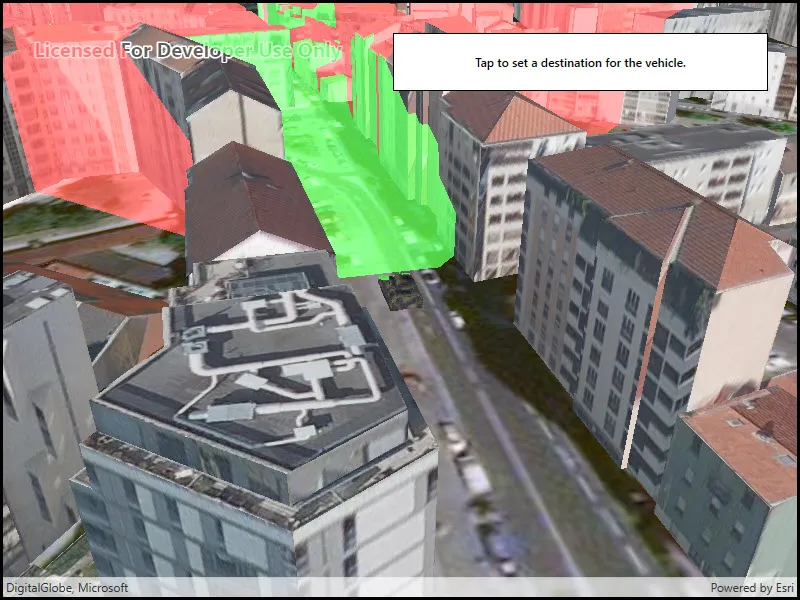
A viewshed analysis is a type of visual analysis you can perform on a scene. The viewshed aims to answer the question ‘What can I see from a given location?’. The output is an overlay with two different colors - one representing the visible areas (green) and the other representing the obstructed areas (red).
How to use the sample
Tap to set a destination for the vehicle (a GeoElement). The vehicle will ‘drive’ towards the tapped location. The viewshed analysis will update as the vehicle moves.
How it works
- Create and show the scene, with an elevation source and a buildings layer.
- Add a model (the
GeoElement) to represent the observer (in this case, a tank).- Use a
SimpleRendererwhich has a heading expression set in theGraphicsOverlay. This way you can relate the viewshed’s heading to theGeoElementobject’s heading.
- Use a
- Create a
GeoElementViewshedwith configuration for the viewshed analysis. - Add the viewshed to an
AnalysisOverlayand add the overlay to the scene. - Configure the SceneView
CameraControllerto orbit the vehicle.
Relevant API
- AnalysisOverlay
- GeodeticDistanceResult
- GeoElementViewshed
- GeometryEngine.DistanceGeodetic
- ModelSceneSymbol
- OrbitGeoElementCameraController
Offline data
This sample downloads the following items from ArcGIS Online automatically:
- bradley_low_3ds.zip - Model Scene Symbol for use in ArcGIS Maps SDK for Native Apps samples
About the data
This sample shows a Johannesburg, South Africa Scene from ArcGIS Online. The sample uses a Tank model scene symbol hosted as an item on ArcGIS Online.
Tags
3D, analysis, buildings, model, scene, viewshed, visibility analysis
Sample code
// Copyright 2018 Esri.//// Licensed under the Apache License, Version 2.0 (the "License"); you may not use this file except in compliance with the License.// You may obtain a copy of the License at: http://www.apache.org/licenses/LICENSE-2.0//// Unless required by applicable law or agreed to in writing, software distributed under the License is distributed on an// "AS IS" BASIS, WITHOUT WARRANTIES OR CONDITIONS OF ANY KIND, either express or implied. See the License for the specific// language governing permissions and limitations under the License.
using ArcGIS.Samples.Managers;using Esri.ArcGISRuntime.Geometry;using Esri.ArcGISRuntime.Mapping;using Esri.ArcGISRuntime.Symbology;using Esri.ArcGISRuntime.UI;using Esri.ArcGISRuntime.UI.GeoAnalysis;using System;using System.Collections.Generic;using System.Linq;using System.Threading.Tasks;using System.Timers;using System.Windows;
namespace ArcGIS.WPF.Samples.ViewshedGeoElement{    [ArcGIS.Samples.Shared.Attributes.Sample(        name: "Viewshed for GeoElement",        category: "Analysis",        description: "Analyze the viewshed for an object (GeoElement) in a scene.",        instructions: "Tap to set a destination for the vehicle (a GeoElement). The vehicle will 'drive' towards the tapped location. The viewshed analysis will update as the vehicle moves.",        tags: new[] { "3D", "analysis", "buildings", "model", "scene", "viewshed", "visibility analysis" })]    [ArcGIS.Samples.Shared.Attributes.OfflineData("07d62a792ab6496d9b772a24efea45d0")]    public partial class ViewshedGeoElement    {        // URLs to the scene layer with buildings and the elevation source        private readonly Uri _elevationUri = new Uri("https://elevation3d.arcgis.com/arcgis/rest/services/WorldElevation3D/Terrain3D/ImageServer");        private readonly Uri _buildingsUri = new Uri("https://tiles.arcgis.com/tiles/P3ePLMYs2RVChkJx/arcgis/rest/services/Building_Johannesburg/SceneServer");
        // Graphic and overlay for showing the tank        private readonly GraphicsOverlay _tankOverlay = new GraphicsOverlay();        private Graphic _tank;
        // Animation properties        private MapPoint _tankEndPoint;
        // Units for geodetic calculation (used in animating tank)        private readonly LinearUnit _metersUnit = (LinearUnit)Unit.FromWkid(9001);        private readonly AngularUnit _degreesUnit = (AngularUnit)Unit.FromWkid(9102);
        public ViewshedGeoElement()        {            InitializeComponent();            _ = Initialize();        }
        private async Task Initialize()        {            // Create the scene with an imagery basemap.            MySceneView.Scene = new Scene(BasemapStyle.ArcGISImageryStandard);
            // Add the elevation surface.            ArcGISTiledElevationSource tiledElevationSource = new ArcGISTiledElevationSource(_elevationUri);            Surface baseSurface = new Surface            {                ElevationSources = { tiledElevationSource }            };            MySceneView.Scene.BaseSurface = baseSurface;
            // Add buildings.            ArcGISSceneLayer sceneLayer = new ArcGISSceneLayer(_buildingsUri);            MySceneView.Scene.OperationalLayers.Add(sceneLayer);
            // Configure the graphics overlay for the tank and add the overlay to the SceneView.            _tankOverlay.SceneProperties.SurfacePlacement = SurfacePlacement.Relative;            MySceneView.GraphicsOverlays.Add(_tankOverlay);
            // Configure the heading expression for the tank; this will allow the            //     viewshed to update automatically based on the tank's position.            SimpleRenderer renderer3D = new SimpleRenderer();            renderer3D.SceneProperties.HeadingExpression = "[HEADING]";            _tankOverlay.Renderer = renderer3D;
            try            {                // Create the tank graphic - get the model path.                string modelPath = GetModelPath();                // - Create the symbol and make it 10x larger (to be the right size relative to the scene).                ModelSceneSymbol tankSymbol = await ModelSceneSymbol.CreateAsync(new Uri(modelPath), 10);                // - Adjust the position.                tankSymbol.Heading = 90;                // - The tank will be positioned relative to the scene surface by its bottom.                //       This ensures that the tank is on the ground rather than partially under it.                tankSymbol.AnchorPosition = SceneSymbolAnchorPosition.Bottom;                // - Create the graphic.                _tank = new Graphic(new MapPoint(28.047199, -26.189105, SpatialReferences.Wgs84), tankSymbol);                // - Update the heading.                _tank.Attributes["HEADING"] = 0.0;                // - Add the graphic to the overlay.                _tankOverlay.Graphics.Add(_tank);
                // Create a viewshed for the tank.                GeoElementViewshed geoViewshed = new GeoElementViewshed(                    geoElement: _tank,                    horizontalAngle: 90.0,                    verticalAngle: 40.0,                    minDistance: 0.1,                    maxDistance: 250.0,                    headingOffset: 0.0,                    pitchOffset: 0.0)                {                    // Offset viewshed observer location to top of tank.                    OffsetZ = 3.0                };
                // Create the analysis overlay and add to the scene.                AnalysisOverlay overlay = new AnalysisOverlay();                overlay.Analyses.Add(geoViewshed);                MySceneView.AnalysisOverlays.Add(overlay);
                // Create a camera controller to orbit the tank.                OrbitGeoElementCameraController cameraController = new OrbitGeoElementCameraController(_tank, 200.0)                {                    CameraPitchOffset = 45.0                };                // - Apply the camera controller to the SceneView.                MySceneView.CameraController = cameraController;
                // Create a timer; this will enable animating the tank.                Timer animationTimer = new Timer(60)                {                    Enabled = true,                    AutoReset = true                };                // - Move the tank every time the timer expires.                animationTimer.Elapsed += (o, e) =>                {                    AnimateTank();                };                // - Start the timer.                animationTimer.Start();
                // Allow the user to click to define a new destination.                MySceneView.GeoViewTapped += (sender, args) => { _tankEndPoint = args.Location; };            }            catch (Exception e)            {                MessageBox.Show(e.ToString(), "Error");            }        }
        private void AnimateTank()        {            // Return if the tank already arrived.            if (_tankEndPoint == null)            {                return;            }
            // Get the current location and distance from the destination.            MapPoint location = (MapPoint)_tank.Geometry;            GeodeticDistanceResult distance = location.DistanceGeodetic(_tankEndPoint, _metersUnit, _degreesUnit,                GeodeticCurveType.Geodesic);
            // Move the tank a short distance.            location = GeometryEngine.MoveGeodetic(new List<MapPoint>() { location }, 1.0, _metersUnit, distance.Azimuth1, _degreesUnit,                GeodeticCurveType.Geodesic).First();            _tank.Geometry = location;
            // Rotate to face the destination.            double heading = (double)_tank.Attributes["HEADING"];            heading = heading + (distance.Azimuth1 - heading) / 10;            _tank.Attributes["HEADING"] = heading;
            // Clear the destination if the tank already arrived.            if (distance.Distance < 5)            {                _tankEndPoint = null;            }        }
        private static string GetModelPath()        {            // Returns the tank model.
return DataManager.GetDataFolder("07d62a792ab6496d9b772a24efea45d0", "bradle.3ds"); } }}<UserControl x:Class="ArcGIS.WPF.Samples.ViewshedGeoElement.ViewshedGeoElement" xmlns="http://schemas.microsoft.com/winfx/2006/xaml/presentation" xmlns:x="http://schemas.microsoft.com/winfx/2006/xaml" xmlns:esri="http://schemas.esri.com/arcgis/runtime/2013"> <Grid> <esri:SceneView x:Name="MySceneView" /> <Border Style="{StaticResource BorderStyle}"> <TextBlock FontWeight="SemiBold" Text="Tap to set a destination for the vehicle." TextAlignment="Center" /> </Border> </Grid></UserControl>