Create contour lines from local raster data using a local geoprocessing package .gpkx and the contour geoprocessing tool.
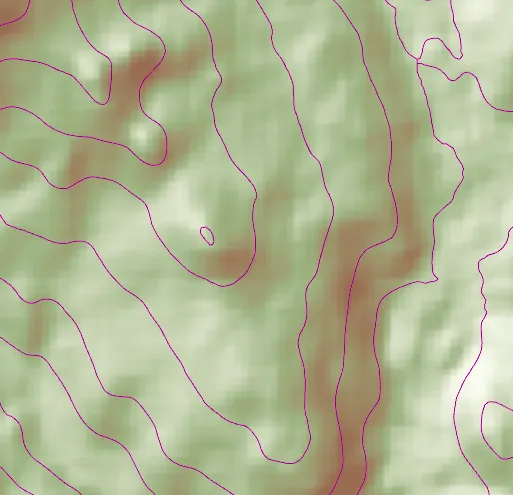
Use case
For executing offline geoprocessing tasks in your apps via an offline (local) server.
How to use the sample
Contour Line Controls (Top Left):
- Interval - Specifies the spacing between contour lines.
- Generate Contours - Adds contour lines to map using interval.
- Clear Results - Removes contour lines from map.
How it works
- Add raster data to map using as an
ArcGISTiledLayer. - Create and run the Local Server.
LocalServer::instancecreates the Local Server.LocalServer::start()starts the server asynchronously.
- Wait for server to be in the
LocalServerStatus::Startedstate.LocalServer::statusChanged()fires whenever the running status of the Local Server changes.
- Start a
LocalGeoprocessingServiceand run aGeoprocessingTasknew LocalGeoprocessingService(Url, ServiceType), creates a local geoprocessing serviceLocalGeoprocessingService::start()starts the service asynchronously.new GeoprocessingTask(LocalGeoprocessingService.url() + "/Contour"), creates a geoprocessing task that uses the contour lines tool
- Create
GeoprocessingParametersand add aGeoprocessingDoubleas a parameter using set interval.new GeoprocessingParameters(ExecutionType), creates geoprocessing parametersinputs.insert("ContourInterval", new GeoprocessingDouble(double)), creates a parameter with nameContourIntervalwith the interval set as its value.gpParams.setInputs(inputs), sets the input with the interval value.
- Create and start a
GeoprocessingJobusing the parameters from above.GeoprocessingTask::createJob(GeoprocessingParameters), creates a geoprocessing jobGeoprocessingJob::start(), starts the job.
- Add contour lines as an
ArcGISMapImageLayerto map.- Get url from local geoprocessing service,
LocalGeoprocessingService::url() - Get server job id of geoprocessing job,
GeoprocessingJob::serverJobId() - Replace
GPServerfrom url withMapServer/jobs/jobId, to get generate contour lines data - create a map image layer from that new url and add that layer to the map
- Get url from local geoprocessing service,
Relevant API
- GeoprocessingDouble
- GeoprocessingJob
- GeoprocessingParameter
- GeoprocessingParameters
- GeoprocessingTask
- LocalGeoprocessingService
- LocalGeoprocessingService::serviceType
- LocalServer
- LocalServerStatus
Offline Data
Read more about how to set up the sample’s offline data here.
| Link | Local Location |
|---|---|
| Contour geoprocessing package | <userhome>/ArcGIS/Runtime/Data/gpkx/Contour.gpkx |
| Raster Hillshade TPKX | <userhome>/ArcGIS/Runtime/Data/tpkx/RasterHillshade.tpkx |
Additional information
Local Server can be downloaded for Windows and Linux platforms. Local Server is not supported on macOS.
Tags
geoprocessing, local, offline, parameters, processing, service
Sample code
// [WriteFile Name=LocalServerGeoprocessing, Category=LocalServer]// [Legal]// Copyright 2017 Esri.//// Licensed under the Apache License, Version 2.0 (the "License");// you may not use this file except in compliance with the License.// You may obtain a copy of the License at// http://www.apache.org/licenses/LICENSE-2.0//// Unless required by applicable law or agreed to in writing, software// distributed under the License is distributed on an "AS IS" BASIS,// WITHOUT WARRANTIES OR CONDITIONS OF ANY KIND, either express or implied.// See the License for the specific language governing permissions and// limitations under the License.// [Legal]
#ifdef PCH_BUILD#include "pch.hpp"#endif // PCH_BUILD
// sample headers#include "LocalServerGeoprocessing.h"
// ArcGIS Maps SDK headers#include "ArcGISMapImageLayer.h"#include "ArcGISTiledLayer.h"#include "Basemap.h"#include "Envelope.h"#include "GeoprocessingDouble.h"#include "GeoprocessingJob.h"#include "GeoprocessingParameter.h"#include "GeoprocessingParameters.h"#include "GeoprocessingTask.h"#include "GeoprocessingTypes.h"#include "LayerListModel.h"#include "LocalGeoprocessingService.h"#include "LocalServer.h"#include "LocalServerTypes.h"#include "Map.h"#include "MapQuickView.h"#include "MapTypes.h"#include "MapViewTypes.h"#include "TaskTypes.h"#include "TileCache.h"#include "Viewpoint.h"
// Qt headers#include <QDir>#include <QFuture>#include <QTemporaryDir>
using namespace Esri::ArcGISRuntime;
// constructorLocalServerGeoprocessing::LocalServerGeoprocessing(QQuickItem* parent) :  QQuickItem(parent){  // Create a temporary directory for the local server if one has not already been created  if (!LocalServer::appDataPath().isEmpty() && !LocalServer::tempDataPath().isEmpty())  {    return;  }
  // create temp/data path  const QString tempPath = LocalServerGeoprocessing::shortestTempPath() + "/EsriQtTemp";
  // create the directory  m_tempDir = std::make_unique<QTemporaryDir>(tempPath);
  // set the temp & app data path for the local server  LocalServer::instance()->setTempDataPath(m_tempDir->path());  LocalServer::instance()->setAppDataPath(m_tempDir->path());}
// destructorLocalServerGeoprocessing::~LocalServerGeoprocessing() = default;
void LocalServerGeoprocessing::init(){  qmlRegisterType<MapQuickView>("Esri.Samples", 1, 0, "MapView");  qmlRegisterType<LocalServerGeoprocessing>("Esri.Samples", 1, 0, "LocalServerGeoprocessingSample");}
void LocalServerGeoprocessing::componentComplete(){  QQuickItem::componentComplete();
  QString dataPath = QDir::homePath() + "/ArcGIS/Runtime/Data";
  // find QML MapView component  m_mapView = findChild<MapQuickView*>("mapView");  m_mapView->setWrapAroundMode(WrapAroundMode::Disabled);
  // Create a map using the topographic BaseMap  m_map = new Map(BasemapStyle::ArcGISLightGray, this);
  // Set map to map view  m_mapView->setMap(m_map);
  TileCache* tileCache = new TileCache(dataPath + "/tpkx/RasterHillshade.tpkx", this);  m_tiledLayer = new ArcGISTiledLayer(tileCache, this);  m_map->operationalLayers()->append(m_tiledLayer);
  // create a gp service  m_localGPService = new LocalGeoprocessingService(dataPath + "/gpkx/Contour.gpkx", this);  m_localGPService->setServiceType(GeoprocessingServiceType::AsynchronousSubmitWithMapServerResult);
  if (LocalServer::instance()->isInstallValid())  {    connectSignals();    if (LocalServer::instance()->status() == LocalServerStatus::Started)    {      m_localGPService->start();    }    else    {      LocalServer::start();    }  }}
void LocalServerGeoprocessing::connectSignals(){  connect(m_tiledLayer, &ArcGISTiledLayer::loadStatusChanged, this, [this](LoadStatus status)  {    if (status == LoadStatus::Loaded)    {      m_mapView->setViewpointAsync(Viewpoint(m_tiledLayer->fullExtent()));    }  });
  // start the gp service once local server has started  connect(LocalServer::instance(), &LocalServer::statusChanged, this, [this]()  {    if (LocalServer::status() == LocalServerStatus::Started)    {      // start the service      m_localGPService->start();      m_isReady = false;      emit isReadyChanged();    }  });
  // local gp service status  connect(m_localGPService, &LocalGeoprocessingService::statusChanged, this, [this]()  {    if (m_localGPService->status() == LocalServerStatus::Started)    {      m_gpTask = new GeoprocessingTask(QUrl(m_localGPService->url().toString() + "/Contour"), this);      m_isReady = true;      emit isReadyChanged();    }  });}
void LocalServerGeoprocessing::generateContours(double interval){  m_isReady = false;  emit isReadyChanged();  GeoprocessingParameters gpParams(GeoprocessingExecutionType::AsynchronousSubmit);  QMap<QString, GeoprocessingParameter*> inputs = gpParams.inputs();  inputs.insert("ContourInterval", new GeoprocessingDouble(interval, this));  gpParams.setInputs(inputs);
  GeoprocessingJob* gpJob = m_gpTask->createJob(gpParams);
  connect(gpJob, &GeoprocessingJob::statusChanged, this, [this, gpJob](JobStatus jobStatus)  {    if (jobStatus == JobStatus::Succeeded)    {      QString url = m_localGPService->url().toString().replace("GPServer", "MapServer/jobs/" + gpJob->serverJobId());      ArcGISMapImageLayer* mapImageLayer = new ArcGISMapImageLayer(QUrl(url), this);      m_map->operationalLayers()->append(mapImageLayer);      m_isReady = true;      emit isReadyChanged();    }  });
  gpJob->start();}
void LocalServerGeoprocessing::clearResults(){  if (m_mapView->map()->operationalLayers()->size() > 1)  {    m_mapView->map()->operationalLayers()->removeAt(1);  }}
QString LocalServerGeoprocessing::shortestTempPath(){  // get tmp and home paths  const QString tmpPath = QDir::tempPath();  const QString homePath = QDir::homePath();
  // return whichever is shorter, temp or home path  if (homePath.length() > tmpPath.length())  {    return tmpPath;  }  else  {    return homePath;  }}
// [WriteFile Name=LocalServerGeoprocessing, Category=LocalServer]// [Legal]// Copyright 2017 Esri.//// Licensed under the Apache License, Version 2.0 (the "License");// you may not use this file except in compliance with the License.// You may obtain a copy of the License at// http://www.apache.org/licenses/LICENSE-2.0//// Unless required by applicable law or agreed to in writing, software// distributed under the License is distributed on an "AS IS" BASIS,// WITHOUT WARRANTIES OR CONDITIONS OF ANY KIND, either express or implied.// See the License for the specific language governing permissions and// limitations under the License.// [Legal]
#ifndef LOCAL_SERVER_GEOPROCESSING_H#define LOCAL_SERVER_GEOPROCESSING_H
// Qt headers#include <QQuickItem>#include <QStringListModel>
// STL headers#include <memory>
namespace Esri::ArcGISRuntime{ class Map; class MapQuickView; class LocalServer; class LocalGeoprocessingService; class ArcGISTiledLayer; class GeoprocessingTask;} // namespace Esri::ArcGISRuntime
class QTemporaryDir;
class LocalServerGeoprocessing : public QQuickItem{ Q_OBJECT
Q_PROPERTY(bool isReady MEMBER m_isReady NOTIFY isReadyChanged)
public: explicit LocalServerGeoprocessing(QQuickItem* parent = nullptr); ~LocalServerGeoprocessing() override;
void componentComplete() override;
static void init(); Q_INVOKABLE void generateContours(double interval); Q_INVOKABLE void clearResults();
signals: void isReadyChanged();
private: void connectSignals(); static QString shortestTempPath();
private: Esri::ArcGISRuntime::Map* m_map = nullptr; Esri::ArcGISRuntime::MapQuickView* m_mapView = nullptr; Esri::ArcGISRuntime::ArcGISTiledLayer* m_tiledLayer = nullptr; Esri::ArcGISRuntime::LocalGeoprocessingService* m_localGPService = nullptr; Esri::ArcGISRuntime::GeoprocessingTask* m_gpTask = nullptr; bool m_isReady = false; std::unique_ptr<QTemporaryDir> m_tempDir;};
#endif // LOCAL_SERVER_GEOPROCESSING_H// [WriteFile Name=LocalServerFeatureLayer, Category=LocalServer]// [Legal]// Copyright 2017 Esri.//// Licensed under the Apache License, Version 2.0 (the "License");// you may not use this file except in compliance with the License.// You may obtain a copy of the License at// http://www.apache.org/licenses/LICENSE-2.0//// Unless required by applicable law or agreed to in writing, software// distributed under the License is distributed on an "AS IS" BASIS,// WITHOUT WARRANTIES OR CONDITIONS OF ANY KIND, either express or implied.// See the License for the specific language governing permissions and// limitations under the License.// [Legal]
import QtQuickimport QtQuick.Controlsimport Esri.Samples
LocalServerGeoprocessingSample { id: localServerGeoprocessingSample width: 800 height: 600
// Create MapQuickView here, and create its Map etc. in C++ code MapView { anchors.fill: parent objectName: "mapView" // set focus to enable keyboard navigation focus: true
Component.onCompleted: { // Set the focus on MapView to initially enable keyboard navigation forceActiveFocus(); }
Rectangle { id: actionAreaRect anchors { margins: 15 top: parent.top left: parent.left } width: parent.width * 0.3 height: parent.height * 0.30 color: isReady ? "black" : "silver" opacity: 0.7 radius: 5
Column { id: contentColumn spacing: 5 anchors.fill: parent anchors.margins: 5 visible: isReady
Text { text: qsTr("Specify the interval, or distance, between contour lines and click the 'Generate Contours' button.") width: parent.width wrapMode: Text.WordWrap color: "white" font.pixelSize: 12 }
Rectangle { width: parent.width height: 35 radius: 5
Text { anchors { left: parent.left verticalCenter: parent.verticalCenter margins: 5 } width: 40 text: qsTr("Interval: ") font.bold: true font.pixelSize: 14 }
TextField { id: intervalText anchors { right: parent.right verticalCenter: parent.verticalCenter margins: 5 } width: 100 text: "200" selectByMouse: true validator: DoubleValidator {bottom: 100; top: 500} } }
Button { width: parent.width text: "Generate Contours" height: 35 font.pixelSize: 14 font.bold: true onClicked: { generateContours(intervalText.text); } }
Button { width: parent.width text: "Clear Results" height: 35 font.pixelSize: 14 font.bold: true onClicked: { clearResults(); } }
}
BusyIndicator { id: busyIndicator anchors.verticalCenter: parent.verticalCenter anchors.horizontalCenter: parent.horizontalCenter width: 22 height: width running: !isReady visible: !isReady } } }}