Class MultipointClass
[Guid("00A5CB40-52DA-11D0-A8F2-00608C85EDE5")]
[ClassInterface(ClassInterfaceType.None)]
public class MultipointClass : Multipoint, IPointCollection5, IPointCollection4, IPointCollection3, IPointCollection2, IPointCollection, IGeometry5, IGeometry4, IGeometry3, IGeometry2, IGeometryCollection, IMultipoint, IGeometry, IMAware, IMCollection, IZAware, IPointIDAware, IRelationalOperator2, IRelationalOperator, IProximityOperator, ITopologicalOperator2, ITopologicalOperator, ITopologicalOperator6, IConstructMultipoint, IHitTest, IHitTest3D, ISupportErrorInfo, IPersistStream, IPersist, IClone, ITransform2D, ITransform3D, ISpatialIndex, IXMLSerialize, IZ2, IZ, IZCollection, IMSnap, IProximityOperator3D, IRelationalOperator3D2, IRelationalOperator3D- Inheritance
-
MultipointClass
- Implements
- Inherited Members
Constructors
MultipointClass()
public MultipointClass()Explicit Interface Implementations
AddGeometries(int, ref IGeometry)
Adds references to the specified geometries. This method is intended for internal use only.
virtual void AddGeometries(int Count, ref IGeometry newGeometries)Parameters
Remarks
The geometries are added last in the list. Use an array of geometries (IGeometry) and the exact number (count ) of elements in the array. Exceeding the boundary of the array will cause an application error. If you don't want to place the geometries last in the collection then use the InsertGeometries method.
When using C# you must use the IGeometryBridge interface to call this method.
When using VBNET you must use the IGeometryBridge interface to call this method.
AddGeometry(IGeometry, ref object, ref object)
Adds a reference to the input geometry either at the end, or before, or after the specified index.
virtual void AddGeometry(IGeometry inGeometry, ref object before, ref object after)Parameters
Remarks
When applying the AddGeometry method give either the before or after index and not both. Adding a Geometry to the collection as the first one is done by setting the before index as 0.
The spatial reference of the GeometryCollection is transferred
(objects projected if necessary) to any objects added to
it. However the spatial reference of the added geometry is not
transferred to the GeometryCollection. Always make sure to set
the spatial reference on the object GeometryCollection prior to add
other geometries to it to avoid creating invalid geometry. For
example, adding geometry objects to a GeometryBag that doesn't have
a well-defined spatial reference will set an undefined spatial
reference to all the objects added to the bag. Using this
GeometryBag may cause unexpected behavior with the
ITopologicalOperator::ConstructUnion method.
IPoint pnt = new PointClass();
pnt.PutCoords(x, y);
IGeometryCollection geomColl = new MultipointClass() as IGeometryCollection;
object obj = Type.Missing;
geomColl.AddGeometry(pnt, ref obj, ref obj);
AddGeometryCollection(IGeometryCollection)
Adds references to geometries in the input collection.
virtual void AddGeometryCollection(IGeometryCollection newGeometries)Parameters
newGeometriesIGeometryCollection
AddPoint(IPoint, ref object, ref object)
Adds a vertex to a Path, Ring, Polyline, or Polygon; or adds a reference to the input point to a Multipoint, TriangleFan, or TriangleStrip.
virtual void AddPoint(IPoint inPoint, ref object before, ref object after)Parameters
AddPointCollection(IPointCollection)
Adds copies of points in the input point collection to this Path, Ring, Polyline, or Polygon; or adds references to the points in the collection to this Multipoint, TriangleFan, or TriangleStrip.
virtual void AddPointCollection(IPointCollection newPoints)Parameters
newPointsIPointCollection
AddPoints(int, ref IPoint)
Adds copies of the input points as vertices to this Path, Ring, Polyline, or Polygon; or references to the input points to this Multipoint, TriangleFan, or TriangleStrip. This method is intended for internal use only.
virtual void AddPoints(int Count, ref IPoint newPoints)Parameters
AddWKSPointVA(int, ref WKSPointVA)
Adds vertices/points.
virtual void AddWKSPointVA(int Count, ref WKSPointVA pointStructures)Parameters
CountintpointStructuresWKSPointVA
AddWKSPointZs(int, ref WKSPointZ)
Adds vertices/points to this Path, Ring, Polyline, Polygon, Multipoint, TriangleFan, Triangles, TriangleStrip, or MultiPatch.
virtual void AddWKSPointZs(int Count, ref WKSPointZ pointStructures)Parameters
AddWKSPoints(int, ref WKSPoint)
Adds vertices to this Path, Ring, Polyline, or Polygon, or adds new points to this Multipoint, TriangleFan, or TriangleStrip.
virtual void AddWKSPoints(int Count, ref WKSPoint pointStructures)Parameters
AllowIndexing
Indicates whether to allow a spatial index to be created for this geometry.
virtual bool AllowIndexing { get; set; }Returns
Remarks
The SpatialIndex if enabled is used by the IRelationalOperator's methods.
Assign(IClone)
Assigns the properties of src to the receiver.
virtual void Assign(IClone src)Parameters
srcIClone
Boundary
The boundary of this geometry. A polygon's boundary is a polyline. A polyline's boundary is a multipoint. A point or multipoint's boundary is an empty point or multipoint.
virtual IGeometry Boundary { get; }Returns
Remarks
ITopologicalOperator methods must be applied on high-level geometries only. High-Level geometries are point, multipoint, polyline and polygon. To use this method with low-level geometries such as segments (Line, Circular Arc, Elliptic Arc, Bézier Curve), paths or rings, they must be wrapped into high-level geometries types.
This method does not support GeometryBags.

//The following code shows to wrap a line segment into a polyline in C#
//Assume a line (line1 as ILine) is already created
object obj = Type.Missing;
ISegmentCollection segCollection = new PolylineClass() as ISegmentCollection;
segCollection.AddSegment((ISegment)line1, ref obj, ref obj);
//Set the spatial reference on the new polyline
//The spatial reference is not transfered automatically from the segments
IGeometry geom = segCollection as IGeometry;
geom.SpatialReference = spatialRef;
//Can now be used with ITopologicalOperator methods
Buffer(double)
Constructs a polygon that is the locus of points at a distance less than or equal to a specified distance from this geometry.
virtual IGeometry Buffer(double distance)Parameters
distancedouble
Returns
Remarks
The buffer distance is in the same units as the source shape that
is being buffered.
A negative distance can be specified to produce a buffer inside the original polygon. This cannot be used with polyline.
ITopologicalOperator methods must be applied on top-level geometries only. Top-Level geometries are point, multipoint, polyline and polygon. To use this method with segments (Line, Circular Arc, Elliptic Arc, Bézier Curve), paths or rings, they must be wrapped with a top-level type.
A buffer distance of 0 will generate an empty polygon with the input geometry being a polyline and multipoint. However, if the input geometry is a point, the output will be the original point.

//The following code shows to wrap a line segment into a polyline in C#
//Assume a line (line1 as ILine) is already created
object obj = Type.Missing;
ISegmentCollection segCollection = new PolylineClass() as ISegmentCollection;
segCollection.AddSegment((ISegment)line1, ref obj, ref obj);
//Set the spatial reference on the new polyline
//The spatial reference is not transfered automatically from the segments
IGeometry geom = segCollection as IGeometry;
geom.SpatialReference = spatialRef;
//Can now be used with ITopologicalOperator methods
[C#]//This example demonstrates how to use
ITopologicalOperator::Buffer
private void BufferArea()
{
IPoint[] points = new IPoint[5];
//The spatial reference should be set here using
IGeometry::SpatialReference (Code skipped here)
for(int i = 0; i < points.Length; i++)
{
points[i] = new PointClass();
}
points[0].PutCoords(0, 0);
points[1].PutCoords(0, 10);
points[2].PutCoords(10, 10);
points[3].PutCoords(10, 0);
points[4].PutCoords(0, 0);
IPointCollection4 pointCollection = new PolygonClass();
IGeometryBridge geometryBride = new
GeometryEnvironmentClass();
geometryBride.AddPoints(pointCollection, ref points);
IArea area = pointCollection as IArea;
System.Windows.Forms.MessageBox.Show("Area original polygon
: " + area.Area);
ITopologicalOperator topologicalOperator = pointCollection
as ITopologicalOperator;
//Outside buffer
IPolygon polygon = topologicalOperator.Buffer(1) as
IPolygon;
area = polygon as IArea;
System.Windows.Forms.MessageBox.Show( "Area polygon positive
distance : " + area.Area);
//Inside buffer
polygon = topologicalOperator.Buffer(-1) as IPolygon;
area = polygon as IArea;
System.Windows.Forms.MessageBox.Show("Area polygon negative
distance : " + area.Area);
}
Sub exampleITopologicalOperator_Buffer()
Dim ptc As
ESRI.ArcGIS.Geometry.IPointCollection, i As Long, pa As
ESRI.ArcGIS.Geometry.IArea, ptopo As
ESRI.ArcGIS.Geometry.ITopologicalOperator
ptc = New
ESRI.ArcGIS.Geometry.Polygon
Dim pt(4) As
ESRI.ArcGIS.Geometry.IPoint, poutPoly As
ESRI.ArcGIS.Geometry.IPolygon
'The spatial reference
should be set here using IGeometry::SpatialReference (Code skipped
here)
For i = 0 To 4
pt(i) = New ESRI.ArcGIS.Geometry.Point
Next
pt(0).PutCoords(0,
0)
pt(1).PutCoords(0,
10)
pt(2).PutCoords(10,
10)
pt(3).PutCoords(10,
0)
pt(4).PutCoords(0,
0)
Dim geometryBride As
ESRI.ArcGIS.Geometry.IGeometryBridge
geometryBride = New
ESRI.ArcGIS.Geometry.GeometryEnvironmentClass()
geometryBride.AddPoints(ptc, pt)
pa = ptc
Debug.Print("Area
original polygon : " & pa.Area)
ptopo = ptc
poutPoly =
ptopo.Buffer(1) 'Outside buffer
pa = poutPoly
Debug.Print("Area
polygon positive distance : " & pa.Area)
poutPoly =
ptopo.Buffer(-1) 'Inside buffer
pa = poutPoly
Debug.Print("Area
polygon negative distance : " & pa.Area)
End Sub
CalculateNonSimpleZs()
Calculates the non-simple Z values by extrapolation/interpolation for polylines and interpolation for polygons.
virtual void CalculateNonSimpleZs()CentroidEx
The center of gravity (centroid).
virtual IPoint CentroidEx { get; }Returns
Changed
Indicates if a geometry has been changed (edited, projected, etc).
virtual bool Changed { get; set; }Returns
Clip(IEnvelope)
Constructs the intersection of this geometry and the specified envelope.
virtual void Clip(IEnvelope clipperEnvelope)Parameters
clipperEnvelopeIEnvelope
Remarks
Use QueryClipped or QueryClippedDense methods to send the results to a different polygon.
ITopologicalOperator methods must be applied on high-level
geometries only. High-Level geometries are point, multipoint,
polyline and polygon. To use this method with
low-level geometries such as segments (Line, Circular Arc, Elliptic
Arc, Bézier Curve), paths or rings, they must be wrapped
into high-level geometries types.

//The following code shows to wrap a line segment into a polyline in C#
//Assume a line (line1 as ILine) is already created
object obj = Type.Missing;
ISegmentCollection segCollection = new PolylineClass() as ISegmentCollection;
segCollection.AddSegment((ISegment)line1, ref obj, ref obj);
//Set the spatial reference on the new polyline
//The spatial reference is not transfered automatically from the segments
IGeometry geom = segCollection as IGeometry;
geom.SpatialReference = spatialRef;
//Can now be used with ITopologicalOperator methods
ClipDense(IEnvelope, double)
Constructs the intersection of this geometry and the specified envelope; densifies lines in output contributed by the clipping envelope.
virtual void ClipDense(IEnvelope clipperEnvelope, double denseDistance)Parameters
Remarks
ITopologicalOperator methods must be applied on high-level geometries only. High-Level geometries are point, multipoint, polyline and polygon. To use this method with low-level geometries such as segments (Line, Circular Arc, Elliptic Arc, Bézier Curve), paths or rings, they must be wrapped into high-level geometries types.
This method does not support GeometryBags.
ClipToDomain()
Clips the geometry to the domain of the spatial reference. Useful for ensuring that buffers can be fit within the spatial domain of the feature class to which they are being added.
virtual void ClipToDomain()Clone()
Clones the receiver and assigns the result to *clone.
virtual IClone Clone()Returns
ConstructArcPoints(ICircularArc)
Constructs the four arc points (fromPoint, toPoint, center point, intersection point of the tangents at fromPoint and toPoint, in that order) for the specified circular arc.
virtual void ConstructArcPoints(ICircularArc a)Parameters
Remarks

private void ConstrConstructArcPoints()
{
IPoint centerPoint = new PointClass();
centerPoint.PutCoords(10, 0);
IPoint fromPoint = new PointClass();
fromPoint.PutCoords(0, 0);
IPoint toPoint = new PointClass();
toPoint.PutCoords(0, 20);
IConstructCircularArc circularArcConstruction = new CircularArcClass();
circularArcConstruction.ConstructThreePoints(fromPoint, centerPoint, toPoint, false);
IConstructMultipoint constructMultipoint = new MultipointClass();
constructMultipoint.ConstructArcPoints(circularArcConstruction as ICircularArc);
IPointCollection pointCollection = constructMultipoint as IPointCollection;
System.Windows.Forms.MessageBox.Show("From Point : " + pointCollection.get_Point(0).X + " , " + pointCollection.get_Point(0).Y + "\n" +
"To Point : " + pointCollection.get_Point(1).X + " , " + pointCollection.get_Point(1).Y + "\n" +
"Center Point : " + pointCollection.get_Point(2).X + " , " + pointCollection.get_Point(2).Y + "\n" +
"Intersection Point : " + pointCollection.get_Point(3).X + " , " + pointCollection.get_Point(3).Y + "\n"
);
}
Private Sub ConstructArcPoints()
Dim pConstructCircularArc As ESRI.ArcGIS.Geometry.IConstructCircularArc
Dim pCArc As ESRI.ArcGIS.Geometry.ICircularArc
Dim pPoint1 As ESRI.ArcGIS.Geometry.IPoint
Dim pPoint2 As ESRI.ArcGIS.Geometry.IPoint
Dim pPoint3 As ESRI.ArcGIS.Geometry.IPoint
Dim pTcoll As ESRI.ArcGIS.Geometry.IPointCollection
Dim pConstructMultipoint As ESRI.ArcGIS.Geometry.IConstructMultipoint
Dim pMultipoint As ESRI.ArcGIS.Geometry.IMultipoint
pConstructMultipoint = New ESRI.ArcGIS.Geometry.Multipoint
pConstructCircularArc = New ESRI.ArcGIS.Geometry.CircularArc
pCArc = pConstructCircularArc
pPoint1 = New ESRI.ArcGIS.Geometry.Point
pPoint2 = New ESRI.ArcGIS.Geometry.Point
pPoint3 = New ESRI.ArcGIS.Geometry.Point
pPoint1.PutCoords(100, 100)
pPoint2.PutCoords(300, 300)
pPoint3.PutCoords(500, 150)
pConstructCircularArc.ConstructThreePoints(pPoint1, pPoint2, pPoint3, False)
pConstructMultipoint.ConstructArcPoints(pCArc)
pMultipoint = pConstructMultipoint
pTcoll = pMultipoint
Debug.Print("*********************************************")
Debug.Print(" Report the points")
Debug.Print("*********************************************")
Debug.Print("From Point : " & pTcoll.Point(0).X & " , " & pTcoll.Point(0).Y)
Debug.Print("To Point : " & pTcoll.Point(1).X & " , " & pTcoll.Point(1).Y)
Debug.Print("Center Point : " & pTcoll.Point(2).X & " , " & pTcoll.Point(2).Y)
Debug.Print("Intersection Point : " & pTcoll.Point(3).X & " , " & pTcoll.Point(3).Y)
End Sub
ConstructBuffers(int, ref double)
Constructs a set of buffers at various distances. More efficient than calling Buffer repeatedly on the same geometry. This method is intended for internal use only.
virtual IEnumGeometry ConstructBuffers(int numBuffers, ref double distances)Parameters
Returns
Remarks
use the generic version of this method accesible through the GeometryEnvironment singleton object via the IGeometryBridge interface.
This method is only implemented for polygons and polylines.
When using C# you must use the IGeometryBridge interface to call this method.
When using VBNET you must use the IGeometryBridge interface to call this method.
ConstructDivideEqual(ICurve, int)
Constructs cPoints points evenly distributed along the input curve.
virtual void ConstructDivideEqual(ICurve inCurve, int numInnerPoints)Parameters
Remarks
The number of points in the constructed multipoint is equal to the input numPoints plus the 2 endpoints.

private void ConstructDivideEqual()
{
IPoint centerPoint = new PointClass();
centerPoint.PutCoords(10, 0);
IPoint fromPoint = new PointClass();
fromPoint.PutCoords(0, 0);
IPoint toPoint = new PointClass();
toPoint.PutCoords(0, 20);
ICircularArc circularArcConstruction = new CircularArcClass();
circularArcConstruction.PutCoords(centerPoint, fromPoint, toPoint, esriArcOrientation.esriArcClockwise);
IConstructMultipoint constructMultipoint = new MultipointClass();
constructMultipoint.ConstructDivideEqual(circularArcConstruction as ICurve, 10);
IPointCollection pointCollection = constructMultipoint as IPointCollection;
System.Windows.Forms.MessageBox.Show("Number of points is: " + pointCollection.PointCount);
}
Sub ConstructDivideEqual_Example()
Dim pCArc As ICircularArc, pConstructMultipoint As IConstructMultipoint
Dim pCenter As IPoint, pFrom As IPoint, pTo As IPoint
Dim ptc As IPointCollection
pCArc = New CircularArc
pCenter = New Point
pCenter.PutCoords(10, 0)
pFrom = New Point
pFrom.PutCoords(0, 0)
pTo = New Point
pTo.PutCoords(0, 20)
pCArc.PutCoords(pCenter, pFrom, pTo, esriArcOrientation.esriArcClockwise)
pConstructMultipoint = New Multipoint
pConstructMultipoint.ConstructDivideEqual(pCArc, 10)
ptc = pConstructMultipoint
Debug.Print("Number of points is: " & ptc.PointCount)
End Sub
ConstructDivideLength(ICurve, double)
Places points along the input curve each seperate by the specified distance.
virtual void ConstructDivideLength(ICurve inCurve, double separationDistance)Parameters
Remarks
If the final inner point is too close to the To point, that inner point is not included in the constructed multipoint.
//This example demonstrates how to use ConstructDivideLentgth
private void ConstructDivideLength()
{
IPoint centerPoint = new PointClass();
centerPoint.PutCoords(10, 0);
IPoint fromPoint = new PointClass();
fromPoint.PutCoords(0, 0);
IPoint toPoint = new PointClass();
toPoint.PutCoords(0, 20);
ICircularArc circularArcConstruction = new CircularArcClass();
circularArcConstruction.PutCoords(centerPoint, fromPoint, toPoint, esriArcOrientation.esriArcClockwise);
IConstructMultipoint constructMultipoint = new MultipointClass();
constructMultipoint.ConstructDivideLength(circularArcConstruction as ICurve, 10);
IPointCollection pointCollection = constructMultipoint as IPointCollection;
System.Windows.Forms.MessageBox.Show("Number of points is: " + pointCollection.PointCount);
}
Sub ConstructDivideEqual_ConstructDivideLength_Example()
Dim pCArc As ICircularArc, pConstructMultipoint As IConstructMultipoint
Dim pCenter As IPoint, pFrom As IPoint, pTo As IPoint
Dim ptc As IPointCollection
pCArc = New CircularArc
pCenter = New Point
pCenter.PutCoords(10, 0)
pFrom = New Point
pFrom.PutCoords(0, 0)
pTo = New Point
pTo.PutCoords(0, 20)
pCArc.PutCoords(pCenter, pFrom, pTo, esriArcOrientation.esriArcClockwise)
pConstructMultipoint = New Multipoint
pConstructMultipoint.ConstructDivideLength(pCArc, pCArc.Length / 11)
ptc = pConstructMultipoint
Debug.Print("Number of points is: " & ptc.PointCount)
End Sub
ConstructIntersection(ISegment, esriSegmentExtension, ISegment, esriSegmentExtension, out object, out object, out object)
Constructs the point(s) of intersection/tangency between two segments. Different ways of extending the segments in order to locate additional points can be specified.
virtual void ConstructIntersection(ISegment segment1, esriSegmentExtension extension1, ISegment segment2, esriSegmentExtension extension2, out object params1, out object params2, out object isTangentPoint)Parameters
segment1ISegmentextension1esriSegmentExtensionsegment2ISegmentextension2esriSegmentExtensionparams1objectparams2objectisTangentPointobject
Remarks

private void ConstructIntersection()
{
  IPoint[] points = new IPoint[4];
  for(int i = 0; i < 4; i++)
  {
      points[i] = new PointClass();
  }
points[0].PutCoords(150, 100);
points[1].PutCoords(200, 600);
points[2].PutCoords(400, 600);
points[3].PutCoords(450, 100);
IBezierCurveGEN bezierCurve = new BezierCurveClass();
bezierCurve.PutCoords(ref points);
IPoint centerPoint = new PointClass();
centerPoint.PutCoords(300, 300);
IPoint fromPoint = new PointClass();
fromPoint.PutCoords(100, 100);
IPoint toPoint = new PointClass();
toPoint.PutCoords(500, 100);
IConstructCircularArc circularArcConstruction = new CircularArcClass();
circularArcConstruction.ConstructThreePoints(fromPoint, centerPoint, toPoint, false);
//params optional
object param0;
object param1;
object isTangentPoint;
IConstructMultipoint constructMultipoint = new MultipointClass();
constructMultipoint.ConstructIntersection(circularArcConstruction as ISegment, esriSegmentExtension.esriNoExtension, bezierCurve as ISegment, esriSegmentExtension.esriNoExtension, out param0, out param1, out isTangentPoint);
IMultipoint multipoint = constructMultipoint as IMultipoint;
IPointCollection pointCollection = multipoint as IPointCollection;
for (int i = 0; i < pointCollection.PointCount; i++)
{
System.Windows.Forms.MessageBox.Show("Point : " + i + " X = " + pointCollection.get_Point(i).X + " Y = " + pointCollection.get_Point(i).Y);
}
}
Private Sub ConstructIntersection()
Dim pConstructCircularArc As ESRI.ArcGIS.Geometry.IConstructCircularArc
Dim pCArc As ESRI.ArcGIS.Geometry.ICircularArc
Dim pPoint1 As ESRI.ArcGIS.Geometry.IPoint
Dim pPoint2 As ESRI.ArcGIS.Geometry.IPoint
Dim pPoint3 As ESRI.ArcGIS.Geometry.IPoint
Dim pTcoll As ESRI.ArcGIS.Geometry.IPointCollection
Dim pConstructMultipoint As ESRI.ArcGIS.Geometry.IConstructMultipoint
Dim pMultipoint As ESRI.ArcGIS.Geometry.IMultipoint
Dim i As Long
Dim pBezier As ESRI.ArcGIS.Geometry.IBezierCurve
Dim pPtCon(0 To 3) As ESRI.ArcGIS.Geometry.IPoint
For i = 0 To 3
pPtCon(i) = New ESRI.ArcGIS.Geometry.Point
Next
pPtCon(0).PutCoords(150, 100)
pPtCon(1).PutCoords(200, 600)
pPtCon(2).PutCoords(400, 600)
pPtCon(3).PutCoords(450, 100)
pBezier = New ESRI.ArcGIS.Geometry.BezierCurve
pBezier.PutCoords(4, pPtCon(0))
pConstructMultipoint = New ESRI.ArcGIS.Geometry.Multipoint
pConstructCircularArc = New ESRI.ArcGIS.Geometry.CircularArc
pCArc = pConstructCircularArc
pPoint1 = New ESRI.ArcGIS.Geometry.Point
pPoint2 = New ESRI.ArcGIS.Geometry.Point
pPoint3 = New ESRI.ArcGIS.Geometry.Point
pPoint1.PutCoords(100, 100)
pPoint2.PutCoords(300, 300)
pPoint3.PutCoords(500, 100)
pConstructCircularArc.ConstructThreePoints(pPoint1, pPoint2, pPoint3, False)
pConstructMultipoint.ConstructIntersection(pCArc, ESRI.ArcGIS.Geometry.esriSegmentExtension.esriNoExtension, pBezier, ESRI.ArcGIS.Geometry.esriSegmentExtension.esriNoExtension)
pMultipoint = pConstructMultipoint
pTcoll = pMultipoint
Debug.Print("*********************************************")
Debug.Print(" Report the intersection points")
Debug.Print("*********************************************")
For i = 0 To pTcoll.PointCount - 1
Debug.Print("Point : " & pTcoll.Point(i).X & " , " & pTcoll.Point(i).Y)
Next
End Sub
ConstructIntersectionEx(ISegment, esriSegmentExtension, ISegment, esriSegmentExtension, out double, out double, out int)
Constructs the point(s) of intersection/tangency between two segments. Different ways of extending the segments in order to locate additional points can be specified.
virtual void ConstructIntersectionEx(ISegment segment1, esriSegmentExtension extension1, ISegment segment2, esriSegmentExtension extension2, out double params1, out double params2, out int tangentBits)Parameters
segment1ISegmentextension1esriSegmentExtensionsegment2ISegmentextension2esriSegmentExtensionparams1doubleparams2doubletangentBitsint
Remarks
ConstructTangent(ICurve, IPoint)
Constructs all points of tangency to a curve from a point.
virtual void ConstructTangent(ICurve inCurve, IPoint p)Parameters
Remarks
Input must consist of a single segment and not polycurves.

private void ConstructTangent()
{
IPoint[] points = new IPoint[4];
for (int i = 0; i < 4; i++)
{
points[i] = new PointClass();
}
points[0].PutCoords(150, 100);
points[1].PutCoords(200, 600);
points[2].PutCoords(400, 600);
points[3].PutCoords(450, 100);
IBezierCurveGEN bezierCurve = new BezierCurveClass();
bezierCurve.PutCoords(ref points);
IConstructMultipoint constructMultipoint = new MultipointClass();
constructMultipoint.ConstructTangent(bezierCurve as ICurve, points[1]);
IMultipoint multipoint = constructMultipoint as IMultipoint;
IPointCollection pointCollection = multipoint as IPointCollection;
//Report the points
for (int i = 0; i < pointCollection.PointCount; i++)
{
System.Windows.Forms.MessageBox.Show("Point : " + pointCollection.get_Point(i).X + " , " + pointCollection.get_Point(i).Y);
}
}
Private Sub ConstructTangent()
Dim pTcoll As ESRI.ArcGIS.Geometry.IPointCollection
Dim pConstructMultipoint As ESRI.ArcGIS.Geometry.IConstructMultipoint
Dim pMultipoint As ESRI.ArcGIS.Geometry.IMultipoint
Dim i As Long
Dim pBezier As ESRI.ArcGIS.Geometry.IBezierCurve
Dim pPtCon(0 To 3) As ESRI.ArcGIS.Geometry.IPoint
For i = 0 To 3
pPtCon(i) = New ESRI.ArcGIS.Geometry.Point
Next
pPtCon(0).PutCoords(150, 100)
pPtCon(1).PutCoords(200, 600)
pPtCon(2).PutCoords(400, 600)
pPtCon(3).PutCoords(450, 100)
pBezier = New ESRI.ArcGIS.Geometry.BezierCurve
pBezier.PutCoords(4, pPtCon(0))
pConstructMultipoint = New ESRI.ArcGIS.Geometry.Multipoint
pConstructMultipoint.ConstructTangent(pBezier, pPtCon(0))
pMultipoint = pConstructMultipoint
pTcoll = pMultipoint
Debug.Print("*********************************************")
Debug.Print(" Report the points")
Debug.Print("*********************************************")
For i = 0 To pTcoll.PointCount - 1
Debug.Print("Point : " & pTcoll.Point(i).X & " , " & pTcoll.Point(i).Y)
Next
End Sub
ConstructUnion(IEnumGeometry)
Defines this geometry to be the union of the inputs. More efficient for unioning multiple geometries than calling Union repeatedly.
virtual void ConstructUnion(IEnumGeometry geometries)Parameters
geometriesIEnumGeometry
Remarks
ITopologicalOperator methods must be applied on high-level geometries only. High-Level geometries are point, multipoint, polyline and polygon. To use this method with low-level geometries such as segments (Line, Circular Arc, Elliptic Arc, Bézier Curve), paths or rings, they must be wrapped into high-level geometries types.
This method does not support GeometryBags.
Temproray files might be created. If environment variable
"ARCTMPDIR" exists, then the files are written to the path,
otherwise written to current directory or system temp
directory.
//The following code shows to wrap a line segment into a polyline in C#
//Assume a line (line1 as ILine) is already created
object obj = Type.Missing;
ISegmentCollection segCollection = new PolylineClass() as ISegmentCollection;
segCollection.AddSegment((ISegment)line1, ref obj, ref obj);
//Set the spatial reference on the new polyline
//The spatial reference is not transfered automatically from the segments
IGeometry geom = segCollection as IGeometry;
geom.SpatialReference = spatialRef;
//Can now be used with ITopologicalOperator methods
ConstructUnionEx(IEnumGeometry, bool)
Defines this geometry to be the union of the inputs, with the option for non-planary result.
virtual void ConstructUnionEx(IEnumGeometry pEnum, bool bNonPlanar)Parameters
pEnumIEnumGeometrybNonPlanarbool
Contains(IGeometry)
Indicates if this geometry contains the other geometry.
virtual bool Contains(IGeometry other)Parameters
otherIGeometry
Returns
Remarks
Only geometries that support the IRelationalOperator interface can be used as input geometries.
If geometry1 Contains geometry2, then geometry2 is Within geometry1.
An empty geometry does not contain another geometry. On the other hand, an empty geometry is contained in another geometry, unless the other geometry is empty.
Contains examples. Only "true" relationships are showed in this picture.

ContainsEx(IGeometry, esriSpatialRelationExEnum)
Indicates if this geometry contains the other geometry, optionally using Celementini's definition.
virtual bool ContainsEx(IGeometry pOther, esriSpatialRelationExEnum Relation)Parameters
pOtherIGeometryRelationesriSpatialRelationExEnum
Returns
ConvexHull()
Constructs the convex hull of this geometry.
virtual IGeometry ConvexHull()Returns
Remarks
ITopologicalOperator methods must be applied on high-level geometries only. High-Level geometries are point, multipoint, polyline and polygon. To use this method with low-level geometries such as segments (Line, Circular Arc, Elliptic Arc, Bézier Curve), paths or rings, they must be wrapped into high-level geometries types.
This method does not support GeometryBags.
ConvexHull method does not deal with Z attribute now.

Crosses(IGeometry)
Indicates if the two geometries intersect in a geometry of lesser dimension.
virtual bool Crosses(IGeometry other)Parameters
otherIGeometry
Returns
Remarks
Only geometries that support the IRelationalOperator interface can be used as input geometries.
Cross only applies to polyline/polyline, polyline/polygon, or polygon/polyline relations.
If either one of the geometries is empty, the geometries do not cross.
Crosses examples. Only "true" relationships are showed in this picture.

Cut(IPolyline, out IGeometry, out IGeometry)
Splits this geometry into a part left of the cutting polyline, and a part right of it.
virtual void Cut(IPolyline cutter, out IGeometry leftGeom, out IGeometry rightGeom)Parameters
Remarks
ITopologicalOperator methods must be applied on high-level geometries only. High-Level geometries are point, multipoint, polyline and polygon. To use this method with low-level geometries such as segments (Line, Circular Arc, Elliptic Arc, Bézier Curve), paths or rings, they must be wrapped into high-level geometries types.
When a polyline/polygon is cut, it is split where it intersects the cutter polyline. Each piece is classified as ‘left of’ or ‘right of’ the cutter. This classification is based on the orientation of the cutter line. Parts of the target polyline that do not intersect the cutting polyline are returned as part of the ‘right of’ result for that input polyline. If a geometry is not cut, the left geometry will be empty.
When using a multi-part polyline to cut a single ring of a polyline, the orientation of the polyline paths is important. The cut piece of the ring must be on the same side of each cutting path as defined by the orientation of each path.
This method does not support GeometryBags.

//The following code shows to wrap a line segment into a polyline in C#
//Assume a line (line1 as ILine) is already created
object obj = Type.Missing;
ISegmentCollection segCollection = new PolylineClass() as ISegmentCollection;
segCollection.AddSegment((ISegment)line1, ref obj, ref obj);
//Set the spatial reference on the new polyline
//The spatial reference is not transfered automatically from the segments
IGeometry geom = segCollection as IGeometry;
geom.SpatialReference = spatialRef;
//Can now be used with ITopologicalOperator methods
Deserialize(IXMLSerializeData)
Deserializes an object from XML.
virtual void Deserialize(IXMLSerializeData data)Parameters
dataIXMLSerializeData
Difference(IGeometry)
Constructs the geometry containing points from this geometry but not the other geometry.
virtual IGeometry Difference(IGeometry other)Parameters
otherIGeometry
Returns
Remarks
ITopologicalOperator methods must be applied on high-level geometries only. High-Level geometries are point, multipoint, polyline and polygon. To use this method with low-level geometries such as segments (Line, Circular Arc, Elliptic Arc, Bézier Curve), paths or rings, they must be wrapped into high-level geometries types.
This method does not support GeometryBags.
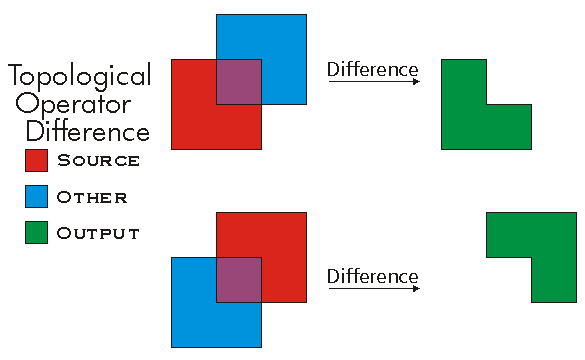
//The following code shows to wrap a line segment into a polyline in C#
//Assume a line (line1 as ILine) is already created
object obj = Type.Missing;
ISegmentCollection segCollection = new PolylineClass() as ISegmentCollection;
segCollection.AddSegment((ISegment)line1, ref obj, ref obj);
//Set the spatial reference on the new polyline
//The spatial reference is not transfered automatically from the segments
IGeometry geom = segCollection as IGeometry;
geom.SpatialReference = spatialRef;
//Can now be used with ITopologicalOperator methods
DifferenceEx(IGeometry, bool)
defined for (multi)points and polylines.
virtual IGeometry DifferenceEx(IGeometry other, bool bNonPlanar)Parameters
Returns
Dimension
The topological dimension of this geometry.
virtual esriGeometryDimension Dimension { get; }Returns
Remarks
Note: At 9.0, Multipatches are now considered as two dimensional geometry. esriGeometry3Dimension will be used for an upcoming new geometry type.
-1 esriGeometryNoDimension
1 esriGeometry0Dimension
2 esriGeometry1Dimension
4 esriGeometry2Dimension
5 esriGeometry25Dimension
6 esriGeometry3Dimension

Disjoint(IGeometry)
Indicates if the two geometries share no points in common. Negate this result to compute the Intersect relation.
virtual bool Disjoint(IGeometry other)Parameters
otherIGeometry
Returns
Remarks
Only geometries that support the IRelationalOperator interface can be used as input geometries.
Two geometries are disjoint if either one is empty.
Disjoint example. Only "true" relationships are showed in this picture.

Disjoint3D(IGeometry)
Indicates if the two geometries share no points in common. Negate this result to compute the Intersect relation.
virtual bool Disjoint3D(IGeometry pOther)Parameters
pOtherIGeometry
Returns
DropMs()
Sets all the M values to a non-valid number (NaN).
virtual void DropMs()DropPointIDs()
Unsets all PointID values without changing awareness. Only works if geometry is aware of PointIDs.
virtual void DropPointIDs()DropZs()
Sets all the Z values to a non-valid number (NaN).
virtual void DropZs()EnumVertices
A new enumerator for this point collection.
virtual IEnumVertex EnumVertices { get; }Returns
Envelope
Creates a copy of this geometry's envelope and returns it.
virtual IEnvelope Envelope { get; }Returns
Examples
<p class="MsoNormal" style=
"MARGIN: 0in 0in 0pt; LINE-HEIGHT: normal; mso-layout-grid-align: none">
<span style=
"FONT-SIZE: 10pt; FONT-FAMILY: 'Courier New'; mso-no-proof: yes"><span style="mso-spacerun: yes">
<img src="./bitmaps/envelope.gif" align=
"baseline"></span></span></p>
<p class="MsoNormal" style=
"MARGIN: 0in 0in 0pt; LINE-HEIGHT: normal; mso-layout-grid-align: none">
 </p>
<p class="MsoNormal" style=
"MARGIN: 0in 0in 0pt; LINE-HEIGHT: normal; mso-layout-grid-align: none">
<span style=
"FONT-SIZE: 10pt; FONT-FAMILY: 'Courier New'; mso-no-proof: yes"><span style="mso-spacerun: yes">
       </span> <span style=
"COLOR: blue">public</span> <span style="COLOR: blue">static</span>
<span style="COLOR: teal">IGeometry</span>
GetEnvelopeGeometry()</span></p>
<p class="MsoNormal" style=
"MARGIN: 0in 0in 0pt; LINE-HEIGHT: normal; mso-layout-grid-align: none">
<span style=
"FONT-SIZE: 10pt; FONT-FAMILY: 'Courier New'; mso-no-proof: yes"><span style="mso-spacerun: yes">
       </span> {</span></p>
<p class="MsoNormal" style=
"MARGIN: 0in 0in 0pt; LINE-HEIGHT: normal; mso-layout-grid-align: none">
<span style=
"FONT-SIZE: 10pt; FONT-FAMILY: 'Courier New'; mso-no-proof: yes"><span style="mso-spacerun: yes">
           </span>
<span style="COLOR: blue">const</span> <span style=
"COLOR: blue">double</span> DeltaX = 2.5;</span></p>
<p class="MsoNormal" style=
"MARGIN: 0in 0in 0pt; LINE-HEIGHT: normal; mso-layout-grid-align: none">
<span style=
"FONT-SIZE: 10pt; FONT-FAMILY: 'Courier New'; mso-no-proof: yes"><span style="mso-spacerun: yes">
           </span>
<span style="COLOR: blue">const</span> <span style=
"COLOR: blue">double</span> DeltaY = 2.5;</span></p>
<p class="MsoNormal" style=
"MARGIN: 0in 0in 0pt; LINE-HEIGHT: normal; mso-layout-grid-align: none">
<span style=
"FONT-SIZE: 10pt; FONT-FAMILY: 'Courier New'; mso-no-proof: yes"><span style="mso-spacerun: yes">
           </span>
<span style="COLOR: blue">const</span> <span style=
"COLOR: blue">double</span> DeltaZ = 2.5;</span></p>
<p class="MsoNormal" style=
"MARGIN: 0in 0in 0pt; LINE-HEIGHT: normal; mso-layout-grid-align: none">
<span style=
"FONT-SIZE: 10pt; FONT-FAMILY: 'Courier New'; mso-no-proof: yes"> </span></p>
<p class="MsoNormal" style=
"MARGIN: 0in 0in 0pt; LINE-HEIGHT: normal; mso-layout-grid-align: none">
<span style=
"FONT-SIZE: 10pt; FONT-FAMILY: 'Courier New'; mso-no-proof: yes"><span style="mso-spacerun: yes">
           </span>
<span style="COLOR: teal">IPoint</span> centerPoint =
GetPoint();</span></p>
<p class="MsoNormal" style=
"MARGIN: 0in 0in 0pt; LINE-HEIGHT: normal; mso-layout-grid-align: none">
<span style=
"FONT-SIZE: 10pt; FONT-FAMILY: 'Courier New'; mso-no-proof: yes"> </span></p>
<p class="MsoNormal" style=
"MARGIN: 0in 0in 0pt; LINE-HEIGHT: normal; mso-layout-grid-align: none">
<span style=
"FONT-SIZE: 10pt; FONT-FAMILY: 'Courier New'; mso-no-proof: yes"><span style="mso-spacerun: yes">
           </span>
<span style="COLOR: teal">IEnvelope</span> envelope = <span style=
"COLOR: blue">new</span> <span style=
"COLOR: teal">EnvelopeClass</span>();</span></p>
<p class="MsoNormal" style=
"MARGIN: 0in 0in 0pt; LINE-HEIGHT: normal; mso-layout-grid-align: none">
<span style=
"FONT-SIZE: 10pt; FONT-FAMILY: 'Courier New'; mso-no-proof: yes"><span style="mso-spacerun: yes">
           </span>
envelope.XMin = centerPoint.X - DeltaX;</span></p>
<p class="MsoNormal" style=
"MARGIN: 0in 0in 0pt; LINE-HEIGHT: normal; mso-layout-grid-align: none">
<span style=
"FONT-SIZE: 10pt; FONT-FAMILY: 'Courier New'; mso-no-proof: yes"><span style="mso-spacerun: yes">
           </span>
envelope.XMax = centerPoint.X + DeltaX;</span></p>
<p class="MsoNormal" style=
"MARGIN: 0in 0in 0pt; LINE-HEIGHT: normal; mso-layout-grid-align: none">
<span style=
"FONT-SIZE: 10pt; FONT-FAMILY: 'Courier New'; mso-no-proof: yes"><span style="mso-spacerun: yes">
           </span>
envelope.YMin = centerPoint.Y - DeltaY;</span></p>
<p class="MsoNormal" style=
"MARGIN: 0in 0in 0pt; LINE-HEIGHT: normal; mso-layout-grid-align: none">
<span style=
"FONT-SIZE: 10pt; FONT-FAMILY: 'Courier New'; mso-no-proof: yes"><span style="mso-spacerun: yes">
           </span>
envelope.YMax = centerPoint.Y + DeltaY;</span></p>
<p class="MsoNormal" style=
"MARGIN: 0in 0in 0pt; LINE-HEIGHT: normal; mso-layout-grid-align: none">
<span style=
"FONT-SIZE: 10pt; FONT-FAMILY: 'Courier New'; mso-no-proof: yes"><span style="mso-spacerun: yes">
           </span>
envelope.ZMin = centerPoint.Z - DeltaZ;</span></p>
<p class="MsoNormal" style=
"MARGIN: 0in 0in 0pt; LINE-HEIGHT: normal; mso-layout-grid-align: none">
<span style=
"FONT-SIZE: 10pt; FONT-FAMILY: 'Courier New'; mso-no-proof: yes"><span style="mso-spacerun: yes">
           </span>
envelope.ZMax = centerPoint.Z + DeltaZ;</span></p>
<p class="MsoNormal" style=
"MARGIN: 0in 0in 0pt; LINE-HEIGHT: normal; mso-layout-grid-align: none">
<span style=
"FONT-SIZE: 10pt; FONT-FAMILY: 'Courier New'; mso-no-proof: yes"> </span></p>
<p class="MsoNormal" style=
"MARGIN: 0in 0in 0pt; LINE-HEIGHT: normal; mso-layout-grid-align: none">
<span style=
"FONT-SIZE: 10pt; FONT-FAMILY: 'Courier New'; mso-no-proof: yes"><span style="mso-spacerun: yes">
           </span>
MakeZAware(envelope <span style="COLOR: blue">as</span>
<span style="COLOR: teal">IGeometry</span>);</span></p>
<p class="MsoNormal" style=
"MARGIN: 0in 0in 0pt; LINE-HEIGHT: normal; mso-layout-grid-align: none">
<span style=
"FONT-SIZE: 10pt; FONT-FAMILY: 'Courier New'; mso-no-proof: yes"> </span></p>
<p class="MsoNormal" style=
"MARGIN: 0in 0in 0pt; LINE-HEIGHT: normal; mso-layout-grid-align: none">
<span style=
"FONT-SIZE: 10pt; FONT-FAMILY: 'Courier New'; mso-no-proof: yes"><span style="mso-spacerun: yes">
           </span>
<span style="COLOR: blue">return</span> envelope <span style=
"COLOR: blue">as</span> <span style=
"COLOR: teal">IGeometry</span>;</span></p>
<p class="MsoNormal" style="MARGIN: 0in 0in 10pt"><span style=
"FONT-SIZE: 10pt; LINE-HEIGHT: 115%; FONT-FAMILY: 'Courier New'; mso-no-proof: yes">
<span style=
"mso-spacerun: yes">       </span>
}</span></p>
<p class="MsoNormal" style=
"MARGIN: 0in 0in 0pt; LINE-HEIGHT: normal; mso-layout-grid-align: none">
<span style=
"FONT-SIZE: 10pt; FONT-FAMILY: 'Courier New'; mso-no-proof: yes"><span style="mso-spacerun: yes">
       </span> <span style=
"COLOR: blue">private</span> <span style=
"COLOR: blue">static</span> <span style="COLOR: teal">IPoint</span>
GetPoint()</span></p>
<p class="MsoNormal" style=
"MARGIN: 0in 0in 0pt; LINE-HEIGHT: normal; mso-layout-grid-align: none">
<span style=
"FONT-SIZE: 10pt; FONT-FAMILY: 'Courier New'; mso-no-proof: yes"><span style="mso-spacerun: yes">
       </span> {</span></p>
<p class="MsoNormal" style=
"MARGIN: 0in 0in 0pt; LINE-HEIGHT: normal; mso-layout-grid-align: none">
<span style=
"FONT-SIZE: 10pt; FONT-FAMILY: 'Courier New'; mso-no-proof: yes"><span style="mso-spacerun: yes">
           </span>
<span style="COLOR: blue">const</span> <span style=
"COLOR: blue">double</span> Min = -10;</span></p>
<p class="MsoNormal" style=
"MARGIN: 0in 0in 0pt; LINE-HEIGHT: normal; mso-layout-grid-align: none">
<span style=
"FONT-SIZE: 10pt; FONT-FAMILY: 'Courier New'; mso-no-proof: yes"><span style="mso-spacerun: yes">
           </span>
<span style="COLOR: blue">const</span> <span style=
"COLOR: blue">double</span> Max = 10;</span></p>
<p class="MsoNormal" style=
"MARGIN: 0in 0in 0pt; LINE-HEIGHT: normal; mso-layout-grid-align: none">
<span style=
"FONT-SIZE: 10pt; FONT-FAMILY: 'Courier New'; mso-no-proof: yes"> </span></p>
<p class="MsoNormal" style=
"MARGIN: 0in 0in 0pt; LINE-HEIGHT: normal; mso-layout-grid-align: none">
<span style=
"FONT-SIZE: 10pt; FONT-FAMILY: 'Courier New'; mso-no-proof: yes"><span style="mso-spacerun: yes">
           </span>
<span style="COLOR: teal">Random</span> random = <span style=
"COLOR: blue">new</span> <span style=
"COLOR: teal">Random</span>();</span></p>
<p class="MsoNormal" style=
"MARGIN: 0in 0in 0pt; LINE-HEIGHT: normal; mso-layout-grid-align: none">
<span style=
"FONT-SIZE: 10pt; FONT-FAMILY: 'Courier New'; mso-no-proof: yes"> </span></p>
<p class="MsoNormal" style=
"MARGIN: 0in 0in 0pt; LINE-HEIGHT: normal; mso-layout-grid-align: none">
<span style=
"FONT-SIZE: 10pt; FONT-FAMILY: 'Courier New'; mso-no-proof: yes"><span style="mso-spacerun: yes">
           </span>
<span style="COLOR: blue">double</span> x = Min + (Max - Min) *
random.NextDouble();</span></p>
<p class="MsoNormal" style=
"MARGIN: 0in 0in 0pt; LINE-HEIGHT: normal; mso-layout-grid-align: none">
<span style=
"FONT-SIZE: 10pt; FONT-FAMILY: 'Courier New'; mso-no-proof: yes"><span style="mso-spacerun: yes">
           </span>
<span style="COLOR: blue">double</span> y = Min + (Max - Min) *
random.NextDouble();</span></p>
<p class="MsoNormal" style=
"MARGIN: 0in 0in 0pt; LINE-HEIGHT: normal; mso-layout-grid-align: none">
<span style=
"FONT-SIZE: 10pt; FONT-FAMILY: 'Courier New'; mso-no-proof: yes"><span style="mso-spacerun: yes">
           </span>
<span style="COLOR: blue">double</span> z = Min + (Max - Min) *
random.NextDouble();</span></p>
<p class="MsoNormal" style=
"MARGIN: 0in 0in 0pt; LINE-HEIGHT: normal; mso-layout-grid-align: none">
<span style=
"FONT-SIZE: 10pt; FONT-FAMILY: 'Courier New'; mso-no-proof: yes"> </span></p>
<p class="MsoNormal" style=
"MARGIN: 0in 0in 0pt; LINE-HEIGHT: normal; mso-layout-grid-align: none">
<span style=
"FONT-SIZE: 10pt; FONT-FAMILY: 'Courier New'; mso-no-proof: yes"><span style="mso-spacerun: yes">
           </span>
<span style="COLOR: blue">return</span> ConstructPoint3D(x, y,
z);</span></p>
<p class="MsoNormal" style=
"MARGIN: 0in 0in 0pt; LINE-HEIGHT: normal; mso-layout-grid-align: none">
<span style=
"FONT-SIZE: 10pt; FONT-FAMILY: 'Courier New'; mso-no-proof: yes"><span style="mso-spacerun: yes">
       </span> }</span></p>
<p class="MsoNormal" style=
"MARGIN: 0in 0in 0pt; LINE-HEIGHT: normal; mso-layout-grid-align: none">
<span style=
"FONT-SIZE: 10pt; FONT-FAMILY: 'Courier New'; mso-no-proof: yes"> </span></p>
<p class="MsoNormal" style=
"MARGIN: 0in 0in 0pt; LINE-HEIGHT: normal; mso-layout-grid-align: none">
<span style=
"FONT-SIZE: 10pt; COLOR: black; FONT-FAMILY: 'Courier New'; mso-no-proof: yes; mso-fareast-font-family: 'Times New Roman'">
<span style=
"mso-spacerun: yes">       </span></span>
<span style=
"FONT-SIZE: 10pt; COLOR: blue; FONT-FAMILY: 'Courier New'; mso-no-proof: yes; mso-fareast-font-family: 'Times New Roman'">
private</span> <span style=
"FONT-SIZE: 10pt; COLOR: blue; FONT-FAMILY: 'Courier New'; mso-no-proof: yes; mso-fareast-font-family: 'Times New Roman'">
static</span> <span style=
"FONT-SIZE: 10pt; COLOR: teal; FONT-FAMILY: 'Courier New'; mso-no-proof: yes; mso-fareast-font-family: 'Times New Roman'">
IPoint</span> <span style=
"FONT-SIZE: 10pt; COLOR: black; FONT-FAMILY: 'Courier New'; mso-no-proof: yes; mso-fareast-font-family: 'Times New Roman'">
ConstructPoint3D(</span><span style=
"FONT-SIZE: 10pt; COLOR: blue; FONT-FAMILY: 'Courier New'; mso-no-proof: yes; mso-fareast-font-family: 'Times New Roman'">double</span>
<span style=
"FONT-SIZE: 10pt; COLOR: black; FONT-FAMILY: 'Courier New'; mso-no-proof: yes; mso-fareast-font-family: 'Times New Roman'">
x,</span> <span style=
"FONT-SIZE: 10pt; COLOR: blue; FONT-FAMILY: 'Courier New'; mso-no-proof: yes; mso-fareast-font-family: 'Times New Roman'">
double</span> <span style=
"FONT-SIZE: 10pt; COLOR: black; FONT-FAMILY: 'Courier New'; mso-no-proof: yes; mso-fareast-font-family: 'Times New Roman'">
y,</span> <span style=
"FONT-SIZE: 10pt; COLOR: blue; FONT-FAMILY: 'Courier New'; mso-no-proof: yes; mso-fareast-font-family: 'Times New Roman'">
double</span> <span style=
"FONT-SIZE: 10pt; COLOR: black; FONT-FAMILY: 'Courier New'; mso-no-proof: yes; mso-fareast-font-family: 'Times New Roman'">
z)</span></p>
<p class="MsoNormal" style=
"MARGIN: 0in 0in 0pt; LINE-HEIGHT: normal; mso-layout-grid-align: none">
<span style=
"FONT-SIZE: 10pt; COLOR: black; FONT-FAMILY: 'Courier New'; mso-no-proof: yes; mso-fareast-font-family: 'Times New Roman'">
<span style=
"mso-spacerun: yes">       </span>
{</span></p>
<p class="MsoNormal" style=
"MARGIN: 0in 0in 0pt; LINE-HEIGHT: normal; mso-layout-grid-align: none">
<span style=
"FONT-SIZE: 10pt; COLOR: black; FONT-FAMILY: 'Courier New'; mso-no-proof: yes; mso-fareast-font-family: 'Times New Roman'">
<span style=
"mso-spacerun: yes">           </span></span>
<span style=
"FONT-SIZE: 10pt; COLOR: teal; FONT-FAMILY: 'Courier New'; mso-no-proof: yes; mso-fareast-font-family: 'Times New Roman'">
IPoint</span> <span style=
"FONT-SIZE: 10pt; COLOR: black; FONT-FAMILY: 'Courier New'; mso-no-proof: yes; mso-fareast-font-family: 'Times New Roman'">
point = ConstructPoint2D(x, y);</span></p>
<p class="MsoNormal" style=
"MARGIN: 0in 0in 0pt; LINE-HEIGHT: normal; mso-layout-grid-align: none">
<span style=
"FONT-SIZE: 10pt; COLOR: black; FONT-FAMILY: 'Courier New'; mso-no-proof: yes; mso-fareast-font-family: 'Times New Roman'">
<span style=
"mso-spacerun: yes">           </span>
point.Z = z;<br>
<br>
<span style=
"mso-spacerun: yes">           </span></span>
<span style=
"FONT-SIZE: 10pt; COLOR: blue; FONT-FAMILY: 'Courier New'; mso-no-proof: yes; mso-fareast-font-family: 'Times New Roman'">
return</span> <span style=
"FONT-SIZE: 10pt; COLOR: black; FONT-FAMILY: 'Courier New'; mso-no-proof: yes; mso-fareast-font-family: 'Times New Roman'">
point;</span></p>
<p class="MsoNormal" style=
"MARGIN: 0in 0in 0pt; LINE-HEIGHT: normal; mso-layout-grid-align: none">
<span style=
"FONT-SIZE: 10pt; COLOR: black; FONT-FAMILY: 'Courier New'; mso-no-proof: yes; mso-fareast-font-family: 'Times New Roman'">
<span style=
"mso-spacerun: yes">       </span>
}<br>
<br style="mso-special-character: line-break">
<br style="mso-special-character: line-break"></span></p>
<p class="MsoNormal" style=
"MARGIN: 0in 0in 0pt; LINE-HEIGHT: normal; mso-layout-grid-align: none">
<span style=
"FONT-SIZE: 10pt; COLOR: black; FONT-FAMILY: 'Courier New'; mso-no-proof: yes; mso-fareast-font-family: 'Times New Roman'">
<span style=
"mso-spacerun: yes">       </span></span>
<span style=
"FONT-SIZE: 10pt; COLOR: blue; FONT-FAMILY: 'Courier New'; mso-no-proof: yes; mso-fareast-font-family: 'Times New Roman'">
private</span> <span style=
"FONT-SIZE: 10pt; COLOR: blue; FONT-FAMILY: 'Courier New'; mso-no-proof: yes; mso-fareast-font-family: 'Times New Roman'">
static</span> <span style=
"FONT-SIZE: 10pt; COLOR: teal; FONT-FAMILY: 'Courier New'; mso-no-proof: yes; mso-fareast-font-family: 'Times New Roman'">
IPoint</span> <span style=
"FONT-SIZE: 10pt; COLOR: black; FONT-FAMILY: 'Courier New'; mso-no-proof: yes; mso-fareast-font-family: 'Times New Roman'">
ConstructPoint2D(</span><span style=
"FONT-SIZE: 10pt; COLOR: blue; FONT-FAMILY: 'Courier New'; mso-no-proof: yes; mso-fareast-font-family: 'Times New Roman'">double</span>
<span style=
"FONT-SIZE: 10pt; COLOR: black; FONT-FAMILY: 'Courier New'; mso-no-proof: yes; mso-fareast-font-family: 'Times New Roman'">
x,</span> <span style=
"FONT-SIZE: 10pt; COLOR: blue; FONT-FAMILY: 'Courier New'; mso-no-proof: yes; mso-fareast-font-family: 'Times New Roman'">
double</span> <span style=
"FONT-SIZE: 10pt; COLOR: black; FONT-FAMILY: 'Courier New'; mso-no-proof: yes; mso-fareast-font-family: 'Times New Roman'">
y)</span></p>
<p class="MsoNormal" style=
"MARGIN: 0in 0in 0pt; LINE-HEIGHT: normal; mso-layout-grid-align: none">
<span style=
"FONT-SIZE: 10pt; COLOR: black; FONT-FAMILY: 'Courier New'; mso-no-proof: yes; mso-fareast-font-family: 'Times New Roman'">
<span style=
"mso-spacerun: yes">       </span>
{</span></p>
<p class="MsoNormal" style=
"MARGIN: 0in 0in 0pt; LINE-HEIGHT: normal; mso-layout-grid-align: none">
<span style=
"FONT-SIZE: 10pt; COLOR: black; FONT-FAMILY: 'Courier New'; mso-no-proof: yes; mso-fareast-font-family: 'Times New Roman'">
<span style=
"mso-spacerun: yes">           </span></span>
<span style=
"FONT-SIZE: 10pt; COLOR: teal; FONT-FAMILY: 'Courier New'; mso-no-proof: yes; mso-fareast-font-family: 'Times New Roman'">
IPoint</span> <span style=
"FONT-SIZE: 10pt; COLOR: black; FONT-FAMILY: 'Courier New'; mso-no-proof: yes; mso-fareast-font-family: 'Times New Roman'">
point =</span> <span style=
"FONT-SIZE: 10pt; COLOR: blue; FONT-FAMILY: 'Courier New'; mso-no-proof: yes; mso-fareast-font-family: 'Times New Roman'">
new</span> <span style=
"FONT-SIZE: 10pt; COLOR: teal; FONT-FAMILY: 'Courier New'; mso-no-proof: yes; mso-fareast-font-family: 'Times New Roman'">
PointClass</span><span style=
"FONT-SIZE: 10pt; COLOR: black; FONT-FAMILY: 'Courier New'; mso-no-proof: yes; mso-fareast-font-family: 'Times New Roman'">();</span></p>
<p class="MsoNormal" style=
"MARGIN: 0in 0in 0pt; LINE-HEIGHT: normal; mso-layout-grid-align: none">
<span style=
"FONT-SIZE: 10pt; COLOR: black; FONT-FAMILY: 'Courier New'; mso-no-proof: yes; mso-fareast-font-family: 'Times New Roman'">
<span style=
"mso-spacerun: yes">           </span>
point.PutCoords(x, y);<br>
<span style="mso-spacerun: yes"> </span></span></p>
<p class="MsoNormal" style=
"MARGIN: 0in 0in 0pt; LINE-HEIGHT: normal; mso-layout-grid-align: none">
<span style=
"FONT-SIZE: 10pt; COLOR: black; FONT-FAMILY: 'Courier New'; mso-no-proof: yes; mso-fareast-font-family: 'Times New Roman'">
<span style=
"mso-spacerun: yes">           </span></span>
<span style=
"FONT-SIZE: 10pt; COLOR: blue; FONT-FAMILY: 'Courier New'; mso-no-proof: yes; mso-fareast-font-family: 'Times New Roman'">
return</span> <span style=
"FONT-SIZE: 10pt; COLOR: black; FONT-FAMILY: 'Courier New'; mso-no-proof: yes; mso-fareast-font-family: 'Times New Roman'">
point;</span></p>
<p class="MsoNormal" style=
"MARGIN: 0in 0in 10pt; LINE-HEIGHT: normal"><span style=
"FONT-SIZE: 10pt; COLOR: black; FONT-FAMILY: 'Courier New'; mso-no-proof: yes; mso-fareast-font-family: 'Times New Roman'">
<span style=
"mso-spacerun: yes">       </span>
}</span></p>
<p class="MsoNormal" style=
"MARGIN: 0in 0in 0pt; LINE-HEIGHT: normal; mso-layout-grid-align: none">
<span style=
"FONT-SIZE: 10pt; FONT-FAMILY: 'Courier New'; mso-no-proof: yes"><span style="mso-spacerun: yes">
       </span> <span style=
"COLOR: blue">private</span> <span style=
"COLOR: blue">static</span> <span style="COLOR: blue">void</span>
MakeZAware(<span style="COLOR: teal">IGeometry</span>
geometry)</span></p>
<p class="MsoNormal" style=
"MARGIN: 0in 0in 0pt; LINE-HEIGHT: normal; mso-layout-grid-align: none">
<span style=
"FONT-SIZE: 10pt; FONT-FAMILY: 'Courier New'; mso-no-proof: yes"><span style="mso-spacerun: yes">
       </span> {</span></p>
<p class="MsoNormal" style=
"MARGIN: 0in 0in 0pt; LINE-HEIGHT: normal; mso-layout-grid-align: none">
<span style=
"FONT-SIZE: 10pt; FONT-FAMILY: 'Courier New'; mso-no-proof: yes"><span style="mso-spacerun: yes">
           </span>
<span style="COLOR: teal">IZAware</span> zAware = geometry
<span style="COLOR: blue">as</span> <span style=
"COLOR: teal">IZAware</span>;</span></p>
<p class="MsoNormal" style=
"MARGIN: 0in 0in 0pt; LINE-HEIGHT: normal; mso-layout-grid-align: none">
<span style=
"FONT-SIZE: 10pt; FONT-FAMILY: 'Courier New'; mso-no-proof: yes"><span style="mso-spacerun: yes">
           </span>
zAware.ZAware = <span style="COLOR: blue">true</span>;</span></p>
<p class="MsoNormal" style=
"MARGIN: 0in 0in 0pt; LINE-HEIGHT: normal; mso-layout-grid-align: none">
<span style=
"FONT-SIZE: 10pt; FONT-FAMILY: 'Courier New'; mso-no-proof: yes"><span style="mso-spacerun: yes">
       </span> }</span></p>
Remarks

Equals(IGeometry)
Indicates if the two geometries are of the same type and define the same set of points in the plane.
virtual bool Equals(IGeometry other)Parameters
otherIGeometry
Returns
Remarks
Only geometries that support the IRelationalOperator interface can be used as input geometries. GeometryBags are not supported. IRelationalOperator::Equals delegates to ITopologicalOperatorSymmetricDifference and returns true when that method returns an empty geometry; M's and Z's are ignored. Please use IClone::IsEqual if M's and Z's need to be compared.
IClone::IsEqual simply iterates over each segment in each geometry, in index order, and compares their types and coordinates (but using the spatial reference's cluster tolerances to determine equality of coordinates).
Only "true" relationships are showed in this picture.

The RCW for the IRelationalOperator inherits from System.Object, as do all reference types in .NET. The System.Object type has a method called Equals, which results in the IRelationalOperator RCW having two overloaded versions of the Equals method. Ensure that you are not using the Equals method inherited from the System.Object class by mistake, by making sure you pass in an IGeometry reference to the Equals method. For example, the following extract of code from a C# console application demonstrates calling Equals correctly.
ESRI.ArcGIS.Geometry.IPoint pt1 = new ESRI.ArcGIS.Geometry.PointClass();
pt1.PutCoords(5, 5);
ESRI.ArcGIS.Geometry.IPoint pt2 = new ESRI.ArcGIS.Geometry.PointClass();
pt2.PutCoords(5, 5);
ESRI.ArcGIS.Geometry.IRelationalOperator rel1 = pt1 as ESRI.ArcGIS.Geometry.IRelationalOperator;
ESRI.ArcGIS.Geometry.IGeometry geom2 = pt2 as ESRI.ArcGIS.Geometry.IGeometry;
bool relEqual = rel1.Equals(pt2); //calling IRelationalOperator::Equals
Console.WriteLine("Equal: " + relEqual.ToString());
bool netEqual =  rel1.Equals(pt2 as object);  //calling Object::Equals
Console.WriteLine("Equal: " + netEqual.ToString());
GeoNormalize()
Shifts longitudes, if need be, into a continuous range of 360 degrees.
virtual void GeoNormalize()Remarks
GeoNormalizeFromLongitude(double)
Normalizes longitudes into a continuous range containing the longitude. This method is obsolete.
virtual void GeoNormalizeFromLongitude(double Longitude)Parameters
Longitudedouble
Remarks
GeometriesChanged()
Tells this geometry collection that some of its geometries have been altered. Use this method on polylines, polygons and multipatches after directly editing one of its parts.
virtual void GeometriesChanged()Geometry[int]
A reference to the ith geometry.
virtual IGeometry Geometry[int Index] { get; }Parameters
Indexint
Returns
Remarks
Note: The GeometryType returned by the Geometry method depends on which object type points the IGeometryCollection pointer.
| IGeometryCollection Object GeometryType | Returned Object GeometryType |
| Polygon |
Rings |
| Polyline |
Paths |
| Multipoint |
Points |
| Multipatch |
TriangleFans or TriangleStrips or Rings |
| TriangleFan |
Points |
| TriangleStrip |
Points |
| Geometry Bag |
Any type of IGeometry |
GeometryCount
The number of geometries in this collection.
virtual int GeometryCount { get; }Returns
GeometryType
The type of this geometry.
virtual esriGeometryType GeometryType { get; }Returns
Remarks
esriGeometryNull          = 0
esriGeometryPoint         = 1
esriGeometryMultipoint    = 2
esriGeometryPolyline      = 3
esriGeometryPolygon       = 4
esriGeometryEnvelope      = 5
esriGeometryPath          = 6
esriGeometryAny           = 7
esriGeometryMultiPatch    = 9
esriGeometryRing          = 11
esriGeometryLine          = 13
esriGeometryCircularArc   = 14
esriGeometryBezier3Curve  = 15
esriGeometryEllipticArc   = 16
esriGeometryBag           = 17
esriGeometryTriangleStrip = 18
esriGeometryTriangleFan   = 19
esriGeometryRay           = 20
esriGeometrySphere        = 21

GetClassID(out Guid)
virtual void GetClassID(out Guid pClassID)Parameters
pClassIDGuid
GetPoints(int, int, out IPoint)
Populates an array with references to points in the Multipoint. The QueryPoints method on IPointCollection makes copies of the points. This method is intended for internal use only.
virtual void GetPoints(int Index, int Count, out IPoint Points)Parameters
GetSizeMax(out _ULARGE_INTEGER)
virtual void GetSizeMax(out _ULARGE_INTEGER pcbSize)Parameters
pcbSize_ULARGE_INTEGER
HitTest(IPoint, double, esriGeometryHitPartType, IPoint, ref double, ref int, ref int, ref bool)
Locates a part of a geometry closest to a query point. Any located part must be within searchRadius units from the query point.
virtual bool HitTest(IPoint QueryPoint, double searchRadius, esriGeometryHitPartType geometryPart, IPoint hitPoint, ref double hitDistance, ref int hitPartIndex, ref int hitSegmentIndex, ref bool bRightSide)Parameters
QueryPointIPointsearchRadiusdoublegeometryPartesriGeometryHitPartTypehitPointIPointhitDistancedoublehitPartIndexinthitSegmentIndexintbRightSidebool
Returns
Remarks
The segment index returned has different meanings depending on the esriGeometryHitPartType used (Please see the example for more details).
EsriGeometryPartVertex: returns a vertex index
EsriGeometryPartBoundary, esriGeometryPartMidpoint and esriGeometryPartEndpoint: return a segment index
EsriGeometryPartCentroid: Always returns 0 for the part index and the segment index.
brightside: Indicates if the input point is on the right side of the input geometry
Note: The distance units use in this method are the units of the input geometry. No conversion is performed. esriGeometryHitPartType parameter cannot be a combination of several esriGeometryHitPartTypes.
HitTest3D(IPoint, double, esriGeometryHitPartType, IPoint, ref double, ref int, ref int)
Locates a part of a geometry closest to a query point. Any located part must be within searchRadius units from the query point.
virtual bool HitTest3D(IPoint QueryPoint, double searchRadius, esriGeometryHitPartType geometryPart, IPoint hitPoint, ref double hitDistance, ref int hitPartIndex, ref int hitSegmentIndex)Parameters
QueryPointIPointsearchRadiusdoublegeometryPartesriGeometryHitPartTypehitPointIPointhitDistancedoublehitPartIndexinthitSegmentIndexint
Returns
HitTestCone(IRay, double, esriGeometryHitPartType, IPoint, ref double, ref int, ref int)
Locates a part of a geometry closest to a query ray.
virtual bool HitTestCone(IRay pQueryRay, double minAngle, esriGeometryHitPartType geometryPart, IPoint pHitPoint, ref double pHitDistance, ref int pHitPartIndex, ref int pHitSegmentIndex)Parameters
pQueryRayIRayminAngledoublegeometryPartesriGeometryHitPartTypepHitPointIPointpHitDistancedoublepHitPartIndexintpHitSegmentIndexint
Returns
IGeometry2_Dimension
virtual esriGeometryDimension IGeometry2_Dimension { get; }Returns
IGeometry2_Envelope
virtual IEnvelope IGeometry2_Envelope { get; }Returns
IGeometry2_GeoNormalize()
virtual void IGeometry2_GeoNormalize()IGeometry2_GeoNormalizeFromLongitude(double)
virtual void IGeometry2_GeoNormalizeFromLongitude(double Longitude)Parameters
Longitudedouble
IGeometry2_GeometryType
virtual esriGeometryType IGeometry2_GeometryType { get; }Returns
IGeometry2_IsEmpty
virtual bool IGeometry2_IsEmpty { get; }Returns
IGeometry2_Project(ISpatialReference)
virtual void IGeometry2_Project(ISpatialReference newReferenceSystem)Parameters
newReferenceSystemISpatialReference
IGeometry2_QueryEnvelope(IEnvelope)
virtual void IGeometry2_QueryEnvelope(IEnvelope outEnvelope)Parameters
outEnvelopeIEnvelope
IGeometry2_SetEmpty()
virtual void IGeometry2_SetEmpty()IGeometry2_SnapToSpatialReference()
virtual void IGeometry2_SnapToSpatialReference()IGeometry2_SpatialReference
virtual ISpatialReference IGeometry2_SpatialReference { get; set; }Returns
IGeometry3_Dimension
virtual esriGeometryDimension IGeometry3_Dimension { get; }Returns
IGeometry3_Envelope
virtual IEnvelope IGeometry3_Envelope { get; }Returns
IGeometry3_GeoNormalize()
virtual void IGeometry3_GeoNormalize()IGeometry3_GeoNormalizeFromLongitude(double)
virtual void IGeometry3_GeoNormalizeFromLongitude(double Longitude)Parameters
Longitudedouble
IGeometry3_GeometryType
virtual esriGeometryType IGeometry3_GeometryType { get; }Returns
IGeometry3_IsEmpty
virtual bool IGeometry3_IsEmpty { get; }Returns
IGeometry3_Project(ISpatialReference)
virtual void IGeometry3_Project(ISpatialReference newReferenceSystem)Parameters
newReferenceSystemISpatialReference
IGeometry3_ProjectEx(ISpatialReference, esriTransformDirection, IGeoTransformation, bool, double, double)
virtual void IGeometry3_ProjectEx(ISpatialReference newReferenceSystem, esriTransformDirection Direction, IGeoTransformation GeoTransformation, bool bAngularDensify, double maxSegmentLength, double maxDeviation)Parameters
newReferenceSystemISpatialReferenceDirectionesriTransformDirectionGeoTransformationIGeoTransformationbAngularDensifyboolmaxSegmentLengthdoublemaxDeviationdouble
IGeometry3_QueryEnvelope(IEnvelope)
virtual void IGeometry3_QueryEnvelope(IEnvelope outEnvelope)Parameters
outEnvelopeIEnvelope
IGeometry3_SetEmpty()
virtual void IGeometry3_SetEmpty()IGeometry3_SnapToSpatialReference()
virtual void IGeometry3_SnapToSpatialReference()IGeometry3_SpatialReference
virtual ISpatialReference IGeometry3_SpatialReference { get; set; }Returns
IGeometry4_Dimension
virtual esriGeometryDimension IGeometry4_Dimension { get; }Returns
IGeometry4_Envelope
virtual IEnvelope IGeometry4_Envelope { get; }Returns
IGeometry4_GeoNormalize()
virtual void IGeometry4_GeoNormalize()IGeometry4_GeoNormalizeFromLongitude(double)
virtual void IGeometry4_GeoNormalizeFromLongitude(double Longitude)Parameters
Longitudedouble
IGeometry4_GeometryType
virtual esriGeometryType IGeometry4_GeometryType { get; }Returns
IGeometry4_IsEmpty
virtual bool IGeometry4_IsEmpty { get; }Returns
IGeometry4_Project(ISpatialReference)
virtual void IGeometry4_Project(ISpatialReference newReferenceSystem)Parameters
newReferenceSystemISpatialReference
IGeometry4_ProjectEx(ISpatialReference, esriTransformDirection, IGeoTransformation, bool, double, double)
virtual void IGeometry4_ProjectEx(ISpatialReference newReferenceSystem, esriTransformDirection Direction, IGeoTransformation GeoTransformation, bool bAngularDensify, double maxSegmentLength, double maxDeviation)Parameters
newReferenceSystemISpatialReferenceDirectionesriTransformDirectionGeoTransformationIGeoTransformationbAngularDensifyboolmaxSegmentLengthdoublemaxDeviationdouble
IGeometry4_QueryEnvelope(IEnvelope)
virtual void IGeometry4_QueryEnvelope(IEnvelope outEnvelope)Parameters
outEnvelopeIEnvelope
IGeometry4_QueryWKSEnvelope(out WKSEnvelope)
virtual void IGeometry4_QueryWKSEnvelope(out WKSEnvelope e)Parameters
IGeometry4_SetEmpty()
virtual void IGeometry4_SetEmpty()IGeometry4_SnapToSpatialReference()
virtual void IGeometry4_SnapToSpatialReference()IGeometry4_SpatialReference
virtual ISpatialReference IGeometry4_SpatialReference { get; set; }Returns
IGeometry5_Changed
virtual bool IGeometry5_Changed { get; set; }Returns
IGeometry5_Dimension
virtual esriGeometryDimension IGeometry5_Dimension { get; }Returns
IGeometry5_Envelope
virtual IEnvelope IGeometry5_Envelope { get; }Returns
IGeometry5_GeoNormalize()
virtual void IGeometry5_GeoNormalize()IGeometry5_GeoNormalizeFromLongitude(double)
virtual void IGeometry5_GeoNormalizeFromLongitude(double Longitude)Parameters
Longitudedouble
IGeometry5_GeometryType
virtual esriGeometryType IGeometry5_GeometryType { get; }Returns
IGeometry5_IsEmpty
virtual bool IGeometry5_IsEmpty { get; }Returns
IGeometry5_Project(ISpatialReference)
virtual void IGeometry5_Project(ISpatialReference newReferenceSystem)Parameters
newReferenceSystemISpatialReference
IGeometry5_ProjectEx(ISpatialReference, esriTransformDirection, IGeoTransformation, bool, double, double)
virtual void IGeometry5_ProjectEx(ISpatialReference newReferenceSystem, esriTransformDirection Direction, IGeoTransformation GeoTransformation, bool bAngularDensify, double maxSegmentLength, double maxDeviation)Parameters
newReferenceSystemISpatialReferenceDirectionesriTransformDirectionGeoTransformationIGeoTransformationbAngularDensifyboolmaxSegmentLengthdoublemaxDeviationdouble
IGeometry5_QueryEnvelope(IEnvelope)
virtual void IGeometry5_QueryEnvelope(IEnvelope outEnvelope)Parameters
outEnvelopeIEnvelope
IGeometry5_QueryWKSEnvelope(out WKSEnvelope)
virtual void IGeometry5_QueryWKSEnvelope(out WKSEnvelope e)Parameters
IGeometry5_SetEmpty()
virtual void IGeometry5_SetEmpty()IGeometry5_SnapToSpatialReference()
virtual void IGeometry5_SnapToSpatialReference()IGeometry5_SpatialReference
virtual ISpatialReference IGeometry5_SpatialReference { get; set; }Returns
IMultipoint_Dimension
virtual esriGeometryDimension IMultipoint_Dimension { get; }Returns
IMultipoint_Envelope
virtual IEnvelope IMultipoint_Envelope { get; }Returns
IMultipoint_GeoNormalize()
virtual void IMultipoint_GeoNormalize()IMultipoint_GeoNormalizeFromLongitude(double)
virtual void IMultipoint_GeoNormalizeFromLongitude(double Longitude)Parameters
Longitudedouble
IMultipoint_GeometryType
virtual esriGeometryType IMultipoint_GeometryType { get; }Returns
IMultipoint_IsEmpty
virtual bool IMultipoint_IsEmpty { get; }Returns
IMultipoint_Project(ISpatialReference)
virtual void IMultipoint_Project(ISpatialReference newReferenceSystem)Parameters
newReferenceSystemISpatialReference
IMultipoint_QueryEnvelope(IEnvelope)
virtual void IMultipoint_QueryEnvelope(IEnvelope outEnvelope)Parameters
outEnvelopeIEnvelope
IMultipoint_SetEmpty()
virtual void IMultipoint_SetEmpty()IMultipoint_SnapToSpatialReference()
virtual void IMultipoint_SnapToSpatialReference()IMultipoint_SpatialReference
virtual ISpatialReference IMultipoint_SpatialReference { get; set; }Returns
IPersistStream_GetClassID(out Guid)
virtual void IPersistStream_GetClassID(out Guid pClassID)Parameters
pClassIDGuid
IPointCollection2_AddPoint(IPoint, ref object, ref object)
virtual void IPointCollection2_AddPoint(IPoint inPoint, ref object before, ref object after)Parameters
IPointCollection2_AddPointCollection(IPointCollection)
virtual void IPointCollection2_AddPointCollection(IPointCollection newPoints)Parameters
newPointsIPointCollection
IPointCollection2_AddPoints(int, ref IPoint)
virtual void IPointCollection2_AddPoints(int Count, ref IPoint newPoints)Parameters
IPointCollection2_AddWKSPoints(int, ref WKSPoint)
virtual void IPointCollection2_AddWKSPoints(int Count, ref WKSPoint pointStructures)Parameters
IPointCollection2_EnumVertices
virtual IEnumVertex IPointCollection2_EnumVertices { get; }Returns
IPointCollection2_InsertPointCollection(int, IPointCollection)
virtual void IPointCollection2_InsertPointCollection(int Index, IPointCollection newPoints)Parameters
IndexintnewPointsIPointCollection
IPointCollection2_InsertPoints(int, int, ref IPoint)
virtual void IPointCollection2_InsertPoints(int Index, int Count, ref IPoint newPoints)Parameters
IPointCollection2_InsertWKSPoints(int, int, ref WKSPoint)
virtual void IPointCollection2_InsertWKSPoints(int Index, int Count, ref WKSPoint newPoints)Parameters
IPointCollection2_Point[int]
virtual IPoint IPointCollection2_Point[int i] { get; }Parameters
iint
Returns
IPointCollection2_PointCount
virtual int IPointCollection2_PointCount { get; }Returns
IPointCollection2_QueryPoint(int, IPoint)
virtual void IPointCollection2_QueryPoint(int Index, IPoint Point)Parameters
IPointCollection2_QueryPoints(int, int, ref IPoint)
virtual void IPointCollection2_QueryPoints(int Index, int Count, ref IPoint Points)Parameters
IPointCollection2_QueryWKSPoints(int, int, out WKSPoint)
virtual void IPointCollection2_QueryWKSPoints(int Index, int Count, out WKSPoint pointStructures)Parameters
IPointCollection2_RemovePoints(int, int)
virtual void IPointCollection2_RemovePoints(int Index, int Count)Parameters
IPointCollection2_ReplacePointCollection(int, int, IPointCollection)
virtual void IPointCollection2_ReplacePointCollection(int Index, int goingAway, IPointCollection newPoints)Parameters
IndexintgoingAwayintnewPointsIPointCollection
IPointCollection2_ReplacePoints(int, int, int, ref IPoint)
virtual void IPointCollection2_ReplacePoints(int Index, int comingIn, int goingAway, ref IPoint newPoints)Parameters
IPointCollection2_SetPointCollection(IPointCollection)
virtual void IPointCollection2_SetPointCollection(IPointCollection newPoints)Parameters
newPointsIPointCollection
IPointCollection2_SetPoints(int, ref IPoint)
virtual void IPointCollection2_SetPoints(int Count, ref IPoint newPoints)Parameters
IPointCollection2_SetWKSPoints(int, ref WKSPoint)
virtual void IPointCollection2_SetWKSPoints(int Count, ref WKSPoint pointStructures)Parameters
IPointCollection2_UpdatePoint(int, IPoint)
virtual void IPointCollection2_UpdatePoint(int i, IPoint p)Parameters
IPointCollection3_AddPoint(IPoint, ref object, ref object)
virtual void IPointCollection3_AddPoint(IPoint inPoint, ref object before, ref object after)Parameters
IPointCollection3_AddPointCollection(IPointCollection)
virtual void IPointCollection3_AddPointCollection(IPointCollection newPoints)Parameters
newPointsIPointCollection
IPointCollection3_AddPoints(int, ref IPoint)
virtual void IPointCollection3_AddPoints(int Count, ref IPoint newPoints)Parameters
IPointCollection3_AddWKSPoints(int, ref WKSPoint)
virtual void IPointCollection3_AddWKSPoints(int Count, ref WKSPoint pointStructures)Parameters
IPointCollection3_EnumVertices
virtual IEnumVertex IPointCollection3_EnumVertices { get; }Returns
IPointCollection3_GetPoints(int, int, out IPoint)
virtual void IPointCollection3_GetPoints(int Index, int Count, out IPoint Points)Parameters
IPointCollection3_InsertPointCollection(int, IPointCollection)
virtual void IPointCollection3_InsertPointCollection(int Index, IPointCollection newPoints)Parameters
IndexintnewPointsIPointCollection
IPointCollection3_InsertPoints(int, int, ref IPoint)
virtual void IPointCollection3_InsertPoints(int Index, int Count, ref IPoint newPoints)Parameters
IPointCollection3_InsertWKSPoints(int, int, ref WKSPoint)
virtual void IPointCollection3_InsertWKSPoints(int Index, int Count, ref WKSPoint newPoints)Parameters
IPointCollection3_Point[int]
virtual IPoint IPointCollection3_Point[int i] { get; }Parameters
iint
Returns
IPointCollection3_PointCount
virtual int IPointCollection3_PointCount { get; }Returns
IPointCollection3_QueryPoint(int, IPoint)
virtual void IPointCollection3_QueryPoint(int Index, IPoint Point)Parameters
IPointCollection3_QueryPoints(int, int, ref IPoint)
virtual void IPointCollection3_QueryPoints(int Index, int Count, ref IPoint Points)Parameters
IPointCollection3_QueryWKSPoints(int, int, out WKSPoint)
virtual void IPointCollection3_QueryWKSPoints(int Index, int Count, out WKSPoint pointStructures)Parameters
IPointCollection3_RemovePoints(int, int)
virtual void IPointCollection3_RemovePoints(int Index, int Count)Parameters
IPointCollection3_ReplacePointCollection(int, int, IPointCollection)
virtual void IPointCollection3_ReplacePointCollection(int Index, int goingAway, IPointCollection newPoints)Parameters
IndexintgoingAwayintnewPointsIPointCollection
IPointCollection3_ReplacePoints(int, int, int, ref IPoint)
virtual void IPointCollection3_ReplacePoints(int Index, int comingIn, int goingAway, ref IPoint newPoints)Parameters
IPointCollection3_SetPointCollection(IPointCollection)
virtual void IPointCollection3_SetPointCollection(IPointCollection newPoints)Parameters
newPointsIPointCollection
IPointCollection3_SetPoints(int, ref IPoint)
virtual void IPointCollection3_SetPoints(int Count, ref IPoint newPoints)Parameters
IPointCollection3_SetWKSPoints(int, ref WKSPoint)
virtual void IPointCollection3_SetWKSPoints(int Count, ref WKSPoint pointStructures)Parameters
IPointCollection3_UpdatePoint(int, IPoint)
virtual void IPointCollection3_UpdatePoint(int i, IPoint p)Parameters
IPointCollection4_AddPoint(IPoint, ref object, ref object)
virtual void IPointCollection4_AddPoint(IPoint inPoint, ref object before, ref object after)Parameters
IPointCollection4_AddPointCollection(IPointCollection)
virtual void IPointCollection4_AddPointCollection(IPointCollection newPoints)Parameters
newPointsIPointCollection
IPointCollection4_AddPoints(int, ref IPoint)
virtual void IPointCollection4_AddPoints(int Count, ref IPoint newPoints)Parameters
IPointCollection4_AddWKSPoints(int, ref WKSPoint)
virtual void IPointCollection4_AddWKSPoints(int Count, ref WKSPoint pointStructures)Parameters
IPointCollection4_EnumVertices
virtual IEnumVertex IPointCollection4_EnumVertices { get; }Returns
IPointCollection4_GetPoints(int, int, out IPoint)
virtual void IPointCollection4_GetPoints(int Index, int Count, out IPoint Points)Parameters
IPointCollection4_IndexedEnumVertices[IGeometry]
virtual IEnumVertex IPointCollection4_IndexedEnumVertices[IGeometry queryGeometry] { get; }Parameters
queryGeometryIGeometry
Returns
IPointCollection4_InsertPointCollection(int, IPointCollection)
virtual void IPointCollection4_InsertPointCollection(int Index, IPointCollection newPoints)Parameters
IndexintnewPointsIPointCollection
IPointCollection4_InsertPoints(int, int, ref IPoint)
virtual void IPointCollection4_InsertPoints(int Index, int Count, ref IPoint newPoints)Parameters
IPointCollection4_InsertWKSPoints(int, int, ref WKSPoint)
virtual void IPointCollection4_InsertWKSPoints(int Index, int Count, ref WKSPoint newPoints)Parameters
IPointCollection4_Point[int]
virtual IPoint IPointCollection4_Point[int i] { get; }Parameters
iint
Returns
IPointCollection4_PointCount
virtual int IPointCollection4_PointCount { get; }Returns
IPointCollection4_QueryPoint(int, IPoint)
virtual void IPointCollection4_QueryPoint(int Index, IPoint Point)Parameters
IPointCollection4_QueryPoints(int, int, ref IPoint)
virtual void IPointCollection4_QueryPoints(int Index, int Count, ref IPoint Points)Parameters
IPointCollection4_QueryWKSPoints(int, int, out WKSPoint)
virtual void IPointCollection4_QueryWKSPoints(int Index, int Count, out WKSPoint pointStructures)Parameters
IPointCollection4_RemovePoints(int, int)
virtual void IPointCollection4_RemovePoints(int Index, int Count)Parameters
IPointCollection4_ReplacePointCollection(int, int, IPointCollection)
virtual void IPointCollection4_ReplacePointCollection(int Index, int goingAway, IPointCollection newPoints)Parameters
IndexintgoingAwayintnewPointsIPointCollection
IPointCollection4_ReplacePoints(int, int, int, ref IPoint)
virtual void IPointCollection4_ReplacePoints(int Index, int comingIn, int goingAway, ref IPoint newPoints)Parameters
IPointCollection4_SetPointCollection(IPointCollection)
virtual void IPointCollection4_SetPointCollection(IPointCollection newPoints)Parameters
newPointsIPointCollection
IPointCollection4_SetPoints(int, ref IPoint)
virtual void IPointCollection4_SetPoints(int Count, ref IPoint newPoints)Parameters
IPointCollection4_SetWKSPoints(int, ref WKSPoint)
virtual void IPointCollection4_SetWKSPoints(int Count, ref WKSPoint pointStructures)Parameters
IPointCollection4_UpdatePoint(int, IPoint)
virtual void IPointCollection4_UpdatePoint(int i, IPoint p)Parameters
IPointCollection5_AddPoint(IPoint, ref object, ref object)
virtual void IPointCollection5_AddPoint(IPoint inPoint, ref object before, ref object after)Parameters
IPointCollection5_AddPointCollection(IPointCollection)
virtual void IPointCollection5_AddPointCollection(IPointCollection newPoints)Parameters
newPointsIPointCollection
IPointCollection5_AddPoints(int, ref IPoint)
virtual void IPointCollection5_AddPoints(int Count, ref IPoint newPoints)Parameters
IPointCollection5_AddWKSPointZs(int, ref WKSPointZ)
virtual void IPointCollection5_AddWKSPointZs(int Count, ref WKSPointZ pointStructures)Parameters
IPointCollection5_AddWKSPoints(int, ref WKSPoint)
virtual void IPointCollection5_AddWKSPoints(int Count, ref WKSPoint pointStructures)Parameters
IPointCollection5_EnumVertices
virtual IEnumVertex IPointCollection5_EnumVertices { get; }Returns
IPointCollection5_GetPoints(int, int, out IPoint)
virtual void IPointCollection5_GetPoints(int Index, int Count, out IPoint Points)Parameters
IPointCollection5_IndexedEnumVertices[IGeometry]
virtual IEnumVertex IPointCollection5_IndexedEnumVertices[IGeometry queryGeometry] { get; }Parameters
queryGeometryIGeometry
Returns
IPointCollection5_InsertPointCollection(int, IPointCollection)
virtual void IPointCollection5_InsertPointCollection(int Index, IPointCollection newPoints)Parameters
IndexintnewPointsIPointCollection
IPointCollection5_InsertPoints(int, int, ref IPoint)
virtual void IPointCollection5_InsertPoints(int Index, int Count, ref IPoint newPoints)Parameters
IPointCollection5_InsertWKSPointZs(int, int, ref WKSPointZ)
virtual void IPointCollection5_InsertWKSPointZs(int Index, int Count, ref WKSPointZ newPoints)Parameters
IPointCollection5_InsertWKSPoints(int, int, ref WKSPoint)
virtual void IPointCollection5_InsertWKSPoints(int Index, int Count, ref WKSPoint newPoints)Parameters
IPointCollection5_Point[int]
virtual IPoint IPointCollection5_Point[int i] { get; }Parameters
iint
Returns
IPointCollection5_PointCount
virtual int IPointCollection5_PointCount { get; }Returns
IPointCollection5_QueryPoint(int, IPoint)
virtual void IPointCollection5_QueryPoint(int Index, IPoint Point)Parameters
IPointCollection5_QueryPoints(int, int, ref IPoint)
virtual void IPointCollection5_QueryPoints(int Index, int Count, ref IPoint Points)Parameters
IPointCollection5_QueryWKSPointZs(int, int, out WKSPointZ)
virtual void IPointCollection5_QueryWKSPointZs(int Index, int Count, out WKSPointZ pointStructures)Parameters
IPointCollection5_QueryWKSPoints(int, int, out WKSPoint)
virtual void IPointCollection5_QueryWKSPoints(int Index, int Count, out WKSPoint pointStructures)Parameters
IPointCollection5_RemovePoints(int, int)
virtual void IPointCollection5_RemovePoints(int Index, int Count)Parameters
IPointCollection5_ReplacePointCollection(int, int, IPointCollection)
virtual void IPointCollection5_ReplacePointCollection(int Index, int goingAway, IPointCollection newPoints)Parameters
IndexintgoingAwayintnewPointsIPointCollection
IPointCollection5_ReplacePoints(int, int, int, ref IPoint)
virtual void IPointCollection5_ReplacePoints(int Index, int comingIn, int goingAway, ref IPoint newPoints)Parameters
IPointCollection5_SetPointCollection(IPointCollection)
virtual void IPointCollection5_SetPointCollection(IPointCollection newPoints)Parameters
newPointsIPointCollection
IPointCollection5_SetPoints(int, ref IPoint)
virtual void IPointCollection5_SetPoints(int Count, ref IPoint newPoints)Parameters
IPointCollection5_SetWKSPointZs(int, ref WKSPointZ)
virtual void IPointCollection5_SetWKSPointZs(int Count, ref WKSPointZ pointStructures)Parameters
IPointCollection5_SetWKSPoints(int, ref WKSPoint)
virtual void IPointCollection5_SetWKSPoints(int Count, ref WKSPoint pointStructures)Parameters
IPointCollection5_UpdatePoint(int, IPoint)
virtual void IPointCollection5_UpdatePoint(int i, IPoint p)Parameters
IRelationalOperator2_Contains(IGeometry)
virtual bool IRelationalOperator2_Contains(IGeometry other)Parameters
otherIGeometry
Returns
IRelationalOperator2_Crosses(IGeometry)
virtual bool IRelationalOperator2_Crosses(IGeometry other)Parameters
otherIGeometry
Returns
IRelationalOperator2_Disjoint(IGeometry)
virtual bool IRelationalOperator2_Disjoint(IGeometry other)Parameters
otherIGeometry
Returns
IRelationalOperator2_Equals(IGeometry)
virtual bool IRelationalOperator2_Equals(IGeometry other)Parameters
otherIGeometry
Returns
IRelationalOperator2_Overlaps(IGeometry)
virtual bool IRelationalOperator2_Overlaps(IGeometry other)Parameters
otherIGeometry
Returns
IRelationalOperator2_Relation(IGeometry, string)
virtual bool IRelationalOperator2_Relation(IGeometry other, string relationDescription)Parameters
Returns
IRelationalOperator2_Touches(IGeometry)
virtual bool IRelationalOperator2_Touches(IGeometry other)Parameters
otherIGeometry
Returns
IRelationalOperator2_Within(IGeometry)
virtual bool IRelationalOperator2_Within(IGeometry other)Parameters
otherIGeometry
Returns
IRelationalOperator3D2_Disjoint3D(IGeometry)
virtual bool IRelationalOperator3D2_Disjoint3D(IGeometry pOther)Parameters
pOtherIGeometry
Returns
ITopologicalOperator2_Boundary
virtual IGeometry ITopologicalOperator2_Boundary { get; }Returns
ITopologicalOperator2_Buffer(double)
virtual IGeometry ITopologicalOperator2_Buffer(double distance)Parameters
distancedouble
Returns
ITopologicalOperator2_Clip(IEnvelope)
virtual void ITopologicalOperator2_Clip(IEnvelope clipperEnvelope)Parameters
clipperEnvelopeIEnvelope
ITopologicalOperator2_ClipDense(IEnvelope, double)
virtual void ITopologicalOperator2_ClipDense(IEnvelope clipperEnvelope, double denseDistance)Parameters
ITopologicalOperator2_ConstructUnion(IEnumGeometry)
virtual void ITopologicalOperator2_ConstructUnion(IEnumGeometry geometries)Parameters
geometriesIEnumGeometry
ITopologicalOperator2_ConvexHull()
virtual IGeometry ITopologicalOperator2_ConvexHull()Returns
ITopologicalOperator2_Cut(IPolyline, out IGeometry, out IGeometry)
virtual void ITopologicalOperator2_Cut(IPolyline cutter, out IGeometry leftGeom, out IGeometry rightGeom)Parameters
ITopologicalOperator2_Difference(IGeometry)
virtual IGeometry ITopologicalOperator2_Difference(IGeometry other)Parameters
otherIGeometry
Returns
ITopologicalOperator2_Intersect(IGeometry, esriGeometryDimension)
virtual IGeometry ITopologicalOperator2_Intersect(IGeometry other, esriGeometryDimension resultDimension)Parameters
otherIGeometryresultDimensionesriGeometryDimension
Returns
ITopologicalOperator2_IsKnownSimple
virtual bool ITopologicalOperator2_IsKnownSimple { get; }Returns
ITopologicalOperator2_IsKnownSimple_2
Indicates whether this geometry is known (or assumed) to be topologically correct.
virtual bool ITopologicalOperator2_IsKnownSimple_2 { set; }Returns
ITopologicalOperator2_IsSimple
virtual bool ITopologicalOperator2_IsSimple { get; }Returns
ITopologicalOperator2_QueryClipped(IEnvelope, IGeometry)
virtual void ITopologicalOperator2_QueryClipped(IEnvelope clipperEnvelope, IGeometry clippedGeometry)Parameters
ITopologicalOperator2_QueryClippedDense(IEnvelope, double, IGeometry)
virtual void ITopologicalOperator2_QueryClippedDense(IEnvelope clipperEnvelope, double denseDistance, IGeometry clippedGeometry)Parameters
ITopologicalOperator2_Simplify()
virtual void ITopologicalOperator2_Simplify()ITopologicalOperator2_SymmetricDifference(IGeometry)
virtual IGeometry ITopologicalOperator2_SymmetricDifference(IGeometry other)Parameters
otherIGeometry
Returns
ITopologicalOperator2_TopologyCache(out long)
virtual void ITopologicalOperator2_TopologyCache(out long topologyCacheHandle)Parameters
topologyCacheHandlelong
ITopologicalOperator2_Union(IGeometry)
virtual IGeometry ITopologicalOperator2_Union(IGeometry other)Parameters
otherIGeometry
Returns
IZ2_CalculateNonSimpleZs()
virtual void IZ2_CalculateNonSimpleZs()IZ2_InterpolateFromSurface(IFunctionalSurface)
virtual void IZ2_InterpolateFromSurface(IFunctionalSurface interpolationSurface)Parameters
interpolationSurfaceIFunctionalSurface
IZ2_InterpolateZsBetween(int, int, int, int)
virtual void IZ2_InterpolateZsBetween(int startPart, int startPoint, int endPart, int endPoint)Parameters
IZ2_MultiplyZs(double)
virtual void IZ2_MultiplyZs(double factor)Parameters
factordouble
IZ2_OffsetZs(double)
virtual void IZ2_OffsetZs(double Offset)Parameters
Offsetdouble
IZ2_SetConstantZ(double)
virtual void IZ2_SetConstantZ(double zLevel)Parameters
zLeveldouble
IZ2_ZMax
virtual double IZ2_ZMax { get; }Returns
IZ2_ZMin
virtual double IZ2_ZMin { get; }Returns
IZ2_ZVertical
virtual bool IZ2_ZVertical { get; }Returns
IZ_MultiplyZs(double)
virtual void IZ_MultiplyZs(double factor)Parameters
factordouble
IZ_OffsetZs(double)
virtual void IZ_OffsetZs(double Offset)Parameters
Offsetdouble
IZ_ZMax
virtual double IZ_ZMax { get; }Returns
IZ_ZMin
virtual double IZ_ZMin { get; }Returns
IndexedEnumVertices[IGeometry]
An indexed vertex enumerator for this point collection.
virtual IEnumVertex IndexedEnumVertices[IGeometry queryGeometry] { get; }Parameters
queryGeometryIGeometry
Returns
Remarks
Currently, the method is only implemented with multipoint geometry type.
InsertGeometries(int, int, ref IGeometry)
Inserts at the specified index references to some number of geometries in the input array. This method is intended for internal use only.
virtual void InsertGeometries(int Index, int Count, ref IGeometry newGeometries)Parameters
Remarks
The geometries are inserted before the ith (index) element in the list. Use an array of geometries and give the exact number (count ) of elements in the array. A too large value for the count parameter causes exceeding the boundary of the array and will cause an application error. To place the geometries last in the collection then use the addGeometries method.
When using C# you must use the IGeometryBridge interface to call this method.
When using VBNET you must use the IGeometryBridge interface to call this method.
InsertGeometryCollection(int, IGeometryCollection)
Inserts at the specified index references to all if the geometries in the input collection.
virtual void InsertGeometryCollection(int Index, IGeometryCollection newGeometries)Parameters
IndexintnewGeometriesIGeometryCollection
Remarks
InsertGeometryCollection merges one GeometryCollection within another at a specified index.
//C# Example: Insert GeometryCollection geomColl2 within geomColl at index 3.
geomColl.InsertGeometryCollection(3, geomColl2);
InsertPointCollection(int, IPointCollection)
Inserts copies of points, from the input point collection, as vertices into this Path, Ring, Polyline, or Polygon; or references to points in the input point collection into this Multipoint, TriangleFan, or TriangleStrip.
virtual void InsertPointCollection(int Index, IPointCollection newPoints)Parameters
IndexintnewPointsIPointCollection
InsertPoints(int, int, ref IPoint)
Inserts copies of the input points as vertices into a Path, Ring, Polyline, or Polygon; or references to the input points into a Multipoint, TriangleFan, or TriangleStrip. This method is intended for internal use only.
virtual void InsertPoints(int Index, int Count, ref IPoint newPoints)Parameters
InsertWKSPointVA(int, int, ref WKSPointVA)
Inserts new vertices/points.
virtual void InsertWKSPointVA(int Index, int Count, ref WKSPointVA newPoints)Parameters
IndexintCountintnewPointsWKSPointVA
InsertWKSPointZs(int, int, ref WKSPointZ)
Inserts new vertices/points into this Path, Ring, Polyline, Polygon, Multipoint, TriangleFan, Triangles, TriangleStrip, or MultiPatch.
virtual void InsertWKSPointZs(int Index, int Count, ref WKSPointZ newPoints)Parameters
InsertWKSPoints(int, int, ref WKSPoint)
Inserts new vertices/points into this Path, Ring, Polyline, Polygon, Multipoint, TriangleFan, TriangleStrip, or MultiPatch.
virtual void InsertWKSPoints(int Index, int Count, ref WKSPoint newPoints)Parameters
InterfaceSupportsErrorInfo(ref Guid)
virtual void InterfaceSupportsErrorInfo(ref Guid riid)Parameters
riidGuid
InterpolateFromSurface(IFunctionalSurface)
Use the specified functional surface to generate Z values for the vertices of this object.
virtual void InterpolateFromSurface(IFunctionalSurface interpolationSurface)Parameters
interpolationSurfaceIFunctionalSurface
InterpolateZsBetween(int, int, int, int)
Generate Z values by linear interpolation for all vertices in the range [start+1, end-1].
virtual void InterpolateZsBetween(int startPart, int startPoint, int endPart, int endPoint)Parameters
Intersect(IGeometry, esriGeometryDimension)
Constructs the geometry that is the set-theoretic intersection of the input geometries. Use different resultDimension values to generate results of different dimensions.
virtual IGeometry Intersect(IGeometry other, esriGeometryDimension resultDimension)Parameters
otherIGeometryresultDimensionesriGeometryDimension
Returns
Remarks
Intersection is basically an AND between input geometries.
ITopologicalOperator methods must be applied on high-level geometries only. High-Level geometries are point, multipoint, polyline and polygon. To use this method with low-level geometries such as segments (Line, Circular Arc, Elliptic Arc, Bézier Curve), paths or rings, they must be wrapped into high-level geometries types.
Note that when esriGeometryNoDimension is specified as resultDimension, the output will be in the dimension of the minimum dimension of the input geometries.
This method does not support GeometryBags.
Since ArcGIS 9.2, Intersect has a larger cost - it takes longer to run the method. Therefore, it is a better approach to test if the two geometries are disjoint before calling Intersect.

//The following code shows to wrap a line segment into a polyline in C#
//Assume a line (line1 as ILine) is already created
object obj = Type.Missing;
ISegmentCollection segCollection = new PolylineClass() as ISegmentCollection;
segCollection.AddSegment((ISegment)line1, ref obj, ref obj);
//Set the spatial reference on the new polyline
//The spatial reference is not transfered automatically from the segments
IGeometry geom = segCollection as IGeometry;
geom.SpatialReference = spatialRef;
//Can now be used with ITopologicalOperator methods
IntersectEx(IGeometry, bool, esriGeometryDimension)
Constructs the set-theoretic intersection of the inputs in the specified result dimension, , with the option for non-planary result.
virtual IGeometry IntersectEx(IGeometry other, bool bNonPlanar, esriGeometryDimension resultDimension)Parameters
otherIGeometrybNonPlanarboolresultDimensionesriGeometryDimension
Returns
IntersectMultidimension(IGeometry)
Constructs the set-theoretic intersection of the inputs. The results are returned in a geometry bag with one element per result dimension.
virtual IGeometry IntersectMultidimension(IGeometry other)Parameters
otherIGeometry
Returns
Remarks
This method only works with the following combination of geometries: Polygon with Polyline (and vice versa), Polyline with Multipoint (and vice versa), Polygon with Multipoint (and vice versa).
When using this method to intersect a Polygon with a Polyline (or vice versa) the geometry returned will be a GeometryBag.
When using this method to intersect a Multipoint with a Polygon (or vice versa) or Multipoint with a Polyline (or vice versa) the geometry returned will be a Multipoint.
If the desired combination of geometries is not available on this function, use Intersect on ITopologicalOperator.
IntersectMultidimensionEx(IGeometry, bool)
Constructs the set-theoretic intersection of the inputs. The results are returned in a geometry bag with one element per result dimension.
virtual IGeometry IntersectMultidimensionEx(IGeometry other, bool bNonPlanar)Parameters
Returns
Invalidate()
Invalidate the spatial index.
virtual void Invalidate()IsDirty()
virtual void IsDirty()IsEmpty
Indicates whether this geometry contains any points.
virtual bool IsEmpty { get; }Returns
IsEqual(IClone)
Indicates if the receiver and other have the same properties.
virtual bool IsEqual(IClone other)Parameters
otherIClone
Returns
IsIdentical(IClone)
Indicates if the receiver and other are the same object.
virtual bool IsIdentical(IClone other)Parameters
otherIClone
Returns
IsKnownSimple
Indicates whether this geometry is known (or assumed) to be topologically correct.
virtual bool IsKnownSimple { get; }Returns
Remarks
Here is the status of the IsKnownSimple flag in some common situations:
IsKnownSimple = 'False'
- A non-empty newly created geometry. For example, creating a polygon using IPointCollection sets the flag IsKnownSimple = 'false' on that geometry.
- Geometry after projection (IGeometry::Project )
- Geometry after generalization (IPolycurve::Generalize ) or smoothing(IPolycurve::Smooth )
- …
IsKnownSimple = 'True'
- A geometry coming directly from a feature class
- An empty geometry
- Output geometry of any method on ITopologicalOperator
- …
This method does not support GeometryBags.
IsNear(IGeometry, double)
Indicates if this geometry is within distance from the other geometry.
virtual bool IsNear(IGeometry pOther, double distance)Parameters
Returns
IsNear3D(IGeometry, double)
Indicates if this geometry is within distance from the other geometry; both geometries must have Zs.
virtual bool IsNear3D(IGeometry pOther, double distance)Parameters
Returns
IsSimple
Indicates whether this geometry is known (or assumed) to be topologically correct, after explicitly determining this if the geometry is not already known (or assumed) to be simple.
virtual bool IsSimple { get; }Returns
Remarks
ITopologicalOperator methods must be applied on high-level geometries only. High-Level geometries are point, multipoint, polyline and polygon. To use this method with low-level geometries such as segments (Line, Circular Arc, Elliptic Arc, Bézier Curve), paths or rings, they must be wrapped into high-level geometries types.
The xy cluster tolerance value of the geometry's associated spatial reference is used by this method. If the goal of this method is to determine if a geometry can be persisted in an sde (or other integer-based) layer without alteration, you may wish to use the minimum xy cluster tolerance value (ISpatialReferenceTolerance::SetMinimumXYTolerance) before applying this method (don't forget to set it back).
This method does not support GeometryBags.


//The following code shows to wrap a line segment into a polyline in C#
//Assume a line (line1 as ILine) is already created
object obj = Type.Missing;
ISegmentCollection segCollection = new PolylineClass() as ISegmentCollection;
segCollection.AddSegment((ISegment)line1, ref obj, ref obj);
//Set the spatial reference on the new polyline
//The spatial reference is not transfered automatically from the segments
IGeometry geom = segCollection as IGeometry;
geom.SpatialReference = spatialRef;
//Can now be used with ITopologicalOperator methods
Load(IStream)
virtual void Load(IStream pstm)Parameters
pstmIStream
MAware
Indicates whether or not the geometry is aware of and capable of handling Ms.
virtual bool MAware { get; set; }Returns
MMax
The maximum M value.
virtual double MMax { get; }Returns
MMin
The minimum M value.
virtual double MMin { get; }Returns
MSimple
Indicates if all the Ms are valid numbers.
virtual bool MSimple { get; }Returns
Move(double, double)
Moves dx units horizontally and dy units vertically.
virtual void Move(double dx, double dy)Parameters
Remarks

Move3D(double, double, double)
Moves the object by dx, dy and dz along the x, y, and z axes respectively.
virtual void Move3D(double dx, double dy, double dz)Parameters
MoveVector(ILine)
Moves a direction and distance v. v can be in a different spatial reference than the geometry being moved.
virtual void MoveVector(ILine v)Parameters
vILine
Remarks
MoveVector3D(IVector3D)
Moves the object by an offset defined by a 3D vector.
virtual void MoveVector3D(IVector3D v)Parameters
MultiplyMs(double)
Multiplies all the M values by a factor.
virtual void MultiplyMs(double factor)Parameters
factordouble
Remarks
The MultiplyMs method will update all the measure attributes for a PolyLine, and should only be used if every measure has been set (i.e. there are no NaNs). Check the IMAware::MSimple property or use the IMSegmentation methods to fill in any missing measure values. MultiplyMs is analogous to scaling spatial coordinates.
public IPolyline MultiplyMs(IPolyline polyline, double factor)
{
//Offset (add) the M values on a PolyLine by a factor
IMAware mAware = polyline as IMAware;
IMCollection mCollection = mAware as IMCollection;
if (mAware.MAware)
{
mCollection.MultiplyMs(factor);
return mCollection as IPolyline;
}
else
{
return null;
}
}
MultiplyZs(double)
Multiplies all the Z values by a factor.
virtual void MultiplyZs(double factor)Parameters
factordouble
OffsetMs(double)
Offsets all the M values by an offset value.
virtual void OffsetMs(double Offset)Parameters
Offsetdouble
Remarks
The OffsetMs method will update all the measure attributes for a PolyLine, and should only be used if every measure has been set (i.e. there are no NaNs). Check the IMAware::MSimple property or use the IMSegmentation methods to fill in any missing measure values. OffsetMs is analgous to moving spatial coordinates.
public IPolyline OffsetMs(IPolyline polyline, double offset)
{
//Offset (add) the M values on a PolyLine by a factor
IMAware mAware = polyline as IMAware;
IMCollection mCollection = mAware as IMCollection;
if (mAware.MAware)
{
mCollection.OffsetMs(offset);
return mCollection as IPolyline;
}
else
{
return null;
}
}
OffsetZs(double)
Offsets all the Z values by an offset value.
virtual void OffsetZs(double Offset)Parameters
Offsetdouble
Overlaps(IGeometry)
Indicates if the intersection of the two geometries has the same dimension as one of the input geometries.
virtual bool Overlaps(IGeometry other)Parameters
otherIGeometry
Returns
Remarks
Only geometries that support the IRelationalOperator interface can be used as input geometries.
Overlaps only applies to polyline/polyline, polygon/polygon and multipoint/multipoint relations.
Two geometries do not overlap if either one is empty.
Overlaps examples. Only "true" relationships are showed in this picture.

Point[int]
A copy of the ith vertex of a Path, Ring, Polyline, or Polygon; or a reference to the ith point of a Multipoint, TriangleFan, or TriangleStrip.
virtual IPoint Point[int i] { get; }Parameters
iint
Returns
Examples
<p class="MsoNormal" style=
"MARGIN: 0in 0in 0pt; LINE-HEIGHT: normal; mso-layout-grid-align: none">
<span style=
"FONT-SIZE: 10pt; FONT-FAMILY: 'Courier New'; mso-no-proof: yes"><span style="mso-spacerun: yes">
<img src="./bitmaps/point.gif" align="baseline"></span></span></p>
<p class="MsoNormal" style=
"MARGIN: 0in 0in 0pt; LINE-HEIGHT: normal; mso-layout-grid-align: none">
 </p>
<p class="MsoNormal" style=
"MARGIN: 0in 0in 0pt; LINE-HEIGHT: normal; mso-layout-grid-align: none">
<span style=
"FONT-SIZE: 10pt; FONT-FAMILY: 'Courier New'; mso-no-proof: yes"><span style="mso-spacerun: yes">
<span style=
"FONT-SIZE: 10pt; FONT-FAMILY: 'Courier New'; mso-no-proof: yes"><span style="mso-spacerun: yes">
       </span> <span style=
"COLOR: blue">public</span> <span style="COLOR: blue">static</span>
<span style="COLOR: teal">IGeometry</span>
GetPointGeometry()</span></span></span></p>
<p class="MsoNormal" style=
"MARGIN: 0in 0in 0pt; LINE-HEIGHT: normal; mso-layout-grid-align: none">
<span style=
"FONT-SIZE: 10pt; FONT-FAMILY: 'Courier New'; mso-no-proof: yes"><span style="mso-spacerun: yes">
       </span> {</span></p>
<p class="MsoNormal" style=
"MARGIN: 0in 0in 0pt; LINE-HEIGHT: normal; mso-layout-grid-align: none">
<span style=
"FONT-SIZE: 10pt; FONT-FAMILY: 'Courier New'; mso-no-proof: yes"><span style="mso-spacerun: yes">
           </span>
<span style="COLOR: blue">const</span> <span style=
"COLOR: blue">double</span> Min = -10;</span></p>
<p class="MsoNormal" style=
"MARGIN: 0in 0in 0pt; LINE-HEIGHT: normal; mso-layout-grid-align: none">
<span style=
"FONT-SIZE: 10pt; FONT-FAMILY: 'Courier New'; mso-no-proof: yes"><span style="mso-spacerun: yes">
           </span>
<span style="COLOR: blue">const</span> <span style=
"COLOR: blue">double</span> Max = 10;</span></p>
<p class="MsoNormal" style=
"MARGIN: 0in 0in 0pt; LINE-HEIGHT: normal; mso-layout-grid-align: none">
<span style=
"FONT-SIZE: 10pt; FONT-FAMILY: 'Courier New'; mso-no-proof: yes"> </span></p>
<p class="MsoNormal" style=
"MARGIN: 0in 0in 0pt; LINE-HEIGHT: normal; mso-layout-grid-align: none">
<span style=
"FONT-SIZE: 10pt; FONT-FAMILY: 'Courier New'; mso-no-proof: yes"><span style="mso-spacerun: yes">
           </span>
<span style="COLOR: teal">Random</span> random = <span style=
"COLOR: blue">new</span> <span style=
"COLOR: teal">Random</span>();</span></p>
<p class="MsoNormal" style=
"MARGIN: 0in 0in 0pt; LINE-HEIGHT: normal; mso-layout-grid-align: none">
<span style=
"FONT-SIZE: 10pt; FONT-FAMILY: 'Courier New'; mso-no-proof: yes"> </span></p>
<p class="MsoNormal" style=
"MARGIN: 0in 0in 0pt; LINE-HEIGHT: normal; mso-layout-grid-align: none">
<span style=
"FONT-SIZE: 10pt; FONT-FAMILY: 'Courier New'; mso-no-proof: yes"><span style="mso-spacerun: yes">
           </span>
<span style="COLOR: blue">double</span> x = Min + (Max - Min) *
random.NextDouble();</span></p>
<p class="MsoNormal" style=
"MARGIN: 0in 0in 0pt; LINE-HEIGHT: normal; mso-layout-grid-align: none">
<span style=
"FONT-SIZE: 10pt; FONT-FAMILY: 'Courier New'; mso-no-proof: yes"><span style="mso-spacerun: yes">
           </span>
<span style="COLOR: blue">double</span> y = Min + (Max - Min) *
random.NextDouble();</span></p>
<p class="MsoNormal" style=
"MARGIN: 0in 0in 0pt; LINE-HEIGHT: normal; mso-layout-grid-align: none">
<span style=
"FONT-SIZE: 10pt; FONT-FAMILY: 'Courier New'; mso-no-proof: yes"><span style="mso-spacerun: yes">
           </span>
<span style="COLOR: blue">double</span> z = Min + (Max - Min) *
random.NextDouble();</span></p>
<p class="MsoNormal" style=
"MARGIN: 0in 0in 0pt; LINE-HEIGHT: normal; mso-layout-grid-align: none">
 </p>
<p class="MsoNormal" style=
"MARGIN: 0in 0in 0pt; LINE-HEIGHT: normal; mso-layout-grid-align: none">
<span style=
"FONT-SIZE: 10pt; FONT-FAMILY: 'Courier New'; mso-no-proof: yes"><span style="FONT-SIZE: 10pt; COLOR: teal; FONT-FAMILY: 'Courier New'; mso-no-proof: yes; mso-fareast-font-family: 'Times New Roman'">

IPoint</span> <span style=
"FONT-SIZE: 10pt; COLOR: black; FONT-FAMILY: 'Courier New'; mso-no-proof: yes; mso-fareast-font-family: 'Times New Roman'">
point = ConstructPoint3D(x, y, z);</span></span></p>
<p class="MsoNormal" style=
"MARGIN: 0in 0in 0pt; LINE-HEIGHT: normal; mso-layout-grid-align: none">
 </p>
<p class="MsoNormal" style=
"MARGIN: 0in 0in 0pt; LINE-HEIGHT: normal; mso-layout-grid-align: none">
<span style=
"FONT-SIZE: 10pt; FONT-FAMILY: 'Courier New'; mso-no-proof: yes"><span style="FONT-SIZE: 10pt; FONT-FAMILY: 'Courier New'; mso-no-proof: yes">
<span style=
"mso-spacerun: yes">           </span>
MakeZAware(point <span style="COLOR: blue">as</span> <span style=
"COLOR: teal">IGeometry</span>);</span></span></p>
<p class="MsoNormal" style=
"MARGIN: 0in 0in 0pt; LINE-HEIGHT: normal; mso-layout-grid-align: none">
<span style=
"FONT-SIZE: 10pt; FONT-FAMILY: 'Courier New'; mso-no-proof: yes"> </span></p>
<p class="MsoNormal" style=
"MARGIN: 0in 0in 0pt; LINE-HEIGHT: normal; mso-layout-grid-align: none">
<span style=
"FONT-SIZE: 10pt; FONT-FAMILY: 'Courier New'; mso-no-proof: yes"><span style="mso-spacerun: yes">
           </span>
<span style="COLOR: blue">return</span> point <span style=
"COLOR: blue">as</span> <span style=
"COLOR: teal">IGeometry</span>;</span></p>
<p class="MsoNormal" style=
"MARGIN: 0in 0in 0pt; LINE-HEIGHT: normal; mso-layout-grid-align: none">
<span style=
"FONT-SIZE: 10pt; FONT-FAMILY: 'Courier New'; mso-no-proof: yes"><span style="mso-spacerun: yes">
       </span> }</span></p>
<p class="MsoNormal" style=
"MARGIN: 0in 0in 0pt; LINE-HEIGHT: normal; mso-layout-grid-align: none">
<span style=
"FONT-SIZE: 10pt; FONT-FAMILY: 'Courier New'; mso-no-proof: yes"> </span></p>
<p class="MsoNormal" style=
"MARGIN: 0in 0in 0pt; LINE-HEIGHT: normal; mso-layout-grid-align: none">
<span style=
"FONT-SIZE: 10pt; COLOR: black; FONT-FAMILY: 'Courier New'; mso-no-proof: yes; mso-fareast-font-family: 'Times New Roman'">
<span style=
"mso-spacerun: yes">       </span></span>
<span style=
"FONT-SIZE: 10pt; COLOR: blue; FONT-FAMILY: 'Courier New'; mso-no-proof: yes; mso-fareast-font-family: 'Times New Roman'">
private</span> <span style=
"FONT-SIZE: 10pt; COLOR: blue; FONT-FAMILY: 'Courier New'; mso-no-proof: yes; mso-fareast-font-family: 'Times New Roman'">
static</span> <span style=
"FONT-SIZE: 10pt; COLOR: teal; FONT-FAMILY: 'Courier New'; mso-no-proof: yes; mso-fareast-font-family: 'Times New Roman'">
IPoint</span> <span style=
"FONT-SIZE: 10pt; COLOR: black; FONT-FAMILY: 'Courier New'; mso-no-proof: yes; mso-fareast-font-family: 'Times New Roman'">
ConstructPoint3D(</span><span style=
"FONT-SIZE: 10pt; COLOR: blue; FONT-FAMILY: 'Courier New'; mso-no-proof: yes; mso-fareast-font-family: 'Times New Roman'">double</span>
<span style=
"FONT-SIZE: 10pt; COLOR: black; FONT-FAMILY: 'Courier New'; mso-no-proof: yes; mso-fareast-font-family: 'Times New Roman'">
x,</span> <span style=
"FONT-SIZE: 10pt; COLOR: blue; FONT-FAMILY: 'Courier New'; mso-no-proof: yes; mso-fareast-font-family: 'Times New Roman'">
double</span> <span style=
"FONT-SIZE: 10pt; COLOR: black; FONT-FAMILY: 'Courier New'; mso-no-proof: yes; mso-fareast-font-family: 'Times New Roman'">
y,</span> <span style=
"FONT-SIZE: 10pt; COLOR: blue; FONT-FAMILY: 'Courier New'; mso-no-proof: yes; mso-fareast-font-family: 'Times New Roman'">
double</span> <span style=
"FONT-SIZE: 10pt; COLOR: black; FONT-FAMILY: 'Courier New'; mso-no-proof: yes; mso-fareast-font-family: 'Times New Roman'">
z)</span></p>
<p class="MsoNormal" style=
"MARGIN: 0in 0in 0pt; LINE-HEIGHT: normal; mso-layout-grid-align: none">
<span style=
"FONT-SIZE: 10pt; COLOR: black; FONT-FAMILY: 'Courier New'; mso-no-proof: yes; mso-fareast-font-family: 'Times New Roman'">
<span style=
"mso-spacerun: yes">       </span>
{</span></p>
<p class="MsoNormal" style=
"MARGIN: 0in 0in 0pt; LINE-HEIGHT: normal; mso-layout-grid-align: none">
<span style=
"FONT-SIZE: 10pt; COLOR: black; FONT-FAMILY: 'Courier New'; mso-no-proof: yes; mso-fareast-font-family: 'Times New Roman'">
<span style=
"mso-spacerun: yes">           </span></span>
<span style=
"FONT-SIZE: 10pt; COLOR: teal; FONT-FAMILY: 'Courier New'; mso-no-proof: yes; mso-fareast-font-family: 'Times New Roman'">
IPoint</span> <span style=
"FONT-SIZE: 10pt; COLOR: black; FONT-FAMILY: 'Courier New'; mso-no-proof: yes; mso-fareast-font-family: 'Times New Roman'">
point = ConstructPoint2D(x, y);</span></p>
<p class="MsoNormal" style=
"MARGIN: 0in 0in 0pt; LINE-HEIGHT: normal; mso-layout-grid-align: none">
<span style=
"FONT-SIZE: 10pt; COLOR: black; FONT-FAMILY: 'Courier New'; mso-no-proof: yes; mso-fareast-font-family: 'Times New Roman'">
<span style=
"mso-spacerun: yes">           </span>
point.Z = z;<br>
<br>
<span style=
"mso-spacerun: yes">           </span></span>
<span style=
"FONT-SIZE: 10pt; COLOR: blue; FONT-FAMILY: 'Courier New'; mso-no-proof: yes; mso-fareast-font-family: 'Times New Roman'">
return</span> <span style=
"FONT-SIZE: 10pt; COLOR: black; FONT-FAMILY: 'Courier New'; mso-no-proof: yes; mso-fareast-font-family: 'Times New Roman'">
point;</span></p>
<p class="MsoNormal" style=
"MARGIN: 0in 0in 0pt; LINE-HEIGHT: normal; mso-layout-grid-align: none">
<span style=
"FONT-SIZE: 10pt; COLOR: black; FONT-FAMILY: 'Courier New'; mso-no-proof: yes; mso-fareast-font-family: 'Times New Roman'">
<span style=
"mso-spacerun: yes">       </span>
}<br>
<br style="mso-special-character: line-break">
<br style="mso-special-character: line-break"></span></p>
<p class="MsoNormal" style=
"MARGIN: 0in 0in 0pt; LINE-HEIGHT: normal; mso-layout-grid-align: none">
<span style=
"FONT-SIZE: 10pt; COLOR: black; FONT-FAMILY: 'Courier New'; mso-no-proof: yes; mso-fareast-font-family: 'Times New Roman'">
<span style=
"mso-spacerun: yes">       </span></span>
<span style=
"FONT-SIZE: 10pt; COLOR: blue; FONT-FAMILY: 'Courier New'; mso-no-proof: yes; mso-fareast-font-family: 'Times New Roman'">
private</span> <span style=
"FONT-SIZE: 10pt; COLOR: blue; FONT-FAMILY: 'Courier New'; mso-no-proof: yes; mso-fareast-font-family: 'Times New Roman'">
static</span> <span style=
"FONT-SIZE: 10pt; COLOR: teal; FONT-FAMILY: 'Courier New'; mso-no-proof: yes; mso-fareast-font-family: 'Times New Roman'">
IPoint</span> <span style=
"FONT-SIZE: 10pt; COLOR: black; FONT-FAMILY: 'Courier New'; mso-no-proof: yes; mso-fareast-font-family: 'Times New Roman'">
ConstructPoint2D(</span><span style=
"FONT-SIZE: 10pt; COLOR: blue; FONT-FAMILY: 'Courier New'; mso-no-proof: yes; mso-fareast-font-family: 'Times New Roman'">double</span>
<span style=
"FONT-SIZE: 10pt; COLOR: black; FONT-FAMILY: 'Courier New'; mso-no-proof: yes; mso-fareast-font-family: 'Times New Roman'">
x,</span> <span style=
"FONT-SIZE: 10pt; COLOR: blue; FONT-FAMILY: 'Courier New'; mso-no-proof: yes; mso-fareast-font-family: 'Times New Roman'">
double</span> <span style=
"FONT-SIZE: 10pt; COLOR: black; FONT-FAMILY: 'Courier New'; mso-no-proof: yes; mso-fareast-font-family: 'Times New Roman'">
y)</span></p>
<p class="MsoNormal" style=
"MARGIN: 0in 0in 0pt; LINE-HEIGHT: normal; mso-layout-grid-align: none">
<span style=
"FONT-SIZE: 10pt; COLOR: black; FONT-FAMILY: 'Courier New'; mso-no-proof: yes; mso-fareast-font-family: 'Times New Roman'">
<span style=
"mso-spacerun: yes">       </span>
{</span></p>
<p class="MsoNormal" style=
"MARGIN: 0in 0in 0pt; LINE-HEIGHT: normal; mso-layout-grid-align: none">
<span style=
"FONT-SIZE: 10pt; COLOR: black; FONT-FAMILY: 'Courier New'; mso-no-proof: yes; mso-fareast-font-family: 'Times New Roman'">
<span style=
"mso-spacerun: yes">           </span></span>
<span style=
"FONT-SIZE: 10pt; COLOR: teal; FONT-FAMILY: 'Courier New'; mso-no-proof: yes; mso-fareast-font-family: 'Times New Roman'">
IPoint</span> <span style=
"FONT-SIZE: 10pt; COLOR: black; FONT-FAMILY: 'Courier New'; mso-no-proof: yes; mso-fareast-font-family: 'Times New Roman'">
point =</span> <span style=
"FONT-SIZE: 10pt; COLOR: blue; FONT-FAMILY: 'Courier New'; mso-no-proof: yes; mso-fareast-font-family: 'Times New Roman'">
new</span> <span style=
"FONT-SIZE: 10pt; COLOR: teal; FONT-FAMILY: 'Courier New'; mso-no-proof: yes; mso-fareast-font-family: 'Times New Roman'">
PointClass</span><span style=
"FONT-SIZE: 10pt; COLOR: black; FONT-FAMILY: 'Courier New'; mso-no-proof: yes; mso-fareast-font-family: 'Times New Roman'">();</span></p>
<p class="MsoNormal" style=
"MARGIN: 0in 0in 0pt; LINE-HEIGHT: normal; mso-layout-grid-align: none">
<span style=
"FONT-SIZE: 10pt; COLOR: black; FONT-FAMILY: 'Courier New'; mso-no-proof: yes; mso-fareast-font-family: 'Times New Roman'">
<span style=
"mso-spacerun: yes">           </span>
point.PutCoords(x, y);<br>
<span style="mso-spacerun: yes"> </span></span></p>
<p class="MsoNormal" style=
"MARGIN: 0in 0in 0pt; LINE-HEIGHT: normal; mso-layout-grid-align: none">
<span style=
"FONT-SIZE: 10pt; COLOR: black; FONT-FAMILY: 'Courier New'; mso-no-proof: yes; mso-fareast-font-family: 'Times New Roman'">
<span style=
"mso-spacerun: yes">           </span></span>
<span style=
"FONT-SIZE: 10pt; COLOR: blue; FONT-FAMILY: 'Courier New'; mso-no-proof: yes; mso-fareast-font-family: 'Times New Roman'">
return</span> <span style=
"FONT-SIZE: 10pt; COLOR: black; FONT-FAMILY: 'Courier New'; mso-no-proof: yes; mso-fareast-font-family: 'Times New Roman'">
point;</span></p>
<p class="MsoNormal" style=
"MARGIN: 0in 0in 10pt; LINE-HEIGHT: normal"><span style=
"FONT-SIZE: 10pt; COLOR: black; FONT-FAMILY: 'Courier New'; mso-no-proof: yes; mso-fareast-font-family: 'Times New Roman'">
<span style=
"mso-spacerun: yes">       </span>
}</span></p>
<p class="MsoNormal" style=
"MARGIN: 0in 0in 0pt; LINE-HEIGHT: normal; mso-layout-grid-align: none">
<span style=
"FONT-SIZE: 10pt; FONT-FAMILY: 'Courier New'; mso-no-proof: yes"><span style="mso-spacerun: yes">
       </span> <span style=
"COLOR: blue">private</span> <span style=
"COLOR: blue">static</span> <span style="COLOR: blue">void</span>
MakeZAware(<span style="COLOR: teal">IGeometry</span>
geometry)</span></p>
<p class="MsoNormal" style=
"MARGIN: 0in 0in 0pt; LINE-HEIGHT: normal; mso-layout-grid-align: none">
<span style=
"FONT-SIZE: 10pt; FONT-FAMILY: 'Courier New'; mso-no-proof: yes"><span style="mso-spacerun: yes">
       </span> {</span></p>
<p class="MsoNormal" style=
"MARGIN: 0in 0in 0pt; LINE-HEIGHT: normal; mso-layout-grid-align: none">
<span style=
"FONT-SIZE: 10pt; FONT-FAMILY: 'Courier New'; mso-no-proof: yes"><span style="mso-spacerun: yes">
           </span>
<span style="COLOR: teal">IZAware</span> zAware = geometry
<span style="COLOR: blue">as</span> <span style=
"COLOR: teal">IZAware</span>;</span></p>
<p class="MsoNormal" style=
"MARGIN: 0in 0in 0pt; LINE-HEIGHT: normal; mso-layout-grid-align: none">
<span style=
"FONT-SIZE: 10pt; FONT-FAMILY: 'Courier New'; mso-no-proof: yes"><span style="mso-spacerun: yes">
           </span>
zAware.ZAware = <span style="COLOR: blue">true</span>;</span></p>
<p class="MsoNormal" style=
"MARGIN: 0in 0in 0pt; LINE-HEIGHT: normal; mso-layout-grid-align: none">
<span style=
"FONT-SIZE: 10pt; FONT-FAMILY: 'Courier New'; mso-no-proof: yes"><span style="mso-spacerun: yes">
       </span> }</span></p>
Remarks
Note: Since a copy of the point is returned by Point (get_Point) for path, ring, polyline and polygon the IPointCollection::UpdatePoint method must be used to update points on those geometry types.
PointCount
The number of points in the collection.
virtual int PointCount { get; }Returns
PointIDAware
Indicates whether or not the geometry is aware of and capable of handling PointIDs.
virtual bool PointIDAware { get; set; }Returns
PointIDSimple
Indicates if all PointID values for this geometry are well-defined. Only works if geometry is aware of PointIDs.
virtual bool PointIDSimple { get; }Returns
Project(ISpatialReference)
Projects this geometry into a new spatial reference.
virtual void Project(ISpatialReference newReferenceSystem)Parameters
newReferenceSystemISpatialReference
Remarks
Note: This method can only be called upon the top level geometries (Points, Multipoints, Polylines and Polygons). If the from/to spatial references have different geographic coordinate systems, the Project method looks for a GeoTransformationsOperationSet. If the set of Geotransformations is present in memory, Project will use it to perform a geographic/datum Transformation. To use a specific geotransformation, use the IGeometry2::ProjectEx method.
//Create Spatial Reference Factory
ISpatialReferenceFactory srFactory = new SpatialReferenceEnvironmentClass();
ISpatialReference sr1;
//GCS to project from
IGeographicCoordinateSystem gcs = srFactory.CreateGeographicCoordinateSystem((int)esriSRGeoCSType.esriSRGeoCS_NAD1983);
sr1 = gcs;
sr1.SetFalseOriginAndUnits(-180, -90, 1000000);
//Projected Coordinate System to project into
IProjectedCoordinateSystem pcs = srFactory.CreateProjectedCoordinateSystem((int)esriSRProjCSType.esriSRProjCS_NAD1983N_AmericaLambert);
pcs.SetFalseOriginAndUnits(0, 0, 1000);
ISpatialReference sr2;
sr2 = pcs;
//Point to project
IPoint point = new PointClass() as IPoint;
point.PutCoords(-117.17, 34.06);
//Geometry Interface to do actual project
IGeometry geometry;
geometry = point;
geometry.SpatialReference = sr1;
geometry.Project(sr2);
point = geometry as IPoint;
double x;
double y;
point.QueryCoords(out x, out y);
Debug.Print("X: " + x.ToString());
Debug.Print("Y: " + y.ToString());
Project5(ISpatialReference, int)
Same as Project, but with additional parameter projectionHint.
virtual void Project5(ISpatialReference newSpatialReference, int ProjectionHint)Parameters
newSpatialReferenceISpatialReferenceProjectionHintint
ProjectEx(ISpatialReference, esriTransformDirection, IGeoTransformation, bool, double, double)
Projects a geometry, optionally applies a GeoTransformation, and optionally densifies the geometry.
virtual void ProjectEx(ISpatialReference newReferenceSystem, esriTransformDirection Direction, IGeoTransformation GeoTransformation, bool bAngularDensify, double maxSegmentLength, double maxDeviation)Parameters
newReferenceSystemISpatialReferenceDirectionesriTransformDirectionGeoTransformationIGeoTransformationbAngularDensifyboolmaxSegmentLengthdoublemaxDeviationdouble
Remarks
By default, ProjectEx will not densify geometries as they are projected. This can lead to the output geometries not reflecting the 'true' shape in the new coordinate system. A straight line in one coordinate system is not necessarily a straight line in a different coordinate system. Set the bAngularDensify parameter if you want to densify the geometries while they are projected.
//This example demonstrates how to use IGeometry2::ProjectEx
public void ProjectExExample()
{
//Create source spatial reference
ISpatialReferenceFactory spatialReferenceFactory = new SpatialReferenceEnvironmentClass();
ISpatialReference spatialReference = spatialReferenceFactory.CreateGeographicCoordinateSystem((int)esriSRGeoCSType.esriSRGeoCS_WGS1984);
spatialReference.SetFalseOriginAndUnits(-80.0000000232831, 39.9999999767169, 42949672.9);
//Create envelope and define its spatial reference
IEnvelope envelope = new EnvelopeClass();
envelope.PutCoords(-68.6076204314651, 49.6186709634653, -68.5531907607304, 49.6530789785679);
envelope.SpatialReference = spatialReference;
//Destination spatial reference
IProjectedCoordinateSystem projectedCoordinateSystem = spatialReferenceFactory.CreateProjectedCoordinateSystem((int)esriSRProjCSType.esriSRProjCS_NAD1927UTM_19N);
//Define the XYDomain equivalent to SetFalseOriginAndUnits
projectedCoordinateSystem.SetDomain(500000, 600000, 5300000, 5600000);
//Create a Geotransformation (Datum transformation)
IGeoTransformation geoTransformation = spatialReferenceFactory.CreateGeoTransformation((int)esriSRGeoTransformationType.esriSRGeoTransformation_NAD1927_To_WGS1984_12) as IGeoTransformation;
String report = "Print envelope coordinates before projection:\n" +
envelope.XMin + " , " + envelope.YMin + " , " + envelope.XMax + " , " + envelope.YMax + "\n\n\n";
//Project envelope
IGeometry2 geometry = envelope as IGeometry2;
geometry.ProjectEx(projectedCoordinateSystem as ISpatialReference, esriTransformDirection.esriTransformReverse, geoTransformation, false, 0, 0);
report = report + "Print envelope coordinates after projection:\n" +
envelope.XMin + " , " + envelope.YMin + " , " + envelope.XMax + " , " + envelope.YMax;
System.Windows.Forms.MessageBox.Show(report);
}
ProjectEx5(ISpatialReference, esriTransformDirection, ITransformation, bool, double, double, int)
Same as ProjectEx, but with additional parameter projectionHint.
virtual void ProjectEx5(ISpatialReference newReferenceSystem, esriTransformDirection Direction, ITransformation Transformation, bool bAngularDensify, double maxSegmentLength, double maxDeviation, int ProjectionHint)Parameters
newReferenceSystemISpatialReferenceDirectionesriTransformDirectionTransformationITransformationbAngularDensifyboolmaxSegmentLengthdoublemaxDeviationdoubleProjectionHintint
Remarks
By default, ProjectEx will not densify geometries as they are projected. This can lead to the output geometries not reflecting the 'true' shape in the new coordinate system. A straight line in one coordinate system is not necessarily a straight line in a different coordinate system. Set the bAngularDensify parameter if you want to densify the geometries while they are projected.
ProjectToPlane(IPoint, IVector3D, IVector3D)
Generates a polygon footprint for the object in an arbitrary plane. The footprint may have multiple parts.
virtual IGeometry ProjectToPlane(IPoint planarOrigin, IVector3D planarPositiveX, IVector3D planarNorm)Parameters
Returns
Remarks
This method can be used to get the xy-footprint of a multipatch if set all the parameters to Null.


public static void TransformMultiPatchGeometry()
{
//Transform3D: Cylinder Projected To XY Plane Via ProjectToPlane()
//Define Origin At Which ProjectToPlane Operation Should Be Performed
IPoint
planarOriginPoint = ConstructPoint3D(0, 0,
0);
//Construct A Vector3D Corresponding To The Positive X Vector
IVector3D planarPositiveXVector3D = ConstructVector3D(10, 0, 0);
//Construct A Vector3D Corresponding To The Normal Vector
IVector3D planarNormalVector3D = ConstructVector3D(0, 0, 10);
IGeometry geometry = GetMultiPatchGeometry();
ITransform3D transform3D = geometry as ITransform3D;
IGeometry
transform3D.ProjectToPlane(
planarOriginPoint,
planarPositiveXVector3D,
planarNormalVector3D
);
}
private static IVector3D ConstructVector3D(double xComponent, double yComponent, double zComponent)
{
IVector3D vector3D = new Vector3DClass();
vector3D.SetComponents(xComponent, yComponent, zComponent);
return vector3D;
}
QueryClipped(IEnvelope, IGeometry)
Redefines clippedGeometry to be the intersection of this geometry and the clipping envelope.
virtual void QueryClipped(IEnvelope clipperEnvelope, IGeometry clippedGeometry)Parameters
Remarks
ITopologicalOperator methods must be applied on high-level geometries only. High-Level geometries are point, multipoint, polyline and polygon. To use this method with low-level geometries such as segments (Line, Circular Arc, Elliptic Arc, Bézier Curve), paths or rings, they must be wrapped into high-level geometries types.
The other geometry must be an high-level geometry. High-Level geometries are point, multipoint, polyline and polygon. To use it with low-level geometries such as segments (Line, Circular Arc, Elliptic Arc, Bézier Curve), path or ring they must be wrapped into high-level geometries type. The output geometry must be co-created prior to the query. The output geometry is not co-created by the method; it is populated. This can be used in performance critical situations. For example, creating the geometry only once outside a loop and use the query method could improve performance.
This method does not support GeometryBags.
//The following code shows to wrap a line segment into a polyline in C#
//Assume a line (line1 as ILine) is already created
object obj = Type.Missing;
ISegmentCollection segCollection = new PolylineClass() as ISegmentCollection;
segCollection.AddSegment((ISegment)line1, ref obj, ref obj);
//Set the spatial reference on the new polyline
//The spatial reference is not transfered automatically from the segments
IGeometry geom = segCollection as IGeometry;
geom.SpatialReference = spatialRef;
//Can now be used with ITopologicalOperator methods
QueryClippedDense(IEnvelope, double, IGeometry)
Redefines clippedGeometry to be the intersection of this geometry and the clipping envelope; densifies lines in the output contributed by the clipping envelope.
virtual void QueryClippedDense(IEnvelope clipperEnvelope, double denseDistance, IGeometry clippedGeometry)Parameters
Remarks
ITopologicalOperator methods must be applied on high-level geometries only. High-Level geometries are point, multipoint, polyline and polygon. To use this method with low-level geometries such as segments (Line, Circular Arc, Elliptic Arc, Bézier Curve), paths or rings, they must be wrapped into high-level geometries types.
The other geometry must be an high-level geometry. High-Level geometries are point, multipoint, polyline and polygon. To use it with low-level geometries such as segments (Line, Circular Arc, Elliptic Arc, Bézier Curve), path or ring they must be wrapped into high-level geometries type. The output geometry must be co-created prior to the query. The output geometry is not co-created by the method; it is populated. This can be used in performance critical situations. For example, creating the geometry only once outside a loop and use the query method could improve performance.
This method does not support GeometryBags.
QueryEnvelope(IEnvelope)
Copies this geometry's envelope properties into the specified envelope.
virtual void QueryEnvelope(IEnvelope outEnvelope)Parameters
outEnvelopeIEnvelope
Remarks
Note: The output geometry must be co-created prior to the query. The output geometry is not co-created by the method; it is populated. This can be used in performance critical situations. For example, creating the geometry only once outside a loop and use the query method could improve performance.
QueryGeometries(int, int, out IGeometry)
Populates the array with references to a sub-sequence of geometries. This method is intended for internal use only.
virtual void QueryGeometries(int Index, int Count, out IGeometry geometries)Parameters
Remarks
Note: The GeometryType returned by the QueryGeometries method depends on which object type points the IGeometryCollection pointer.
| IGeometryCollection Object GeometryType | Returned Object GeometryType |
| Polygon |
Rings |
| Polyline |
Paths |
| Multipoint |
Points |
| Multipatch |
TriangleFans or TriangleStrips or Rings |
| TriangleFan |
Points |
| TriangleStrip |
Points |
| Geometry Bag |
Any type of IGeometry |
When using C# you must use the IGeometryBridge interface to call this method.
When using VBNET you must use the IGeometryBridge interface to call this method.
QueryNearestPoint(IPoint, esriSegmentExtension, IPoint)
Copies into 'nearest' a point on this geometry nearest to the input point.
virtual void QueryNearestPoint(IPoint p, esriSegmentExtension extension, IPoint nearest)Parameters
pIPointextensionesriSegmentExtensionnearestIPoint
Remarks

QueryNearestPoint3D(IPoint, esriSegmentExtension, IPoint)
Copies into 'nearest' a point on this geometry nearest to the input point.
virtual void QueryNearestPoint3D(IPoint pInP, esriSegmentExtension extension, IPoint pNearest)Parameters
pInPIPointextensionesriSegmentExtensionpNearestIPoint
Remarks
If the geometry is an Envelope and the input point is located within the bounds of the Envelope, QueryNearestPoint3D will return a point on the exterior of the Envelope nearest the input point.

public static void QueryNearestPoint3D()
{
IGeometry pointGeometry = GetPointGeometry();
IGeometry envelopeGeometry = GetEnvelopeGeometry();
IProximityOperator3DÂ proximityOperator3D = envelopeGeometry as IProximityOperator3D;
IPoint nearestPoint3D = new PointClass();
proximityOperator3D.QueryNearestPoint3D(pointGeometry as IPoint, esriSegmentExtension.esriNoExtension, nearestPoint3D);
//nearestPoint3D =Â (5.393, -0.583, -6.043)
}
QueryPoint(int, IPoint)
Queries for a point in the PointCollection at given index.
virtual void QueryPoint(int Index, IPoint Point)Parameters
Remarks
Note: The output geometry must be co-created prior to the query. The output geometry is not co-created by the method; it is populated. This can be used in performance critical situations. For example, creating the geometry only once outside a loop and use the query method could improve performance.
QueryPoints(int, int, ref IPoint)
Copies some points to an existing array of points. This method is intended for internal use only.
virtual void QueryPoints(int Index, int Count, ref IPoint Points)Parameters
QueryWKSEnvelope(out WKSEnvelope)
Defines the specified wksenvelope to be the current extent of this geometry in the x-y plane.
virtual void QueryWKSEnvelope(out WKSEnvelope e)Parameters
QueryWKSPointVA(int, int, out WKSPointVA)
Copies vertices/points coordinates to the array of point structures.
virtual void QueryWKSPointVA(int Index, int Count, out WKSPointVA pointStructures)Parameters
IndexintCountintpointStructuresWKSPointVA
QueryWKSPointZs(int, int, out WKSPointZ)
Copies vertices/points coordinates to the array of point structures.
virtual void QueryWKSPointZs(int Index, int Count, out WKSPointZ pointStructures)Parameters
QueryWKSPoints(int, int, out WKSPoint)
Copies vertices'/points' coordinates to the array of point structures.
virtual void QueryWKSPoints(int Index, int Count, out WKSPoint pointStructures)Parameters
Relation(IGeometry, string)
Indicates if the defined relationship exists.
virtual bool Relation(IGeometry other, string relationDescription)Parameters
Returns
Remarks
Here is a VBA example of using the "RELATE" function to detect overlapping polylines. It assumes two polyline features are selected. G1 and G2 are placeholders for, in this example, the VBA variables r1 and r2.
Option Explicit
Public Sub overlapstest()
Dim ef As IEnumFeature
Dim d As IMxDocument
Set d = ThisDocument
Set ef = d.FocusMap.FeatureSelection
Dim r1 As IRelationalOperator, r2 As IRelationalOperator
Set r1 = ef.Next.Shape
Set r2 = ef.Next.Shape
Debug.Print "relation:", r1.Relation(r2, "RELATE(G1, G2, ""1********"")")
End Sub
RemoveGeometries(int, int)
Removes references to some geometries from this collection.
virtual void RemoveGeometries(int Index, int Count)Parameters
Remarks
RemovePoints(int, int)
Removes vertices from a Path, Ring, Polyline, or Polygon, or references to points from a Multipoint, TriangleFan, or TriangleStrip.
virtual void RemovePoints(int Index, int Count)Parameters
ReplacePointCollection(int, int, IPointCollection)
Replaces vertices/points within a PointCollection.
virtual void ReplacePointCollection(int Index, int goingAway, IPointCollection newPoints)Parameters
IndexintgoingAwayintnewPointsIPointCollection
ReplacePoints(int, int, int, ref IPoint)
Replaces vertices/points within a PointCollection.
virtual void ReplacePoints(int Index, int comingIn, int goingAway, ref IPoint newPoints)Parameters
ReturnDistance(IGeometry)
Returns the minimum distance between two geometries.
virtual double ReturnDistance(IGeometry other)Parameters
otherIGeometry
Returns
Remarks

The geometry combinations which can be used with ReturnDistance are:
Point: Point, MultiPoint, Envelope, Polyline, Polygon, Line, CircularArc, EllipticArc, BezierCurve.
Multipoint: Point, MultiPoint, Envelope, Polyline, Polygon.
Envelope: Point, MultiPoint, Envelope, Line, CircularArc, EllipticArc, BezierCurve, PolyLine, Polygon.
PolyLine: Point, Multipoint, Envelope, PolyLine, Polygon.
Polygon: Point, Multipoint, Envelope, PolyLine, Polygon.
Line: Point, Envelope, Line, CircularArc, EllipticArc, BezierCurve.
CircularArc: Point, Envelope, Line, CircularArc, EllipticArc (not implemented yet), BezierCurve.
EllipticArc: Point, Envelope, Line, CircularArc (not implemented yet), EllipticArc (not implemented yet), BezierCurve (not implemented yet).
BezierCurve: Point, Envelope, Line, CircularArc, EllipticArc (not implemented yet), BezierCurve.
Note: To get the distance between a segment (Line, CircularArc, EllipticArc, BezierCurve) and a MultiPoint, PolyLine or Polygon, add that segment to a PolyLine.
ReturnDistance3D(IGeometry)
Returns the minimal distance between two geometries.
virtual double ReturnDistance3D(IGeometry pOther)Parameters
pOtherIGeometry
Returns
ReturnNearestPoint(IPoint, esriSegmentExtension)
Creates and returns a point on this geometry nearest to the input point.
virtual IPoint ReturnNearestPoint(IPoint p, esriSegmentExtension extension)Parameters
pIPointextensionesriSegmentExtension
Returns
Remarks
ReturnNearestPoint3D(IPoint, esriSegmentExtension)
Creates and returns a point on this geometry nearest to the input point.
virtual IPoint ReturnNearestPoint3D(IPoint pInP, esriSegmentExtension extension)Parameters
pInPIPointextensionesriSegmentExtension
Returns
Remarks
If the geometry is an Envelope and the input point is located within the bounds of the Envelope, QueryNearestPoint3D will return a point on the exterior of the Envelope nearest the input point.

public static void ReturnNearestPoint3D()
{
IGeometry
IGeometry
envelopeGeometry =
GetEnvelopeGeometry();
IProximityOperator3D
IPoint
nearestPoint3D = proximityOperator3D.ReturnNearestPoint3D(pointGeometry
as IPoint, esriSegmentExtension.esriNoExtension);
//nearestPoint3D = (5.393, -0.583,
-6.043)
}
Rotate(IPoint, double)
Rotates about the specified origin point. The angle is in radians. The origin can be in a different spatial reference than the geometry being rotated.
virtual void Rotate(IPoint Origin, double rotationAngle)Parameters
Remarks
An Envelope cannot be Rotated.

RotateVector3D(IVector3D, double)
Rotates the object about axis defined by the specified vector through an angle measured in radians.
virtual void RotateVector3D(IVector3D axis, double rotationAngle)Parameters
Remarks
The angle of rotation must be in radians. To convert to radians from decimal degrees, multiply by PI/180.

public static void TransformMultiPatchGeometry()
{
const double DegreesOfRotation = 45;
//Transform3D: Cylinder Rotated Around An Axis Via RotateVector3D()
//Construct A Vector3D Corresponding To The Desired Axis Of Rotation
IVector3D axisOfRotationVector3D = ConstructVector3D(0, 10, 0);
//Obtain Angle Of Rotation In Radians
double angleOfRotationInRadians = GetRadians(DegreesOfRotation);
IGeometry geometry = GetMultiPatchGeometry();
ITransform3D transform3D = geometry as ITransform3D;
transform3D.RotateVector3D(axisOfRotationVector3D, angleOfRotationInRadians);
}
private static IVector3D ConstructVector3D(double xComponent, double yComponent, double zComponent)
{
IVector3D vector3D = new Vector3DClass();
vector3D.SetComponents(xComponent, yComponent, zComponent);
return vector3D;
}
private static double GetRadians(double decimalDegrees)
{
return decimalDegrees * (Math.PI / 180);
}
Save(IStream, int)
virtual void Save(IStream pstm, int fClearDirty)Parameters
Scale(IPoint, double, double)
Scales about the specified origin using seperate horizonal and vertical scales. The origin point can be in a different spatial reference than the geometry being scaled.
virtual void Scale(IPoint Origin, double sx, double sy)Parameters
Remarks
Note: Caution must be taken when scaling a CircularArc or a geometry containing CircularArc segments. Unless Abs(ScaleX) = Abs(ScaleY), the resulting CircularArcs will not retain the characteristics of the original geometry (since they remain CircularArcs).

//Create Point you wish to scale
IPoint startingPoint = new PointClass() as IPoint;
startingPoint.PutCoords(10, 10);
//Create a point to act as origin
IPoint origin = new PointClass() as IPoint;
origin.PutCoords(15, 15);
//Cast the startingPoint into the correct Interface
ITransform2D transformScalePoint = startingPoint as ITransform2D;
//Perform Scale
transformScalePoint.Scale(origin, .5, .5);
double x;
double y;
startingPoint.QueryCoords(out x, out y);
Debug.Print(x.ToString());
Debug.Print(y.ToString());
Scale3D(IPoint, double, double, double)
Scales the object about the specified origin point. sx, sy, and sz are the scaling factors for the x, y, and z dimensions repectively.
virtual void Scale3D(IPoint Origin, double sx, double sy, double sz)Parameters
Serialize(IXMLSerializeData)
Serializes an object to XML.
virtual void Serialize(IXMLSerializeData data)Parameters
dataIXMLSerializeData
SetConstantZ(double)
Sets Z coordinates at all vertices to zLevel.
virtual void SetConstantZ(double zLevel)Parameters
zLeveldouble
SetEmpty()
Removes all points from this geometry.
virtual void SetEmpty()Remarks
Use the SetEmpty method to clear geometries and release memory. For example, a polygon with 100 rings will have an internal array of 100 pointers to ring objects. That array will go away and Release will be called on each ring. If that polygon had the only reference on those rings, then they'll go away, which releases all their segments, which may also then go away.
{
geometry.SetEmpty();
return geometry.IsEmpty;
}
SetGeometries(int, ref IGeometry)
Replaces all geometries in the collection with the specified number of references to those in the input array. This method is intended for internal use only.
virtual void SetGeometries(int Count, ref IGeometry newGeometries)Parameters
Remarks
SetGeometries is used to reset the references of the geometries within the GeometryCollection . The result is that all references are changed to point only at the geometries contained within the specified array. Note that the GeometryCount changes accordingly also.
When using C# you must use the IGeometryBridge interface to call this method.
When using VBNET you must use the IGeometryBridge interface to call this method.
SetGeometryCollection(IGeometryCollection)
Replaces all geometries in the collection with references to geometries from the input collection.
virtual void SetGeometryCollection(IGeometryCollection newParts)Parameters
newPartsIGeometryCollection
Remarks
SetGeometryCollection copies the geometry references from one GeometryCollection to another.
VB Example: Set GeometryCollection m_pGeoColl_A as m_pGeoColl_B
m_pGeoColl_A.SetGeometryCollection m_pGeoColl_B
SetNonSimpleZs(double)
Replaces undefined (nonsimple) Z values with the specified constant value.
virtual void SetNonSimpleZs(double zLevel)Parameters
zLeveldouble
SetPointCollection(IPointCollection)
Replaces all vertices of this Path, Ring, Polyline, or Polygon with copies of the points in the input collection; or all points of this Multipoint, TriangleFan, or TriangleStrip with references to points from the input collection.
virtual void SetPointCollection(IPointCollection newPoints)Parameters
newPointsIPointCollection
SetPoints(int, ref IPoint)
Replaces all existing vertices of this Path, Ring, Polyline, or Polygon with copies of the input points; or all existing points of this Multipoint, TriangleFan, or TriangleStrip with references to the input points (for C++ and VB users only).
virtual void SetPoints(int Count, ref IPoint newPoints)Parameters
SetWKSPointVA(int, ref WKSPointVA)
Replaces all vertices/points.
virtual void SetWKSPointVA(int Count, ref WKSPointVA pointStructures)Parameters
CountintpointStructuresWKSPointVA
SetWKSPointZs(int, ref WKSPointZ)
Replaces all vertices/points of this Path, Ring, Polyline, Polygon, Multipoint, TriangleFan, Triangles, TriangleStrip, or MultiPatch with new ones.
virtual void SetWKSPointZs(int Count, ref WKSPointZ pointStructures)Parameters
SetWKSPoints(int, ref WKSPoint)
Replaces all vertices of this Path, Ring, Polyline, or Polygon with new ones, or replaces all points of this Multipoint, TriangleFan, or TriangleStrip with new ones.
virtual void SetWKSPoints(int Count, ref WKSPoint pointStructures)Parameters
Simplify()
Makes this geometry topologically correct.
virtual void Simplify()Remarks
This method first looks at the ITopologicalOperator::IsKnownSimple flag before starting processing. If the flag is 'true' then operation is interrupted and the geometry is considered simple. If the flag is 'false' then the geometry consistency is checked and the geometry is updated as needed.
ITopologicalOperator methods must be applied on high-level geometries only. High-Level geometries are point, multipoint, polyline and polygon. To use this method with low-level geometries such as segments (Line, Circular Arc, Elliptic Arc, Bézier Curve), paths or rings, they must be wrapped into high-level geometries types.
SimplifyAsFeature()
Simplifies the geometry using the rules appropriate for this feature.
virtual void SimplifyAsFeature()Snap()
Snaps ms to the precision of the spatial reference associated with the geometry. M snapping does not happen automatically as part of calling IGeometry::SnapToSpatialReference.
virtual void Snap()SnapToSpatialReference()
Moves points of this geometry so that they can be represented in the precision of the geometry's associated spatial reference system.
virtual void SnapToSpatialReference()Remarks
SpatialReference
The spatial reference associated with this geometry.
virtual ISpatialReference SpatialReference { get; set; }Returns
SymmetricDifference(IGeometry)
Constructs the geometry that contains points from either but not both input geometries.
virtual IGeometry SymmetricDifference(IGeometry other)Parameters
otherIGeometry
Returns
Remarks
SymmetricDifference is basically an XOR between the input geometries.
SymmetricDifference of G1 and G2 can also be described as the Union(Difference(G1, G2), Difference(G2, G1)).
ITopologicalOperator methods must be applied on high-level geometries only. High-Level geometries are point, multipoint, polyline and polygon. To use this method with low-level geometries such as segments (Line, Circular Arc, Elliptic Arc, Bézier Curve), paths or rings, they must be wrapped into high-level geometries types.
This method does not support GeometryBags.
//The following code shows to wrap a line segment into a polyline in C#
//Assume a line (line1 as ILine) is already created
object obj = Type.Missing;
ISegmentCollection segCollection = new PolylineClass() as ISegmentCollection;
segCollection.AddSegment((ISegment)line1, ref obj, ref obj);
//Set the spatial reference on the new polyline
//The spatial reference is not transfered automatically from the segments
IGeometry geom = segCollection as IGeometry;
geom.SpatialReference = spatialRef;
//Can now be used with ITopologicalOperator methods
SymmetricDifferenceEx(IGeometry, bool)
defined for (multi)points and polylines.
virtual IGeometry SymmetricDifferenceEx(IGeometry other, bool bNonPlanar)Parameters
Returns
TopologyCache(out long)
Provides a handle to the TopologyCache.
virtual void TopologyCache(out long topologyCacheHandle)Parameters
topologyCacheHandlelong
Touches(IGeometry)
Indicates if the boundaries of the geometries intersect.
virtual bool Touches(IGeometry other)Parameters
otherIGeometry
Returns
Remarks
Only geometries that support the IRelationalOperator interface can be used as input geometries.
Touch does not apply for point/point comparison.
If either one of the two geometries is empty, the geometries are not touched.
Transform(esriTransformDirection, ITransformation)
Applies an arbitrary transformation. In particular, the transformation parameter can be either an affine transformation or a geographic transformation (datum shift).
virtual void Transform(esriTransformDirection Direction, ITransformation Transformation)Parameters
DirectionesriTransformDirectionTransformationITransformation
Transform3D(esriTransformDirection, ITransformation3D)
Applies an arbitrary 3D transformation.
virtual void Transform3D(esriTransformDirection Direction, ITransformation3D Transformation)Parameters
DirectionesriTransformDirectionTransformationITransformation3D
Union(IGeometry)
Constructs the geometry that is the set-theoretic union of the input geometries.
virtual IGeometry Union(IGeometry other)Parameters
otherIGeometry
Returns
Remarks
The Union is basically an OR between the input geometries.
ITopologicalOperator methods must be applied on high-level geometries only. High-Level geometries are point, multipoint, polyline and polygon. To use this method with low-level geometries such as segments (Line, Circular Arc, Elliptic Arc, Bézier Curve), paths or rings, they must be wrapped into high-level geometries types.
This method does not support GeometryBags.
//The following code shows to wrap a line segment into a polyline in C#
//Assume a line (line1 as ILine) is already created
object obj = Type.Missing;
ISegmentCollection segCollection = new PolylineClass() as ISegmentCollection;
segCollection.AddSegment((ISegment)line1, ref obj, ref obj);
//Set the spatial reference on the new polyline
//The spatial reference is not transfered automatically from the segments
IGeometry geom = segCollection as IGeometry;
geom.SpatialReference = spatialRef;
//Can now be used with ITopologicalOperator methods
UnionEx(IGeometry, bool)
Constructs the set-theoretic union of the inputs, with the option for non-planary result.
virtual IGeometry UnionEx(IGeometry other, bool bNonPlanar)Parameters
Returns
UpdatePoint(int, IPoint)
Changes the ith vertex or point to be a copy of the input point.
virtual void UpdatePoint(int i, IPoint p)Parameters
Remarks
For efficiency UpdatePoint does not check if the spatial reference of the input point is equal to the spatial reference of the PointCollection. Please make sure that the spatial reference of the input point is equal to the spatial reference of the PointCollection before you pass the point in.
Note : You can also explicitly check the spatial reference by
using IClone::IsEqual
//Point to use in the UpdatePoint call
IPoint point = new PointClass() as IPoint;
//Point Collection to UpdatePoint
IPointCollection ptCollection = new MultipointClass() as IPointCollection;
//Set the spatial reference of the Point Collection usually it has already been set
ISpatialReferenceFactory srFactory = new SpatialReferenceEnvironmentClass() as ISpatialReferenceFactory;
IGeometry geom = ptCollection as IGeometry;
geom.SpatialReference = srFactory.CreateProjectedCoordinateSystem((int)esriSRProjCSType.esriSRProjCS_NAD1983N_AmericaLambert);
ISpatialReference sr = geom.SpatialReference;
//This line does nothing if the two spatial references are already equal
point.Project(sr);
//The integer is the number of point in the point collection you are updating
ptCollection.UpdatePoint(1, point);
Within(IGeometry)
Indicates if this geometry is contained (is within) another geometry.
virtual bool Within(IGeometry other)Parameters
otherIGeometry
Returns
Remarks
Only geometries that support the IRelationalOperator interface can be used as input geometries.
If geometry1 is Within geometry2, then geometry2 Contains geometry1.
An empty geometry is within another geometry, unless the other geometry is empty.
Within examples. Only "true" relationships are showed in this picture.

WithinEx(IGeometry, esriSpatialRelationExEnum)
Indicates if this geometry contains the other geometry, optionally using Celementini's definition.
virtual bool WithinEx(IGeometry pOther, esriSpatialRelationExEnum Relation)Parameters
pOtherIGeometryRelationesriSpatialRelationExEnum
Returns
ZAware
Indicates whether or not the geometry is aware of and capable of handling Zs.
virtual bool ZAware { get; set; }Returns
Remarks
Use ZAware = True when you want geometries to retain Z values during geometry operations.
private Double getZFromPoint(IPoint
point)
{
return point.Z;
}
ZMax
The maximum Z value.
virtual double ZMax { get; }Returns
ZMin
The minimum Z value.
virtual double ZMin { get; }Returns
ZSimple
Indicates if all the Zs are valid numbers.
virtual bool ZSimple { get; }Returns
ZVertical
Indicates if at least two consecutive vertices of this polyline or polygon have the same x and y values, but distinct z values.
virtual bool ZVertical { get; }