Interface ICircularArc
Provides access to members that control properties of circular arcs.
[Guid("991F5C10-BC4C-11D0-8303-0000F8034032")]
[InterfaceType(ComInterfaceType.InterfaceIsIUnknown)]
public interface ICircularArc : ICurve, IGeometry
Remarks

private void OutputArcProperties(ICircularArc circularArc)
{
String report = "Center Point: (" + circularArc.CenterPoint.X + ", " +
circularArc.CenterPoint.Y + ")" + "\n" +
"From Point: (" + circularArc.FromPoint.X + ", " +
circularArc.FromPoint.Y + ")" + "\n" +
"To Point: (" + circularArc.ToPoint.X + ", " +
circularArc.ToPoint.Y + ")" + "\n" +
"From Angle: " + circularArc.FromAngle + "\n" +
"Central Angle: " + circularArc.CentralAngle + "\n" +
"To Angle: " + circularArc.ToAngle + "\n" +
"Radius: " + circularArc.Radius + "\n" +
"Chord Height: " + circularArc.ChordHeight + "\n" +
"IsCounterClockwise: " + circularArc.IsCounterClockwise + "\n" +
"IsMinor: " + circularArc.IsMinor + "\n" +
"IsLine: " + circularArc.IsLine + "\n" +
"IsPoint: " + circularArc.IsPoint + ")";
//IsLine and IsPoint check for degenerate cases of CircularArcs
System.Windows.Forms.MessageBox.Show(report);
}
Properties
CenterPoint
The center point.
IPoint CenterPoint { get; }Property Value
Remarks
CentralAngle
The included (or central) angle.
double CentralAngle { get; set; }Property Value
Remarks
ChordHeight
The chord height (assigning preserves endpoints, and orientation unless chord height is < 0).
double ChordHeight { get; set; }Property Value
Remarks
Dimension
esriGeometryDimension Dimension { get; }Property Value
Envelope
IEnvelope Envelope { get; }Property Value
FromAngle
The angle, measured from a horizontal line through this circular arc's center point, that defines where this arc starts.
double FromAngle { get; set; }Property Value
Remarks
FromPoint
IPoint FromPoint { get; set; }Property Value
GeometryType
esriGeometryType GeometryType { get; }Property Value
IsClosed
bool IsClosed { get; }Property Value
IsCounterClockwise
Indicates if this circular is oriented counter-clockwise from its 'from' point to its 'to' point.
bool IsCounterClockwise { get; set; }Property Value
Remarks

IsEmpty
bool IsEmpty { get; }Property Value
IsLine
Indicates if the arc has degenerated to a line (radius is infinite).
bool IsLine { get; }Property Value
Remarks
A CircularArc that returns TRUE can be constructed using ConstructThreePoints and three colinear points.

IsMinor
Indicates whether this circular arc is a minor arc or a major arc.
bool IsMinor { get; set; }Property Value
Remarks

IsPoint
Indicates if the arc has degenerated to a point (radius is 0).
bool IsPoint { get; }Property Value
Remarks

Length
double Length { get; }Property Value
Radius
The radius.
double Radius { get; set; }Property Value
Remarks
SpatialReference
ISpatialReference SpatialReference { get; set; }Property Value
ToAngle
The angle, measured from a horizontal line through this circular arc's center point, that defines where this arc ends.
double ToAngle { get; set; }Property Value
Remarks
ToPoint
IPoint ToPoint { get; set; }Property Value
Methods
Complement()
Changes this arc into its complement; 'from' and 'to' points are unchanged.
void Complement()Remarks
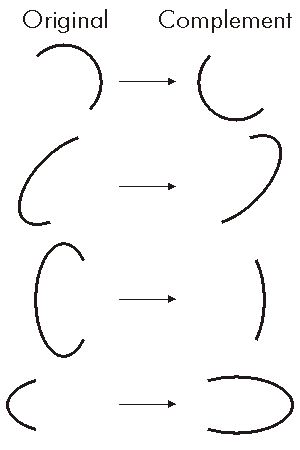
//This example shows how to create a Complement of Circular arc.
static void ComplementArcs()
{
//Create three points to draw an arc through.
IPoint point1 = new ESRI.ArcGIS.Geometry.Point();
IPoint point2 = new ESRI.ArcGIS.Geometry.Point();
IPoint point3 = new ESRI.ArcGIS.Geometry.Point();
point1.PutCoords(200, 200);
point2.PutCoords(200, 300);
point3.PutCoords(300, 300);
//Construct a Three Point Arc and draw as solid line.
IConstructCircularArc constructionArc = new CircularArc() as IConstructCircularArc;
constructionArc.ConstructThreePoints(point1, point2, point3, true);
//Draw the compliment of the previous arc as dashed line.
ICircularArc evilCircularArc = constructionArc as ICircularArc;
evilCircularArc.Complement();
}
Public Sub ComplementArcs()
'Create three points to draw an arc through.
Dim pPoint1 As ESRI.ArcGIS.Geometry.IPoint, pPoint2 As ESRI.ArcGIS.Geometry.IPoint, pPoint3 As ESRI.ArcGIS.Geometry.IPoint
pPoint1 = eCreatePoint(200, 200)
pPoint2 = eCreatePoint(200, 300)
pPoint3 = eCreatePoint(300, 300)
'Construct a Three Point Arc and draw as solid line.
Dim pCArc As ESRI.ArcGIS.Geometry.IConstructCircularArc
pCArc = New ESRI.ArcGIS.Geometry.CircularArc
pCArc.ConstructThreePoints(pPoint1, pPoint2, pPoint3, True)
'Create the compliment of the previous arc as dashed line.
Dim pCArcCmp As ESRI.ArcGIS.Geometry.ICircularArc
pCArcCmp = pCArc
pCArcCmp.Complement()
End Sub
Public Function eCreatePoint(ByVal X As Double, ByVal Y As Double) As ESRI.ArcGIS.Geometry.IPoint
eCreatePoint = New ESRI.ArcGIS.Geometry.PointClass()
eCreatePoint.PutCoords(X, Y)
End Function
GeoNormalize()
void GeoNormalize()GeoNormalizeFromLongitude(double)
void GeoNormalizeFromLongitude(double Longitude)Parameters
Longitudedouble
GetSubcurve(double, double, bool, out ICurve)
void GetSubcurve(double fromDistance, double toDistance, bool asRatio, out ICurve outSubcurve)Parameters
Project(ISpatialReference)
void Project(ISpatialReference newReferenceSystem)Parameters
newReferenceSystemISpatialReference
PutCoords(IPoint, IPoint, IPoint, esriArcOrientation)
Defines this arc by a center point, 'from' and 'to' points, and orientation. If the from and to points do not lie on the same circle, the arc's center point will be adjusted.
void PutCoords(IPoint Center, IPoint from, IPoint to, esriArcOrientation arcOrientation)Parameters
CenterIPointfromIPointtoIPointarcOrientationesriArcOrientation
Remarks
If the FromPoint, ToPoint and CenterPoint specified do not create a circle, the created arc will have its CenterPoint adjusted until the FromPoint and ToPoint can be accomodated on the same circle. Therefore the resultant arcs CenterPoint may not be exactly the same as the input CenterPoint.

PutCoordsByAngle(IPoint, double, double, double)
Defines this circular arc by a center point, 'from' angle, signed central angle, and radius.
void PutCoordsByAngle(IPoint cp, double FromAngle, double CentralAngle, double arcRadius)Parameters
Remarks
PutCoordsByAngle is one of the easiest ways to create a desired Circular Arc. However, due to numeric accuracy limitations of computers and trigonometric functions, the From and To Points may be very slightly offset from the expected coordinates. This is important to keep in mind when attempting to connect the endpoints to other segments.

PutRadiusByPoint(IPoint)
Defines the radius of this circular arc to be the distance from the arc's center point to the input point; other properties remain unchanged.
void PutRadiusByPoint(IPoint radialPoint)Parameters
radialPointIPoint
Remarks

QueryCenterPoint(IPoint)
Copies the center point of this circular arc to the input point.
void QueryCenterPoint(IPoint Center)Parameters
CenterIPoint
Remarks
Note: The output geometry must be co-created prior to the query. The output geometry is not co-created by the method; it is populated. This can be used in performance critical situations. For example, creating the geometry only once outside a loop and use the query method could improve performance.
private void showCenterPoint()
{
//Create three points to draw an arc through.
IPoint point1 = new ESRI.ArcGIS.Geometry.Point();
IPoint point2 = new ESRI.ArcGIS.Geometry.Point();
IPoint point3 = new ESRI.ArcGIS.Geometry.Point();
point1.PutCoords(200, 200);
point2.PutCoords(200, 300);
point3.PutCoords(300, 300);
//Construct a Three Point Arc.
IConstructCircularArc constructionArc = new CircularArc() as IConstructCircularArc;
constructionArc.ConstructThreePoints(point1, point2, point3, false);
ICircularArc circularArc = constructionArc as ICircularArc;
System.Windows.Forms.MessageBox.Show(
"Values from QueryCenterPoint are: \n" +
"Center Point X coord: " + circularArc.CenterPoint.X + ",\n" +
"Center Point Y coord: " + circularArc.CenterPoint.Y
);
}
QueryCoords(IPoint, IPoint, IPoint, ref bool, ref bool)
Copies the center, 'from' and 'to' points, orientation and major/minor property into the input parameters.
void QueryCoords(IPoint Center, IPoint from, IPoint to, ref bool isCCW, ref bool IsMinor)Parameters
Remarks
These are the necessary inputs for PutCoords, except in special cases (half circle, full circle, and Central Angle = 0) where the ArcOrientation must know which of these cases exists to ensure that the desired Circular Arc is unambiguous.
-isCCW stands for "is counter clockwise"
QueryCoordsByAngle(IPoint, ref double, ref double, ref double)
Returns the center point, 'from' angle, signed central angle, and radius.
void QueryCoordsByAngle(IPoint Center, ref double FromAngle, ref double centerAngle, ref double arcRadius)Parameters
Remarks
QueryEnvelope(IEnvelope)
void QueryEnvelope(IEnvelope outEnvelope)Parameters
outEnvelopeIEnvelope
QueryFromPoint(IPoint)
void QueryFromPoint(IPoint from)Parameters
fromIPoint
QueryNormal(esriSegmentExtension, double, bool, double, ILine)
void QueryNormal(esriSegmentExtension extension, double DistanceAlongCurve, bool asRatio, double Length, ILine normal)Parameters
extensionesriSegmentExtensionDistanceAlongCurvedoubleasRatioboolLengthdoublenormalILine
QueryPoint(esriSegmentExtension, double, bool, IPoint)
void QueryPoint(esriSegmentExtension extension, double DistanceAlongCurve, bool asRatio, IPoint outPoint)Parameters
extensionesriSegmentExtensionDistanceAlongCurvedoubleasRatiobooloutPointIPoint
QueryPointAndDistance(esriSegmentExtension, IPoint, bool, IPoint, ref double, ref double, ref bool)
void QueryPointAndDistance(esriSegmentExtension extension, IPoint inPoint, bool asRatio, IPoint outPoint, ref double DistanceAlongCurve, ref double distanceFromCurve, ref bool bRightSide)Parameters
extensionesriSegmentExtensioninPointIPointasRatiobooloutPointIPointDistanceAlongCurvedoubledistanceFromCurvedoublebRightSidebool
QueryTangent(esriSegmentExtension, double, bool, double, ILine)
void QueryTangent(esriSegmentExtension extension, double DistanceAlongCurve, bool asRatio, double Length, ILine tangent)Parameters
extensionesriSegmentExtensionDistanceAlongCurvedoubleasRatioboolLengthdoubletangentILine
QueryToPoint(IPoint)
void QueryToPoint(IPoint to)Parameters
toIPoint
ReverseOrientation()
void ReverseOrientation()SetEmpty()
void SetEmpty()SnapToSpatialReference()
void SnapToSpatialReference()