Filter 3D scene features out of a given geometry with a polygon filter.
Use case
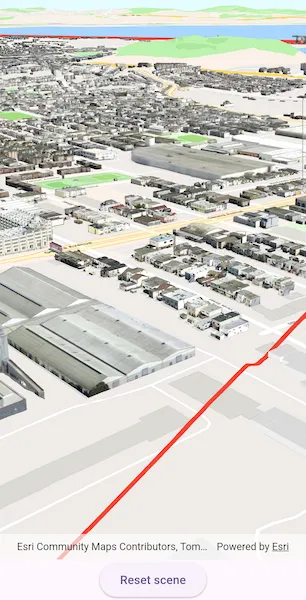
You can directly control what users see within a specific scene view to give a more focused or cleaner user experience by using a SceneLayerPolygonFilter to selectively show or hide scene features within a given area.
How to use the sample
The sample initializes showing the “Navigation” 3D Basemap. Tap the “Filter” button, to set a SceneLayerPolygonFilter and filter out the Esri 3D buildings within the extent of a detailed buildings scene layer. Notice how the Esri 3D buildings within and intersecting the extent of the detailed buildings layer are hidden. Tap the “Show detailed buildings” button to display a scene layer that contains more detailed buildings. Tap the “Reset scene” button to hide the detailed buildings scene layer and clear the 3D buildings filter.
How it works
- Create a
Surfacefor the scene and set the World Elevation 3D as an elevation source. - Construct a
Basemapfor the scene using the “Navigation” 3D Basemap, load it, then search for the “Buildings” baselayer. - Add the detailed 3D San Francisco Buildings
ArcGISSceneLayerto the scene’s operational layers and set its visibility tofalseso it does not intersect the 3D basemap buildings. - Construct a
SceneLayerPolygonFilterwith the extent of the San Francisco Buildings Scene Layer and theSceneLayerPolygonFilterSpatialRelationship.disjointenum to hide all features within the extent. - Set the
SceneLayerPolygonFilteron the Esri 3D Buildings layer to hide all buildings within the extent of the San Francisco Buildings layer. - Set the visibility of the 3D San Francisco Buildings layer to
trueto show the detailed 3D buildings in the extent.
Relevant API
- ArcGISSceneLayer
- SceneLayerPolygonFilter
- SceneLayerPolygonFilterSpatialRelationship
About the data
This sample uses the Navigation 3D Basemap which includes commercial 3D buildings data acquired from TomTom and Vantor, in addition to Esri Community Maps and Overture Maps Foundation data. It also uses the San Francisco 3D Buildings scene layer which provides detailed 3D models of buildings in San Francisco, California, USA.
Additional information
This sample uses SceneLayerPolygonFilterSpatialRelationship.disjoint to hide all features within the extent of the given geometry. You can alternatively use SceneLayerPolygonFilterSpatialRelationship.contains to only show features within the extent of the geometry.
You can also show or hide features in a scene layer using ArcGISSceneLayer.setFeatureVisible or setFeaturesVisible and pass in a feature or list of features and a boolean value to set their visibility.
Tags
3D, buildings, disjoint, exclude, extent, filter, hide, polygon
Sample code
// Copyright 2025 Esri//// Licensed under the Apache License, Version 2.0 (the "License");// you may not use this file except in compliance with the License.// You may obtain a copy of the License at////   https://www.apache.org/licenses/LICENSE-2.0//// Unless required by applicable law or agreed to in writing, software// distributed under the License is distributed on an "AS IS" BASIS,// WITHOUT WARRANTIES OR CONDITIONS OF ANY KIND, either express or implied.// See the License for the specific language governing permissions and// limitations under the License.//
import 'package:arcgis_maps/arcgis_maps.dart';import 'package:arcgis_maps_sdk_flutter_samples/common/common.dart';import 'package:flutter/material.dart';
class FilterFeaturesInScene extends StatefulWidget {  const FilterFeaturesInScene({super.key});
  @override  State<FilterFeaturesInScene> createState() => _FilterFeaturesInSceneState();}
class _FilterFeaturesInSceneState extends State<FilterFeaturesInScene>    with SampleStateSupport {  // Create a controller for the scene view.  final _sceneViewController = ArcGISSceneView.createController();  // A flag for when the scene view is ready.  var _ready = false;
  // URLs to the services used in the sample.  final _basemapUrl =      'https://arcgisruntime.maps.arcgis.com/home/item.html?id=00a5f468dda941d7bf0b51c144aae3f0';  final _elevationServiceUrl =      'https://elevation3d.arcgis.com/arcgis/rest/services/WorldElevation3D/Terrain3D/ImageServer';  final _detailedBuildingsLayerUrl =      'https://tiles.arcgis.com/tiles/z2tnIkrLQ2BRzr6P/arcgis/rest/services/SanFrancisco_Bldgs/SceneServer';
  // The scene layer containing detailed buildings in San Francisco, CA, USA.  late ArcGISSceneLayer _detailedBuildingsLayer;  // The "Buildings" scene layer from the scene's basemap.  late ArcGISSceneLayer _buildingsLayer;
  // A graphic of the extent of the detailed San Francisco buildings scene layer.  var _sfExtentGraphic = Graphic();  // A filter that limits the visible features of the scene layer.  late SceneLayerPolygonFilter _sceneLayerPolygonFilter;  // A state for filtering features in a scene.  var _sceneFilterAction = SceneFilterAction.filter;
  @override  Widget build(BuildContext context) {    return Scaffold(      body: SafeArea(        top: false,        left: false,        right: false,        child: Stack(          children: [            Column(              children: [                Expanded(                  // Add a scene view to the widget tree and set a controller.                  child: ArcGISSceneView(                    controllerProvider: () => _sceneViewController,                    onSceneViewReady: onSceneViewReady,                  ),                ),                Center(                  // A button to control the state of the filter.                  child: ElevatedButton(                    onPressed: onSceneActionPressed,                    child: Text(_sceneFilterAction.label),                  ),                ),              ],            ),            // Display a progress indicator and prevent interaction until state is ready.            LoadingIndicator(visible: !_ready),          ],        ),      ),    );  }
  Future<void> onSceneViewReady() async {    // Configure the scene and add to the scene view controller.    final scene = await _setupScene();    _sceneViewController.arcGISScene = scene;
    // Create a scene layer for the San Francisco buildings.    _detailedBuildingsLayer = ArcGISSceneLayer.withUri(      Uri.parse(_detailedBuildingsLayerUrl),    );    // Load so that the extent can be accessed.    await _detailedBuildingsLayer.load();
    // Add the detailed buildings layer to the scene.    // The layer is initially hidden so that it doesn't    // clip into the buildings layer while it is unfiltered.    _detailedBuildingsLayer.isVisible = false;    _sceneViewController.arcGISScene!.operationalLayers.add(      _detailedBuildingsLayer,    );
    // Prepare the scene layer filter.    _configureSceneLayerFilter();
    // Set the viewpoint over San Francisco.    final camera = Camera.withLocation(      location: ArcGISPoint(x: -122.421, y: 37.7041, z: 207),      heading: 60,      pitch: 70,      roll: 0,    );    _sceneViewController.setViewpointCamera(camera);
    // Set the ready state variable to true to enable the sample UI.    setState(() => _ready = true);  }
  Future<ArcGISScene> _setupScene() async {    // Create a basemap with the ArcGIS Navigation 3D Basemap.    final basemap = Basemap.withUri(Uri.parse(_basemapUrl))!;
    // Load the basemap to access the base layers.    await basemap.load();
    // Get the "Buildings" layer from the base layers.    _buildingsLayer =        basemap.baseLayers.where((layer) => layer.name == 'Buildings').first            as ArcGISSceneLayer;
    // Create a scene with the basemap.    final scene = ArcGISScene.withBasemap(basemap);
    // Construct and set the scene topography.    final worldElevationService = Uri.parse(_elevationServiceUrl);    final elevationSource = ArcGISTiledElevationSource.withUri(      worldElevationService,    );    scene.baseSurface.elevationSources.add(elevationSource);
    return scene;  }
  // Builds a polygon from the San Francisco buildings extent,  // adds a red outline graphic, and sets up a filter.  void _configureSceneLayerFilter() {    // Build a polygon from the full extent of the San Francisco detailed buildings layer.    final polygonBuilder = PolygonBuilder(      spatialReference: _sceneViewController.spatialReference,    );    final extent = _detailedBuildingsLayer.fullExtent!;    polygonBuilder.addPointXY(x: extent.xMin, y: extent.yMin);    polygonBuilder.addPointXY(x: extent.xMax, y: extent.yMin);    polygonBuilder.addPointXY(x: extent.xMax, y: extent.yMax);    polygonBuilder.addPointXY(x: extent.xMin, y: extent.yMax);    // Convert the polygon builder to a polygon geometry.    final polygon = polygonBuilder.toGeometry() as Polygon;
    // Create a red outline symbol with transparent fill.    final outlineSymbol = SimpleFillSymbol(      color: Colors.transparent,      outline: SimpleLineSymbol(color: Colors.red, width: 5),    );
    // Create a graphic using the polygon geometry and symbol.    _sfExtentGraphic = Graphic(geometry: polygon, symbol: outlineSymbol);
    // Create a graphics overlay and add to the scene view.    final graphicsOverlay = GraphicsOverlay();    // Add the graphics overlay to the scene view controller.    _sceneViewController.graphicsOverlays.add(graphicsOverlay);
    // Initially hide the graphic, since the filter has not been applied yet.    _sfExtentGraphic.isVisible = false;    // Add the graphic to the graphics overlay.    graphicsOverlay.graphics.add(_sfExtentGraphic);
    // Create the SceneLayerPolygonFilter to later apply to the buildings base layer.    _sceneLayerPolygonFilter = SceneLayerPolygonFilter(      polygons: [polygon],      spatialRelationship: SceneLayerPolygonFilterSpatialRelationship.disjoint,    );  }
  // Filter scene based on the current filter action.  void onSceneActionPressed() {    switch (_sceneFilterAction) {      case SceneFilterAction.show:        _showDetailedBuildings();      case SceneFilterAction.filter:        _filterScene();      case SceneFilterAction.reset:        _resetScene();    }    setState(() => _sceneFilterAction = _sceneFilterAction.next());  }
  // Show the detailed buildings layer.  void _showDetailedBuildings() {    _detailedBuildingsLayer.isVisible = true;  }
  // Apply a polygon filter to hide the 3D buildings in the base layer within the San Francisco detailed buildings layer extent.  void _filterScene() {    // Set the polygon filter to the buildings layer.    _buildingsLayer.polygonFilter = _sceneLayerPolygonFilter;    // Show the graphic to indicate the filtered extent.    _sfExtentGraphic.isVisible = true;  }
  // Reset the scene.  void _resetScene() {    // Hide the detailed buildings layer.    _detailedBuildingsLayer.isVisible = false;    // Remove the polygon filter from the buildings layer.    _buildingsLayer.polygonFilter = null;    // Hide the red extent boundary graphic.    _sfExtentGraphic.isVisible = false;  }}
// The different states for filtering features in the sample workflow.enum SceneFilterAction {  show('Show detailed buildings'),  filter('Filter'),  reset('Reset scene');
  const SceneFilterAction(this.label);
  final String label;
  // The next action to apply to the scene.  SceneFilterAction next() {    switch (this) {      case SceneFilterAction.filter:        return SceneFilterAction.show;      case SceneFilterAction.show:        return SceneFilterAction.reset;      case SceneFilterAction.reset:        return SceneFilterAction.filter;    }  }}