Display directions for a route between two points.
Use case
Find routes with driving directions between any number of locations. You might use the ArcGIS platform to create a custom network for routing on private roads.
How to use the sample
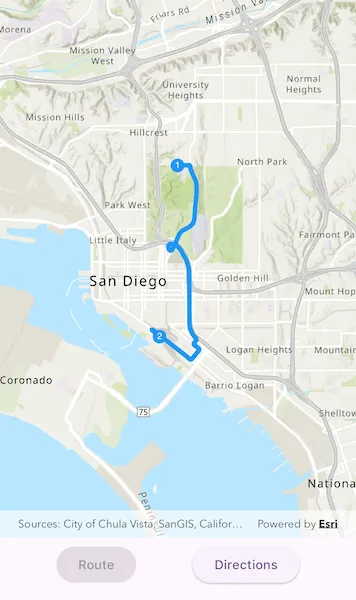
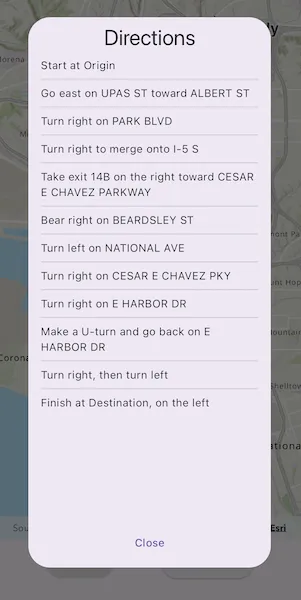
For simplicity, the sample comes loaded with a start and end stop. You can tap on the “Route” button to display a route between these stops. Once the route is generated, tap on the “Directions” button to show turn-by-turn directions in a dialog.
How it works
- Create a
RouteTaskusing a URL to an online route service. - Generate default
RouteParametersusingrouteTask.createDefaultParameters(). - Set
returnStopsandreturnDirectionson the parameters to true. - Add
Stops to the parametersstopscollection for each destination. - Solve the route using
routeTask.solveRoute(routeParameters)to get aRouteResult. - Iterate through the result’s
routesproperty, which contains a list ofArcGISRouteobjects. To display the route, create a graphic using the geometry fromroute.routeGeometry. To display directions, useroute.directionManeuvers, and for eachDirectionManeuver, displayDirectionManeuver.directionText.
Relevant API
- ArcGISRoute
- DirectionManeuver
- RouteParameters
- RouteResult
- RouteTask
- Stop
Tags
directions, driving, navigation, network, network analysis, route, routing, shortest path, turn-by-turn
Sample code
find_route.dart
//// Copyright 2024 Esri//// Licensed under the Apache License, Version 2.0 (the "License");// you may not use this file except in compliance with the License.// You may obtain a copy of the License at////   https://www.apache.org/licenses/LICENSE-2.0//// Unless required by applicable law or agreed to in writing, software// distributed under the License is distributed on an "AS IS" BASIS,// WITHOUT WARRANTIES OR CONDITIONS OF ANY KIND, either express or implied.// See the License for the specific language governing permissions and// limitations under the License.//
import 'package:arcgis_maps/arcgis_maps.dart';import 'package:arcgis_maps_sdk_flutter_samples/common/common.dart';import 'package:flutter/material.dart';
class FindRoute extends StatefulWidget {  const FindRoute({super.key});
  @override  State<FindRoute> createState() => _FindRouteState();}
class _FindRouteState extends State<FindRoute> with SampleStateSupport {  // Create a controller for the map view.  final _mapViewController = ArcGISMapView.createController();  // Create a graphics overlay for the stops.  final _stopsGraphicsOverlay = GraphicsOverlay();  // Create a graphics overlay for the route.  final _routeGraphicsOverlay = GraphicsOverlay();  // Create a list of stops.  final _stops = <Stop>[];  // A flag to indicate whether the route is generated.  var _routeGenerated = false;  // A flag for when the map view is ready and controls can be used.  var _ready = false;  // Create a list of directions for the route.  var _directions = <DirectionManeuver>[];  // Define route parameters for the route.  late final RouteParameters _routeParameters;  // Create a route task.  final _routeTask = RouteTask.withUri(    Uri.parse(      'https://sampleserver6.arcgisonline.com/arcgis/rest/services/NetworkAnalysis/SanDiego/NAServer/Route',    ),  );
  @override  Widget build(BuildContext context) {    return Scaffold(      body: SafeArea(        top: false,        left: false,        right: false,        child: Stack(          children: [            // Create a column with buttons for generating the route and showing the directions.            Column(              children: [                Expanded(                  // Add a map view to the widget tree and set a controller.                  child: ArcGISMapView(                    controllerProvider: () => _mapViewController,                    onMapViewReady: onMapViewReady,                  ),                ),                SizedBox(                  height: 60,                  // Add the buttons to the column.                  child: Row(                    mainAxisAlignment: MainAxisAlignment.spaceEvenly,                    children: [                      // Create a button to generate the route.                      ElevatedButton(                        onPressed: _routeGenerated ? null : generateRoute,                        child: const Text('Route'),                      ),                      // Create a button to show the directions.                      ElevatedButton(                        onPressed: _routeGenerated                            ? () => showDialog<void>(                                context: context,                                builder: showDirections,                              )                            : null,                        child: const Text('Directions'),                      ),                    ],                  ),                ),              ],            ),            // Display a progress indicator and prevent interaction until state is ready.            LoadingIndicator(visible: !_ready),          ],        ),      ),    );  }
  Future<void> onMapViewReady() async {    initMap();    initStops();    await initRouteParameters();    // Set the ready state variable to true to enable the sample UI.    setState(() => _ready = true);  }
  void initMap() {    // Create a map with a topographic basemap style and an initial viewpoint.    final map = ArcGISMap.withBasemapStyle(BasemapStyle.arcGISTopographic);
    map.initialViewpoint = Viewpoint.fromCenter(      ArcGISPoint(        x: -13041154.7153,        y: 3858170.2368,        spatialReference: SpatialReference.webMercator,      ),      scale: 100000,    );    // Set the map to the map view controller.    _mapViewController.arcGISMap = map;    // Add the graphics overlays to the map view.    _mapViewController.graphicsOverlays.add(_routeGraphicsOverlay);    _mapViewController.graphicsOverlays.add(_stopsGraphicsOverlay);  }
  void initStops() {    // Create symbols to use for the start and end stops of the route.    final routeStartCircleSymbol = SimpleMarkerSymbol(      color: Colors.blue,      size: 15,    );    final routeEndCircleSymbol = SimpleMarkerSymbol(      color: Colors.blue,      size: 15,    );    final routeStartNumberSymbol = TextSymbol(      text: '1',      color: Colors.white,      size: 10,    );    final routeEndNumberSymbol = TextSymbol(      text: '2',      color: Colors.white,      size: 10,    );
    // Configure pre-defined start and end points for the route.    final startPoint = ArcGISPoint(      x: -13041171.537945,      y: 3860988.271378,      spatialReference: SpatialReference.webMercator,    );
    final endPoint = ArcGISPoint(      x: -13041693.562570,      y: 3856006.859684,      spatialReference: SpatialReference.webMercator,    );
    final originStop = Stop(startPoint)..name = 'Origin';
    final destinationStop = Stop(endPoint)..name = 'Destination';
    _stops.add(originStop);    _stops.add(destinationStop);
    // Add the start and end points to the stops graphics overlay.    _stopsGraphicsOverlay.graphics.addAll([      Graphic(geometry: startPoint, symbol: routeStartCircleSymbol),      Graphic(geometry: endPoint, symbol: routeEndCircleSymbol),      Graphic(geometry: startPoint, symbol: routeStartNumberSymbol),      Graphic(geometry: endPoint, symbol: routeEndNumberSymbol),    ]);  }
  Future<void> initRouteParameters() async {    // Create default route parameters.    _routeParameters = await _routeTask.createDefaultParameters()      ..setStops(_stops)      ..returnDirections = true      ..directionsDistanceUnits = UnitSystem.imperial      ..returnRoutes = true      ..returnStops = true;  }
  void resetRoute() {    // Clear the route graphics overlay.    _routeGraphicsOverlay.graphics.clear();
    setState(() {      _directions = [];      _routeGenerated = false;    });  }
  Future<void> generateRoute() async {    // Create the symbol for the route line.    final routeLineSymbol = SimpleLineSymbol(color: Colors.blue, width: 5);
    // Reset the route.    resetRoute();
    // Solve the route using the route parameters.    final routeResult = await _routeTask.solveRoute(_routeParameters);    if (routeResult.routes.isEmpty) {      showMessageDialog('No routes have been generated.');      return;    }
    // Get the first route.    final route = routeResult.routes.first;    final routeGeometry = route.routeGeometry;
    // Add the route to the route graphics overlay.    if (routeGeometry != null) {      final routeGraphic = Graphic(        geometry: routeGeometry,        symbol: routeLineSymbol,      );      _routeGraphicsOverlay.graphics.add(routeGraphic);    }
    setState(() {      _directions = route.directionManeuvers;      _routeGenerated = true;    });  }
  Dialog showDirections(BuildContext context) {    // Show the directions in a dialog.    return Dialog(      child: Padding(        padding: const EdgeInsets.all(8),        child: Column(          children: [            Center(              child: Text(                'Directions',                style: Theme.of(context).textTheme.headlineMedium,              ),            ),            Expanded(              child: _directions.isEmpty                  ? const Center(child: Text('No directions to show.'))                  : buildDirectionsListView(),            ),            TextButton(              onPressed: () {                Navigator.pop(context);              },              child: const Text('Close'),            ),          ],        ),      ),    );  }
  ListView buildDirectionsListView() {    // Build a list view of the directions.    return ListView.separated(      padding: const EdgeInsets.all(8),      itemCount: _directions.length,      itemBuilder: (context, index) {        return Text(_directions[index].directionText);      },      separatorBuilder: (context, index) => const Divider(),    );  }}