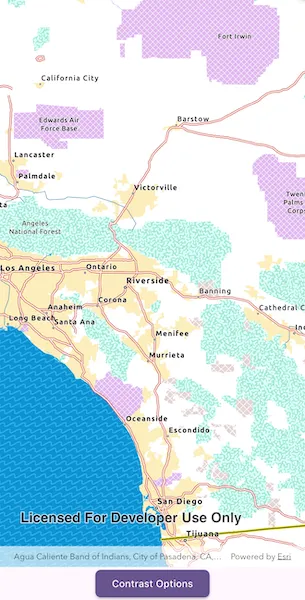
Display a map view that updates between authored light, dark, and high-contrast basemaps.
Use case
Use this pattern when your app needs contrast-responsive basemaps to switch between light, dark, and high-contrast states. This is especially useful with basemaps authored for accessibility, along with reference layers for the associated base layer.
How to use the sample
When the sample is launched, it displays the chosen contrast basemap. When automatic mode is selected for the sample, changing the device appearance in the device system settings between light and dark theme, or turning high contrast on and off, will result in the appropriate basemap being loaded to match settings. Toggle the device settings to see the different basemaps.
Tap Contrast Options to show or hide the basemap’s reference layers. Switch to manual mode to choose Light, Dark, High contrast light, or High contrast dark directly. Show or hide the basemap’s reference layers to compare how labels and boundaries read in each contrast appearance mode.
How it works
- Provide four authored basemaps that represent the supported contrast appearances: Light, Dark, High contrast light, and High contrast dark.
- Resolve which contrast appearance should be active based on the current mode and device settings.
- In manual mode, use the appearance selected in the settings bottom sheet.
- In automatic mode, resolve the appearance from the device’s current light, dark, and high-contrast settings. This sample uses Flutter’s
MediaQuery.platformBrightnessandMediaQuery.highContrastvalues.
- Map the resolved appearance to an ArcGIS Online
Basemapand update the map’sbasemap. - Apply the current reference-layer visibility setting to the basemap’s labels and boundary layers.
Relevant API
- ArcGISMap
- Basemap
- BasemapStyle
About the data
This sample uses four ArcGIS Living Atlas web maps authored for regular light, regular dark, high-contrast light, and high-contrast dark presentation states.
The enhanced contrast web maps are designed for accessibility-focused presentation workflows, and the light and dark canvas maps provide the regular contrast companions. You can use these web maps as a starting reference for your own contrast-specific basemap workflows.
Additional information
For more background information on the cartographic approach behind the enhanced contrast basemaps, see Working with Enhanced Contrast basemaps to improve accessibility.
Automatic mode responds to the light, dark, and high-contrast values exposed to Flutter by the device’s system settings.
Tags
accessibility, accessible, basemap, colorblind, contrast, dark, enhanced, high, inclusive, legibility, light, living atlas, readability, vision, visual impairment, WCAG
Sample code
// Copyright 2026 Esri//// Licensed under the Apache License, Version 2.0 (the "License");// you may not use this file except in compliance with the License.// You may obtain a copy of the License at////   https://www.apache.org/licenses/LICENSE-2.0//// Unless required by applicable law or agreed to in writing, software// distributed under the License is distributed on an "AS IS" BASIS,// WITHOUT WARRANTIES OR CONDITIONS OF ANY KIND, either express or implied.// See the License for the specific language governing permissions and// limitations under the License.//
import 'package:app_settings/app_settings.dart';import 'package:arcgis_maps/arcgis_maps.dart';import 'package:arcgis_maps_sdk_flutter_samples/common/common.dart';import 'package:flutter/material.dart';
// Create an enumeration to define the contrast mode options.enum ContrastMode { automatic, manual }
// Create an enumeration to define the contrast appearance options.enum ContrastAppearance { light, highContrastLight, dark, highContrastDark }
class UpdateBasemapForContrastAccessibility extends StatefulWidget {  const UpdateBasemapForContrastAccessibility({super.key});
  @override  State<UpdateBasemapForContrastAccessibility> createState() =>      _UpdateBasemapForContrastAccessibilityState();}
class _UpdateBasemapForContrastAccessibilityState    extends State<UpdateBasemapForContrastAccessibility>    with SampleStateSupport, WidgetsBindingObserver {  // Create a controller for the map view and a Web Mercator map.  final _mapViewController = ArcGISMapView.createController();  final _arcGISMap = ArcGISMap(spatialReference: SpatialReference.webMercator)    ..initialViewpoint = Viewpoint.withLatLongScale(      latitude: 34.05,      longitude: -117.19,      scale: 2000000,    );
  // Store the current contrast mode, appearance, and reference layer setting.  var _contrastMode = ContrastMode.automatic;  var _contrastAppearance = ContrastAppearance.light;  var _referenceLayersVisible = true;
  // Track when the controls can be used and the loading indicator can be hidden.  var _ready = false;
  // Track when the map view has been initialized before reacting to device setting changes.  var _mapViewReady = false;
  // A flag for when the settings bottom sheet is visible.  var _settingsVisible = false;
  @override  void initState() {    super.initState();
    // Observe platform brightness and accessibility feature changes.    WidgetsBinding.instance.addObserver(this);  }
  @override  void dispose() {    // Stop observing platform changes when the sample closes.    WidgetsBinding.instance.removeObserver(this);
    super.dispose();  }
  @override  void didChangeDependencies() {    super.didChangeDependencies();
    // Re-resolve automatic contrast when inherited media settings change.    _syncAutomaticContrast();  }
  @override  void didChangePlatformBrightness() {    // Re-resolve automatic contrast when the platform brightness changes.    _syncAutomaticContrast();  }
  @override  void didChangeAccessibilityFeatures() {    // Re-resolve automatic contrast when accessibility features change.    _syncAutomaticContrast();  }
  @override  Widget build(BuildContext context) {    return Scaffold(      body: SafeArea(        top: false,        left: false,        right: false,        child: Stack(          children: [            Column(              children: [                Expanded(                  // Add a map view to the widget tree and set a controller.                  child: ArcGISMapView(                    controllerProvider: () => _mapViewController,                    onMapViewReady: onMapViewReady,                  ),                ),                Row(                  mainAxisAlignment: MainAxisAlignment.center,                  children: [                    // Add a button to toggle the visibility of the settings panel.                    ElevatedButton(                      onPressed: _ready                          ? () => setState(() => _settingsVisible = true)                          : null,                      child: const Text('Contrast Options'),                    ),                  ],                ),              ],            ),            // Display a progress indicator and prevent interaction until state is ready.            LoadingIndicator(visible: !_ready),          ],        ),      ),      bottomSheet: _settingsVisible ? _buildContrastSettings(context) : null,    );  }
  Future<void> onMapViewReady() async {    // Assign the map to the map view controller.    _mapViewController.arcGISMap = _arcGISMap;    _mapViewReady = true;
    // Apply the contrast appearance that matches the current device settings.    await _setContrastAppearance(_automaticContrastAppearance());  }
  Widget _buildContrastSettings(BuildContext context) {    final sectionTitleStyle = Theme.of(      context,    ).textTheme.titleMedium?.copyWith(fontWeight: FontWeight.w600);
    return BottomSheetSettings(      title: 'Contrast Options',      onCloseIconPressed: () => setState(() => _settingsVisible = false),      settingsWidgets: (context) => [        Container(          constraints: BoxConstraints(            maxHeight: MediaQuery.sizeOf(context).height * 0.4,          ),          child: SingleChildScrollView(            child: Column(              crossAxisAlignment: CrossAxisAlignment.stretch,              children: [                // Reference layers toggle.                SwitchListTile(                  contentPadding: EdgeInsets.zero,                  title: const Text('Reference layers'),                  subtitle: Text(                    _referenceLayersVisible                        ? 'Labels and boundary reference layers are visible.'                        : 'Labels and boundary reference layers are hidden.',                  ),                  value: _referenceLayersVisible,                  onChanged: _ready ? _setReferenceLayersVisible : null,                ),                const Divider(height: 24),                // Visual contrast mode.                Text('Visual contrast mode', style: sectionTitleStyle),                RadioGroup<ContrastMode>(                  groupValue: _contrastMode,                  onChanged: (mode) {                    if (_ready && mode != null) _setContrastMode(mode);                  },                  child: Column(                    children: [                      RadioListTile<ContrastMode>(                        contentPadding: EdgeInsets.zero,                        enabled: _ready,                        title: const Text('Automatic'),                        subtitle: const Text(                          'Use device light, dark, and high-contrast settings to auto-select basemap.',                        ),                        value: ContrastMode.automatic,                      ),                      RadioListTile<ContrastMode>(                        contentPadding: EdgeInsets.zero,                        enabled: _ready,                        title: const Text('Manual'),                        subtitle: const Text(                          'Choose one of the four basemaps manually.',                        ),                        value: ContrastMode.manual,                      ),                    ],                  ),                ),                // Manual contrast options (only when Manual is selected).                if (_contrastMode == ContrastMode.manual) ...[                  const SizedBox(height: 12),                  Text('Manual contrast', style: sectionTitleStyle),                  RadioGroup<ContrastAppearance>(                    groupValue: _contrastAppearance,                    onChanged: (appearance) {                      if (_ready && appearance != null) {                        _setContrastAppearance(appearance).ignore();                      }                    },                    child: Column(                      children: [                        for (final appearance in ContrastAppearance.values)                          RadioListTile<ContrastAppearance>(                            contentPadding: EdgeInsets.zero,                            enabled: _ready,                            title: Text(appearance.label),                            subtitle: Text(appearance.description),                            value: appearance,                          ),                      ],                    ),                  ),                ],                const SizedBox(height: 12),                // Deep-link to system accessibility settings.                SizedBox(                  width: double.infinity,                  child: OutlinedButton.icon(                    icon: const Icon(Icons.settings_accessibility),                    label: const Text('Go to Settings'),                    onPressed: () => AppSettings.openAppSettings(                      type: AppSettingsType.accessibility,                    ),                  ),                ),              ],            ),          ),        ),      ],    );  }
  void _setContrastMode(ContrastMode mode) {    // Store the selected mode and resolve the effective appearance.    setState(() => _contrastMode = mode);
    // Apply the device-driven appearance when automatic mode is selected.    if (mode == ContrastMode.automatic) {      _setContrastAppearance(_automaticContrastAppearance()).ignore();    }  }
  Future<void> _setContrastAppearance(ContrastAppearance appearance) async {    // Avoid reloading the same basemap once the map is ready.    if (_mapViewReady && _ready && appearance == _contrastAppearance) return;
    // Disable controls while the next basemap is loading.    setState(() => _ready = false);
    try {      // Create and load the basemap for the selected appearance.      final basemap = _basemapForContrastAppearance(appearance);      await basemap.load();
      if (!mounted) return;
      // Apply the loaded basemap and restore the reference layer visibility.      _arcGISMap.basemap = basemap;      _applyReferenceLayerVisibility();      // Store the active appearance and enable controls.      setState(() {        _contrastAppearance = appearance;        _ready = true;      });    } on ArcGISException catch (error) {      // Show ArcGIS load failures in the shared sample dialog.      if (!mounted) return;      showMessageDialog(error.message, title: 'Error', showOK: true);      setState(() => _ready = true);    }  }
  void _setReferenceLayersVisible(bool visible) {    // Store and apply the reference layer visibility choice.    setState(() => _referenceLayersVisible = visible);    _applyReferenceLayerVisibility();  }
  void _applyReferenceLayerVisibility() {    // Update every reference layer in the current basemap.    for (final layer in _arcGISMap.basemap?.referenceLayers ?? <Layer>[]) {      layer.isVisible = _referenceLayersVisible;    }  }
  void _syncAutomaticContrast() {    // Only synchronize automatically after the map view is ready.    if (!_mapViewReady || !_ready || _contrastMode != ContrastMode.automatic) {      return;    }
    // Apply the resolved appearance when it differs from the current one.    final appearance = _automaticContrastAppearance();    if (appearance != _contrastAppearance) {      _setContrastAppearance(appearance).ignore();    }  }
  ContrastAppearance _automaticContrastAppearance() {    // Read Flutter's current brightness and high-contrast settings.    final mediaQuery = MediaQuery.of(context);    final darkTheme = mediaQuery.platformBrightness == Brightness.dark;    final highContrast = mediaQuery.highContrast;
    // Map device settings to the four contrast appearances.    return switch ((darkTheme, highContrast)) {      (true, true) => ContrastAppearance.highContrastDark,      (true, false) => ContrastAppearance.dark,      (false, true) => ContrastAppearance.highContrastLight,      (false, false) => ContrastAppearance.light,    };  }
  Basemap _basemapForContrastAppearance(ContrastAppearance appearance) {    // Return an authored basemap for the selected contrast appearance.    return switch (appearance) {      ContrastAppearance.light => Basemap.withStyle(        BasemapStyle.arcGISLightGray,      ),      ContrastAppearance.dark => Basemap.withStyle(BasemapStyle.arcGISDarkGray),      ContrastAppearance.highContrastLight => Basemap.withUri(        Uri.parse(          'https://www.arcgis.com/home/item.html?id=084291b0ecad4588b8c8853898d72445',        ),      )!,      ContrastAppearance.highContrastDark => Basemap.withUri(        Uri.parse(          'https://www.arcgis.com/home/item.html?id=3e23478909194c54992eaaee78b5f754',        ),      )!,    };  }}
// Extension on ContrastAppearance to provide labels and descriptions for the UI.extension on ContrastAppearance {  String get label {    return switch (this) {      ContrastAppearance.light => 'Light',      ContrastAppearance.highContrastLight => 'High contrast light',      ContrastAppearance.dark => 'Dark',      ContrastAppearance.highContrastDark => 'High contrast dark',    };  }
  String get description {    return switch (this) {      ContrastAppearance.light =>        'Regular light basemap for regular light theme.',      ContrastAppearance.highContrastLight =>        'High-contrast light basemap for enhanced light theme.',      ContrastAppearance.dark => 'Regular dark basemap for regular dark theme.',      ContrastAppearance.highContrastDark =>        'High-contrast dark basemap for enhanced dark theme.',    };  }}