Create a raster layer from a raster image service.
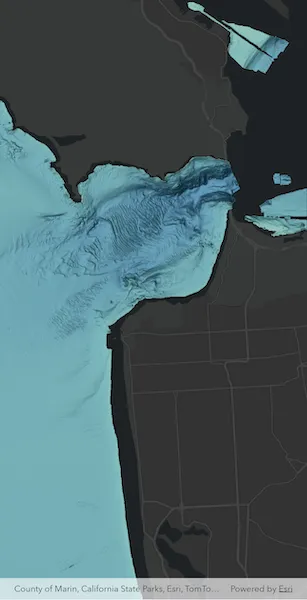
Use case
Accessing a raster image from an online service can be useful for analysing the most up-to-date data available for an area. For example, retrieving recent results of bathymetry surveys within a shipping channel monitored for its sediment build-up would allow planners to assess dredging needs.
How to use the sample
Simply launch the sample to see a raster from an image service being used on a map.
How it works
- Create an
ImageServiceRasterusing the service’s URL. - Create a
RasterLayerfrom the image service raster. - Add the raster layer to the map.
Relevant API
- ImageServiceRaster
- RasterLayer
About the data
This sample uses a NOAA raster image service. The service computes a hillshade image from the depth (in meters) of U.S. coastal waters.
Tags
image service, raster
Sample code
add_raster_from_service.dart
// Copyright 2025 Esri//// Licensed under the Apache License, Version 2.0 (the "License");// you may not use this file except in compliance with the License.// You may obtain a copy of the License at////   https://www.apache.org/licenses/LICENSE-2.0//// Unless required by applicable law or agreed to in writing, software// distributed under the License is distributed on an "AS IS" BASIS,// WITHOUT WARRANTIES OR CONDITIONS OF ANY KIND, either express or implied.// See the License for the specific language governing permissions and// limitations under the License.//
import 'dart:async';
import 'package:arcgis_maps/arcgis_maps.dart';import 'package:arcgis_maps_sdk_flutter_samples/common/busy_indicator.dart';import 'package:arcgis_maps_sdk_flutter_samples/common/common.dart';import 'package:flutter/material.dart';
class AddRasterFromService extends StatefulWidget {  const AddRasterFromService({super.key});
  @override  State<AddRasterFromService> createState() => _AddRasterFromServiceState();}
class _AddRasterFromServiceState extends State<AddRasterFromService>    with SampleStateSupport {  // Create a controller for the map view.  final _mapViewController = ArcGISMapView.createController();  // A flag indicating the map is currently drawing layers.  var _drawing = false;  // A flag for when the map view is ready and controls can be used.  var _ready = false;  // A subscription to listen for MapViewController draw status state changes.  late final StreamSubscription _drawStatusChangedSubscription;  // A subscription to listen for layer view state changes.  late final StreamSubscription _layerViewChangedSubscription;
  @override  void dispose() {    _drawStatusChangedSubscription.cancel();    _layerViewChangedSubscription.cancel();    super.dispose();  }
  @override  Widget build(BuildContext context) {    return Scaffold(      body: Stack(        children: [          ArcGISMapView(            controllerProvider: () => _mapViewController,            onMapViewReady: onMapViewReady,          ),          LoadingIndicator(visible: !_ready),          BusyIndicator(labelText: 'Drawing...', visible: _drawing),        ],      ),    );  }
  void onMapViewReady() {    _drawStatusChangedSubscription = _mapViewController.onDrawStatusChanged        .listen((status) {          if (status == DrawStatus.inProgress) {            setState(() => _drawing = true);          } else {            setState(() => _drawing = false);          }        });
    // Create a map with the ArcGIS DarkGrayBase basemap style and set to the map view.    final map = ArcGISMap.withBasemapStyle(BasemapStyle.arcGISDarkGrayBase);
    // Set the map to the map view.    _mapViewController.arcGISMap = map;
    // Creates an initial viewpoint with a coordinate point centered on    // San Francisco's Golden Gate Bridge.    _mapViewController.setViewpoint(      Viewpoint.fromCenter(        ArcGISPoint(          x: -13637000,          y: 4550000,          spatialReference: SpatialReference.webMercator,        ),        scale: 100000,      ),    );
    // Creates a raster from an image service.    final imageServiceRaster = ImageServiceRaster(      uri: Uri.parse(        'https://gis.ngdc.noaa.gov/arcgis/rest/services/bag_hillshades_subsets/ImageServer',      ),    );
    // Create a raster layer from the raster.    final rasterLayer = RasterLayer.withRaster(imageServiceRaster);
    // Add Raster layer to the map.    map.operationalLayers.add(rasterLayer);    // Listen for layer view state changes.    _layerViewChangedSubscription = _mapViewController.onLayerViewStateChanged        .listen((layerViewState) {          if (layerViewState.layer == rasterLayer &&              layerViewState.layerViewState.status.contains(                LayerViewStatus.active,              )) {            setState(() => _ready = true);          }        });  }}