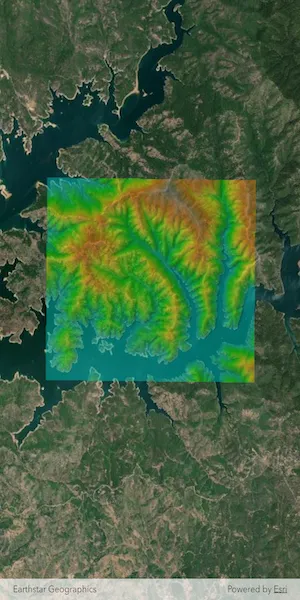
Apply a raster function to a local raster file and display the output with a raster layer.
Use case
Raster functions allow processing operations that can be applied to one or more rasters on the fly. A land survey agency may apply hillshade and aspect functions to rasters with elevation data in order to better determine the topography of a landscape and to make further planning decisions.
How to use the sample
Load the sample to see a raster function applied to a raster.
How it works
- Create a
RasterFunctionusing the path to a local raster function JSON file. - Set the raster function arguments as required by the function used.
- Use the raster function to create a new
Raster. - Set the raster to a
RasterLayerand display it in theMap.
Relevant API
- Raster
- RasterFunction
- RasterLayer
Offline data
This sample uses the Shasta_Elevation.tif raster and the color.json raster function.
About the data
The raster function in the provided JSON file blends a color image with a greyscale image (in this case, a raster image containing elevation data), to add a hillshade effect to the input raster.
Additional information
Learn more about raster functions in the ArcGIS Pro documentation.
Tags
analysis, function, image, layer, processing, raster, raster function, transformation
Sample code
// Copyright 2025 Esri//// Licensed under the Apache License, Version 2.0 (the "License");// you may not use this file except in compliance with the License.// You may obtain a copy of the License at////   https://www.apache.org/licenses/LICENSE-2.0//// Unless required by applicable law or agreed to in writing, software// distributed under the License is distributed on an "AS IS" BASIS,// WITHOUT WARRANTIES OR CONDITIONS OF ANY KIND, either express or implied.// See the License for the specific language governing permissions and// limitations under the License.//
import 'dart:io';
import 'package:arcgis_maps/arcgis_maps.dart';import 'package:arcgis_maps_sdk_flutter_samples/common/common.dart';import 'package:flutter/material.dart';import 'package:path_provider/path_provider.dart';
class ApplyFunctionToRasterFromFile extends StatefulWidget {  const ApplyFunctionToRasterFromFile({super.key});
  @override  State<ApplyFunctionToRasterFromFile> createState() =>      _ApplyFunctionToRasterFromFileState();}
class _ApplyFunctionToRasterFromFileState    extends State<ApplyFunctionToRasterFromFile>    with SampleStateSupport {  // Create a controller for the map view.  final _mapViewController = ArcGISMapView.createController();  // Raster layer to display raster data on the map.  late RasterLayer _rasterLayer;  // A flag for when the map view is ready and controls can be used.  var _ready = false;
  @override  Widget build(BuildContext context) {    return Scaffold(      body: Stack(        children: [          ArcGISMapView(            controllerProvider: () => _mapViewController,            onMapViewReady: onMapViewReady,          ),          // Display a progress indicator and prevent interaction until state is ready.          LoadingIndicator(visible: !_ready),        ],      ),    );  }
  Future<void> onMapViewReady() async {    // Create a map with a standard imagery basemap style.    final map = ArcGISMap.withBasemapStyle(BasemapStyle.arcGISImageryStandard);    // Add map to the map view.    _mapViewController.arcGISMap = map;    // Load the raster layer.    await loadRasterLayer();    // Add the raster layer to the map.    map.operationalLayers.add(_rasterLayer);    // Set the viewpoint to the center of the raster layer's full extent.    final fullExtent = _rasterLayer.fullExtent;    if (fullExtent != null) {      final center = fullExtent.center;      const scale = 80000.0;      await _mapViewController.setViewpointCenter(center, scale: scale);    }    // Set the ready state variable to true to enable the sample UI.    setState(() => _ready = true);  }
  Future<void> loadRasterLayer() async {    // Get the application documents directory.    final appDir = await getApplicationDocumentsDirectory();    final destinationFiles = [      File('${appDir.absolute.path}/Shasta_Elevation.zip'),      File('${appDir.absolute.path}/color.json'),    ];
    // Download the raster file and the color json file.    await downloadSampleDataWithProgress(      itemIds: [        'b051f5c3e01048f3bf11c59b41507896',        '5356dbf91788474493467519e268cf87',      ],      destinationFiles: destinationFiles,    );
    // Create and load a Raster from the local tif file.    final shastaElevationRaster = Raster.withFileUri(      Uri.file('${appDir.absolute.path}/Shasta_Elevation/Shasta_Elevation.tif'),    );    await shastaElevationRaster.load();    // Load the color configuration from the JSON file located in the app's directory.    final file = File(destinationFiles[1].path);    final rasterColorJson = await file.readAsString();
    // Create a RasterFunction.    final rasterFunction = RasterFunction.fromJson(rasterColorJson);    if (rasterFunction != null) {      final arguments = rasterFunction.arguments;      if (arguments != null) {        final rasterNames = arguments.rasterNames;        // Set the raster function arguments as required by the function used.        arguments.setRaster(          name: rasterNames[0],          raster: shastaElevationRaster,        );        arguments.setRaster(          name: rasterNames[1],          raster: shastaElevationRaster,        );        // Create a Raster from the raster function.        final raster = Raster.withFunction(rasterFunction);        // Load the Raster Layer.        _rasterLayer = RasterLayer.withRaster(raster);        _rasterLayer.opacity = 0.5;        await _rasterLayer.load();      }    }  }}