Set the map view to a new viewpoint.
Use case
Programmatically navigate to a specified location in the map or scene. Use this to focus on a particular point or area of interest.
How to use the sample
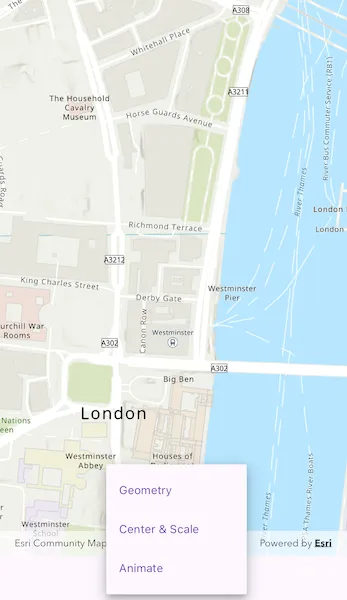
The map view has several methods for setting its current viewpoint. Select a viewpoint from the UI to see the viewpoint changed using that method.
How it works
- Create a new
ArcGISMapViewwith anArcGISMapViewController, and assign anArcGISMapto theArcGISMapViewController.arcGISMapproperty. - Change the map’s
Viewpointusing one of the available methods:
- Use
ArcGISMapViewController.setViewpointGeometry()to set the viewpoint to a givenGeometry. - Use
ArcGISMapViewController.setViewpointCenter()to center the viewpoint on aArcGISPointand set a distance from the ground using a scale. - Use
ArcGISMapViewController.setViewpointAnimated()to pan to a viewpoint over the specified length of time.
Relevant API
- ArcGISMap
- ArcGISMapView
- ArcGISPoint
- Geometry
- Viewpoint
Additional information
Below are some other ways to set a viewpoint:
- ArcGISMapViewController.setViewpoint
- ArcGISMapViewController.setViewpointRotation
- ArcGISMapViewController.setViewpointScale
- ArcGISMapViewController.setViewpointWithDurationAndCurve
Tags
animate, extent, pan, rotate, scale, view, zoom
Sample code
change_viewpoint.dart
// Copyright 2024 Esri//// Licensed under the Apache License, Version 2.0 (the "License");// you may not use this file except in compliance with the License.// You may obtain a copy of the License at////   https://www.apache.org/licenses/LICENSE-2.0//// Unless required by applicable law or agreed to in writing, software// distributed under the License is distributed on an "AS IS" BASIS,// WITHOUT WARRANTIES OR CONDITIONS OF ANY KIND, either express or implied.// See the License for the specific language governing permissions and// limitations under the License.//
import 'package:arcgis_maps/arcgis_maps.dart';import 'package:arcgis_maps_sdk_flutter_samples/common/common.dart';import 'package:flutter/material.dart';
class ChangeViewpoint extends StatefulWidget {  const ChangeViewpoint({super.key});
  @override  State<ChangeViewpoint> createState() => _ChangeViewpointState();}
class _ChangeViewpointState extends State<ChangeViewpoint>    with SampleStateSupport {  // Create a controller for the map view.  final _mapViewController = ArcGISMapView.createController();
  // Define the Redlands polygon.  late PolygonBuilder _redlandsEnvelope;
  // Define the Edinburgh polygon.  late PolygonBuilder _edinburghEnvelope;
  // String array to store titles for the viewpoints specified above.  final _viewpointTitles = ['Geometry', 'Center & Scale', 'Animate'];
  // Create variable for holding state relating to the viewpoint.  String? _selectedViewpoint;
  // Define an envelope that can navigate to the full extent.  Envelope? _fullExtent;
  // A flag for when the map view is ready and controls can be used.  var _ready = false;
  @override  Widget build(BuildContext context) {    return Scaffold(      body: SafeArea(        top: false,        left: false,        right: false,        child: Stack(          children: [            Column(              children: [                Expanded(                  // Add a map view to the widget tree and set a controller.                  child: ArcGISMapView(                    controllerProvider: () => _mapViewController,                    onMapViewReady: onMapViewReady,                  ),                ),                // Build the bottom menu.                buildBottomMenu(),              ],            ),            // Display a progress indicator and prevent interaction until state is ready.            LoadingIndicator(visible: !_ready),          ],        ),      ),    );  }
  Future<void> onMapViewReady() async {    // Create new Map with basemap and initial location.    final map = ArcGISMap.withBasemapStyle(BasemapStyle.arcGISTopographic);    // Assign the map to the ArcGISMapView.    _mapViewController.arcGISMap = map;
    // Load the map so that we get the full extent.    await map.load();    _fullExtent = map.basemap!.baseLayers.first.fullExtent;
    // Coordinates for Redlands.    _redlandsEnvelope = PolygonBuilder(      spatialReference: SpatialReference.webMercator,    );    _redlandsEnvelope.addPointXY(x: -13049785.1566222, y: 4032064.6003424);    _redlandsEnvelope.addPointXY(x: -13049785.1566222, y: 4040202.42595729);    _redlandsEnvelope.addPointXY(x: -13037033.5780234, y: 4032064.6003424);    _redlandsEnvelope.addPointXY(x: -13037033.5780234, y: 4040202.42595729);
    // Coordinates for Edinburgh.    _edinburghEnvelope = PolygonBuilder(      spatialReference: SpatialReference.webMercator,    );    _edinburghEnvelope.addPointXY(x: -354262.156621384, y: 7548092.94093301);    _edinburghEnvelope.addPointXY(x: -354262.156621384, y: 7548901.50684376);    _edinburghEnvelope.addPointXY(x: -353039.164455303, y: 7548092.94093301);    _edinburghEnvelope.addPointXY(x: -353039.164455303, y: 7548901.50684376);
    // Set the ready state variable to true to enable the sample UI.    setState(() => _ready = true);  }
  Widget buildBottomMenu() {    return Center(      // A drop down menu for selecting viewpoint.      child: DropdownMenu(        hintText: 'Choose a style',        trailingIcon: const Icon(Icons.arrow_drop_down),        textStyle: Theme.of(context).textTheme.labelMedium,        initialSelection: _selectedViewpoint,        dropdownMenuEntries: _viewpointTitles.map((items) {          return DropdownMenuEntry(value: items, label: items);        }).toList(),        onSelected: (viewpoint) {          if (viewpoint != null) {            changeViewpoint(viewpoint);          }        },      ),    );  }
  Future<void> changeViewpoint(String viewpoint) async {    // Set the selected viewpoint.    setState(() => _selectedViewpoint = viewpoint);
    switch (_selectedViewpoint) {      case 'Geometry':        // Set Viewpoint using Redlands envelope defined above and a padding of 20.        await _mapViewController.setViewpointGeometry(          _redlandsEnvelope.toGeometry(),          paddingInDiPs: 20,        );      case 'Center & Scale':        // Set Viewpoint so that it is centered on the London coordinates defined above.        await _mapViewController.setViewpointCenter(          ArcGISPoint(            x: -13881.7678417696,            y: 6710726.57374296,            spatialReference: SpatialReference.webMercator,          ),          scale: 8762.7156655228955,        );      case 'Animate':        if (_fullExtent != null) {          // Navigate to full extent of the first baselayer before animating to specified geometry.          _mapViewController.setViewpoint(            Viewpoint.fromTargetExtent(_fullExtent!.extent),          );
          // Set Viewpoint of ArcGISMapView to the Viewpoint created above and animate to it using a timespan of 5 seconds.          await _mapViewController.setViewpointAnimated(            Viewpoint.fromTargetExtent(_edinburghEnvelope.toGeometry()),            duration: 5,          );        }      default:        throw StateError('Unknown viewpoint type');    }  }}