Use the Geometry Editor to create new point, multipoint, polyline, or polygon geometries or to edit existing geometries by interacting with a map view.
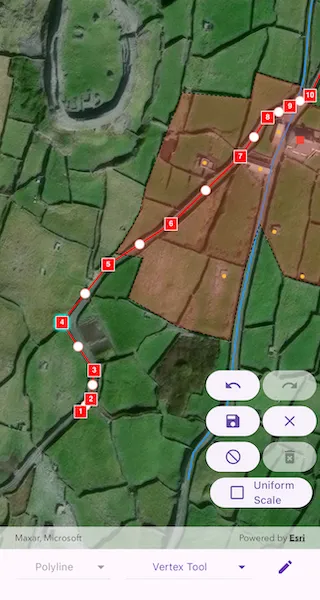
Use case
A field worker can mark features of interest on a map using an appropriate geometry. Features such as sample or observation locations, fences or pipelines, and building footprints can be digitized using point, multipoint, polyline, and polygon geometry types. Polyline and polygon geometries can be created and edited using a vertex-based creation and editing tool (i.e. vertex locations specified explicitly via tapping), or using a freehand tool.
How to use the sample
To create a new geometry, select the geometry type you want to create using the dropdown menu (i.e. points, multipoints, polyline, or polygon) and interactively tap and drag on the map view to create the geometry.
To edit an existing geometry, tap the geometry to be edited in the map and then perform edits by tapping and dragging its elements.
When the whole geometry is selected, you can use the control handles to scale and rotate the geometry.
Choose the desired creation/editing tool from the tool dropdown menu. The VertexTool is selected by default. If editing point or multipoint geometries you can choose between the VertexTool or ReticleVertexTool. If editing polyline or polygon geometries you can additionally choose the FreehandTool, or one of the available ShapeTools.
When using the ReticleVertexTool, you can move the map position of the reticle by dragging and zooming the map. Insert a vertex under the reticle by tapping on the map. Move a vertex by tapping when the reticle is located over a vertex, drag the map to move the position of the reticle, then tap a second time to place the vertex.
Use the control panel to undo or redo changes made to the geometry, delete a selected element, save the geometry, stop the editing session and discard any edits, and remove all geometries from the map.
How it works
- Create a
GeometryEditorand set it to the map view controller’sgeometryEditorproperty. - Start the
GeometryEditorusingGeometryEditor.startWithGeometryType(GeometryType)to create a new geometry orGeometryEditor.startWithGeometry(Geometry)to edit an existing geometry.- If using the Geometry Editor to edit an existing geometry, the geometry must be retrieved from the graphics overlay being used to visualize the geometry prior to calling the start method. To do this:
- Use
ArcGISMapViewController.identifyGraphicsOverlay(...)to identify graphics at the location of a tap. - Await the
IdentifyGraphicsOverlayResultresult. - Find the desired graphic in the
IdentifyGraphicsOverlayResult.graphicslist. - Access the geometry associated with the
GraphicusingGraphic.geometry- this will be used in theGeometryEditor.startWithGeometry(Geometry)method.
- Use
- If using the Geometry Editor to edit an existing geometry, the geometry must be retrieved from the graphics overlay being used to visualize the geometry prior to calling the start method. To do this:
- Create
VertexTool,ReticleVertexTool,FreehandTool, orShapeToolobjects to define how the user interacts with the view to create or edit geometries, and set thetoolproperty of the geometry editor. - Edit a tool’s
InteractionConfigurationto set theGeometryEditorScaleModeto allow either uniform or stretch scale mode. - Check to see if undo and redo are possible during an editing session by listening to the
GeometryEditor.onCanUndoChangedandGeomtryEditor.onCanRedoChangedevents. If it’s possible, useGeometryEditor.undo()andGeometryEditor.redo(). - Check whether the currently selected
GeometryEditorElementcan be deleted (GeometryEditor.selectedElement.canDelete). If the element can be deleted, delete usingGeometryEditor.deleteSelectedElement. - Call
GeometryEditor.stop()to finish the editing session. TheGeometryEditordoes not automatically handle the visualization of a geometry output from an editing session. This must be done manually by propagating the geometry returned byGeometryEditor.stop()into aGraphicadded to aGraphicsOverlay.- To create a new
Graphicin theGraphicsOverlay:- Using
Graphic(Geometry), create a new Graphic with the geometry returned by theGeometryEditor.stop()method. - Append the
Graphicto the list of graphics on theGraphicsOverlay’s usingGraphicsOverlay.graphics.add(Graphic).
- Using
- To update the geometry underlying an existing
Graphicin theGraphicsOverlay:- Replace the existing
Graphic’sGeometryproperty with the geometry returned byGeometryEditor.stop().
- Replace the existing
- To create a new
Relevant API
- ArcGISMapView
- Geometry
- GeometryEditor
- Graphic
- GraphicsOverlay
Additional information
The sample opens with the ArcGIS Imagery basemap centered on the island of Inis Meáin (Aran Islands) in Ireland. Inis Meáin comprises a landscape of interlinked stone walls, roads, buildings, archaeological sites, and geological features, producing complex geometrical relationships.
Tags
draw, edit, freehand, geometry editor, sketch, vertex
Sample code
// Copyright 2024 Esri//// Licensed under the Apache License, Version 2.0 (the "License");// you may not use this file except in compliance with the License.// You may obtain a copy of the License at////   https://www.apache.org/licenses/LICENSE-2.0//// Unless required by applicable law or agreed to in writing, software// distributed under the License is distributed on an "AS IS" BASIS,// WITHOUT WARRANTIES OR CONDITIONS OF ANY KIND, either express or implied.// See the License for the specific language governing permissions and// limitations under the License.//
import 'package:arcgis_maps/arcgis_maps.dart';import 'package:arcgis_maps_sdk_flutter_samples/common/common.dart';import 'package:flutter/material.dart';
class CreateAndEditGeometries extends StatefulWidget {  const CreateAndEditGeometries({super.key});
  @override  State<CreateAndEditGeometries> createState() =>      _CreateAndEditGeometriesState();}
class _CreateAndEditGeometriesState extends State<CreateAndEditGeometries>    with SampleStateSupport {  // Create a controller for the map view.  final _mapViewController = ArcGISMapView.createController();  // Create a graphics overlay.  final _graphicsOverlay = GraphicsOverlay();  // Create a geometry editor.  final _geometryEditor = GeometryEditor();
  // Create a list of geometry types to make available for editing.  final _geometryTypes = [    GeometryType.point,    GeometryType.multipoint,    GeometryType.polyline,    GeometryType.polygon,  ];
  // Create symbols which will be used for each geometry type.  late final SimpleMarkerSymbol _pointSymbol;  late final SimpleMarkerSymbol _multipointSymbol;  late final SimpleLineSymbol _polylineSymbol;  late final SimpleFillSymbol _polygonSymbol;
  // Create a selection of tools to make available to the geometry editor.  final _vertexTool = VertexTool();  final _reticleVertexTool = ReticleVertexTool();  final _freehandTool = FreehandTool();  final _arrowShapeTool = ShapeTool(shapeType: ShapeToolType.arrow);  final _ellipseShapeTool = ShapeTool(shapeType: ShapeToolType.ellipse);  final _rectangleShapeTool = ShapeTool(shapeType: ShapeToolType.rectangle);  final _triangleShapeTool = ShapeTool(shapeType: ShapeToolType.triangle);
  // Create variables for holding state relating to the geometry editor for controlling the UI.  GeometryType? _selectedGeometryType;  GeometryEditorTool? _selectedTool;  Graphic? _selectedGraphic;  var _selectedScaleMode = GeometryEditorScaleMode.stretch;  var _geometryEditorCanUndo = false;  var _geometryEditorCanRedo = false;  var _geometryEditorIsStarted = false;  var _geometryEditorHasSelectedElement = false;  // A flag for controlling the visibility of the editing toolbar.  var _showEditToolbar = true;
  @override  Widget build(BuildContext context) {    return Scaffold(      body: SafeArea(        top: false,        left: false,        right: false,        child: Stack(          children: [            Column(              children: [                Expanded(                  // Add a map view to the widget tree and set a controller.                  child: ArcGISMapView(                    controllerProvider: () => _mapViewController,                    onMapViewReady: onMapViewReady,                    // Only select existing graphics to edit if the geometry editor is not started                    // i.e. editing is not already in progress.                    onTap: !_geometryEditorIsStarted ? onTap : null,                  ),                ),                // Build the bottom menu.                buildBottomMenu(),              ],            ),            Visibility(              visible: _showEditToolbar,              // Build the editing toolbar.              child: buildEditingToolbar(),            ),          ],        ),      ),    );  }
  Future<void> onMapViewReady() async {    // Create a map with an imagery basemap style.    final map = ArcGISMap.withBasemapStyle(BasemapStyle.arcGISImageryStandard);    // Set the map to the map view controller.    _mapViewController.arcGISMap = map;    // Add the graphics overlay to the map view.    _mapViewController.graphicsOverlays.add(_graphicsOverlay);    // Configure some initial graphics.    _graphicsOverlay.graphics.addAll(initialGraphics());    // Set an initial viewpoint over the graphics.    _mapViewController.setViewpoint(      Viewpoint.fromCenter(        ArcGISPoint(          x: -9.5920,          y: 53.08230,          spatialReference: SpatialReference(wkid: 4326),        ),        scale: 5000,      ),    );    // Do some initial configuration of the geometry editor.    // Initially set the created vertex tool as the current tool.    setState(() => _selectedTool = _vertexTool);    _geometryEditor.tool = _vertexTool;    // Listen to changes in canUndo and canRedo in order to enable/disable the UI.    _geometryEditor.onCanUndoChanged.listen(      (canUndo) => setState(() => _geometryEditorCanUndo = canUndo),    );    _geometryEditor.onCanRedoChanged.listen(      (canRedo) => setState(() => _geometryEditorCanRedo = canRedo),    );    // Listen to changes in isStarted in order to enable/disable the UI.    _geometryEditor.onIsStartedChanged.listen(      (isStarted) => setState(() => _geometryEditorIsStarted = isStarted),    );    // Listen to changes in the selected element in order to enable/disable the UI.    _geometryEditor.onSelectedElementChanged.listen(      (selectedElement) => setState(        () => _geometryEditorHasSelectedElement = selectedElement != null,      ),    );    // Set the geometry editor to the map view controller.    _mapViewController.geometryEditor = _geometryEditor;  }
  Future<void> onTap(Offset localPosition) async {    // Perform an identify operation on the graphics overlay at the tapped location.    final identifyResult = await _mapViewController.identifyGraphicsOverlay(      _graphicsOverlay,      screenPoint: localPosition,      tolerance: 12,    );
    // Get the features from the identify result.    final graphics = identifyResult.graphics;
    if (graphics.isNotEmpty) {      final graphic = graphics.first;      if (graphic.geometry != null) {        final geometry = graphic.geometry!;        // Hide the selected graphic so that only the version of the graphic that is being edited is visible.        graphic.isVisible = false;        // Set the graphic as the selected graphic and also set the selected geometry type to update the UI.        _selectedGraphic = graphic;        setState(() => _selectedGeometryType = geometry.geometryType);        // If a point or multipoint has been selected, we need to use a vertex tool - the UI also needs updating.        if (geometry.geometryType == GeometryType.point ||            geometry.geometryType == GeometryType.multipoint) {          _geometryEditor.tool = _vertexTool;          setState(() => _selectedTool = _vertexTool);        }        // Start the geometry editor using the geometry of the graphic.        _geometryEditor.startWithGeometry(geometry);      }    }  }
  void startEditingWithGeometryType(GeometryType geometryType) {    // Set the selected geometry type.    setState(() => _selectedGeometryType = geometryType);    _geometryEditor.startWithGeometryType(geometryType);  }
  void stopAndSave() {    // Get the geometry from the geometry editor.    final geometry = _geometryEditor.stop();
    if (geometry != null) {      if (_selectedGraphic != null) {        // If there was a selected graphic being edited, update it.        _selectedGraphic!.geometry = geometry;        _selectedGraphic!.isVisible = true;        // Reset the selected graphic to null.        _selectedGraphic = null;      } else {        // If there was no existing graphic, create a new one and add to the graphics overlay.        final graphic = Graphic(geometry: geometry);        // Apply a symbol to the graphic depending on the geometry type.        final geometryType = geometry.geometryType;        if (geometryType == GeometryType.point) {          graphic.symbol = _pointSymbol;        } else if (geometryType == GeometryType.multipoint) {          graphic.symbol = _multipointSymbol;        } else if (geometryType == GeometryType.polyline) {          graphic.symbol = _polylineSymbol;        } else if (geometryType == GeometryType.polygon) {          graphic.symbol = _polygonSymbol;        }        _graphicsOverlay.graphics.add(graphic);      }    }
    // Reset the selected geometry type to null.    setState(() => _selectedGeometryType = null);  }
  void stopAndDiscardEdits() {    // Stop the geometry editor. No need to capture the geometry as we are discarding.    _geometryEditor.stop();    if (_selectedGraphic != null) {      // If editing a previously existing geometry, reset the selectedGraphic.      _selectedGraphic!.isVisible = true;      _selectedGraphic = null;    }    // Reset the selected geometry type.    setState(() => _selectedGeometryType = null);  }
  void toggleScale() {    // Toggle the selected scale mode and then update each tool with the new value.    setState(      () => _selectedScaleMode =          _selectedScaleMode == GeometryEditorScaleMode.uniform          ? GeometryEditorScaleMode.stretch          : GeometryEditorScaleMode.uniform,    );    _vertexTool.configuration.scaleMode = _selectedScaleMode;    _freehandTool.configuration.scaleMode = _selectedScaleMode;    _arrowShapeTool.configuration.scaleMode = _selectedScaleMode;    _ellipseShapeTool.configuration.scaleMode = _selectedScaleMode;    _rectangleShapeTool.configuration.scaleMode = _selectedScaleMode;    _triangleShapeTool.configuration.scaleMode = _selectedScaleMode;  }
  List<DropdownMenuItem<GeometryType>> configureGeometryTypeMenuItems() {    // Returns a list of drop down menu items for each geometry type.    return _geometryTypes.map((type) {      // All geometry types can be created using a vertex or reticle vertex tool.      // Only polyline and polygon geometry types can be created using freehand or shape tools.      final isVertexTool =          _selectedTool == _vertexTool || _selectedTool == _reticleVertexTool;      if (type == GeometryType.point || type == GeometryType.multipoint) {        return DropdownMenuItem(          enabled: isVertexTool,          value: type,          child: Text(            type.name.capitalize(),            style: isVertexTool                ? null                : const TextStyle(                    color: Colors.grey,                    fontStyle: FontStyle.italic,                  ),          ),        );      } else {        return DropdownMenuItem(          value: type,          child: Text(type.name.capitalize()),        );      }    }).toList();  }
  List<DropdownMenuItem<GeometryEditorTool>> configureToolMenuItems() {    // A list of all tools with an identifying name to display in the UI.    final tools = {      _vertexTool: 'Vertex Tool',      _reticleVertexTool: 'Reticle Vertex Tool',      _freehandTool: 'Freehand Tool',      _arrowShapeTool: 'Arrow Shape Tool',      _ellipseShapeTool: 'Ellipse Shape Tool',      _rectangleShapeTool: 'Rectangle Shape Tool',      _triangleShapeTool: 'Triangle Shape Tool',    };
    // Vertex and reticle vertex tools are compatible with all geometry types.    // Freehand and shape tools are only compatible with polyline or polygon.    // We also enable selection of freehand/shape tools when a geometry type has not yet been selected.    final isNotPointOrMultipoint =        _selectedGeometryType != GeometryType.point &&        _selectedGeometryType != GeometryType.multipoint;
    return tools.keys.map((tool) {      if (tool == _vertexTool || tool == _reticleVertexTool) {        return DropdownMenuItem(          value: tool,          child: Text(tools[tool] ?? 'Unknown Tool'),        );      } else {        return DropdownMenuItem(          enabled: isNotPointOrMultipoint,          value: tool,          child: Text(            tools[tool] ?? 'Unknown Tool',            style: isNotPointOrMultipoint                ? null                : const TextStyle(                    color: Colors.grey,                    fontStyle: FontStyle.italic,                  ),          ),        );      }    }).toList();  }
  Widget buildBottomMenu() {    return Row(      mainAxisAlignment: MainAxisAlignment.spaceEvenly,      children: [        // A drop down button for selecting geometry type.        DropdownButton(          alignment: Alignment.center,          hint: Text(            'Geometry Type',            style: Theme.of(context).textTheme.labelMedium,          ),          icon: const Icon(Icons.arrow_drop_down),          iconEnabledColor: Theme.of(context).colorScheme.primary,          iconDisabledColor: Theme.of(context).disabledColor,          style: Theme.of(context).textTheme.labelMedium,          value: _selectedGeometryType,          items: configureGeometryTypeMenuItems(),          // If the geometry editor is already started then we fully disable the DropDownButton and prevent editing with another geometry type.          onChanged: !_geometryEditorIsStarted              ? (GeometryType? geometryType) {                  if (geometryType != null) {                    startEditingWithGeometryType(geometryType);                  }                }              : null,        ),        // A drop down button for selecting a tool.        DropdownButton(          alignment: Alignment.center,          hint: Text('Tool', style: Theme.of(context).textTheme.labelMedium),          iconEnabledColor: Theme.of(context).colorScheme.primary,          style: Theme.of(context).textTheme.labelMedium,          value: _selectedTool,          items: configureToolMenuItems(),          onChanged: (tool) {            if (tool != null) {              setState(() => _selectedTool = tool);              _geometryEditor.tool = tool;            }          },        ),        // A button to toggle the visibility of the editing toolbar.        IconButton(          onPressed: () => setState(() => _showEditToolbar = !_showEditToolbar),          icon: const Icon(Icons.edit),        ),      ],    );  }
  Widget buildEditingToolbar() {    // A toolbar of buttons with icons for editing functions. Tooltips are used to aid the user experience.    return Padding(      padding: const EdgeInsets.only(bottom: 100, right: 5),      child: Row(        mainAxisAlignment: MainAxisAlignment.end,        children: [          Column(            mainAxisAlignment: MainAxisAlignment.end,            children: [              Row(                spacing: 4,                children: [                  // A button to call undo on the geometry editor, if enabled.                  Tooltip(                    message: 'Undo',                    child: ElevatedButton(                      onPressed:                          _geometryEditorIsStarted && _geometryEditorCanUndo                          ? _geometryEditor.undo                          : null,                      child: const Icon(Icons.undo),                    ),                  ),                  // A button to call redo on the geometry editor, if enabled.                  Tooltip(                    message: 'Redo',                    child: ElevatedButton(                      onPressed:                          _geometryEditorIsStarted && _geometryEditorCanRedo                          ? _geometryEditor.redo                          : null,                      child: const Icon(Icons.redo),                    ),                  ),                ],              ),              Row(                spacing: 4,                children: [                  // A button to stop and save edits.                  Tooltip(                    message: 'Stop and save edits',                    child: ElevatedButton(                      onPressed: _geometryEditorIsStarted ? stopAndSave : null,                      child: const Icon(Icons.save),                    ),                  ),                  // A button to delete the selected element on the geometry editor.                  Tooltip(                    message: 'Delete selected element',                    child: ElevatedButton(                      onPressed:                          _geometryEditorIsStarted &&                              _geometryEditorHasSelectedElement &&                              _geometryEditor.selectedElement != null &&                              _geometryEditor.selectedElement!.canDelete                          ? _geometryEditor.deleteSelectedElement                          : null,                      child: const Icon(Icons.clear),                    ),                  ),                ],              ),              Row(                spacing: 4,                children: [                  // A button to stop the geometry editor and discard all edits.                  Tooltip(                    message: 'Stop and discard edits',                    child: ElevatedButton(                      onPressed: _geometryEditorIsStarted                          ? stopAndDiscardEdits                          : null,                      child: const Icon(Icons.not_interested_sharp),                    ),                  ),                  // A button to clear all graphics from the graphics overlay.                  Tooltip(                    message: 'Delete all graphics',                    child: ElevatedButton(                      onPressed: !_geometryEditorIsStarted                          ? () => _graphicsOverlay.graphics.clear()                          : null,                      child: const Icon(Icons.delete_forever),                    ),                  ),                ],              ),              // A button to toggle the scale mode setting of the geometry editor tools.              ElevatedButton(                // Scale mode is not compatible with point geometry types or the reticle vertex tool.                onPressed:                    _selectedGeometryType == GeometryType.point ||                        _selectedTool == _reticleVertexTool                    ? null                    : toggleScale,                child: Row(                  mainAxisAlignment: MainAxisAlignment.spaceBetween,                  spacing: 10,                  children: [                    Icon(                      _selectedScaleMode == GeometryEditorScaleMode.uniform                          ? Icons.check_box                          : Icons.check_box_outline_blank,                    ),                    const Text('Uniform\nScale'),                  ],                ),              ),            ],          ),        ],      ),    );  }
  List<Graphic> initialGraphics() {    // Create symbols for each geometry type.    _pointSymbol = SimpleMarkerSymbol(      style: SimpleMarkerSymbolStyle.square,      color: Colors.red,      size: 10,    );    _multipointSymbol = SimpleMarkerSymbol(color: Colors.yellow, size: 5);    _polylineSymbol = SimpleLineSymbol(color: Colors.blue, width: 2);    final outlineSymbol = SimpleLineSymbol(      style: SimpleLineSymbolStyle.dash,      color: Colors.black,    );    _polygonSymbol = SimpleFillSymbol(      color: Colors.red.withValues(alpha: 0.3),      outline: outlineSymbol,    );
    // Create geometries from JSON strings.    const pointJson = '''          {"x":-1067898.59, "y":6998366.62,          "spatialReference":{"latestWkid":3857,"wkid":102100}}''';    final houseGeometry = Geometry.fromJsonString(pointJson);
    const multipointJson = '''        {"points":[[-1067984.26,6998346.28],[-1067966.80,6998244.84],            [-1067921.88,6998284.65],[-1067934.36,6998340.74],            [-1067917.93,6998373.97],[-1067828.30,6998355.28],            [-1067832.25,6998339.70],[-1067823.10,6998336.93],            [-1067873.22,6998386.78],[-1067896.72,6998244.49]],        "spatialReference":{"latestWkid":3857,"wkid":102100}}''';    final outbuildingsGeometry = Geometry.fromJsonString(multipointJson);
    const polylineOneJson = '''        {"paths":[[[-1068095.40,6998123.52],[-1068086.16,6998134.60],            [-1068083.20,6998160.44],[-1068104.27,6998205.37],            [-1068070.63,6998255.22],[-1068014.44,6998291.54],            [-1067952.33,6998351.85],[-1067927.93,6998386.93],            [-1067907.97,6998396.78],[-1067889.86,6998406.63],            [-1067848.08,6998495.26],[-1067832.92,6998521.11]]],        "spatialReference":{"latestWkid":3857,"wkid":102100}}''';    final roadOneGeometry = Geometry.fromJsonString(polylineOneJson);
    const polylineTwoJson = '''        {"paths":[[[-1067999.28,6998061.97],[-1067994.48,6998086.59],            [-1067964.53,6998125.37],[-1067952.70,6998215.84],            [-1067923.13,6998347.54],[-1067903.90,6998391.86],            [-1067895.40,6998422.02],[-1067891.70,6998460.18],            [-1067889.49,6998483.56],[-1067880.98,6998527.26]]],        "spatialReference":{"latestWkid":3857,"wkid":102100}}''';    final roadTwoGeometry = Geometry.fromJsonString(polylineTwoJson);
    const polygonJson = '''        {"rings":[[[-1067943.67,6998403.86],[-1067938.17,6998427.60],            [-1067898.77,6998415.86],[-1067888.26,6998398.80],            [-1067800.85,6998372.93],[-1067799.61,6998342.81],            [-1067809.38,6998330.00],[-1067817.07,6998307.85],            [-1067838.07,6998285.34],[-1067849.10,6998250.38],            [-1067874.02,6998256.00],[-1067879.87,6998235.95],            [-1067913.41,6998245.03],[-1067934.84,6998291.34],            [-1067948.41,6998251.90],[-1067961.18,6998186.68],            [-1068008.59,6998199.49],[-1068052.89,6998225.45],            [-1068039.37,6998261.11],[-1068064.12,6998265.26],            [-1068043.32,6998299.88],[-1068036.25,6998327.93],            [-1068004.43,6998409.28],[-1067943.67,6998403.86]]],        "spatialReference":{"latestWkid":3857,"wkid":102100}}''';    final boundaryGeometry = Geometry.fromJsonString(polygonJson);
    // Return a list of graphics for each geometry type.    return [      Graphic(geometry: houseGeometry, symbol: _pointSymbol),      Graphic(geometry: outbuildingsGeometry, symbol: _multipointSymbol),      Graphic(geometry: roadOneGeometry, symbol: _polylineSymbol),      Graphic(geometry: roadTwoGeometry, symbol: _polylineSymbol),      Graphic(geometry: boundaryGeometry, symbol: _polygonSymbol),    ];  }}
extension on String {  // An extension on String to capitalize the first character of the String.  String capitalize() {    return '${this[0].toUpperCase()}${substring(1).toLowerCase()}';  }}