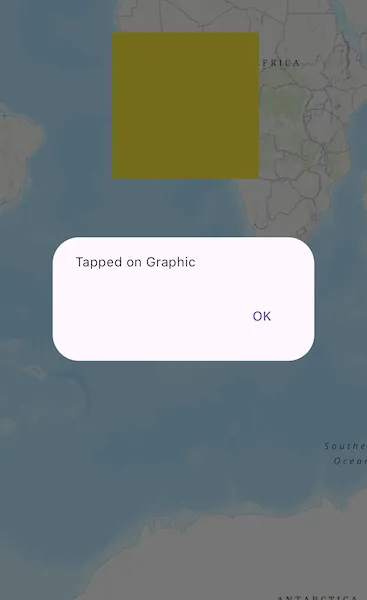
Display an alert message when a graphic is tapped.
Use case
A user may wish to select a graphic on a map to view relevant information about it.
How to use the sample
Tap on a graphic to identify it. You will see an alert dialog displayed.
How it works
- Create a
GraphicsOverlayand add it to theArcGISMapView. - Add a
Graphicalong with aSimpleFillSymbolto the graphics overlay. - Identify the location clicked on the map view by the user with a
onTapmethod. - Identify the graphic on the map view with
identifyGraphicsOverlay(graphicsOverlay, screenPoint, tolerance, maximumResults).
Relevant API
- ArcGISMapView
- Graphic
- GraphicsOverlay
Tags
graphics, identify
Sample code
identify_graphics.dart
// Copyright 2024 Esri//// Licensed under the Apache License, Version 2.0 (the "License");// you may not use this file except in compliance with the License.// You may obtain a copy of the License at////   https://www.apache.org/licenses/LICENSE-2.0//// Unless required by applicable law or agreed to in writing, software// distributed under the License is distributed on an "AS IS" BASIS,// WITHOUT WARRANTIES OR CONDITIONS OF ANY KIND, either express or implied.// See the License for the specific language governing permissions and// limitations under the License.//
import 'package:arcgis_maps/arcgis_maps.dart';import 'package:arcgis_maps_sdk_flutter_samples/common/common.dart';import 'package:flutter/material.dart';
class IdentifyGraphics extends StatefulWidget {  const IdentifyGraphics({super.key});
  @override  State<IdentifyGraphics> createState() => _IdentifyGraphicsState();}
class _IdentifyGraphicsState extends State<IdentifyGraphics>    with SampleStateSupport {  // Create a controller for the map view.  final _mapViewController = ArcGISMapView.createController();  // Graphic to store the polygon.  late final Graphic _graphic;  // Graphics overlay to present the graphics for the sample.  final _graphicsOverlay = GraphicsOverlay();  // A flag for when the map view is ready and controls can be used.  var _ready = false;
  @override  Widget build(BuildContext context) {    return Scaffold(      body: Stack(        children: [          Column(            children: [              Expanded(                // Add a map view to the widget tree and set a controller.                child: ArcGISMapView(                  controllerProvider: () => _mapViewController,                  onMapViewReady: onMapViewReady,                  onTap: onTap,                ),              ),            ],          ),          // Display a progress indicator and prevent interaction until state is ready.          LoadingIndicator(visible: !_ready),        ],      ),    );  }
  Future<void> onMapViewReady() async {    // Create a map with a topographic basemap.    final map = ArcGISMap.withBasemapStyle(BasemapStyle.arcGISTopographic);    // Create a polygon geometry.    final polygonBuilder = PolygonBuilder(      spatialReference: _mapViewController.spatialReference,    );    // Add points to the polygon.    polygonBuilder.addPointXY(x: -2000000, y: 2000000);    polygonBuilder.addPointXY(x: 2000000, y: 2000000);    polygonBuilder.addPointXY(x: 2000000, y: -2000000);    polygonBuilder.addPointXY(x: -2000000, y: -2000000);    // Create a graphic with the polygon geometry and a yellow fill symbol.    _graphic = Graphic(      geometry: polygonBuilder.toGeometry(),      symbol: SimpleFillSymbol(color: Colors.yellow),    );
    // Add the graphics to the graphics overlay.    _graphicsOverlay.graphics.add(_graphic);    // Add the graphics overlay to the map view controller.    _mapViewController.graphicsOverlays.add(_graphicsOverlay);    // Set the viewpoint to the graphic.    _mapViewController.setViewpoint(      Viewpoint.fromTargetExtent(_graphic.geometry!.extent),    );    // Set the map to the map view controller.    _mapViewController.arcGISMap = map;    // Set the ready state variable to true to enable the sample UI.    setState(() => _ready = true);  }
  Future<void> onTap(Offset offset) async {    // Identify the graphics overlay at the tapped point.    final identifyGraphicsOverlay = await _mapViewController        .identifyGraphicsOverlay(          _graphicsOverlay,          screenPoint: offset,          tolerance: 12,          maximumResults: 10,        );    // Check if the identified graphic is the same as the sample graphic.    if (identifyGraphicsOverlay.graphics.isNotEmpty) {      final identifiedGraphic = identifyGraphicsOverlay.graphics.first;      if (identifiedGraphic == _graphic) {        showMessageDialog(          'Tapped on Graphic',          title: 'Identify Graphics',          showOK: true,        );      }    }  }}