Build a legend for all the operational layers in the map.
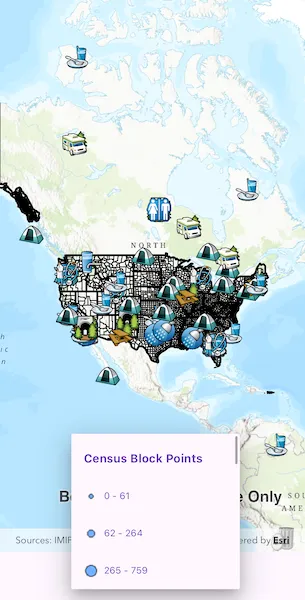
Use case
Legends are used to describe what each symbol on a map represents. A common format is to show an image of the symbol alongside of a text description of what that symbol represents. This sample demonstrates how a simple legend can be built up in code using the LayerContent interface.
How to use the sample
- Open the sample
- Flick through the legend control to see the various elements that represent features on the map.
How it works
- Layers implement the
LayerContentinterface, which contain a list ofLegendInfo.LegendInfocontains aSymboland a name string.layer.fetchLegendInfos()must be called on eachLayerinstance to fetch the info from the data. - For each symbol in the
LegendInfolist,symbol.createSwatch()must be called so that an image of theSymbolis returned. - The names and images are then displayed next to each other in a list view UI control.
Relevant API
- LayerContent
- LegendInfo
Tags
legend, legend info, symbol swatch
Sample code
show_legend.dart
//// Copyright 2024 Esri//// Licensed under the Apache License, Version 2.0 (the "License");// you may not use this file except in compliance with the License.// You may obtain a copy of the License at////   https://www.apache.org/licenses/LICENSE-2.0//// Unless required by applicable law or agreed to in writing, software// distributed under the License is distributed on an "AS IS" BASIS,// WITHOUT WARRANTIES OR CONDITIONS OF ANY KIND, either express or implied.// See the License for the specific language governing permissions and// limitations under the License.//
import 'package:arcgis_maps/arcgis_maps.dart';import 'package:arcgis_maps_sdk_flutter_samples/common/common.dart';import 'package:flutter/material.dart';
class ShowLegend extends StatefulWidget {  const ShowLegend({super.key});
  @override  State<ShowLegend> createState() => _ShowLegendState();}
class _ShowLegendState extends State<ShowLegend> with SampleStateSupport {  // Create a map view controller.  final _mapViewController = ArcGISMapView.createController();
  // Create a map with a basemap style.  final _map = ArcGISMap.withBasemapStyle(BasemapStyle.arcGISTopographic);
  // Create a list to store dropdown items.  var _legendsDropDown = <DropdownMenuEntry<LegendInfo>>[];
  @override  Widget build(BuildContext context) {    return Scaffold(      body: SafeArea(        top: false,        left: false,        right: false,        child: Column(          // Add the map view and dropdown menu to a column.          children: [            Expanded(              // Add a map view to the widget tree and set a controller.              child: ArcGISMapView(                controllerProvider: () => _mapViewController,                onMapViewReady: onMapViewReady,              ),            ),            // Add a dropdown menu to the widget tree.            DropdownMenu(              menuHeight: 250,              width: 250,              hintText: 'Legend',              textStyle: Theme.of(context).textTheme.labelMedium,              // No need to set up onChanged callback.              onSelected: (_) {},              dropdownMenuEntries: _legendsDropDown,            ),          ],        ),      ),    );  }
  Future<void> onMapViewReady() async {    // Get the screen scale.    final screenScale = MediaQuery.of(context).devicePixelRatio;    // Create an image layer.    final imageLayer = ArcGISMapImageLayer.withUri(      Uri.parse(        'https://sampleserver6.arcgisonline.com/arcgis/rest/services/Census/MapServer',      ),    );    // Create a feature table.    final featureTable = ServiceFeatureTable.withUri(      Uri.parse(        'https://sampleserver6.arcgisonline.com/arcgis/rest/services/Recreation/FeatureServer/0',      ),    );    // Create a feature layer.    final featureLayer = FeatureLayer.withFeatureTable(featureTable);    // Add image and feature layers to the operational layers list of the map.    _map.operationalLayers.addAll([imageLayer, featureLayer]);    // Load the image and feature layers.    await featureLayer.load();    await imageLayer.load();    // Create a list to store operational layers and populate it with image and feature layers.    final operationalLayersList = <LayerContent>[      ...imageLayer.subLayerContents,      featureLayer,    ];
    // Create a list to store dropdown items.    final legendsDropDown = <DropdownMenuEntry<LegendInfo>>[];    // Get the legend info for each layer and add it to the legends dropdown list.    for (final layer in operationalLayersList) {      // Get the legend info for the current layer.      final layerLegends = await layer.fetchLegendInfos();      // Add the name of the current layer.      legendsDropDown.add(        DropdownMenuEntry(          value: layerLegends.first,          label: layer.name,          labelWidget: Text(            layer.name,            style: const TextStyle(fontSize: 15, fontWeight: FontWeight.bold),          ),        ),      );
      // Add current layer's legends to the dropdown list.      for (final legend in layerLegends) {        ArcGISImage? arcGISImage;        const symbolSize = Size.square(6);        // Create a swatch for the legend if the legend exists.        if (legend.symbol != null) {          arcGISImage = await legend.symbol!.createSwatch(            screenScale: screenScale,            width: symbolSize.width,            height: symbolSize.height,          );        }        // Add the legend to the legends list.        legendsDropDown.add(          DropdownMenuEntry(            value: legend,            label: legend.name,            labelWidget: Row(              spacing: 8,              children: [                // Add the legend image to the dropdown list if the image exists.                if (arcGISImage != null)                  Image.memory(arcGISImage.getEncodedBuffer())                else                  const SizedBox.shrink(),                // Add the legend name to the dropdown list.                Text(legend.name, style: const TextStyle(fontSize: 12)),              ],            ),          ),        );      }    }    // Reset the state once the dropdown list is updated.    setState(() => _legendsDropDown = legendsDropDown);
    // Set the map to the map view controller.    _mapViewController.arcGISMap = _map;    // Set the initial viewpoint of the map.    _map.initialViewpoint = Viewpoint.fromCenter(      ArcGISPoint(        x: -11000000,        y: 6000000,        spatialReference: SpatialReference.webMercator,      ),      scale: 90000000,    );  }}