You can navigate a scene view (a 3D map):
- Using built-in navigation (described on this page), such as panning, zooming, and changing pitch
- By programmatically changing camera position
Built-in navigation
The scene view has a number of built-in gestures that allow you to navigate a scene (3D).
Basic navigation
Navigation for scene views is essentially the same as navigation for map views. Navigation in a scene view moves the position of a camera in 3D space and therefore has some subtle differences. The following table summarizes the built-in navigation capabilities of the ArcGISSceneView control.
| Navigation | User Action |
|---|---|
| Zoom in | Two finger pinch open Single finger double-tap |
| Zoom out | Two finger pinch close Two finger single-tap |
| Continuous zoom in / out | Single finger double-tap, ending in a vertical up/down drag |
| Move/Pan | Single finger drag or flick |
| Rotate the scene | Two finger rotate |
Advanced navigation
Scene views have additional navigation not found in map views:
| Navigation | User Action |
|---|---|
| Tilt the scene | Two finger up/down drag |
Programmatically change camera position
Your applications can programmatically navigate a 3D scene by creating a new camera and setting it to the scene view. A camera defines the location from which you are viewing the scene.

The camera is shown in this image for illustration purposes; when you set camera settings (location, pitch), think of the camera class a real-life camera you’re adjusting the position of.
Set the camera
For example, to point the camera to toward the Snowdon mountainside, use these values:
- For 3D location, use 53.06 latitude, -4.04 longitude, 1289 meters above sea level
- For heading, use 295 degrees
- For pitch, use 71 degrees
- For roll, use 0 degrees
// Set the camera to point at the Snowdon mountainside.final snowdonCamera = Camera.withLatLong(latitude: 53.06, longitude: -4.04, altitude: 1289, heading: 295, pitch: 71, roll: 0);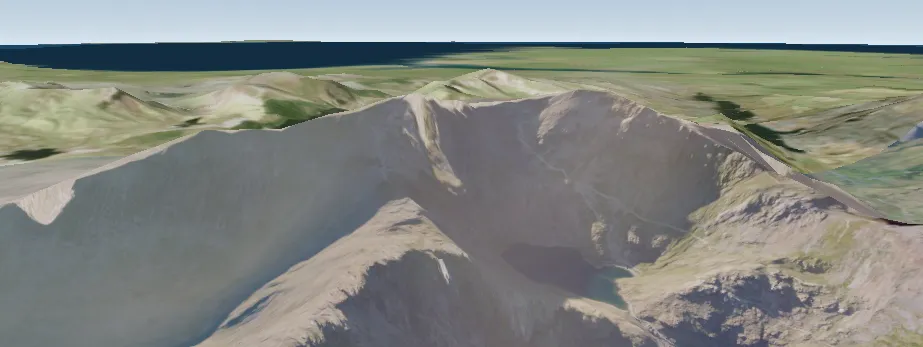
Now you have a new camera you can apply to your scene view. You can apply it immediately using setViewpointCamera as shown in the code below, or the camera can be animated to the new position using one of the asynchronous methods.
// Immediately change the display to the viewpoint specified by the// Snowdon camera.sceneViewController.setViewpointCamera(snowdonCamera);