Download tiles to a local tile cache file stored on the device.
Use case
Field workers with limited network connectivity can use exported tiles as a basemap for use offline.
How to use the sample
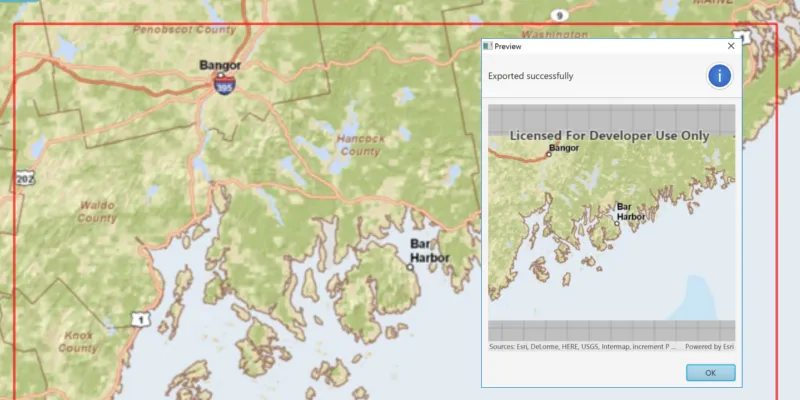
Pan and zoom into the desired area, making sure the area is within the red boundary. Click the ‘Export Tiles’ button to start the process. On successful completion you will see a preview of the downloaded tile package.
How it works
- Create an
ExportTileCacheTask, passing in the URI of the tiled layer. - Create default
ExportTileCacheParametersfor the task, specifying extent, minimum scale and maximum scale. - Use the parameters and a path to create an
ExportTileCacheJobfrom the task. - Start the job, and when it completes successfully, get the resulting
TileCache. - Use the tile cache to create an
ArcGISTiledLayer, and display it in the map.
Relevant API
- ArcGISTiledLayer
- ExportTileCacheJob
- ExportTileCacheParameters
- ExportTileCacheTask
- TileCache
Additional information
ArcGIS tiled layers do not support reprojection, query, select, identify, or editing. See the Layer types discussion in the ArcGIS Developers Java guide to learn more about the characteristics of ArcGIS tiled layers.
Tags
cache, download, offline
Sample code
ExportTilesSample.java
/* * Copyright 2017 Esri. * * Licensed under the Apache License, Version 2.0 (the "License"); you may not * use this file except in compliance with the License. You may obtain a copy of * the License at * * http://www.apache.org/licenses/LICENSE-2.0 * * Unless required by applicable law or agreed to in writing, software * distributed under the License is distributed on an "AS IS" BASIS, WITHOUT * WARRANTIES OR CONDITIONS OF ANY KIND, either express or implied. See the * License for the specific language governing permissions and limitations under * the License. */
package com.esri.samples.export_tiles;
import java.io.File;import java.io.IOException;import java.util.concurrent.ExecutionException;
import javafx.application.Application;import javafx.geometry.Insets;import javafx.geometry.Point2D;import javafx.geometry.Pos;import javafx.scene.Scene;import javafx.scene.control.Alert;import javafx.scene.control.Button;import javafx.scene.control.ProgressBar;import javafx.scene.layout.StackPane;import javafx.scene.paint.Color;import javafx.stage.Stage;
import com.esri.arcgisruntime.ArcGISRuntimeEnvironment;import com.esri.arcgisruntime.concurrent.Job;import com.esri.arcgisruntime.concurrent.ListenableFuture;import com.esri.arcgisruntime.data.TileCache;import com.esri.arcgisruntime.geometry.Envelope;import com.esri.arcgisruntime.geometry.Point;import com.esri.arcgisruntime.layers.ArcGISTiledLayer;import com.esri.arcgisruntime.layers.Layer;import com.esri.arcgisruntime.loadable.LoadStatus;import com.esri.arcgisruntime.mapping.ArcGISMap;import com.esri.arcgisruntime.mapping.Basemap;import com.esri.arcgisruntime.mapping.BasemapStyle;import com.esri.arcgisruntime.mapping.view.Graphic;import com.esri.arcgisruntime.mapping.view.GraphicsOverlay;import com.esri.arcgisruntime.mapping.view.MapView;import com.esri.arcgisruntime.mapping.Viewpoint;import com.esri.arcgisruntime.symbology.SimpleLineSymbol;import com.esri.arcgisruntime.tasks.tilecache.ExportTileCacheParameters;import com.esri.arcgisruntime.tasks.tilecache.ExportTileCacheTask;
public class ExportTilesSample extends Application {
  private MapView mapView;
  @Override  public void start(Stage stage) {
    try {      // create stack pane and application scene      StackPane stackPane = new StackPane();      Scene scene = new Scene(stackPane);
      // set title, size, and add scene to stage      stage.setTitle("Export Tiles Sample");      stage.setWidth(800);      stage.setHeight(700);      stage.setScene(scene);      stage.show();
      // authentication with an API key or named user is required to access basemaps and other location services      String yourAPIKey = System.getProperty("apiKey");      ArcGISRuntimeEnvironment.setApiKey(yourAPIKey);
      // create a new map with the imagery basemap style      ArcGISMap map = new ArcGISMap(BasemapStyle.ARCGIS_IMAGERY);
      // set the map to the map view      mapView = new MapView();      mapView.setMap(map);      // set the viewpoint over California, USA      mapView.setViewpointAsync(new Viewpoint(35, -117, 1e7));
      // create a graphics overlay for the map view      var graphicsOverlay = new GraphicsOverlay();      mapView.getGraphicsOverlays().add(graphicsOverlay);
      // create a graphic to show a red outline square around the tiles to be downloaded      Graphic downloadArea = new Graphic();      graphicsOverlay.getGraphics().add(downloadArea);      var simpleLineSymbol = new SimpleLineSymbol(SimpleLineSymbol.Style.SOLID, Color.RED, 2);      downloadArea.setSymbol(simpleLineSymbol);
      // update the square whenever the viewpoint changes      mapView.addViewpointChangedListener(viewpointChangedEvent -> {        if (map.getLoadStatus() == LoadStatus.LOADED) {          // upper left corner of the downloaded tile cache area          Point2D minScreenPoint = new Point2D(50, 50);          // lower right corner of the downloaded tile cache area          Point2D maxScreenPoint = new Point2D(mapView.getWidth() - 50, mapView.getHeight() - 50);          // convert screen points to map points          Point minPoint = mapView.screenToLocation(minScreenPoint);          Point maxPoint = mapView.screenToLocation(maxScreenPoint);          // use the points to define and return an envelope          if (minPoint != null && maxPoint != null) {            Envelope envelope = new Envelope(minPoint, maxPoint);            downloadArea.setGeometry(envelope);          }        }      });
      // when the map has loaded, create a tiled layer from it and export tiles      map.addDoneLoadingListener(() -> {        if (map.getLoadStatus() == LoadStatus.LOADED) {
          // check that the layer from the basemap is a tiled layer          Layer layer = map.getBasemap().getBaseLayers().get(0);          if (layer instanceof ArcGISTiledLayer) {            ArcGISTiledLayer tiledLayer = (ArcGISTiledLayer) layer;            // create progress bar to show task progress            var progressBar = new ProgressBar(0.0);            progressBar.setVisible(false);
            // create button to export tiles            Button exportTilesButton = new Button("Export Tiles");            // when the button is clicked, export the tiles to a temporary file            exportTilesButton.setOnAction(e -> {              try {                // disable the button and show the progress bar                exportTilesButton.setDisable(true);                progressBar.setVisible(true);
                // create a file                File tempFile = File.createTempFile("tiles", ".tpkx");                tempFile.deleteOnExit();
                // create a new export tile cache task                var exportTileCacheTask = new ExportTileCacheTask(tiledLayer.getUri());
                // create parameters for the export tiles job                double mapScale = mapView.getMapScale();                // the max scale parameter is set to 10% of the map's scale to limit the                // number of tiles exported to within the tiled layer's max tile export limit                ListenableFuture<ExportTileCacheParameters> exportTileCacheParametersListenableFuture =                  exportTileCacheTask.createDefaultExportTileCacheParametersAsync(downloadArea.getGeometry(), mapScale, mapScale * 0.1);
                exportTileCacheParametersListenableFuture.addDoneListener(() -> {                  try {                    var exportTileCacheParameters = exportTileCacheParametersListenableFuture.get();
                    // create a job with the parameters                    var exportTileCacheJob = exportTileCacheTask.exportTileCache(exportTileCacheParameters, tempFile.getAbsolutePath());
                    // start the job and wait for it to finish                    exportTileCacheJob.start();                    exportTileCacheJob.addProgressChangedListener(() -> progressBar.setProgress(exportTileCacheJob.getProgress() / 100.0));                    exportTileCacheJob.addJobDoneListener(() -> {                      if (exportTileCacheJob.getStatus() == Job.Status.SUCCEEDED) {
                        // show preview of exported tiles in alert window                        TileCache tileCache = exportTileCacheJob.getResult();                        Alert preview = new Alert(Alert.AlertType.INFORMATION);                        preview.initOwner(mapView.getScene().getWindow());                        preview.setTitle("Preview");                        preview.setHeaderText("Exported to " + tileCache.getPath());                        MapView previewMapView = new MapView();                        previewMapView.setMinSize(400, 400);                        ArcGISTiledLayer tiledLayerPreview = new ArcGISTiledLayer(tileCache);                        ArcGISMap previewMap = new ArcGISMap(new Basemap(tiledLayerPreview));                        previewMapView.setMap(previewMap);                        preview.getDialogPane().setContent(previewMapView);                        preview.show();                        // dispose of the preview mapview's resources                        preview.setOnCloseRequest(event -> previewMapView.dispose());
                      } else {                        new Alert(Alert.AlertType.ERROR, exportTileCacheJob.getError().getMessage()).show();                      }                      // reset the UI                      progressBar.setVisible(false);                      progressBar.setProgress(0);                      exportTilesButton.setDisable(false);                    });
                  } catch (InterruptedException | ExecutionException ex) {                    new Alert(Alert.AlertType.ERROR, ex.getMessage()).show();                    progressBar.setVisible(false);                    progressBar.setProgress(0);                  }                });
              } catch (IOException ex) {                new Alert(Alert.AlertType.ERROR, "Failed to create temporary file").show();              }
            });            // add the map view, button, and progress bar to stack pane            stackPane.getChildren().addAll(mapView, exportTilesButton, progressBar);            StackPane.setAlignment(exportTilesButton, Pos.BOTTOM_CENTER);            StackPane.setMargin(exportTilesButton, new Insets(0, 0, 100, 0));            StackPane.setAlignment(progressBar, Pos.BOTTOM_CENTER);            StackPane.setMargin(progressBar, new Insets(0, 0, 80, 0));          }
        } else {          new Alert(Alert.AlertType.ERROR, "Map could not be loaded").show();        }      });
    } catch (Exception e) {      // on any error, display the stack trace.      e.printStackTrace();    }  }
  /**   * Stops and releases all resources used in application.   */  @Override  public void stop() {
    if (mapView != null) {      mapView.dispose();    }  }
  /**   * Opens and runs application.   *   * @param args arguments passed to this application   */  public static void main(String[] args) {
    Application.launch(args);  }
}