Find webmap portal items by using a search term.
Use case
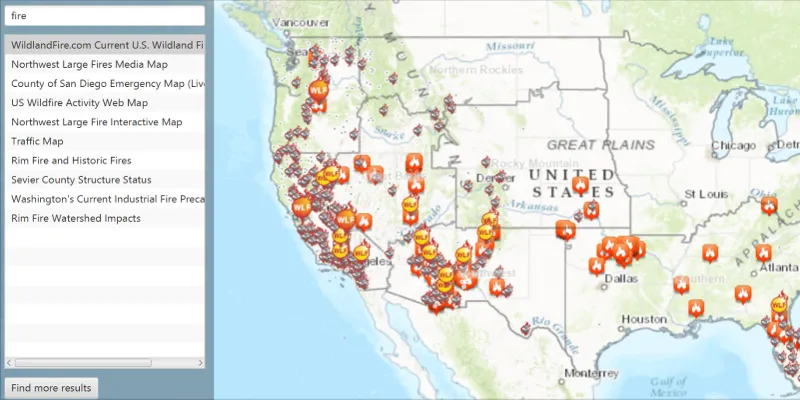
Portals can contain many portal items and at times you may wish to query the portal to find what you’re looking for. In this example, we search for webmap portal items using a text search.
How to use the sample
Enter search terms into the search bar. Once the search is complete, a list is populated with the resultant webmaps. Click on a webmap to set it to the map view. Click on the “Find more results” button to add more results to the list.
How it works
- Create a new
Portaland load it. - Create new
PortalQueryParameters. Set the type toPortalItem.Type.WEBMAPand add the text you want to search for. - Use
portal.findItemsAsync(params)to get the first set of matching items (10 by default). - Get more results with
portal.findItemsAsync(portalQueryResultSet.getNextQueryParameters()).
Relevant API
- Portal
- PortalItem
- PortalQueryParameters
- PortalQueryResultSet
Tags
keyword, query, search, webmap
Sample code
/* * Copyright 2017 Esri. * * Licensed under the Apache License, Version 2.0 (the "License"); you may not * use this file except in compliance with the License. You may obtain a copy of * the License at * * http://www.apache.org/licenses/LICENSE-2.0 * * Unless required by applicable law or agreed to in writing, software * distributed under the License is distributed on an "AS IS" BASIS, WITHOUT * WARRANTIES OR CONDITIONS OF ANY KIND, either express or implied. See the * License for the specific language governing permissions and limitations under * the License. */
package com.esri.samples.webmap_keyword_search;
import java.util.List;
import javafx.fxml.FXML;import javafx.scene.control.Alert;import javafx.scene.control.Button;import javafx.scene.control.ListCell;import javafx.scene.control.ListView;import javafx.scene.control.TextField;
import com.esri.arcgisruntime.concurrent.ListenableFuture;import com.esri.arcgisruntime.mapping.ArcGISMap;import com.esri.arcgisruntime.mapping.view.MapView;import com.esri.arcgisruntime.portal.Portal;import com.esri.arcgisruntime.portal.PortalItem;import com.esri.arcgisruntime.portal.PortalQueryParameters;import com.esri.arcgisruntime.portal.PortalQueryResultSet;
public class WebmapKeywordSearchController {
  @FXML private TextField keyword;  @FXML private MapView mapView;  @FXML private ListView<PortalItem> resultsList;  @FXML private Button moreButton;
  private Portal portal;  private PortalQueryResultSet<PortalItem> portalQueryResultSet;
  @FXML  private void initialize() {    // load a portal for arcgis.com    portal = new Portal("https://arcgis.com");    portal.loadAsync();
    resultsList.setCellFactory(c -> new PortalItemCell());
    // show the selected webmap in a map view    resultsList.getSelectionModel().selectedItemProperty().addListener(o -> {      PortalItem webmap = resultsList.getSelectionModel().getSelectedItem();      if (webmap != null) {        webmap.loadAsync();        mapView.setMap(new ArcGISMap(webmap));        // check if webmap supported        mapView.getMap().addDoneLoadingListener(() -> {          if (mapView.getMap().getLoadError() != null) {            showMessage("Unable to load map", mapView.getMap().getLoadError().getMessage(), Alert.AlertType.ERROR);          }        });      }    });  }
  /**   * Searches a portal for webmaps matching query string in the keyword text field. The list view is updated with   * the results.   */  @FXML  private void search() {
    // create query parameters specifying the type WEBMAP    PortalQueryParameters params = new PortalQueryParameters();    params.setQuery(PortalItem.Type.WEBMAP, null, keyword.getText());
    // find matching portal items    ListenableFuture<PortalQueryResultSet<PortalItem>> results = portal.findItemsAsync(params);    results.addDoneListener(() -> {      try {        // update the results list view with matching items        portalQueryResultSet = results.get();        List<PortalItem> portalItems = portalQueryResultSet.getResults();        resultsList.getItems().clear();        resultsList.getItems().addAll(portalItems);        moreButton.setDisable(false);      } catch (Exception e) {        e.printStackTrace();      }    });  }
  /**   * Adds the next set of results to the list view.   */  @FXML  private void getMoreResults() {    if (portalQueryResultSet.getNextQueryParameters() != null) {      // find matching portal items      ListenableFuture<PortalQueryResultSet<PortalItem>> results = portal.findItemsAsync(portalQueryResultSet.getNextQueryParameters());      results.addDoneListener(() -> {        try {          // replace the result set with the current set of results          portalQueryResultSet = results.get();          List<PortalItem> portalItems = portalQueryResultSet.getResults();
          // add set of results to list view          resultsList.getItems().addAll(portalItems);        } catch (Exception e) {          e.printStackTrace();        }      });    } else {      showMessage("End of results", "There are no more results matching this query", Alert.AlertType.INFORMATION);      moreButton.setDisable(true);    }  }
  /**   * Shows a Layer title in a ListView.   */  private class PortalItemCell extends ListCell<PortalItem> {
    @Override    protected void updateItem(PortalItem portalItem, boolean empty) {      super.updateItem(portalItem, empty);      setText(empty ? null : portalItem.getTitle());      setGraphic(null);    }  }
  /**   * Display an alert to the user with the specified information.   * @param title alert title   * @param description alert content description   * @param type alert type   */  private void showMessage(String title, String description, Alert.AlertType type) {
    Alert alert = new Alert(type);    alert.setTitle(title);    alert.setContentText(description);    alert.show();  }
  /**   * Stops and releases all resources used in application.   */  void terminate() {
    if (mapView != null) {      mapView.dispose();    }  }
}
/* * Copyright 2017 Esri. * * Licensed under the Apache License, Version 2.0 (the "License"); you may not * use this file except in compliance with the License. You may obtain a copy of * the License at * * http://www.apache.org/licenses/LICENSE-2.0 * * Unless required by applicable law or agreed to in writing, software * distributed under the License is distributed on an "AS IS" BASIS, WITHOUT * WARRANTIES OR CONDITIONS OF ANY KIND, either express or implied. See the * License for the specific language governing permissions and limitations under * the License. */
package com.esri.samples.webmap_keyword_search;
import java.io.IOException;
import javafx.application.Application;import javafx.fxml.FXMLLoader;import javafx.scene.Parent;import javafx.scene.Scene;import javafx.stage.Stage;
public class WebmapKeywordSearchSample extends Application {
private static WebmapKeywordSearchController controller;
@Override public void start(Stage stage) throws IOException { // set up the scene FXMLLoader loader = new FXMLLoader(getClass().getResource("/webmap_keyword_search/main.fxml")); Parent root = loader.load(); controller = loader.getController(); Scene scene = new Scene(root);
// set up the stage stage.setTitle("Webmap Keyword Search Sample"); stage.setWidth(800); stage.setHeight(700); stage.setScene(scene); stage.show(); }
/** * Stops and releases all resources used in application. */ @Override public void stop() { controller.terminate(); }
/** * Opens and runs application. * * @param args arguments passed to this application */ public static void main(String[] args) {
Application.launch(args); }}