Apply map algebra to an elevation raster to floor, mask, and categorize the elevation values into discrete integer-based categories.
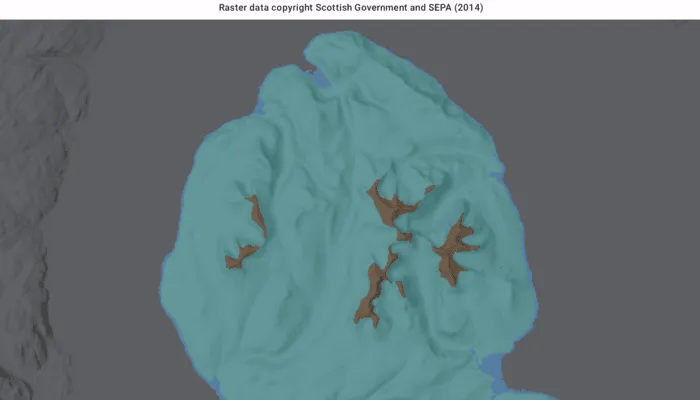
Use case
Categorizing raster data, such as elevation values, into distinct categories is a common spatial analysis workflow. This often involves applying threshold‑based logic or algebraic expressions to transform continuous numeric fields into discrete, integer‑based categories suitable for downstream analytical or computational operations. These operations can be specified and applied using map algebra.
How to use the sample
When the sample opens, it displays the source elevation raster. Tap the Categorize button to generate a raster with three distinct ice age related geomorphological categories (raised shore line areas in blue, ice free high ground in brown and areas covered by ice in teal). After processing completes, switch between the map algebra results raster and the original elevation raster.
How it works
- Create a
ContinuousFieldfrom a raster file. - Create a
ContinuousFieldFunctionfrom the continuous field and mask values below sea level. - Round elevation values down to the lowest 10-meter interval with map algebra operators
floor(continuousFieldFunction / 10f) * 10f, and then convert the result to aDiscreteFieldFunctionwith.toDiscreteFieldFunction. - Create
BooleanFieldFunctions for each category by defining a range with map algebra operators such asisGreaterThanOrEqualTo,and, andisLessThan. - Create a new
DiscreteFieldby chainingreplaceIfoperations into discrete category values and evaluating the result withevaluate. - Export the discrete field to files with
exportToFilesand create aRasterwith the result. Use it to create aRasterLayer. - Apply a
ColormapRendererto the raster and display it in the map view.
Relevant API
- BooleanFieldFunction
- Colormap
- ColormapRenderer
- ColorRamp
- ContinuousField
- ContinuousFieldFunction
- DiscreteField
- DiscreteFieldFunction
- Raster
- RasterLayer
- StretchRenderer
About the data
The sample uses a 10m resolution digital terrain elevation raster of the Isle of Arran, Scotland (Data Copyright Scottish Government and SEPA (2014)).
Additional information
This sample requires an ArcGIS Maps SDK Analysis extension license key. Without this license, the map algebra analysis will fail at runtime.
Tags
elevation, map algebra, raster, spatial analysis, terrain
Sample code
/* Copyright 2026 Esri * * Licensed under the Apache License, Version 2.0 (the "License"); * you may not use this file except in compliance with the License. * You may obtain a copy of the License at * *    http://www.apache.org/licenses/LICENSE-2.0 * * Unless required by applicable law or agreed to in writing, software * distributed under the License is distributed on an "AS IS" BASIS, * WITHOUT WARRANTIES OR CONDITIONS OF ANY KIND, either express or implied. * See the License for the specific language governing permissions and * limitations under the License. * */
package com.esri.arcgismaps.sample.applymapalgebra.components
import android.app.Applicationimport androidx.compose.runtime.getValueimport androidx.compose.runtime.mutableStateOfimport androidx.compose.runtime.setValueimport androidx.lifecycle.AndroidViewModelimport androidx.lifecycle.viewModelScopeimport com.arcgismaps.Colorimport com.arcgismaps.analysis.ContinuousFieldimport com.arcgismaps.analysis.ContinuousFieldFunctionimport com.arcgismaps.analysis.floorimport com.arcgismaps.mapping.ArcGISMapimport com.arcgismaps.mapping.BasemapStyleimport com.arcgismaps.mapping.Viewpointimport com.arcgismaps.mapping.layers.RasterLayerimport com.arcgismaps.mapping.symbology.raster.ColorRampimport com.arcgismaps.mapping.symbology.raster.Colormapimport com.arcgismaps.mapping.symbology.raster.ColormapRendererimport com.arcgismaps.mapping.symbology.raster.StretchRendererimport com.arcgismaps.mapping.symbology.raster.MinMaxStretchParametersimport com.arcgismaps.mapping.symbology.raster.PresetColorRampTypeimport com.arcgismaps.raster.Rasterimport com.esri.arcgismaps.sample.applymapalgebra.Rimport com.esri.arcgismaps.sample.sampleslib.components.MessageDialogViewModelimport kotlinx.coroutines.launchimport java.io.Fileimport kotlin.io.path.absolutePathStringimport kotlin.io.path.createTempDirectory
private const val ORIGINAL_ELEVATION_LAYER_NAME = "Original elevation"private const val MAP_ALGEBRA_RESULTS_LAYER_NAME = "Map algebra results"
/** * ViewModel for the Apply map algebra sample. * * The sample starts by showing the original elevation raster. After the user runs * categorization, it adds a results layer and lets the user switch between the two layers. */class ApplyMapAlgebraViewModel(app: Application) : AndroidViewModel(app) {
    // Path where sample data would be provisioned if available.    private val provisionPath: String by lazy {        app.getExternalFilesDir(null)?.path.toString() + File.separator + app.getString(            R.string.apply_map_algebra_app_name        )    }
    // Local raster expected by the sample workflow.    private val elevationRasterPath = provisionPath + File.separator + "arran.tif"
    // The map displayed by the MapView.    val arcGISMap =        ArcGISMap(BasemapStyle.ArcGISHillshadeDark).apply {            initialViewpoint = Viewpoint(                55.584612,                -5.234218,                500_000.0            )        }
    // Controls whether the UI should show the layer switcher.    var hasMapAlgebraResults by mutableStateOf(false)        private set
    // UI state for running analysis    var isPerformingAnalysis by mutableStateOf(false)        private set
    // Currently selected visible raster layer name.    var selectedRasterLayerName by mutableStateOf(ORIGINAL_ELEVATION_LAYER_NAME)        private set
    // Show the results option only after processing creates the output raster.    val availableLayerNames: List<String>        get() = if (!hasMapAlgebraResults) {            listOf(ORIGINAL_ELEVATION_LAYER_NAME)        } else {            listOf(ORIGINAL_ELEVATION_LAYER_NAME, MAP_ALGEBRA_RESULTS_LAYER_NAME)        }
    // Used to surface errors to the Compose UI    val messageDialogVM = MessageDialogViewModel()
    init {        // Load the source elevation raster at startup so users see the original layer first.        if (File(elevationRasterPath).exists()) {            val elevationLayer = RasterLayer(Raster.createWithPath(elevationRasterPath)).apply {                name = ORIGINAL_ELEVATION_LAYER_NAME            }            arcGISMap.operationalLayers += elevationLayer            selectedRasterLayerName = ORIGINAL_ELEVATION_LAYER_NAME            // Create a stretch renderer to visualize elevation values            val stretchParams = MinMaxStretchParameters(minValues = listOf(0.0), maxValues = listOf(874.0))            val colorRamp = ColorRamp.create(                type = PresetColorRampType.Surface,                size = 256            )            val stretchRenderer = StretchRenderer(                parameters = stretchParams,                gammas = listOf(1.0),                estimateStatistics = false,                colorRamp = colorRamp            )            // Load the layer and apply the renderer            viewModelScope.launch {                elevationLayer.load()                    .onSuccess {                        elevationLayer.renderer = stretchRenderer                        elevationLayer.opacity = 0.5f                    }                    .onFailure { messageDialogVM.showMessageDialog(it) }            }        } else {            messageDialogVM.showMessageDialog(                title = "Elevation raster not found",                description = "Place arran.tif into the sample's provisioned folder: $provisionPath"            )        }
        viewModelScope.launch {            // Load the map            arcGISMap.load().onFailure { messageDialogVM.showMessageDialog(it) }        }    }
    /**     * Runs map algebra on the source elevation raster and creates the     * "Map algebra results" layer used by the sample's layer switcher.     */    fun categorizeElevation() {        // Ensure we have a raster to analyze        if (!File(elevationRasterPath).exists()) {            return messageDialogVM.showMessageDialog(                title = "Elevation raster not found",                description = "Place arran.tif into the sample's provisioned folder: $provisionPath"            )        }
        viewModelScope.launch {            isPerformingAnalysis = true            try {                // Build a continuous field from the source elevation raster.                val elevationField = ContinuousField.createFromFiles(                    filePaths = listOf(elevationRasterPath),                    band = 0                ).getOrThrow()
                // Mask out values below sea level before classifying the terrain.                val continuousFieldFunction = ContinuousFieldFunction.create(elevationField)                val elevationFieldFunction = continuousFieldFunction.mask(                    selection = continuousFieldFunction.isGreaterThanOrEqualTo(0.0f)                )
                // Group the elevation values into 10-meter bins.                val tenMeterBin = (floor(elevationFieldFunction / 10f) * 10f).toDiscreteFieldFunction()
                // Build the three geomorphic categories used by the sample.                val isRaisedShoreline = tenMeterBin.isGreaterThanOrEqualTo(0) and tenMeterBin.isLessThan(10)                val isIceCovered = tenMeterBin.isGreaterThanOrEqualTo(10) and tenMeterBin.isLessThan(600)                val isIceFreeHighGround = tenMeterBin.isGreaterThanOrEqualTo(600)
                // Create and evaluate a function that replaces each matching range with a category value.                val geomorphicCategoryFieldFunction = tenMeterBin                    .replaceIf(isRaisedShoreline, 1)                    .replaceIf(isIceCovered, 2)                    .replaceIf(isIceFreeHighGround, 3)                val geomorphicCategoryField = geomorphicCategoryFieldFunction.evaluate().getOrThrow()
                // Export the processed data and read it back as a Raster.                val exportedFiles = geomorphicCategoryField.exportToFiles(                    outputDirectory = createTempDirectory().absolutePathString(),                    filenamesPrefix = "geomorphicCategorization"                ).getOrThrow()                val resultRaster = Raster.createWithPath(exportedFiles.first())
                // Create a colormap renderer for the geomorphic categories.                val colormap = Colormap.create(                    mapOf(                        1 to Color.fromRgba(82, 158, 235, 255), // Raised shoreline - blue                        2 to Color.fromRgba(102, 204, 204, 255), // Ice covered - teal                        3 to Color.fromRgba(140, 100, 65, 255), // Ice-free high ground - brown                    )                )                val colormapRenderer = ColormapRenderer(colormap)
                // Create a RasterLayer from the result Raster and apply the colormap renderer.                val resultLayer = RasterLayer(resultRaster).apply {                    name = MAP_ALGEBRA_RESULTS_LAYER_NAME                    renderer = colormapRenderer                    opacity = 0.5f                }
                // Load the result layer and add to the map's operational layers.                resultLayer.load().onSuccess {                    arcGISMap.operationalLayers += resultLayer                    hasMapAlgebraResults = true                    selectRasterLayer(MAP_ALGEBRA_RESULTS_LAYER_NAME)                }.getOrThrow()            } catch (throwable: Throwable) {                messageDialogVM.showMessageDialog(                    title = "Error during analysis",                    description = throwable.message.toString()                )            }            finally {                isPerformingAnalysis = false            }        }    }
    /**     * Helper to toggle visibility between the original elevation raster and the results raster.     */    fun selectRasterLayer(layerName: String) {        arcGISMap.operationalLayers            .filterIsInstance<RasterLayer>()            .forEach { layer ->                val isSelected = layer.name == layerName                layer.isVisible = isSelected                if (isSelected) selectedRasterLayerName = layerName            }    }}
/* Copyright 2026 Esri * * Licensed under the Apache License, Version 2.0 (the "License"); * you may not use this file except in compliance with the License. * You may obtain a copy of the License at * * http://www.apache.org/licenses/LICENSE-2.0 * * Unless required by applicable law or agreed to in writing, software * distributed under the License is distributed on an "AS IS" BASIS, * WITHOUT WARRANTIES OR CONDITIONS OF ANY KIND, either express or implied. * See the License for the specific language governing permissions and * limitations under the License. * */
package com.esri.arcgismaps.sample.applymapalgebra
import android.os.Bundleimport androidx.activity.ComponentActivityimport androidx.activity.enableEdgeToEdgeimport androidx.activity.compose.setContentimport androidx.compose.material3.MaterialThemeimport androidx.compose.material3.Surfaceimport androidx.compose.runtime.Composableimport com.esri.arcgismaps.sample.sampleslib.theme.SampleAppThemeimport com.esri.arcgismaps.sample.applymapalgebra.screens.ApplyMapAlgebraScreen
class MainActivity : ComponentActivity() {
override fun onCreate(savedInstanceState: Bundle?) { super.onCreate(savedInstanceState)
enableEdgeToEdge() setContent { SampleAppTheme { ApplyMapAlgebraApp() } } }
@Composable private fun ApplyMapAlgebraApp() { Surface(color = MaterialTheme.colorScheme.background) { ApplyMapAlgebraScreen( sampleName = getString(R.string.apply_map_algebra_app_name) ) } }}/* Copyright 2026 Esri * * Licensed under the Apache License, Version 2.0 (the "License"); * you may not use this file except in compliance with the License. * You may obtain a copy of the License at * * http://www.apache.org/licenses/LICENSE-2.0 * * Unless required by applicable law or agreed to in writing, software * distributed under the License is distributed on an "AS IS" BASIS, * WITHOUT WARRANTIES OR CONDITIONS OF ANY KIND, either express or implied. * See the License for the specific language governing permissions and * limitations under the License. * */
package com.esri.arcgismaps.sample.applymapalgebra
import android.content.Intentimport android.os.Bundleimport com.esri.arcgismaps.sample.sampleslib.DownloaderActivity
class DownloadActivity : DownloaderActivity() { override fun onCreate(savedInstanceState: Bundle?) { super.onCreate(savedInstanceState) downloadAndStartSample( Intent(this, MainActivity::class.java), getString(R.string.apply_map_algebra_app_name), listOf( "https://www.arcgis.com/home/item.html?id=aa97788593e34a32bcaae33947fdc271" ) ) }}/* Copyright 2026 Esri * * Licensed under the Apache License, Version 2.0 (the "License"); * you may not use this file except in compliance with the License. * You may obtain a copy of the License at * * http://www.apache.org/licenses/LICENSE-2.0 * * Unless required by applicable law or agreed to in writing, software * distributed under the License is distributed on an "AS IS" BASIS, * WITHOUT WARRANTIES OR CONDITIONS OF ANY KIND, either express or implied. * See the License for the specific language governing permissions and * limitations under the License. * */
package com.esri.arcgismaps.sample.applymapalgebra.screens
import androidx.compose.foundation.layout.Columnimport androidx.compose.foundation.layout.fillMaxSizeimport androidx.compose.foundation.layout.fillMaxWidthimport androidx.compose.foundation.layout.paddingimport androidx.compose.material3.FilledTonalButtonimport androidx.compose.material3.MaterialThemeimport androidx.compose.material3.Scaffoldimport androidx.compose.material3.SegmentedButtonimport androidx.compose.material3.SegmentedButtonDefaultsimport androidx.compose.material3.SingleChoiceSegmentedButtonRowimport androidx.compose.material3.Textimport androidx.compose.material3.Surfaceimport androidx.compose.runtime.Composableimport androidx.lifecycle.viewmodel.compose.viewModelimport androidx.compose.ui.Modifierimport androidx.compose.ui.text.font.FontWeightimport androidx.compose.ui.text.style.TextAlignimport androidx.compose.ui.unit.dpimport com.arcgismaps.toolkit.geoviewcompose.MapViewimport com.esri.arcgismaps.sample.applymapalgebra.components.ApplyMapAlgebraViewModelimport com.esri.arcgismaps.sample.sampleslib.components.MessageDialogimport com.esri.arcgismaps.sample.sampleslib.components.SampleTopAppBar
/** * Main screen layout for the sample app */@Composablefun ApplyMapAlgebraScreen(sampleName: String) { val viewModel: ApplyMapAlgebraViewModel = viewModel()
Scaffold( topBar = { SampleTopAppBar(title = sampleName) }, content = { padding -> Column(modifier = Modifier .fillMaxSize() .padding(padding)) {
Text( text = "Raster data copyright Scottish Government and SEPA (2014)", style = MaterialTheme.typography.labelSmall, textAlign = TextAlign.Center, modifier = Modifier .fillMaxWidth() .padding(vertical = 6.dp, horizontal = 12.dp) )
MapView( modifier = Modifier .fillMaxSize() .weight(1f), arcGISMap = viewModel.arcGISMap )
Surface( modifier = Modifier .fillMaxWidth() .padding(12.dp), color = MaterialTheme.colorScheme.surface ) { if (!viewModel.hasMapAlgebraResults || viewModel.isPerformingAnalysis) { FilledTonalButton( modifier = Modifier.fillMaxWidth(), onClick = { viewModel.categorizeElevation() }, enabled = !viewModel.isPerformingAnalysis ) { if (viewModel.isPerformingAnalysis) { Text("Categorizing...") } else { Text("Categorize") } } } else { SingleChoiceSegmentedButtonRow( modifier = Modifier.fillMaxWidth() ) { viewModel.availableLayerNames.forEachIndexed { index, layerName -> SegmentedButton( shape = SegmentedButtonDefaults.itemShape( index = index, count = viewModel.availableLayerNames.size ), selected = layerName == viewModel.selectedRasterLayerName, onClick = { viewModel.selectRasterLayer(layerName) } ) { Text( text = layerName, fontWeight = if (layerName == viewModel.selectedRasterLayerName) { FontWeight.Bold } else { FontWeight.Normal } ) } } } } } }
// Show a message dialog if the viewmodel reported an error viewModel.messageDialogVM.apply { if (dialogStatus) { MessageDialog( title = messageTitle, description = messageDescription, onDismissRequest = ::dismissDialog ) } } } )}