Generate multiple individual buffers or a single unioned buffer around multiple points.
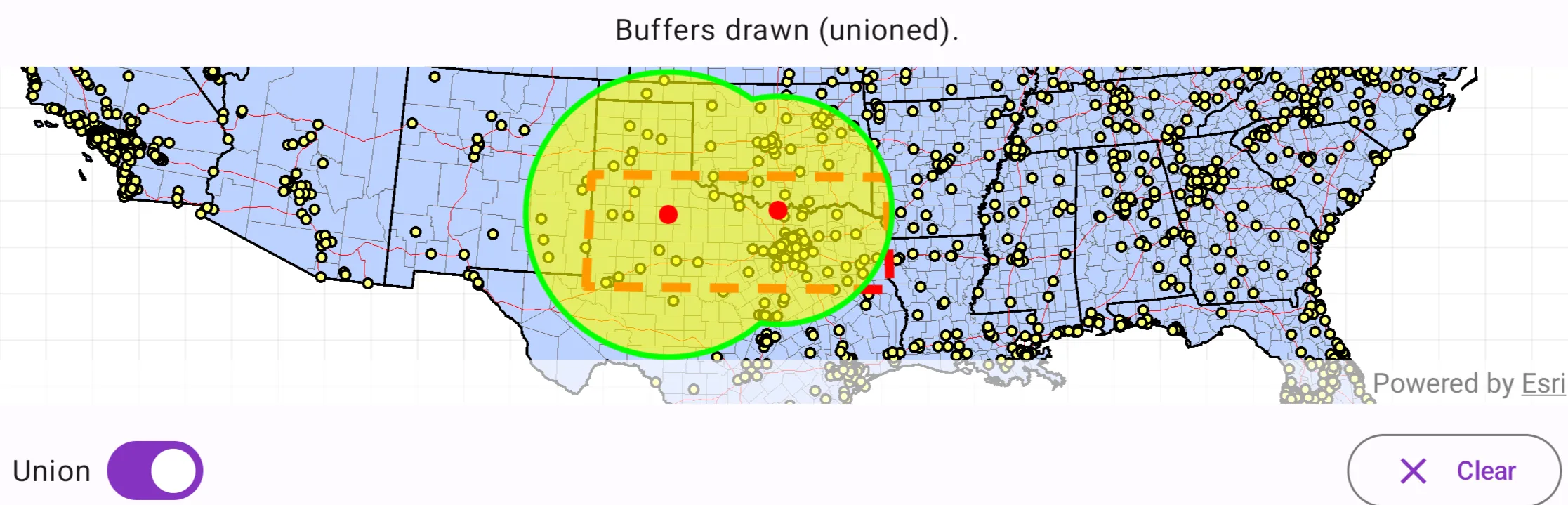
Use case
Creating buffers is a core concept in GIS proximity analysis that allows you to visualize and locate geographic features contained within a set distance of a feature. For example, consider an area where wind turbines are proposed. It has been determined that each turbine should be located at least 2 km away from residential premises due to noise pollution regulations, and a proximity analysis is therefore required. The first step would be to generate 2 km buffer polygons around all proposed turbines. As the buffer polygons may overlap for each turbine, unioning the result would produce a single graphic result with a neater visual output. If any premises are located within 2 km of a turbine, that turbine would be in breach of planning regulations.
How to use the sample
Click/tap on the map to add points. Click the “Create Buffer(s)” button to draw buffer(s) around the points (the size of the buffer is determined by the value entered by the user). Check the check box if you want the result to union (combine) the buffers. Click the “Clear” button to start over. The red dashed envelope shows the area where you can expect reasonable results for planar buffer operations with the North Central Texas State Plane spatial reference.
How it works
- Use
GeometryEngine.bufferOrNull(point, radius)to create aPolygonandGeometryEngine.unionOrNull(polygons)to union polygons. The parameterpointsare the points to buffer around,distancesare the buffer distances for each point (in meters). - Add the resulting polygons (if not unioned) or single polygon (if unioned) to the map’s
GraphicsOverlayas aGraphic.
Relevant API
- Geometry
- GeometryEngine.bufferOrNull
- GeometryEngine.unionOrNull
- SpatialReference
Additional information
The properties of the underlying projection determine the accuracy of buffer polygons in a given area. Planar buffers work well when analyzing distances around features that are concentrated in a relatively small area in a projected coordinate system. Inaccurate buffers could still be created by buffering points inside the spatial reference’s envelope with distances that move it outside the envelope. On the other hand, geodesic buffers consider the curved shape of the Earth’s surface and provide more accurate buffer offsets for features that are more dispersed (i.e., cover multiple UTM zones, large regions, or even the whole globe). See the “Buffer” sample for an example of a geodesic buffer.
For more information about using buffer analysis, see the topic How Buffer (Analysis) works in the ArcGIS Pro documentation.
Tags
analysis, buffer, geometry, planar
Sample code
/* Copyright 2025 Esri * * Licensed under the Apache License, Version 2.0 (the "License"); * you may not use this file except in compliance with the License. * You may obtain a copy of the License at * *    http://www.apache.org/licenses/LICENSE-2.0 * * Unless required by applicable law or agreed to in writing, software * distributed under the License is distributed on an "AS IS" BASIS, * WITHOUT WARRANTIES OR CONDITIONS OF ANY KIND, either express or implied. * See the License for the specific language governing permissions and * limitations under the License. * */
package com.esri.arcgismaps.sample.createbuffersaroundpoints.components
import android.app.Applicationimport androidx.lifecycle.AndroidViewModelimport androidx.lifecycle.viewModelScopeimport com.arcgismaps.Colorimport com.arcgismaps.geometry.GeometryEngineimport com.arcgismaps.geometry.Latitudeimport com.arcgismaps.geometry.Longitudeimport com.arcgismaps.geometry.Pointimport com.arcgismaps.geometry.Polygonimport com.arcgismaps.geometry.PolygonBuilderimport com.arcgismaps.geometry.SpatialReferenceimport com.arcgismaps.mapping.ArcGISMapimport com.arcgismaps.mapping.Viewpointimport com.arcgismaps.mapping.Basemapimport com.arcgismaps.mapping.layers.ArcGISMapImageLayerimport com.arcgismaps.mapping.view.Graphicimport com.arcgismaps.mapping.view.GraphicsOverlayimport com.arcgismaps.mapping.symbology.SimpleFillSymbolimport com.arcgismaps.mapping.symbology.SimpleFillSymbolStyleimport com.arcgismaps.mapping.symbology.SimpleLineSymbolimport com.arcgismaps.mapping.symbology.SimpleLineSymbolStyleimport com.arcgismaps.mapping.symbology.SimpleMarkerSymbolimport com.arcgismaps.mapping.symbology.SimpleMarkerSymbolStyleimport com.arcgismaps.mapping.symbology.SimpleRendererimport com.esri.arcgismaps.sample.sampleslib.components.MessageDialogViewModelimport kotlinx.coroutines.flow.MutableStateFlowimport kotlinx.coroutines.flow.asStateFlowimport kotlinx.coroutines.launch
/** * ViewModel for the "Create buffers around points" sample. */class CreateBuffersAroundPointsViewModel(app: Application) : AndroidViewModel(app) {
    // Message dialog VM for reporting errors to the UI    val messageDialogVM = MessageDialogViewModel()
    // Create the spatial reference (State Plane North Central Texas, WKID 32038)    val statePlaneNorthCentralTexas = SpatialReference(wkid = 32038)
    // Map with projected spatial reference (State Plane North Central Texas).    val arcGISMap by lazy {        ArcGISMap(spatialReference = statePlaneNorthCentralTexas).apply {            // Set initial viewpoint of the map            initialViewpoint = Viewpoint(boundingGeometry = boundaryPolygon)            // Set the basemap base layer to display the USA map server.            setBasemap(                basemap = Basemap(                    baseLayer = ArcGISMapImageLayer(                        url = "https://sampleserver6.arcgisonline.com/arcgis/rest/services/USA/MapServer"                    )                )            )        }    }    // The boundary polygon that defines the valid area of use.    private val boundaryPolygon: Polygon by lazy {        // Build the boundary polygon coordinates in lat/long and project into the state plane spatial reference        val boundaryLatLon = listOf(            Point(Latitude(31.720), Longitude(-103.070)),            Point(Latitude(34.580), Longitude(-103.070)),            Point(Latitude(34.580), Longitude(-94.000)),            Point(Latitude(31.720), Longitude(-94.000))        )
        // Project the polygon into the State Plane spatial reference        val projectedBoundaryPoints = boundaryLatLon.mapNotNull { point ->            GeometryEngine.projectOrNull(                geometry = point,                spatialReference = statePlaneNorthCentralTexas            )        }        // Build the boundary polygon geometry using the projected points        PolygonBuilder(spatialReference = statePlaneNorthCentralTexas).apply {            projectedBoundaryPoints.forEach { addPoint(it) }        }.toGeometry()    }
    // Graphics overlays: boundary, buffers, and tapped points    private val boundaryGraphicsOverlay by lazy {        GraphicsOverlay().apply {            // Create a dashed red boundary graphic            graphics += Graphic(                geometry = boundaryPolygon,                symbol = SimpleLineSymbol(                    style = SimpleLineSymbolStyle.Dash,                    color = Color.red,                    width = 5f                )            )        }    }
    // Configure buffer overlay renderer (yellow fill with green outline)    private val bufferGraphicsOverlay by lazy {        val bufferOutline = SimpleLineSymbol(            style = SimpleLineSymbolStyle.Solid,            color = Color.green,            width = 3f        )        val bufferFill = SimpleFillSymbol(            style = SimpleFillSymbolStyle.Solid,            color = Color.fromRgba(r = 255, g = 255, b = 0, a = 153),            outline = bufferOutline        )        GraphicsOverlay().apply { renderer = SimpleRenderer(symbol = bufferFill) }    }

    // Configure tapped points overlay renderer (small red circles)    private val tappedPointsGraphicsOverlay by lazy {        val tapSymbol = SimpleMarkerSymbol(            style = SimpleMarkerSymbolStyle.Circle,            color = Color.red,            size = 10f        )        GraphicsOverlay().apply { renderer = SimpleRenderer(symbol = tapSymbol) }    }
    val graphicsOverlays: List<GraphicsOverlay>        get() = listOf(boundaryGraphicsOverlay, bufferGraphicsOverlay, tappedPointsGraphicsOverlay)
    // Keep last tapped point when requesting radius input    private var lastTappedPoint: Point? = null
    // List of (point, radiusInMapUnits)    private val bufferPoints: MutableList<Pair<Point, Double>> = mutableListOf()

    private val _statusText = MutableStateFlow("Tap on the map to add buffers.")    val statusText = _statusText.asStateFlow()
    private val _isInputDialogVisible = MutableStateFlow(false)    val isInputDialogVisible = _isInputDialogVisible.asStateFlow()
    // Controls whether buffers should be union    private val _shouldUnion = MutableStateFlow(false)    val shouldUnion = _shouldUnion.asStateFlow()
    init {        viewModelScope.launch {            // Load the map; report any failure            arcGISMap.load().onFailure { messageDialogVM.showMessageDialog(it) }        }    }
    /**     * Called by the MapView on single tap. If the tap is within the valid boundary,     * request a buffer radius input from the UI. Otherwise update status to indicate out-of-bounds.     */    fun onMapTapped(mapPoint: Point) {        val contains = GeometryEngine.contains(boundaryPolygon, mapPoint)        if (!contains) {            _statusText.value = "Tap within the boundary to add buffer."            return        }
        // Store the tapped point and request input dialog        lastTappedPoint = mapPoint        _isInputDialogVisible.value = true        _statusText.value = "Enter buffer radius (miles) for the tapped location"    }
    /**     * Submit the radius (in miles) & converts miles to the map's linear units,     * (the state plane spatial reference uses US feet) then creates the buffer and updates the overlays.     */    fun submitRadiusMiles(radiusMiles: Double) {        val point = lastTappedPoint ?: return
        if (radiusMiles <= 0.0 || radiusMiles >= 300) {            return messageDialogVM.showMessageDialog("Please enter a value between 0 & 300.")        }
        // Convert miles to feet (1 mile = 5280 feet). The state plane uses US feet for this sample.        val radiusFeet = radiusMiles * 5280.0
        // Add to internal list and draw        bufferPoints.add(point to radiusFeet)
        // Add tap point graphic        tappedPointsGraphicsOverlay.graphics.add(Graphic(geometry = point))
        // Redraw buffers using current union setting        drawBuffers(unioned = _shouldUnion.value)
        _isInputDialogVisible.value = false        _statusText.value = "Buffer created. Tap to add more points or press Clear."    }
    /**     * Draws buffers for all stored bufferPoints. If unioned is true, attempt to union buffers     * into a single geometry before displaying.     */    fun drawBuffers(unioned: Boolean) {        // Clear existing buffer graphics        bufferGraphicsOverlay.graphics.clear()
        if (bufferPoints.isEmpty()) {            _statusText.value = "Add a point to draw the buffers."            return        }
        // Create buffer geometries for each point        val polygons = bufferPoints.mapNotNull { (pt, radius) ->            GeometryEngine.bufferOrNull(pt, radius)        }
        if (polygons.isEmpty()) {            messageDialogVM.showMessageDialog("Error creating buffer geometries")            return        }
        if (unioned) {            // Union the polygons into a single geometry (may return a Polygon or Multipart geometry)            GeometryEngine.unionOrNull(polygons)?.let { unionedGeometry ->                bufferGraphicsOverlay.graphics.add(Graphic(geometry = unionedGeometry))            }        } else {            // Add each polygon as its own graphic            polygons.forEach { bufferGraphicsOverlay.graphics.add(Graphic(geometry = it)) }        }        _statusText.value = "Buffers drawn (${if (unioned) "unioned" else "individual"})."
    }
    /**     * Update the union toggle and redraw buffers using the new value.     */    fun updateUnion(shouldUnion: Boolean) {        _shouldUnion.value = shouldUnion        drawBuffers(unioned = shouldUnion)    }
    /**     * Clears all buffer points and corresponding graphics.     */    fun clearAll() {        bufferPoints.clear()        bufferGraphicsOverlay.graphics.clear()        tappedPointsGraphicsOverlay.graphics.clear()        _statusText.value = "Tap on the map to add buffers."    }
    /**     * Dismiss the radius input dialog.     */    fun dismissInputDialog() {        _isInputDialogVisible.value = false        _statusText.value = "Tap on the map to add buffers."    }}
/* Copyright 2025 Esri * * Licensed under the Apache License, Version 2.0 (the "License"); * you may not use this file except in compliance with the License. * You may obtain a copy of the License at * * http://www.apache.org/licenses/LICENSE-2.0 * * Unless required by applicable law or agreed to in writing, software * distributed under the License is distributed on an "AS IS" BASIS, * WITHOUT WARRANTIES OR CONDITIONS OF ANY KIND, either express or implied. * See the License for the specific language governing permissions and * limitations under the License. * */
package com.esri.arcgismaps.sample.createbuffersaroundpoints
import android.os.Bundleimport androidx.activity.ComponentActivityimport androidx.activity.enableEdgeToEdgeimport androidx.activity.compose.setContentimport androidx.compose.material3.MaterialThemeimport androidx.compose.material3.Surfaceimport androidx.compose.runtime.Composableimport com.esri.arcgismaps.sample.sampleslib.theme.SampleAppThemeimport com.esri.arcgismaps.sample.createbuffersaroundpoints.screens.CreateBuffersAroundPointsScreen
class MainActivity : ComponentActivity() {
override fun onCreate(savedInstanceState: Bundle?) { super.onCreate(savedInstanceState)
enableEdgeToEdge() setContent { SampleAppTheme { CreateBuffersAroundPointsApp() } } }
@Composable private fun CreateBuffersAroundPointsApp() { Surface(color = MaterialTheme.colorScheme.background) { CreateBuffersAroundPointsScreen( sampleName = getString(R.string.create_buffers_around_points_app_name) ) } }}/* Copyright 2025 Esri * * Licensed under the Apache License, Version 2.0 (the "License"); * you may not use this file except in compliance with the License. * You may obtain a copy of the License at * * http://www.apache.org/licenses/LICENSE-2.0 * * Unless required by applicable law or agreed to in writing, software * distributed under the License is distributed on an "AS IS" BASIS, * WITHOUT WARRANTIES OR CONDITIONS OF ANY KIND, either express or implied. * See the License for the specific language governing permissions and * limitations under the License. * */
package com.esri.arcgismaps.sample.createbuffersaroundpoints.screens
import androidx.compose.foundation.layout.Arrangementimport androidx.compose.foundation.layout.Columnimport androidx.compose.foundation.layout.Rowimport androidx.compose.foundation.layout.fillMaxSizeimport androidx.compose.foundation.layout.fillMaxWidthimport androidx.compose.foundation.layout.paddingimport androidx.compose.foundation.text.KeyboardOptionsimport androidx.compose.material.icons.Iconsimport androidx.compose.material.icons.filled.Clearimport androidx.compose.material3.AlertDialogimport androidx.compose.material3.Buttonimport androidx.compose.material3.FilledTonalButtonimport androidx.compose.material3.Iconimport androidx.compose.material3.MaterialThemeimport androidx.compose.material3.OutlinedButtonimport androidx.compose.material3.Scaffoldimport androidx.compose.material3.Surfaceimport androidx.compose.material3.Switchimport androidx.compose.material3.Textimport androidx.compose.material3.TextFieldimport androidx.compose.runtime.Composableimport androidx.compose.runtime.getValueimport androidx.compose.runtime.mutableStateOfimport androidx.compose.runtime.rememberimport androidx.compose.runtime.setValueimport androidx.compose.ui.Alignmentimport androidx.compose.ui.Modifierimport androidx.compose.ui.text.input.KeyboardTypeimport androidx.compose.ui.text.style.TextAlignimport androidx.compose.ui.unit.dpimport androidx.lifecycle.viewmodel.compose.viewModelimport androidx.lifecycle.compose.collectAsStateWithLifecycleimport com.arcgismaps.geometry.Pointimport com.arcgismaps.toolkit.geoviewcompose.MapViewimport com.esri.arcgismaps.sample.createbuffersaroundpoints.components.CreateBuffersAroundPointsViewModelimport com.esri.arcgismaps.sample.sampleslib.components.MessageDialogimport com.esri.arcgismaps.sample.sampleslib.components.SampleTopAppBar
/** * Main screen layout for the sample app. Provides the map, controls for unioning/clearing * buffers, and a simple input dialog to enter buffer radius in miles when the user taps the map. */@Composablefun CreateBuffersAroundPointsScreen(sampleName: String) { val mapViewModel: CreateBuffersAroundPointsViewModel = viewModel()
// Observe view model states val statusText by mapViewModel.statusText.collectAsStateWithLifecycle() val isInputVisible by mapViewModel.isInputDialogVisible.collectAsStateWithLifecycle() val shouldUnion by mapViewModel.shouldUnion.collectAsStateWithLifecycle()
// Local state for the input value (string) and validation var radiusInput by remember { mutableStateOf("100") }
Scaffold( topBar = { SampleTopAppBar(title = sampleName) }, content = { padding -> Column(modifier = Modifier.padding(padding)) {
// Overlay at the top center that shows the current status of interactions Surface( modifier = Modifier .fillMaxWidth(), color = MaterialTheme.colorScheme.surface.copy(alpha = 0.9f) ) { Text( modifier = Modifier .fillMaxWidth() .padding(8.dp), text = statusText, textAlign = TextAlign.Center, style = MaterialTheme.typography.bodyLarge, ) } // MapView: display the map and handle taps MapView( modifier = Modifier .fillMaxSize() .weight(1f), arcGISMap = mapViewModel.arcGISMap, graphicsOverlays = mapViewModel.graphicsOverlays, onSingleTapConfirmed = { tapEvent -> tapEvent.mapPoint?.let { mapPoint: Point -> mapViewModel.onMapTapped(mapPoint) } } )
// Controls row: union switch and clear button Row( modifier = Modifier .fillMaxWidth() .padding(12.dp), horizontalArrangement = Arrangement.SpaceBetween ) { Row( horizontalArrangement = Arrangement.spacedBy(8.dp), verticalAlignment = Alignment.CenterVertically ) { Text(text = "Union", style = MaterialTheme.typography.bodyLarge) Switch( checked = shouldUnion, onCheckedChange = { checked -> mapViewModel.updateUnion(checked) } ) }
Row { OutlinedButton(onClick = { mapViewModel.clearAll() }) { Icon(Icons.Filled.Clear, contentDescription = "Clear buffers") Text(text = " Clear", modifier = Modifier.padding(start = 8.dp)) } } }
// Message dialog from the view model mapViewModel.messageDialogVM.apply { if (dialogStatus) { MessageDialog( title = messageTitle, description = messageDescription, onDismissRequest = ::dismissDialog ) } } }
// Buffer radius input dialog if (isInputVisible) { AlertDialog( onDismissRequest = { }, title = { Text(text = "Buffer radius (miles)") }, text = { Column { Text(text = "Enter a radius between 0 and 300 miles.") TextField( value = radiusInput, onValueChange = { radiusInput = it }, label = { Text("Radius in miles") }, keyboardOptions = KeyboardOptions(keyboardType = KeyboardType.Number) ) } }, confirmButton = { FilledTonalButton(onClick = { // Parse the input and submit to the view model val miles = radiusInput.toDoubleOrNull() if (miles == null) { // Show an error dialog via the view model mapViewModel.messageDialogVM.showMessageDialog( "Invalid input", "Please enter a valid number" ) } else { mapViewModel.submitRadiusMiles(miles) } }) { Text("Done") } }, dismissButton = { Button(onClick = mapViewModel::dismissInputDialog) { Text("Cancel") } } ) } } )}