Identify features in all layers in a map.
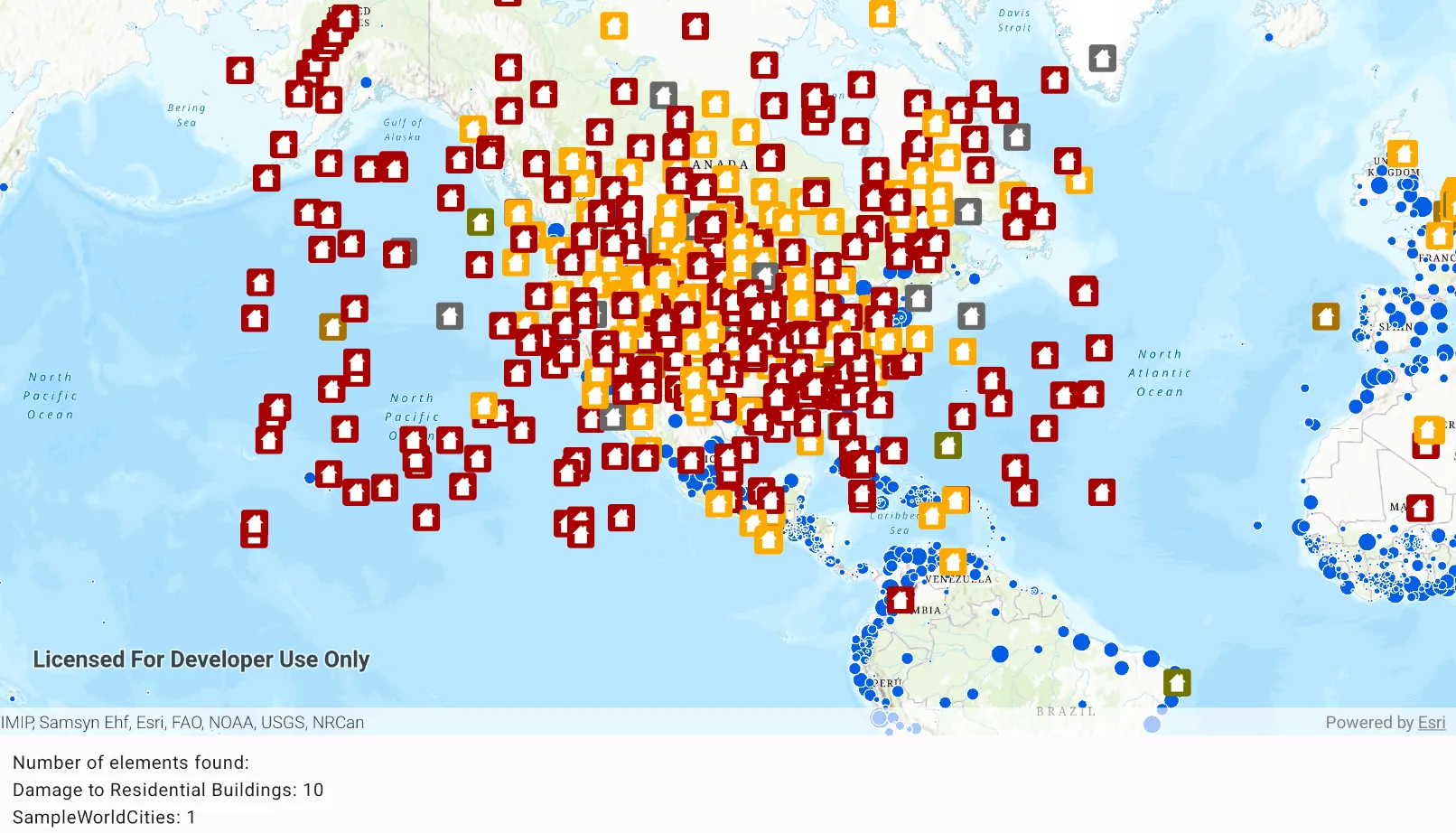
Use case
“Identify layers” operation allows users to tap on a map, returning features at that location across multiple layers. Because some layer types have sublayers, the sample recursively counts results for sublayers within each layer.
How to use the sample
Tap to identify features. A bottom text banner will show all layers with features under the tapped location, as well as the number of features.
How it works
- The tapped position is passed to
MapView.identifyLayers(...)method. - For each
IdentifyLayerResultin the results, features are counted.- Note: there is one identify result per layer with matching features; if the feature count is 0, that means a sublayer contains the matching features.
Relevant API
- IdentifyLayerResult
- IdentifyLayerResult.sublayerResults
- LayerContent
Additional information
This sample uses the GeoView-Compose Toolkit module to be able to implement a composable MapView.
The GeoView supports two methods of identify: identifyLayer, which identifies features within a specific layer and identifyLayers, which identifies features for all layers in the current view.
Tags
geoview-compose, identify, recursion, recursive, sublayers, toolkit
Sample code
/* Copyright 2023 Esri * * Licensed under the Apache License, Version 2.0 (the "License"); * you may not use this file except in compliance with the License. * You may obtain a copy of the License at * *    http://www.apache.org/licenses/LICENSE-2.0 * * Unless required by applicable law or agreed to in writing, software * distributed under the License is distributed on an "AS IS" BASIS, * WITHOUT WARRANTIES OR CONDITIONS OF ANY KIND, either express or implied. * See the License for the specific language governing permissions and * limitations under the License. * */
package com.esri.arcgismaps.sample.identifylayerfeatures.components
import android.app.Applicationimport androidx.compose.runtime.mutableStateOfimport androidx.compose.ui.unit.dpimport androidx.lifecycle.AndroidViewModelimport com.arcgismaps.data.ServiceFeatureTableimport com.arcgismaps.mapping.ArcGISMapimport com.arcgismaps.mapping.BasemapStyleimport com.arcgismaps.mapping.Viewpointimport com.arcgismaps.mapping.layers.ArcGISMapImageLayerimport com.arcgismaps.mapping.layers.FeatureLayer.Companion.createWithFeatureTableimport com.arcgismaps.mapping.view.IdentifyLayerResultimport com.arcgismaps.mapping.view.SingleTapConfirmedEventimport com.arcgismaps.toolkit.geoviewcompose.MapViewProxyimport com.esri.arcgismaps.sample.identifylayerfeatures.Rimport com.esri.arcgismaps.sample.sampleslib.components.MessageDialogViewModelimport kotlinx.coroutines.CoroutineScopeimport kotlinx.coroutines.launch
class MapViewModel(    application: Application,    private val sampleCoroutineScope: CoroutineScope) : AndroidViewModel(application) {
    // create a map using the topographic basemap style    val map: ArcGISMap = ArcGISMap(BasemapStyle.ArcGISTopographic)
    // create a mapViewProxy that will be used to identify features in the MapView    // should also be passed to the composable MapView this mapViewProxy is associated with    val mapViewProxy = MapViewProxy()
    // create a ViewModel to handle dialog interactions    val messageDialogVM: MessageDialogViewModel = MessageDialogViewModel()
    // string text to display the identify layer results    val bottomTextBanner = mutableStateOf("Tap on the map to identify feature layers")
    init {        // create a feature layer of damaged property data        val featureTable = ServiceFeatureTable(application.getString(R.string.damage_assessment))        val featureLayer = createWithFeatureTable(featureTable)
        // create a layer with world cities data        val mapImageLayer = ArcGISMapImageLayer(application.getString(R.string.world_cities))        sampleCoroutineScope.launch {            mapImageLayer.load().onSuccess {                mapImageLayer.apply {                    subLayerContents.value[1].isVisible = false                    subLayerContents.value[2].isVisible = false                }            }.onFailure { error ->                // show the message dialog and pass the error message to be displayed in the dialog                messageDialogVM.showMessageDialog(error.message.toString(), error.cause.toString())            }        }
        // add the world cities layer with and the damaged properties feature layer        map.apply {            // set initial Viewpoint to North America            initialViewpoint = Viewpoint(39.8, -98.6, 5e7)            operationalLayers.addAll(listOf(mapImageLayer, featureLayer))        }
    }
    /**     * Identify the feature layer results and display the resulting information     */    private fun handleIdentifyResult(result: Result<List<IdentifyLayerResult>>) {        sampleCoroutineScope.launch {            result.onSuccess { identifyResultList ->                val message = StringBuilder()                var totalCount = 0                identifyResultList.forEach { identifyLayerResult ->                    val geoElementsCount = geoElementsCountFromResult(identifyLayerResult)                    val layerName = identifyLayerResult.layerContent.name                    message.append(layerName).append(": ").append(geoElementsCount)
                    // add new line character if not the final element in array                    if (identifyLayerResult != identifyResultList[identifyResultList.size - 1]) {                        message.append("\n")                    }                    totalCount += geoElementsCount                }                // if any elements were found show the results, else notify user that no elements were found                if (totalCount > 0) {                    bottomTextBanner.value = "Number of elements found:\n${message}"                } else {                   bottomTextBanner.value = "Number of elements found: N/A"                    messageDialogVM.showMessageDialog(                        title = "No element found",                        description = "Tap an area on the map with visible features"                    )                }            }.onFailure { error ->                messageDialogVM.showMessageDialog(                    title = "Error identifying results: ${error.message.toString()}",                    description = error.cause.toString()                )            }        }    }
    /**     * Gets a count of the GeoElements in the passed result layer.     * This method recursively calls itself to descend into sublayers and count their results.     * @param result from a single layer.     * @return the total count of GeoElements.     */    private fun geoElementsCountFromResult(result: IdentifyLayerResult): Int {        var subLayerGeoElementCount = 0        for (sublayerResult in result.sublayerResults) {            // recursively call this function to accumulate elements from all sublayers            subLayerGeoElementCount += geoElementsCountFromResult(sublayerResult)        }        return subLayerGeoElementCount + result.geoElements.size    }
    /**     * Identifies the tapped screen coordinate in the provided [singleTapConfirmedEvent]     */    fun identify(singleTapConfirmedEvent: SingleTapConfirmedEvent) {        sampleCoroutineScope.launch {            // identify the layers on the tapped coordinate            val identifyResult = mapViewProxy.identifyLayers(                screenCoordinate = singleTapConfirmedEvent.screenCoordinate,                tolerance = 12.dp,                maximumResults = 10            )            // use the layer result to display feature information            handleIdentifyResult(identifyResult)        }    }}
/* Copyright 2023 Esri * * Licensed under the Apache License, Version 2.0 (the "License"); * you may not use this file except in compliance with the License. * You may obtain a copy of the License at * * http://www.apache.org/licenses/LICENSE-2.0 * * Unless required by applicable law or agreed to in writing, software * distributed under the License is distributed on an "AS IS" BASIS, * WITHOUT WARRANTIES OR CONDITIONS OF ANY KIND, either express or implied. * See the License for the specific language governing permissions and * limitations under the License. * */
package com.esri.arcgismaps.sample.identifylayerfeatures
import android.os.Bundleimport androidx.activity.ComponentActivityimport androidx.activity.compose.setContentimport androidx.activity.enableEdgeToEdgeimport androidx.compose.material3.MaterialThemeimport androidx.compose.material3.Surfaceimport androidx.compose.runtime.Composableimport com.arcgismaps.ApiKeyimport com.arcgismaps.ArcGISEnvironmentimport com.esri.arcgismaps.sample.sampleslib.theme.SampleAppThemeimport com.esri.arcgismaps.sample.identifylayerfeatures.screens.MainScreen
class MainActivity : ComponentActivity() {
override fun onCreate(savedInstanceState: Bundle?) { super.onCreate(savedInstanceState) // authentication with an API key or named user is // required to access basemaps and other location services ArcGISEnvironment.apiKey = ApiKey.create(BuildConfig.ACCESS_TOKEN)
enableEdgeToEdge() setContent { SampleAppTheme { IdentifyLayerFeaturesApp() } } }
@Composable private fun IdentifyLayerFeaturesApp() { Surface( color = MaterialTheme.colorScheme.background ) { MainScreen( sampleName = getString(R.string.identify_layer_features_app_name) ) } }}/* Copyright 2023 Esri * * Licensed under the Apache License, Version 2.0 (the "License"); * you may not use this file except in compliance with the License. * You may obtain a copy of the License at * * http://www.apache.org/licenses/LICENSE-2.0 * * Unless required by applicable law or agreed to in writing, software * distributed under the License is distributed on an "AS IS" BASIS, * WITHOUT WARRANTIES OR CONDITIONS OF ANY KIND, either express or implied. * See the License for the specific language governing permissions and * limitations under the License. * */
package com.esri.arcgismaps.sample.identifylayerfeatures.screens
import android.app.Applicationimport androidx.compose.animation.animateContentSizeimport androidx.compose.foundation.layout.Columnimport androidx.compose.foundation.layout.Rowimport androidx.compose.foundation.layout.fillMaxSizeimport androidx.compose.foundation.layout.fillMaxWidthimport androidx.compose.foundation.layout.paddingimport androidx.compose.material3.Scaffoldimport androidx.compose.material3.Textimport androidx.compose.runtime.Composableimport androidx.compose.runtime.rememberimport androidx.compose.runtime.rememberCoroutineScopeimport androidx.compose.ui.Modifierimport androidx.compose.ui.platform.LocalContextimport androidx.compose.ui.unit.dpimport com.arcgismaps.toolkit.geoviewcompose.MapViewimport com.esri.arcgismaps.sample.identifylayerfeatures.components.MapViewModelimport com.esri.arcgismaps.sample.sampleslib.components.MessageDialogimport com.esri.arcgismaps.sample.sampleslib.components.SampleTopAppBar
/** * Main screen layout for the sample app */@Composablefun MainScreen(sampleName: String) { // coroutineScope that will be cancelled when this call leaves the composition val sampleCoroutineScope = rememberCoroutineScope() // get the application property that will be used to construct MapViewModel val sampleApplication = LocalContext.current.applicationContext as Application // create a ViewModel to handle MapView interactions val mapViewModel = remember { MapViewModel(sampleApplication, sampleCoroutineScope) } // create a Viewpoint
Scaffold( topBar = { SampleTopAppBar(title = sampleName) }, content = { Column( modifier = Modifier .fillMaxSize() .padding(it) ) { MapView( modifier = Modifier .fillMaxSize() .weight(1f) .animateContentSize(), arcGISMap = mapViewModel.map, mapViewProxy = mapViewModel.mapViewProxy, onSingleTapConfirmed = mapViewModel::identify ) // Bottom text to display the identify results Row( modifier = Modifier .padding(12.dp) .fillMaxWidth() .animateContentSize() ) { Text(text = mapViewModel.bottomTextBanner.value) } // display a dialog if the sample encounters an error mapViewModel.messageDialogVM.apply { if (dialogStatus) { MessageDialog( title = messageTitle, description = messageDescription, onDismissRequest = ::dismissDialog ) } } } } )}