Find features in a feature table which match an SQL query.
Use case
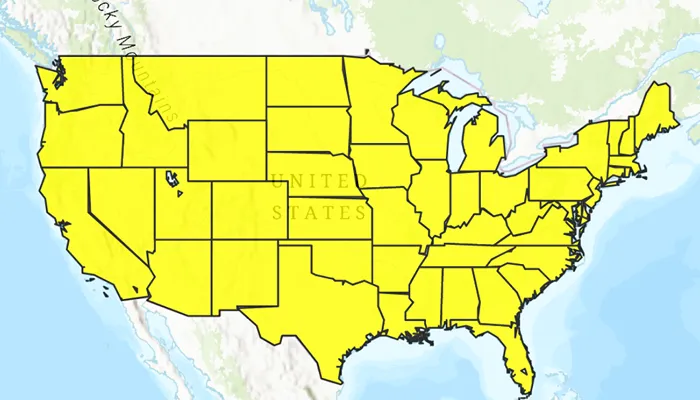
Query expressions can be used in ArcGIS to select a subset of features from a feature table. This is most useful in large or complicated data sets. A possible use case might be on a feature table marking the location of street furniture through a city. A user may wish to query by a TYPE column to return “benches”. In this sample, we query a U.S. state by STATE_NAME from a feature table containing all U.S. states.
How to use the sample
Input the name of a U.S. state into the text field. When you click the search icon on the device keypad or press the enter key, a query is performed and the matching features are highlighted or an error is returned.
How it works
- Create a
ServiceFeatureTableusing the URL of a feature service. - Create a
QueryParameterswith a where clause specified usingwhereClause(). - Perform the query using
queryFeatures(queryParameters)on the service feature table. - When complete, the query will return a
FeatureQueryResultwhich can be iterated over to get the matching features.
Relevant API
- FeatureLayer
- FeatureQueryResult
- QueryParameters
- ServiceFeatureTable
About the data
This sample uses U.S. State polygon features from the USA 2016 Daytime Population feature service.
Additional information
This sample uses the GeoView-Compose Toolkit module to be able to implement a composable MapView.
Tags
geoview-compose, query, search, toolkit
Sample code
/* Copyright 2023 Esri * * Licensed under the Apache License, Version 2.0 (the "License"); * you may not use this file except in compliance with the License. * You may obtain a copy of the License at * *    http://www.apache.org/licenses/LICENSE-2.0 * * Unless required by applicable law or agreed to in writing, software * distributed under the License is distributed on an "AS IS" BASIS, * WITHOUT WARRANTIES OR CONDITIONS OF ANY KIND, either express or implied. * See the License for the specific language governing permissions and * limitations under the License. * */
package com.esri.arcgismaps.sample.queryfeaturetable.components
import android.app.Applicationimport androidx.compose.runtime.getValueimport androidx.compose.runtime.mutableStateOfimport androidx.compose.runtime.setValueimport androidx.lifecycle.AndroidViewModelimport com.arcgismaps.Colorimport com.arcgismaps.data.FeatureQueryResultimport com.arcgismaps.data.QueryParametersimport com.arcgismaps.data.ServiceFeatureTableimport com.arcgismaps.geometry.Pointimport com.arcgismaps.geometry.SpatialReferenceimport com.arcgismaps.mapping.ArcGISMapimport com.arcgismaps.mapping.BasemapStyleimport com.arcgismaps.mapping.Viewpointimport com.arcgismaps.mapping.layers.FeatureLayerimport com.arcgismaps.mapping.symbology.SimpleFillSymbolimport com.arcgismaps.mapping.symbology.SimpleFillSymbolStyleimport com.arcgismaps.mapping.symbology.SimpleLineSymbolimport com.arcgismaps.mapping.symbology.SimpleLineSymbolStyleimport com.arcgismaps.mapping.symbology.SimpleRendererimport com.arcgismaps.toolkit.geoviewcompose.MapViewProxyimport com.esri.arcgismaps.sample.queryfeaturetable.Rimport com.esri.arcgismaps.sample.sampleslib.components.MessageDialogViewModelimport kotlinx.coroutines.CoroutineScopeimport kotlinx.coroutines.launchimport java.util.Locale
class MapViewModel(    application: Application,    private val sampleCoroutineScope: CoroutineScope) : AndroidViewModel(application) {
    // create a ViewModel to handle dialog interactions    val messageDialogVM: MessageDialogViewModel = MessageDialogViewModel()
    // create a service feature table and a feature layer from it    private val serviceFeatureTable: ServiceFeatureTable = ServiceFeatureTable(        application.getString(R.string.us_daytime_population_url)    )
    // create the feature layer using the service feature table    private val featureLayer: FeatureLayer by lazy {        FeatureLayer.createWithFeatureTable(serviceFeatureTable)    }
    // map used to display the feature layer    val map = ArcGISMap(BasemapStyle.ArcGISTopographic)
    private var usaViewpoint = Viewpoint(        center = Point(-11e6, 5e6, SpatialReference.webMercator()),        scale = 1e8    )
    // create a MapViewProxy to handle MapView operations    var mapViewProxy by mutableStateOf(MapViewProxy())
    init {        // use symbols to show U.S. states with a black outline and yellow fill        val lineSymbol = SimpleLineSymbol(            style = SimpleLineSymbolStyle.Solid,            color = Color.black,            width = 1.0f        )        val fillSymbol = SimpleFillSymbol(            style = SimpleFillSymbolStyle.Solid,            color = Color.fromRgba(255, 255, 0, 255),            outline = lineSymbol        )
        // set featurelayer properties        featureLayer.apply {            // set renderer for the feature layer            renderer = SimpleRenderer(fillSymbol)            opacity = 0.8f            maxScale = 10000.0        }        // add the feature layer to the map's operational layers        map.apply {            initialViewpoint = usaViewpoint            operationalLayers.add(featureLayer)        }    }
    /**     * Search for a U.S. state using [searchQuery] in the feature table, and if found add it     * to the featureLayer, zoom to it, and select it.     */    fun searchForState(searchQuery: String) {        // clear any previous selections        featureLayer.clearSelection()        // create a query for the state that was entered        val queryParameters = QueryParameters().apply {            // make search case insensitive            whereClause = ("upper(STATE_NAME) LIKE '%" + searchQuery.uppercase(Locale.US) + "%'")        }
        sampleCoroutineScope.launch {            // call select features            val featureQueryResult = serviceFeatureTable.queryFeatures(queryParameters).getOrElse {                messageDialogVM.showMessageDialog(it.message.toString(), it.cause.toString())            } as FeatureQueryResult
            val feature = featureQueryResult.firstOrNull()            if (feature != null) {                // select the feature                featureLayer.selectFeature(feature)                // get the extent of the first feature in the result to zoom to                val envelope = feature.geometry?.extent                    ?: return@launch messageDialogVM.showMessageDialog("Error retrieving geometry extent")                // update the map's viewpoint to the feature's geometry                mapViewProxy.setViewpointGeometry(envelope)            } else {                messageDialogVM.showMessageDialog("No states found with name: $searchQuery")            }        }    }}
/* Copyright 2023 Esri * * Licensed under the Apache License, Version 2.0 (the "License"); * you may not use this file except in compliance with the License. * You may obtain a copy of the License at * * http://www.apache.org/licenses/LICENSE-2.0 * * Unless required by applicable law or agreed to in writing, software * distributed under the License is distributed on an "AS IS" BASIS, * WITHOUT WARRANTIES OR CONDITIONS OF ANY KIND, either express or implied. * See the License for the specific language governing permissions and * limitations under the License. * */
package com.esri.arcgismaps.sample.queryfeaturetable
import android.os.Bundleimport androidx.activity.ComponentActivityimport androidx.activity.compose.setContentimport androidx.activity.enableEdgeToEdgeimport androidx.compose.material3.MaterialThemeimport androidx.compose.material3.Surfaceimport androidx.compose.runtime.Composableimport com.arcgismaps.ApiKeyimport com.arcgismaps.ArcGISEnvironmentimport com.esri.arcgismaps.sample.sampleslib.theme.SampleAppThemeimport com.esri.arcgismaps.sample.queryfeaturetable.screens.MainScreen
class MainActivity : ComponentActivity() {
override fun onCreate(savedInstanceState: Bundle?) { super.onCreate(savedInstanceState) // authentication with an API key or named user is // required to access basemaps and other location services ArcGISEnvironment.apiKey = ApiKey.create(BuildConfig.ACCESS_TOKEN)
enableEdgeToEdge() setContent { SampleAppTheme { QueryFeatureTableApp() } } }
@Composable private fun QueryFeatureTableApp() { Surface( color = MaterialTheme.colorScheme.background ) { MainScreen( sampleName = getString(R.string.query_feature_table_app_name) ) } }}/* Copyright 2023 Esri * * Licensed under the Apache License, Version 2.0 (the "License"); * you may not use this file except in compliance with the License. * You may obtain a copy of the License at * * http://www.apache.org/licenses/LICENSE-2.0 * * Unless required by applicable law or agreed to in writing, software * distributed under the License is distributed on an "AS IS" BASIS, * WITHOUT WARRANTIES OR CONDITIONS OF ANY KIND, either express or implied. * See the License for the specific language governing permissions and * limitations under the License. * */
package com.esri.arcgismaps.sample.queryfeaturetable.screens
import android.app.Applicationimport androidx.compose.foundation.layout.Columnimport androidx.compose.foundation.layout.fillMaxSizeimport androidx.compose.foundation.layout.fillMaxWidthimport androidx.compose.foundation.layout.paddingimport androidx.compose.material3.Scaffoldimport androidx.compose.runtime.Composableimport androidx.compose.runtime.rememberimport androidx.compose.runtime.rememberCoroutineScopeimport androidx.compose.ui.Modifierimport androidx.compose.ui.platform.LocalContextimport com.arcgismaps.toolkit.geoviewcompose.MapViewimport com.esri.arcgismaps.sample.queryfeaturetable.components.MapViewModelimport com.esri.arcgismaps.sample.sampleslib.components.MessageDialogimport com.esri.arcgismaps.sample.sampleslib.components.SampleTopAppBar
/** * Main screen layout for the sample app */@Composablefun MainScreen(sampleName: String) { // coroutineScope that will be cancelled when this call leaves the composition val sampleCoroutineScope = rememberCoroutineScope() // get the application context val application = LocalContext.current.applicationContext as Application // create a ViewModel to handle MapView interactions val mapViewModel = remember { MapViewModel(application, sampleCoroutineScope) }
Scaffold( topBar = { SampleTopAppBar(title = sampleName) }, content = { Column(modifier = Modifier .fillMaxSize() .padding(it)) { // composable function that wraps the MapView MapView( modifier = Modifier .fillMaxWidth() .weight(1f), arcGISMap = mapViewModel.map, mapViewProxy = mapViewModel.mapViewProxy ) SearchBar( modifier = Modifier.fillMaxWidth(), onQuerySubmit = mapViewModel::searchForState ) }
mapViewModel.messageDialogVM.apply { if (dialogStatus) { // display a dialog if the sample encounters an error MessageDialog( title = messageTitle, description = messageDescription, onDismissRequest = ::dismissDialog ) } } } )}/* Copyright 2023 Esri * * Licensed under the Apache License, Version 2.0 (the "License"); * you may not use this file except in compliance with the License. * You may obtain a copy of the License at * * http://www.apache.org/licenses/LICENSE-2.0 * * Unless required by applicable law or agreed to in writing, software * distributed under the License is distributed on an "AS IS" BASIS, * WITHOUT WARRANTIES OR CONDITIONS OF ANY KIND, either express or implied. * See the License for the specific language governing permissions and * limitations under the License. * */
package com.esri.arcgismaps.sample.queryfeaturetable.screens
import android.content.res.Configurationimport android.view.KeyEventimport androidx.compose.foundation.layout.Rowimport androidx.compose.foundation.text.KeyboardActionsimport androidx.compose.foundation.text.KeyboardOptionsimport androidx.compose.material.icons.Iconsimport androidx.compose.material.icons.filled.Closeimport androidx.compose.material3.Iconimport androidx.compose.material3.IconButtonimport androidx.compose.material3.OutlinedTextFieldimport androidx.compose.material3.Textimport androidx.compose.runtime.Composableimport androidx.compose.runtime.getValueimport androidx.compose.runtime.mutableStateOfimport androidx.compose.runtime.rememberimport androidx.compose.runtime.saveable.rememberSaveableimport androidx.compose.runtime.setValueimport androidx.compose.ui.Modifierimport androidx.compose.ui.focus.FocusRequesterimport androidx.compose.ui.focus.focusRequesterimport androidx.compose.ui.input.key.onKeyEventimport androidx.compose.ui.platform.LocalFocusManagerimport androidx.compose.ui.text.input.ImeActionimport androidx.compose.ui.text.input.KeyboardTypeimport androidx.compose.ui.tooling.preview.Preview
@Composablefun SearchBar( modifier: Modifier = Modifier, onQuerySubmit: (String) -> Unit) { // query text typed in OutlinedTextField var text by rememberSaveable { mutableStateOf("") } // remember the OutlinedTextField's focus requester to change focus on search val focusRequester = remember { FocusRequester() } // focus manager is used to clear focus from OutlinedTextField on search val focusManager = LocalFocusManager.current
Row(modifier) { OutlinedTextField( modifier = modifier.focusRequester(focusRequester).onKeyEvent { // submit query when enter is tapped if (it.nativeKeyEvent.keyCode == KeyEvent.KEYCODE_ENTER) { onQuerySubmit(text) focusManager.clearFocus() } false }, value = text, maxLines = 1, singleLine = true, onValueChange = { text = it.lines()[0] }, label = { Text("Search for a US state") }, keyboardOptions = KeyboardOptions( keyboardType = KeyboardType.Text, imeAction = ImeAction.Search ), keyboardActions = KeyboardActions( onSearch = { onQuerySubmit(text) focusManager.clearFocus() }, ), trailingIcon = { IconButton(onClick = { text = "" focusManager.clearFocus() }) { Icon( Icons.Filled.Close, contentDescription = "ClearIcon" ) } }, ) }
}
@Preview(showBackground = true)@Preview(uiMode = Configuration.UI_MODE_NIGHT_YES, showBackground = true)@Composablefun PreviewSearchBar() { SearchBar(onQuerySubmit = {})}