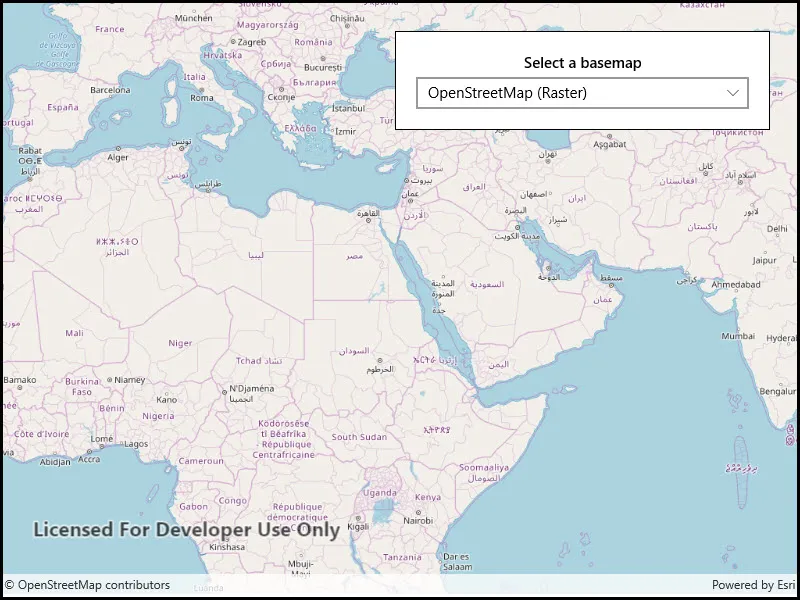
Change a map’s basemap. A basemap is beneath all layers on a Map and is used to provide visual reference for the operational layers.
Use case
Basemaps should be selected contextually. For example, in maritime applications, it would be more appropriate to use a basemap of the world’s oceans as opposed to a basemap of the world’s streets.
How to use the sample
Use the drop down menu to select the active basemap from the list of available basemaps.
How it works
- Create an
Mapobject. - Set the map to the
MapViewobject. - Choose a new basemap type and set it on the map.
Relevant API
- Basemap
- Map
- MapView
Tags
basemap, map
Sample code
<UserControl x:Class="ArcGIS.UWP.Samples.ChangeBasemap.ChangeBasemap" xmlns="http://schemas.microsoft.com/winfx/2006/xaml/presentation" xmlns:x="http://schemas.microsoft.com/winfx/2006/xaml" xmlns:esriUI="using:Esri.ArcGISRuntime.UI.Controls"> <Grid> <esriUI:MapView x:Name="MyMapView" /> <Border Style="{StaticResource BorderStyle}"> <StackPanel> <TextBlock Text="Select a basemap" FontWeight="SemiBold" HorizontalAlignment="Center" Margin="0,0,0,5" TextWrapping="Wrap" /> <ComboBox x:Name="BasemapChooser" HorizontalAlignment="Stretch" SelectionChanged="OnBasemapListSelectionChanged" /> </StackPanel> </Border> </Grid></UserControl>// Copyright 2021 Esri.//// Licensed under the Apache License, Version 2.0 (the "License"); you may not use this file except in compliance with the License.// You may obtain a copy of the License at: http://www.apache.org/licenses/LICENSE-2.0//// Unless required by applicable law or agreed to in writing, software distributed under the License is distributed on an// "AS IS" BASIS, WITHOUT WARRANTIES OR CONDITIONS OF ANY KIND, either express or implied. See the License for the specific// language governing permissions and limitations under the License.
using Esri.ArcGISRuntime.Mapping;using System.Collections.Generic;using System.Linq;using Windows.UI.Xaml.Controls;
namespace ArcGIS.UWP.Samples.ChangeBasemap{ [ArcGIS.Samples.Shared.Attributes.Sample( name: "Change basemap", category: "Map", description: "Change a map's basemap. A basemap is beneath all layers on a `Map` and is used to provide visual reference for the operational layers.", instructions: "Use the drop down menu to select the active basemap from the list of available basemaps.", tags: new[] { "basemap", "map" })] public partial class ChangeBasemap { // Dictionary that associates names with basemaps. private readonly Dictionary<string, Basemap> _basemapOptions = new Dictionary<string, Basemap>() { {"Streets", new Basemap(BasemapStyle.ArcGISStreets)}, {"Streets - Night", new Basemap(BasemapStyle.ArcGISStreetsNight)}, {"Imagery", new Basemap(BasemapStyle.ArcGISImageryStandard)}, {"Imagery with Labels", new Basemap(BasemapStyle.ArcGISImagery)}, {"Dark Gray Canvas", new Basemap(BasemapStyle.ArcGISDarkGray)}, {"Light Gray Canvas", new Basemap(BasemapStyle.ArcGISLightGray)}, {"Navigation", new Basemap(BasemapStyle.ArcGISNavigation)}, {"OpenStreetMap", new Basemap(BasemapStyle.OSMStandard)} };
public ChangeBasemap() { InitializeComponent();
// Setup the control references and execute initialization Initialize(); }
private void Initialize() { // Create new Map Map myMap = new Map();
// Assign the map to the MapView MyMapView.Map = myMap;
// Set titles as an items source and choose the first item BasemapChooser.ItemsSource = _basemapOptions.Keys; BasemapChooser.SelectedIndex = 0; }
private void OnBasemapListSelectionChanged(object sender, SelectionChangedEventArgs e) { // Get the title of the selected basemap string selectedBasemapTitle = e.AddedItems[0].ToString();
// Retrieve the basemap from the dictionary MyMapView.Map.Basemap = _basemapOptions[selectedBasemapTitle]; } }}