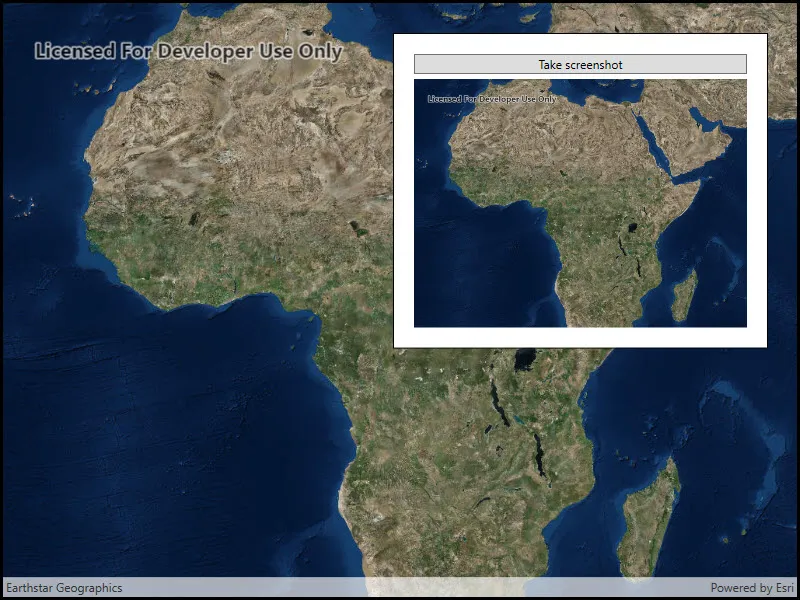
Take a screenshot of the map.
Use case
GIS users may want to export a screenshot of a map to enable sharing as an image or printing.
How to use the sample
Pan and zoom to find an interesting location, then use the button to take a screenshot. The screenshot will be displayed. Note that there may be a small delay if the map is still rendering when you push the button.
How it works
- Wait for the MapView to finish rendering the Map.
- Call
mapView.ExportImageAsync()to get theRuntimeImage, which is a bitmap image. - Use the
RuntimeImage.ToImageSourceAsyncextension method to get a copy of the image that is compatible with native image display controls.
Relevant API
- GeoView.DrawStatus
- GeoView.DrawStatusChanged
- GeoView.ExportImageAsync
- RuntimeImage
- RuntimeImage.ToImageSourceAsync
Tags
capture, export, image, print, screen capture, screenshot, share, shot
Sample code
// Copyright 2018 Esri.//// Licensed under the Apache License, Version 2.0 (the "License"); you may not use this file except in compliance with the License.// You may obtain a copy of the License at: http://www.apache.org/licenses/LICENSE-2.0//// Unless required by applicable law or agreed to in writing, software distributed under the License is distributed on an// "AS IS" BASIS, WITHOUT WARRANTIES OR CONDITIONS OF ANY KIND, either express or implied. See the License for the specific// language governing permissions and limitations under the License.
using Esri.ArcGISRuntime.Mapping;using Esri.ArcGISRuntime.UI;using Esri.ArcGISRuntime.UI.Controls;using System;using System.Threading;using System.Threading.Tasks;using System.Windows;
namespace ArcGIS.WPF.Samples.TakeScreenshot{    [ArcGIS.Samples.Shared.Attributes.Sample(        name: "Take screenshot",        category: "MapView",        description: "Take a screenshot of the map.",        instructions: "Pan and zoom to find an interesting location, then use the button to take a screenshot. The screenshot will be displayed. Note that there may be a small delay if the map is still rendering when you push the button.",        tags: new[] { "capture", "export", "image", "print", "screen capture", "screenshot", "share", "shot" })]    public partial class TakeScreenshot    {        public TakeScreenshot()        {            InitializeComponent();            Initialize();        }
        private void Initialize()        {            // Show an imagery basemap.            MyMapView.Map = new Map(BasemapStyle.ArcGISImageryStandard);        }
        private async void OnScreenshotButtonClicked(object sender, RoutedEventArgs e)        {            try            {                // Wait for rendering to finish before taking the screenshot.                await WaitForRenderCompleteAsync(MyMapView);
                // Export the image from MapView.                RuntimeImage image = await MyMapView.ExportImageAsync();
                // Display the image in the UI.                ImageView.Source = await image.ToImageSourceAsync();
                // Make the image visible.                ImageView.Visibility = Visibility.Visible;            }            catch (Exception ex)            {                MessageBox.Show(ex.ToString(), "Error");            }        }
        private static Task WaitForRenderCompleteAsync(MapView mapview)        {            // The task completion source manages the task, including marking it as finished when the time comes.            TaskCompletionSource<object> tcs = new TaskCompletionSource<object>();
            // If the map is currently finished drawing, set the result immediately.            if (mapview.DrawStatus == DrawStatus.Completed)            {                tcs.SetResult(null);            }            // Otherwise, configure a callback and a timeout to either set the result when            // the map is finished drawing or set the result after 2000 ms.            else            {                // Define a cancellation token source for 2000 ms.                const int timeoutMs = 2000;                var ct = new CancellationTokenSource(timeoutMs);
                // Register the callback that sets the task result after 2000 ms.                ct.Token.Register(() =>                    tcs.TrySetResult(null), false);
                // Define a local function that will set the task result and unregister itself when the map finishes drawing.                void DrawCompleteHandler(object s, DrawStatusChangedEventArgs e)                {                    if (e.Status == DrawStatus.Completed)                    {                        mapview.DrawStatusChanged -= DrawCompleteHandler;                        tcs.TrySetResult(null);                    }                }
                // Register the draw complete event handler.                mapview.DrawStatusChanged += DrawCompleteHandler;            }
// Return the task. return tcs.Task; } }}<UserControl x:Class="ArcGIS.WPF.Samples.TakeScreenshot.TakeScreenshot" xmlns="http://schemas.microsoft.com/winfx/2006/xaml/presentation" xmlns:x="http://schemas.microsoft.com/winfx/2006/xaml" xmlns:esri="http://schemas.esri.com/arcgis/runtime/2013"> <Grid> <esri:MapView x:Name="MyMapView" /> <Border Style="{StaticResource BorderStyle}"> <StackPanel> <Button Click="OnScreenshotButtonClicked" Content="Take screenshot" /> <Image x:Name="ImageView" Margin="0,5,0,0" Visibility="Collapsed" /> </StackPanel> </Border> </Grid></UserControl>