Find dynamic entities from a data source that match a query.
Use case
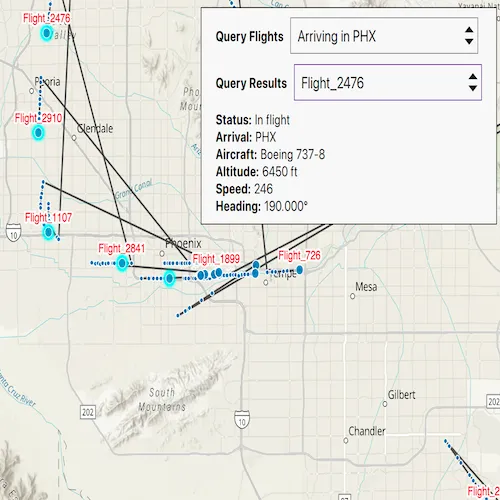
Developers can query a DynamicEntityDataSource to find dynamic entities that meet spatial and/or attribute criteria. The query returns a collection of dynamic entities matching the DynamicEntityQueryParameters or track IDs at the moment the query is executed. An example of this is a flight tracking app that monitors airspace near a particular airport, allowing the user to monitor flights based on different criteria such as arrival airport or flight number.
How to use the sample
Tap the “Query Flights” button and select a query to perform from the menu. Once the query is complete, a list of the resulting flights will be displayed. Tap on a flight to see its latest attributes in real-time.
How it works
- Create a
CustomDynamicEntityDataSourceto stream dynamic entity events. - Create a
DynamicEntityLayerwith the data source and add it to the map’s operational layers. - Create
DynamicEntityQueryParametersand set properties for the query:- To spatially filter results, set the
geometryandspatialRelationship(defaults toIntersects). - To query entities with certain attribute values, set the
whereClause. - To get entities with specific track IDs, call
setTrackIds().
- To spatially filter results, set the
- Perform the query with
DynamicEntityDataSource::queryDynamicEntitiesAsync(parameters)for combined criteria, or pass onlytrackIdsif you want an exact track ID lookup. - When complete, iterate
DynamicEntityQueryResultviaiterator().asList()to access returnedDynamicEntityobjects. - Connect to
DynamicEntity::dynamicEntityChangedto receive real-time attribute updates. - Read the latest observation from
DynamicEntityChangedInfo::receivedObservation.
Relevant API
- DynamicEntity
- DynamicEntityChangedInfo
- DynamicEntityDataSource
- DynamicEntityDataSourceInfo
- DynamicEntityLayer
- DynamicEntityObservation
- DynamicEntityQueryParameters
- DynamicEntityQueryResult
About the data
This sample uses the PHX Air Traffic JSON portal item, which is hosted on ArcGIS Online and downloaded automatically. The file contains JSON data for mock air traffic around the Phoenix Sky Harbor International Airport in Phoenix, AZ, USA. The decoded data is used to simulate dynamic entity events through a CustomDynamicEntityDataSource, which is displayed on the map with a DynamicEntityLayer.
Additional information
A dynamic entities query is performed on the most recent observation of each dynamic entity in the data source at the time the query is executed. As the dynamic entities change, they may no longer match the query parameters.
Tags
data, dynamic, entity, live, query, real-time, search, stream, track
Sample code
// [WriteFile Name=QueryDynamicEntities, Category=Search]// [Legal]// Copyright 2026 Esri.//// Licensed under the Apache License, Version 2.0 (the "License");// you may not use this file except in compliance with the License.// You may obtain a copy of the License at// http://www.apache.org/licenses/LICENSE-2.0
// Unless required by applicable law or agreed to in writing, software// distributed under the License is distributed on an "AS IS" BASIS,// WITHOUT WARRANTIES OR CONDITIONS OF ANY KIND, either express or implied.// See the License for the specific language governing permissions and// limitations under the License.// [Legal]
// sample headers#include "CustomDynamicEntityDataSource.h"
// ArcGIS Maps SDK headers#include "Domain.h"#include "DynamicEntityDataSource.h"#include "DynamicEntityDataSourceInfo.h"#include "Field.h"#include "Point.h"#include "ServiceTypes.h"#include "SpatialReference.h"
// Qt headers#include <QtConcurrent/QtConcurrent>
using namespace Esri::ArcGISRuntime;
CustomDynamicEntityDataSource::CustomDynamicEntityDataSource(const QString& fileName,                                                             const QString& entityIdField,                                                             const int msDelay,                                                             QObject* parent) :  DynamicEntityDataSource(parent),  m_fileName(fileName),  m_entityIdField(entityIdField),  m_msDelay(msDelay){}
CustomDynamicEntityDataSource::~CustomDynamicEntityDataSource(){  // The app will crash upon destruction if the asynchronous method is still running upon destruction  m_watcher.cancel();  m_watcher.waitForFinished();}
// Override the virtual onLoadAsync method to define what the DynamicEntityDataSource will do upon loadQFuture<DynamicEntityDataSourceInfo*> CustomDynamicEntityDataSource::onLoadAsync(){  m_fields = getSchema();
  m_file.setFileName(m_fileName);
  if (m_file.open(QIODevice::ReadOnly | QIODevice::Text))  {    m_textStream.setDevice(&m_file);  }
  // Create a DynamicEntityDataSourceInfo object to return  DynamicEntityDataSourceInfo* dynamicEntityDataSourceInfo = new DynamicEntityDataSourceInfo(m_entityIdField, m_fields, this);
  // Your data may not display correctly if you do not have a spatial reference set  dynamicEntityDataSourceInfo->setSpatialReference(SpatialReference::wgs84());
  // Return the QFuture<DynamicEntityDataSourceInfo*>  return QtFuture::makeReadyValueFuture(dynamicEntityDataSourceInfo);}
// Override the virtual onConnectAsync method to define what the DynamicEntityDataSource will do when the data source is connectedQFuture<void> CustomDynamicEntityDataSource::onConnectAsync(){  m_watcher.setFuture(QtConcurrent::run([this]()  {    observationProcessLoopAsync();  }));  return QtFuture::makeReadyVoidFuture();}
// Override the virtual onDisconnectAsync method to define what the DynamicEntityDataSource will do when the data source is disconnectedQFuture<void> CustomDynamicEntityDataSource::onDisconnectAsync(){  m_watcher.cancel();  m_watcher.waitForFinished();  return QtFuture::makeReadyVoidFuture();}
// This method runs asynchronously to step through the accompanying .json file and call addObservation(geometry, attributes) with each linevoid CustomDynamicEntityDataSource::observationProcessLoopAsync(){  while (!m_textStream.atEnd() && !m_watcher.isCanceled())  {    const QString line = m_textStream.readLine();    const QJsonObject jsonObject = QJsonDocument::fromJson(line.toUtf8()).object();
    // Get the observation geometry from the line    const QJsonObject geometryObject = jsonObject.value("geometry").toObject();    const Point point(geometryObject.value("x").toDouble(), geometryObject.value("y").toDouble(), SpatialReference::wgs84());
    // Get the observation attributes from the line    const QVariantMap attributes = jsonObject.value("attributes").toObject().toVariantMap();
    addObservation(point, attributes);
    QThread::msleep(m_msDelay);
    if (m_textStream.atEnd())    {      m_textStream.seek(0);    }  }}
// Schema fields that are hardcoded to match the accompanying .json dataQList<Field> CustomDynamicEntityDataSource::getSchema(){  return QList<Field>{Field(FieldType::Text, "aircraft", "", 8, Domain(), false, false),                      Field(FieldType::Float64, "altitude_feet", "", 8, Domain(), false, false),                      Field(FieldType::Text, "arrival_airport", "", 8, Domain(), false, false),                      Field(FieldType::Text, "flight_number", "", 8, Domain(), false, false),                      Field(FieldType::Float64, "heading", "", 8, Domain(), false, false),                      Field(FieldType::Float64, "speed", "", 8, Domain(), false, false),                      Field(FieldType::Text, "status", "", 8, Domain(), false, false)};}
// [WriteFile Name=QueryDynamicEntities, Category=Search]// [Legal]// Copyright 2026 Esri.//// Licensed under the Apache License, Version 2.0 (the "License");// you may not use this file except in compliance with the License.// You may obtain a copy of the License at// http://www.apache.org/licenses/LICENSE-2.0//// Unless required by applicable law or agreed to in writing, software// distributed under the License is distributed on an "AS IS" BASIS,// WITHOUT WARRANTIES OR CONDITIONS OF ANY KIND, either express or implied.// See the License for the specific language governing permissions and// limitations under the License.// [Legal]
#ifdef PCH_BUILD#include "pch.hpp"#endif // PCH_BUILD
// sample headers#include "CustomDynamicEntityDataSource.h"#include "QueryDynamicEntities.h"
// ArcGIS Maps SDK headers#include "AttributeListModel.h"#include "CoreTypes.h"#include "DynamicEntity.h"#include "DynamicEntityChangedInfo.h"#include "DynamicEntityDataSourcePurgeOptions.h"#include "DynamicEntityIterator.h"#include "DynamicEntityLayer.h"#include "DynamicEntityObservation.h"#include "DynamicEntityQueryParameters.h"#include "DynamicEntityQueryResult.h"#include "Envelope.h"#include "GeometryEngine.h"#include "Graphic.h"#include "GraphicListModel.h"#include "GraphicsOverlay.h"#include "GraphicsOverlayListModel.h"#include "LabelDefinition.h"#include "LabelDefinitionListModel.h"#include "LabelingTypes.h"#include "LayerListModel.h"#include "LinearUnit.h"#include "Map.h"#include "MapQuickView.h"#include "MapTypes.h"#include "Point.h"#include "Polygon.h"#include "RealTimeTypes.h"#include "SimpleFillSymbol.h"#include "SimpleLabelExpression.h"#include "SimpleLineSymbol.h"#include "SpatialReference.h"#include "SymbolTypes.h"#include "TextSymbol.h"#include "TrackDisplayProperties.h"#include "Viewpoint.h"
// Qt headers#include <QFuture>#include <QStandardPaths>
using namespace Esri::ArcGISRuntime;
// helper method to get cross platform data pathnamespace{ QString defaultDataPath() { QString dataPath;
#ifdef Q_OS_IOS dataPath = QStandardPaths::writableLocation(QStandardPaths::DocumentsLocation);#else dataPath = QStandardPaths::writableLocation(QStandardPaths::HomeLocation);#endif
return dataPath; }} // namespace
QueryDynamicEntities::QueryDynamicEntities(QObject* parent /* = nullptr */) : QObject(parent), m_map(new Map(BasemapStyle::ArcGISTopographic, this)){ m_resultsModel = new FlightInfoListModel(this);}
QueryDynamicEntities::~QueryDynamicEntities() = default;
void QueryDynamicEntities::init(){ // Register the map view for QML qmlRegisterType<MapQuickView>("Esri.Samples", 1, 0, "MapView"); qmlRegisterType<QueryDynamicEntities>("Esri.Samples", 1, 0, "QueryDynamicEntitiesSample");}
FlightInfoListModel* QueryDynamicEntities::resultsModel() const{ return m_resultsModel;}
void QueryDynamicEntities::connectEntityUpdates(DynamicEntity* entity, const QString& trackId){ if (!entity || trackId.isEmpty() || !m_resultsModel) { return; }
// If a connection already exists for this track, disconnect to avoid duplicates if (m_entityConnections.contains(trackId)) { QObject::disconnect(m_entityConnections.value(trackId)); m_entityConnections.remove(trackId); }
QMetaObject::Connection conn = connect(entity, &DynamicEntity::dynamicEntityChanged, this, [this, trackId](DynamicEntityChangedInfo* changedInfo) { changedInfo->deleteLater(); DynamicEntityObservation* obs = changedInfo->receivedObservation(); if (!obs) { return; } const QVariantMap updatedMap = obs->attributes()->attributesMap(); m_resultsModel->setAttributesForTrack(trackId, updatedMap); emit resultsModelChanged(); }); m_entityConnections.insert(trackId, conn);}
void QueryDynamicEntities::clearEntityUpdateConnections(){ for (QHash<QString, QMetaObject::Connection>::iterator it = m_entityConnections.begin(); it != m_entityConnections.end(); ++it) { QObject::disconnect(it.value()); } m_entityConnections.clear();}
void QueryDynamicEntities::addResultEntity(DynamicEntity* result, bool selectEntity){ if (!result || !m_resultsModel) { return; }
const QVariantMap map = result->attributes()->attributesMap(); const QString trackId = map.value("flight_number").toString(); if (trackId.isEmpty()) { return; }
if (selectEntity && m_dynamicEntityLayer) { m_dynamicEntityLayer->selectDynamicEntity(result); }
m_resultsModel->setAttributesForTrack(trackId, map); m_resultEntities.insert(trackId, result); connectEntityUpdates(result, trackId);}
MapQuickView* QueryDynamicEntities::mapView() const{ return m_mapView;}
// Set the view (created in QML)void QueryDynamicEntities::setMapView(MapQuickView* mapView){ if (!mapView || mapView == m_mapView) { return; }
m_mapView = mapView; m_mapView->setMap(m_map);
m_mapView->setViewpointAsync(Viewpoint{Point{-112.0101, 33.4352, SpatialReference::wgs84()}, 400000});
emit mapViewChanged(); setUpGraphics();}
void QueryDynamicEntities::setUpGraphics(){ // Create a graphics overlay for the airport buffer. m_bufferGraphicsOverlay = new GraphicsOverlay(this); m_mapView->graphicsOverlays()->append(m_bufferGraphicsOverlay);
// Create a 15-mile geodetic buffer around Phoenix Airport (PHX). m_phoenixAirportBuffer = new Polygon(GeometryEngine::bufferGeodetic(Point{-112.0101, 33.4352, SpatialReference::wgs84()}, 15, LinearUnit(LinearUnitId::Miles), NAN, GeodeticCurveType::Geodesic));
// Create a semi-transparent fill symbol for the buffer and add it to the overlay. SimpleFillSymbol* bufferSymbol = new SimpleFillSymbol(SimpleFillSymbolStyle::Solid, QColor(255, 0, 0, 75), new SimpleLineSymbol(SimpleLineSymbolStyle::Solid, QColor("Black"), 1.0, this), this);
// Add the buffer graphic to the overlay and hide it initially. m_bufferGraphicsOverlay->graphics()->append(new Graphic(*m_phoenixAirportBuffer, bufferSymbol)); m_bufferGraphicsOverlay->setVisible(false);
setupDynamicEntityDataSource();}
void QueryDynamicEntities::setupDynamicEntityDataSource(){ QString dataPath = defaultDataPath() + "/ArcGIS/Runtime/Data/dynamicEntity/phx_air_traffic.json"; m_dataSource = new CustomDynamicEntityDataSource(dataPath, "flight_number", 100, this);
m_dynamicEntityLayer = new DynamicEntityLayer(m_dataSource, this);
// Ensure the data source begins emitting observations QFuture<void> connectFuture = m_dataSource->connectDataSourceAsync(); Q_UNUSED(connectFuture)
// Connect the data source and configure once connected connect(m_dataSource, &DynamicEntityDataSource::connectionStatusChanged, this, [this](ConnectionStatus status) { if (status == ConnectionStatus::Connected) { m_dynamicEntityLayer->dataSource()->purgeOptions()->setMaximumObservationsPerTrack(20); } });
// Set previous observation properties m_dynamicEntityLayer->trackDisplayProperties()->setShowPreviousObservations(true); m_dynamicEntityLayer->trackDisplayProperties()->setShowTrackLine(true); m_dynamicEntityLayer->trackDisplayProperties()->setMaximumObservations(20);
// Label dynamic entity with its flight number above the point. SimpleLabelExpression* simpleLabelExpression = new SimpleLabelExpression("[flight_number]", this); TextSymbol* labelSymbol = new TextSymbol(this); labelSymbol->setColor(Qt::red); labelSymbol->setSize(12); labelSymbol->setHaloColor(Qt::white); labelSymbol->setHaloWidth(2);
LabelDefinition* labelDef = new LabelDefinition(simpleLabelExpression, labelSymbol, this); labelDef->setPlacement(LabelingPlacement::PointAboveCenter); m_dynamicEntityLayer->labelDefinitions()->append(labelDef); m_dynamicEntityLayer->setLabelsEnabled(true);
m_map->operationalLayers()->append(m_dynamicEntityLayer);}
void QueryDynamicEntities::handleQuerySelection(const QString& queryType){ m_dynamicEntityLayer->clearSelection(); m_bufferGraphicsOverlay->setVisible(false);
// Disconnect any existing entity update subscriptions before running a new query clearEntityUpdateConnections();
if (queryType == "Within 15 Miles of PHX") { m_bufferGraphicsOverlay->setVisible(true);
m_params = new DynamicEntityQueryParameters(this); m_params->setGeometry(*m_phoenixAirportBuffer); m_params->setSpatialRelationship(SpatialRelationship::Intersects);
// Perform query using geometry on the data source and select returned dynamic entities. m_dataSource->queryDynamicEntitiesAsync(m_params).then(this, [this](DynamicEntityQueryResult* results) { if (!results) { return; } // Clear previous results m_resultsModel->clear(); m_resultEntities.clear();
for (DynamicEntity* result : results->iterator().asList()) { addResultEntity(result, true); } emit resultsModelChanged(); }); } else if (queryType == "Arriving in PHX") { m_bufferGraphicsOverlay->setVisible(false);
// Perform query using where clause on the data source and select returned dynamic entities. m_params = new DynamicEntityQueryParameters(this); m_params->setWhereClause("status = 'In flight' AND arrival_airport = 'PHX'"); m_dataSource->queryDynamicEntitiesAsync(m_params).then(this, [this](DynamicEntityQueryResult* results) { if (!results) { return; } m_resultsModel->clear(); m_resultEntities.clear();
for (DynamicEntity* result : results->iterator().asList()) { addResultEntity(result, true); } emit resultsModelChanged(); }); } else if (queryType == "Flight Number") { m_bufferGraphicsOverlay->setVisible(false); if (m_resultsModel) { m_resultsModel->clear(); } m_resultEntities.clear(); emit resultsModelChanged(); }}
void QueryDynamicEntities::runFlightNumberQuery(const QString& flightNumber){ if (!m_dataSource || flightNumber.trimmed().isEmpty()) { return; }
// Perform query using trackId on the data source and select returned dynamic entities. m_params = new DynamicEntityQueryParameters(this); m_params->setTrackIds(QStringList{flightNumber.trimmed()}); m_dataSource->queryDynamicEntitiesAsync(m_params).then(this, [this](DynamicEntityQueryResult* results) { if (!results) { return; }
clearEntityUpdateConnections(); if (m_resultsModel) { m_resultsModel->clear(); } m_resultEntities.clear();
Esri::ArcGISRuntime::DynamicEntity* matched = nullptr; for (DynamicEntity* result : results->iterator().asList()) { const int before = m_resultEntities.size(); addResultEntity(result, false); if (m_resultEntities.size() > before) { matched = result; break; } } emit resultsModelChanged();
// Select the matched flight if (matched && m_dynamicEntityLayer) { m_dynamicEntityLayer->clearSelection(); m_dynamicEntityLayer->selectDynamicEntity(matched); } });}
QString QueryDynamicEntities::flightDetailsForRow(int row) const{ if (!m_resultsModel) { return {}; } if (row < 0 || row >= m_resultsModel->rowCount()) { return {}; }
const QModelIndex idx = m_resultsModel->index(row, 0); const QString status = m_resultsModel->data(idx, FlightInfoListModel::StatusRole).toString(); const QString arrival = m_resultsModel->data(idx, FlightInfoListModel::ArrivalAirportRole).toString(); const QString aircraft = m_resultsModel->data(idx, FlightInfoListModel::AircraftRole).toString(); const QString altitude = m_resultsModel->data(idx, FlightInfoListModel::AltitudeFeetRole).toString(); const QString speed = m_resultsModel->data(idx, FlightInfoListModel::SpeedRole).toString(); const QString heading = m_resultsModel->data(idx, FlightInfoListModel::HeadingRole).toString();
return QString( "<b>Status:</b> %1<br><b>Arrival:</b> %2<br><b>Aircraft:</b> %3<br><b>Altitude:</b> %4 ft<br><b>Speed:</b> %5<br><b>Heading:</b> %6°") .arg(status, arrival, aircraft, altitude, speed, heading);}
int QueryDynamicEntities::resultsCount() const{ return m_resultsModel ? m_resultsModel->rowCount() : 0;}// [WriteFile Name=QueryDynamicEntities, Category=Search]// [Legal]// Copyright 2026 Esri.//// Licensed under the Apache License, Version 2.0 (the "License");// you may not use this file except in compliance with the License.// You may obtain a copy of the License at// http://www.apache.org/licenses/LICENSE-2.0//// Unless required by applicable law or agreed to in writing, software// distributed under the License is distributed on an "AS IS" BASIS,// WITHOUT WARRANTIES OR CONDITIONS OF ANY KIND, either express or implied.// See the License for the specific language governing permissions and// limitations under the License.// [Legal]
#ifdef PCH_BUILD#include "pch.hpp"#endif // PCH_BUILD
// sample headers#include "FlightInfoListModel.h"
// Qt headers#include <QModelIndex>// STL headers#include <algorithm>
FlightInfoListModel::FlightInfoListModel(QObject* parent) : QAbstractListModel(parent){ setupRoles();}
void FlightInfoListModel::setupRoles(){ m_roles[TrackIdRole] = "trackId"; m_roles[FlightNumberRole] = "flightNumber"; m_roles[StatusRole] = "status"; m_roles[ArrivalAirportRole] = "arrivalAirport"; m_roles[AircraftRole] = "aircraft"; m_roles[AltitudeFeetRole] = "altitudeFeet"; m_roles[SpeedRole] = "speed"; m_roles[HeadingRole] = "heading";}
void FlightInfoListModel::clear(){ beginResetModel(); m_entries.clear(); endResetModel();}
int FlightInfoListModel::rowCount(const QModelIndex& parent) const{ Q_UNUSED(parent); return m_entries.count();}
QVariant FlightInfoListModel::data(const QModelIndex& index, int role) const{ if (!index.isValid() || index.row() < 0 || index.row() >= m_entries.count()) { return {}; }
const FlightInfoEntry& entry = m_entries.at(index.row()); switch (role) { case TrackIdRole: return entry.trackId; case FlightNumberRole: return entry.flightNumber; case StatusRole: return entry.status; case ArrivalAirportRole: return entry.arrivalAirport; case AircraftRole: return entry.aircraft; case AltitudeFeetRole: return entry.altitudeFeet; case SpeedRole: return entry.speed; case HeadingRole: return entry.heading; default: return {}; }}
QHash<int, QByteArray> FlightInfoListModel::roleNames() const{ return m_roles;}
void FlightInfoListModel::setAttributesForTrack(const QString& trackId, const QVariantMap& attributes){ const int existingIndex = indexOfTrack(trackId); FlightInfoEntry updated; updated.trackId = trackId; updated.flightNumber = attrToString(attributes, "flight_number"); updated.status = attrToString(attributes, "status"); updated.arrivalAirport = attrToString(attributes, "arrival_airport"); updated.aircraft = attrToString(attributes, "aircraft");
// Format numeric values cleanly for UI presentation const QVariant altVar = attributes.value("altitude_feet"); if (altVar.isValid() && !altVar.isNull()) { const double altVal = altVar.toDouble(); updated.altitudeFeet = QString::number(static_cast<long long>(altVal)); } else { updated.altitudeFeet = {}; }
const QVariant speedVar = attributes.value("speed"); if (speedVar.isValid() && !speedVar.isNull()) { const double spdVal = speedVar.toDouble(); updated.speed = QString::number(static_cast<long long>(spdVal)); } else { updated.speed = {}; }
const QVariant headingVar = attributes.value("heading"); if (headingVar.isValid() && !headingVar.isNull()) { const double hdgVal = headingVar.toDouble(); updated.heading = QString::number(hdgVal, 'f', 3); } else { updated.heading = {}; }
if (existingIndex >= 0) { m_entries[existingIndex] = updated; const QModelIndex modelIndex = createIndex(existingIndex, 0); emit dataChanged(modelIndex, modelIndex, {TrackIdRole, FlightNumberRole, StatusRole, ArrivalAirportRole, AircraftRole, AltitudeFeetRole, SpeedRole, HeadingRole}); } else { const int insertAt = m_entries.count(); beginInsertRows(QModelIndex(), insertAt, insertAt); m_entries.append(updated); endInsertRows(); }}
int FlightInfoListModel::indexOfTrack(const QString& trackId) const{ QList<FlightInfoEntry>::const_iterator it = std::find_if(m_entries.cbegin(), m_entries.cend(), [&trackId](const FlightInfoEntry& e) { return e.trackId == trackId; }); return it != m_entries.cend() ? static_cast<int>(std::distance(m_entries.cbegin(), it)) : -1;}
QString FlightInfoListModel::attrToString(const QVariantMap& attrs, const char* key){ QVariantMap::const_iterator it = attrs.constFind(key); if (it == attrs.constEnd()) { return {}; } const QVariant& v = *it; return v.toString();}// [WriteFile Name=QueryDynamicEntities, Category=Search]// [Legal]// Copyright 2026 Esri.//// Licensed under the Apache License, Version 2.0 (the "License");// you may not use this file except in compliance with the License.// You may obtain a copy of the License at// http://www.apache.org/licenses/LICENSE-2.0
// Unless required by applicable law or agreed to in writing, software// distributed under the License is distributed on an "AS IS" BASIS,// WITHOUT WARRANTIES OR CONDITIONS OF ANY KIND, either express or implied.// See the License for the specific language governing permissions and// limitations under the License.// [Legal]
#ifndef CUSTOMDYNAMICENTITYDATASOURCE_H#define CUSTOMDYNAMICENTITYDATASOURCE_H
// ArcGIS Maps SDK headers#include "DynamicEntityDataSource.h"#include "Field.h"
// Qt headers#include <QFile>#include <QFuture>#include <QFutureWatcher>#include <QJsonObject>#include <QObject>#include <QString>#include <QTextStream>#include <QUrl>#include <QVariantMap>
namespace Esri::ArcGISRuntime{
class DynamicEntityDataSource; class DynamicEntityDataSourceInfo;
class CustomDynamicEntityDataSource : public DynamicEntityDataSource { Q_OBJECT
public: CustomDynamicEntityDataSource(const QString& fileName, const QString& entityIdField, const int msDelay, QObject* parent = nullptr); ~CustomDynamicEntityDataSource() override;
QFuture<DynamicEntityDataSourceInfo*> onLoadAsync() override; QFuture<void> onConnectAsync() override; QFuture<void> onDisconnectAsync() override;
private: void observationProcessLoopAsync(); QList<Field> getSchema();
QString m_fileName; QFile m_file; QTextStream m_textStream; QString m_entityIdField; int m_msDelay; QList<Field> m_fields; QFutureWatcher<void> m_watcher; };
} // namespace Esri::ArcGISRuntime
#endif // CUSTOMDYNAMICENTITYDATASOURCE_H// [WriteFile Name=QueryDynamicEntities, Category=Search]// [Legal]// Copyright 2026 Esri.//// Licensed under the Apache License, Version 2.0 (the "License");// you may not use this file except in compliance with the License.// You may obtain a copy of the License at// http://www.apache.org/licenses/LICENSE-2.0//// Unless required by applicable law or agreed to in writing, software// distributed under the License is distributed on an "AS IS" BASIS,// WITHOUT WARRANTIES OR CONDITIONS OF ANY KIND, either express or implied.// See the License for the specific language governing permissions and// limitations under the License.// [Legal]
#ifndef FLIGHTINFOLISTMODEL_H#define FLIGHTINFOLISTMODEL_H
// Qt headers#include <QAbstractListModel>#include <QByteArray>#include <QHash>#include <QList>
struct FlightInfoEntry{ QString trackId; QString flightNumber; QString status; QString arrivalAirport; QString aircraft; QString altitudeFeet; QString speed; QString heading;};
class FlightInfoListModel : public QAbstractListModel{ Q_OBJECT
public: enum FlightInfoRoles { TrackIdRole = Qt::UserRole + 1, FlightNumberRole, StatusRole, ArrivalAirportRole, AircraftRole, AltitudeFeetRole, SpeedRole, HeadingRole };
explicit FlightInfoListModel(QObject* parent = nullptr); ~FlightInfoListModel() override = default;
void setupRoles(); void clear(); void setAttributesForTrack(const QString& trackId, const QVariantMap& attributes);
// QAbstractItemModel interface int rowCount(const QModelIndex& parent = QModelIndex()) const override; QVariant data(const QModelIndex& index, int role = Qt::DisplayRole) const override; QHash<int, QByteArray> roleNames() const override;
private: int indexOfTrack(const QString& trackId) const; static QString attrToString(const QVariantMap& attrs, const char* key);
private: QHash<int, QByteArray> m_roles; QList<FlightInfoEntry> m_entries;};
#endif // FLIGHTINFOLISTMODEL_H// [WriteFile Name=QueryDynamicEntities, Category=Search]// [Legal]// Copyright 2026 Esri.//// Licensed under the Apache License, Version 2.0 (the "License");// you may not use this file except in compliance with the License.// You may obtain a copy of the License at// http://www.apache.org/licenses/LICENSE-2.0//// Unless required by applicable law or agreed to in writing, software// distributed under the License is distributed on an "AS IS" BASIS,// WITHOUT WARRANTIES OR CONDITIONS OF ANY KIND, either express or implied.// See the License for the specific language governing permissions and// limitations under the License.// [Legal]
#ifndef QUERYDYNAMICENTITIES_H#define QUERYDYNAMICENTITIES_H
// sample headers#include "FlightInfoListModel.h"
// Qt headers#include <QObject>
namespace Esri::ArcGISRuntime{ class Map; class MapQuickView; class GraphicsOverlay; class Geometry; class Polygon; class DynamicEntityLayer; class Point; class CustomDynamicEntityDataSource; class DynamicEntityQueryParameters; class DynamicEntity; class Polygon;} // namespace Esri::ArcGISRuntime
Q_MOC_INCLUDE("MapQuickView.h");
class QueryDynamicEntities : public QObject{ Q_OBJECT
Q_PROPERTY(Esri::ArcGISRuntime::MapQuickView* mapView READ mapView WRITE setMapView NOTIFY mapViewChanged) Q_PROPERTY(FlightInfoListModel* resultsModel READ resultsModel NOTIFY resultsModelChanged) Q_PROPERTY(int resultsCount READ resultsCount NOTIFY resultsModelChanged)
public: explicit QueryDynamicEntities(QObject* parent = nullptr); ~QueryDynamicEntities() override;
static void init(); Q_INVOKABLE void handleQuerySelection(const QString& queryType); Q_INVOKABLE void runFlightNumberQuery(const QString& flightNumber); Q_INVOKABLE int resultsCount() const; Q_INVOKABLE QString flightDetailsForRow(int row) const;
signals: void mapViewChanged(); void resultsModelChanged();
private: Esri::ArcGISRuntime::MapQuickView* mapView() const; void setMapView(Esri::ArcGISRuntime::MapQuickView* mapView); void setUpGraphics(); void setupDynamicEntityDataSource(); void connectEntityUpdates(Esri::ArcGISRuntime::DynamicEntity* entity, const QString& trackId); void clearEntityUpdateConnections(); void addResultEntity(Esri::ArcGISRuntime::DynamicEntity* result, bool selectEntity); FlightInfoListModel* resultsModel() const;
Esri::ArcGISRuntime::Map* m_map = nullptr; Esri::ArcGISRuntime::MapQuickView* m_mapView = nullptr; Esri::ArcGISRuntime::GraphicsOverlay* m_bufferGraphicsOverlay = nullptr;
Esri::ArcGISRuntime::Polygon* m_phoenixAirportBuffer = nullptr; Esri::ArcGISRuntime::DynamicEntityLayer* m_dynamicEntityLayer = nullptr; Esri::ArcGISRuntime::CustomDynamicEntityDataSource* m_dataSource = nullptr; Esri::ArcGISRuntime::DynamicEntityQueryParameters* m_params = nullptr; FlightInfoListModel* m_resultsModel = nullptr; QHash<QString, Esri::ArcGISRuntime::DynamicEntity*> m_resultEntities; QHash<QString, QMetaObject::Connection> m_entityConnections;};
#endif // QUERYDYNAMICENTITIES_H// [WriteFile Name=QueryDynamicEntities, Category=Search]// [Legal]// Copyright 2026 Esri.
// Licensed under the Apache License, Version 2.0 (the "License");// you may not use this file except in compliance with the License.// You may obtain a copy of the License at// http://www.apache.org/licenses/LICENSE-2.0
// Unless required by applicable law or agreed to in writing, software// distributed under the License is distributed on an "AS IS" BASIS,// WITHOUT WARRANTIES OR CONDITIONS OF ANY KIND, either express or implied.// See the License for the specific language governing permissions and// limitations under the License.// [Legal]
import QtQuickimport QtQuick.Controlsimport QtQuick.Layoutsimport Esri.Samples
Item {
// add a mapView component MapView { id: view anchors.fill: parent
Component.onCompleted: { // Set and keep the focus on MapView to enable keyboard navigation forceActiveFocus(); } }
// Declare the C++ instance which creates the map etc. and supply the view QueryDynamicEntitiesSample { id: model mapView: view }
Rectangle { id: controlBox anchors { right: parent.right top: parent.top margins: 20 } width: Math.min(column.implicitWidth, parent.width * 0.9) height: column.implicitHeight color: palette.base opacity: 1 border.color: "black" border.width: 1 MouseArea { anchors.fill: parent onClicked: mouse => mouse.accepted = true; } Column { id: column leftPadding: 20 topPadding: 10 rightPadding: 20 bottomPadding: 10 spacing: 10
GridLayout { id: queryGrid columns: 2 columnSpacing: 8 width: Math.min(controlBox.width * 0.9, controlBox.width) Label { text: qsTr("Query Flights") font.bold: true Layout.alignment: Qt.AlignVCenter Layout.preferredWidth: (queryGrid.width - queryGrid.columnSpacing) * 0.3 } ComboBox { id: querySelector model: ["", "Within 15 Miles of PHX", "Arriving in PHX", "Flight Number"] currentIndex: 0 Layout.alignment: Qt.AlignVCenter Layout.preferredWidth: (queryGrid.width - queryGrid.columnSpacing) * 0.7 onActivated: { if (!currentText || currentText.length === 0) { flightsCombo.currentIndex = -1 detailsText.text = "" return } // Clear prior UI state when switching queries flightsCombo.currentIndex = -1 detailsText.text = "" model.handleQuerySelection(currentText) } } }
// Query results dropdown GridLayout { id: resultsGrid visible: querySelector.currentText === "Within 15 Miles of PHX" || querySelector.currentText === "Arriving in PHX" columns: 2 columnSpacing: 8 width: Math.min(controlBox.width * 0.9, controlBox.width) Label { text: qsTr("Query Results") font.bold: true Layout.alignment: Qt.AlignVCenter Layout.preferredWidth: (resultsGrid.width - resultsGrid.columnSpacing) * 0.3 } ComboBox { id: flightsCombo visible: resultsGrid.visible model: model.resultsModel textRole: "flightNumber" Layout.preferredWidth: (resultsGrid.width - resultsGrid.columnSpacing) * 0.7 currentIndex: -1 onActivated: { detailsText.text = model.flightDetailsForRow(currentIndex) } } }
// Flight number query input GridLayout { id: searchGrid visible: querySelector.currentText === "Flight Number" columns: 2 columnSpacing: 8 width: Math.min(controlBox.width * 0.9, controlBox.width) TextField { id: flightNumberField placeholderText: qsTr("(Eg: Flight_1107)") Layout.preferredWidth: (searchGrid.width - searchGrid.columnSpacing) * 0.6 onAccepted: runButton.clicked() } Button { id: runButton text: qsTr("Search") Layout.preferredWidth: (searchGrid.width - searchGrid.columnSpacing) * 0.4 onClicked: { detailsText.text = "" model.runFlightNumberQuery(flightNumberField.text) } } }
// Details text shown when a flight is selected or for flight-number search Label { id: detailsText visible: (flightsCombo.visible && flightsCombo.currentIndex >= 0) || (querySelector.currentText === "Flight Number" && model.resultsCount > 0) text: "" textFormat: Text.RichText wrapMode: Text.Wrap width: Math.min(controlBox.width * 0.9, controlBox.width) }
// Update UI when results arrive Connections { target: model function onResultsModelChanged() { if (querySelector.currentText === "Flight Number") { // Show first result's details if available; empty otherwise detailsText.text = model.flightDetailsForRow(0) } } }
// React to live data changes in the list model so details refresh Connections { target: model.resultsModel // Fired when one or more roles change for rows in the model function onDataChanged(topLeft, bottomRight, roles) { if (flightsCombo.visible && flightsCombo.currentIndex >= 0) { detailsText.text = model.flightDetailsForRow(flightsCombo.currentIndex) } else if (querySelector.currentText === "Flight Number") { detailsText.text = model.flightDetailsForRow(0) } } function onRowsInserted(parent, start, end) { if (querySelector.currentText === "Flight Number") { detailsText.text = model.flightDetailsForRow(0) } } } } }}