Use different feature request modes to populate the map from a service feature table.
Use case
Feature tables can be initialized with a feature request mode which controls how frequently features are requested and locally cached in response to panning, zooming, selecting, or querying. The appropriate feature request mode can have implications on performance and should be determined based on considerations such as how often the data is expected to change or how often changes in the data should be reflected to the user.
OnInteractionCache- fetches features within the current extent when needed (performing a pan or zoom) from the server and caches those features in a table on the client. Queries will be performed locally if the features are present, otherwise they will be requested from the server. This mode minimizes requests to the server and is useful for large batches of features which will change very infrequently.OnInteractionNoCache- always fetches features from the server and doesn’t cache any features on the client. This mode is best for features which may changes often on the server or whose changes need to always be visible.ManualCache- only fetches features when explicitly populated from a query. This modes is best for features which change minimally or when it is not critical for the user to see the latest changes.
How to use the sample
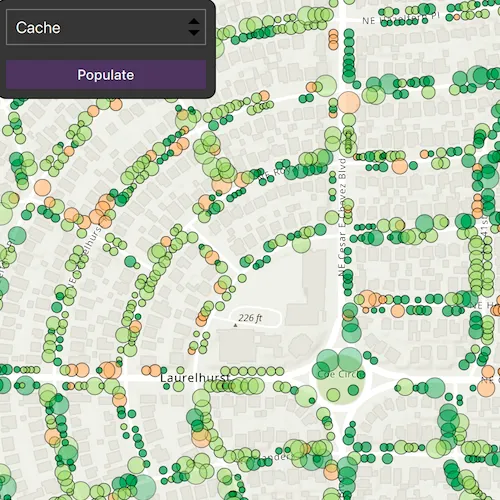
Choose a request mode from the combo box. Pan and zoom to see how the features update at different scales. If you choose ManualCache, click the “Populate” button to manually get a cache with a subset of features.
How it works
- Create a
ServiceFeatureTablewith the a feature service URL. - Create a
FeatureLayerwith the feature table and add it to a map’s operational layers to display it. - Set the
FeatureRequestModeproperty of the service feature table to the desired mode (OnInteractionCache,OnInteractionNoCache, orManualCache).- If using
ManualCache, populate the features withServiceFeatureTable::populateFromServiceAsync().
- If using
Relevant API
- FeatureLayer
- FeatureRequestMode
- ServiceFeatureTable
About the data
This sample uses the Trees of Portland service showcasing over 200,000 street trees in Portland, OR. Each tree point models the health of the tree (green - better, red - worse) as well as the diameter of its trunk.
Tags
cache, data, feature, feature request mode, performance
Sample code
// [WriteFile Name=ToggleBetweenFeatureRequestModes, Category=Features]// [Legal]// Copyright 2025 Esri.
// Licensed under the Apache License, Version 2.0 (the "License");// you may not use this file except in compliance with the License.// You may obtain a copy of the License at// http://www.apache.org/licenses/LICENSE-2.0
// Unless required by applicable law or agreed to in writing, software// distributed under the License is distributed on an "AS IS" BASIS,// WITHOUT WARRANTIES OR CONDITIONS OF ANY KIND, either express or implied.// See the License for the specific language governing permissions and// limitations under the License.// [Legal]
#ifdef PCH_BUILD#include "pch.hpp"#endif // PCH_BUILD
// sample headers#include "ToggleBetweenFeatureRequestModes.h"
// ArcGIS Maps SDK headers#include "FeatureLayer.h"#include "GeodatabaseTypes.h"#include "LayerListModel.h"#include "Map.h"#include "MapQuickView.h"#include "MapTypes.h"#include "Polygon.h"#include "QueryParameters.h"#include "ServiceFeatureTable.h"#include "Viewpoint.h"
// Qt headers#include <QFuture>#include <QUrl>
using namespace Esri::ArcGISRuntime;
ToggleBetweenFeatureRequestModes::ToggleBetweenFeatureRequestModes(QObject* parent /* = nullptr */) :  QObject(parent),  m_map(new Map(BasemapStyle::ArcGISTopographic, this)){  const QUrl serviceUrl = QUrl("https://services2.arcgis.com/ZQgQTuoyBrtmoGdP/arcgis/rest/services/Trees_of_Portland/FeatureServer/0");
  // Create a feature table for the trees of Portland feature service.  // The feature request mode for this service feature table is OnInteractionCache by default.  m_treeFeatureTable = new ServiceFeatureTable(serviceUrl, this);
  m_treeFeatureLayer = new FeatureLayer(m_treeFeatureTable, this);
  m_map->operationalLayers()->append(m_treeFeatureLayer);}
ToggleBetweenFeatureRequestModes::~ToggleBetweenFeatureRequestModes() = default;
void ToggleBetweenFeatureRequestModes::init(){  // Register the map view for QML  qmlRegisterType<MapQuickView>("Esri.Samples", 1, 0, "MapView");  qmlRegisterType<ToggleBetweenFeatureRequestModes>("Esri.Samples", 1, 0, "ToggleBetweenFeatureRequestModesSample");}
MapQuickView* ToggleBetweenFeatureRequestModes::mapView() const{  return m_mapView;}
// Set the view (created in QML)void ToggleBetweenFeatureRequestModes::setMapView(MapQuickView* mapView){  if (!mapView || mapView == m_mapView)  {    return;  }
  m_mapView = mapView;  m_mapView->setMap(m_map);
  m_map->setInitialViewpoint(Viewpoint(45.5266, -122.6219, 6000));
  emit mapViewChanged();}
// Use this method for manual cache.void ToggleBetweenFeatureRequestModes::fetchCacheManually(){  const Geometry geometry = m_mapView->visibleArea();
  // Create new query object that contains parameters to query specific request types.  QueryParameters params;  params.setGeometry(geometry);
  // Create list of the fields that are returned from the service.  // Using "*" will return all fields. This can be replaced to return certain fields.  const QStringList outFields = {"*"};  constexpr bool clearCache = true;
  // Populate feature table with the data based on query.  m_treeFeatureTable->populateFromServiceAsync(params, clearCache, outFields, this);}
// Use this method to set feature request mode.void ToggleBetweenFeatureRequestModes::setFeatureRequestMode(Esri::ArcGISRuntime::FeatureRequestMode featureRequestMode){  m_treeFeatureTable->setFeatureRequestMode(featureRequestMode);}
// [WriteFile Name=ToggleBetweenFeatureRequestModes, Category=Features]// [Legal]// Copyright 2025 Esri.
// Licensed under the Apache License, Version 2.0 (the "License");// you may not use this file except in compliance with the License.// You may obtain a copy of the License at// http://www.apache.org/licenses/LICENSE-2.0
// Unless required by applicable law or agreed to in writing, software// distributed under the License is distributed on an "AS IS" BASIS,// WITHOUT WARRANTIES OR CONDITIONS OF ANY KIND, either express or implied.// See the License for the specific language governing permissions and// limitations under the License.// [Legal]
#ifndef TOGGLEBETWEENFEATUREREQUESTMODES_H#define TOGGLEBETWEENFEATUREREQUESTMODES_H
// ArcGIS Maps SDK headers#include "GeodatabaseTypes.h"
// Qt headers#include <QObject>
namespace Esri::ArcGISRuntime{ class Map; class MapQuickView; class FeatureLayer; class ServiceFeatureTable; enum class FeatureRequestMode;} // namespace Esri::ArcGISRuntime
Q_MOC_INCLUDE("MapQuickView.h");
class ToggleBetweenFeatureRequestModes : public QObject{ Q_OBJECT
Q_PROPERTY(Esri::ArcGISRuntime::MapQuickView* mapView READ mapView WRITE setMapView NOTIFY mapViewChanged)
public: enum class RequestMode { Cache = static_cast<int>(Esri::ArcGISRuntime::FeatureRequestMode::OnInteractionCache), NoCache = static_cast<int>(Esri::ArcGISRuntime::FeatureRequestMode::OnInteractionNoCache), ManualCache = static_cast<int>(Esri::ArcGISRuntime::FeatureRequestMode::ManualCache) }; Q_ENUM(RequestMode)
explicit ToggleBetweenFeatureRequestModes(QObject* parent = nullptr); ~ToggleBetweenFeatureRequestModes() override;
static void init();
Q_INVOKABLE void setFeatureRequestMode(Esri::ArcGISRuntime::FeatureRequestMode featureRequestMode); Q_INVOKABLE void fetchCacheManually();
signals: void mapViewChanged();
private: Esri::ArcGISRuntime::MapQuickView* mapView() const; void setMapView(Esri::ArcGISRuntime::MapQuickView* mapView);
Esri::ArcGISRuntime::Map* m_map = nullptr; Esri::ArcGISRuntime::MapQuickView* m_mapView = nullptr; Esri::ArcGISRuntime::ServiceFeatureTable* m_treeFeatureTable = nullptr; Esri::ArcGISRuntime::FeatureLayer* m_treeFeatureLayer = nullptr;};
#endif // TOGGLEBETWEENFEATUREREQUESTMODES_H// [WriteFile Name=ToggleBetweenFeatureRequestModes, Category=Features]// [Legal]// Copyright 2025 Esri.
// Licensed under the Apache License, Version 2.0 (the "License");// you may not use this file except in compliance with the License.// You may obtain a copy of the License at// http://www.apache.org/licenses/LICENSE-2.0
// Unless required by applicable law or agreed to in writing, software// distributed under the License is distributed on an "AS IS" BASIS,// WITHOUT WARRANTIES OR CONDITIONS OF ANY KIND, either express or implied.// See the License for the specific language governing permissions and// limitations under the License.// [Legal]
import QtQuickimport QtQuick.Controlsimport Esri.Samples
Item {
property var currentFeatureRequestMode;
onCurrentFeatureRequestModeChanged: { model.setFeatureRequestMode(currentFeatureRequestMode); }
// add a mapView component MapView { id: view anchors.fill: parent
Component.onCompleted: { // Set and keep the focus on MapView to enable keyboard navigation forceActiveFocus(); } }
// Declare the C++ instance which creates the map etc. and supply the view ToggleBetweenFeatureRequestModesSample { id: model mapView: view }
// Add a background to the column Rectangle { anchors.fill: column radius: 10 border.width: 1 color: palette.base
MouseArea { anchors.fill: parent acceptedButtons: Qt.LeftButton | Qt.RightButton onClicked: mouse => mouse.accepted = true onDoubleClicked: mouse => mouse.accepted = true onWheel: wheel => wheel.accepted = true } }
Column { id: column spacing: 15 padding: 10
ComboBox { id: request_mode width: 200 model: ["Cache", "No Cache", "Manual Cache"] onCurrentIndexChanged: { switch (currentIndex) { case 0: currentFeatureRequestMode = ToggleBetweenFeatureRequestModesSample.Cache break case 1: currentFeatureRequestMode = ToggleBetweenFeatureRequestModesSample.NoCache break case 2: currentFeatureRequestMode = ToggleBetweenFeatureRequestModesSample.ManualCache break } } }
Button { id: populate width: 200 anchors.horizontalCenter: parent.horizontalCenter text: qsTr("Populate") enabled : currentFeatureRequestMode === ToggleBetweenFeatureRequestModesSample.ManualCache onClicked: { model.fetchCacheManually(); } } }}