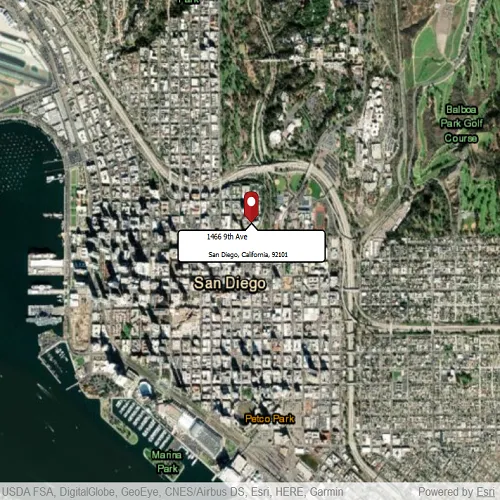
Use an online service to find the address for a tapped point.
Use case
You might use a geocoder to find a customer’s delivery address based on the location returned by their device’s GPS.
How to use the sample
Tap the map to see the nearest address displayed in a callout.
How it works
- Create the
Mapwith aBasemap. - Create a
LocatorTaskusing a URL. - Set the
ReverseGeocodeParametersfor theLocatorTaskand specify the geocode’s attributes. - Get the matching results from the
GeocodeResultusingReverseGeocodeWithParametersAsync - Change the attributes of the
MapView’sCalloutDataand display the location using aCallout
Relevant API
- GeocodeParameters
- LocatorTask
- ReverseGeocodeParameters
Offline data
Read more about how to set up the sample’s offline data here.
| Link | Local Location |
|---|---|
| pin PNG file | <userhome>/ArcGIS/Runtime/Data/symbol/pin.png |

About the data
This sample uses the World Geocoding Service.
Tags
address, geocode, locate, reverse geocode, search
Sample code
// [WriteFile Name=ReverseGeocodeOnline, Category=Search]// [Legal]// Copyright 2020 Esri.//// Licensed under the Apache License, Version 2.0 (the "License");// you may not use this file except in compliance with the License.// You may obtain a copy of the License at// http://www.apache.org/licenses/LICENSE-2.0//// Unless required by applicable law or agreed to in writing, software// distributed under the License is distributed on an "AS IS" BASIS,// WITHOUT WARRANTIES OR CONDITIONS OF ANY KIND, either express or implied.// See the License for the specific language governing permissions and// limitations under the License.// [Legal]
#ifdef PCH_BUILD#include "pch.hpp"#endif // PCH_BUILD
// sample headers#include "ReverseGeocodeOnline.h"
// ArcGIS Maps SDK headers#include "AttributeListModel.h"#include "CalloutData.h"#include "Envelope.h"#include "GeocodeResult.h"#include "Graphic.h"#include "GraphicListModel.h"#include "GraphicsOverlay.h"#include "GraphicsOverlayListModel.h"#include "LocatorTask.h"#include "Map.h"#include "MapQuickView.h"#include "MapTypes.h"#include "PictureMarkerSymbol.h"#include "Point.h"#include "ReverseGeocodeParameters.h"#include "SimpleRenderer.h"#include "SpatialReference.h"
// Qt headers#include <QDir>#include <QFuture>#include <QUrl>#include <QUuid>
using namespace Esri::ArcGISRuntime;
namespace{const QUrl url("https://geocode-api.arcgis.com/arcgis/rest/services/World/GeocodeServer");const QUrl pinUrl("qrc:/Samples/Search/ReverseGeocodeOnline/pin_circle_red.png");} // namespace
ReverseGeocodeOnline::ReverseGeocodeOnline(QObject* parent /* = nullptr */):  QObject(parent),  m_map(new Map(BasemapStyle::ArcGISImagery, this)){  m_graphicsOverlay = new GraphicsOverlay(this);  m_locatorTask = new LocatorTask(url, this);}
ReverseGeocodeOnline::~ReverseGeocodeOnline() = default;
void ReverseGeocodeOnline::configureGraphic(){  PictureMarkerSymbol* pinSymbol = new PictureMarkerSymbol(pinUrl, this);  pinSymbol->setHeight(40);  pinSymbol->setWidth(40);  pinSymbol->setOffsetY(pinSymbol->height() / 2);  SimpleRenderer* simpleRenderer = new SimpleRenderer(pinSymbol, this);
  m_graphicsOverlay->setRenderer(simpleRenderer);  m_graphicsOverlay->graphics()->append(new Graphic(this));  m_graphic = m_graphicsOverlay->graphics()->at(0);}
void ReverseGeocodeOnline::getAddress(){  connect(m_mapView, &MapQuickView::mouseClicked, this, [this](QMouseEvent& e)  {    e.accept();    const Point clickedLocation = m_mapView->screenToLocation(e.position().x(), e.position().y());    ReverseGeocodeParameters reverseGeocodeParameters;    reverseGeocodeParameters.setOutputSpatialReference(m_mapView->spatialReference());    m_locatorTask->reverseGeocodeWithParametersAsync(clickedLocation, reverseGeocodeParameters).then(this, [this](const QList<GeocodeResult>& geocodeResults)    {      if (geocodeResults.empty())        return;
      GeocodeResult geocode = geocodeResults.at(0);      const Point location = geocode.displayLocation();      m_mapView->setViewpointCenterAsync(location);
      const QString address = geocode.label();      const int splitIndex = address.indexOf(",");
      m_mapView->calloutData()->setTitle(address.left(splitIndex).trimmed());      m_mapView->calloutData()->setDetail(address.mid(splitIndex + 1).trimmed());      m_mapView->calloutData()->setLocation(location);      m_mapView->calloutData()->setVisible(true);
      m_graphic->setGeometry(geocode.displayLocation());      m_graphic->attributes()->setAttributesMap(geocode.attributes());      constexpr double scale = 8000.0;      m_mapView->setViewpointCenterAsync(geocode.extent().center(), scale);      m_graphic->setVisible(true);    });  });}
void ReverseGeocodeOnline::init(){  // Register the map view for QML  qmlRegisterType<MapQuickView>("Esri.Samples", 1, 0, "MapView");  qmlRegisterType<ReverseGeocodeOnline>("Esri.Samples", 1, 0, "ReverseGeocodeOnlineSample");  qmlRegisterUncreatableType<CalloutData>("Esri.Samples", 1, 0, "CalloutData", "CalloutData is an uncreatable type");}
MapQuickView* ReverseGeocodeOnline::mapView() const{  return m_mapView;}
CalloutData* ReverseGeocodeOnline::calloutData() const{  return m_calloutData;}
// Set the view (created in QML)void ReverseGeocodeOnline::setMapView(MapQuickView* mapView){  if (!mapView || mapView == m_mapView)    return;
  m_mapView = mapView;  m_mapView->setMap(m_map);
  // center map in San Diego  const Point center(-13042254.715252, 3857970.236806, SpatialReference(3857));  m_mapView->setViewpointCenterAsync(center, 30000);
  configureGraphic();  m_mapView->graphicsOverlays()->append(m_graphicsOverlay);
  getAddress();
  emit mapViewChanged();}
// [WriteFile Name=ReverseGeocodeOnline, Category=Search]// [Legal]// Copyright 2020 Esri.//// Licensed under the Apache License, Version 2.0 (the "License");// you may not use this file except in compliance with the License.// You may obtain a copy of the License at// http://www.apache.org/licenses/LICENSE-2.0//// Unless required by applicable law or agreed to in writing, software// distributed under the License is distributed on an "AS IS" BASIS,// WITHOUT WARRANTIES OR CONDITIONS OF ANY KIND, either express or implied.// See the License for the specific language governing permissions and// limitations under the License.// [Legal]
#ifndef REVERSEGEOCODEONLINE_H#define REVERSEGEOCODEONLINE_H
// Qt headers#include <QObject>
namespace Esri::ArcGISRuntime{class CalloutData;class Graphic;class GraphicsOverlay;class LocatorTask;class Map;class MapQuickView;}
Q_MOC_INCLUDE("MapQuickView.h")Q_MOC_INCLUDE("CalloutData.h")
class ReverseGeocodeOnline : public QObject{ Q_OBJECT
Q_PROPERTY(Esri::ArcGISRuntime::MapQuickView* mapView READ mapView WRITE setMapView NOTIFY mapViewChanged) Q_PROPERTY(Esri::ArcGISRuntime::CalloutData* calloutData READ calloutData NOTIFY calloutDataChanged)
public: explicit ReverseGeocodeOnline(QObject* parent = nullptr); ~ReverseGeocodeOnline();
static void init();
signals: void mapViewChanged(); void calloutDataChanged();
private: Esri::ArcGISRuntime::MapQuickView* mapView() const; void setMapView(Esri::ArcGISRuntime::MapQuickView* mapView); Esri::ArcGISRuntime::CalloutData* calloutData() const;
void configureGraphic(); void getAddress();
Esri::ArcGISRuntime::Map* m_map = nullptr; Esri::ArcGISRuntime::MapQuickView* m_mapView = nullptr; Esri::ArcGISRuntime::CalloutData* m_calloutData = nullptr; Esri::ArcGISRuntime::Graphic* m_graphic = nullptr; Esri::ArcGISRuntime::GraphicsOverlay* m_graphicsOverlay = nullptr; Esri::ArcGISRuntime::LocatorTask* m_locatorTask = nullptr;};
#endif // REVERSEGEOCODEONLINE_H// [WriteFile Name=ReverseGeocodeOnline, Category=Search]// [Legal]// Copyright 2020 Esri.//// Licensed under the Apache License, Version 2.0 (the "License");// you may not use this file except in compliance with the License.// You may obtain a copy of the License at// http://www.apache.org/licenses/LICENSE-2.0//// Unless required by applicable law or agreed to in writing, software// distributed under the License is distributed on an "AS IS" BASIS,// WITHOUT WARRANTIES OR CONDITIONS OF ANY KIND, either express or implied.// See the License for the specific language governing permissions and// limitations under the License.// [Legal]
import QtQuickimport QtQuick.Controlsimport Esri.Samplesimport Esri.ArcGISRuntime.Toolkit
Item {
// add a MapView component MapView { id: view anchors.fill: parent
Component.onCompleted: { // Set the focus on MapView to initially enable keyboard navigation forceActiveFocus(); }
Callout { id: callout calloutData: view.calloutData accessoryButtonVisible: false leaderPosition: Callout.LeaderPosition.Top padding: 5 } }
// Declare the C++ instance which creates the map etc. and supply the view ReverseGeocodeOnlineSample { id: model mapView: view }}