A utility network container allows a dense collection of features to be represented by a single feature, which can be used to reduce map clutter.
Use case
Offering a container view for features aids in the review for valid, structural attachment, and containment relationships. It also helps determine if a dataset has an association role set. Container views often model a cluster of electrical devices on a pole top or inside a cabinet or vault.
How to use the sample
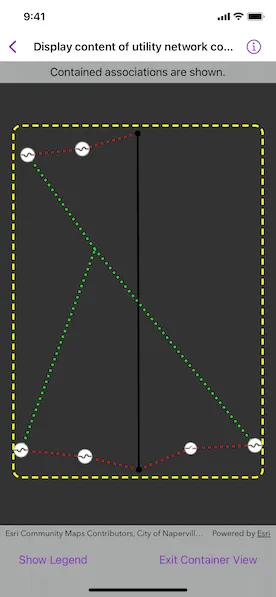
Tap a container feature to show all features inside the container. The container is shown as a polygon graphic with the content features contained within. The viewpoint and scale of the map are also changed to the container’s extent. Connectivity and attachment associations inside the container are shown as dotted lines.
How it works
- Create and load a web map that includes ArcGIS Pro Subtype Group Layers with only container features visible (i.e. fuse bank, switch bank, transformer bank, hand hole, and junction box).
- Create a
MapViewand add theonSingleTapGesture(perform:)modifier to detect tap events. - Get and load the first
UtilityNetworkfrom the web map. - Add a
GraphicsOverlayfor displaying a container view. - Identify the tapped feature and create an
UtilityElementfrom it. - Get the associations for this element using
UtilityNetwork.associations(for:ofKind:). - Turn-off the visibility of all of the map’s
operationalLayers. - Get the features for the
UtilityElement(s) from the associations usingUtilityNetwork.features(for:). - Add a
Graphicwith the same geometry and symbol as these features. - Add another
Graphicthat represents this extent and zoom to this extent with some buffer. - Get associations for this extent using
UtilityNetwork.associations(forExtent:ofKind:). - Add a
Graphicto represent the association geometry between them using a symbol that distinguishes betweenattachmentandconnectivityassociation type. - Turn-on the visibility of all
operationalLayers, clear theGraphicobjects, and zoom out to previous extent to exit container view.
Relevant API
- SubtypeFeatureLayer
- UtilityAssociation
- UtilityAssociation.Kind
- UtilityElement
- UtilityNetwork
About the data
The Naperville Electric SubtypeGroupLayers with Containers web map contains a utility network used to find associations shown in this sample. Authentication is required and handled within the sample code.
Tags
associations, connectivity association, containment association, structural attachment associations, utility network
Sample code
// Copyright 2023 Esri//// Licensed under the Apache License, Version 2.0 (the "License");// you may not use this file except in compliance with the License.// You may obtain a copy of the License at////   https://www.apache.org/licenses/LICENSE-2.0//// Unless required by applicable law or agreed to in writing, software// distributed under the License is distributed on an "AS IS" BASIS,// WITHOUT WARRANTIES OR CONDITIONS OF ANY KIND, either express or implied.// See the License for the specific language governing permissions and// limitations under the License.
import ArcGISimport SwiftUI
struct DisplayContentOfUtilityNetworkContainerView: View {    /// The display scale of this environment.    @Environment(\.displayScale) private var displayScale
    /// The view model for the sample.    @StateObject private var model = Model()
    /// A Boolean value indicating whether the map view interaction is enabled.    @State private var isMapViewUserInteractionEnabled = true
    /// A Boolean value indicating whether the legends are shown.    @State private var isShowingLegend = false
    /// A Boolean value indicating whether the content within the container is shown.    @State private var isShowingContainer = false
    /// The map point where the map was tapped.    @State private var mapPoint: Point?
    /// The point to identify a graphic.    @State private var screenPoint: CGPoint?
    /// The viewpoint before the map view zooms into the container's extent.    @State private var previousViewpoint: Viewpoint?
    /// The current viewpoint of the map view.    @State private var viewpoint = Viewpoint(latitude: 41.80, longitude: -88.16, scale: 4e3)
    var body: some View {        MapViewReader { proxy in            MapView(map: model.map, graphicsOverlays: [model.graphicsOverlay])                .interactionModes(isMapViewUserInteractionEnabled ? .all : [])                .onViewpointChanged(kind: .boundingGeometry) { viewpoint = $0 }                .onSingleTapGesture { screenPoint, mapPoint in                    self.screenPoint = screenPoint                    self.mapPoint = mapPoint                }                .overlay(alignment: .top) {                    Text(model.statusMessage)                        .padding(.vertical, 6)                        .frame(maxWidth: .infinity)                        .background(.thinMaterial, ignoresSafeAreaEdges: .horizontal)                }                .toolbar {                    ToolbarItemGroup(placement: .bottomBar) {                        Button("Show Legend") {                            isShowingLegend = true                        }                        .disabled(model.legendItems.isEmpty)                        .popover(isPresented: $isShowingLegend) {                            sheetContent                                .presentationDetents([.fraction(0.5)])                                .frame(idealWidth: 320, idealHeight: 380)                        }                        .task(id: displayScale) {                            // Updates the legend info when display scale changes.                            await model.updateLegendInfoItems(displayScale: displayScale)                        }                        Spacer()                        Button("Exit Container View") {                            resetMapView(proxy)                            model.statusMessage = "Tap on a container to see its content."                        }                        .disabled(!isShowingContainer)                    }                }                .task {                    // Loads the utility network from the web map.                    do {                        try await model.loadUtilityNetwork()                        model.statusMessage = "Tap on a container to see its content."                    } catch {                        model.statusMessage = "An error occurred while loading the network."                    }                }                .task(id: screenPoint) {                    guard let screenPoint else { return }                    // The identify results from the touch point.                    guard let identifyResults = try? await proxy.identifyLayers(screenPoint: screenPoint, tolerance: 5) else { return }                    // The features identified are as part of its sublayer's result.                    guard let layerResult = identifyResults.first(where: { $0.layerContent is SubtypeFeatureLayer }) else { return }                    // The top selected feature.                    guard let containerFeature = (layerResult.sublayerResults                        .lazy                        .flatMap { $0.geoElements.compactMap { $0 as? ArcGISFeature } })                        .first                    else {                        return                    }
                    do {                        // Displays the container feature's content.                        try await model.handleIdentifiedFeature(containerFeature)                    } catch {                        model.statusMessage = "An error occurred while getting the associations."                        resetMapView(proxy)                        return                    }
                    // Sets UI states to focus on the container's content.                    model.setOperationalLayersVisibility(isVisible: false)                    // Turns off user interaction to avoid straying away from the container view.                    isMapViewUserInteractionEnabled = false                    previousViewpoint = viewpoint                    if let extent = model.graphicsOverlay.extent {                        await proxy.setViewpointGeometry(extent, padding: 20)                        isShowingContainer = true                    }                }                .onTeardown {                    model.tearDown()                }        }    }
    /// A helper method to reset the map view.    /// - Parameter proxy: The map view proxy.    private func resetMapView(_ proxy: MapViewProxy) {        model.setOperationalLayersVisibility(isVisible: true)        model.graphicsOverlay.removeAllGraphics()        isShowingContainer = false        isMapViewUserInteractionEnabled = true        Task {            if let previousViewpoint {                await proxy.setViewpoint(previousViewpoint)            }        }    }
    /// The legends list.    private var sheetContent: some View {        NavigationStack {            List(model.legendItems, id: \.name) { legend in                Label {                    Text(legend.name)                } icon: {                    Image(uiImage: legend.image)                }            }            .navigationTitle("Legend")            .navigationBarTitleDisplayMode(.inline)            .toolbar {                ToolbarItem(placement: .confirmationAction) {                    Button("Done") {                        isShowingLegend = false                    }                }            }        }        .frame(idealWidth: 320, idealHeight: 428)    }}
#Preview {    NavigationStack {        DisplayContentOfUtilityNetworkContainerView()    }}
// Copyright 2023 Esri//// Licensed under the Apache License, Version 2.0 (the "License");// you may not use this file except in compliance with the License.// You may obtain a copy of the License at//// https://www.apache.org/licenses/LICENSE-2.0//// Unless required by applicable law or agreed to in writing, software// distributed under the License is distributed on an "AS IS" BASIS,// WITHOUT WARRANTIES OR CONDITIONS OF ANY KIND, either express or implied.// See the License for the specific language governing permissions and// limitations under the License.
import ArcGISimport Combineimport UIKit
extension DisplayContentOfUtilityNetworkContainerView { /// The model used to manage the state of the trace view. @MainActor class Model: ObservableObject { // MARK: Properties
/// The status message shown to the user. @Published var statusMessage = ""
/// The legends for elements in the utility network. @Published private(set) var legendItems: [LegendItem] = []
/// The Naperville Electric Containers web map. let map = Map(item: .napervilleElectricalNetwork())
/// The graphics overlay to display utility network graphics. let graphicsOverlay = GraphicsOverlay()
/// A line symbol to show the bounding extent. private let boundingBoxSymbol = SimpleLineSymbol(style: .dash, color: .yellow, width: 3)
/// A line symbol to show the attachment association. private let attachmentSymbol = SimpleLineSymbol(style: .dot, color: .green, width: 3)
/// A line symbol to show the connectivity association. private let connectivitySymbol = SimpleLineSymbol(style: .dot, color: .red, width: 3)
/// The feature layers that allow us to fetch the legend symbols of /// different elements in the network. private let featureLayers: [FeatureLayer] = { let layerIDs = [1, 5] return layerIDs.map { layerID in let url: URL = .featureService.appendingPathComponent("\(layerID)") let table = ServiceFeatureTable(url: url) return FeatureLayer(featureTable: table) } }()
/// The utility network for this sample. private var network: UtilityNetwork { map.utilityNetworks.first! }
// MARK: Methods
/// Loads the utility network. func loadUtilityNetwork() async throws { // Gets and loads the first utility network from the web map. try await map.load() try await network.load() }
init() { // Updates the URL session challenge handler to use the // specified credentials and tokens for any challenges. ArcGISEnvironment.authenticationManager.arcGISAuthenticationChallengeHandler = ChallengeHandler() }
/// Cleans up the model's setup. func tearDown() { // Resets the URL session challenge handler to use default handling // and removes all credentials. ArcGISEnvironment.authenticationManager.arcGISAuthenticationChallengeHandler = nil ArcGISEnvironment.authenticationManager.arcGISCredentialStore.removeAll() }
// MARK: Legend
/// Creates legend items with a name and an image. /// - Parameter displayScale: The display scale for the swatch images. func updateLegendInfoItems(displayScale: CGFloat) async { statusMessage = "Getting Legend Info…" // The legend info array that contains all the info from each feature layer. let legendInfos: [LegendInfo] = await withTaskGroup(of: [LegendInfo].self) { group in for layer in featureLayers { group.addTask { (try? await layer.legendInfos) ?? [] } } var infos: [LegendInfo] = [] for await infosFromLayer in group { infos.append(contentsOf: infosFromLayer) } return infos }
// The symbols used to display the container view boundary // and associations. var symbolsByName: [String: Symbol] = [ "Bounding Box": boundingBoxSymbol, "Attachment": attachmentSymbol, "Connectivity": connectivitySymbol ]
// Adds the other legends to the dictionary. for legendInfo in legendInfos { let name = legendInfo.name guard !name.isEmpty && name != "Unknown", let symbol = legendInfo.symbol else { continue } symbolsByName[name] = symbol }
// Creates swatches from each symbol. statusMessage = "Getting Legend Symbol Swatches…" let legendItems: [LegendItem] = await withTaskGroup(of: LegendItem?.self) { group in for (name, symbol) in symbolsByName { group.addTask { if let swatch = try? await symbol.makeSwatch(scale: displayScale) { return LegendItem(name: name, image: swatch) } else { return nil } } } var items: [LegendItem] = [] for await legendItem in group where legendItem != nil { items.append(legendItem!) } return items } // Updates the legend items in the model. self.legendItems = legendItems.sorted(using: KeyPathComparator(\.name)) }
// MARK: Network Association Graphics
/// Creates graphics for the associations and content in the /// container element. /// - Parameter feature: The container element's feature. func handleIdentifiedFeature(_ feature: ArcGISFeature) async throws { let containerElement = network.makeElement(arcGISFeature: feature)! let contentElements = try await contentElements(for: containerElement) let contentGraphics = try await makeGraphics(for: contentElements, within: containerElement) graphicsOverlay.addGraphics(contentGraphics)
let message: String if contentGraphics.count == 1 { message = "This feature contains no associations." } else { message = "Contained associations are shown." } statusMessage = message
if let extent = graphicsOverlay.extent { let associationsGraphics = try await makeGraphics(forAssociationsWithin: extent) let boundingBoxGraphic = Graphic(geometry: GeometryEngine.buffer(around: extent, distance: 0.05)!, symbol: boundingBoxSymbol) graphicsOverlay.addGraphics(associationsGraphics) graphicsOverlay.addGraphic(boundingBoxGraphic) } }
/// Gets content elements within the container element. /// - Parameter containerElement: The container element. /// - Returns: An array of utility elements in the container. private func contentElements(for containerElement: UtilityElement) async throws -> [UtilityElement] { // Gets the containment associations from the element to display its content. let containmentAssociations = try await network.associations(for: containerElement, ofKind: .containment) // Determines the relationship of each element and add it to the content elements. return containmentAssociations.map { association in if association.fromElement.objectID == containerElement.objectID { return association.toElement } else { return association.fromElement } } }
/// Creates the graphics for the utility elements within a container. /// - Parameters: /// - contentElements: The elements within the container. /// - containerElement: The container element. /// - Returns: An array of graphics. private func makeGraphics(for contentElements: [UtilityElement], within containerElement: UtilityElement) async throws -> [Graphic] { let contentFeatures = try await network.features(for: contentElements) let graphics: [Graphic] = contentFeatures.compactMap { feature in guard let featureTable = feature.table as? ServiceFeatureTable, let symbol = featureTable.layerInfo?.drawingInfo?.renderer?.symbol(for: feature) else { return nil } return Graphic(geometry: feature.geometry, symbol: symbol) } return graphics }
/// Creates the associations graphics for elements in the container. /// - Parameter boundingExtent: The boundary for the container. /// - Returns: An array of association relationship graphics. private func makeGraphics(forAssociationsWithin boundingExtent: Envelope) async throws -> [Graphic] { let containmentAssociations = try await network.associations(forExtent: boundingExtent) let graphics: [Graphic] = containmentAssociations.map { association in let symbol = association.kind == .attachment ? attachmentSymbol : connectivitySymbol return Graphic(geometry: association.geometry, symbol: symbol) } return graphics }
// MARK: Helpers
/// Changes the visibility of the operational layers. /// - Parameter isVisible: A Boolean to make the map visible or not. func setOperationalLayersVisibility(isVisible: Bool) { map.operationalLayers.forEach { $0.isVisible = isVisible } } }
/// A struct for displaying legend info in a list row. struct LegendItem { /// The description label of the legend item. let name: String /// The image swatch of the legend item. let image: UIImage }}
private extension Item { /// A web map portal item for the Naperville Electric subtype group layers /// with containers. static func napervilleElectricalNetwork() -> PortalItem { PortalItem( // Sample server 7 authentication required. portal: Portal(url: .samplePortal, connection: .authenticated), id: .init("0e38e82729f942a19e937b31bfac1b8d")! ) }}
private extension URL { /// The server containing the data for this sample. private static var sampleServer7: URL { URL(string: "https://sampleserver7.arcgisonline.com")! }
/// The feature service containing the data for this sample. static var featureService: URL { sampleServer7.appendingPathComponent("server/rest/services/UtilityNetwork/NapervilleElectric/FeatureServer") }
/// The portal containing the data for this sample. static var samplePortal: URL { sampleServer7.appendingPathComponent("portal") }}
// MARK: Authentication
/// The authentication model used to handle challenges and credentials.private struct ChallengeHandler: ArcGISAuthenticationChallengeHandler { func handleArcGISAuthenticationChallenge( _ challenge: ArcGISAuthenticationChallenge ) async throws -> ArcGISAuthenticationChallenge.Disposition { // NOTE: Never hardcode login information in a production application. // This is done solely for the sake of the sample. return .continueWithCredential( // Credentials for sample server 7 services. try await TokenCredential.credential(for: challenge, username: "viewer01", password: "I68VGU^nMurF") ) }}