OAuth credentials are an item used to support authentication workflows. They are required to implement user authentication and app authentication using OAuth 2.0 workflows.
Creating OAuth 2.0 credentials
Prerequisites
OAuth 2.0 credentials can be created using an ArcGIS Online account with a user type of Creator or higher.
Steps
The steps to create OAuth 2.0 credentials are explained in the Create OAuth credentials for user authentication tutorial:
Create OAuth credentials for user authentication
Most user authentication flows require a valid client from a set of OAuth credentials. They also require a redirect URL to be configured in the settings of the OAuth credential.
Redirect URLs
A redirect URL is a required parameter of user authentication flows. This is the URL that your application will direct users to after they successfully authenticate.
Redirect URLs are managed as a property of OAuth credentials. They can be added to your credentials during the creation process, or any time through the Settings panel of the credentials item page.
To add a redirect URL to your developer credentials, complete the following steps:
-
Sign in to your portal and search for your developer credentials.
-
Go to the item page of the credentials and click Settings > Application.
-
Under Redirect URLs, add the URL that you want to direct users to after completing authentication. This URL varies based on your application and typically takes the format of
"httpsor:// <server >[ :port]/callback.html" "http. This is a valid web page or server endpoint to which a user can be redirected after successful sign in.://my-arcgis-app :/auth" - For example, if you are running an application on
https, add://localhost :8080 httpsto the list of redirect URLs. The exact URL depends on the name of your callback page and the programming language you are using. If you are following a "Sign in with user authentication" ArcGIS tutorial, it will specify the name of your callback page.://localhost :8080/callback.html

- For example, if you are running an application on
Privileges and item access
When implementing user authentication, your application inherits all privileges and item access rights from the signed-in ArcGIS user. Although OAuth credentials provide settings to manage privileges and item access, these settings are not used in user authentication. To learn how OAuth credentials manage privileges and item access for other types of authentication, go to OAuth credentials (for app authentication)
Referrers
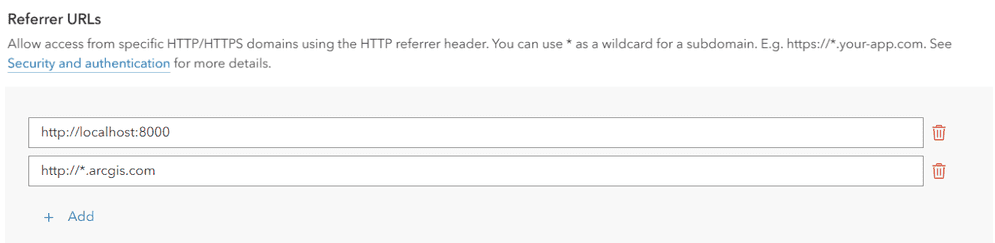
A referrer is an HTTP header field used to identify the client requesting a server resource. This functions as a security measure, allowing applications to confirm their client's identity. When OAuth credentials have a specific HTTP referer header set, services can confirm that an incoming request's referrer matches one of the valid referrers assigned to that access token.
Specific domains can be provided or you can use wildcard characters (*) in the subdomain of your allowed referrer. For example https will allow the access token to be used on both https and https. While it is also possible to restrict access token use to specific paths (https), we do not recommend this method because browsers may remove the path due to privacy concerns.
Usage tracking
All services and content accessed with OAuth credentials are tracked. You can monitor the usage of credentials in order to view the consumption of services and the billing amount.
ArcGIS Online developers use their portal to monitor service usage. To monitor service usage of OAuth credentials, use the following steps:
-
Go to ArcGIS.com and sign in to your portal with an ArcGIS Online account.
-
Click Content > My content.
-
Find the OAuth credentials item you would like to review usage for. Go to its item page.
-
Click Settings > Application > View usage.

-
Review the usage report for the OAuth credentials. The Credits view displays the number of credits the application has consumed. The Users view displays the number of users who have signed in to your application, if applicable.

In addition to these steps, ArcGIS Online administrators can use the portal to generate a usage report.