Class CircularArcClass
[ClassInterface(ClassInterfaceType.None)]
[Guid("CD3A614E-BC4B-11D0-8303-0000F8034032")]
public class CircularArcClass : CircularArc, ICircularArc, ITransform2D, ICurve3, ICurve2, ISegment, ICurve, IGeometry, IConstructCircularArc3, IConstructCircularArc2, IConstructCircularArc, IProximityOperator, ISupportErrorInfo, IClone, ISegmentM, ISegmentZ, ISegmentID- Inheritance
-
CircularArcClass
- Implements
- Inherited Members
Constructors
CircularArcClass()
public CircularArcClass()Explicit Interface Implementations
Assign(IClone)
Assigns the properties of src to the receiver.
virtual void Assign(IClone src)Parameters
srcIClone
CenterPoint
The center point.
virtual IPoint CenterPoint { get; }Returns
Remarks

CentralAngle
The included (or central) angle.
virtual double CentralAngle { get; set; }Returns
Remarks
ChordHeight
The chord height (assigning preserves endpoints, and orientation unless chord height is < 0).
virtual double ChordHeight { get; set; }Returns
Remarks
Clone()
Clones the receiver and assigns the result to *clone.
virtual IClone Clone()Returns
Complement()
Changes this arc into its complement; 'from' and 'to' points are unchanged.
virtual void Complement()Remarks
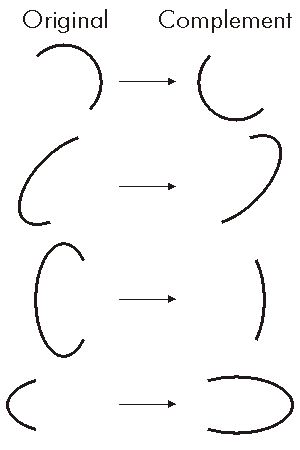
//This example shows how to create a Complement of Circular arc.
static void ComplementArcs()
{
//Create three points to draw an arc through.
IPoint point1 = new ESRI.ArcGIS.Geometry.Point();
IPoint point2 = new ESRI.ArcGIS.Geometry.Point();
IPoint point3 = new ESRI.ArcGIS.Geometry.Point();
point1.PutCoords(200, 200);
point2.PutCoords(200, 300);
point3.PutCoords(300, 300);
//Construct a Three Point Arc and draw as solid line.
IConstructCircularArc constructionArc = new CircularArc() as IConstructCircularArc;
constructionArc.ConstructThreePoints(point1, point2, point3, true);
//Draw the compliment of the previous arc as dashed line.
ICircularArc evilCircularArc = constructionArc as ICircularArc;
evilCircularArc.Complement();
}
Public Sub ComplementArcs()
'Create three points to draw an arc through.
Dim pPoint1 As ESRI.ArcGIS.Geometry.IPoint, pPoint2 As ESRI.ArcGIS.Geometry.IPoint, pPoint3 As ESRI.ArcGIS.Geometry.IPoint
pPoint1 = eCreatePoint(200, 200)
pPoint2 = eCreatePoint(200, 300)
pPoint3 = eCreatePoint(300, 300)
'Construct a Three Point Arc and draw as solid line.
Dim pCArc As ESRI.ArcGIS.Geometry.IConstructCircularArc
pCArc = New ESRI.ArcGIS.Geometry.CircularArc
pCArc.ConstructThreePoints(pPoint1, pPoint2, pPoint3, True)
'Create the compliment of the previous arc as dashed line.
Dim pCArcCmp As ESRI.ArcGIS.Geometry.ICircularArc
pCArcCmp = pCArc
pCArcCmp.Complement()
End Sub
Public Function eCreatePoint(ByVal X As Double, ByVal Y As Double) As ESRI.ArcGIS.Geometry.IPoint
eCreatePoint = New ESRI.ArcGIS.Geometry.PointClass()
eCreatePoint.PutCoords(X, Y)
End Function
ConstructArcDistance(IPoint, IPoint, bool, double)
Constructs an arc from a center point, a starting point, and an arc length.
virtual void ConstructArcDistance(IPoint Center, IPoint from, bool isCCW, double arcDistance)Parameters
Remarks
-isCCW stands for "is counter clockwise"
private void ConstructArcDistance()
{
IConstructCircularArc constructCircularArc = new CircularArcClass();
ICircularArc circularArc = constructCircularArc as ICircularArc;
IPoint fromPoint = new PointClass();
IPoint toPoint = new PointClass();
fromPoint.PutCoords(100, 100);
toPoint.PutCoords(50, 50);
constructCircularArc.ConstructArcDistance(fromPoint, toPoint, true, 150);
String report = "Length : " + circularArc.Length + "\n" +
"Radius : " + circularArc.Radius + "\n" +
"Chord Height : " + circularArc.ChordHeight + "\n" +
"Central Angle (Rad) : " + circularArc.CentralAngle + "\n" +
"From Angle (Rad) : " + circularArc.FromAngle + "\n" +
"To Angle (Rad) : " + circularArc.ToAngle + "\n" +
"Center Point : " + circularArc.CenterPoint.X + " , " + circularArc.CenterPoint.Y + "\n" +
"From Point : " + circularArc.FromPoint.X + " , " + circularArc.FromPoint.Y + "\n" +
"To Point : " + circularArc.ToPoint.X + " , " + circularArc.ToPoint.Y;
System.Windows.Forms.MessageBox.Show(report);
}
Private Sub ConstructArcDistance()
Dim pConstructCircularArc As ESRI.ArcGIS.Geometry.IConstructCircularArc
Dim pCArc As ESRI.ArcGIS.Geometry.ICircularArc
Dim pCenterPoint As ESRI.ArcGIS.Geometry.IPoint
Dim pStartPoint As ESRI.ArcGIS.Geometry.IPoint
pConstructCircularArc = New ESRI.ArcGIS.Geometry.CircularArc
pCArc = pConstructCircularArc
pCenterPoint = New ESRI.ArcGIS.Geometry.Point
pStartPoint = New ESRI.ArcGIS.Geometry.Point
pCenterPoint.PutCoords(100, 100)
pStartPoint.PutCoords(50, 50)
pConstructCircularArc.ConstructArcDistance(pCenterPoint, pStartPoint, True, 150)
Debug.Print("Length : " & pCArc.Length)
Debug.Print("Radius : " & pCArc.Radius)
Debug.Print("Chord Height : " & pCArc.ChordHeight)
Debug.Print("Central Angle (Rad) : " & pCArc.CentralAngle)
Debug.Print("From Angle (Rad) : " & pCArc.FromAngle)
Debug.Print("To Angle (Rad) : " & pCArc.ToAngle)
Debug.Print("Center Point : " & pCArc.CenterPoint.X & " , " & pCArc.CenterPoint.Y)
Debug.Print("From Point : " & pCArc.FromPoint.X & " , " & pCArc.FromPoint.Y)
Debug.Print("To Point : " & pCArc.ToPoint.X & " , " & pCArc.ToPoint.Y)
End Sub
ConstructBearingAngleArc(IPoint, double, bool, double, double)
Constructs an arc with the given chord bearing, central angle and arc distance.
virtual void ConstructBearingAngleArc(IPoint from, double inAngle, bool isCCW, double CentralAngle, double arcDistance)Parameters
Remarks
-isCCW stands for "is counter clockwise"

private void ConstructBearingAngleArc()
{
  IConstructCircularArc constructCircularArc = new CircularArcClass();
  ICircularArc circularArc = constructCircularArc as ICircularArc;
IPoint fromPoint = new PointClass();
fromPoint.PutCoords(100, 100);
//The angles should be in Radians (Radians = Degrees * PI/180)
constructCircularArc.ConstructBearingAngleArc(fromPoint, 0, true, (90 * (Math.PI / 180)), 150);
String report = "Length : " + circularArc.Length + "\n" +
"Radius : " + circularArc.Radius + "\n" +
"Chord Height : " + circularArc.ChordHeight + "\n" +
"Central Angle (Rad) : " + circularArc.CentralAngle + "\n" +
"From Angle (Rad) : " + circularArc.FromAngle + "\n" +
"To Angle (Rad) : " + circularArc.ToAngle + "\n" +
"Center Point : " + circularArc.CenterPoint.X + " , " + circularArc.CenterPoint.Y + "\n" +
"From Point : " + circularArc.FromPoint.X + " , " + circularArc.FromPoint.Y + "\n" +
"To Point : " + circularArc.ToPoint.X + " , " + circularArc.ToPoint.Y;
System.Windows.Forms.MessageBox.Show(report);
}
Private Sub ConstructBearingAngleArc()
Dim pConstructCircularArc As ESRI.ArcGIS.Geometry.IConstructCircularArc
Dim pCArc As ESRI.ArcGIS.Geometry.ICircularArc
Dim pFromPoint As ESRI.ArcGIS.Geometry.IPoint
Dim Pi As Double
pConstructCircularArc = New ESRI.ArcGIS.Geometry.CircularArc
pCArc = pConstructCircularArc
Pi = 4 * Math.Atan(1) 'Calculate the value of pi.
pFromPoint = New ESRI.ArcGIS.Geometry.Point
pFromPoint.PutCoords(100, 100)
'The angles should be in Radians (Radians = Degrees * PI/180)
pConstructCircularArc.ConstructBearingAngleArc(pFromPoint, 0, True, (90 * (Pi / 180)), 150)
Debug.Print("Length : " & pCArc.Length)
Debug.Print("Radius : " & pCArc.Radius)
Debug.Print("Chord Height : " & pCArc.ChordHeight)
Debug.Print("Central Angle (Rad) : " & pCArc.CentralAngle)
Debug.Print("From Angle (Rad) : " & pCArc.FromAngle)
Debug.Print("To Angle (Rad) : " & pCArc.ToAngle)
Debug.Print("Center Point : " & pCArc.CenterPoint.X & " , " & pCArc.CenterPoint.Y)
Debug.Print("From Point : " & pCArc.FromPoint.X & " , " & pCArc.FromPoint.Y)
Debug.Print("To Point : " & pCArc.ToPoint.X & " , " & pCArc.ToPoint.Y)
End Sub
ConstructBearingAngleChord(IPoint, double, bool, double, double)
Constructs an arc with the given chord bearing, central angle and chord distance.
virtual void ConstructBearingAngleChord(IPoint from, double inAngle, bool isCCW, double CentralAngle, double chordDistance)Parameters
Remarks
-isCCW stands for "is counter clockwise"
private void ConstructBearingAngleChord()
{
  IConstructCircularArc constructCircularArc = new CircularArcClass();
  ICircularArc circularArc = constructCircularArc as ICircularArc;
IPoint fromPoint = new PointClass();
fromPoint.PutCoords(100, 100);
//The angles should be in Radians (Radians = Degrees * PI/180)
constructCircularArc.ConstructBearingAngleChord(fromPoint, 0, true, (90 * (Math.PI / 180)), 150);
String report = "Length : " + circularArc.Length + "\n" +
"Radius : " + circularArc.Radius + "\n" +
"Chord Height : " + circularArc.ChordHeight + "\n" +
"Central Angle (Rad) : " + circularArc.CentralAngle + "\n" +
"From Angle (Rad) : " + circularArc.FromAngle + "\n" +
"To Angle (Rad) : " + circularArc.ToAngle + "\n" +
"Center Point : " + circularArc.CenterPoint.X + " , " + circularArc.CenterPoint.Y + "\n" +
"From Point : " + circularArc.FromPoint.X + " , " + circularArc.FromPoint.Y + "\n" +
"To Point : " + circularArc.ToPoint.X + " , " + circularArc.ToPoint.Y;
System.Windows.Forms.MessageBox.Show(report);
}
Private Sub ConstructBearingAngleChord()
Dim pConstructCircularArc As ESRI.ArcGIS.Geometry.IConstructCircularArc
Dim pCArc As ESRI.ArcGIS.Geometry.ICircularArc
Dim Pi As Double
Dim pFromPoint As ESRI.ArcGIS.Geometry.IPoint
pConstructCircularArc = New ESRI.ArcGIS.Geometry.CircularArc
pCArc = pConstructCircularArc
Pi = 4 * Math.Atan(1) 'Calculate the value of pi.
pFromPoint = New ESRI.ArcGIS.Geometry.Point
pFromPoint.PutCoords(100, 100)
'The angles should be in Radians (Radians = Degrees * PI/180)
pConstructCircularArc.ConstructBearingAngleChord(pFromPoint, 0, True, (90 * (Pi / 180)), 100)
Debug.Print("Length : " & pCArc.Length)
Debug.Print("Radius : " & pCArc.Radius)
Debug.Print("Chord Height : " & pCArc.ChordHeight)
Debug.Print("Central Angle (Rad) : " & pCArc.CentralAngle)
Debug.Print("From Angle (Rad) : " & pCArc.FromAngle)
Debug.Print("To Angle (Rad) : " & pCArc.ToAngle)
Debug.Print("Center Point : " & pCArc.CenterPoint.X & " , " & pCArc.CenterPoint.Y)
Debug.Print("From Point : " & pCArc.FromPoint.X & " , " & pCArc.FromPoint.Y)
Debug.Print("To Point : " & pCArc.ToPoint.X & " , " & pCArc.ToPoint.Y)
End Sub
ConstructBearingAngleTangent(IPoint, double, bool, double, double)
Constructs an arc with the given chord bearing, central angle and tangent distance.
virtual void ConstructBearingAngleTangent(IPoint from, double inAngle, bool isCCW, double CentralAngle, double tangentDistance)Parameters
Remarks
-isCCW stands for "is counter clockwise"
private void ConstructBearingAngleTangent()
{
  IConstructCircularArc constructCircularArc = new CircularArcClass();
  ICircularArc circularArc = constructCircularArc as ICircularArc;
IPoint fromPoint = new PointClass();
fromPoint.PutCoords(100, 100);
//The angles should be in Radians (Radians = Degrees * PI/180)
constructCircularArc.ConstructBearingAngleTangent(fromPoint, 0, true, (90 * (Math.PI / 180)), 300);
String report = "Length : " + circularArc.Length + "\n" +
"Radius : " + circularArc.Radius + "\n" +
"Chord Height : " + circularArc.ChordHeight + "\n" +
"Central Angle (Rad) : " + circularArc.CentralAngle + "\n" +
"From Angle (Rad) : " + circularArc.FromAngle + "\n" +
"To Angle (Rad) : " + circularArc.ToAngle + "\n" +
"Center Point : " + circularArc.CenterPoint.X + " , " + circularArc.CenterPoint.Y + "\n" +
"From Point : " + circularArc.FromPoint.X + " , " + circularArc.FromPoint.Y + "\n" +
"To Point : " + circularArc.ToPoint.X + " , " + circularArc.ToPoint.Y;
System.Windows.Forms.MessageBox.Show(report);
}
Private Sub ConstructBearingAngleTangent()
Dim pConstructCircularArc As ESRI.ArcGIS.Geometry.IConstructCircularArc
Dim pCArc As ESRI.ArcGIS.Geometry.ICircularArc
Dim Pi As Double
Dim pFromPoint As ESRI.ArcGIS.Geometry.IPoint
pConstructCircularArc = New ESRI.ArcGIS.Geometry.CircularArc
pCArc = pConstructCircularArc
Pi = 4 * Math.Atan(1) 'Calculate the value of pi.
pFromPoint = New ESRI.ArcGIS.Geometry.Point
pFromPoint.PutCoords(100, 100)
'The angles should be in Radians (Radians = Degrees * PI/180)
pConstructCircularArc.ConstructBearingAngleTangent(pFromPoint, 0, True, (90 * Pi) / 180, 300)
Debug.Print("Length : " & pCArc.Length)
Debug.Print("Radius : " & pCArc.Radius)
Debug.Print("Chord Height : " & pCArc.ChordHeight)
Debug.Print("Central Angle (Rad) : " & pCArc.CentralAngle)
Debug.Print("From Angle (Rad) : " & pCArc.FromAngle)
Debug.Print("To Angle (Rad) : " & pCArc.ToAngle)
Debug.Print("Center Point : " & pCArc.CenterPoint.X & " , " & pCArc.CenterPoint.Y)
Debug.Print("From Point : " & pCArc.FromPoint.X & " , " & pCArc.FromPoint.Y)
Debug.Print("To Point : " & pCArc.ToPoint.X & " , " & pCArc.ToPoint.Y)
End Sub
ConstructBearingArcTangent(IPoint, double, bool, double, double)
Constructs an arc with the given chord bearing, arc distance and tangent distance.
virtual void ConstructBearingArcTangent(IPoint from, double inAngle, bool isCCW, double arcDistance, double tangentDistance)Parameters
Remarks
-isCCW stands for "is counter clockwise"
private void ConstructBearingArcTangent()
{
  IConstructCircularArc constructCircularArc = new CircularArcClass();
  ICircularArc circularArc = constructCircularArc as ICircularArc;
IPoint fromPoint = new PointClass();
fromPoint.PutCoords(100, 100);
//The angles should be in Radians (Radians = Degrees * PI/180)
constructCircularArc.ConstructBearingArcTangent(fromPoint, 0, true, 100, 300);
String report = "Length : " + circularArc.Length + "\n" +
"Radius : " + circularArc.Radius + "\n" +
"Chord Height : " + circularArc.ChordHeight + "\n" +
"Central Angle (Rad) : " + circularArc.CentralAngle + "\n" +
"From Angle (Rad) : " + circularArc.FromAngle + "\n" +
"To Angle (Rad) : " + circularArc.ToAngle + "\n" +
"Center Point : " + circularArc.CenterPoint.X + " , " + circularArc.CenterPoint.Y + "\n" +
"From Point : " + circularArc.FromPoint.X + " , " + circularArc.FromPoint.Y + "\n" +
"To Point : " + circularArc.ToPoint.X + " , " + circularArc.ToPoint.Y;
System.Windows.Forms.MessageBox.Show(report);
}
Private Sub ConstructBearingArcTangent()
Dim pConstructCircularArc As ESRI.ArcGIS.Geometry.IConstructCircularArc
Dim pCArc As ESRI.ArcGIS.Geometry.ICircularArc
Dim Pi As Double
Dim pFromPoint As ESRI.ArcGIS.Geometry.IPoint
pConstructCircularArc = New ESRI.ArcGIS.Geometry.CircularArc
pCArc = pConstructCircularArc
Pi = 4 * Math.Atan(1) 'Calculate the value of pi.
pFromPoint = New ESRI.ArcGIS.Geometry.Point
pFromPoint.PutCoords(100, 100)
'The angles should be in Radians (Radians = Degrees * PI/180)
pConstructCircularArc.ConstructBearingArcTangent(pFromPoint, 0, True, 100, 300)
Debug.Print("Length : " & pCArc.Length)
Debug.Print("Radius : " & pCArc.Radius)
Debug.Print("Chord Height : " & pCArc.ChordHeight)
Debug.Print("Central Angle (Rad) : " & pCArc.CentralAngle)
Debug.Print("From Angle (Rad) : " & pCArc.FromAngle)
Debug.Print("To Angle (Rad) : " & pCArc.ToAngle)
Debug.Print("Center Point : " & pCArc.CenterPoint.X & " , " & pCArc.CenterPoint.Y)
Debug.Print("From Point : " & pCArc.FromPoint.X & " , " & pCArc.FromPoint.Y)
Debug.Print("To Point : " & pCArc.ToPoint.X & " , " & pCArc.ToPoint.Y)
End Sub
ConstructBearingChordArc(IPoint, double, bool, double, double)
Constructs an arc with the given chord bearing, chord distance and arc distance (negative for clockwise orientation).
virtual void ConstructBearingChordArc(IPoint from, double inAngle, bool isCCW, double chordDistance, double arcDistance)Parameters
Remarks
-isCCW stands for "is counter clockwise"
private void ConstructBearingChordArc()
{
  IConstructCircularArc constructCircularArc = new CircularArcClass();
  ICircularArc circularArc = constructCircularArc as ICircularArc;
IPoint fromPoint = new PointClass();
fromPoint.PutCoords(100, 100);
//The angles should be in Radians (Radians = Degrees * PI/180)
constructCircularArc.ConstructBearingChordArc(fromPoint, 0, true, 100, 300);
String report = "Length : " + circularArc.Length + "\n" +
"Radius : " + circularArc.Radius + "\n" +
"Chord Height : " + circularArc.ChordHeight + "\n" +
"Central Angle (Rad) : " + circularArc.CentralAngle + "\n" +
"From Angle (Rad) : " + circularArc.FromAngle + "\n" +
"To Angle (Rad) : " + circularArc.ToAngle + "\n" +
"Center Point : " + circularArc.CenterPoint.X + " , " + circularArc.CenterPoint.Y + "\n" +
"From Point : " + circularArc.FromPoint.X + " , " + circularArc.FromPoint.Y + "\n" +
"To Point : " + circularArc.ToPoint.X + " , " + circularArc.ToPoint.Y;
System.Windows.Forms.MessageBox.Show(report);
}
Private Sub ConstructBearingChordArc()
Dim pConstructCircularArc As ESRI.ArcGIS.Geometry.IConstructCircularArc
Dim pCArc As ESRI.ArcGIS.Geometry.ICircularArc
Dim Pi As Double
Dim pFromPoint As ESRI.ArcGIS.Geometry.IPoint
pConstructCircularArc = New ESRI.ArcGIS.Geometry.CircularArc
pCArc = pConstructCircularArc
Pi = 4 * Math.Atan(1) 'Calculate the value of pi.
pFromPoint = New ESRI.ArcGIS.Geometry.Point
pFromPoint.PutCoords(100, 100)
'The angles should be in Radians (Radians = Degrees * PI/180)
pConstructCircularArc.ConstructBearingChordArc(pFromPoint, 0, True, 100, 300)
Debug.Print("Length : " & pCArc.Length)
Debug.Print("Radius : " & pCArc.Radius)
Debug.Print("Chord Height : " & pCArc.ChordHeight)
Debug.Print("Central Angle (Rad) : " & pCArc.CentralAngle)
Debug.Print("From Angle (Rad) : " & pCArc.FromAngle)
Debug.Print("To Angle (Rad) : " & pCArc.ToAngle)
Debug.Print("Center Point : " & pCArc.CenterPoint.X & " , " & pCArc.CenterPoint.Y)
Debug.Print("From Point : " & pCArc.FromPoint.X & " , " & pCArc.FromPoint.Y)
Debug.Print("To Point : " & pCArc.ToPoint.X & " , " & pCArc.ToPoint.Y)
End Sub
ConstructBearingChordTangent(IPoint, double, bool, double, double)
Constructs an arc with the given chord bearing, chord distance and tangent distance.
virtual void ConstructBearingChordTangent(IPoint from, double inAngle, bool isCCW, double chordDistance, double tangentDistance)Parameters
Remarks
-isCCW stands for "is counter clockwise"
private void ConstructBearingChordTangent()
{
  IConstructCircularArc constructCircularArc = new CircularArcClass();
  ICircularArc circularArc = constructCircularArc as ICircularArc;
IPoint fromPoint = new PointClass();
fromPoint.PutCoords(100, 100);
//The angles should be in Radians (Radians = Degrees * PI/180)
constructCircularArc.ConstructBearingChordTangent(fromPoint, 0, true, 100, 300);
String report = "Length : " + circularArc.Length + "\n" +
"Radius : " + circularArc.Radius + "\n" +
"Chord Height : " + circularArc.ChordHeight + "\n" +
"Central Angle (Rad) : " + circularArc.CentralAngle + "\n" +
"From Angle (Rad) : " + circularArc.FromAngle + "\n" +
"To Angle (Rad) : " + circularArc.ToAngle + "\n" +
"Center Point : " + circularArc.CenterPoint.X + " , " + circularArc.CenterPoint.Y + "\n" +
"From Point : " + circularArc.FromPoint.X + " , " + circularArc.FromPoint.Y + "\n" +
"To Point : " + circularArc.ToPoint.X + " , " + circularArc.ToPoint.Y;
System.Windows.Forms.MessageBox.Show(report);
}
Private Sub ConstructBearingChordTangent()
Dim pConstructCircularArc As ESRI.ArcGIS.Geometry.IConstructCircularArc
Dim pCArc As ESRI.ArcGIS.Geometry.ICircularArc
Dim Pi As Double
Dim pFromPoint As ESRI.ArcGIS.Geometry.IPoint
pConstructCircularArc = New ESRI.ArcGIS.Geometry.CircularArc
pCArc = pConstructCircularArc
Pi = 4 * Math.Atan(1) 'Calculate the value of pi.
pFromPoint = New ESRI.ArcGIS.Geometry.Point
pFromPoint.PutCoords(100, 100)
'The angles should be in Radians (Radians = Degrees * PI/180)
pConstructCircularArc.ConstructBearingChordTangent(pFromPoint, 0, True, 100, 300)
Debug.Print("Length : " & pCArc.Length)
Debug.Print("Radius : " & pCArc.Radius)
Debug.Print("Chord Height : " & pCArc.ChordHeight)
Debug.Print("Central Angle (Rad) : " & pCArc.CentralAngle)
Debug.Print("From Angle (Rad) : " & pCArc.FromAngle)
Debug.Print("To Angle (Rad) : " & pCArc.ToAngle)
Debug.Print("Center Point : " & pCArc.CenterPoint.X & " , " & pCArc.CenterPoint.Y)
Debug.Print("From Point : " & pCArc.FromPoint.X & " , " & pCArc.FromPoint.Y)
Debug.Print("To Point : " & pCArc.ToPoint.X & " , " & pCArc.ToPoint.Y)
End Sub
ConstructBearingRadiusAngle(IPoint, double, bool, double, double)
Constructs an arc with the given chord bearing, radius and central angle.
virtual void ConstructBearingRadiusAngle(IPoint startPoint, double inAngle, bool isCCW, double inRadius, double CentralAngle)Parameters
Remarks
-isCCW stands for "is counter clockwise"
private void ConstructBearingRadiusAngle()
{
  IConstructCircularArc constructCircularArc = new CircularArcClass();
  ICircularArc circularArc = constructCircularArc as ICircularArc;
IPoint fromPoint = new PointClass();
fromPoint.PutCoords(100, 100);
//The angles should be in Radians (Radians = Degrees * PI/180)
constructCircularArc.ConstructBearingRadiusAngle(fromPoint, 0, true, 40, Math.PI);
String report = "Length : " + circularArc.Length + "\n" +
"Radius : " + circularArc.Radius + "\n" +
"Chord Height : " + circularArc.ChordHeight + "\n" +
"Central Angle (Rad) : " + circularArc.CentralAngle + "\n" +
"From Angle (Rad) : " + circularArc.FromAngle + "\n" +
"To Angle (Rad) : " + circularArc.ToAngle + "\n" +
"Center Point : " + circularArc.CenterPoint.X + " , " + circularArc.CenterPoint.Y + "\n" +
"From Point : " + circularArc.FromPoint.X + " , " + circularArc.FromPoint.Y + "\n" +
"To Point : " + circularArc.ToPoint.X + " , " + circularArc.ToPoint.Y;
System.Windows.Forms.MessageBox.Show(report);
}
Private Sub ConstructBearingRadiusAngle()
Dim pConstructCircularArc As ESRI.ArcGIS.Geometry.IConstructCircularArc
Dim pCArc As ESRI.ArcGIS.Geometry.ICircularArc
Dim Pi As Double
Dim pFromPoint As ESRI.ArcGIS.Geometry.IPoint
pConstructCircularArc = New ESRI.ArcGIS.Geometry.CircularArc
pCArc = pConstructCircularArc
Pi = 4 * Math.Atan(1) 'Calculate the value of pi.
pFromPoint = New ESRI.ArcGIS.Geometry.Point
pFromPoint.PutCoords(100, 100)
'The angles should be in Radians (Radians = Degrees * PI/180)
pConstructCircularArc.ConstructBearingRadiusAngle(pFromPoint, 0, True, 40, Pi)
Debug.Print("Length : " & pCArc.Length)
Debug.Print("Radius : " & pCArc.Radius)
Debug.Print("Chord Height : " & pCArc.ChordHeight)
Debug.Print("Central Angle (Rad) : " & pCArc.CentralAngle)
Debug.Print("From Angle (Rad) : " & pCArc.FromAngle)
Debug.Print("To Angle (Rad) : " & pCArc.ToAngle)
Debug.Print("Center Point : " & pCArc.CenterPoint.X & " , " & pCArc.CenterPoint.Y)
Debug.Print("From Point : " & pCArc.FromPoint.X & " , " & pCArc.FromPoint.Y)
Debug.Print("To Point : " & pCArc.ToPoint.X & " , " & pCArc.ToPoint.Y)
End Sub
ConstructBearingRadiusArc(IPoint, double, bool, double, double)
Constructs an arc with the given chord bearing, radius and arc distance.
virtual void ConstructBearingRadiusArc(IPoint from, double inAngle, bool isCCW, double inRadius, double arcDistance)Parameters
Remarks
-isCCW stands for "is counter clockwise"
private void ConstructBearingRadiusArc()
{
  IConstructCircularArc constructCircularArc = new CircularArcClass();
  ICircularArc circularArc = constructCircularArc as ICircularArc;
IPoint fromPoint = new PointClass();
fromPoint.PutCoords(100, 100);
//The angles should be in Radians (Radians = Degrees * PI/180)
constructCircularArc.ConstructBearingRadiusArc(fromPoint, 0, true, 40, 40);
String report = "Length : " + circularArc.Length + "\n" +
"Radius : " + circularArc.Radius + "\n" +
"Chord Height : " + circularArc.ChordHeight + "\n" +
"Central Angle (Rad) : " + circularArc.CentralAngle + "\n" +
"From Angle (Rad) : " + circularArc.FromAngle + "\n" +
"To Angle (Rad) : " + circularArc.ToAngle + "\n" +
"Center Point : " + circularArc.CenterPoint.X + " , " + circularArc.CenterPoint.Y + "\n" +
"From Point : " + circularArc.FromPoint.X + " , " + circularArc.FromPoint.Y + "\n" +
"To Point : " + circularArc.ToPoint.X + " , " + circularArc.ToPoint.Y;
System.Windows.Forms.MessageBox.Show(report);
}
Private Sub ConstructBearingRadiusArc()
Dim pConstructCircularArc As ESRI.ArcGIS.Geometry.IConstructCircularArc
Dim pCArc As ESRI.ArcGIS.Geometry.ICircularArc
Dim Pi As Double
Dim pFromPoint As ESRI.ArcGIS.Geometry.IPoint
pConstructCircularArc = New ESRI.ArcGIS.Geometry.CircularArc
pCArc = pConstructCircularArc
Pi = 4 * Math.Atan(1) 'Calculate the value of pi.
pFromPoint = New ESRI.ArcGIS.Geometry.Point
pFromPoint.PutCoords(100, 100)
'The angles should be in Radians (Radians = Degrees * PI/180)
pConstructCircularArc.ConstructBearingRadiusArc(pFromPoint, 0, True, 40, 40)
Debug.Print("Length : " & pCArc.Length)
Debug.Print("Radius : " & pCArc.Radius)
Debug.Print("Chord Height : " & pCArc.ChordHeight)
Debug.Print("Central Angle (Rad) : " & pCArc.CentralAngle)
Debug.Print("From Angle (Rad) : " & pCArc.FromAngle)
Debug.Print("To Angle (Rad) : " & pCArc.ToAngle)
Debug.Print("Center Point : " & pCArc.CenterPoint.X & " , " & pCArc.CenterPoint.Y)
Debug.Print("From Point : " & pCArc.FromPoint.X & " , " & pCArc.FromPoint.Y)
Debug.Print("To Point : " & pCArc.ToPoint.X & " , " & pCArc.ToPoint.Y)
End Sub
ConstructBearingRadiusChord(IPoint, double, bool, double, double, bool)
Constructs an arc with the given chord bearing, radius and chord distance.
virtual void ConstructBearingRadiusChord(IPoint from, double inAngle, bool isCCW, double inRadius, double chordDistance, bool IsMinor)Parameters
Remarks
-isCCW stands for "is counter clockwise"
private void ConstructBearingRadiusChord()
{
  IConstructCircularArc constructCircularArc = new CircularArcClass();
  ICircularArc circularArc = constructCircularArc as ICircularArc;
IPoint fromPoint = new PointClass();
fromPoint.PutCoords(100, 100);
//The angles should be in Radians (Radians = Degrees * PI/180)
constructCircularArc.ConstructBearingRadiusChord(fromPoint, 0, true, 40, 40, true);
String report = "Length : " + circularArc.Length + "\n" +
"Radius : " + circularArc.Radius + "\n" +
"Chord Height : " + circularArc.ChordHeight + "\n" +
"Central Angle (Rad) : " + circularArc.CentralAngle + "\n" +
"From Angle (Rad) : " + circularArc.FromAngle + "\n" +
"To Angle (Rad) : " + circularArc.ToAngle + "\n" +
"Center Point : " + circularArc.CenterPoint.X + " , " + circularArc.CenterPoint.Y + "\n" +
"From Point : " + circularArc.FromPoint.X + " , " + circularArc.FromPoint.Y + "\n" +
"To Point : " + circularArc.ToPoint.X + " , " + circularArc.ToPoint.Y;
System.Windows.Forms.MessageBox.Show(report);
}
Private Sub ConstructBearingRadiusChord()
Dim pConstructCircularArc As ESRI.ArcGIS.Geometry.IConstructCircularArc
Dim pCArc As ESRI.ArcGIS.Geometry.ICircularArc
Dim Pi As Double
Dim pFromPoint As ESRI.ArcGIS.Geometry.IPoint
pConstructCircularArc = New ESRI.ArcGIS.Geometry.CircularArc
pCArc = pConstructCircularArc
Pi = 4 * Math.Atan(1) 'Calculate the value of pi.
pFromPoint = New ESRI.ArcGIS.Geometry.Point
pFromPoint.PutCoords(100, 100)
'The angles should be in Radians (Radians = Degrees * PI/180)
pConstructCircularArc.ConstructBearingRadiusChord(pFromPoint, 0, True, 40, 40, True)
Debug.Print("Length : " & pCArc.Length)
Debug.Print("Radius : " & pCArc.Radius)
Debug.Print("Chord Height : " & pCArc.ChordHeight)
Debug.Print("Central Angle (Rad) : " & pCArc.CentralAngle)
Debug.Print("From Angle (Rad) : " & pCArc.FromAngle)
Debug.Print("To Angle (Rad) : " & pCArc.ToAngle)
Debug.Print("Center Point : " & pCArc.CenterPoint.X & " , " & pCArc.CenterPoint.Y)
Debug.Print("From Point : " & pCArc.FromPoint.X & " , " & pCArc.FromPoint.Y)
Debug.Print("To Point : " & pCArc.ToPoint.X & " , " & pCArc.ToPoint.Y)
End Sub
ConstructBearingRadiusTangent(IPoint, double, bool, double, double)
Constructs an arc with the given chord bearing, radius and tangent distance.
virtual void ConstructBearingRadiusTangent(IPoint from, double inAngle, bool isCCW, double inRadius, double tangentDistance)Parameters
Remarks
-isCCW stands for "is counter clockwise"
private void ConstructBearingRadiusTangent()
{
IConstructCircularArc constructCircularArc = new CircularArcClass();
ICircularArc circularArc = constructCircularArc as ICircularArc;
IPoint fromPoint = new PointClass();
fromPoint.PutCoords(100, 100);
//The angles should be in Radians (Radians = Degrees * PI/180)
constructCircularArc.ConstructBearingRadiusTangent(fromPoint, 0, true, 40, 1000);
String report = "Length : " + circularArc.Length + "\n" +
"Radius : " + circularArc.Radius + "\n" +
"Chord Height : " + circularArc.ChordHeight + "\n" +
"Central Angle (Rad) : " + circularArc.CentralAngle + "\n" +
"From Angle (Rad) : " + circularArc.FromAngle + "\n" +
"To Angle (Rad) : " + circularArc.ToAngle + "\n" +
"Center Point : " + circularArc.CenterPoint.X + " , " + circularArc.CenterPoint.Y + "\n" +
"From Point : " + circularArc.FromPoint.X + " , " + circularArc.FromPoint.Y + "\n" +
"To Point : " + circularArc.ToPoint.X + " , " + circularArc.ToPoint.Y;
System.Windows.Forms.MessageBox.Show(report);
}
Private Sub ConstructBearingRadiusTangent()
Dim pConstructCircularArc As ESRI.ArcGIS.Geometry.IConstructCircularArc
Dim pCArc As ESRI.ArcGIS.Geometry.ICircularArc
Dim Pi As Double
Dim pFromPoint As ESRI.ArcGIS.Geometry.IPoint
pConstructCircularArc = New ESRI.ArcGIS.Geometry.CircularArc
pCArc = pConstructCircularArc
Pi = 4 * Math.Atan(1) 'Calculate the value of pi.
pFromPoint = New ESRI.ArcGIS.Geometry.Point
pFromPoint.PutCoords(100, 100)
'The angles should be in Radians (Radians = Degrees * PI/180)
pConstructCircularArc.ConstructBearingRadiusTangent(pFromPoint, 0, True, 40, 1000)
Debug.Print("Length : " & pCArc.Length)
Debug.Print("Radius : " & pCArc.Radius)
Debug.Print("Chord Height : " & pCArc.ChordHeight)
Debug.Print("Central Angle (Rad) : " & pCArc.CentralAngle)
Debug.Print("From Angle (Rad) : " & pCArc.FromAngle)
Debug.Print("To Angle (Rad) : " & pCArc.ToAngle)
Debug.Print("Center Point : " & pCArc.CenterPoint.X & " , " & pCArc.CenterPoint.Y)
Debug.Print("From Point : " & pCArc.FromPoint.X & " , " & pCArc.FromPoint.Y)
Debug.Print("To Point : " & pCArc.ToPoint.X & " , " & pCArc.ToPoint.Y)
End Sub
ConstructChordDistance(IPoint, IPoint, bool, double)
Constructs an arc from a center point, a starting point, and a chord length.
virtual void ConstructChordDistance(IPoint Center, IPoint from, bool isCCW, double chordDistance)Parameters
Remarks
-isCCW stands for "is counter clockwise"
Note : To construct a major CircularArc using the same paramaters use the IConstructCircularcArc2::ConstructChordDistanceEx method with the IsMinor parameter equal to false.
private void ConstructChordDistance()
{
IConstructCircularArc constructCircularArc = new CircularArcClass();
ICircularArc circularArc = constructCircularArc as ICircularArc;
IPoint fromPoint = new PointClass();
IPoint toPoint = new PointClass();
fromPoint.PutCoords(100, 100);
toPoint.PutCoords(50, 50); constructCircularArc.ConstructChordDistance(fromPoint, toPoint, true, 100); String report = "Length : " + circularArc.Length + "\n" +
"Radius : " + circularArc.Radius + "\n" +
"Chord Height : " + circularArc.ChordHeight + "\n" +
"Central Angle (Rad) : " + circularArc.CentralAngle + "\n" +
"From Angle (Rad) : " + circularArc.FromAngle + "\n" +
"To Angle (Rad) : " + circularArc.ToAngle + "\n" +
"Center Point : " + circularArc.CenterPoint.X + " , " + circularArc.CenterPoint.Y + "\n" +
"From Point : " + circularArc.FromPoint.X + " , " + circularArc.FromPoint.Y + "\n" +
"To Point : " + circularArc.ToPoint.X + " , " + circularArc.ToPoint.Y;
System.Windows.Forms.MessageBox.Show(report);
}
Private Sub ConstructChordDistance()
Dim pConstructCircularArc As ESRI.ArcGIS.Geometry.IConstructCircularArc
Dim pCArc As ESRI.ArcGIS.Geometry.ICircularArc
Dim pCenterPoint As ESRI.ArcGIS.Geometry.IPoint
Dim pFromPoint As ESRI.ArcGIS.Geometry.IPoint
pConstructCircularArc = New ESRI.ArcGIS.Geometry.CircularArc
pCArc = pConstructCircularArc
pFromPoint = New ESRI.ArcGIS.Geometry.Point
pCenterPoint = New ESRI.ArcGIS.Geometry.Point
pFromPoint.PutCoords(100, 100)
pCenterPoint.PutCoords(50, 50)
pConstructCircularArc.ConstructChordDistance(pCenterPoint, pFromPoint, True, 100)
Debug.Print("Length : " & pCArc.Length)
Debug.Print("Radius : " & pCArc.Radius)
Debug.Print("Chord Height : " & pCArc.ChordHeight)
Debug.Print("Central Angle (Rad) : " & pCArc.CentralAngle)
Debug.Print("From Angle (Rad) : " & pCArc.FromAngle)
Debug.Print("To Angle (Rad) : " & pCArc.ToAngle)
Debug.Print("Center Point : " & pCArc.CenterPoint.X & " , " & pCArc.CenterPoint.Y)
Debug.Print("From Point : " & pCArc.FromPoint.X & " , " & pCArc.FromPoint.Y)
Debug.Print("To Point : " & pCArc.ToPoint.X & " , " & pCArc.ToPoint.Y)
End Sub
ConstructChordDistanceEx(IPoint, IPoint, bool, double, bool)
Constructs an arc from a center point, a from point, and a chord length.
virtual void ConstructChordDistanceEx(IPoint Center, IPoint from, bool isCCW, double chordDistance, bool IsMinor)Parameters
Remarks
Please see the ConstructChordDistance method for more details.
-isCCW stands for "is counter clockwise"
-If IsMinor is true the central angle of the output Arc will be smaller or equal than PI (Approx. 3.14 Rad)
private void ConstructChordDistanceEx()
{
IConstructCircularArc2 constructCircularArc = new CircularArcClass();
ICircularArc circularArc = constructCircularArc as ICircularArc;
IPoint fromPoint = new PointClass();
fromPoint.PutCoords(100, 100);
IPoint toPoint = new PointClass();
toPoint.PutCoords(50, 50);
constructCircularArc.ConstructChordDistanceEx(fromPoint, toPoint, true, 100, true);
String report = "Length : " + circularArc.Length + "\n" +
"Radius : " + circularArc.Radius + "\n" +
"Chord Height : " + circularArc.ChordHeight + "\n" +
"Central Angle (Rad) : " + circularArc.CentralAngle + "\n" +
"From Angle (Rad) : " + circularArc.FromAngle + "\n" +
"To Angle (Rad) : " + circularArc.ToAngle + "\n" +
"Center Point : " + circularArc.CenterPoint.X + " , " + circularArc.CenterPoint.Y + "\n" +
"From Point : " + circularArc.FromPoint.X + " , " + circularArc.FromPoint.Y + "\n" +
"To Point : " + circularArc.ToPoint.X + " , " + circularArc.ToPoint.Y;
System.Windows.Forms.MessageBox.Show(report);
}
Private Sub ConstructChordDistanceEx()
Dim pConstructCircularArc As ESRI.ArcGIS.Geometry.IConstructCircularArc2
Dim pCArc As ESRI.ArcGIS.Geometry.ICircularArc
Dim pCenterPoint As ESRI.ArcGIS.Geometry.IPoint
Dim pFromPoint As ESRI.ArcGIS.Geometry.IPoint
pConstructCircularArc = New ESRI.ArcGIS.Geometry.CircularArc
pCArc = pConstructCircularArc
pFromPoint = New ESRI.ArcGIS.Geometry.Point
pCenterPoint = New ESRI.ArcGIS.Geometry.Point
pFromPoint.PutCoords(100, 100)
pCenterPoint.PutCoords(50, 50)
pConstructCircularArc.ConstructChordDistanceEx(pCenterPoint, pFromPoint, True, 100, True)
Debug.Print("Length : " & pCArc.Length)
Debug.Print("Radius : " & pCArc.Radius)
Debug.Print("Chord Height : " & pCArc.ChordHeight)
Debug.Print("Central Angle (Rad) : " & pCArc.CentralAngle)
Debug.Print("From Angle (Rad) : " & pCArc.FromAngle)
Debug.Print("To Angle (Rad) : " & pCArc.ToAngle)
Debug.Print("Center Point : " & pCArc.CenterPoint.X & " , " & pCArc.CenterPoint.Y)
Debug.Print("From Point : " & pCArc.FromPoint.X & " , " & pCArc.FromPoint.Y)
Debug.Print("To Point : " & pCArc.ToPoint.X & " , " & pCArc.ToPoint.Y)
End Sub
ConstructCircle(IPoint, double, bool)
Constructs a circle of a given radius and orientation.
virtual void ConstructCircle(IPoint CenterPoint, double Radius, bool isCCW)Parameters
Remarks
-isCCW stands for "is counter clockwise"

public ICircularArc CreateCircleArc(IPoint point, double radius, bool isCCW)
{
ICircularArc circularArc = new CircularArcClass();
IConstructCircularArc construtionCircularArc = circularArc as IConstructCircularArc;
construtionCircularArc.ConstructCircle(point, radius, isCCW);
return circularArc;
}
Public Function CreateCArcFull(ByVal pCPoint As ESRI.ArcGIS.Geometry.IPoint, ByVal Radius As Double, _
ByVal IsCCW As Boolean) As ESRI.ArcGIS.Geometry.ICircularArc
Dim pConstCArc As ESRI.ArcGIS.Geometry.IConstructCircularArc
pConstCArc = New ESRI.ArcGIS.Geometry.CircularArc
pConstCArc.ConstructCircle(pCPoint, Radius, IsCCW)
CreateCArcFull = pConstCArc
End Function
ConstructEndPointsAngle(IPoint, IPoint, bool, double)
Constructs an arc from the given endpoints and central angle.
virtual void ConstructEndPointsAngle(IPoint from, IPoint to, bool isCCW, double CentralAngle)Parameters
Remarks
-isCCW stands for "is counter clockwise"
private void ConstructEndPointsAngel()
{
IConstructCircularArc constructCircularArc = new CircularArcClass();
ICircularArc circularArc = constructCircularArc as ICircularArc;
IPoint fromPoint = new PointClass();
IPoint toPoint = new PointClass();
fromPoint.PutCoords(100, 100);
toPoint.PutCoords(50, 50);
constructCircularArc.ConstructEndPointsAngle(fromPoint, toPoint, true, 90);
String report = "Length : " + circularArc.Length + "\n" +
"Radius : " + circularArc.Radius + "\n" +
"Chord Height : " + circularArc.ChordHeight + "\n" +
"Central Angle (Rad) : " + circularArc.CentralAngle + "\n" +
"From Angle (Rad) : " + circularArc.FromAngle + "\n" +
"To Angle (Rad) : " + circularArc.ToAngle + "\n" +
"Center Point : " + circularArc.CenterPoint.X + " , " + circularArc.CenterPoint.Y + "\n" +
"From Point : " + circularArc.FromPoint.X + " , " + circularArc.FromPoint.Y + "\n" +
"To Point : " + circularArc.ToPoint.X + " , " + circularArc.ToPoint.Y;
System.Windows.Forms.MessageBox.Show(report);
}
Private Sub ConstructEndPointsAngle()
Dim pConstructCircularArc As ESRI.ArcGIS.Geometry.IConstructCircularArc
Dim pCArc As ESRI.ArcGIS.Geometry.ICircularArc
Dim Pi As Double
Dim pToPoint As ESRI.ArcGIS.Geometry.IPoint
Dim pFromPoint As ESRI.ArcGIS.Geometry.IPoint
pConstructCircularArc = New ESRI.ArcGIS.Geometry.CircularArc
pCArc = pConstructCircularArc
Pi = 4 * Math.Atan(1) 'Calculate the value of pi.
pFromPoint = New ESRI.ArcGIS.Geometry.Point
pToPoint = New ESRI.ArcGIS.Geometry.Point
pFromPoint.PutCoords(100, 100)
pToPoint.PutCoords(50, 50)
'The angles should be in Radians (Radians = Degrees * PI/180)
pConstructCircularArc.ConstructEndPointsAngle(pFromPoint, pToPoint, True, 90 * Pi / 180)
Debug.Print("Length : " & pCArc.Length)
Debug.Print("Radius : " & pCArc.Radius)
Debug.Print("Chord Height : " & pCArc.ChordHeight)
Debug.Print("Central Angle (Rad) : " & pCArc.CentralAngle)
Debug.Print("From Angle (Rad) : " & pCArc.FromAngle)
Debug.Print("To Angle (Rad) : " & pCArc.ToAngle)
Debug.Print("Center Point : " & pCArc.CenterPoint.X & " , " & pCArc.CenterPoint.Y)
Debug.Print("From Point : " & pCArc.FromPoint.X & " , " & pCArc.FromPoint.Y)
Debug.Print("To Point : " & pCArc.ToPoint.X & " , " & pCArc.ToPoint.Y)
End Sub
ConstructEndPointsArc(IPoint, IPoint, bool, double)
Constructs an arc from the given endpoints and arc distance.
virtual void ConstructEndPointsArc(IPoint from, IPoint to, bool isCCW, double arcDistance)Parameters
Remarks
-isCCW stands for "is counter clockwise"
private void ConstructEndPointsArc()
{
  IConstructCircularArc constructCircularArc = new CircularArcClass();
  ICircularArc circularArc = constructCircularArc as ICircularArc;
  IPoint fromPoint = new PointClass();
  IPoint toPoint = new PointClass();
  fromPoint.PutCoords(100, 100);
  toPoint.PutCoords(50, 50);
constructCircularArc.ConstructEndPointsArc(fromPoint, toPoint, true, 200);
  String report = "Length : " + circularArc.Length + "\n" +
                  "Radius : " + circularArc.Radius + "\n" +
                  "Chord Height : " + circularArc.ChordHeight + "\n" +
                  "Central Angle (Rad) : " + circularArc.CentralAngle + "\n" +
                  "From Angle (Rad) : " + circularArc.FromAngle + "\n" +
                  "To Angle (Rad) : " + circularArc.ToAngle + "\n" +
                  "Center Point : " + circularArc.CenterPoint.X + " , " + circularArc.CenterPoint.Y + "\n" +
                  "From Point : " + circularArc.FromPoint.X + " , " + circularArc.FromPoint.Y + "\n" +
                  "To Point : " + circularArc.ToPoint.X + " , " + circularArc.ToPoint.Y;
  System.Windows.Forms.MessageBox.Show(report);
}
Private Sub ConstructEndPointsArc()
Dim pConstructCircularArc As ESRI.ArcGIS.Geometry.IConstructCircularArc
Dim pCArc As ESRI.ArcGIS.Geometry.ICircularArc
Dim pToPoint As ESRI.ArcGIS.Geometry.IPoint
Dim pFromPoint As ESRI.ArcGIS.Geometry.IPoint
pConstructCircularArc = New ESRI.ArcGIS.Geometry.CircularArc
pCArc = pConstructCircularArc
pFromPoint = New ESRI.ArcGIS.Geometry.Point
pToPoint = New ESRI.ArcGIS.Geometry.Point
pFromPoint.PutCoords(100, 100)
pToPoint.PutCoords(50, 50)
pConstructCircularArc.ConstructEndPointsArc(pFromPoint, pToPoint, True, 200)
Debug.Print("Length : " & pCArc.Length)
Debug.Print("Radius : " & pCArc.Radius)
Debug.Print("Chord Height : " & pCArc.ChordHeight)
Debug.Print("Central Angle (Rad) : " & pCArc.CentralAngle)
Debug.Print("From Angle (Rad) : " & pCArc.FromAngle)
Debug.Print("To Angle (Rad) : " & pCArc.ToAngle)
Debug.Print("Center Point : " & pCArc.CenterPoint.X & " , " & pCArc.CenterPoint.Y)
Debug.Print("From Point : " & pCArc.FromPoint.X & " , " & pCArc.FromPoint.Y)
Debug.Print("To Point : " & pCArc.ToPoint.X & " , " & pCArc.ToPoint.Y)
End Sub
ConstructEndPointsChordHeight(IPoint, IPoint, bool, double)
Constructs an arc with specified endpoints and and chord height.
virtual void ConstructEndPointsChordHeight(IPoint from, IPoint to, bool isCCW, double ChordHeight)Parameters
Remarks
-isCCW stands for "is counter clockwise"
private void ConstructEndPointsChordHeight()
{
IConstructCircularArc constructCircularArc = new CircularArcClass();
ICircularArc circularArc = constructCircularArc as ICircularArc;
IPoint fromPoint1 = new PointClass();
fromPoint1.PutCoords(100, 100);
IPoint toPoint1 = new PointClass();
toPoint1.PutCoords(50, 50);
constructCircularArc.ConstructEndPointsChordHeight(fromPoint1, toPoint1, true, 100);
String report = "Length : " + circularArc.Length + "\n" +
"Radius : " + circularArc.Radius + "\n" +
"Chord Height : " + circularArc.ChordHeight + "\n" +
"Central Angle (Rad) : " + circularArc.CentralAngle + "\n" +
"From Angle (Rad) : " + circularArc.FromAngle + "\n" +
"To Angle (Rad) : " + circularArc.ToAngle + "\n" +
"Center Point : " + circularArc.CenterPoint.X + " , " + circularArc.CenterPoint.Y + "\n" +
"From Point : " + circularArc.FromPoint.X + " , " + circularArc.FromPoint.Y + "\n" +
"To Point : " + circularArc.ToPoint.X + " , " + circularArc.ToPoint.Y;
System.Windows.Forms.MessageBox.Show(report);
}
Private Sub ConstructEndPointsChordHeight()
Dim pConstructCircularArc As ESRI.ArcGIS.Geometry.IConstructCircularArc
Dim pCArc As ESRI.ArcGIS.Geometry.ICircularArc
Dim pToPoint As ESRI.ArcGIS.Geometry.IPoint
Dim pFromPoint As ESRI.ArcGIS.Geometry.IPoint
pConstructCircularArc = New ESRI.ArcGIS.Geometry.CircularArc
pCArc = pConstructCircularArc
pFromPoint = New ESRI.ArcGIS.Geometry.Point
pToPoint = New ESRI.ArcGIS.Geometry.Point
pFromPoint.PutCoords(100, 100)
pToPoint.PutCoords(50, 50)
pConstructCircularArc.ConstructEndPointsChordHeight(pFromPoint, pToPoint, True, 100)
Debug.Print("Length : " & pCArc.Length)
Debug.Print("Radius : " & pCArc.Radius)
Debug.Print("Chord Height : " & pCArc.ChordHeight)
Debug.Print("Central Angle (Rad) : " & pCArc.CentralAngle)
Debug.Print("From Angle (Rad) : " & pCArc.FromAngle)
Debug.Print("To Angle (Rad) : " & pCArc.ToAngle)
Debug.Print("Center Point : " & pCArc.CenterPoint.X & " , " & pCArc.CenterPoint.Y)
Debug.Print("From Point : " & pCArc.FromPoint.X & " , " & pCArc.FromPoint.Y)
Debug.Print("To Point : " & pCArc.ToPoint.X & " , " & pCArc.ToPoint.Y)
End Sub
ConstructEndPointsRadius(IPoint, IPoint, bool, double, bool)
Constructs an arc from the given endpoints and radius.
virtual void ConstructEndPointsRadius(IPoint from, IPoint to, bool isCCW, double inRadius, bool IsMinor)Parameters
Remarks
private void ConstructEndPointsRadius()
{
IConstructCircularArc constructCircularArc = new CircularArcClass();
ICircularArc circularArc = constructCircularArc as ICircularArc;
IPoint fromPoint = new PointClass();
IPoint toPoint = new PointClass();
fromPoint.PutCoords(100, 100);
toPoint.PutCoords(50, 50);
constructCircularArc.ConstructEndPointsRadius(fromPoint, toPoint, true, 90, true);
String report = "Length : " + circularArc.Length + "\n" +
"Radius : " + circularArc.Radius + "\n" +
"Chord Height : " + circularArc.ChordHeight + "\n" +
"Central Angle (Rad) : " + circularArc.CentralAngle + "\n" +
"From Angle (Rad) : " + circularArc.FromAngle + "\n" +
"To Angle (Rad) : " + circularArc.ToAngle + "\n" +
"Center Point : " + circularArc.CenterPoint.X + " , " + circularArc.CenterPoint.Y + "\n" +
"From Point : " + circularArc.FromPoint.X + " , " + circularArc.FromPoint.Y + "\n" +
"To Point : " + circularArc.ToPoint.X + " , " + circularArc.ToPoint.Y;
System.Windows.Forms.MessageBox.Show(report);
}
Private Sub ConstructEndPointsRadius()
Dim pConstructCircularArc As ESRI.ArcGIS.Geometry.IConstructCircularArc
Dim pCArc As ESRI.ArcGIS.Geometry.ICircularArc
Dim pToPoint As ESRI.ArcGIS.Geometry.IPoint
Dim pFromPoint As ESRI.ArcGIS.Geometry.IPoint
pConstructCircularArc = New ESRI.ArcGIS.Geometry.CircularArc
pCArc = pConstructCircularArc
pFromPoint = New ESRI.ArcGIS.Geometry.Point
pToPoint = New ESRI.ArcGIS.Geometry.Point
pFromPoint.PutCoords(100, 100)
pToPoint.PutCoords(50, 50)
pConstructCircularArc.ConstructEndPointsRadius(pFromPoint, pToPoint, True, 100, False)
Debug.Print("Length : " & pCArc.Length)
Debug.Print("Radius : " & pCArc.Radius)
Debug.Print("Chord Height : " & pCArc.ChordHeight)
Debug.Print("Central Angle (Rad) : " & pCArc.CentralAngle)
Debug.Print("From Angle (Rad) : " & pCArc.FromAngle)
Debug.Print("To Angle (Rad) : " & pCArc.ToAngle)
Debug.Print("Center Point : " & pCArc.CenterPoint.X & " , " & pCArc.CenterPoint.Y)
Debug.Print("From Point : " & pCArc.FromPoint.X & " , " & pCArc.FromPoint.Y)
Debug.Print("To Point : " & pCArc.ToPoint.X & " , " & pCArc.ToPoint.Y)
End Sub
ConstructEndPointsTangent(IPoint, IPoint, bool, double)
Constructs an arc from the given endpoints and tangent distance.
virtual void ConstructEndPointsTangent(IPoint from, IPoint to, bool isCCW, double tangentDistance)Parameters
Remarks
-isCCW stands for "is counter clockwise"
ConstructFilletPoint(ISegment, ISegment, IPoint, IPoint)
Constructs an arc of given start point near first segment and tangent to two segments. hintPoint can be nil or can be a location near the desired fillet.
virtual void ConstructFilletPoint(ISegment s1, ISegment s2, IPoint from, IPoint hintPoint)Parameters
Remarks

private void ConstructFilletPoint()
{
  IConstructCircularArc constructCircularArc = new CircularArcClass();
  ICircularArc circularArc = constructCircularArc as ICircularArc;
IPoint fromPoint1 = new PointClass();
fromPoint1.PutCoords(100, 100);
IPoint toPoint1 = new PointClass();
toPoint1.PutCoords(50, 50);
ILine line1 = new LineClass();
line1.PutCoords(fromPoint1, toPoint1);
IPoint fromPoint2 = new PointClass();
fromPoint2.PutCoords(100, 100);
IPoint toPoint2 = new PointClass();
toPoint2.PutCoords(150, 50);
ILine line2 = new LineClass();
line2.PutCoords(fromPoint2, toPoint2);
IPoint hintPoint = new PointClass();
hintPoint.PutCoords(100, 75);
constructCircularArc.ConstructFilletPoint(line1 as ISegment, line2 as ISegment, line1.ToPoint, hintPoint);
String report = "Length : " + circularArc.Length + "\n" +
"Radius : " + circularArc.Radius + "\n" +
"Chord Height : " + circularArc.ChordHeight + "\n" +
"Central Angle (Rad) : " + circularArc.CentralAngle + "\n" +
"From Angle (Rad) : " + circularArc.FromAngle + "\n" +
"To Angle (Rad) : " + circularArc.ToAngle + "\n" +
"Center Point : " + circularArc.CenterPoint.X + " , " + circularArc.CenterPoint.Y + "\n" +
"From Point : " + circularArc.FromPoint.X + " , " + circularArc.FromPoint.Y + "\n" +
"To Point : " + circularArc.ToPoint.X + " , " + circularArc.ToPoint.Y;
System.Windows.Forms.MessageBox.Show(report);
}
Private Sub ConstructFilletPoint()
Dim pConstructCircularArc As ESRI.ArcGIS.Geometry.IConstructCircularArc
Dim pCArc As ESRI.ArcGIS.Geometry.ICircularArc
Dim pToPoint As ESRI.ArcGIS.Geometry.IPoint
Dim pFromPoint As ESRI.ArcGIS.Geometry.IPoint
Dim pLine1 As ESRI.ArcGIS.Geometry.ILine
Dim pLine2 As ESRI.ArcGIS.Geometry.ILine
Dim pHintPoint As ESRI.ArcGIS.Geometry.IPoint
pConstructCircularArc = New ESRI.ArcGIS.Geometry.CircularArc
pCArc = pConstructCircularArc
pFromPoint = New ESRI.ArcGIS.Geometry.Point
pToPoint = New ESRI.ArcGIS.Geometry.Point
pLine1 = New ESRI.ArcGIS.Geometry.Line
pLine2 = New ESRI.ArcGIS.Geometry.Line
pFromPoint.PutCoords(100, 100)
pToPoint.PutCoords(50, 50)
pLine1.PutCoords(pFromPoint, pToPoint)
pFromPoint.PutCoords(100, 100)
pToPoint.PutCoords(150, 50)
pLine2.PutCoords(pFromPoint, pToPoint)
pHintPoint = New ESRI.ArcGIS.Geometry.Point
pHintPoint.PutCoords(100, 75)
pConstructCircularArc.ConstructFilletPoint(pLine1, pLine2, pLine1.ToPoint, pHintPoint)
Debug.Print("Length : " & pCArc.Length)
Debug.Print("Radius : " & pCArc.Radius)
Debug.Print("Chord Height : " & pCArc.ChordHeight)
Debug.Print("Central Angle (Rad) : " & pCArc.CentralAngle)
Debug.Print("From Angle (Rad) : " & pCArc.FromAngle)
Debug.Print("To Angle (Rad) : " & pCArc.ToAngle)
Debug.Print("Center Point : " & pCArc.CenterPoint.X & " , " & pCArc.CenterPoint.Y)
Debug.Print("From Point : " & pCArc.FromPoint.X & " , " & pCArc.FromPoint.Y)
Debug.Print("To Point : " & pCArc.ToPoint.X & " , " & pCArc.ToPoint.Y)
End Sub
ConstructFilletPoint2(ISegment, ISegment, IPoint, IPoint)
Constructs a fillet from two segments and a point on the fillet.
virtual void ConstructFilletPoint2(ISegment pS1, ISegment pS2, IPoint pOn, IPoint pHintPoint)Parameters
ConstructFilletRadius(ISegment, ISegment, double, IPoint)
Constructs an arc of given radius and tangent to two segments. hintPoint can be nil or can be a location near the desired fillet.
virtual void ConstructFilletRadius(ISegment s1, ISegment s2, double inRadius, IPoint hintPoint)Parameters
Remarks

private void ConstructFilletRadius()
{
  IConstructCircularArc constructCircularArc = new CircularArcClass();
  ICircularArc circularArc = constructCircularArc as ICircularArc;
IPoint fromPoint1 = new PointClass();
fromPoint1.PutCoords(100, 100);
IPoint toPoint1 = new PointClass();
toPoint1.PutCoords(50, 50);
ILine line1 = new LineClass();
line1.PutCoords(fromPoint1, toPoint1);
IPoint fromPoint2 = new PointClass();
fromPoint2.PutCoords(100, 100);
IPoint toPoint2 = new PointClass();
toPoint2.PutCoords(150, 50);
ILine line2 = new LineClass();
line2.PutCoords(fromPoint2, toPoint2);
IPoint hintPoint = new PointClass();
hintPoint.PutCoords(100, 75);
constructCircularArc.ConstructFilletRadius(line1 as ISegment, line2 as ISegment, 50, hintPoint);
String report = "Length : " + circularArc.Length + "\n" +
"Radius : " + circularArc.Radius + "\n" +
"Chord Height : " + circularArc.ChordHeight + "\n" +
"Central Angle (Rad) : " + circularArc.CentralAngle + "\n" +
"From Angle (Rad) : " + circularArc.FromAngle + "\n" +
"To Angle (Rad) : " + circularArc.ToAngle + "\n" +
"Center Point : " + circularArc.CenterPoint.X + " , " + circularArc.CenterPoint.Y + "\n" +
"From Point : " + circularArc.FromPoint.X + " , " + circularArc.FromPoint.Y + "\n" +
"To Point : " + circularArc.ToPoint.X + " , " + circularArc.ToPoint.Y;
System.Windows.Forms.MessageBox.Show(report);
}
Private Sub ConstructFilletRadius()
Dim pConstructCircularArc As ESRI.ArcGIS.Geometry.IConstructCircularArc
Dim pCArc As ESRI.ArcGIS.Geometry.ICircularArc
Dim pToPoint As ESRI.ArcGIS.Geometry.IPoint
Dim pFromPoint As ESRI.ArcGIS.Geometry.IPoint
Dim pLine1 As ESRI.ArcGIS.Geometry.ILine
Dim pLine2 As ESRI.ArcGIS.Geometry.ILine
Dim pHintPoint As ESRI.ArcGIS.Geometry.IPoint
pConstructCircularArc = New ESRI.ArcGIS.Geometry.CircularArc
pCArc = pConstructCircularArc
pFromPoint = New ESRI.ArcGIS.Geometry.Point
pToPoint = New ESRI.ArcGIS.Geometry.Point
pLine1 = New ESRI.ArcGIS.Geometry.Line
pLine2 = New ESRI.ArcGIS.Geometry.Line
pFromPoint.PutCoords(100, 100)
pToPoint.PutCoords(50, 50)
pLine1.PutCoords(pFromPoint, pToPoint)
pFromPoint.PutCoords(100, 100)
pToPoint.PutCoords(150, 50)
pLine2.PutCoords(pFromPoint, pToPoint)
pHintPoint = New ESRI.ArcGIS.Geometry.Point
pHintPoint.PutCoords(100, 75)
pConstructCircularArc.ConstructFilletRadius(pLine1, pLine2, 50, pHintPoint)
Debug.Print("Length : " & pCArc.Length)
Debug.Print("Radius : " & pCArc.Radius)
Debug.Print("Chord Height : " & pCArc.ChordHeight)
Debug.Print("Central Angle (Rad) : " & pCArc.CentralAngle)
Debug.Print("From Angle (Rad) : " & pCArc.FromAngle)
Debug.Print("To Angle (Rad) : " & pCArc.ToAngle)
Debug.Print("Center Point : " & pCArc.CenterPoint.X & " , " & pCArc.CenterPoint.Y)
Debug.Print("From Point : " & pCArc.FromPoint.X & " , " & pCArc.FromPoint.Y)
Debug.Print("To Point : " & pCArc.ToPoint.X & " , " & pCArc.ToPoint.Y)
End Sub
ConstructTangentAndPoint(ISegment, bool, IPoint)
Constructs an arc with one endpoint being p, tangent to s, and connected to s. If atFrom is true, the connection is at s's from point, otherwise at s's to point.
virtual void ConstructTangentAndPoint(ISegment s, bool atFrom, IPoint p)Parameters
Remarks

private void ConstructTangentAndPoint()
{
IConstructCircularArc constructCircularArc = new CircularArcClass();
ICircularArc circularArc = constructCircularArc as ICircularArc;
IPoint fromPoint1 = new PointClass();
fromPoint1.PutCoords(100, 100);
IPoint toPoint1 = new PointClass();
toPoint1.PutCoords(50, 50);
ILine line1 = new LineClass();
line1.PutCoords(fromPoint1, toPoint1);
IPoint point = new PointClass();
point.PutCoords(100, 75);
constructCircularArc.ConstructTangentAndPoint(line1 as ISegment, false, point);
String report = "Length : " + circularArc.Length + "\n" +
"Radius : " + circularArc.Radius + "\n" +
"Chord Height : " + circularArc.ChordHeight + "\n" +
"Central Angle (Rad) : " + circularArc.CentralAngle + "\n" +
"From Angle (Rad) : " + circularArc.FromAngle + "\n" +
"To Angle (Rad) : " + circularArc.ToAngle + "\n" +
"Center Point : " + circularArc.CenterPoint.X + " , " + circularArc.CenterPoint.Y + "\n" +
"From Point : " + circularArc.FromPoint.X + " , " + circularArc.FromPoint.Y + "\n" +
"To Point : " + circularArc.ToPoint.X + " , " + circularArc.ToPoint.Y;
System.Windows.Forms.MessageBox.Show(report);
}
Private Sub ConstructTangentAndPoint()
Dim pConstructCircularArc As ESRI.ArcGIS.Geometry.IConstructCircularArc
Dim pCArc As ESRI.ArcGIS.Geometry.ICircularArc
Dim pToPoint As ESRI.ArcGIS.Geometry.IPoint
Dim pFromPoint As ESRI.ArcGIS.Geometry.IPoint
Dim pPoint As ESRI.ArcGIS.Geometry.IPoint
Dim pLine1 As ESRI.ArcGIS.Geometry.ILine
pConstructCircularArc = New ESRI.ArcGIS.Geometry.CircularArc
pCArc = pConstructCircularArc
pFromPoint = New ESRI.ArcGIS.Geometry.Point
pToPoint = New ESRI.ArcGIS.Geometry.Point
pLine1 = New ESRI.ArcGIS.Geometry.Line
pFromPoint.PutCoords(100, 100)
pToPoint.PutCoords(100, 400)
pLine1.PutCoords(pFromPoint, pToPoint)
pPoint = New ESRI.ArcGIS.Geometry.Point
pPoint.PutCoords(200, 400)
pConstructCircularArc.ConstructTangentAndPoint(pLine1, False, pPoint)
Debug.Print("Length : " & pCArc.Length)
Debug.Print("Radius : " & pCArc.Radius)
Debug.Print("Chord Height : " & pCArc.ChordHeight)
Debug.Print("Central Angle (Rad) : " & pCArc.CentralAngle)
Debug.Print("From Angle (Rad) : " & pCArc.FromAngle)
Debug.Print("To Angle (Rad) : " & pCArc.ToAngle)
Debug.Print("Center Point : " & pCArc.CenterPoint.X & " , " & pCArc.CenterPoint.Y)
Debug.Print("From Point : " & pCArc.FromPoint.X & " , " & pCArc.FromPoint.Y)
Debug.Print("To Point : " & pCArc.ToPoint.X & " , " & pCArc.ToPoint.Y)
End Sub
ConstructTangentAngleArc(ISegment, bool, bool, double, double)
Constructs an arc with a common tangent to the input segment, a given central angle and an arc length.
virtual void ConstructTangentAngleArc(ISegment Segment, bool atStart, bool isCCW, double CentralAngle, double arcDistance)Parameters
Remarks
-isCCW stands for "is counter clockwise"
private void ConstructTangentAngleArc()
{
  IConstructCircularArc constructCircularArc = new CircularArcClass();
  ICircularArc circularArc = constructCircularArc as ICircularArc;
IPoint fromPoint = new PointClass();
fromPoint.PutCoords(100, 100);
IPoint toPoint = new PointClass();
toPoint.PutCoords(100, 400);
ILine line = new LineClass();
line.PutCoords(fromPoint, toPoint);
//The angles should be in Radians (Radians = Degrees * PI/180)
constructCircularArc.ConstructTangentAngleArc(line as ISegment, false, true, Math.PI, 100);
String report = "Length : " + circularArc.Length + "\n" +
"Radius : " + circularArc.Radius + "\n" +
"Chord Height : " + circularArc.ChordHeight + "\n" +
"Central Angle (Rad) : " + circularArc.CentralAngle + "\n" +
"From Angle (Rad) : " + circularArc.FromAngle + "\n" +
"To Angle (Rad) : " + circularArc.ToAngle + "\n" +
"Center Point : " + circularArc.CenterPoint.X + " , " + circularArc.CenterPoint.Y + "\n" +
"From Point : " + circularArc.FromPoint.X + " , " + circularArc.FromPoint.Y + "\n" +
"To Point : " + circularArc.ToPoint.X + " , " + circularArc.ToPoint.Y;
System.Windows.Forms.MessageBox.Show(report);
}
Private Sub ConstructTangentAngleArc()
Dim pConstructCircularArc As ESRI.ArcGIS.Geometry.IConstructCircularArc
Dim pCArc As ESRI.ArcGIS.Geometry.ICircularArc
Dim Pi As Double
Dim pToPoint As ESRI.ArcGIS.Geometry.IPoint
Dim pFromPoint As ESRI.ArcGIS.Geometry.IPoint
Dim pPoint As ESRI.ArcGIS.Geometry.IPoint
Dim pLine1 As ESRI.ArcGIS.Geometry.ILine
pConstructCircularArc = New ESRI.ArcGIS.Geometry.CircularArc
pCArc = pConstructCircularArc
Pi = 4 * Math.Atan(1) 'Calculate the value of pi.
pFromPoint = New ESRI.ArcGIS.Geometry.Point
pToPoint = New ESRI.ArcGIS.Geometry.Point
pLine1 = New ESRI.ArcGIS.Geometry.Line
pFromPoint.PutCoords(100, 100)
pToPoint.PutCoords(100, 400)
pLine1.PutCoords(pFromPoint, pToPoint)
pPoint = New ESRI.ArcGIS.Geometry.Point
pPoint.PutCoords(200, 400)
'The angles should be in Radians (Radians = Degrees * PI/180)
pConstructCircularArc.ConstructTangentAngleArc(pLine1, False, True, Pi, 100)
Debug.Print("Length : " & pCArc.Length)
Debug.Print("Radius : " & pCArc.Radius)
Debug.Print("Chord Height : " & pCArc.ChordHeight)
Debug.Print("Central Angle (Rad) : " & pCArc.CentralAngle)
Debug.Print("From Angle (Rad) : " & pCArc.FromAngle)
Debug.Print("To Angle (Rad) : " & pCArc.ToAngle)
Debug.Print("Center Point : " & pCArc.CenterPoint.X & " , " & pCArc.CenterPoint.Y)
Debug.Print("From Point : " & pCArc.FromPoint.X & " , " & pCArc.FromPoint.Y)
Debug.Print("To Point : " & pCArc.ToPoint.X & " , " & pCArc.ToPoint.Y)
End Sub
ConstructTangentAngleChord(ISegment, bool, bool, double, double)
Constructs an arc with a common tangent to the input segment, a given central angle and a chord length.
virtual void ConstructTangentAngleChord(ISegment Segment, bool atStart, bool isCCW, double CentralAngle, double chordDistance)Parameters
Remarks
-isCCW stands for "is counter clockwise"
private void ConstructTangentAngleChord()
{
  IConstructCircularArc constructCircularArc = new CircularArcClass();
  ICircularArc circularArc = constructCircularArc as ICircularArc;
IPoint fromPoint = new PointClass();
fromPoint.PutCoords(100, 100);
IPoint toPoint = new PointClass();
toPoint.PutCoords(100, 400);
ILine line = new LineClass();
line.PutCoords(fromPoint, toPoint);
//The angles should be in Radians (Radians = Degrees * PI/180)
constructCircularArc.ConstructTangentAngleChord(line as ISegment, false, true, Math.PI, 100);
String report = "Length : " + circularArc.Length + "\n" +
"Radius : " + circularArc.Radius + "\n" +
"Chord Height : " + circularArc.ChordHeight + "\n" +
"Central Angle (Rad) : " + circularArc.CentralAngle + "\n" +
"From Angle (Rad) : " + circularArc.FromAngle + "\n" +
"To Angle (Rad) : " + circularArc.ToAngle + "\n" +
"Center Point : " + circularArc.CenterPoint.X + " , " + circularArc.CenterPoint.Y + "\n" +
"From Point : " + circularArc.FromPoint.X + " , " + circularArc.FromPoint.Y + "\n" +
"To Point : " + circularArc.ToPoint.X + " , " + circularArc.ToPoint.Y;
System.Windows.Forms.MessageBox.Show(report);
}
Private Sub ConstructTangentAngleChord()
Dim pConstructCircularArc As ESRI.ArcGIS.Geometry.IConstructCircularArc
Dim pCArc As ESRI.ArcGIS.Geometry.ICircularArc
Dim Pi As Double
Dim pToPoint As ESRI.ArcGIS.Geometry.IPoint
Dim pFromPoint As ESRI.ArcGIS.Geometry.IPoint
Dim pPoint As ESRI.ArcGIS.Geometry.IPoint
Dim pLine1 As ESRI.ArcGIS.Geometry.ILine
pConstructCircularArc = New ESRI.ArcGIS.Geometry.CircularArc
pCArc = pConstructCircularArc
Pi = 4 * Math.Atan(1) 'Calculate the value of pi.
pFromPoint = New ESRI.ArcGIS.Geometry.Point
pToPoint = New ESRI.ArcGIS.Geometry.Point
pLine1 = New ESRI.ArcGIS.Geometry.Line
pFromPoint.PutCoords(100, 100)
pToPoint.PutCoords(100, 400)
pLine1.PutCoords(pFromPoint, pToPoint)
pPoint = New ESRI.ArcGIS.Geometry.Point
pPoint.PutCoords(200, 400)
'The angles should be in Radians (Radians = Degrees * PI/180)
pConstructCircularArc.ConstructTangentAngleChord(pLine1, False, False, Pi, 100)
Debug.Print("Length : " & pCArc.Length)
Debug.Print("Radius : " & pCArc.Radius)
Debug.Print("Chord Height : " & pCArc.ChordHeight)
Debug.Print("Central Angle (Rad) : " & pCArc.CentralAngle)
Debug.Print("From Angle (Rad) : " & pCArc.FromAngle)
Debug.Print("To Angle (Rad) : " & pCArc.ToAngle)
Debug.Print("Center Point : " & pCArc.CenterPoint.X & " , " & pCArc.CenterPoint.Y)
Debug.Print("From Point : " & pCArc.FromPoint.X & " , " & pCArc.FromPoint.Y)
Debug.Print("To Point : " & pCArc.ToPoint.X & " , " & pCArc.ToPoint.Y)
End Sub
ConstructTangentAngleTangent(ISegment, bool, bool, double, double)
Constructs an arc with a common tangent to the input segment, a given central angle and a tangent length.
virtual void ConstructTangentAngleTangent(ISegment Segment, bool atStart, bool isCCW, double CentralAngle, double tangentDistance)Parameters
Remarks
-isCCW stands for "is counter clockwise"
private void ConstructTangentAngleTangent()
{
  IConstructCircularArc constructCircularArc = new CircularArcClass();
  ICircularArc circularArc = constructCircularArc as ICircularArc;
IPoint fromPoint = new PointClass();
fromPoint.PutCoords(100, 100);
IPoint toPoint = new PointClass();
toPoint.PutCoords(100, 400);
ILine line = new LineClass();
line.PutCoords(fromPoint, toPoint);
//The angles should be in Radians (Radians = Degrees * PI/180)
constructCircularArc.ConstructTangentAngleTangent(line as ISegment, false, true, Math.PI / 2, 100);
String report = "Length : " + circularArc.Length + "\n" +
"Radius : " + circularArc.Radius + "\n" +
"Chord Height : " + circularArc.ChordHeight + "\n" +
"Central Angle (Rad) : " + circularArc.CentralAngle + "\n" +
"From Angle (Rad) : " + circularArc.FromAngle + "\n" +
"To Angle (Rad) : " + circularArc.ToAngle + "\n" +
"Center Point : " + circularArc.CenterPoint.X + " , " + circularArc.CenterPoint.Y + "\n" +
"From Point : " + circularArc.FromPoint.X + " , " + circularArc.FromPoint.Y + "\n" +
"To Point : " + circularArc.ToPoint.X + " , " + circularArc.ToPoint.Y;
System.Windows.Forms.MessageBox.Show(report);
}
Private Sub ConstructTangentAngleTangent()
Dim pConstructCircularArc As ESRI.ArcGIS.Geometry.IConstructCircularArc
Dim pCArc As ESRI.ArcGIS.Geometry.ICircularArc
Dim Pi As Double
Dim pToPoint As ESRI.ArcGIS.Geometry.IPoint
Dim pFromPoint As ESRI.ArcGIS.Geometry.IPoint
Dim pPoint As ESRI.ArcGIS.Geometry.IPoint
Dim pLine1 As ESRI.ArcGIS.Geometry.ILine
pConstructCircularArc = New ESRI.ArcGIS.Geometry.CircularArc
pCArc = pConstructCircularArc
Pi = 4 * Math.Atan(1) 'Calculate the value of pi.
pFromPoint = New ESRI.ArcGIS.Geometry.Point
pToPoint = New ESRI.ArcGIS.Geometry.Point
pLine1 = New ESRI.ArcGIS.Geometry.Line
pFromPoint.PutCoords(100, 100)
pToPoint.PutCoords(100, 400)
pLine1.PutCoords(pFromPoint, pToPoint)
pPoint = New ESRI.ArcGIS.Geometry.Point
pPoint.PutCoords(200, 400)
'The angles should be in Radians (Radians = Degrees * PI/180)
pConstructCircularArc.ConstructTangentAngleTangent(pLine1, False, True, Pi / 2, 100)
Debug.Print("Length : " & pCArc.Length)
Debug.Print("Radius : " & pCArc.Radius)
Debug.Print("Chord Height : " & pCArc.ChordHeight)
Debug.Print("Central Angle (Rad) : " & pCArc.CentralAngle)
Debug.Print("From Angle (Rad) : " & pCArc.FromAngle)
Debug.Print("To Angle (Rad) : " & pCArc.ToAngle)
Debug.Print("Center Point : " & pCArc.CenterPoint.X & " , " & pCArc.CenterPoint.Y)
Debug.Print("From Point : " & pCArc.FromPoint.X & " , " & pCArc.FromPoint.Y)
Debug.Print("To Point : " & pCArc.ToPoint.X & " , " & pCArc.ToPoint.Y)
End Sub
ConstructTangentArcTangent(ISegment, bool, bool, double, double)
Constructs an arc with a common tangent to the input segment, a given arc length and a tangent length.
virtual void ConstructTangentArcTangent(ISegment Segment, bool atStart, bool isCCW, double arcDistance, double tangentDistance)Parameters
Remarks
-isCCW stands for "is counter clockwise"
private void ConstructTangentArcTangent()
{
  IConstructCircularArc constructCircularArc = new CircularArcClass();
  ICircularArc circularArc = constructCircularArc as ICircularArc;
IPoint fromPoint = new PointClass();
fromPoint.PutCoords(100, 100);
IPoint toPoint = new PointClass();
toPoint.PutCoords(100, 400);
ILine line = new LineClass();
line.PutCoords(fromPoint, toPoint);
//The angles should be in Radians (Radians = Degrees * PI/180)
constructCircularArc.ConstructTangentArcTangent(line as ISegment, false, true, 157.08, 100);
String report = "Length : " + circularArc.Length + "\n" +
"Radius : " + circularArc.Radius + "\n" +
"Chord Height : " + circularArc.ChordHeight + "\n" +
"Central Angle (Rad) : " + circularArc.CentralAngle + "\n" +
"From Angle (Rad) : " + circularArc.FromAngle + "\n" +
"To Angle (Rad) : " + circularArc.ToAngle + "\n" +
"Center Point : " + circularArc.CenterPoint.X + " , " + circularArc.CenterPoint.Y + "\n" +
"From Point : " + circularArc.FromPoint.X + " , " + circularArc.FromPoint.Y + "\n" +
"To Point : " + circularArc.ToPoint.X + " , " + circularArc.ToPoint.Y;
System.Windows.Forms.MessageBox.Show(report);
}
Private Sub ConstructTangentArcTangent()
Dim pConstructCircularArc As ESRI.ArcGIS.Geometry.IConstructCircularArc
Dim pCArc As ESRI.ArcGIS.Geometry.ICircularArc
Dim Pi As Double
Dim pToPoint As ESRI.ArcGIS.Geometry.IPoint
Dim pFromPoint As ESRI.ArcGIS.Geometry.IPoint
Dim pPoint As ESRI.ArcGIS.Geometry.IPoint
Dim pLine1 As ESRI.ArcGIS.Geometry.ILine
pConstructCircularArc = New ESRI.ArcGIS.Geometry.CircularArc
pCArc = pConstructCircularArc
Pi = 4 * Math.Atan(1) 'Calculate the value of pi.
pFromPoint = New ESRI.ArcGIS.Geometry.Point
pToPoint = New ESRI.ArcGIS.Geometry.Point
pLine1 = New ESRI.ArcGIS.Geometry.Line
pFromPoint.PutCoords(100, 100)
pToPoint.PutCoords(100, 400)
pLine1.PutCoords(pFromPoint, pToPoint)
pPoint = New ESRI.ArcGIS.Geometry.Point
pPoint.PutCoords(200, 400)
'The angles should be in Radians (Radians = Degrees * PI/180)
pConstructCircularArc.ConstructTangentArcTangent(pLine1, False, True, 157.08, 100)
Debug.Print("Length : " & pCArc.Length)
Debug.Print("Radius : " & pCArc.Radius)
Debug.Print("Chord Height : " & pCArc.ChordHeight)
Debug.Print("Central Angle (Rad) : " & pCArc.CentralAngle)
Debug.Print("From Angle (Rad) : " & pCArc.FromAngle)
Debug.Print("To Angle (Rad) : " & pCArc.ToAngle)
Debug.Print("Center Point : " & pCArc.CenterPoint.X & " , " & pCArc.CenterPoint.Y)
Debug.Print("From Point : " & pCArc.FromPoint.X & " , " & pCArc.FromPoint.Y)
Debug.Print("To Point : " & pCArc.ToPoint.X & " , " & pCArc.ToPoint.Y)
End Sub
ConstructTangentChordArc(ISegment, bool, bool, double, double)
Constructs an arc with a common tangent to the input segment, a given chord length and an arc length.
virtual void ConstructTangentChordArc(ISegment Segment, bool atStart, bool isCCW, double chordDistance, double arcDistance)Parameters
Remarks
-isCCW stands for "is counter clockwise"
private void ConstructTangentChordArc()
{
  IConstructCircularArc constructCircularArc = new CircularArcClass();
  ICircularArc circularArc = constructCircularArc as ICircularArc;
IPoint fromPoint = new PointClass();
fromPoint.PutCoords(100, 100);
IPoint toPoint = new PointClass();
toPoint.PutCoords(100, 400);
ILine line = new LineClass();
line.PutCoords(fromPoint, toPoint);
//The angles should be in Radians (Radians = Degrees * PI/180)
constructCircularArc.ConstructTangentChordArc(line as ISegment, false, true, 100, 157.08);
String report = "Length : " + circularArc.Length + "\n" +
"Radius : " + circularArc.Radius + "\n" +
"Chord Height : " + circularArc.ChordHeight + "\n" +
"Central Angle (Rad) : " + circularArc.CentralAngle + "\n" +
"From Angle (Rad) : " + circularArc.FromAngle + "\n" +
"To Angle (Rad) : " + circularArc.ToAngle + "\n" +
"Center Point : " + circularArc.CenterPoint.X + " , " + circularArc.CenterPoint.Y + "\n" +
"From Point : " + circularArc.FromPoint.X + " , " + circularArc.FromPoint.Y + "\n" +
"To Point : " + circularArc.ToPoint.X + " , " + circularArc.ToPoint.Y;
System.Windows.Forms.MessageBox.Show(report);
}
Private Sub ConstructTangentChordArc()
Dim pConstructCircularArc As ESRI.ArcGIS.Geometry.IConstructCircularArc
Dim pCArc As ESRI.ArcGIS.Geometry.ICircularArc
Dim Pi As Double
Dim pToPoint As ESRI.ArcGIS.Geometry.IPoint
Dim pFromPoint As ESRI.ArcGIS.Geometry.IPoint
Dim pPoint As ESRI.ArcGIS.Geometry.IPoint
Dim pLine1 As ESRI.ArcGIS.Geometry.ILine
pConstructCircularArc = New ESRI.ArcGIS.Geometry.CircularArc
pCArc = pConstructCircularArc
Pi = 4 * Math.Atan(1) 'Calculate the value of pi.
pFromPoint = New ESRI.ArcGIS.Geometry.Point
pToPoint = New ESRI.ArcGIS.Geometry.Point
pLine1 = New ESRI.ArcGIS.Geometry.Line
pFromPoint.PutCoords(100, 100)
pToPoint.PutCoords(100, 400)
pLine1.PutCoords(pFromPoint, pToPoint)
pPoint = New ESRI.ArcGIS.Geometry.Point
pPoint.PutCoords(200, 400)
'The angles should be in Radians (Radians = Degrees * PI/180)
pConstructCircularArc.ConstructTangentChordArc(pLine1, False, True, 100, 157.08)
Debug.Print("Length : " & pCArc.Length)
Debug.Print("Radius : " & pCArc.Radius)
Debug.Print("Chord Height : " & pCArc.ChordHeight)
Debug.Print("Central Angle (Rad) : " & pCArc.CentralAngle)
Debug.Print("From Angle (Rad) : " & pCArc.FromAngle)
Debug.Print("To Angle (Rad) : " & pCArc.ToAngle)
Debug.Print("Center Point : " & pCArc.CenterPoint.X & " , " & pCArc.CenterPoint.Y)
Debug.Print("From Point : " & pCArc.FromPoint.X & " , " & pCArc.FromPoint.Y)
Debug.Print("To Point : " & pCArc.ToPoint.X & " , " & pCArc.ToPoint.Y)
End Sub
ConstructTangentChordTangent(ISegment, bool, bool, double, double)
Constructs an arc with a common tangent to input segment, a given chord length and a tangent length.
virtual void ConstructTangentChordTangent(ISegment Segment, bool atStart, bool isCCW, double chordDistance, double tangentDistance)Parameters
Remarks
-isCCW stands for "is counter clockwise"
private void ConstructTangentChordTangent()
{
  IConstructCircularArc constructCircularArc = new CircularArcClass();
  ICircularArc circularArc = constructCircularArc as ICircularArc;
IPoint fromPoint = new PointClass();
fromPoint.PutCoords(100, 100);
IPoint toPoint = new PointClass();
toPoint.PutCoords(100, 400);
ILine line = new LineClass();
line.PutCoords(fromPoint, toPoint);
//The angles should be in Radians (Radians = Degrees * PI/180)
constructCircularArc.ConstructTangentChordTangent(line as ISegment, false, true, 100, 100000000);
String report = "Length : " + circularArc.Length + "\n" +
"Radius : " + circularArc.Radius + "\n" +
"Chord Height : " + circularArc.ChordHeight + "\n" +
"Central Angle (Rad) : " + circularArc.CentralAngle + "\n" +
"From Angle (Rad) : " + circularArc.FromAngle + "\n" +
"To Angle (Rad) : " + circularArc.ToAngle + "\n" +
"Center Point : " + circularArc.CenterPoint.X + " , " + circularArc.CenterPoint.Y + "\n" +
"From Point : " + circularArc.FromPoint.X + " , " + circularArc.FromPoint.Y + "\n" +
"To Point : " + circularArc.ToPoint.X + " , " + circularArc.ToPoint.Y;
System.Windows.Forms.MessageBox.Show(report);
}
Private Sub ConstructTangentChordTangent()
Dim pConstructCircularArc As ESRI.ArcGIS.Geometry.IConstructCircularArc
Dim pCArc As ESRI.ArcGIS.Geometry.ICircularArc
Dim Pi As Double
Dim pToPoint As ESRI.ArcGIS.Geometry.IPoint
Dim pFromPoint As ESRI.ArcGIS.Geometry.IPoint
Dim pPoint As ESRI.ArcGIS.Geometry.IPoint
Dim pLine1 As ESRI.ArcGIS.Geometry.ILine
pConstructCircularArc = New ESRI.ArcGIS.Geometry.CircularArc
pCArc = pConstructCircularArc
Pi = 4 * Math.Atan(1) 'Calculate the value of pi.
pFromPoint = New ESRI.ArcGIS.Geometry.Point
pToPoint = New ESRI.ArcGIS.Geometry.Point
pLine1 = New ESRI.ArcGIS.Geometry.Line
pFromPoint.PutCoords(100, 100)
pToPoint.PutCoords(100, 400)
pLine1.PutCoords(pFromPoint, pToPoint)
pPoint = New ESRI.ArcGIS.Geometry.Point
pPoint.PutCoords(200, 400)
'The angles should be in Radians (Radians = Degrees * PI/180)
pConstructCircularArc.ConstructTangentChordTangent(pLine1, False, True, 100, 100000000)
Debug.Print("Length : " & pCArc.Length)
Debug.Print("Radius : " & pCArc.Radius)
Debug.Print("Chord Height : " & pCArc.ChordHeight)
Debug.Print("Central Angle (Rad) : " & pCArc.CentralAngle)
Debug.Print("From Angle (Rad) : " & pCArc.FromAngle)
Debug.Print("To Angle (Rad) : " & pCArc.ToAngle)
Debug.Print("Center Point : " & pCArc.CenterPoint.X & " , " & pCArc.CenterPoint.Y)
Debug.Print("From Point : " & pCArc.FromPoint.X & " , " & pCArc.FromPoint.Y)
Debug.Print("To Point : " & pCArc.ToPoint.X & " , " & pCArc.ToPoint.Y)
End Sub
ConstructTangentDistance(IPoint, IPoint, bool, double)
Constructs an arc from a center point, a starting point, and an tangent length.
virtual void ConstructTangentDistance(IPoint Center, IPoint from, bool isCCW, double tangentDistance)Parameters
Remarks
-isCCW stands for "is counter clockwise"
private void ConstructTangentDistance()
{
  IConstructCircularArc constructCircularArc = new CircularArcClass();
  ICircularArc circularArc = constructCircularArc as ICircularArc;
  IPoint fromPoint = new PointClass();
  IPoint toPoint = new PointClass();
  fromPoint.PutCoords(100, 100);
  toPoint.PutCoords(50, 50);
  constructCircularArc.ConstructTangentDistance(fromPoint, toPoint, true, 100000000);
  String report = "Length : " + circularArc.Length + "\n" +
                  "Radius : " + circularArc.Radius + "\n" +
                  "Chord Height : " + circularArc.ChordHeight + "\n" +
                  "Central Angle (Rad) : " + circularArc.CentralAngle + "\n" +
                  "From Angle (Rad) : " + circularArc.FromAngle + "\n" +
                  "To Angle (Rad) : " + circularArc.ToAngle + "\n" +
                  "Center Point : " + circularArc.CenterPoint.X + " , " + circularArc.CenterPoint.Y + "\n" +
                  "From Point : " + circularArc.FromPoint.X + " , " + circularArc.FromPoint.Y + "\n" +
                  "To Point : " + circularArc.ToPoint.X + " , " + circularArc.ToPoint.Y;
  System.Windows.Forms.MessageBox.Show(report);
}
Private Sub ConstructTangentDistance()
Dim pConstructCircularArc As ESRI.ArcGIS.Geometry.IConstructCircularArc
Dim pCArc As ESRI.ArcGIS.Geometry.ICircularArc
Dim Pi As Double
Dim pCenterPoint As ESRI.ArcGIS.Geometry.IPoint
Dim pStartPoint As ESRI.ArcGIS.Geometry.IPoint
pConstructCircularArc = New ESRI.ArcGIS.Geometry.CircularArc
pCArc = pConstructCircularArc
Pi = 4 * Math.Atan(1) 'Calculate the value of pi.
pCenterPoint = New ESRI.ArcGIS.Geometry.Point
pStartPoint = New ESRI.ArcGIS.Geometry.Point
pCenterPoint.PutCoords(200, 100)
pStartPoint.PutCoords(100, 100)
'The angles should be in Radians (Radians = Degrees * PI/180)
pConstructCircularArc.ConstructTangentDistance(pCenterPoint, pStartPoint, True, 100000000)
Debug.Print("Length : " & pCArc.Length)
Debug.Print("Radius : " & pCArc.Radius)
Debug.Print("Chord Height : " & pCArc.ChordHeight)
Debug.Print("Central Angle (Rad) : " & pCArc.CentralAngle)
Debug.Print("From Angle (Rad) : " & pCArc.FromAngle)
Debug.Print("To Angle (Rad) : " & pCArc.ToAngle)
Debug.Print("Center Point : " & pCArc.CenterPoint.X & " , " & pCArc.CenterPoint.Y)
Debug.Print("From Point : " & pCArc.FromPoint.X & " , " & pCArc.FromPoint.Y)
Debug.Print("To Point : " & pCArc.ToPoint.X & " , " & pCArc.ToPoint.Y)
End Sub
ConstructTangentRadiusAngle(ISegment, bool, bool, double, double)
Constructs an arc with a common tangent to the input segment, a given radius and a central angle.
virtual void ConstructTangentRadiusAngle(ISegment Segment, bool atStart, bool isCCW, double inRadius, double CentralAngle)Parameters
Remarks
-isCCW stands for "is counter clockwise"
private void ConstructTangentRadiusAngle()
{
  IConstructCircularArc constructCircularArc = new CircularArcClass();
  ICircularArc circularArc = constructCircularArc as ICircularArc;
IPoint fromPoint = new PointClass();
fromPoint.PutCoords(100, 100);
IPoint toPoint = new PointClass();
toPoint.PutCoords(100, 400);
ILine line = new LineClass();
line.PutCoords(fromPoint, toPoint);
//The angles should be in Radians (Radians = Degrees * PI/180)
constructCircularArc.ConstructTangentRadiusAngle(line as ISegment, false, true, 50, Math.PI);
String report = "Length : " + circularArc.Length + "\n" +
"Radius : " + circularArc.Radius + "\n" +
"Chord Height : " + circularArc.ChordHeight + "\n" +
"Central Angle (Rad) : " + circularArc.CentralAngle + "\n" +
"From Angle (Rad) : " + circularArc.FromAngle + "\n" +
"To Angle (Rad) : " + circularArc.ToAngle + "\n" +
"Center Point : " + circularArc.CenterPoint.X + " , " + circularArc.CenterPoint.Y + "\n" +
"From Point : " + circularArc.FromPoint.X + " , " + circularArc.FromPoint.Y + "\n" +
"To Point : " + circularArc.ToPoint.X + " , " + circularArc.ToPoint.Y;
System.Windows.Forms.MessageBox.Show(report);
}
Private Sub ConstructTangentRadiusAngle()
Dim pConstructCircularArc As ESRI.ArcGIS.Geometry.IConstructCircularArc
Dim pCArc As ESRI.ArcGIS.Geometry.ICircularArc
Dim Pi As Double
Dim pToPoint As ESRI.ArcGIS.Geometry.IPoint
Dim pFromPoint As ESRI.ArcGIS.Geometry.IPoint
Dim pLine1 As ESRI.ArcGIS.Geometry.ILine
pConstructCircularArc = New ESRI.ArcGIS.Geometry.CircularArc
pCArc = pConstructCircularArc
Pi = 4 * Math.Atan(1) 'Calculate the value of pi.
pFromPoint = New ESRI.ArcGIS.Geometry.Point
pToPoint = New ESRI.ArcGIS.Geometry.Point
pLine1 = New ESRI.ArcGIS.Geometry.Line
pFromPoint.PutCoords(100, 100)
pToPoint.PutCoords(100, 400)
pLine1.PutCoords(pFromPoint, pToPoint)
'The angles should be in Radians (Radians = Degrees * PI/180)
pConstructCircularArc.ConstructTangentRadiusAngle(pLine1, False, True, 50, Pi)
Debug.Print("Length : " & pCArc.Length)
Debug.Print("Radius : " & pCArc.Radius)
Debug.Print("Chord Height : " & pCArc.ChordHeight)
Debug.Print("Central Angle (Rad) : " & pCArc.CentralAngle)
Debug.Print("From Angle (Rad) : " & pCArc.FromAngle)
Debug.Print("To Angle (Rad) : " & pCArc.ToAngle)
Debug.Print("Center Point : " & pCArc.CenterPoint.X & " , " & pCArc.CenterPoint.Y)
Debug.Print("From Point : " & pCArc.FromPoint.X & " , " & pCArc.FromPoint.Y)
Debug.Print("To Point : " & pCArc.ToPoint.X & " , " & pCArc.ToPoint.Y)
End Sub
ConstructTangentRadiusArc(ISegment, bool, bool, double, double)
Constructs an arc having a common tangent to the input segment, a given radius and an arc length.
virtual void ConstructTangentRadiusArc(ISegment Segment, bool atStart, bool isCCW, double inRadius, double arcDistance)Parameters
Remarks
-isCCW stands for "is counter clockwise"
private void ConstructTangentRadiusArc()
{
  IConstructCircularArc constructCircularArc = new CircularArcClass();
  ICircularArc circularArc = constructCircularArc as ICircularArc;
IPoint fromPoint = new PointClass();
IPoint toPoint = new PointClass();
fromPoint.PutCoords(100, 100);
toPoint.PutCoords(50, 50);
ILine line = new LineClass();
line.PutCoords(fromPoint, toPoint);
constructCircularArc.ConstructTangentRadiusArc(line as ISegment, false, true, 50, 157.08);
String report = "Length : " + circularArc.Length + "\n" +
"Radius : " + circularArc.Radius + "\n" +
"Chord Height : " + circularArc.ChordHeight + "\n" +
"Central Angle (Rad) : " + circularArc.CentralAngle + "\n" +
"From Angle (Rad) : " + circularArc.FromAngle + "\n" +
"To Angle (Rad) : " + circularArc.ToAngle + "\n" +
"Center Point : " + circularArc.CenterPoint.X + " , " + circularArc.CenterPoint.Y + "\n" +
"From Point : " + circularArc.FromPoint.X + " , " + circularArc.FromPoint.Y + "\n" +
"To Point : " + circularArc.ToPoint.X + " , " + circularArc.ToPoint.Y;
System.Windows.Forms.MessageBox.Show(report);
}
Private Sub ConstructTangentRadiusArc()
Dim pConstructCircularArc As ESRI.ArcGIS.Geometry.IConstructCircularArc
Dim pCArc As ESRI.ArcGIS.Geometry.ICircularArc
Dim Pi As Double
Dim pToPoint As ESRI.ArcGIS.Geometry.IPoint
Dim pFromPoint As ESRI.ArcGIS.Geometry.IPoint
Dim pLine1 As ESRI.ArcGIS.Geometry.ILine
pConstructCircularArc = New ESRI.ArcGIS.Geometry.CircularArc
pCArc = pConstructCircularArc
Pi = 4 * Math.Atan(1) 'Calculate the value of pi.
pFromPoint = New ESRI.ArcGIS.Geometry.Point
pToPoint = New ESRI.ArcGIS.Geometry.Point
pLine1 = New ESRI.ArcGIS.Geometry.Line
pFromPoint.PutCoords(100, 100)
pToPoint.PutCoords(100, 400)
pLine1.PutCoords(pFromPoint, pToPoint)
'The angles should be in Radians (Radians = Degrees * PI/180)
pConstructCircularArc.ConstructTangentRadiusArc(pLine1, False, True, 50, 157.08)
Debug.Print("Length : " & pCArc.Length)
Debug.Print("Radius : " & pCArc.Radius)
Debug.Print("Chord Height : " & pCArc.ChordHeight)
Debug.Print("Central Angle (Rad) : " & pCArc.CentralAngle)
Debug.Print("From Angle (Rad) : " & pCArc.FromAngle)
Debug.Print("To Angle (Rad) : " & pCArc.ToAngle)
Debug.Print("Center Point : " & pCArc.CenterPoint.X & " , " & pCArc.CenterPoint.Y)
Debug.Print("From Point : " & pCArc.FromPoint.X & " , " & pCArc.FromPoint.Y)
Debug.Print("To Point : " & pCArc.ToPoint.X & " , " & pCArc.ToPoint.Y)
End Sub
ConstructTangentRadiusChord(ISegment, bool, bool, double, double)
Constructs an arc with a common tangent to the input segment, a given radius and a chord length.
virtual void ConstructTangentRadiusChord(ISegment Segment, bool atStart, bool isCCW, double inRadius, double chordDistance)Parameters
Remarks
-isCCW stands for "is counter clockwise"
Note : To construct a major CircularArc using the same paramaters use the IConstructCircularcArc2::ConstructTangentRadiusChordEx method with the IsMinor parameter equal to false.
private void onstructTangentRadiusChord()
{
  IConstructCircularArc constructCircularArc = new CircularArcClass();
  ICircularArc circularArc = constructCircularArc as ICircularArc;
IPoint fromPoint = new PointClass();
IPoint toPoint = new PointClass();
fromPoint.PutCoords(100, 100);
toPoint.PutCoords(50, 400);
ILine line = new LineClass();
line.PutCoords(fromPoint, toPoint);
constructCircularArc.ConstructTangentRadiusChord(line as ISegment, false, true, 50, 100);
String report = "Length : " + circularArc.Length + "\n" +
"Radius : " + circularArc.Radius + "\n" +
"Chord Height : " + circularArc.ChordHeight + "\n" +
"Central Angle (Rad) : " + circularArc.CentralAngle + "\n" +
"From Angle (Rad) : " + circularArc.FromAngle + "\n" +
"To Angle (Rad) : " + circularArc.ToAngle + "\n" +
"Center Point : " + circularArc.CenterPoint.X + " , " + circularArc.CenterPoint.Y + "\n" +
"From Point : " + circularArc.FromPoint.X + " , " + circularArc.FromPoint.Y + "\n" +
"To Point : " + circularArc.ToPoint.X + " , " + circularArc.ToPoint.Y;
System.Windows.Forms.MessageBox.Show(report);
}
Private Sub ConstructTangentRadiusChord()
Dim pConstructCircularArc As ESRI.ArcGIS.Geometry.IConstructCircularArc
Dim pCArc As ESRI.ArcGIS.Geometry.ICircularArc
Dim Pi As Double
Dim pToPoint As ESRI.ArcGIS.Geometry.IPoint
Dim pFromPoint As ESRI.ArcGIS.Geometry.IPoint
Dim pLine1 As ESRI.ArcGIS.Geometry.ILine
pConstructCircularArc = New ESRI.ArcGIS.Geometry.CircularArc
pCArc = pConstructCircularArc
Pi = 4 * Math.Atan(1) 'Calculate the value of pi.
pFromPoint = New ESRI.ArcGIS.Geometry.Point
pToPoint = New ESRI.ArcGIS.Geometry.Point
pLine1 = New ESRI.ArcGIS.Geometry.Line
pFromPoint.PutCoords(100, 100)
pToPoint.PutCoords(100, 400)
pLine1.PutCoords(pFromPoint, pToPoint)
pConstructCircularArc.ConstructTangentRadiusChord(pLine1, False, True, 50, 100)
Debug.Print("Length : " & pCArc.Length)
Debug.Print("Radius : " & pCArc.Radius)
Debug.Print("Chord Height : " & pCArc.ChordHeight)
Debug.Print("Central Angle (Rad) : " & pCArc.CentralAngle)
Debug.Print("From Angle (Rad) : " & pCArc.FromAngle)
Debug.Print("To Angle (Rad) : " & pCArc.ToAngle)
Debug.Print("Center Point : " & pCArc.CenterPoint.X & " , " & pCArc.CenterPoint.Y)
Debug.Print("From Point : " & pCArc.FromPoint.X & " , " & pCArc.FromPoint.Y)
Debug.Print("To Point : " & pCArc.ToPoint.X & " , " & pCArc.ToPoint.Y)
End Sub
ConstructTangentRadiusChordEx(ISegment, bool, bool, double, double, bool)
Constructs an arc with a common tangent to the input segment, a given radius and a chord length.
virtual void ConstructTangentRadiusChordEx(ISegment Segment, bool atStart, bool isCCW, double inRadius, double chordDistance, bool IsMinor)Parameters
Remarks
Please see the ConstructTangentRadiusChord method for more details.
-isCCW stands for "is counter clockwise"
-If IsMinor is true the central angle of the output Arc will be smaller or equal than PI (Approx. 3.14 Rad)
private void ConstructTangentRadiusChordEx()
{
  IConstructCircularArc2 constructCircularArc = new CircularArcClass();
  ICircularArc circularArc = constructCircularArc as ICircularArc;
IPoint fromPoint = new PointClass();
fromPoint.PutCoords(100, 100);
IPoint toPoint = new PointClass();
toPoint.PutCoords(50, 50);
ILine line = new LineClass();
line.PutCoords(fromPoint, toPoint);
constructCircularArc.ConstructTangentRadiusChordEx(line as ISegment, true, true, 100, 50, true);
String report = "Length : " + circularArc.Length + "\n" +
"Radius : " + circularArc.Radius + "\n" +
"Chord Height : " + circularArc.ChordHeight + "\n" +
"Central Angle (Rad) : " + circularArc.CentralAngle + "\n" +
"From Angle (Rad) : " + circularArc.FromAngle + "\n" +
"To Angle (Rad) : " + circularArc.ToAngle + "\n" +
"Center Point : " + circularArc.CenterPoint.X + " , " + circularArc.CenterPoint.Y + "\n" +
"From Point : " + circularArc.FromPoint.X + " , " + circularArc.FromPoint.Y + "\n" +
"To Point : " + circularArc.ToPoint.X + " , " + circularArc.ToPoint.Y;
System.Windows.Forms.MessageBox.Show(report);
}
Private Sub ConstructTangentRadiusChordEx()
Dim pConstructCircularArc As ESRI.ArcGIS.Geometry.IConstructCircularArc2
Dim pCArc As ESRI.ArcGIS.Geometry.ICircularArc
Dim pToPoint As ESRI.ArcGIS.Geometry.IPoint
Dim pFromPoint As ESRI.ArcGIS.Geometry.IPoint
Dim pLine1 As ESRI.ArcGIS.Geometry.ILine
pConstructCircularArc = New ESRI.ArcGIS.Geometry.CircularArc
pCArc = pConstructCircularArc
pFromPoint = New ESRI.ArcGIS.Geometry.Point
pToPoint = New ESRI.ArcGIS.Geometry.Point
pLine1 = New ESRI.ArcGIS.Geometry.Line
pFromPoint.PutCoords(100, 100)
pToPoint.PutCoords(100, 400)
pLine1.PutCoords(pFromPoint, pToPoint)
pConstructCircularArc.ConstructTangentRadiusChordEx(pLine1, False, True, 50, 100, True)
Debug.Print("Length : " & pCArc.Length)
Debug.Print("Radius : " & pCArc.Radius)
Debug.Print("Chord Height : " & pCArc.ChordHeight)
Debug.Print("Central Angle (Rad) : " & pCArc.CentralAngle)
Debug.Print("From Angle (Rad) : " & pCArc.FromAngle)
Debug.Print("To Angle (Rad) : " & pCArc.ToAngle)
Debug.Print("Center Point : " & pCArc.CenterPoint.X & " , " & pCArc.CenterPoint.Y)
Debug.Print("From Point : " & pCArc.FromPoint.X & " , " & pCArc.FromPoint.Y)
Debug.Print("To Point : " & pCArc.ToPoint.X & " , " & pCArc.ToPoint.Y)
End Sub
ConstructTangentRadiusTangent(ISegment, bool, bool, double, double)
Constructs an arc with a common tangent to the input segment, a given radius and a tangent length.
virtual void ConstructTangentRadiusTangent(ISegment Segment, bool atStart, bool isCCW, double inRadius, double tangentDistance)Parameters
Remarks
-isCCW stands for "is counter clockwise"
private void ConstructTangentRadiusTangent()
{
  IConstructCircularArc constructCircularArc = new CircularArcClass();
  ICircularArc circularArc = constructCircularArc as ICircularArc;
IPoint fromPoint = new PointClass();
IPoint toPoint = new PointClass();
fromPoint.PutCoords(100, 100);
toPoint.PutCoords(50, 400);
ILine line = new LineClass();
line.PutCoords(fromPoint, toPoint);
constructCircularArc.ConstructTangentRadiusTangent(line as ISegment, false, true, 50, 50);
String report = "Length : " + circularArc.Length + "\n" +
"Radius : " + circularArc.Radius + "\n" +
"Chord Height : " + circularArc.ChordHeight + "\n" +
"Central Angle (Rad) : " + circularArc.CentralAngle + "\n" +
"From Angle (Rad) : " + circularArc.FromAngle + "\n" +
"To Angle (Rad) : " + circularArc.ToAngle + "\n" +
"Center Point : " + circularArc.CenterPoint.X + " , " + circularArc.CenterPoint.Y + "\n" +
"From Point : " + circularArc.FromPoint.X + " , " + circularArc.FromPoint.Y + "\n" +
"To Point : " + circularArc.ToPoint.X + " , " + circularArc.ToPoint.Y;
System.Windows.Forms.MessageBox.Show(report);
}
Private Sub ConstructTangentRadiusTangent()
Dim pConstructCircularArc As ESRI.ArcGIS.Geometry.IConstructCircularArc
Dim pCArc As ESRI.ArcGIS.Geometry.ICircularArc
Dim pToPoint As ESRI.ArcGIS.Geometry.IPoint
Dim pFromPoint As ESRI.ArcGIS.Geometry.IPoint
Dim pLine1 As ESRI.ArcGIS.Geometry.ILine
pConstructCircularArc = New ESRI.ArcGIS.Geometry.CircularArc
pCArc = pConstructCircularArc
pFromPoint = New ESRI.ArcGIS.Geometry.Point
pToPoint = New ESRI.ArcGIS.Geometry.Point
pLine1 = New ESRI.ArcGIS.Geometry.Line
pFromPoint.PutCoords(100, 100)
pToPoint.PutCoords(100, 400)
pLine1.PutCoords(pFromPoint, pToPoint)
pConstructCircularArc.ConstructTangentRadiusTangent(pLine1, False, True, 50, 50)
Debug.Print("Length : " & pCArc.Length)
Debug.Print("Radius : " & pCArc.Radius)
Debug.Print("Chord Height : " & pCArc.ChordHeight)
Debug.Print("Central Angle (Rad) : " & pCArc.CentralAngle)
Debug.Print("From Angle (Rad) : " & pCArc.FromAngle)
Debug.Print("To Angle (Rad) : " & pCArc.ToAngle)
Debug.Print("Center Point : " & pCArc.CenterPoint.X & " , " & pCArc.CenterPoint.Y)
Debug.Print("From Point : " & pCArc.FromPoint.X & " , " & pCArc.FromPoint.Y)
Debug.Print("To Point : " & pCArc.ToPoint.X & " , " & pCArc.ToPoint.Y)
End Sub
ConstructThreePoints(IPoint, IPoint, IPoint, bool)
Constructs an arc from three points. useExistingCenter can be set to true in order to help create a reasonable arc when from and to are identical.
virtual void ConstructThreePoints(IPoint from, IPoint middle, IPoint to, bool useExistingCenter)Parameters
Remarks
ConstructThreePoints is excellent for creating a CircularArc with exact endpoint coordinates.
The from and to points may be identical, in which case the third point, if it is distinct, will be on the circle and diametrically opposed to the from/to point (orientation will be clockwise).

public  ICircularArc CreateCArcThreePoint(IPoint fromPoint, IPoint thruPoint,IPoint toPoint)
{
   ICircularArc circularArcThreePoint = new CircularArcClass();
   IConstructCircularArc construtionCircularArc = circularArcThreePoint as IConstructCircularArc;
   construtionCircularArc.ConstructThreePoints(fromPoint, thruPoint, toPoint, true);
   return circularArcThreePoint;
}
Public Function CreateCArcThreePoint(ByVal FromPoint As ESRI.ArcGIS.Geometry.IPoint, ByVal ThruPoint As ESRI.ArcGIS.Geometry.IPoint, ByVal ToPoint As ESRI.ArcGIS.Geometry.IPoint) As ESRI.ArcGIS.Geometry.ICircularArc
Dim ConstCArc As ESRI.ArcGIS.Geometry.IConstructCircularArc
CreateCArcThreePoint = New ESRI.ArcGIS.Geometry.CircularArc
ConstCArc = CreateCArcThreePoint
ConstCArc.ConstructThreePoints(FromPoint, ThruPoint, ToPoint, True)
End Function
ConvertDistanceMeasureToRatio(double, ref double)
Converts the distance measure to a ratio of the total distance.
virtual void ConvertDistanceMeasureToRatio(double distanceMeasure, ref double distanceRatio)Parameters
Densify(int, double, out int, out ILine)
Densify segment into the specified number of smaller segments. This method is intended for internal use only.
virtual void Densify(int cInSlots, double maxDeviation, out int pcOutSegments, out ILine segments)Parameters
Remarks
Densifying individual segments can be accomplished in client code by add the segment to a temporary polyline, then densifying the polyline using one of the methods on IPolycurve. Alternatively, the IGeometryBridge interface on the GeometryEnvironment object can be used.
When using C# you must use the IGeometryBridge interface to call this method.
When using VBNET you must use the IGeometryBridge interface to call this method.
Dimension
virtual esriGeometryDimension Dimension { get; }Returns
Envelope
virtual IEnvelope Envelope { get; }Returns
EnvelopeIntersection(IEnvelope, bool, ref double, ref double, ref int, out int)
Finds intersections with clipping envelope; boundaryOverlap is ignored for non-linear segments.
virtual void EnvelopeIntersection(IEnvelope intersectionEnvelope, bool boundaryOverlap, ref double segmentParams, ref double envelopeDistances, ref int numIntersections, out int outcode)Parameters
intersectionEnvelopeIEnvelopeboundaryOverlapboolsegmentParamsdoubleenvelopeDistancesdoublenumIntersectionsintoutcodeint
FromAngle
The angle, measured from a horizontal line through this circular arc's center point, that defines where this arc starts.
virtual double FromAngle { get; set; }Returns
Remarks
FromPoint
virtual IPoint FromPoint { get; set; }Returns
GeoNormalize()
virtual void GeoNormalize()GeoNormalizeFromLongitude(double)
virtual void GeoNormalizeFromLongitude(double Longitude)Parameters
Longitudedouble
GeographicShift(double)
Shift longitudes to the right of splitLongitude. This method is obsolete.
virtual void GeographicShift(double splitLongitude)Parameters
splitLongitudedouble
GeometryType
virtual esriGeometryType GeometryType { get; }Returns
GetDistanceAtVertexAttribute(esriGeometryAttributes, double, bool)
Gets the distance corresponding to the attribute value along the segment.
virtual double GetDistanceAtVertexAttribute(esriGeometryAttributes attributeType, double attributeValue, bool asRatio)Parameters
attributeTypeesriGeometryAttributesattributeValuedoubleasRatiobool
Returns
GetIDs(out int, out int)
Get the IDs on the segment's endpoints.
virtual void GetIDs(out int fromID, out int toID)Parameters
GetMs(out double, out double)
Get the Ms on the segment's endpoints.
virtual void GetMs(out double fromM, out double toM)Parameters
GetPointsAtVertexAttribute(esriGeometryAttributes, double, double, out IPointCollection)
Gets the point at the location corresponding to the attribute value.
virtual void GetPointsAtVertexAttribute(esriGeometryAttributes attributeType, double attributeValue, double lateralOffset, out IPointCollection outPoints)Parameters
attributeTypeesriGeometryAttributesattributeValuedoublelateralOffsetdoubleoutPointsIPointCollection
GetSubSegmentBetweenVertexAttributes(esriGeometryAttributes, double, double, out ISegment)
Gets the segment corresponding to the extent along the segment between the 'from' and 'to' attribute values.
virtual void GetSubSegmentBetweenVertexAttributes(esriGeometryAttributes attributeType, double fromAttribute, double toAttribute, out ISegment outSegment)Parameters
attributeTypeesriGeometryAttributesfromAttributedoubletoAttributedoubleoutSegmentISegment
GetSubcurve(double, double, bool, out ICurve)
virtual void GetSubcurve(double fromDistance, double toDistance, bool asRatio, out ICurve outSubcurve)Parameters
GetVertexAttributeAtDistance(esriGeometryAttributes, double, bool)
Gets the attribute value corresponding to the distance along the segment.
virtual double GetVertexAttributeAtDistance(esriGeometryAttributes attributeType, double distance, bool asRatio)Parameters
attributeTypeesriGeometryAttributesdistancedoubleasRatiobool
Returns
GetZs(out double, out double)
Get the Zs on the segment's endpoints.
virtual void GetZs(out double fromZ, out double toZ)Parameters
HasVertexAttributes(esriGeometryAttributes, out bool, out bool)
Returns two booleans telling if the segment as from attribute and to attribute values.
virtual void HasVertexAttributes(esriGeometryAttributes attributeType, out bool hasFromAttribute, out bool hasToAttribute)Parameters
attributeTypeesriGeometryAttributeshasFromAttributeboolhasToAttributebool
HorizontalIntersectionCount(ref WKSPoint, out bool)
Returns the number of horizontal intersections.
virtual int HorizontalIntersectionCount(ref WKSPoint p, out bool pointOnLine)Parameters
Returns
IConstructCircularArc2_ConstructArcDistance(IPoint, IPoint, bool, double)
virtual void IConstructCircularArc2_ConstructArcDistance(IPoint Center, IPoint from, bool isCCW, double arcDistance)Parameters
IConstructCircularArc2_ConstructBearingAngleArc(IPoint, double, bool, double, double)
virtual void IConstructCircularArc2_ConstructBearingAngleArc(IPoint from, double inAngle, bool isCCW, double CentralAngle, double arcDistance)Parameters
IConstructCircularArc2_ConstructBearingAngleChord(IPoint, double, bool, double, double)
virtual void IConstructCircularArc2_ConstructBearingAngleChord(IPoint from, double inAngle, bool isCCW, double CentralAngle, double chordDistance)Parameters
IConstructCircularArc2_ConstructBearingAngleTangent(IPoint, double, bool, double, double)
virtual void IConstructCircularArc2_ConstructBearingAngleTangent(IPoint from, double inAngle, bool isCCW, double CentralAngle, double tangentDistance)Parameters
IConstructCircularArc2_ConstructBearingArcTangent(IPoint, double, bool, double, double)
virtual void IConstructCircularArc2_ConstructBearingArcTangent(IPoint from, double inAngle, bool isCCW, double arcDistance, double tangentDistance)Parameters
IConstructCircularArc2_ConstructBearingChordArc(IPoint, double, bool, double, double)
virtual void IConstructCircularArc2_ConstructBearingChordArc(IPoint from, double inAngle, bool isCCW, double chordDistance, double arcDistance)Parameters
IConstructCircularArc2_ConstructBearingChordTangent(IPoint, double, bool, double, double)
virtual void IConstructCircularArc2_ConstructBearingChordTangent(IPoint from, double inAngle, bool isCCW, double chordDistance, double tangentDistance)Parameters
IConstructCircularArc2_ConstructBearingRadiusAngle(IPoint, double, bool, double, double)
virtual void IConstructCircularArc2_ConstructBearingRadiusAngle(IPoint startPoint, double inAngle, bool isCCW, double inRadius, double CentralAngle)Parameters
IConstructCircularArc2_ConstructBearingRadiusArc(IPoint, double, bool, double, double)
virtual void IConstructCircularArc2_ConstructBearingRadiusArc(IPoint from, double inAngle, bool isCCW, double inRadius, double arcDistance)Parameters
IConstructCircularArc2_ConstructBearingRadiusChord(IPoint, double, bool, double, double, bool)
virtual void IConstructCircularArc2_ConstructBearingRadiusChord(IPoint from, double inAngle, bool isCCW, double inRadius, double chordDistance, bool IsMinor)Parameters
IConstructCircularArc2_ConstructBearingRadiusTangent(IPoint, double, bool, double, double)
virtual void IConstructCircularArc2_ConstructBearingRadiusTangent(IPoint from, double inAngle, bool isCCW, double inRadius, double tangentDistance)Parameters
IConstructCircularArc2_ConstructChordDistance(IPoint, IPoint, bool, double)
virtual void IConstructCircularArc2_ConstructChordDistance(IPoint Center, IPoint from, bool isCCW, double chordDistance)Parameters
IConstructCircularArc2_ConstructCircle(IPoint, double, bool)
virtual void IConstructCircularArc2_ConstructCircle(IPoint CenterPoint, double Radius, bool isCCW)Parameters
IConstructCircularArc2_ConstructEndPointsAngle(IPoint, IPoint, bool, double)
virtual void IConstructCircularArc2_ConstructEndPointsAngle(IPoint from, IPoint to, bool isCCW, double CentralAngle)Parameters
IConstructCircularArc2_ConstructEndPointsArc(IPoint, IPoint, bool, double)
virtual void IConstructCircularArc2_ConstructEndPointsArc(IPoint from, IPoint to, bool isCCW, double arcDistance)Parameters
IConstructCircularArc2_ConstructEndPointsChordHeight(IPoint, IPoint, bool, double)
virtual void IConstructCircularArc2_ConstructEndPointsChordHeight(IPoint from, IPoint to, bool isCCW, double ChordHeight)Parameters
IConstructCircularArc2_ConstructEndPointsRadius(IPoint, IPoint, bool, double, bool)
virtual void IConstructCircularArc2_ConstructEndPointsRadius(IPoint from, IPoint to, bool isCCW, double inRadius, bool IsMinor)Parameters
IConstructCircularArc2_ConstructEndPointsTangent(IPoint, IPoint, bool, double)
virtual void IConstructCircularArc2_ConstructEndPointsTangent(IPoint from, IPoint to, bool isCCW, double tangentDistance)Parameters
IConstructCircularArc2_ConstructFilletPoint(ISegment, ISegment, IPoint, IPoint)
virtual void IConstructCircularArc2_ConstructFilletPoint(ISegment s1, ISegment s2, IPoint from, IPoint hintPoint)Parameters
IConstructCircularArc2_ConstructFilletRadius(ISegment, ISegment, double, IPoint)
virtual void IConstructCircularArc2_ConstructFilletRadius(ISegment s1, ISegment s2, double inRadius, IPoint hintPoint)Parameters
IConstructCircularArc2_ConstructTangentAndPoint(ISegment, bool, IPoint)
virtual void IConstructCircularArc2_ConstructTangentAndPoint(ISegment s, bool atFrom, IPoint p)Parameters
IConstructCircularArc2_ConstructTangentAngleArc(ISegment, bool, bool, double, double)
virtual void IConstructCircularArc2_ConstructTangentAngleArc(ISegment Segment, bool atStart, bool isCCW, double CentralAngle, double arcDistance)Parameters
IConstructCircularArc2_ConstructTangentAngleChord(ISegment, bool, bool, double, double)
virtual void IConstructCircularArc2_ConstructTangentAngleChord(ISegment Segment, bool atStart, bool isCCW, double CentralAngle, double chordDistance)Parameters
IConstructCircularArc2_ConstructTangentAngleTangent(ISegment, bool, bool, double, double)
virtual void IConstructCircularArc2_ConstructTangentAngleTangent(ISegment Segment, bool atStart, bool isCCW, double CentralAngle, double tangentDistance)Parameters
IConstructCircularArc2_ConstructTangentArcTangent(ISegment, bool, bool, double, double)
virtual void IConstructCircularArc2_ConstructTangentArcTangent(ISegment Segment, bool atStart, bool isCCW, double arcDistance, double tangentDistance)Parameters
IConstructCircularArc2_ConstructTangentChordArc(ISegment, bool, bool, double, double)
virtual void IConstructCircularArc2_ConstructTangentChordArc(ISegment Segment, bool atStart, bool isCCW, double chordDistance, double arcDistance)Parameters
IConstructCircularArc2_ConstructTangentChordTangent(ISegment, bool, bool, double, double)
virtual void IConstructCircularArc2_ConstructTangentChordTangent(ISegment Segment, bool atStart, bool isCCW, double chordDistance, double tangentDistance)Parameters
IConstructCircularArc2_ConstructTangentDistance(IPoint, IPoint, bool, double)
virtual void IConstructCircularArc2_ConstructTangentDistance(IPoint Center, IPoint from, bool isCCW, double tangentDistance)Parameters
IConstructCircularArc2_ConstructTangentRadiusAngle(ISegment, bool, bool, double, double)
virtual void IConstructCircularArc2_ConstructTangentRadiusAngle(ISegment Segment, bool atStart, bool isCCW, double inRadius, double CentralAngle)Parameters
IConstructCircularArc2_ConstructTangentRadiusArc(ISegment, bool, bool, double, double)
virtual void IConstructCircularArc2_ConstructTangentRadiusArc(ISegment Segment, bool atStart, bool isCCW, double inRadius, double arcDistance)Parameters
IConstructCircularArc2_ConstructTangentRadiusChord(ISegment, bool, bool, double, double)
virtual void IConstructCircularArc2_ConstructTangentRadiusChord(ISegment Segment, bool atStart, bool isCCW, double inRadius, double chordDistance)Parameters
IConstructCircularArc2_ConstructTangentRadiusTangent(ISegment, bool, bool, double, double)
virtual void IConstructCircularArc2_ConstructTangentRadiusTangent(ISegment Segment, bool atStart, bool isCCW, double inRadius, double tangentDistance)Parameters
IConstructCircularArc2_ConstructThreePoints(IPoint, IPoint, IPoint, bool)
virtual void IConstructCircularArc2_ConstructThreePoints(IPoint from, IPoint middle, IPoint to, bool useExistingCenter)Parameters
IConstructCircularArc2_QueryFilletRadiusRange(ISegment, ISegment, IPoint, out double, out double)
virtual void IConstructCircularArc2_QueryFilletRadiusRange(ISegment s1, ISegment s2, IPoint hintPoint, out double minRadius, out double maxRadius)Parameters
IConstructCircularArc3_ConstructArcDistance(IPoint, IPoint, bool, double)
virtual void IConstructCircularArc3_ConstructArcDistance(IPoint Center, IPoint from, bool isCCW, double arcDistance)Parameters
IConstructCircularArc3_ConstructBearingAngleArc(IPoint, double, bool, double, double)
virtual void IConstructCircularArc3_ConstructBearingAngleArc(IPoint from, double inAngle, bool isCCW, double CentralAngle, double arcDistance)Parameters
IConstructCircularArc3_ConstructBearingAngleChord(IPoint, double, bool, double, double)
virtual void IConstructCircularArc3_ConstructBearingAngleChord(IPoint from, double inAngle, bool isCCW, double CentralAngle, double chordDistance)Parameters
IConstructCircularArc3_ConstructBearingAngleTangent(IPoint, double, bool, double, double)
virtual void IConstructCircularArc3_ConstructBearingAngleTangent(IPoint from, double inAngle, bool isCCW, double CentralAngle, double tangentDistance)Parameters
IConstructCircularArc3_ConstructBearingArcTangent(IPoint, double, bool, double, double)
virtual void IConstructCircularArc3_ConstructBearingArcTangent(IPoint from, double inAngle, bool isCCW, double arcDistance, double tangentDistance)Parameters
IConstructCircularArc3_ConstructBearingChordArc(IPoint, double, bool, double, double)
virtual void IConstructCircularArc3_ConstructBearingChordArc(IPoint from, double inAngle, bool isCCW, double chordDistance, double arcDistance)Parameters
IConstructCircularArc3_ConstructBearingChordTangent(IPoint, double, bool, double, double)
virtual void IConstructCircularArc3_ConstructBearingChordTangent(IPoint from, double inAngle, bool isCCW, double chordDistance, double tangentDistance)Parameters
IConstructCircularArc3_ConstructBearingRadiusAngle(IPoint, double, bool, double, double)
virtual void IConstructCircularArc3_ConstructBearingRadiusAngle(IPoint startPoint, double inAngle, bool isCCW, double inRadius, double CentralAngle)Parameters
IConstructCircularArc3_ConstructBearingRadiusArc(IPoint, double, bool, double, double)
virtual void IConstructCircularArc3_ConstructBearingRadiusArc(IPoint from, double inAngle, bool isCCW, double inRadius, double arcDistance)Parameters
IConstructCircularArc3_ConstructBearingRadiusChord(IPoint, double, bool, double, double, bool)
virtual void IConstructCircularArc3_ConstructBearingRadiusChord(IPoint from, double inAngle, bool isCCW, double inRadius, double chordDistance, bool IsMinor)Parameters
IConstructCircularArc3_ConstructBearingRadiusTangent(IPoint, double, bool, double, double)
virtual void IConstructCircularArc3_ConstructBearingRadiusTangent(IPoint from, double inAngle, bool isCCW, double inRadius, double tangentDistance)Parameters
IConstructCircularArc3_ConstructChordDistance(IPoint, IPoint, bool, double)
virtual void IConstructCircularArc3_ConstructChordDistance(IPoint Center, IPoint from, bool isCCW, double chordDistance)Parameters
IConstructCircularArc3_ConstructChordDistanceEx(IPoint, IPoint, bool, double, bool)
virtual void IConstructCircularArc3_ConstructChordDistanceEx(IPoint Center, IPoint from, bool isCCW, double chordDistance, bool IsMinor)Parameters
IConstructCircularArc3_ConstructCircle(IPoint, double, bool)
virtual void IConstructCircularArc3_ConstructCircle(IPoint CenterPoint, double Radius, bool isCCW)Parameters
IConstructCircularArc3_ConstructEndPointsAngle(IPoint, IPoint, bool, double)
virtual void IConstructCircularArc3_ConstructEndPointsAngle(IPoint from, IPoint to, bool isCCW, double CentralAngle)Parameters
IConstructCircularArc3_ConstructEndPointsArc(IPoint, IPoint, bool, double)
virtual void IConstructCircularArc3_ConstructEndPointsArc(IPoint from, IPoint to, bool isCCW, double arcDistance)Parameters
IConstructCircularArc3_ConstructEndPointsChordHeight(IPoint, IPoint, bool, double)
virtual void IConstructCircularArc3_ConstructEndPointsChordHeight(IPoint from, IPoint to, bool isCCW, double ChordHeight)Parameters
IConstructCircularArc3_ConstructEndPointsRadius(IPoint, IPoint, bool, double, bool)
virtual void IConstructCircularArc3_ConstructEndPointsRadius(IPoint from, IPoint to, bool isCCW, double inRadius, bool IsMinor)Parameters
IConstructCircularArc3_ConstructEndPointsTangent(IPoint, IPoint, bool, double)
virtual void IConstructCircularArc3_ConstructEndPointsTangent(IPoint from, IPoint to, bool isCCW, double tangentDistance)Parameters
IConstructCircularArc3_ConstructFilletPoint(ISegment, ISegment, IPoint, IPoint)
virtual void IConstructCircularArc3_ConstructFilletPoint(ISegment s1, ISegment s2, IPoint from, IPoint hintPoint)Parameters
IConstructCircularArc3_ConstructFilletRadius(ISegment, ISegment, double, IPoint)
virtual void IConstructCircularArc3_ConstructFilletRadius(ISegment s1, ISegment s2, double inRadius, IPoint hintPoint)Parameters
IConstructCircularArc3_ConstructTangentAndPoint(ISegment, bool, IPoint)
virtual void IConstructCircularArc3_ConstructTangentAndPoint(ISegment s, bool atFrom, IPoint p)Parameters
IConstructCircularArc3_ConstructTangentAngleArc(ISegment, bool, bool, double, double)
virtual void IConstructCircularArc3_ConstructTangentAngleArc(ISegment Segment, bool atStart, bool isCCW, double CentralAngle, double arcDistance)Parameters
IConstructCircularArc3_ConstructTangentAngleChord(ISegment, bool, bool, double, double)
virtual void IConstructCircularArc3_ConstructTangentAngleChord(ISegment Segment, bool atStart, bool isCCW, double CentralAngle, double chordDistance)Parameters
IConstructCircularArc3_ConstructTangentAngleTangent(ISegment, bool, bool, double, double)
virtual void IConstructCircularArc3_ConstructTangentAngleTangent(ISegment Segment, bool atStart, bool isCCW, double CentralAngle, double tangentDistance)Parameters
IConstructCircularArc3_ConstructTangentArcTangent(ISegment, bool, bool, double, double)
virtual void IConstructCircularArc3_ConstructTangentArcTangent(ISegment Segment, bool atStart, bool isCCW, double arcDistance, double tangentDistance)Parameters
IConstructCircularArc3_ConstructTangentChordArc(ISegment, bool, bool, double, double)
virtual void IConstructCircularArc3_ConstructTangentChordArc(ISegment Segment, bool atStart, bool isCCW, double chordDistance, double arcDistance)Parameters
IConstructCircularArc3_ConstructTangentChordTangent(ISegment, bool, bool, double, double)
virtual void IConstructCircularArc3_ConstructTangentChordTangent(ISegment Segment, bool atStart, bool isCCW, double chordDistance, double tangentDistance)Parameters
IConstructCircularArc3_ConstructTangentDistance(IPoint, IPoint, bool, double)
virtual void IConstructCircularArc3_ConstructTangentDistance(IPoint Center, IPoint from, bool isCCW, double tangentDistance)Parameters
IConstructCircularArc3_ConstructTangentRadiusAngle(ISegment, bool, bool, double, double)
virtual void IConstructCircularArc3_ConstructTangentRadiusAngle(ISegment Segment, bool atStart, bool isCCW, double inRadius, double CentralAngle)Parameters
IConstructCircularArc3_ConstructTangentRadiusArc(ISegment, bool, bool, double, double)
virtual void IConstructCircularArc3_ConstructTangentRadiusArc(ISegment Segment, bool atStart, bool isCCW, double inRadius, double arcDistance)Parameters
IConstructCircularArc3_ConstructTangentRadiusChord(ISegment, bool, bool, double, double)
virtual void IConstructCircularArc3_ConstructTangentRadiusChord(ISegment Segment, bool atStart, bool isCCW, double inRadius, double chordDistance)Parameters
IConstructCircularArc3_ConstructTangentRadiusChordEx(ISegment, bool, bool, double, double, bool)
virtual void IConstructCircularArc3_ConstructTangentRadiusChordEx(ISegment Segment, bool atStart, bool isCCW, double inRadius, double chordDistance, bool IsMinor)Parameters
IConstructCircularArc3_ConstructTangentRadiusTangent(ISegment, bool, bool, double, double)
virtual void IConstructCircularArc3_ConstructTangentRadiusTangent(ISegment Segment, bool atStart, bool isCCW, double inRadius, double tangentDistance)Parameters
IConstructCircularArc3_ConstructThreePoints(IPoint, IPoint, IPoint, bool)
virtual void IConstructCircularArc3_ConstructThreePoints(IPoint from, IPoint middle, IPoint to, bool useExistingCenter)Parameters
IConstructCircularArc3_QueryFilletRadiusRange(ISegment, ISegment, IPoint, out double, out double)
virtual void IConstructCircularArc3_QueryFilletRadiusRange(ISegment s1, ISegment s2, IPoint hintPoint, out double minRadius, out double maxRadius)Parameters
ICurve2_Dimension
virtual esriGeometryDimension ICurve2_Dimension { get; }Returns
ICurve2_Envelope
virtual IEnvelope ICurve2_Envelope { get; }Returns
ICurve2_FromPoint
virtual IPoint ICurve2_FromPoint { get; set; }Returns
ICurve2_GeoNormalize()
virtual void ICurve2_GeoNormalize()ICurve2_GeoNormalizeFromLongitude(double)
virtual void ICurve2_GeoNormalizeFromLongitude(double Longitude)Parameters
Longitudedouble
ICurve2_GeometryType
virtual esriGeometryType ICurve2_GeometryType { get; }Returns
ICurve2_GetSubcurve(double, double, bool, out ICurve)
virtual void ICurve2_GetSubcurve(double fromDistance, double toDistance, bool asRatio, out ICurve outSubcurve)Parameters
ICurve2_IsClosed
virtual bool ICurve2_IsClosed { get; }Returns
ICurve2_IsEmpty
virtual bool ICurve2_IsEmpty { get; }Returns
ICurve2_Length
virtual double ICurve2_Length { get; }Returns
ICurve2_Project(ISpatialReference)
virtual void ICurve2_Project(ISpatialReference newReferenceSystem)Parameters
newReferenceSystemISpatialReference
ICurve2_QueryEnvelope(IEnvelope)
virtual void ICurve2_QueryEnvelope(IEnvelope outEnvelope)Parameters
outEnvelopeIEnvelope
ICurve2_QueryFromPoint(IPoint)
virtual void ICurve2_QueryFromPoint(IPoint from)Parameters
fromIPoint
ICurve2_QueryNormal(esriSegmentExtension, double, bool, double, ILine)
virtual void ICurve2_QueryNormal(esriSegmentExtension extension, double DistanceAlongCurve, bool asRatio, double Length, ILine normal)Parameters
extensionesriSegmentExtensionDistanceAlongCurvedoubleasRatioboolLengthdoublenormalILine
ICurve2_QueryPoint(esriSegmentExtension, double, bool, IPoint)
virtual void ICurve2_QueryPoint(esriSegmentExtension extension, double DistanceAlongCurve, bool asRatio, IPoint outPoint)Parameters
extensionesriSegmentExtensionDistanceAlongCurvedoubleasRatiobooloutPointIPoint
ICurve2_QueryPointAndDistance(esriSegmentExtension, IPoint, bool, IPoint, ref double, ref double, ref bool)
virtual void ICurve2_QueryPointAndDistance(esriSegmentExtension extension, IPoint inPoint, bool asRatio, IPoint outPoint, ref double DistanceAlongCurve, ref double distanceFromCurve, ref bool bRightSide)Parameters
extensionesriSegmentExtensioninPointIPointasRatiobooloutPointIPointDistanceAlongCurvedoubledistanceFromCurvedoublebRightSidebool
ICurve2_QueryTangent(esriSegmentExtension, double, bool, double, ILine)
virtual void ICurve2_QueryTangent(esriSegmentExtension extension, double DistanceAlongCurve, bool asRatio, double Length, ILine tangent)Parameters
extensionesriSegmentExtensionDistanceAlongCurvedoubleasRatioboolLengthdoubletangentILine
ICurve2_QueryToPoint(IPoint)
virtual void ICurve2_QueryToPoint(IPoint to)Parameters
toIPoint
ICurve2_ReverseOrientation()
virtual void ICurve2_ReverseOrientation()ICurve2_SetEmpty()
virtual void ICurve2_SetEmpty()ICurve2_SnapToSpatialReference()
virtual void ICurve2_SnapToSpatialReference()ICurve2_SpatialReference
virtual ISpatialReference ICurve2_SpatialReference { get; set; }Returns
ICurve2_ToPoint
virtual IPoint ICurve2_ToPoint { get; set; }Returns
ICurve3_Dimension
virtual esriGeometryDimension ICurve3_Dimension { get; }Returns
ICurve3_Envelope
virtual IEnvelope ICurve3_Envelope { get; }Returns
ICurve3_FromPoint
virtual IPoint ICurve3_FromPoint { get; set; }Returns
ICurve3_GeoNormalize()
virtual void ICurve3_GeoNormalize()ICurve3_GeoNormalizeFromLongitude(double)
virtual void ICurve3_GeoNormalizeFromLongitude(double Longitude)Parameters
Longitudedouble
ICurve3_GeometryType
virtual esriGeometryType ICurve3_GeometryType { get; }Returns
ICurve3_GetSubcurve(double, double, bool, out ICurve)
virtual void ICurve3_GetSubcurve(double fromDistance, double toDistance, bool asRatio, out ICurve outSubcurve)Parameters
ICurve3_IsClosed
virtual bool ICurve3_IsClosed { get; }Returns
ICurve3_IsEmpty
virtual bool ICurve3_IsEmpty { get; }Returns
ICurve3_Length
virtual double ICurve3_Length { get; }Returns
ICurve3_Project(ISpatialReference)
virtual void ICurve3_Project(ISpatialReference newReferenceSystem)Parameters
newReferenceSystemISpatialReference
ICurve3_PutCoordsEx(IPoint, IPoint)
virtual void ICurve3_PutCoordsEx(IPoint from, IPoint to)Parameters
ICurve3_QueryEnvelope(IEnvelope)
virtual void ICurve3_QueryEnvelope(IEnvelope outEnvelope)Parameters
outEnvelopeIEnvelope
ICurve3_QueryFromPoint(IPoint)
virtual void ICurve3_QueryFromPoint(IPoint from)Parameters
fromIPoint
ICurve3_QueryNormal(esriSegmentExtension, double, bool, double, ILine)
virtual void ICurve3_QueryNormal(esriSegmentExtension extension, double DistanceAlongCurve, bool asRatio, double Length, ILine normal)Parameters
extensionesriSegmentExtensionDistanceAlongCurvedoubleasRatioboolLengthdoublenormalILine
ICurve3_QueryPoint(esriSegmentExtension, double, bool, IPoint)
virtual void ICurve3_QueryPoint(esriSegmentExtension extension, double DistanceAlongCurve, bool asRatio, IPoint outPoint)Parameters
extensionesriSegmentExtensionDistanceAlongCurvedoubleasRatiobooloutPointIPoint
ICurve3_QueryPointAndDistance(esriSegmentExtension, IPoint, bool, IPoint, ref double, ref double, ref bool)
virtual void ICurve3_QueryPointAndDistance(esriSegmentExtension extension, IPoint inPoint, bool asRatio, IPoint outPoint, ref double DistanceAlongCurve, ref double distanceFromCurve, ref bool bRightSide)Parameters
extensionesriSegmentExtensioninPointIPointasRatiobooloutPointIPointDistanceAlongCurvedoubledistanceFromCurvedoublebRightSidebool
ICurve3_QueryTangent(esriSegmentExtension, double, bool, double, ILine)
virtual void ICurve3_QueryTangent(esriSegmentExtension extension, double DistanceAlongCurve, bool asRatio, double Length, ILine tangent)Parameters
extensionesriSegmentExtensionDistanceAlongCurvedoubleasRatioboolLengthdoubletangentILine
ICurve3_QueryToPoint(IPoint)
virtual void ICurve3_QueryToPoint(IPoint to)Parameters
toIPoint
ICurve3_ReverseOrientation()
virtual void ICurve3_ReverseOrientation()ICurve3_SetEmpty()
virtual void ICurve3_SetEmpty()ICurve3_SnapToSpatialReference()
virtual void ICurve3_SnapToSpatialReference()ICurve3_SpatialReference
virtual ISpatialReference ICurve3_SpatialReference { get; set; }Returns
ICurve3_ToPoint
virtual IPoint ICurve3_ToPoint { get; set; }Returns
ICurve_Dimension
virtual esriGeometryDimension ICurve_Dimension { get; }Returns
ICurve_Envelope
virtual IEnvelope ICurve_Envelope { get; }Returns
ICurve_FromPoint
The 'from' point of the curve.
virtual IPoint ICurve_FromPoint { get; set; }Returns
Remarks

ICurve_GeoNormalize()
virtual void ICurve_GeoNormalize()ICurve_GeoNormalizeFromLongitude(double)
virtual void ICurve_GeoNormalizeFromLongitude(double Longitude)Parameters
Longitudedouble
ICurve_GeometryType
virtual esriGeometryType ICurve_GeometryType { get; }Returns
ICurve_GetSubcurve(double, double, bool, out ICurve)
Extracts a portion of this curve into a new curve.
virtual void ICurve_GetSubcurve(double fromDistance, double toDistance, bool asRatio, out ICurve outSubcurve)Parameters
Remarks

ICurve_IsClosed
Indicates if 'from' and 'to' points (of each part) are identical.
virtual bool ICurve_IsClosed { get; }Returns
Remarks
IsClosed may still return TRUE if the curve consists of improperly constructed geometries (ex. non-continuous paths). IsClosed only checks the location of the From and To points of each part, it does not check the internal parts for topological consistency.

ICurve_IsEmpty
virtual bool ICurve_IsEmpty { get; }Returns
ICurve_Length
The length of the curve.
virtual double ICurve_Length { get; }Returns
ICurve_Project(ISpatialReference)
virtual void ICurve_Project(ISpatialReference newReferenceSystem)Parameters
newReferenceSystemISpatialReference
ICurve_QueryEnvelope(IEnvelope)
virtual void ICurve_QueryEnvelope(IEnvelope outEnvelope)Parameters
outEnvelopeIEnvelope
ICurve_QueryFromPoint(IPoint)
Copies this curve's 'from' point to the input point.
virtual void ICurve_QueryFromPoint(IPoint from)Parameters
fromIPoint
Remarks
Note: The output geometry must be co-created prior to the query. The output geometry is not co-created by the method; it is populated. This can be used in performance critical situations. For example, creating the geometry only once outside a loop and use the query method could improve performance.
//The example shows how to query the from and to points of a curve.
public void ICurveQueryPoints(IFeature currentFeature)
{
if (currentFeature.Shape.GeometryType == esriGeometryType.esriGeometryPolyline ||
currentFeature.Shape.GeometryType == esriGeometryType.esriGeometryLine)
{
ICurve curve = currentFeature.Shape as ICurve;
IPoint fromPoint = new PointClass();
IPoint toPoint = new PointClass();
curve.QueryFromPoint(fromPoint);
curve.QueryToPoint(toPoint);
System.Windows.Forms.MessageBox.Show("ICurve properties..." + "\n" +
"Curve.QueryFromPoint (x,y) = " + fromPoint.X + "," + fromPoint.Y + "\n" +
"Curve.QueryToPoint (x,y) = " + toPoint.X + "," + toPoint.Y);
}
}
' The example shows how to query the from and to points of a curve.
Public Sub t_ICurve_QueryPoints(ByVal pFeature As IFeature)
Dim pCurve As ICurve
Dim pPointFrom As IPoint
Dim pPointTo As IPoint
pPointFrom = New Point
pPointTo = New Point
If pFeature.Shape.GeometryType = esriGeometryType.esriGeometryPolyline Or _
esriGeometryType.esriGeometryPolyline Or esriGeometryType.esriGeometryLine Then
pCurve = pFeature.Shape
pCurve.QueryFromPoint(pPointFrom)
pCurve.QueryToPoint(pPointTo)
MsgBox("+++ICurve properties..." & vbCrLf _
& "Curve.QueryFromPoint (x,y) = " & pPointFrom.X & "," & pPointFrom.Y & vbCrLf _
& "Curve.QueryToPoint (x,y) = " & pPointTo.X & "," & pPointTo.Y & vbCrLf)
End If
End Sub
ICurve_QueryNormal(esriSegmentExtension, double, bool, double, ILine)
Constructs a line normal to a curve from a point at a specified distance along the curve.
virtual void ICurve_QueryNormal(esriSegmentExtension extension, double DistanceAlongCurve, bool asRatio, double Length, ILine normal)Parameters
extensionesriSegmentExtensionDistanceAlongCurvedoubleasRatioboolLengthdoublenormalILine
Remarks

ICurve_QueryPoint(esriSegmentExtension, double, bool, IPoint)
Copies to outPoint the properties of a point on the curve at a specified distance from the beginning of the curve.
virtual void ICurve_QueryPoint(esriSegmentExtension extension, double DistanceAlongCurve, bool asRatio, IPoint outPoint)Parameters
extensionesriSegmentExtensionDistanceAlongCurvedoubleasRatiobooloutPointIPoint
Remarks
Note: The output geometry must be co-created prior to the query. The output geometry is not co-created by the method; it is populated. This can be used in performance critical situations. For example, creating the geometry only once outside a loop and use the query method could improve performance.

ICurve_QueryPointAndDistance(esriSegmentExtension, IPoint, bool, IPoint, ref double, ref double, ref bool)
Finds the point on the curve closest to inPoint, then copies that point to outPoint; optionally calculates related items.
virtual void ICurve_QueryPointAndDistance(esriSegmentExtension extension, IPoint inPoint, bool asRatio, IPoint outPoint, ref double DistanceAlongCurve, ref double distanceFromCurve, ref bool bRightSide)Parameters
extensionesriSegmentExtensioninPointIPointasRatiobooloutPointIPointDistanceAlongCurvedoubledistanceFromCurvedoublebRightSidebool
Remarks
AsRatio is an input parameter that only affects the DistanceAlongCurve
distanceFromCurve is an output parameter that represents the minimum distance between the curve and the input point.
DistanceAlongCurve is an output parameter that represents the distance between the Frompoint of the input curve and the returned point on the curve.
bRightSide is an output parameter that tells if the input point is on the right side of the curve. The direction of the curve determines the right and left sides.
Note: The output geometry must be co-created prior to the query. The output geometry is not co-created by the method; it is populated. This can be used in performance critical situations. For example, creating the geometry only once outside a loop and use the query method could improve performance.

ICurve_QueryTangent(esriSegmentExtension, double, bool, double, ILine)
Constructs a line tangent to a curve from a point at a specified distance along the curve.
virtual void ICurve_QueryTangent(esriSegmentExtension extension, double DistanceAlongCurve, bool asRatio, double Length, ILine tangent)Parameters
extensionesriSegmentExtensionDistanceAlongCurvedoubleasRatioboolLengthdoubletangentILine
Remarks
ICurve_QueryToPoint(IPoint)
Copies the curve's 'to' point into the input point.
virtual void ICurve_QueryToPoint(IPoint to)Parameters
toIPoint
Remarks
Note: The output geometry must be co-created prior to the query. The output geometry is not co-created by the method; it is populated. This can be used in performance critical situations. For example, creating the geometry only once outside a loop and use the query method could improve performance.
ICurve_ReverseOrientation()
Reverses the parameterization of the curve ('from' point becomes 'to' point, first segment becomes last segment, etc).
virtual void ICurve_ReverseOrientation()Remarks
The ReverseOrientation method works the same way as the Arcedit FLIP command. It reverses the order of the vertices in the Curve.
Caution should be taken in using ReverseOrientation on Polygons. Since ReverseOrientation changes the direction of each Ring within the Polygon, all Exterior Rings become Interior Rings and vice versa.

public void ReverseOrientation(IFeatureClass featureClass, int oidToEdit)
{
IFeature feature = featureClass.GetFeature(oidToEdit);
if (feature.Shape.GeometryType == esriGeometryType.esriGeometryPolygon)
{
IArea area = feature.Shape as IArea;
double beforeReverse = area.Area;
ICurve curve = feature.Shape as ICurve;
curve.ReverseOrientation();
double afterReverse = area.Area;
System.Windows.Forms.MessageBox.Show(String.Format("The polygon area is originally {0}, after the orientation was reversed the area is {1}.",beforeReverse,afterReverse));
}
}
ICurve_SetEmpty()
virtual void ICurve_SetEmpty()ICurve_SnapToSpatialReference()
virtual void ICurve_SnapToSpatialReference()ICurve_SpatialReference
virtual ISpatialReference ICurve_SpatialReference { get; set; }Returns
ICurve_ToPoint
The 'to' point of the curve.
virtual IPoint ICurve_ToPoint { get; set; }Returns
Remarks
IGeometry_Dimension
The topological dimension of this geometry.
virtual esriGeometryDimension IGeometry_Dimension { get; }Returns
Remarks
Note: At 9.0, Multipatches are now considered as two dimensional geometry. esriGeometry3Dimension will be used for an upcoming new geometry type.
-1 esriGeometryNoDimension
1 esriGeometry0Dimension
2 esriGeometry1Dimension
4 esriGeometry2Dimension
5 esriGeometry25Dimension
6 esriGeometry3Dimension

IGeometry_Envelope
Creates a copy of this geometry's envelope and returns it.
virtual IEnvelope IGeometry_Envelope { get; }Returns
Examples
<p class="MsoNormal" style=
"MARGIN: 0in 0in 0pt; LINE-HEIGHT: normal; mso-layout-grid-align: none">
<span style=
"FONT-SIZE: 10pt; FONT-FAMILY: 'Courier New'; mso-no-proof: yes"><span style="mso-spacerun: yes">
<img src="./bitmaps/envelope.gif" align=
"baseline"></span></span></p>
<p class="MsoNormal" style=
"MARGIN: 0in 0in 0pt; LINE-HEIGHT: normal; mso-layout-grid-align: none">
 </p>
<p class="MsoNormal" style=
"MARGIN: 0in 0in 0pt; LINE-HEIGHT: normal; mso-layout-grid-align: none">
<span style=
"FONT-SIZE: 10pt; FONT-FAMILY: 'Courier New'; mso-no-proof: yes"><span style="mso-spacerun: yes">
       </span> <span style=
"COLOR: blue">public</span> <span style="COLOR: blue">static</span>
<span style="COLOR: teal">IGeometry</span>
GetEnvelopeGeometry()</span></p>
<p class="MsoNormal" style=
"MARGIN: 0in 0in 0pt; LINE-HEIGHT: normal; mso-layout-grid-align: none">
<span style=
"FONT-SIZE: 10pt; FONT-FAMILY: 'Courier New'; mso-no-proof: yes"><span style="mso-spacerun: yes">
       </span> {</span></p>
<p class="MsoNormal" style=
"MARGIN: 0in 0in 0pt; LINE-HEIGHT: normal; mso-layout-grid-align: none">
<span style=
"FONT-SIZE: 10pt; FONT-FAMILY: 'Courier New'; mso-no-proof: yes"><span style="mso-spacerun: yes">
           </span>
<span style="COLOR: blue">const</span> <span style=
"COLOR: blue">double</span> DeltaX = 2.5;</span></p>
<p class="MsoNormal" style=
"MARGIN: 0in 0in 0pt; LINE-HEIGHT: normal; mso-layout-grid-align: none">
<span style=
"FONT-SIZE: 10pt; FONT-FAMILY: 'Courier New'; mso-no-proof: yes"><span style="mso-spacerun: yes">
           </span>
<span style="COLOR: blue">const</span> <span style=
"COLOR: blue">double</span> DeltaY = 2.5;</span></p>
<p class="MsoNormal" style=
"MARGIN: 0in 0in 0pt; LINE-HEIGHT: normal; mso-layout-grid-align: none">
<span style=
"FONT-SIZE: 10pt; FONT-FAMILY: 'Courier New'; mso-no-proof: yes"><span style="mso-spacerun: yes">
           </span>
<span style="COLOR: blue">const</span> <span style=
"COLOR: blue">double</span> DeltaZ = 2.5;</span></p>
<p class="MsoNormal" style=
"MARGIN: 0in 0in 0pt; LINE-HEIGHT: normal; mso-layout-grid-align: none">
<span style=
"FONT-SIZE: 10pt; FONT-FAMILY: 'Courier New'; mso-no-proof: yes"> </span></p>
<p class="MsoNormal" style=
"MARGIN: 0in 0in 0pt; LINE-HEIGHT: normal; mso-layout-grid-align: none">
<span style=
"FONT-SIZE: 10pt; FONT-FAMILY: 'Courier New'; mso-no-proof: yes"><span style="mso-spacerun: yes">
           </span>
<span style="COLOR: teal">IPoint</span> centerPoint =
GetPoint();</span></p>
<p class="MsoNormal" style=
"MARGIN: 0in 0in 0pt; LINE-HEIGHT: normal; mso-layout-grid-align: none">
<span style=
"FONT-SIZE: 10pt; FONT-FAMILY: 'Courier New'; mso-no-proof: yes"> </span></p>
<p class="MsoNormal" style=
"MARGIN: 0in 0in 0pt; LINE-HEIGHT: normal; mso-layout-grid-align: none">
<span style=
"FONT-SIZE: 10pt; FONT-FAMILY: 'Courier New'; mso-no-proof: yes"><span style="mso-spacerun: yes">
           </span>
<span style="COLOR: teal">IEnvelope</span> envelope = <span style=
"COLOR: blue">new</span> <span style=
"COLOR: teal">EnvelopeClass</span>();</span></p>
<p class="MsoNormal" style=
"MARGIN: 0in 0in 0pt; LINE-HEIGHT: normal; mso-layout-grid-align: none">
<span style=
"FONT-SIZE: 10pt; FONT-FAMILY: 'Courier New'; mso-no-proof: yes"><span style="mso-spacerun: yes">
           </span>
envelope.XMin = centerPoint.X - DeltaX;</span></p>
<p class="MsoNormal" style=
"MARGIN: 0in 0in 0pt; LINE-HEIGHT: normal; mso-layout-grid-align: none">
<span style=
"FONT-SIZE: 10pt; FONT-FAMILY: 'Courier New'; mso-no-proof: yes"><span style="mso-spacerun: yes">
           </span>
envelope.XMax = centerPoint.X + DeltaX;</span></p>
<p class="MsoNormal" style=
"MARGIN: 0in 0in 0pt; LINE-HEIGHT: normal; mso-layout-grid-align: none">
<span style=
"FONT-SIZE: 10pt; FONT-FAMILY: 'Courier New'; mso-no-proof: yes"><span style="mso-spacerun: yes">
           </span>
envelope.YMin = centerPoint.Y - DeltaY;</span></p>
<p class="MsoNormal" style=
"MARGIN: 0in 0in 0pt; LINE-HEIGHT: normal; mso-layout-grid-align: none">
<span style=
"FONT-SIZE: 10pt; FONT-FAMILY: 'Courier New'; mso-no-proof: yes"><span style="mso-spacerun: yes">
           </span>
envelope.YMax = centerPoint.Y + DeltaY;</span></p>
<p class="MsoNormal" style=
"MARGIN: 0in 0in 0pt; LINE-HEIGHT: normal; mso-layout-grid-align: none">
<span style=
"FONT-SIZE: 10pt; FONT-FAMILY: 'Courier New'; mso-no-proof: yes"><span style="mso-spacerun: yes">
           </span>
envelope.ZMin = centerPoint.Z - DeltaZ;</span></p>
<p class="MsoNormal" style=
"MARGIN: 0in 0in 0pt; LINE-HEIGHT: normal; mso-layout-grid-align: none">
<span style=
"FONT-SIZE: 10pt; FONT-FAMILY: 'Courier New'; mso-no-proof: yes"><span style="mso-spacerun: yes">
           </span>
envelope.ZMax = centerPoint.Z + DeltaZ;</span></p>
<p class="MsoNormal" style=
"MARGIN: 0in 0in 0pt; LINE-HEIGHT: normal; mso-layout-grid-align: none">
<span style=
"FONT-SIZE: 10pt; FONT-FAMILY: 'Courier New'; mso-no-proof: yes"> </span></p>
<p class="MsoNormal" style=
"MARGIN: 0in 0in 0pt; LINE-HEIGHT: normal; mso-layout-grid-align: none">
<span style=
"FONT-SIZE: 10pt; FONT-FAMILY: 'Courier New'; mso-no-proof: yes"><span style="mso-spacerun: yes">
           </span>
MakeZAware(envelope <span style="COLOR: blue">as</span>
<span style="COLOR: teal">IGeometry</span>);</span></p>
<p class="MsoNormal" style=
"MARGIN: 0in 0in 0pt; LINE-HEIGHT: normal; mso-layout-grid-align: none">
<span style=
"FONT-SIZE: 10pt; FONT-FAMILY: 'Courier New'; mso-no-proof: yes"> </span></p>
<p class="MsoNormal" style=
"MARGIN: 0in 0in 0pt; LINE-HEIGHT: normal; mso-layout-grid-align: none">
<span style=
"FONT-SIZE: 10pt; FONT-FAMILY: 'Courier New'; mso-no-proof: yes"><span style="mso-spacerun: yes">
           </span>
<span style="COLOR: blue">return</span> envelope <span style=
"COLOR: blue">as</span> <span style=
"COLOR: teal">IGeometry</span>;</span></p>
<p class="MsoNormal" style="MARGIN: 0in 0in 10pt"><span style=
"FONT-SIZE: 10pt; LINE-HEIGHT: 115%; FONT-FAMILY: 'Courier New'; mso-no-proof: yes">
<span style=
"mso-spacerun: yes">       </span>
}</span></p>
<p class="MsoNormal" style=
"MARGIN: 0in 0in 0pt; LINE-HEIGHT: normal; mso-layout-grid-align: none">
<span style=
"FONT-SIZE: 10pt; FONT-FAMILY: 'Courier New'; mso-no-proof: yes"><span style="mso-spacerun: yes">
       </span> <span style=
"COLOR: blue">private</span> <span style=
"COLOR: blue">static</span> <span style="COLOR: teal">IPoint</span>
GetPoint()</span></p>
<p class="MsoNormal" style=
"MARGIN: 0in 0in 0pt; LINE-HEIGHT: normal; mso-layout-grid-align: none">
<span style=
"FONT-SIZE: 10pt; FONT-FAMILY: 'Courier New'; mso-no-proof: yes"><span style="mso-spacerun: yes">
       </span> {</span></p>
<p class="MsoNormal" style=
"MARGIN: 0in 0in 0pt; LINE-HEIGHT: normal; mso-layout-grid-align: none">
<span style=
"FONT-SIZE: 10pt; FONT-FAMILY: 'Courier New'; mso-no-proof: yes"><span style="mso-spacerun: yes">
           </span>
<span style="COLOR: blue">const</span> <span style=
"COLOR: blue">double</span> Min = -10;</span></p>
<p class="MsoNormal" style=
"MARGIN: 0in 0in 0pt; LINE-HEIGHT: normal; mso-layout-grid-align: none">
<span style=
"FONT-SIZE: 10pt; FONT-FAMILY: 'Courier New'; mso-no-proof: yes"><span style="mso-spacerun: yes">
           </span>
<span style="COLOR: blue">const</span> <span style=
"COLOR: blue">double</span> Max = 10;</span></p>
<p class="MsoNormal" style=
"MARGIN: 0in 0in 0pt; LINE-HEIGHT: normal; mso-layout-grid-align: none">
<span style=
"FONT-SIZE: 10pt; FONT-FAMILY: 'Courier New'; mso-no-proof: yes"> </span></p>
<p class="MsoNormal" style=
"MARGIN: 0in 0in 0pt; LINE-HEIGHT: normal; mso-layout-grid-align: none">
<span style=
"FONT-SIZE: 10pt; FONT-FAMILY: 'Courier New'; mso-no-proof: yes"><span style="mso-spacerun: yes">
           </span>
<span style="COLOR: teal">Random</span> random = <span style=
"COLOR: blue">new</span> <span style=
"COLOR: teal">Random</span>();</span></p>
<p class="MsoNormal" style=
"MARGIN: 0in 0in 0pt; LINE-HEIGHT: normal; mso-layout-grid-align: none">
<span style=
"FONT-SIZE: 10pt; FONT-FAMILY: 'Courier New'; mso-no-proof: yes"> </span></p>
<p class="MsoNormal" style=
"MARGIN: 0in 0in 0pt; LINE-HEIGHT: normal; mso-layout-grid-align: none">
<span style=
"FONT-SIZE: 10pt; FONT-FAMILY: 'Courier New'; mso-no-proof: yes"><span style="mso-spacerun: yes">
           </span>
<span style="COLOR: blue">double</span> x = Min + (Max - Min) *
random.NextDouble();</span></p>
<p class="MsoNormal" style=
"MARGIN: 0in 0in 0pt; LINE-HEIGHT: normal; mso-layout-grid-align: none">
<span style=
"FONT-SIZE: 10pt; FONT-FAMILY: 'Courier New'; mso-no-proof: yes"><span style="mso-spacerun: yes">
           </span>
<span style="COLOR: blue">double</span> y = Min + (Max - Min) *
random.NextDouble();</span></p>
<p class="MsoNormal" style=
"MARGIN: 0in 0in 0pt; LINE-HEIGHT: normal; mso-layout-grid-align: none">
<span style=
"FONT-SIZE: 10pt; FONT-FAMILY: 'Courier New'; mso-no-proof: yes"><span style="mso-spacerun: yes">
           </span>
<span style="COLOR: blue">double</span> z = Min + (Max - Min) *
random.NextDouble();</span></p>
<p class="MsoNormal" style=
"MARGIN: 0in 0in 0pt; LINE-HEIGHT: normal; mso-layout-grid-align: none">
<span style=
"FONT-SIZE: 10pt; FONT-FAMILY: 'Courier New'; mso-no-proof: yes"> </span></p>
<p class="MsoNormal" style=
"MARGIN: 0in 0in 0pt; LINE-HEIGHT: normal; mso-layout-grid-align: none">
<span style=
"FONT-SIZE: 10pt; FONT-FAMILY: 'Courier New'; mso-no-proof: yes"><span style="mso-spacerun: yes">
           </span>
<span style="COLOR: blue">return</span> ConstructPoint3D(x, y,
z);</span></p>
<p class="MsoNormal" style=
"MARGIN: 0in 0in 0pt; LINE-HEIGHT: normal; mso-layout-grid-align: none">
<span style=
"FONT-SIZE: 10pt; FONT-FAMILY: 'Courier New'; mso-no-proof: yes"><span style="mso-spacerun: yes">
       </span> }</span></p>
<p class="MsoNormal" style=
"MARGIN: 0in 0in 0pt; LINE-HEIGHT: normal; mso-layout-grid-align: none">
<span style=
"FONT-SIZE: 10pt; FONT-FAMILY: 'Courier New'; mso-no-proof: yes"> </span></p>
<p class="MsoNormal" style=
"MARGIN: 0in 0in 0pt; LINE-HEIGHT: normal; mso-layout-grid-align: none">
<span style=
"FONT-SIZE: 10pt; COLOR: black; FONT-FAMILY: 'Courier New'; mso-no-proof: yes; mso-fareast-font-family: 'Times New Roman'">
<span style=
"mso-spacerun: yes">       </span></span>
<span style=
"FONT-SIZE: 10pt; COLOR: blue; FONT-FAMILY: 'Courier New'; mso-no-proof: yes; mso-fareast-font-family: 'Times New Roman'">
private</span> <span style=
"FONT-SIZE: 10pt; COLOR: blue; FONT-FAMILY: 'Courier New'; mso-no-proof: yes; mso-fareast-font-family: 'Times New Roman'">
static</span> <span style=
"FONT-SIZE: 10pt; COLOR: teal; FONT-FAMILY: 'Courier New'; mso-no-proof: yes; mso-fareast-font-family: 'Times New Roman'">
IPoint</span> <span style=
"FONT-SIZE: 10pt; COLOR: black; FONT-FAMILY: 'Courier New'; mso-no-proof: yes; mso-fareast-font-family: 'Times New Roman'">
ConstructPoint3D(</span><span style=
"FONT-SIZE: 10pt; COLOR: blue; FONT-FAMILY: 'Courier New'; mso-no-proof: yes; mso-fareast-font-family: 'Times New Roman'">double</span>
<span style=
"FONT-SIZE: 10pt; COLOR: black; FONT-FAMILY: 'Courier New'; mso-no-proof: yes; mso-fareast-font-family: 'Times New Roman'">
x,</span> <span style=
"FONT-SIZE: 10pt; COLOR: blue; FONT-FAMILY: 'Courier New'; mso-no-proof: yes; mso-fareast-font-family: 'Times New Roman'">
double</span> <span style=
"FONT-SIZE: 10pt; COLOR: black; FONT-FAMILY: 'Courier New'; mso-no-proof: yes; mso-fareast-font-family: 'Times New Roman'">
y,</span> <span style=
"FONT-SIZE: 10pt; COLOR: blue; FONT-FAMILY: 'Courier New'; mso-no-proof: yes; mso-fareast-font-family: 'Times New Roman'">
double</span> <span style=
"FONT-SIZE: 10pt; COLOR: black; FONT-FAMILY: 'Courier New'; mso-no-proof: yes; mso-fareast-font-family: 'Times New Roman'">
z)</span></p>
<p class="MsoNormal" style=
"MARGIN: 0in 0in 0pt; LINE-HEIGHT: normal; mso-layout-grid-align: none">
<span style=
"FONT-SIZE: 10pt; COLOR: black; FONT-FAMILY: 'Courier New'; mso-no-proof: yes; mso-fareast-font-family: 'Times New Roman'">
<span style=
"mso-spacerun: yes">       </span>
{</span></p>
<p class="MsoNormal" style=
"MARGIN: 0in 0in 0pt; LINE-HEIGHT: normal; mso-layout-grid-align: none">
<span style=
"FONT-SIZE: 10pt; COLOR: black; FONT-FAMILY: 'Courier New'; mso-no-proof: yes; mso-fareast-font-family: 'Times New Roman'">
<span style=
"mso-spacerun: yes">           </span></span>
<span style=
"FONT-SIZE: 10pt; COLOR: teal; FONT-FAMILY: 'Courier New'; mso-no-proof: yes; mso-fareast-font-family: 'Times New Roman'">
IPoint</span> <span style=
"FONT-SIZE: 10pt; COLOR: black; FONT-FAMILY: 'Courier New'; mso-no-proof: yes; mso-fareast-font-family: 'Times New Roman'">
point = ConstructPoint2D(x, y);</span></p>
<p class="MsoNormal" style=
"MARGIN: 0in 0in 0pt; LINE-HEIGHT: normal; mso-layout-grid-align: none">
<span style=
"FONT-SIZE: 10pt; COLOR: black; FONT-FAMILY: 'Courier New'; mso-no-proof: yes; mso-fareast-font-family: 'Times New Roman'">
<span style=
"mso-spacerun: yes">           </span>
point.Z = z;<br>
<br>
<span style=
"mso-spacerun: yes">           </span></span>
<span style=
"FONT-SIZE: 10pt; COLOR: blue; FONT-FAMILY: 'Courier New'; mso-no-proof: yes; mso-fareast-font-family: 'Times New Roman'">
return</span> <span style=
"FONT-SIZE: 10pt; COLOR: black; FONT-FAMILY: 'Courier New'; mso-no-proof: yes; mso-fareast-font-family: 'Times New Roman'">
point;</span></p>
<p class="MsoNormal" style=
"MARGIN: 0in 0in 0pt; LINE-HEIGHT: normal; mso-layout-grid-align: none">
<span style=
"FONT-SIZE: 10pt; COLOR: black; FONT-FAMILY: 'Courier New'; mso-no-proof: yes; mso-fareast-font-family: 'Times New Roman'">
<span style=
"mso-spacerun: yes">       </span>
}<br>
<br style="mso-special-character: line-break">
<br style="mso-special-character: line-break"></span></p>
<p class="MsoNormal" style=
"MARGIN: 0in 0in 0pt; LINE-HEIGHT: normal; mso-layout-grid-align: none">
<span style=
"FONT-SIZE: 10pt; COLOR: black; FONT-FAMILY: 'Courier New'; mso-no-proof: yes; mso-fareast-font-family: 'Times New Roman'">
<span style=
"mso-spacerun: yes">       </span></span>
<span style=
"FONT-SIZE: 10pt; COLOR: blue; FONT-FAMILY: 'Courier New'; mso-no-proof: yes; mso-fareast-font-family: 'Times New Roman'">
private</span> <span style=
"FONT-SIZE: 10pt; COLOR: blue; FONT-FAMILY: 'Courier New'; mso-no-proof: yes; mso-fareast-font-family: 'Times New Roman'">
static</span> <span style=
"FONT-SIZE: 10pt; COLOR: teal; FONT-FAMILY: 'Courier New'; mso-no-proof: yes; mso-fareast-font-family: 'Times New Roman'">
IPoint</span> <span style=
"FONT-SIZE: 10pt; COLOR: black; FONT-FAMILY: 'Courier New'; mso-no-proof: yes; mso-fareast-font-family: 'Times New Roman'">
ConstructPoint2D(</span><span style=
"FONT-SIZE: 10pt; COLOR: blue; FONT-FAMILY: 'Courier New'; mso-no-proof: yes; mso-fareast-font-family: 'Times New Roman'">double</span>
<span style=
"FONT-SIZE: 10pt; COLOR: black; FONT-FAMILY: 'Courier New'; mso-no-proof: yes; mso-fareast-font-family: 'Times New Roman'">
x,</span> <span style=
"FONT-SIZE: 10pt; COLOR: blue; FONT-FAMILY: 'Courier New'; mso-no-proof: yes; mso-fareast-font-family: 'Times New Roman'">
double</span> <span style=
"FONT-SIZE: 10pt; COLOR: black; FONT-FAMILY: 'Courier New'; mso-no-proof: yes; mso-fareast-font-family: 'Times New Roman'">
y)</span></p>
<p class="MsoNormal" style=
"MARGIN: 0in 0in 0pt; LINE-HEIGHT: normal; mso-layout-grid-align: none">
<span style=
"FONT-SIZE: 10pt; COLOR: black; FONT-FAMILY: 'Courier New'; mso-no-proof: yes; mso-fareast-font-family: 'Times New Roman'">
<span style=
"mso-spacerun: yes">       </span>
{</span></p>
<p class="MsoNormal" style=
"MARGIN: 0in 0in 0pt; LINE-HEIGHT: normal; mso-layout-grid-align: none">
<span style=
"FONT-SIZE: 10pt; COLOR: black; FONT-FAMILY: 'Courier New'; mso-no-proof: yes; mso-fareast-font-family: 'Times New Roman'">
<span style=
"mso-spacerun: yes">           </span></span>
<span style=
"FONT-SIZE: 10pt; COLOR: teal; FONT-FAMILY: 'Courier New'; mso-no-proof: yes; mso-fareast-font-family: 'Times New Roman'">
IPoint</span> <span style=
"FONT-SIZE: 10pt; COLOR: black; FONT-FAMILY: 'Courier New'; mso-no-proof: yes; mso-fareast-font-family: 'Times New Roman'">
point =</span> <span style=
"FONT-SIZE: 10pt; COLOR: blue; FONT-FAMILY: 'Courier New'; mso-no-proof: yes; mso-fareast-font-family: 'Times New Roman'">
new</span> <span style=
"FONT-SIZE: 10pt; COLOR: teal; FONT-FAMILY: 'Courier New'; mso-no-proof: yes; mso-fareast-font-family: 'Times New Roman'">
PointClass</span><span style=
"FONT-SIZE: 10pt; COLOR: black; FONT-FAMILY: 'Courier New'; mso-no-proof: yes; mso-fareast-font-family: 'Times New Roman'">();</span></p>
<p class="MsoNormal" style=
"MARGIN: 0in 0in 0pt; LINE-HEIGHT: normal; mso-layout-grid-align: none">
<span style=
"FONT-SIZE: 10pt; COLOR: black; FONT-FAMILY: 'Courier New'; mso-no-proof: yes; mso-fareast-font-family: 'Times New Roman'">
<span style=
"mso-spacerun: yes">           </span>
point.PutCoords(x, y);<br>
<span style="mso-spacerun: yes"> </span></span></p>
<p class="MsoNormal" style=
"MARGIN: 0in 0in 0pt; LINE-HEIGHT: normal; mso-layout-grid-align: none">
<span style=
"FONT-SIZE: 10pt; COLOR: black; FONT-FAMILY: 'Courier New'; mso-no-proof: yes; mso-fareast-font-family: 'Times New Roman'">
<span style=
"mso-spacerun: yes">           </span></span>
<span style=
"FONT-SIZE: 10pt; COLOR: blue; FONT-FAMILY: 'Courier New'; mso-no-proof: yes; mso-fareast-font-family: 'Times New Roman'">
return</span> <span style=
"FONT-SIZE: 10pt; COLOR: black; FONT-FAMILY: 'Courier New'; mso-no-proof: yes; mso-fareast-font-family: 'Times New Roman'">
point;</span></p>
<p class="MsoNormal" style=
"MARGIN: 0in 0in 10pt; LINE-HEIGHT: normal"><span style=
"FONT-SIZE: 10pt; COLOR: black; FONT-FAMILY: 'Courier New'; mso-no-proof: yes; mso-fareast-font-family: 'Times New Roman'">
<span style=
"mso-spacerun: yes">       </span>
}</span></p>
<p class="MsoNormal" style=
"MARGIN: 0in 0in 0pt; LINE-HEIGHT: normal; mso-layout-grid-align: none">
<span style=
"FONT-SIZE: 10pt; FONT-FAMILY: 'Courier New'; mso-no-proof: yes"><span style="mso-spacerun: yes">
       </span> <span style=
"COLOR: blue">private</span> <span style=
"COLOR: blue">static</span> <span style="COLOR: blue">void</span>
MakeZAware(<span style="COLOR: teal">IGeometry</span>
geometry)</span></p>
<p class="MsoNormal" style=
"MARGIN: 0in 0in 0pt; LINE-HEIGHT: normal; mso-layout-grid-align: none">
<span style=
"FONT-SIZE: 10pt; FONT-FAMILY: 'Courier New'; mso-no-proof: yes"><span style="mso-spacerun: yes">
       </span> {</span></p>
<p class="MsoNormal" style=
"MARGIN: 0in 0in 0pt; LINE-HEIGHT: normal; mso-layout-grid-align: none">
<span style=
"FONT-SIZE: 10pt; FONT-FAMILY: 'Courier New'; mso-no-proof: yes"><span style="mso-spacerun: yes">
           </span>
<span style="COLOR: teal">IZAware</span> zAware = geometry
<span style="COLOR: blue">as</span> <span style=
"COLOR: teal">IZAware</span>;</span></p>
<p class="MsoNormal" style=
"MARGIN: 0in 0in 0pt; LINE-HEIGHT: normal; mso-layout-grid-align: none">
<span style=
"FONT-SIZE: 10pt; FONT-FAMILY: 'Courier New'; mso-no-proof: yes"><span style="mso-spacerun: yes">
           </span>
zAware.ZAware = <span style="COLOR: blue">true</span>;</span></p>
<p class="MsoNormal" style=
"MARGIN: 0in 0in 0pt; LINE-HEIGHT: normal; mso-layout-grid-align: none">
<span style=
"FONT-SIZE: 10pt; FONT-FAMILY: 'Courier New'; mso-no-proof: yes"><span style="mso-spacerun: yes">
       </span> }</span></p>
Remarks

IGeometry_GeoNormalize()
Shifts longitudes, if need be, into a continuous range of 360 degrees.
virtual void IGeometry_GeoNormalize()Remarks
IGeometry_GeoNormalizeFromLongitude(double)
Normalizes longitudes into a continuous range containing the longitude. This method is obsolete.
virtual void IGeometry_GeoNormalizeFromLongitude(double Longitude)Parameters
Longitudedouble
Remarks
IGeometry_GeometryType
The type of this geometry.
virtual esriGeometryType IGeometry_GeometryType { get; }Returns
Remarks
esriGeometryNull          = 0
esriGeometryPoint         = 1
esriGeometryMultipoint    = 2
esriGeometryPolyline      = 3
esriGeometryPolygon       = 4
esriGeometryEnvelope      = 5
esriGeometryPath          = 6
esriGeometryAny           = 7
esriGeometryMultiPatch    = 9
esriGeometryRing          = 11
esriGeometryLine          = 13
esriGeometryCircularArc   = 14
esriGeometryBezier3Curve  = 15
esriGeometryEllipticArc   = 16
esriGeometryBag           = 17
esriGeometryTriangleStrip = 18
esriGeometryTriangleFan   = 19
esriGeometryRay           = 20
esriGeometrySphere        = 21

IGeometry_IsEmpty
Indicates whether this geometry contains any points.
virtual bool IGeometry_IsEmpty { get; }Returns
IGeometry_Project(ISpatialReference)
Projects this geometry into a new spatial reference.
virtual void IGeometry_Project(ISpatialReference newReferenceSystem)Parameters
newReferenceSystemISpatialReference
Remarks
Note: This method can only be called upon the top level geometries (Points, Multipoints, Polylines and Polygons). If the from/to spatial references have different geographic coordinate systems, the Project method looks for a GeoTransformationsOperationSet. If the set of Geotransformations is present in memory, Project will use it to perform a geographic/datum Transformation. To use a specific geotransformation, use the IGeometry2::ProjectEx method.
//Create Spatial Reference Factory
ISpatialReferenceFactory srFactory = new SpatialReferenceEnvironmentClass();
ISpatialReference sr1;
//GCS to project from
IGeographicCoordinateSystem gcs = srFactory.CreateGeographicCoordinateSystem((int)esriSRGeoCSType.esriSRGeoCS_NAD1983);
sr1 = gcs;
sr1.SetFalseOriginAndUnits(-180, -90, 1000000);
//Projected Coordinate System to project into
IProjectedCoordinateSystem pcs = srFactory.CreateProjectedCoordinateSystem((int)esriSRProjCSType.esriSRProjCS_NAD1983N_AmericaLambert);
pcs.SetFalseOriginAndUnits(0, 0, 1000);
ISpatialReference sr2;
sr2 = pcs;
//Point to project
IPoint point = new PointClass() as IPoint;
point.PutCoords(-117.17, 34.06);
//Geometry Interface to do actual project
IGeometry geometry;
geometry = point;
geometry.SpatialReference = sr1;
geometry.Project(sr2);
point = geometry as IPoint;
double x;
double y;
point.QueryCoords(out x, out y);
Debug.Print("X: " + x.ToString());
Debug.Print("Y: " + y.ToString());
IGeometry_QueryEnvelope(IEnvelope)
Copies this geometry's envelope properties into the specified envelope.
virtual void IGeometry_QueryEnvelope(IEnvelope outEnvelope)Parameters
outEnvelopeIEnvelope
Remarks
Note: The output geometry must be co-created prior to the query. The output geometry is not co-created by the method; it is populated. This can be used in performance critical situations. For example, creating the geometry only once outside a loop and use the query method could improve performance.
IGeometry_SetEmpty()
Removes all points from this geometry.
virtual void IGeometry_SetEmpty()Remarks
Use the SetEmpty method to clear geometries and release memory. For example, a polygon with 100 rings will have an internal array of 100 pointers to ring objects. That array will go away and Release will be called on each ring. If that polygon had the only reference on those rings, then they'll go away, which releases all their segments, which may also then go away.
{
geometry.SetEmpty();
return geometry.IsEmpty;
}
IGeometry_SnapToSpatialReference()
Moves points of this geometry so that they can be represented in the precision of the geometry's associated spatial reference system.
virtual void IGeometry_SnapToSpatialReference()Remarks
IGeometry_SpatialReference
The spatial reference associated with this geometry.
virtual ISpatialReference IGeometry_SpatialReference { get; set; }Returns
ISegment_Dimension
virtual esriGeometryDimension ISegment_Dimension { get; }Returns
ISegment_Envelope
virtual IEnvelope ISegment_Envelope { get; }Returns
ISegment_FromPoint
virtual IPoint ISegment_FromPoint { get; set; }Returns
ISegment_GeoNormalize()
virtual void ISegment_GeoNormalize()ISegment_GeoNormalizeFromLongitude(double)
virtual void ISegment_GeoNormalizeFromLongitude(double Longitude)Parameters
Longitudedouble
ISegment_GeometryType
virtual esriGeometryType ISegment_GeometryType { get; }Returns
ISegment_GetSubcurve(double, double, bool, out ICurve)
virtual void ISegment_GetSubcurve(double fromDistance, double toDistance, bool asRatio, out ICurve outSubcurve)Parameters
ISegment_IsClosed
virtual bool ISegment_IsClosed { get; }Returns
ISegment_IsEmpty
virtual bool ISegment_IsEmpty { get; }Returns
ISegment_Length
virtual double ISegment_Length { get; }Returns
ISegment_Project(ISpatialReference)
virtual void ISegment_Project(ISpatialReference newReferenceSystem)Parameters
newReferenceSystemISpatialReference
ISegment_QueryEnvelope(IEnvelope)
virtual void ISegment_QueryEnvelope(IEnvelope outEnvelope)Parameters
outEnvelopeIEnvelope
ISegment_QueryFromPoint(IPoint)
virtual void ISegment_QueryFromPoint(IPoint from)Parameters
fromIPoint
ISegment_QueryNormal(esriSegmentExtension, double, bool, double, ILine)
virtual void ISegment_QueryNormal(esriSegmentExtension extension, double DistanceAlongCurve, bool asRatio, double Length, ILine normal)Parameters
extensionesriSegmentExtensionDistanceAlongCurvedoubleasRatioboolLengthdoublenormalILine
ISegment_QueryPoint(esriSegmentExtension, double, bool, IPoint)
virtual void ISegment_QueryPoint(esriSegmentExtension extension, double DistanceAlongCurve, bool asRatio, IPoint outPoint)Parameters
extensionesriSegmentExtensionDistanceAlongCurvedoubleasRatiobooloutPointIPoint
ISegment_QueryPointAndDistance(esriSegmentExtension, IPoint, bool, IPoint, ref double, ref double, ref bool)
virtual void ISegment_QueryPointAndDistance(esriSegmentExtension extension, IPoint inPoint, bool asRatio, IPoint outPoint, ref double DistanceAlongCurve, ref double distanceFromCurve, ref bool bRightSide)Parameters
extensionesriSegmentExtensioninPointIPointasRatiobooloutPointIPointDistanceAlongCurvedoubledistanceFromCurvedoublebRightSidebool
ISegment_QueryTangent(esriSegmentExtension, double, bool, double, ILine)
virtual void ISegment_QueryTangent(esriSegmentExtension extension, double DistanceAlongCurve, bool asRatio, double Length, ILine tangent)Parameters
extensionesriSegmentExtensionDistanceAlongCurvedoubleasRatioboolLengthdoubletangentILine
ISegment_QueryToPoint(IPoint)
virtual void ISegment_QueryToPoint(IPoint to)Parameters
toIPoint
ISegment_ReverseOrientation()
virtual void ISegment_ReverseOrientation()ISegment_SetEmpty()
virtual void ISegment_SetEmpty()ISegment_SnapToSpatialReference()
virtual void ISegment_SnapToSpatialReference()ISegment_SpatialReference
virtual ISpatialReference ISegment_SpatialReference { get; set; }Returns
ISegment_ToPoint
virtual IPoint ISegment_ToPoint { get; set; }Returns
InterfaceSupportsErrorInfo(ref Guid)
virtual void InterfaceSupportsErrorInfo(ref Guid riid)Parameters
riidGuid
InterpolateVertexAttributes(double, bool, IPoint)
Interpolates Z and M values at distanceAlongSegment and stores the results at point.
virtual void InterpolateVertexAttributes(double distanceAlongSegment, bool asRatio, IPoint atPoint)Parameters
IsClosed
virtual bool IsClosed { get; }Returns
IsCounterClockwise
Indicates if this circular is oriented counter-clockwise from its 'from' point to its 'to' point.
virtual bool IsCounterClockwise { get; set; }Returns
Remarks

IsEmpty
virtual bool IsEmpty { get; }Returns
IsEqual(IClone)
Indicates if the receiver and other have the same properties.
virtual bool IsEqual(IClone other)Parameters
otherIClone
Returns
IsIdentical(IClone)
Indicates if the receiver and other are the same object.
virtual bool IsIdentical(IClone other)Parameters
otherIClone
Returns
IsLine
Indicates if the arc has degenerated to a line (radius is infinite).
virtual bool IsLine { get; }Returns
Remarks
A CircularArc that returns TRUE can be constructed using ConstructThreePoints and three colinear points.

IsMinor
Indicates whether this circular arc is a minor arc or a major arc.
virtual bool IsMinor { get; set; }Returns
Remarks

IsPoint
Indicates if the arc has degenerated to a point (radius is 0).
virtual bool IsPoint { get; }Returns
Remarks

Length
virtual double Length { get; }Returns
MaxDistanceFromLine(ref WKSPoint, ref WKSPoint, double, double, double, ref double, ref double, ref WKSPoint)
Returns the maximum distance from the line.
virtual void MaxDistanceFromLine(ref WKSPoint baseFrom, ref WKSPoint baseTo, double minOffset, double fromArcDistance, double toArcDistance, ref double maxOffset, ref double atArcDistance, ref WKSPoint farPoint)Parameters
baseFromWKSPointbaseToWKSPointminOffsetdoublefromArcDistancedoubletoArcDistancedoublemaxOffsetdoubleatArcDistancedoublefarPointWKSPoint
Move(double, double)
Moves dx units horizontally and dy units vertically.
virtual void Move(double dx, double dy)Parameters
Remarks

MoveVector(ILine)
Moves a direction and distance v. v can be in a different spatial reference than the geometry being moved.
virtual void MoveVector(ILine v)Parameters
vILine
Remarks
Project(ISpatialReference)
virtual void Project(ISpatialReference newReferenceSystem)Parameters
newReferenceSystemISpatialReference
PutAttributes(bool, bool, ref esriPointAttributes, ref esriPointAttributes)
Sets some attributes from this point and copies them to another point. Awareness is not considered.
virtual void PutAttributes(bool PutAttributes, bool putAwareness, ref esriPointAttributes from, ref esriPointAttributes to)Parameters
PutCoords(IPoint, IPoint, IPoint, esriArcOrientation)
Defines this arc by a center point, 'from' and 'to' points, and orientation. If the from and to points do not lie on the same circle, the arc's center point will be adjusted.
virtual void PutCoords(IPoint Center, IPoint from, IPoint to, esriArcOrientation arcOrientation)Parameters
CenterIPointfromIPointtoIPointarcOrientationesriArcOrientation
Remarks
If the FromPoint, ToPoint and CenterPoint specified do not create a circle, the created arc will have its CenterPoint adjusted until the FromPoint and ToPoint can be accomodated on the same circle. Therefore the resultant arcs CenterPoint may not be exactly the same as the input CenterPoint.

PutCoordsByAngle(IPoint, double, double, double)
Defines this circular arc by a center point, 'from' angle, signed central angle, and radius.
virtual void PutCoordsByAngle(IPoint cp, double FromAngle, double CentralAngle, double arcRadius)Parameters
Remarks
PutCoordsByAngle is one of the easiest ways to create a desired Circular Arc. However, due to numeric accuracy limitations of computers and trigonometric functions, the From and To Points may be very slightly offset from the expected coordinates. This is important to keep in mind when attempting to connect the endpoints to other segments.

PutCoordsEx(IPoint, IPoint)
Sets this segment's endpoints to 'from' and 'to'.
virtual void PutCoordsEx(IPoint from, IPoint to)Parameters
PutRadiusByPoint(IPoint)
Defines the radius of this circular arc to be the distance from the arc's center point to the input point; other properties remain unchanged.
virtual void PutRadiusByPoint(IPoint radialPoint)Parameters
radialPointIPoint
Remarks

PutVertexAttributes(esriGeometryAttributes, double, double)
Sets the 'from' and the 'to' attribute values.
virtual void PutVertexAttributes(esriGeometryAttributes attributeType, double fromAttribute, double toAttribute)Parameters
attributeTypeesriGeometryAttributesfromAttributedoubletoAttributedouble
QueryAreaCorrection(out double)
Queries the area correction value.
virtual void QueryAreaCorrection(out double areaCorrection)Parameters
areaCorrectiondouble
QueryAttributes(bool, bool, ref esriPointAttributes, ref esriPointAttributes)
Gets some attributes from this point and copies them to another point. Awareness is not considered.
virtual void QueryAttributes(bool getAttributes, bool getAwareness, ref esriPointAttributes from, ref esriPointAttributes to)Parameters
QueryCenterPoint(IPoint)
Copies the center point of this circular arc to the input point.
virtual void QueryCenterPoint(IPoint Center)Parameters
CenterIPoint
Remarks
Note: The output geometry must be co-created prior to the query. The output geometry is not co-created by the method; it is populated. This can be used in performance critical situations. For example, creating the geometry only once outside a loop and use the query method could improve performance.
private void showCenterPoint()
{
//Create three points to draw an arc through.
IPoint point1 = new ESRI.ArcGIS.Geometry.Point();
IPoint point2 = new ESRI.ArcGIS.Geometry.Point();
IPoint point3 = new ESRI.ArcGIS.Geometry.Point();
point1.PutCoords(200, 200);
point2.PutCoords(200, 300);
point3.PutCoords(300, 300);
//Construct a Three Point Arc.
IConstructCircularArc constructionArc = new CircularArc() as IConstructCircularArc;
constructionArc.ConstructThreePoints(point1, point2, point3, false);
ICircularArc circularArc = constructionArc as ICircularArc;
System.Windows.Forms.MessageBox.Show(
"Values from QueryCenterPoint are: \n" +
"Center Point X coord: " + circularArc.CenterPoint.X + ",\n" +
"Center Point Y coord: " + circularArc.CenterPoint.Y
);
}
QueryCentroidCorrection(ref double, ref double, ref double)
Queries the centroid correction value.
virtual void QueryCentroidCorrection(ref double weightedCentroidX, ref double weightedCentroidY, ref double areaCorrection)Parameters
QueryCoords(IPoint, IPoint, IPoint, ref bool, ref bool)
Copies the center, 'from' and 'to' points, orientation and major/minor property into the input parameters.
virtual void QueryCoords(IPoint Center, IPoint from, IPoint to, ref bool isCCW, ref bool IsMinor)Parameters
Remarks
These are the necessary inputs for PutCoords, except in special cases (half circle, full circle, and Central Angle = 0) where the ArcOrientation must know which of these cases exists to ensure that the desired Circular Arc is unambiguous.
-isCCW stands for "is counter clockwise"
QueryCoordsByAngle(IPoint, ref double, ref double, ref double)
Returns the center point, 'from' angle, signed central angle, and radius.
virtual void QueryCoordsByAngle(IPoint Center, ref double FromAngle, ref double centerAngle, ref double arcRadius)Parameters
Remarks
QueryCurvature(double, bool, out double, ILine)
Finds curvature and unit vector starting at point on segment and directed to embedded circle center.
virtual void QueryCurvature(double DistanceAlongCurve, bool asRatio, out double curvature, ILine unitVector)Parameters
Remarks
The unit vector returned by QueryCurvature points toward the center of the circle that has the same first and second derivative at the queried point with a curvature value equal to 1 / Radius of that circle.

QueryEnvelope(IEnvelope)
virtual void QueryEnvelope(IEnvelope outEnvelope)Parameters
outEnvelopeIEnvelope
QueryFilletRadiusRange(ISegment, ISegment, IPoint, out double, out double)
Returns minimum and maximum radius for fillet to touch both input segments. hintPoint can be nil or can be a location near the desired fillet.
virtual void QueryFilletRadiusRange(ISegment s1, ISegment s2, IPoint hintPoint, out double minRadius, out double maxRadius)Parameters
Remarks

private void QueryFilletRadiusRange()
{
IConstructCircularArc constructCircularArc = new CircularArcClass();
ICircularArc circularArc = constructCircularArc as ICircularArc;
IPoint fromPoint1 = new PointClass();
fromPoint1.PutCoords(100, 100);
IPoint toPoint1 = new PointClass();
toPoint1.PutCoords(50, 50);
ILine line1 = new LineClass();
line1.PutCoords(fromPoint1, toPoint1);
IPoint fromPoint2 = new PointClass();
fromPoint2.PutCoords(100, 100);
IPoint toPoint2 = new PointClass();
toPoint2.PutCoords(150, 50);
ILine line2 = new LineClass();
line2.PutCoords(fromPoint2, toPoint2);
IPoint hintPoint = new PointClass();
hintPoint.PutCoords(100, 75);
//Discover min and max fillet radius
double minRadius;
double maxRadius;
constructCircularArc.QueryFilletRadiusRange(line1 as ISegment, line2 as ISegment, hintPoint, out minRadius, out maxRadius);
//Create a circular arc with the maxRadius
constructCircularArc.ConstructFilletRadius(line1 as ISegment, line2 as ISegment, maxRadius, hintPoint);
String report = "Length : " + circularArc.Length + "\n" +
"Radius : " + circularArc.Radius + "\n" +
"Chord Height : " + circularArc.ChordHeight + "\n" +
"Central Angle (Rad) : " + circularArc.CentralAngle + "\n" +
"From Angle (Rad) : " + circularArc.FromAngle + "\n" +
"To Angle (Rad) : " + circularArc.ToAngle + "\n" +
"Center Point : " + circularArc.CenterPoint.X + " , " + circularArc.CenterPoint.Y + "\n" +
"From Point : " + circularArc.FromPoint.X + " , " + circularArc.FromPoint.Y + "\n" +
"To Point : " + circularArc.ToPoint.X + " , " + circularArc.ToPoint.Y;
System.Windows.Forms.MessageBox.Show(report);
}
QueryFromPoint(IPoint)
virtual void QueryFromPoint(IPoint from)Parameters
fromIPoint
QueryNearestPoint(IPoint, esriSegmentExtension, IPoint)
Copies into 'nearest' a point on this geometry nearest to the input point.
virtual void QueryNearestPoint(IPoint p, esriSegmentExtension extension, IPoint nearest)Parameters
pIPointextensionesriSegmentExtensionnearestIPoint
Remarks
QueryNormal(esriSegmentExtension, double, bool, double, ILine)
virtual void QueryNormal(esriSegmentExtension extension, double DistanceAlongCurve, bool asRatio, double Length, ILine normal)Parameters
extensionesriSegmentExtensionDistanceAlongCurvedoubleasRatioboolLengthdoublenormalILine
QueryPoint(esriSegmentExtension, double, bool, IPoint)
virtual void QueryPoint(esriSegmentExtension extension, double DistanceAlongCurve, bool asRatio, IPoint outPoint)Parameters
extensionesriSegmentExtensionDistanceAlongCurvedoubleasRatiobooloutPointIPoint
QueryPointAndDistance(esriSegmentExtension, IPoint, bool, IPoint, ref double, ref double, ref bool)
virtual void QueryPointAndDistance(esriSegmentExtension extension, IPoint inPoint, bool asRatio, IPoint outPoint, ref double DistanceAlongCurve, ref double distanceFromCurve, ref bool bRightSide)Parameters
extensionesriSegmentExtensioninPointIPointasRatiobooloutPointIPointDistanceAlongCurvedoubledistanceFromCurvedoublebRightSidebool
QueryPointsAndDistances(esriSegmentExtension, double, IPoint, bool, ref double, out IEnumPointAndDistance)
Given an input point, calculates the minimum distance to the geometry and provides an enumerator over all closest points on the geometry, along with additional information.
virtual void QueryPointsAndDistances(esriSegmentExtension extension, double searchRadius, IPoint inPoint, bool asRatio, ref double distanceFromCurve, out IEnumPointAndDistance pointsAndDistances)Parameters
extensionesriSegmentExtensionsearchRadiusdoubleinPointIPointasRatiobooldistanceFromCurvedoublepointsAndDistancesIEnumPointAndDistance
Remarks
AsRatio is an input parameter that only affects the DistanceAlongCurvereturned as part of the output IEnumPointAndDistance enumerator.
distanceFromCurve is an output parameter that represents the minimum distance between the curve and the input point.
IEnumPointAndDistance is an enumerator (it inherits from IEnumVertex) over all nearest points on the curve

QueryTangent(esriSegmentExtension, double, bool, double, ILine)
virtual void QueryTangent(esriSegmentExtension extension, double DistanceAlongCurve, bool asRatio, double Length, ILine tangent)Parameters
extensionesriSegmentExtensionDistanceAlongCurvedoubleasRatioboolLengthdoubletangentILine
QueryToPoint(IPoint)
virtual void QueryToPoint(IPoint to)Parameters
toIPoint
QueryVertexAttributes(esriGeometryAttributes, out double, out double)
Gets the 'from' and the 'to' attribute values.
virtual void QueryVertexAttributes(esriGeometryAttributes attributeType, out double fromAttribute, out double toAttribute)Parameters
attributeTypeesriGeometryAttributesfromAttributedoubletoAttributedouble
QueryWKSEnvelope(ref WKSEnvelope)
Queries the WKS Envelope.
virtual void QueryWKSEnvelope(ref WKSEnvelope Envelope)Parameters
EnvelopeWKSEnvelope
QueryWKSFromPoint(out WKSPoint)
Query the WKSPoint at the 'from' point.
virtual void QueryWKSFromPoint(out WKSPoint p)Parameters
pWKSPoint
QueryWKSToPoint(out WKSPoint)
Query the WKSPoint at the 'to' point.
virtual void QueryWKSToPoint(out WKSPoint p)Parameters
pWKSPoint
Radius
The radius.
virtual double Radius { get; set; }Returns
Remarks
ReturnDistance(IGeometry)
Returns the minimum distance between two geometries.
virtual double ReturnDistance(IGeometry other)Parameters
otherIGeometry
Returns
Remarks

The geometry combinations which can be used with ReturnDistance are:
Point: Point, MultiPoint, Envelope, Polyline, Polygon, Line, CircularArc, EllipticArc, BezierCurve.
Multipoint: Point, MultiPoint, Envelope, Polyline, Polygon.
Envelope: Point, MultiPoint, Envelope, Line, CircularArc, EllipticArc, BezierCurve, PolyLine, Polygon.
PolyLine: Point, Multipoint, Envelope, PolyLine, Polygon.
Polygon: Point, Multipoint, Envelope, PolyLine, Polygon.
Line: Point, Envelope, Line, CircularArc, EllipticArc, BezierCurve.
CircularArc: Point, Envelope, Line, CircularArc, EllipticArc (not implemented yet), BezierCurve.
EllipticArc: Point, Envelope, Line, CircularArc (not implemented yet), EllipticArc (not implemented yet), BezierCurve (not implemented yet).
BezierCurve: Point, Envelope, Line, CircularArc, EllipticArc (not implemented yet), BezierCurve.
Note: To get the distance between a segment (Line, CircularArc, EllipticArc, BezierCurve) and a MultiPoint, PolyLine or Polygon, add that segment to a PolyLine.
ReturnNearestPoint(IPoint, esriSegmentExtension)
Creates and returns a point on this geometry nearest to the input point.
virtual IPoint ReturnNearestPoint(IPoint p, esriSegmentExtension extension)Parameters
pIPointextensionesriSegmentExtension
Returns
Remarks
ReturnTurnDirection(ISegment)
Finds turn direction between two connected segments.
virtual int ReturnTurnDirection(ISegment otherSegment)Parameters
otherSegmentISegment
Returns
Remarks
ReturnTurnDirection is only available for Lines and CircularArcs, not BezierCurves or EllipticArcs.

ReverseOrientation()
virtual void ReverseOrientation()Rotate(IPoint, double)
Rotates about the specified origin point. The angle is in radians. The origin can be in a different spatial reference than the geometry being rotated.
virtual void Rotate(IPoint Origin, double rotationAngle)Parameters
Remarks
An Envelope cannot be Rotated.

Scale(IPoint, double, double)
Scales about the specified origin using seperate horizonal and vertical scales. The origin point can be in a different spatial reference than the geometry being scaled.
virtual void Scale(IPoint Origin, double sx, double sy)Parameters
Remarks
Note: Caution must be taken when scaling a CircularArc or a geometry containing CircularArc segments. Unless Abs(ScaleX) = Abs(ScaleY), the resulting CircularArcs will not retain the characteristics of the original geometry (since they remain CircularArcs).

//Create Point you wish to scale
IPoint startingPoint = new PointClass() as IPoint;
startingPoint.PutCoords(10, 10);
//Create a point to act as origin
IPoint origin = new PointClass() as IPoint;
origin.PutCoords(15, 15);
//Cast the startingPoint into the correct Interface
ITransform2D transformScalePoint = startingPoint as ITransform2D;
//Perform Scale
transformScalePoint.Scale(origin, .5, .5);
double x;
double y;
startingPoint.QueryCoords(out x, out y);
Debug.Print(x.ToString());
Debug.Print(y.ToString());
SetEmpty()
virtual void SetEmpty()SetIDs(int, int)
Set the IDs on the segment's endpoints.
virtual void SetIDs(int fromID, int toID)Parameters
SetMs(double, double)
Set the Ms on the segment's endpoints.
virtual void SetMs(double fromM, double toM)Parameters
SetZs(double, double)
Set the Zs on the segment's endpoints.
virtual void SetZs(double fromZ, double toZ)Parameters
SnapToSpatialReference()
virtual void SnapToSpatialReference()SpatialReference
virtual ISpatialReference SpatialReference { get; set; }Returns
SplitAtDistance(double, bool, out ISegment, out ISegment)
Split segment at specified distance.
virtual void SplitAtDistance(double distances, bool asRatio, out ISegment fromSegment, out ISegment toSegment)Parameters
Remarks

SplitAtVertexAttribute(esriGeometryAttributes, double, out ISegment, out ISegment)
Splits the segment in two segments at the location corresponding to the attribute value.
virtual void SplitAtVertexAttribute(esriGeometryAttributes attributeType, double attributeValue, out ISegment fromSegment, out ISegment toSegment)Parameters
attributeTypeesriGeometryAttributesattributeValuedoublefromSegmentISegmenttoSegmentISegment
SplitDivideLength(double, double, bool, ref int, ref ISegment)
Divide segment into smaller segments of the specified length.
virtual void SplitDivideLength(double Offset, double Length, bool asRatio, ref int numSplitSegments, ref ISegment splitSegments)Parameters
Remarks

When using C# you must use the IGeometryBridge interface to call this method.
When using VBNET you must use the IGeometryBridge interface to call this method.
SynchronizeEmptyAttributes(ISegment)
Synchronize Empty Attributes.
virtual void SynchronizeEmptyAttributes(ISegment toSegment)Parameters
toSegmentISegment
ToAngle
The angle, measured from a horizontal line through this circular arc's center point, that defines where this arc ends.
virtual double ToAngle { get; set; }Returns
Remarks
ToPoint
virtual IPoint ToPoint { get; set; }Returns
Transform(esriTransformDirection, ITransformation)
Applies an arbitrary transformation. In particular, the transformation parameter can be either an affine transformation or a geographic transformation (datum shift).
virtual void Transform(esriTransformDirection Direction, ITransformation Transformation)Parameters
DirectionesriTransformDirectionTransformationITransformation
VertexAttributeAware[esriGeometryAttributes]
Indicates if the segment is aware of the specified attribute type.
virtual bool VertexAttributeAware[esriGeometryAttributes attributeType] { get; set; }Parameters
attributeTypeesriGeometryAttributes
Returns
VertexAttributeOn(esriGeometryAttributes, double)
Indicates if attributeValue is located on this segment.
virtual int VertexAttributeOn(esriGeometryAttributes attributeType, double attributeValue)Parameters
attributeTypeesriGeometryAttributesattributeValuedouble