Show predefined popups from a web map.
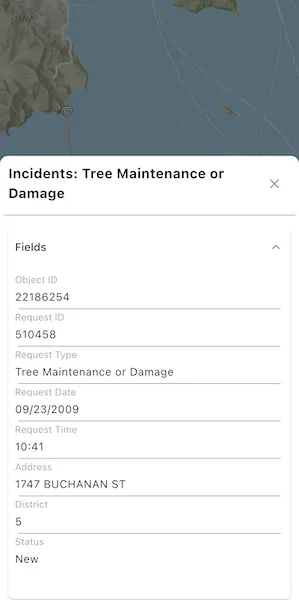
Use case
Many web maps contain predefined popups which are used to display the attributes associated with each feature layer in the map, such as hiking trails, land values, or unemployment rates. You can display text, attachments, images, charts, and web links. Rather than creating new popups to display information, you can easily access and display the predefined popups.
How to use the sample
Tap on the features to prompt a popup that displays information about the feature.
How it works
- Create and load an
ArcGISMapinstance from aPortalItemof a web map. - Set the map to an
ArcGISMapViewController. - Use the
ArcGISMapViewController.identifyLayers()method to identify the top-most feature. - Create a
PopupViewwith the result’s first popup.
Relevant API
- ArcGISMap
- IdentifyLayerResult
- PopupView
About the data
This sample uses a web map that displays reported incidents in San Francisco.
Tags
feature, feature layer, popup, web map
Sample code
show_popup.dart
// Copyright 2025 Esri//// Licensed under the Apache License, Version 2.0 (the "License");// you may not use this file except in compliance with the License.// You may obtain a copy of the License at////   https://www.apache.org/licenses/LICENSE-2.0//// Unless required by applicable law or agreed to in writing, software// distributed under the License is distributed on an "AS IS" BASIS,// WITHOUT WARRANTIES OR CONDITIONS OF ANY KIND, either express or implied.// See the License for the specific language governing permissions and// limitations under the License.//
import 'package:arcgis_maps/arcgis_maps.dart';import 'package:arcgis_maps_sdk_flutter_samples/common/loading_indicator.dart';import 'package:arcgis_maps_sdk_flutter_samples/common/sample_state_support.dart';import 'package:arcgis_maps_toolkit/arcgis_maps_toolkit.dart';import 'package:flutter/material.dart';
class ShowPopup extends StatefulWidget {  const ShowPopup({super.key});
  @override  State<ShowPopup> createState() => _ShowPopupState();}
class _ShowPopupState extends State<ShowPopup> with SampleStateSupport {  // Create a controller for the map view.  final _mapViewController = ArcGISMapView.createController();  // A feature layer from a web map with popups defined.  late FeatureLayer _featureLayer;  // A flag for when the map view is ready and controls can be used.  var _ready = false;
  @override  Widget build(BuildContext context) {    return Scaffold(      body: Stack(        children: [          // Add a map view to the widget tree and set a controller.          ArcGISMapView(            controllerProvider: () => _mapViewController,            onMapViewReady: onMapViewReady,            onTap: onTap,          ),          // Display a progress indicator and prevent interaction until state is ready.          LoadingIndicator(visible: !_ready),        ],      ),    );  }
  Future<void> onMapViewReady() async {    // Create a map with the San Francisco incidents web map portal item.    final map = ArcGISMap.withItem(      PortalItem.withPortalAndItemId(        portal: Portal.arcGISOnline(),        itemId: 'fb788308ea2e4d8682b9c05ef641f273',      ),    );
    // Load the web map so that the operational layers can be accessed.    await map.load();    // Get the first feature layer from the web map.    _featureLayer = map.operationalLayers.whereType<FeatureLayer>().first;
    // Set the map on the map view controller.    _mapViewController.arcGISMap = map;
    // Set the ready state variable to true to enable the sample UI.    setState(() => _ready = true);  }
  Future<void> onTap(Offset offset) async {    // Clear any previous selection.    _featureLayer.clearSelection();
    // Perform an identify operation on the feature layer at the tapped location.    final identifyResult = await _mapViewController.identifyLayer(      _featureLayer,      screenPoint: offset,      tolerance: 22,    );
    // Ensure the identify layer result has a popup.    if (identifyResult.popups.isNotEmpty &&        identifyResult.geoElements.isNotEmpty) {      // Select the identified feature.      final feature = identifyResult.geoElements          .whereType<ArcGISFeature>()          .first;      _featureLayer.selectFeature(feature);      // Get the popup from the identify result and display it in a PopupView.      final popup = identifyResult.popups.first;      showPopup(popup);    }  }
  // Display the popup in a PopupView in a modal bottom sheet.  void showPopup(Popup popup) {    if (!mounted) return;    showModalBottomSheet<void>(      context: context,      isScrollControlled: true,      useSafeArea: true,      isDismissible: false,      builder: (_) => SizedBox(        height: MediaQuery.sizeOf(context).height * 0.7,        // Define a PopupView passing in the identified popup.        child: PopupView(          popup: popup,          // Dismiss the PopupView and clear the selected feature.          onClose: () {            Navigator.of(context).pop();            _featureLayer.clearSelection();          },        ),      ),    ).ignore();  }}