Take a map offline using a preplanned map area.
Use case
Generating offline maps on demand for a specific area can be time consuming for users and a processing load on the server. If areas of interest are known ahead of time, a web map author can pre-create packages for these areas. This way, the generation only needs to happen once, making the workflow more efficient for users and servers.
An archeology team could define preplanned map areas for dig sites which can be taken offline for field use.
How to use the sample
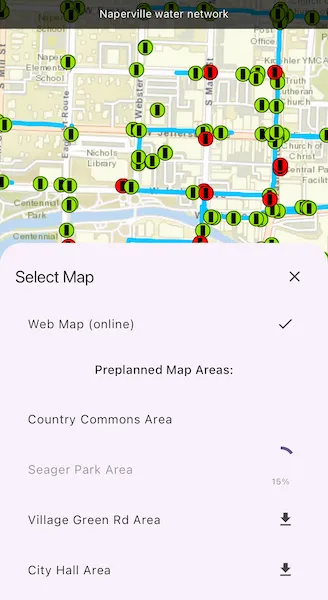
Tap the “Select Map” button to view a list of the available preplanned map areas. Tap a list item to initiate a download of the associated area. The download progress will be shown in the list. Once a download is complete, tap the list item again to display the offline map in the map view.
How it works
- Open the online
ArcGISMapfrom aPortalItemand display it. - Create an
OfflineMapTaskusing the portal item. - Get the
PreplannedMapAreas from the task, and then load them. - To download a selected map area, create the default
DownloadPreplannedOfflineMapParametersfrom the task using the selected preplanned map area. - Set the update mode of the preplanned map area.
- Use the parameters and a download path to create a
DownloadPreplannedOfflineMapJobfrom the task. - Start the job. Once it has completed, get the
DownloadPreplannedOfflineMapResult. - Get the
ArcGISMapfrom the result and display it in theArcGISMapView.
Relevant API
- DownloadPreplannedOfflineMapJob
- DownloadPreplannedOfflineMapParameters
- DownloadPreplannedOfflineMapResult
- OfflineMapTask
- PreplannedMapArea
About the data
The Naperville stormwater network map is based on ArcGIS Solutions for Stormwater and provides a realistic depiction of a theoretical stormwater network.
Additional information
PreplannedUpdateMode can be used to set the way the preplanned map area receives updates in several ways:
noUpdates- No updates will be performed. This mode is intended for when a static snapshot of the data is required, and it does not create a replica. This is the mode used for this sample.syncWithFeatureServices- Changes, including local edits, will be synced directly with the underlying feature services. This is the default update mode.downloadScheduledUpdates- Scheduled, read-only updates will be downloaded from the online map area and applied to the local mobile geodatabases.
For more information about offline workflows, see Offline maps, scenes, and data in the ArcGIS Developers guide.
Tags
map area, offline, pre-planned, preplanned
Sample code
//// Copyright 2024 Esri//// Licensed under the Apache License, Version 2.0 (the "License");// you may not use this file except in compliance with the License.// You may obtain a copy of the License at////   https://www.apache.org/licenses/LICENSE-2.0//// Unless required by applicable law or agreed to in writing, software// distributed under the License is distributed on an "AS IS" BASIS,// WITHOUT WARRANTIES OR CONDITIONS OF ANY KIND, either express or implied.// See the License for the specific language governing permissions and// limitations under the License.//
import 'dart:async';import 'dart:io';import 'dart:math';
import 'package:arcgis_maps/arcgis_maps.dart';import 'package:arcgis_maps_sdk_flutter_samples/common/common.dart';import 'package:flutter/material.dart';import 'package:path_provider/path_provider.dart';
class DownloadPreplannedMapArea extends StatefulWidget {  const DownloadPreplannedMapArea({super.key});
  @override  State<DownloadPreplannedMapArea> createState() =>      _DownloadPreplannedMapAreaState();}
class _DownloadPreplannedMapAreaState extends State<DownloadPreplannedMapArea>    with SampleStateSupport {  // Create a controller for the map view.  final _mapViewController = ArcGISMapView.createController();  // Prepare an offline map task and map for the online web map.  late OfflineMapTask _offlineMapTask;  late ArcGISMap _webMap;  // The location to save offline maps to.  Directory? _downloadDirectory;  // A list to hold entries for preplanned map areas and their associated download jobs.  final _preplannedEntries = <PreplannedEntry>[];  // A flag for when the map view is ready and controls can be used.  var _ready = false;  // The title of the selected map.  var _title = '';  // Whether the web map is selected.  var _webMapSelected = false;  // A flag for when the map selection UI should be displayed.  var _mapSelectionVisible = false;
  @override  void dispose() {    // Delete downloaded offline maps on exit.    _downloadDirectory?.deleteSync(recursive: true);    super.dispose();  }
  @override  Widget build(BuildContext context) {    return Scaffold(      body: SafeArea(        child: Stack(          children: [            Column(              children: [                Expanded(                  // Add a map view to the widget tree and set a controller.                  child: ArcGISMapView(                    controllerProvider: () => _mapViewController,                    onMapViewReady: onMapViewReady,                  ),                ),                Row(                  mainAxisAlignment: MainAxisAlignment.spaceEvenly,                  children: [                    // Create a button to open the map selection view.                    ElevatedButton(                      onPressed: () =>                          setState(() => _mapSelectionVisible = true),                      child: const Text('Select Map'),                    ),                  ],                ),              ],            ),            // Display the name of the current map.            MapBanner(text: _title),            // Display a progress indicator and prevent interaction until state is ready.            LoadingIndicator(visible: !_ready),          ],        ),      ),      // Display a list of available maps in a bottom sheet.      bottomSheet: _mapSelectionVisible          ? buildMapSelectionSheet(context)          : null,    );  }
  Future<void> onMapViewReady() async {    // Configure the directory to download offline maps to.    _downloadDirectory = await createDownloadDirectory();
    // Create a map using a webmap from a portal item.    final portal = Portal.arcGISOnline();    final portalItem = PortalItem.withPortalAndItemId(      portal: portal,      itemId: 'acc027394bc84c2fb04d1ed317aac674',    );    _webMap = ArcGISMap.withItem(portalItem);
    // Create and load an offline map task using the portal item.    _offlineMapTask = OfflineMapTask.withPortalItem(portalItem);    await _offlineMapTask.load();
    // Get the preplanned map areas from the offline map task and load each.    final preplannedMapAreas = await _offlineMapTask.getPreplannedMapAreas();    await Future.wait(preplannedMapAreas.map((mapArea) => mapArea.load()));
    // Add each map area to the preplanned entries list.    for (final mapArea in preplannedMapAreas) {      _preplannedEntries.add(PreplannedEntry(mapArea: mapArea));    }
    // Initially set the web map to the map view controller.    _mapViewController.arcGISMap = _webMap;    await _webMap.load();    setState(() {      _title = _webMap.item?.title ?? '';      _webMapSelected = true;    });
    // Upate the state with the preplanned map areas and set the UI state to ready.    setState(() => _ready = true);  }
  // Builds a map selection widget with a list of available maps.  Widget buildMapSelectionSheet(BuildContext context) {    return Container(      padding: EdgeInsets.fromLTRB(        20,        20,        20,        max(          20,          View.of(context).viewPadding.bottom /              View.of(context).devicePixelRatio,        ),      ),      child: Column(        mainAxisSize: MainAxisSize.min,        spacing: 15,        children: [          Row(            children: [              Text('Select Map', style: Theme.of(context).textTheme.titleLarge),              const Spacer(),              IconButton(                icon: const Icon(Icons.close),                onPressed: () => setState(() => _mapSelectionVisible = false),              ),            ],          ),          // Create a list tile for the web map.          ListTile(            title: const Text('Web Map (online)'),            trailing: _webMapSelected ? const Icon(Icons.check) : null,            onTap: () => !_webMapSelected ? setMapAndViewpoint(_webMap) : null,          ),          Text(            'Preplanned Map Areas:',            style: Theme.of(context).textTheme.titleMedium,          ),          // Create a list of preplanned map areas with their controls.          ListView.builder(            shrinkWrap: true,            itemCount: _preplannedEntries.length,            itemBuilder: (context, index) {              final preplannedEntry = _preplannedEntries[index];              return PreplannedEntryListTile(                preplannedEntry: preplannedEntry,                // "Download" callback to download the offline map.                onDownload: () => downloadOfflineMap(preplannedEntry),                // "Select" callback to set the map and viewpoint of the preplanned entry.                onSelect: () {                  selectPreplannedEntry(preplannedEntry);                  final map = preplannedEntry.job.value?.result?.offlineMap;                  if (map != null) setMapAndViewpoint(map);                },              );            },          ),        ],      ),    );  }
  // Download an offline map for a provided preplanned map area.  Future<void> downloadOfflineMap(PreplannedEntry preplannedEntry) async {    // Create default parameters using the map area.    final defaultDownloadParams = await _offlineMapTask        .createDefaultDownloadPreplannedOfflineMapParameters(          preplannedEntry.mapArea,        );
    // Set the required update mode. This sample map is not setup for updates so we use noUpdates.    defaultDownloadParams.updateMode = PreplannedUpdateMode.noUpdates;
    // Create a directory for the map in the downloads directory.    final mapDir = Directory(      '${_downloadDirectory!.path}${Platform.pathSeparator}${preplannedEntry.mapArea.portalItem.title}',    );    mapDir.createSync();
    // Create and run a job to download the offline map using the default params and download path.    final downloadMapJob = _offlineMapTask        .downloadPreplannedOfflineMapWithParameters(          parameters: defaultDownloadParams,          downloadDirectoryUri: mapDir.uri,        );
    // Start the download job.    unawaited(downloadMapJob.run());
    // Update the preplanned entry with the running job.    preplannedEntry.job.value = downloadMapJob;  }
  // Create the directory for downloading offline map areas into.  Future<Directory> createDownloadDirectory() async {    final documentDir = await getApplicationDocumentsDirectory();    final downloadDir = Directory(      '${documentDir.path}${Platform.pathSeparator}preplanned_map_sample',    );    if (downloadDir.existsSync()) {      downloadDir.deleteSync(recursive: true);    }    downloadDir.createSync();    return downloadDir;  }
  // Select a preplanned entry (and unselect others).  void selectPreplannedEntry(PreplannedEntry? preplannedEntry) {    for (final e in _preplannedEntries) {      e.selected.value = preplannedEntry == e;    }  }
  // Sets the provided map to the map view and updates the viewpoint.  void setMapAndViewpoint(ArcGISMap map) {    // Set the map to the map view and update the UI to reflect the newly selected map.    _mapViewController.arcGISMap = map;    setState(() {      _title = map.item?.title ?? '';      _webMapSelected = map == _webMap;    });
    if (map == _webMap) {      // If the web map was selected, make sure all the preplanned entries are unselected.      selectPreplannedEntry(null);    } else {      // If the selected map is one of the preplanned entries,  build an envelope zoomed      // into the extent of the map to better see the features.      final envBuilder = EnvelopeBuilder.fromEnvelope(        map.initialViewpoint!.targetGeometry.extent,      )..expandBy(0.5);      final viewpoint = Viewpoint.fromTargetExtent(envBuilder.toGeometry());      // Set the viewpoint to the mapview controller.      _mapViewController.setViewpoint(viewpoint);    }  }}
// An entry for a preplanned map area, including its download job and selected status.class PreplannedEntry {  PreplannedEntry({required this.mapArea});
  final PreplannedMapArea mapArea;
  // The download job corresponding to the preplanned map area, wrapped in a ValueNotifier  // to signal updates in the UI. Starts as null and is set when the download begins.  final job = ValueNotifier<DownloadPreplannedOfflineMapJob?>(null);
  // A value indicating whether this preplanned entry is currently selected, wrapped in a  // ValueNotifier to signal updates in the UI.  final selected = ValueNotifier<bool>(false);}
// A widget representing a preplanned entry in a list with download and select options.class PreplannedEntryListTile extends StatelessWidget {  const PreplannedEntryListTile({    required this.preplannedEntry,    required this.onDownload,    required this.onSelect,    super.key,  });
  final PreplannedEntry preplannedEntry;
  // A callback function that is called to initiate the download job for the preplanned entry.  final void Function() onDownload;
  // A callback function that is called to select the preplanned entry.  final void Function() onSelect;
  @override  Widget build(BuildContext context) {    // Use a ValueListenableBuilder to listen for the download job getting created.    return ValueListenableBuilder(      valueListenable: preplannedEntry.job,      child: Text(preplannedEntry.mapArea.portalItem.title),      builder: (context, job, title) {        // If the job is null, present a download button to create the download job.        if (job == null) {          return ListTile(            title: title,            trailing: const Icon(Icons.download),            onTap: onDownload,          );        }
        // Use a StreamBuilder to listen for job status updates.        return StreamBuilder(          initialData: job.status,          stream: job.onStatusChanged,          builder: (context, snapshot) {            final status = snapshot.data ?? JobStatus.started;
            switch (status) {              case JobStatus.started:                // If the job has started, show a loading indicator with progress.                return ListTile(                  enabled: false,                  title: title,                  // Use a StreamBuilder to listen for job progress updates.                  trailing: StreamBuilder(                    initialData: job.progress,                    stream: job.onProgressChanged,                    builder: (context, snapshot) {                      final progress = snapshot.data ?? 0;                      return Column(                        children: [                          CircularProgressIndicator(                            value: progress.toDouble() / 100.0,                          ),                          Text('$progress%'),                        ],                      );                    },                  ),                );              case JobStatus.succeeded:                // If the job has succeeded, allow the preplanned entry to be selected.                return ListTile(                  title: title,                  // Use a ValueListenableBuilder to show whether the preplanned entry is selected.                  trailing: ValueListenableBuilder(                    valueListenable: preplannedEntry.selected,                    builder: (context, selected, _) {                      return selected                          ? const Icon(Icons.check)                          : const SizedBox.shrink();                    },                  ),                  onTap: onSelect,                );              default:                // In all other statuses, show an error icon and disable interaction.                return ListTile(                  enabled: false,                  title: title,                  trailing: const Icon(Icons.error),                );            }          },        );      },    );  }}