Construct a KML document and save it as a KMZ file.
Use case
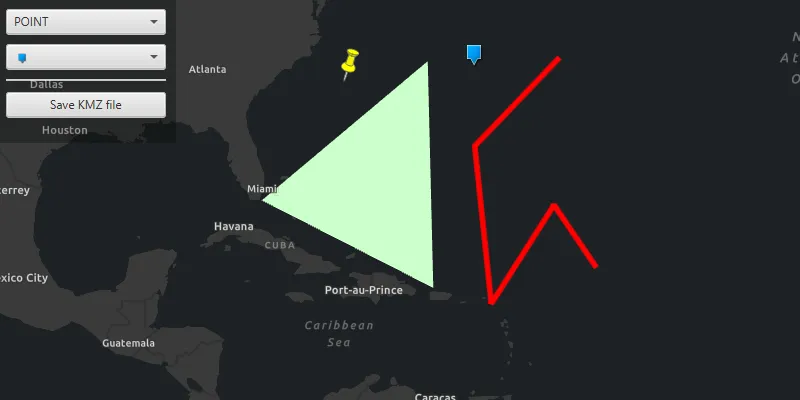
If you need to create and save data on the fly, you can use KML to create points, lines, and polygons by editing geometries on the map using the geometry editor, customizing the style, and serializing them as KML nodes in a KML Document. Once complete, you can share the KML data with others that are using a KML reading application, such as ArcGIS Earth.
How to use the sample
Select the geometry type for editing with the first combo box. Change the style for the KML feature using the second combo box.
Click anywhere on the map to edit. Press ENTER to commit the geometry or ESCAPE to discard the geometry.
When finished, click the ‘Save KMZ file’ button to save the KML document to a KMZ file.
How it works
- Create a
KmlDocument - Create a
KmlDatasetusing the KML document. - Create a
KmlLayerusing the KML dataset and add it to the map as an operational layer. - Create
GeometryusingGeometryEditor. - Project that geometry to WGS84 using
GeometryEngine.project. - Create a
KmlGeometryobject using the projected geometry. - Create a
KmlPlacemarkusing the KML geometry. - Add the KML placemark to the KML document.
- Set the
KmlStylefor the KML placemark. - Save the KML document to a file using
kmlDocument.saveAsAsync(Path).
Relevant API
- GeometryEditor
- GeometryEngine.Project
- KmlDataset
- KmlDocument
- KmlGeometry
- KmlLayer
- KmlPlacemark
- KmlStyle
Tags
Keyhole, KML, KMZ, OGC
Sample code
/* * Copyright 2019 Esri. * * Licensed under the Apache License, Version 2.0 (the "License"); * you may not use this file except in compliance with the License. * You may obtain a copy of the License at * * http://www.apache.org/licenses/LICENSE-2.0 * * Unless required by applicable law or agreed to in writing, software * distributed under the License is distributed on an "AS IS" BASIS, * WITHOUT WARRANTIES OR CONDITIONS OF ANY KIND, either express or implied. * See the License for the specific language governing permissions and * limitations under the License. */
package com.esri.samples.create_and_save_kml_file;
import com.esri.arcgisruntime.ArcGISRuntimeEnvironment;import com.esri.arcgisruntime.geometry.Geometry;import com.esri.arcgisruntime.geometry.GeometryEngine;import com.esri.arcgisruntime.geometry.GeometryType;import com.esri.arcgisruntime.geometry.SpatialReferences;import com.esri.arcgisruntime.layers.KmlLayer;import com.esri.arcgisruntime.mapping.ArcGISMap;import com.esri.arcgisruntime.mapping.BasemapStyle;import com.esri.arcgisruntime.mapping.view.MapView;import com.esri.arcgisruntime.mapping.view.geometryeditor.GeometryEditor;import com.esri.arcgisruntime.ogc.kml.KmlAltitudeMode;import com.esri.arcgisruntime.ogc.kml.KmlDataset;import com.esri.arcgisruntime.ogc.kml.KmlDocument;import com.esri.arcgisruntime.ogc.kml.KmlGeometry;import com.esri.arcgisruntime.ogc.kml.KmlIcon;import com.esri.arcgisruntime.ogc.kml.KmlIconStyle;import com.esri.arcgisruntime.ogc.kml.KmlLineStyle;import com.esri.arcgisruntime.ogc.kml.KmlPlacemark;import com.esri.arcgisruntime.ogc.kml.KmlPolygonStyle;import com.esri.arcgisruntime.ogc.kml.KmlStyle;
import javafx.fxml.FXML;import javafx.scene.control.Alert;import javafx.scene.control.ColorPicker;import javafx.scene.control.ComboBox;import javafx.scene.input.KeyCode;import javafx.scene.input.KeyEvent;import javafx.scene.layout.StackPane;import javafx.scene.paint.Color;import javafx.stage.FileChooser;
import java.io.File;import java.util.Arrays;import java.util.List;
public class CreateAndSaveKMLFileController {
  @FXML private StackPane stackPane;  @FXML private ColorPicker colorPicker;  @FXML private ComboBox<String> pointSymbolComboBox;  @FXML private ComboBox<GeometryType> geometryTypeComboBox;  @FXML private MapView mapView;
  private ArcGISMap map; // keep loadable in scope to avoid garbage collection  private KmlDocument kmlDocument;  private GeometryEditor geometryEditor;  private FileChooser fileChooser;
  @FXML  public void initialize() {
    // authentication with an API key or named user is required to access basemaps and other location services    String yourAPIKey = System.getProperty("apiKey");    ArcGISRuntimeEnvironment.setApiKey(yourAPIKey);
    // create a map and add it to the map view    map = new ArcGISMap(BasemapStyle.ARCGIS_DARK_GRAY);    mapView.setMap(map);
    // create a geometry editor and add it to the map view    geometryEditor = new GeometryEditor();    mapView.setGeometryEditor(geometryEditor);
    // add geometry options for KML placemarks    geometryTypeComboBox.getItems().addAll(GeometryType.POINT, GeometryType.POLYLINE, GeometryType.POLYGON);
    // restart the geometry editor whenever the selected creation mode changes    geometryTypeComboBox.getSelectionModel().selectedItemProperty().addListener(o -> createGeometry());
    // start with POINT selected    map.addDoneLoadingListener(() -> geometryTypeComboBox.getSelectionModel().select(0));
    // show style controls relevant to the selected geometry type    colorPicker.visibleProperty().bind(geometryTypeComboBox.getSelectionModel().selectedItemProperty().isNotEqualTo(GeometryType.POINT));    pointSymbolComboBox.visibleProperty().bind(geometryTypeComboBox.getSelectionModel().selectedItemProperty().isEqualTo(GeometryType.POINT));
    // set the images for the icon selection combo box    List<String> iconLinks = Arrays.asList(            null, // for the default symbol            "https://static.arcgis.com/images/Symbols/Shapes/BlueCircleLargeB.png",            "https://static.arcgis.com/images/Symbols/Shapes/BlueDiamondLargeB.png",            "https://static.arcgis.com/images/Symbols/Shapes/BluePin1LargeB.png",            "https://static.arcgis.com/images/Symbols/Shapes/BluePin2LargeB.png",            "https://static.arcgis.com/images/Symbols/Shapes/BlueSquareLargeB.png",            "https://static.arcgis.com/images/Symbols/Shapes/BlueStarLargeB.png");    pointSymbolComboBox.getItems().addAll(iconLinks);    pointSymbolComboBox.setCellFactory(comboBox -> new ImageURLListCell());    pointSymbolComboBox.setButtonCell(new ImageURLListCell());    pointSymbolComboBox.getSelectionModel().select(0);
    // create a KML layer from a blank KML document and add it to the map    kmlDocument = new KmlDocument();    var kmlDataset = new KmlDataset(kmlDocument);    var kmlLayer = new KmlLayer(kmlDataset);    map.getOperationalLayers().add(kmlLayer);
    // create a file chooser to get a path for saving the KMZ file    fileChooser = new FileChooser();    FileChooser.ExtensionFilter kmzFilter = new FileChooser.ExtensionFilter("KMZ files (*.kmz)", "*.kmz");    fileChooser.getExtensionFilters().add(kmzFilter);    fileChooser.setTitle("Save KMZ file:");  }
  /**   * Starts the geometry editor based on the selected geometry type.   */  @FXML  private void createGeometry() {    // stop the geometry editor    geometryEditor.stop();
    // request focus on stack pane to receive key events    stackPane.requestFocus();
    // start the geometry editor with the selected creation mode    geometryEditor.start(geometryTypeComboBox.getSelectionModel().getSelectedItem());  }
  /**   * Discard or commit the current geometry to a KML placemark if ESCAPE or ENTER are pressed while editing the geometry.   *   * @param keyEvent the key event   */  @FXML  private void handleKeyReleased(KeyEvent keyEvent) {    if (keyEvent.getCode() == KeyCode.ESCAPE) {      // clear the current geometry and start a new geometry editing      createGeometry();    } else if (keyEvent.getCode() == KeyCode.ENTER) {      // project the created geometry to WGS84 to comply with the KML standard      Geometry geometry = geometryEditor.getGeometry();      Geometry projectedGeometry = GeometryEngine.project(geometry, SpatialReferences.getWgs84());
      // create a new KML placemark      var kmlGeometry = new KmlGeometry(projectedGeometry, KmlAltitudeMode.CLAMP_TO_GROUND);      var currentKmlPlacemark = new KmlPlacemark(kmlGeometry);
      // update the style of the current KML placemark      var kmlStyle = new KmlStyle();      currentKmlPlacemark.setStyle(kmlStyle);
      // set the selected style for the placemark      switch (geometry.getGeometryType()) {        case POINT:          if (pointSymbolComboBox.getSelectionModel().getSelectedItem() != null) {            String iconURI = pointSymbolComboBox.getSelectionModel().getSelectedItem();            var kmlIcon = new KmlIcon(iconURI);            var kmlIconStyle = new KmlIconStyle(kmlIcon, 1);            kmlStyle.setIconStyle(kmlIconStyle);          }          break;        case POLYLINE:          Color polylineColor = colorPicker.getValue();          if (polylineColor != null) {            var kmlLineStyle = new KmlLineStyle(polylineColor, 8);            kmlStyle.setLineStyle(kmlLineStyle);          }          break;        case POLYGON:          Color polygonColor = colorPicker.getValue();          if (polygonColor != null) {            var kmlPolygonStyle = new KmlPolygonStyle(polygonColor);            kmlPolygonStyle.setFilled(true);            kmlPolygonStyle.setOutlined(false);            kmlStyle.setPolygonStyle(kmlPolygonStyle);          }          break;      }
      // add the placemark to the kml document      kmlDocument.getChildNodes().add(currentKmlPlacemark);
      // start a new geometry editing      createGeometry();    }  }
  /**   * Open the file chooser to save the KML Document to a KMZ file.   */  @FXML  private void handleSaveAction() {
    // get a path from the file chooser    File kmzFile = fileChooser.showSaveDialog(mapView.getScene().getWindow());    if (kmzFile != null) {      // save the KML document to the file      kmlDocument.saveAsAsync(kmzFile.getPath()).addDoneListener(() ->          new Alert(Alert.AlertType.INFORMATION, "KMZ file saved.").show()      );    }  }
  /**   * Stops and releases all resources used in application.   */  void terminate() {
    if (mapView != null) {      mapView.dispose();    }  }}
/* * Copyright 2019 Esri. * * Licensed under the Apache License, Version 2.0 (the "License"); * you may not use this file except in compliance with the License. * You may obtain a copy of the License at * * http://www.apache.org/licenses/LICENSE-2.0 * * Unless required by applicable law or agreed to in writing, software * distributed under the License is distributed on an "AS IS" BASIS, * WITHOUT WARRANTIES OR CONDITIONS OF ANY KIND, either express or implied. * See the License for the specific language governing permissions and * limitations under the License. */
package com.esri.samples.create_and_save_kml_file;
import javafx.application.Application;import javafx.fxml.FXMLLoader;import javafx.scene.Parent;import javafx.scene.Scene;import javafx.stage.Stage;
public class CreateAndSaveKMLFileSample extends Application {
private static CreateAndSaveKMLFileController controller;
@Override public void start(Stage stage) throws Exception {
// set up the scene FXMLLoader loader = new FXMLLoader(getClass().getResource("/create_and_save_kml_file/main.fxml")); Parent root = loader.load(); controller = loader.getController(); Scene scene = new Scene(root);
// set title, size and add scene to stage stage.setTitle("Create and Save KML File"); stage.setWidth(800); stage.setHeight(700); stage.setScene(scene); stage.show(); }
/** * Stops and releases all resources used in application. */ @Override public void stop() { controller.terminate(); }
/** * Opens and runs application. * * @param args arguments passed to this application */ public static void main(String[] args) { Application.launch(args); }}/* * Copyright 2019 Esri. * * Licensed under the Apache License, Version 2.0 (the "License"); * you may not use this file except in compliance with the License. * You may obtain a copy of the License at * * http://www.apache.org/licenses/LICENSE-2.0 * * Unless required by applicable law or agreed to in writing, software * distributed under the License is distributed on an "AS IS" BASIS, * WITHOUT WARRANTIES OR CONDITIONS OF ANY KIND, either express or implied. * See the License for the specific language governing permissions and * limitations under the License. */
package com.esri.samples.create_and_save_kml_file;
import javafx.scene.control.ListCell;import javafx.scene.image.Image;import javafx.scene.image.ImageView;
/** * Shows an image based on the URL String value. */public class ImageURLListCell extends ListCell<String> {
@Override protected void updateItem(String item, boolean empty) { super.updateItem(item, empty);
ImageView imageView = new ImageView();
if (item == null || empty) { // show 'Default' text instead of an image when the String is null setGraphic(null); setText("Default"); } else { // display image from URL imageView.setImage(new Image(item, 0, 15, true, true)); setGraphic(imageView); setText(null); } }}