Display KML from a URL, portal item, or local KML file.
Use case
Keyhole Markup Language (KML) is a data format used by Google Earth. KML is popular as a transmission format for consumer use and for sharing geographic data between apps. You can use the ArcGIS Maps SDK for Java to display KML files, with full support for a variety of features, including network links, 3D models, screen overlays, and tours.
How to use the sample
Use the drop-down menu to select a source. A KML file from that source will be loaded and displayed in the map.
How it works
- To create a KML layer from a URL, create a
KmlDatasetusing the URL to the KML file. Then pass the dataset to theKmlLayerconstructor. - To create a KML layer from a portal item, construct a
PortalItemwith aPortaland the KML portal item ID. Pass the portal item to theKmlLayerconstructor. - To create a KML layer from a local file, create a
KmlDatasetusing the absolute file path to the local KML file. Then pass the dataset to theKmlLayerconstructor. - Add the layer as an operational layer to the map with
map.getOperationalLayers().add(kmlLayer).
Relevant API
- KmlDataset
- KmlLayer
About the data
This sample displays three different KML files:
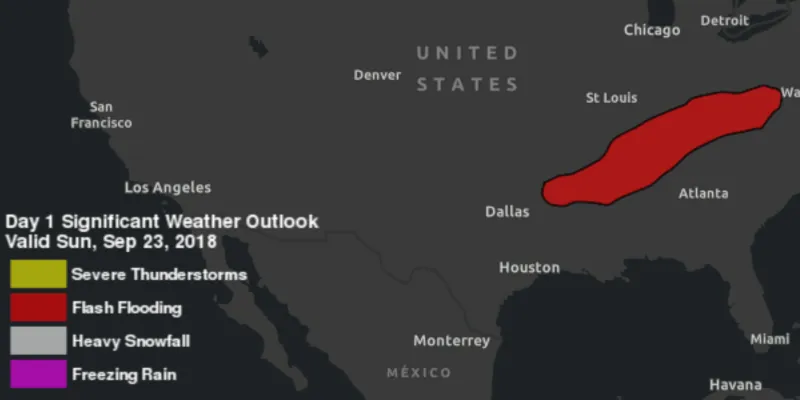
- From URL - this is a map of the significant weather outlook produced by NOAA/NWS. It uses KML network links to always show the latest data.
- From local file - this is a map of U.S. state capitals. It doesn’t define an icon, so the default pushpin is used for the points.
- From portal item - this is a map of U.S. states.
Tags
keyhole, KML, KMZ, OGC
Sample code
DisplayKMLSample.java
/* * Copyright 2018 Esri. * * Licensed under the Apache License, Version 2.0 (the "License"); you may not * use this file except in compliance with the License. You may obtain a copy of * the License at * * http://www.apache.org/licenses/LICENSE-2.0 * * Unless required by applicable law or agreed to in writing, software * distributed under the License is distributed on an "AS IS" BASIS, WITHOUT * WARRANTIES OR CONDITIONS OF ANY KIND, either express or implied. See the * License for the specific language governing permissions and limitations under * the License. */
package com.esri.samples.display_kml;
import java.io.File;
import javafx.application.Application;import javafx.geometry.Insets;import javafx.geometry.Pos;import javafx.scene.Scene;import javafx.scene.control.Alert;import javafx.scene.control.ComboBox;import javafx.scene.control.ProgressIndicator;import javafx.scene.layout.StackPane;import javafx.stage.Stage;
import com.esri.arcgisruntime.ArcGISRuntimeEnvironment;import com.esri.arcgisruntime.geometry.Envelope;import com.esri.arcgisruntime.geometry.SpatialReferences;import com.esri.arcgisruntime.layers.KmlLayer;import com.esri.arcgisruntime.loadable.LoadStatus;import com.esri.arcgisruntime.mapping.ArcGISMap;import com.esri.arcgisruntime.mapping.BasemapStyle;import com.esri.arcgisruntime.mapping.view.MapView;import com.esri.arcgisruntime.ogc.kml.KmlDataset;import com.esri.arcgisruntime.portal.Portal;import com.esri.arcgisruntime.portal.PortalItem;
public class DisplayKMLSample extends Application {
  private MapView mapView;
  @Override  public void start(Stage stage) {
    try {      // create stack pane and application scene      StackPane stackPane = new StackPane();      Scene scene = new Scene(stackPane);
      // set title, size, and add scene to stage      stage.setTitle("Display KML Sample");      stage.setWidth(800);      stage.setHeight(700);      stage.setScene(scene);      stage.show();
      // authentication with an API key or named user is required to access basemaps and other location services      String yourAPIKey = System.getProperty("apiKey");      ArcGISRuntimeEnvironment.setApiKey(yourAPIKey);
      // create a progress indicator      ProgressIndicator progressIndicator = new ProgressIndicator();      progressIndicator.setVisible(false);
      // create a map with the dark gray basemap style      ArcGISMap map = new ArcGISMap(BasemapStyle.ARCGIS_DARK_GRAY);
      // create a map view and set the map to it      mapView = new MapView();      mapView.setMap(map);
      // start zoomed in over the US      mapView.setViewpointGeometryAsync(new Envelope(-19195297.778679, 512343.939994, -3620418.579987, 8658913.035426, 0.0, 0.0, SpatialReferences.getWebMercator()));
      // show a combo box with the different KML data source options      ComboBox<KmlDatasourceType> kmlSourceComboBox = new ComboBox<>();      kmlSourceComboBox.getItems().addAll(KmlDatasourceType.values());
      // show the KML layer when the data source option is shown      kmlSourceComboBox.getSelectionModel().selectedItemProperty().addListener(o -> {
        // show a progress indicator while loading        progressIndicator.setVisible(true);
        // clear previous layer        map.getOperationalLayers().clear();        // create a KML layer based on the source type        KmlDatasourceType kmlSourceType = kmlSourceComboBox.getSelectionModel().getSelectedItem();        try {          KmlLayer kmlLayer = null;          switch (kmlSourceType) {            case URL:              KmlDataset urlKmlDataset = new KmlDataset("https://www.wpc.ncep.noaa.gov/kml/noaa_chart/WPC_Day1_SigWx.kml");              kmlLayer = new KmlLayer(urlKmlDataset);              break;            case PORTAL_ITEM:              Portal portal = new Portal("https://arcgisruntime.maps.arcgis.com");              PortalItem portalItem = new PortalItem(portal, "9fe0b1bfdcd64c83bd77ea0452c76253");              kmlLayer = new KmlLayer(portalItem);              break;            case LOCAL_FILE:              File kmlFile = new File(System.getProperty("data.dir"), "./samples-data/kml/US_State_Capitals.kml");              KmlDataset fileKmlDataset = new KmlDataset(kmlFile.getAbsolutePath());              kmlLayer = new KmlLayer(fileKmlDataset);              break;          }          // add the KML layer as an operational layer          map.getOperationalLayers().add(kmlLayer);
          KmlLayer finalKmlLayer = kmlLayer;          kmlLayer.addDoneLoadingListener(() -> {
            progressIndicator.setVisible(false);
            if (finalKmlLayer.getLoadStatus() != LoadStatus.LOADED) {              new Alert(Alert.AlertType.ERROR, "Error loading KML layer").show();            }          });        } catch (Exception e) {          new Alert(Alert.AlertType.ERROR, "Error creating KML layer").show();        }      });
      // start with the URL data source chosen      kmlSourceComboBox.getSelectionModel().select(0);
      // add the map view to stack pane      stackPane.getChildren().addAll(mapView, kmlSourceComboBox, progressIndicator);      StackPane.setAlignment(kmlSourceComboBox, Pos.TOP_LEFT);      StackPane.setMargin(kmlSourceComboBox, new Insets(10));    } catch (Exception e) {      // on any error, display the stack trace.      e.printStackTrace();    }  }
  private enum KmlDatasourceType {    URL, PORTAL_ITEM, LOCAL_FILE  }
  /**   * Stops and releases all resources used in application.   */  @Override  public void stop() {
    if (mapView != null) {      mapView.dispose();    }  }
  /**   * Opens and runs application.   *   * @param args arguments passed to this application   */  public static void main(String[] args) {
    Application.launch(args);  }
}