Edit the values of a KML ground overlay.
Use case
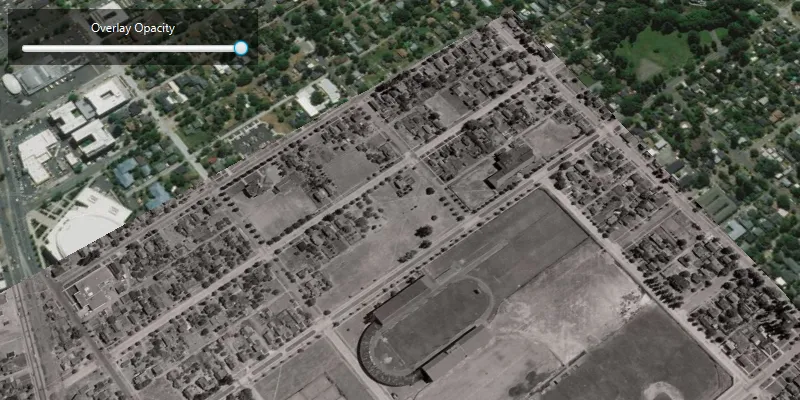
KML ground overlays are used for showing aerial imagery, symbology, or other images draped over a scene. Changing the geometry, rotation, and other attributes of a ground overlay after it has been loaded allows for live editing. For example, editing the geometry and opacity of a historical image draped over present day satellite imagery makes it possible to view change over time.
How to use the sample
Use the slider to adjust the opacity of the ground overlay.
How it works
- Create an
Envelopedefining the geometry of the overlay. - Create a
KmlIconusing a URI linking to an image. - Create a
KmlGroundOverlayusing the envelope and icon. - Set the value of
KmlGroundOverlay.setRotation(). - Create a
KmlDatasetusing the ground overlay. - Create a
KmlLayerusing the dataset. - Add the KML layer to the scene.
- Listen for changes to the opacity slider and change the color value of the ground overlay appropriately using
KmlGroundOverlay.setColor().
Relevant API
- KmlDataset
- KmlGroundOverlay
- KmlIcon
- KmlLayer
About the data
The image used in this sample is an aerial view of the campus of the University of Oregon. This imagery was taken in 1944 by the U.S. Army Corps of Engineers. It is publicly available as Online Aerial Imagery hosted by Oregon University Library. It is also available as a Portal item on ArcGIS Online as University of Oregon Campus Aerial Imagery - 1944.

Tags
imagery, Keyhole, KML, KMZ, OGC
Sample code
/* * Copyright 2019 Esri. * * Licensed under the Apache License, Version 2.0 (the "License"); you may not * use this file except in compliance with the License. You may obtain a copy of * the License at * * http://www.apache.org/licenses/LICENSE-2.0 * * Unless required by applicable law or agreed to in writing, software * distributed under the License is distributed on an "AS IS" BASIS, WITHOUT * WARRANTIES OR CONDITIONS OF ANY KIND, either express or implied. See the * License for the specific language governing permissions and limitations under * the License. */
package com.esri.samples.edit_kml_ground_overlay;
import java.io.File;
import javafx.application.Application;import javafx.geometry.Insets;import javafx.geometry.Pos;import javafx.scene.Scene;import javafx.scene.control.Label;import javafx.scene.control.Slider;import javafx.scene.layout.Background;import javafx.scene.layout.BackgroundFill;import javafx.scene.layout.CornerRadii;import javafx.scene.layout.StackPane;import javafx.scene.layout.VBox;import javafx.scene.paint.Color;import javafx.scene.paint.Paint;import javafx.stage.Stage;
import com.esri.arcgisruntime.ArcGISRuntimeEnvironment;import com.esri.arcgisruntime.geometry.Envelope;import com.esri.arcgisruntime.geometry.SpatialReferences;import com.esri.arcgisruntime.layers.KmlLayer;import com.esri.arcgisruntime.mapping.ArcGISScene;import com.esri.arcgisruntime.mapping.BasemapStyle;import com.esri.arcgisruntime.mapping.Viewpoint;import com.esri.arcgisruntime.mapping.view.Camera;import com.esri.arcgisruntime.mapping.view.SceneView;import com.esri.arcgisruntime.ogc.kml.KmlDataset;import com.esri.arcgisruntime.ogc.kml.KmlGroundOverlay;import com.esri.arcgisruntime.ogc.kml.KmlIcon;
public class EditKMLGroundOverlaySample extends Application {
  private SceneView sceneView;
  @Override  public void start(Stage stage) {
    try {      // create stack pane and application scene      StackPane stackPane = new StackPane();      Scene fxScene = new Scene(stackPane);      fxScene.getStylesheets().add(getClass().getResource("/edit_kml_ground_overlay/style.css").toExternalForm());
      // set title, size and add application scene to stage      stage.setTitle("Edit KML Ground Overlay Sample");      stage.setWidth(800);      stage.setHeight(700);      stage.setScene(fxScene);      stage.show();
      // authentication with an API key or named user is required to access basemaps and other location services      String yourAPIKey = System.getProperty("apiKey");      ArcGISRuntimeEnvironment.setApiKey(yourAPIKey);
      // create a scene and add it to the scene view      ArcGISScene scene = new ArcGISScene(BasemapStyle.ARCGIS_IMAGERY);      sceneView = new SceneView();      sceneView.setArcGISScene(scene);
      // create a geometry for the ground overlay      Envelope overlayGeometry = new Envelope(-123.066227926904, 44.04736963555683, -123.0796942287304, 44.03878298600624, SpatialReferences.getWgs84());
      // create a KML icon for the overlay image      String overlayImageURI = new File(System.getProperty("data.dir"), "./samples-data/images/1944.jpg").getAbsolutePath();      KmlIcon overlayImage = new KmlIcon(overlayImageURI);
      // create the KML ground overlay      KmlGroundOverlay kmlGroundOverlay = new KmlGroundOverlay(overlayGeometry, overlayImage);
      // set the rotation of the ground overlay to correct the overlay's rotation with respect to the basemap      kmlGroundOverlay.setRotation(-3.046024799346924);
      // create a KML dataset with the ground overlay as the root node      KmlDataset kmlDataset = new KmlDataset(kmlGroundOverlay);
      // create a KML layer using the KML dataset      KmlLayer kmlLayer = new KmlLayer(kmlDataset);
      // add the KML layer to the scene view      sceneView.getArcGISScene().getOperationalLayers().add(kmlLayer);
      // set the viewpoint to the ground overlay      sceneView.setViewpoint(new Viewpoint(overlayGeometry, new Camera(overlayGeometry.getCenter(), 1250, 45, 60, 0)));
      // create a slider for adjusting the overlay opacity      Slider slider = new Slider(0, 1, 1);      slider.setMaxWidth(300);
      // add a listener to the slider's value property to set the opacity of the KML ground overlay      slider.valueProperty().addListener(o ->              kmlGroundOverlay.setColor(new Color(0, 0, 0, slider.getValue()))      );
      // create a controls box      VBox controlsVBox = new VBox();      controlsVBox.setBackground(new Background(new BackgroundFill(Paint.valueOf("rgba(0,0,0,0.5)"), CornerRadii.EMPTY,              Insets.EMPTY)));      controlsVBox.setPadding(new Insets(10.0));      controlsVBox.setSpacing(5);      controlsVBox.setMaxSize(250, 20);      controlsVBox.setAlignment(Pos.CENTER);      controlsVBox.getStyleClass().add("panel-region");
      // create a label for the slider      Label label = new Label("Overlay Opacity");      // add the slider and label to the controls box      controlsVBox.getChildren().addAll(label, slider);
      // add the scene view and controls to the stack pane      stackPane.getChildren().addAll(sceneView, controlsVBox);      StackPane.setAlignment(controlsVBox, Pos.TOP_LEFT);      StackPane.setMargin(controlsVBox, new Insets(10, 0, 0, 10));
    } catch (Exception e) {      // on any error, display the stack trace.      e.printStackTrace();    }  }
  /**   * Stops and releases all resources used in application.   */  @Override  public void stop() {
    if (sceneView != null) {      sceneView.dispose();    }  }
  /**   * Opens and runs application.   *   * @param args arguments passed to this application   */  public static void main(String[] args) {
    Application.launch(args);  }}