Find places of interest near a location or within a specific area.
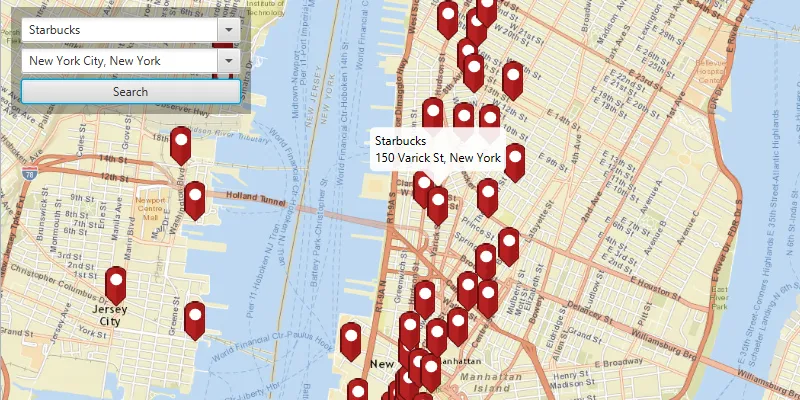
Use case
When getting directions or looking for nearby places, users may only know what the place has (“food”), the type of place (“gym”), or the generic place name (“Starbucks”), rather than the specific address. You can get suggestions and locations for these places of interest (POIs) using a natural language query. Additionally, you can filter the results to a specific area.
How to use the sample
Choose a type of place in the first field and an area to search within in the second field. Click the “Search” button to show the results of the query on the map. Click on a result pin to show its name and address. If you pan away from the result area, the “Redo search in this area” button at the bottom of the screen will become active. Click it to query again for the currently viewed area on the map.
How it works
- Create a
LocatorTaskusing a URL to a locator service. - Find the location for an address (or city name) to build an envelope to search within:
- Create
GeocodeParameters. - Add return fields to the parameters’
resultAttributeNamescollection. Only add a single ”*” option to return all fields. - Call
locatorTask.geocodeAsync(locationQueryString, geocodeParameters)to get a list ofGeocodeResults. - Use
getDisplayLocationfrom each of the results to build anEnvelopeto view.
- Create
- Get place of interest (POI) suggestions based on a place name query:
- Create
SuggestParameters. - Add “POI” to the parameters’ categories collection with
getCategories().add("POI"). - Call
locatorTask.suggestAsync(placeQueryString, suggestParameters)to get a list ofSuggestResults. - The
SuggestResultwill have a label to display in the search suggestions list.
- Create
- Use one of the suggestions or a user-written query to find the locations of POIs:
- Create
GeocodeParameters. - Set the parameters’ search area to the envelope.
- Call
locatorTask.geocodeAsync(suggestionLabelOrPlaceQueryString, geocodeParameters)to get a list ofGeocodeResults. - Display the places of interest using the results’
displayLocations.
- Create
Relevant API
- GeocodeParameters
- GeocodeResult
- LocatorTask
- SuggestParameters
- SuggestResult
Additional information
This sample uses the World Geocoding Service. For more information, see the Geocoding service help topic on the ArcGIS Developer website.
Tags
businesses, geocode, locations, locator, places of interest, POI, point of interest, search, suggestions
Sample code
/* * Copyright 2017 Esri. * * Licensed under the Apache License, Version 2.0 (the "License"); you may not * use this file except in compliance with the License. You may obtain a copy of * the License at * * http://www.apache.org/licenses/LICENSE-2.0 * * Unless required by applicable law or agreed to in writing, software * distributed under the License is distributed on an "AS IS" BASIS, WITHOUT * WARRANTIES OR CONDITIONS OF ANY KIND, either express or implied. See the * License for the specific language governing permissions and limitations under * the License. */
package com.esri.samples.find_place;
import java.util.ArrayList;import java.util.HashMap;import java.util.List;import java.util.concurrent.ExecutionException;import java.util.stream.Collectors;
import javafx.application.Platform;import javafx.fxml.FXML;import javafx.geometry.Point2D;import javafx.scene.control.Button;import javafx.scene.control.ComboBox;import javafx.scene.control.skin.ComboBoxListViewSkin;import javafx.scene.image.Image;import javafx.scene.input.KeyCode;import javafx.scene.input.KeyEvent;import javafx.scene.input.MouseButton;import javafx.util.Duration;
import com.esri.arcgisruntime.ArcGISRuntimeEnvironment;import com.esri.arcgisruntime.concurrent.ListenableFuture;import com.esri.arcgisruntime.geometry.Envelope;import com.esri.arcgisruntime.geometry.Point;import com.esri.arcgisruntime.mapping.ArcGISMap;import com.esri.arcgisruntime.mapping.BasemapStyle;import com.esri.arcgisruntime.mapping.Viewpoint;import com.esri.arcgisruntime.mapping.view.Callout;import com.esri.arcgisruntime.mapping.view.Graphic;import com.esri.arcgisruntime.mapping.view.GraphicsOverlay;import com.esri.arcgisruntime.mapping.view.IdentifyGraphicsOverlayResult;import com.esri.arcgisruntime.mapping.view.MapView;import com.esri.arcgisruntime.mapping.view.ViewpointChangedEvent;import com.esri.arcgisruntime.mapping.view.ViewpointChangedListener;import com.esri.arcgisruntime.mapping.view.WrapAroundMode;import com.esri.arcgisruntime.symbology.PictureMarkerSymbol;import com.esri.arcgisruntime.tasks.geocode.GeocodeParameters;import com.esri.arcgisruntime.tasks.geocode.GeocodeResult;import com.esri.arcgisruntime.tasks.geocode.LocatorTask;import com.esri.arcgisruntime.tasks.geocode.SuggestParameters;import com.esri.arcgisruntime.tasks.geocode.SuggestResult;
public class FindPlaceController {
  @FXML private ComboBox<String> locationBox;  @FXML private MapView mapView;  @FXML private ComboBox<String> placeBox;  @FXML private Button redoButton;
  private Callout callout;  private GraphicsOverlay graphicsOverlay;  private LocatorTask locatorTask;  private PictureMarkerSymbol pinSymbol;
  @FXML  public void initialize() {    // authentication with an API key or named user is required to access basemaps and other location services    String yourAPIKey = System.getProperty("apiKey");    ArcGISRuntimeEnvironment.setApiKey(yourAPIKey);
    // handle JavaFX bug where entering a space between words in the combobox editor will reset the text there    handleSpaceEntered(placeBox);    handleSpaceEntered(locationBox);
    // create a map with the streets basemap style    ArcGISMap map = new ArcGISMap(BasemapStyle.ARCGIS_STREETS);
    // set the map to the map view    mapView.setMap(map);    mapView.setWrapAroundMode(WrapAroundMode.DISABLED);
    // add a graphics overlay to the map view    graphicsOverlay = new GraphicsOverlay();    mapView.getGraphicsOverlays().add(graphicsOverlay);
    // set the callout's default style    callout = mapView.getCallout();    callout.setLeaderPosition(Callout.LeaderPosition.BOTTOM);
    // create a locator task    locatorTask = new LocatorTask("https://geocode-api.arcgis.com/arcgis/rest/services/World/GeocodeServer");
    // create a pin graphic    Image img = new Image(getClass().getResourceAsStream("/find_place/pin.png"), 0, 80, true, true);    pinSymbol = new PictureMarkerSymbol(img);    pinSymbol.loadAsync();
    // event to get auto-complete suggestions when the user types a place query    placeBox.getEditor().setOnKeyTyped((KeyEvent evt) -> {
      // get the search box text for auto-complete suggestions      String typed = placeBox.getEditor().getText();
      if (!"".equals(typed)) {
        // suggest places only        SuggestParameters geocodeParameters = new SuggestParameters();        geocodeParameters.getCategories().add("POI");
        // get suggestions from the locatorTask        ListenableFuture<List<SuggestResult>> suggestions = locatorTask.suggestAsync(typed, geocodeParameters);
        // add a listener to update suggestions list when loaded        suggestions.addDoneListener(new SuggestionsLoadedListener(suggestions, placeBox));      }    });
    // event to get auto-complete suggestions for location when the user types a search location    locationBox.getEditor().setOnKeyTyped((KeyEvent evt) -> {
      // get the search box text for auto-complete suggestions      String typed = locationBox.getEditor().getText();
      if (!typed.equals("")) {
        // get suggestions from the locatorTask        ListenableFuture<List<SuggestResult>> suggestions = locatorTask.suggestAsync(typed);
        // add a listener to update suggestions list when loaded        suggestions.addDoneListener(new SuggestionsLoadedListener(suggestions, locationBox));      }    });
    // event to display a callout for a selected result    mapView.setOnMouseClicked(evt -> {      // check that the primary mouse button was clicked and the user is not panning      if (evt.isStillSincePress() && evt.getButton() == MouseButton.PRIMARY) {        // create a point from where the user clicked        Point2D point = new Point2D(evt.getX(), evt.getY());
        // get layers with elements near the clicked location        ListenableFuture<IdentifyGraphicsOverlayResult> identifyResults =          mapView.identifyGraphicsOverlayAsync(graphicsOverlay, point,            10, false);        identifyResults.addDoneListener(() -> {          try {            List<Graphic> graphics = identifyResults.get().getGraphics();            if (graphics.size() > 0) {              Graphic marker = graphics.get(0);              // update the callout              Platform.runLater(() -> {                callout.setTitle(marker.getAttributes().get("title").toString());                callout.setDetail(marker.getAttributes().get("detail").toString());                callout.showCalloutAt((Point) marker.getGeometry(), new Point2D(0, -24), Duration.ZERO);              });            }          } catch (Exception e) {            e.printStackTrace();          }        });      }    });  }
  /**   * Handles a JavaFX bug (https://bugs.openjdk.org/browse/JDK-8087549) where when the user enters a space the combobox editor TextField is reset.   *   * @param comboBox the comboBox to apply the JavaFX bug work around to   */  private void handleSpaceEntered(ComboBox<String> comboBox) {
    var comboBoxListViewSkin = new ComboBoxListViewSkin<>(comboBox);    comboBoxListViewSkin.getPopupContent().addEventFilter(KeyEvent.ANY, (event -> {        if (event.getCode() == KeyCode.SPACE) {          event.consume();        }      })    );    comboBox.setSkin(comboBoxListViewSkin);  }
  /**   * Searches for places near the chosen location when the "search" button is clicked.   */  @FXML  private void search() {    String placeQuery = placeBox.getEditor().getText();    String locationQuery = locationBox.getEditor().getText();    if (placeQuery != null && locationQuery != null && !"".equals(placeQuery) && !"".equals(locationQuery)) {      GeocodeParameters geocodeParameters = new GeocodeParameters();      geocodeParameters.getResultAttributeNames().add("*"); // return all attributes      geocodeParameters.setOutputSpatialReference(mapView.getSpatialReference());
      // run the locatorTask geocode task      ListenableFuture<List<GeocodeResult>> results = locatorTask.geocodeAsync(locationQuery, geocodeParameters);      results.addDoneListener(() -> {        try {          List<GeocodeResult> points = results.get();          if (points.size() > 0) {            // create a search area envelope around the location            Point p = points.get(0).getDisplayLocation();            Envelope preferredSearchArea = new Envelope(p.getX() - 10000, p.getY() - 10000, p.getX() + 10000, p.getY              () + 10000, p.getSpatialReference());            // set the geocode parameters search area to the envelope            geocodeParameters.setSearchArea(preferredSearchArea);            // zoom to the envelope            mapView.setViewpointAsync(new Viewpoint(preferredSearchArea));            // perform the geocode operation            ListenableFuture<List<GeocodeResult>> geocodeTask = locatorTask.geocodeAsync(placeQuery,              geocodeParameters);
            // add a listener to display the results when loaded            geocodeTask.addDoneListener(new ResultsLoadedListener(geocodeTask));          }        } catch (Exception e) {          e.printStackTrace();        }      });    }  }
  /**   * Searches for places within the current map extent when the "redo search in this area" button is clicked.   */  @FXML  private void searchByCurrentViewpoint() {    String placeQuery = placeBox.getEditor().getText();    GeocodeParameters geocodeParameters = new GeocodeParameters();    geocodeParameters.getResultAttributeNames().add("*"); // return all attributes    geocodeParameters.setOutputSpatialReference(mapView.getSpatialReference());    geocodeParameters.setSearchArea(mapView.getCurrentViewpoint(Viewpoint.Type.BOUNDING_GEOMETRY).getTargetGeometry());
    //perform the geocode operation    ListenableFuture<List<GeocodeResult>> geocodeTask = locatorTask.geocodeAsync(placeQuery, geocodeParameters);
    // add a listener to display the results when loaded    geocodeTask.addDoneListener(new ResultsLoadedListener(geocodeTask));  }
  /**   * A listener to update a {@link ComboBox} when suggestions from a call to   * {@link LocatorTask#suggestAsync(String, SuggestParameters)} are loaded.   */  private class SuggestionsLoadedListener implements Runnable {
    private final ListenableFuture<List<SuggestResult>> results;    private final ComboBox<String> comboBox;
    /**     * Constructs a listener to update an auto-complete list for geocode     * suggestions.     *     * @param results suggestion results from a {@link LocatorTask}     * @param box the {@link ComboBox} to update with the suggestions     */    SuggestionsLoadedListener(ListenableFuture<List<SuggestResult>> results, ComboBox<String> box) {      this.results = results;      this.comboBox = box;    }
    @Override    public void run() {
      try {        List<SuggestResult> suggestResult = results.get();        List<String> suggestions = suggestResult.stream().map(SuggestResult::getLabel).collect(Collectors.toList());
        // update the combo box with suggestions        Platform.runLater(() -> {          comboBox.getItems().clear();          comboBox.getItems().addAll(suggestions);          comboBox.show();        });
      } catch (InterruptedException | ExecutionException e) {        e.printStackTrace();      }    }  }
  /**   * Runnable listener to update marker and callout when new results are loaded.   */  private class ResultsLoadedListener implements Runnable {
    private final ListenableFuture<List<GeocodeResult>> results;
    /**     * Constructs a runnable listener for the geocode results.     *     * @param results results from a {@link LocatorTask#geocodeAsync} task     */    ResultsLoadedListener(ListenableFuture<List<GeocodeResult>> results) {      this.results = results;    }
    @Override    public void run() {
      // hide callout if showing      mapView.getCallout().dismiss();
      List<Graphic> markers = new ArrayList<>();      try {        List<GeocodeResult> geocodes = results.get();        for (GeocodeResult geocode : geocodes) {
          // get attributes from the result for the callout          String addrType = geocode.getAttributes().get("Addr_type").toString();          String placeName = geocode.getAttributes().get("PlaceName").toString();          String placeAddr = geocode.getAttributes().get("Place_addr").toString();          String matchAddr = geocode.getAttributes().get("Match_addr").toString();          String locType = geocode.getAttributes().get("Type").toString();
          // format callout details          String title;          String detail;          switch (addrType) {            case "POI":              title = placeName.equals("") ? "" : placeName;              if (!placeAddr.equals("")) {                detail = placeAddr;              } else if (!matchAddr.equals("") && !locType.equals("")) {                detail = !matchAddr.contains(",") ? locType : matchAddr.substring(matchAddr.indexOf(", ") + 2);              } else {                detail = "";              }              break;            case "StreetName":            case "PointAddress":            case "Postal":              if (matchAddr.contains(",")) {                title = matchAddr.equals("") ? "" : matchAddr.split(",")[0];                detail = matchAddr.equals("") ? "" : matchAddr.substring(matchAddr.indexOf(", ") + 2);                break;              }            default:              title = "";              detail = matchAddr.equals("") ? "" : matchAddr;              break;          }
          HashMap<String, Object> attributes = new HashMap<>();          attributes.put("title", title);          attributes.put("detail", detail);
          // create the marker          Graphic marker = new Graphic(geocode.getDisplayLocation(), attributes, pinSymbol);          markers.add(marker);        }
        // update the markers        if (markers.size() > 0) {          Platform.runLater(() -> {            // clear out previous results            graphicsOverlay.getGraphics().clear();            placeBox.hide();
            // add the markers to the graphics overlay            graphicsOverlay.getGraphics().addAll(markers);
            //reset redo search button            redoButton.setDisable(true);
            // listener to enable the redo-search button the first time the user moves away from the initial search area            ViewpointChangedListener changedListener = new ViewpointChangedListener() {
              @Override              public void viewpointChanged(ViewpointChangedEvent arg0) {
                redoButton.setDisable(false);                mapView.removeViewpointChangedListener(this);              }            };
            mapView.addViewpointChangedListener(changedListener);          });        }
      } catch (InterruptedException | ExecutionException e) {        e.printStackTrace();      }    }  }
  /**   * Stops the animation and disposes of application resources.   */  void terminate() {
    if (mapView != null) {      mapView.dispose();    }  }
}
/* * Copyright 2017 Esri. * * Licensed under the Apache License, Version 2.0 (the "License"); you may not * use this file except in compliance with the License. You may obtain a copy of * the License at * * http://www.apache.org/licenses/LICENSE-2.0 * * Unless required by applicable law or agreed to in writing, software * distributed under the License is distributed on an "AS IS" BASIS, WITHOUT * WARRANTIES OR CONDITIONS OF ANY KIND, either express or implied. See the * License for the specific language governing permissions and limitations under * the License. */
package com.esri.samples.find_place;
import java.io.IOException;
import javafx.application.Application;import javafx.fxml.FXMLLoader;import javafx.scene.Parent;import javafx.scene.Scene;import javafx.stage.Stage;
public class FindPlaceSample extends Application {
private static FindPlaceController controller;
@Override public void start(Stage stage) throws IOException { // set up the scene FXMLLoader loader = new FXMLLoader(getClass().getResource("/find_place/main.fxml")); Parent root = loader.load(); controller = loader.getController(); Scene scene = new Scene(root);
// set up the stage stage.setTitle("Find Place Sample"); stage.setWidth(800); stage.setHeight(700); stage.setScene(scene); stage.show(); }
/** * Stops and releases all resources used in application. */ @Override public void stop() { controller.terminate(); }
/** * Opens and runs application. * * @param args arguments passed to this application */ public static void main(String[] args) {
Application.launch(args); }
}