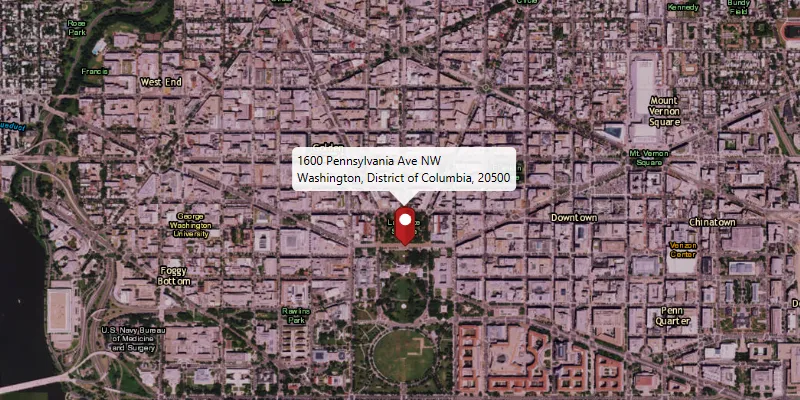
Use an online service to find the address for a point on the map.
Use case
You might use a geocoder to find a customer’s delivery address based on the location returned by their device’s GPS.
How to use the sample
Click on the map to see the nearest address displayed in a callout.
How it works
- Create a
LocatorTaskobject using a URL to a geocoder service. - Set the
GeocodeParametersfor theLocatorTaskand specify the geocoder’s attributes. - Get the matching results from the
GeocodeResultusingLocatorTask.reverseGeocodeAsync. - Show the results using a
PictureMarkerSymboland add the symbol to aGraphicin theGraphicsOverlay.
Relevant API
- GeocodeParameters
- LocatorTask
- ReverseGeocodeParameters
Additional information
This sample uses the World Geocoding Service. For more information, see the Geocoding service help topic on the ArcGIS Developer website.
Tags
address, geocode, locate, reverse geocode, search
Sample code
ReverseGeocodeOnlineSample.java
/* * Copyright 2017 Esri. * * Licensed under the Apache License, Version 2.0 (the "License"); you may not * use this file except in compliance with the License. You may obtain a copy of * the License at * * http://www.apache.org/licenses/LICENSE-2.0 * * Unless required by applicable law or agreed to in writing, software * distributed under the License is distributed on an "AS IS" BASIS, WITHOUT * WARRANTIES OR CONDITIONS OF ANY KIND, either express or implied. See the * License for the specific language governing permissions and limitations under * the License. */
package com.esri.samples.reverse_geocode_online;
import java.util.HashMap;import java.util.List;
import javafx.application.Application;import javafx.application.Platform;import javafx.geometry.Point2D;import javafx.geometry.Pos;import javafx.scene.Scene;import javafx.scene.control.Alert;import javafx.scene.control.ProgressIndicator;import javafx.scene.image.Image;import javafx.scene.input.MouseButton;import javafx.scene.layout.StackPane;import javafx.stage.Stage;import javafx.util.Duration;
import com.esri.arcgisruntime.ArcGISRuntimeEnvironment;import com.esri.arcgisruntime.concurrent.ListenableFuture;import com.esri.arcgisruntime.geometry.Point;import com.esri.arcgisruntime.mapping.ArcGISMap;import com.esri.arcgisruntime.mapping.BasemapStyle;import com.esri.arcgisruntime.mapping.Viewpoint;import com.esri.arcgisruntime.mapping.view.Callout;import com.esri.arcgisruntime.mapping.view.Callout.LeaderPosition;import com.esri.arcgisruntime.mapping.view.Graphic;import com.esri.arcgisruntime.mapping.view.GraphicsOverlay;import com.esri.arcgisruntime.mapping.view.MapView;import com.esri.arcgisruntime.symbology.PictureMarkerSymbol;import com.esri.arcgisruntime.tasks.geocode.GeocodeResult;import com.esri.arcgisruntime.tasks.geocode.LocatorTask;import com.esri.arcgisruntime.tasks.geocode.ReverseGeocodeParameters;
public class ReverseGeocodeOnlineSample extends Application {
  private MapView mapView;  private LocatorTask locatorTask;  private GraphicsOverlay graphicsOverlay;  private PictureMarkerSymbol pinSymbol;  private ProgressIndicator progressIndicator;
  @Override  public void start(Stage stage) {
    try {      // create stack pane and application scene      StackPane stackPane = new StackPane();      Scene scene = new Scene(stackPane);
      // set title, size, and add scene to stage      stage.setTitle("Reverse Geocode Online Sample");      stage.setWidth(800);      stage.setHeight(700);      stage.setScene(scene);      stage.show();
      // authentication with an API key or named user is required to access basemaps and other location services      String yourAPIKey = System.getProperty("apiKey");      ArcGISRuntimeEnvironment.setApiKey(yourAPIKey);
      // add a progress indicator      progressIndicator = new ProgressIndicator(ProgressIndicator.INDETERMINATE_PROGRESS);      progressIndicator.setMaxSize(40, 40);      progressIndicator.setStyle("-fx-progress-color: white;");      progressIndicator.setVisible(false);
      // create a map with the imagery basemap style      ArcGISMap map = new ArcGISMap(BasemapStyle.ARCGIS_IMAGERY);
      // create a map view and set the map to it      mapView = new MapView();      mapView.setMap(map);
      // set a viewpoint on the map view      mapView.setViewpoint(new Viewpoint(40, -95, 36978595));
      // add a graphics overlay      graphicsOverlay = new GraphicsOverlay();      mapView.getGraphicsOverlays().add(graphicsOverlay);
      // set the callout's default style      Callout callout = mapView.getCallout();      callout.setLeaderPosition(LeaderPosition.BOTTOM);
      // create a locator task      locatorTask = new LocatorTask("https://geocode-api.arcgis.com/arcgis/rest/services/World/GeocodeServer");
      // create geocode task parameters      ReverseGeocodeParameters reverseGeocodeParameters = new ReverseGeocodeParameters();      reverseGeocodeParameters.setOutputSpatialReference(mapView.getSpatialReference());
      // create a pin graphic      Image img = new Image(getClass().getResourceAsStream("/pin.png"), 0, 80, true, true);      pinSymbol = new PictureMarkerSymbol(img);      pinSymbol.loadAsync();
      // get geocode on click      mapView.setOnMouseClicked(evt -> {        // check that the primary mouse button was clicked and user is not        // panning        if (evt.isStillSincePress() && evt.getButton() == MouseButton.PRIMARY) {
          // create a point from where the user clicked          Point2D point = new Point2D(evt.getX(), evt.getY());
          // create a map point from a point          Point mapPoint = mapView.screenToLocation(point);
          // show progress indicator          progressIndicator.setVisible(true);
          // run the locator geocode task          ListenableFuture<List<GeocodeResult>> results = locatorTask.reverseGeocodeAsync(mapPoint,              reverseGeocodeParameters);
          // add a listener to display the result when loaded          results.addDoneListener(() -> {            try {              List<GeocodeResult> geocodes = results.get();
              if (geocodes.size() > 0) {                // get the top result                GeocodeResult geocode = geocodes.get(0);
                // set the viewpoint to the marker                Point location = geocode.getDisplayLocation();                mapView.setViewpointCenterAsync(location);
                // get attributes from the result for the callout                String address = geocode.getAttributes().get("Match_addr").toString();                HashMap<String, Object> attributes = new HashMap<>();                attributes.put("title", address.split(",")[0]);                attributes.put("detail", address.substring(address.indexOf(", ") + 2));
                // create the marker                Graphic marker = new Graphic(geocode.getDisplayLocation(), attributes, pinSymbol);
                // update the marker                Platform.runLater(() -> {                  // clear out previous results                  graphicsOverlay.getGraphics().clear();
                  // add the marker to the graphics overlay                  graphicsOverlay.getGraphics().add(marker);
                  // stop the progress indicator                  progressIndicator.setVisible(false);
                  // display the callout                  callout.setTitle(marker.getAttributes().get("title").toString());                  callout.setDetail(marker.getAttributes().get("detail").toString());                  callout.showCalloutAt(location, new Point2D(0, -24), Duration.ZERO);                });              }            } catch (Exception e) {              // handle address not found              progressIndicator.setVisible(false);              Platform.runLater(() -> {                Alert alert = new Alert(Alert.AlertType.INFORMATION);                alert.setHeaderText(null);                alert.setContentText("No address found at this location");                alert.showAndWait();              });            }          });        }      });
      // add map view and control panel to stack pane      stackPane.getChildren().addAll(mapView, progressIndicator);      StackPane.setAlignment(progressIndicator, Pos.BOTTOM_LEFT);
    } catch (Exception e) {      // on any error, print the stack trace      e.printStackTrace();    }  }
  /**   * Stops and releases all resources used in application.   */  @Override  public void stop() {
    // release resources when the application closes    if (mapView != null) {      mapView.dispose();    }  }
  /**   * Opens and runs application.   *   * @param args arguments passed to this application   */  public static void main(String[] args) {
    Application.launch(args);  }
}