Geocode addresses to locations and reverse geocode locations to addresses offline.
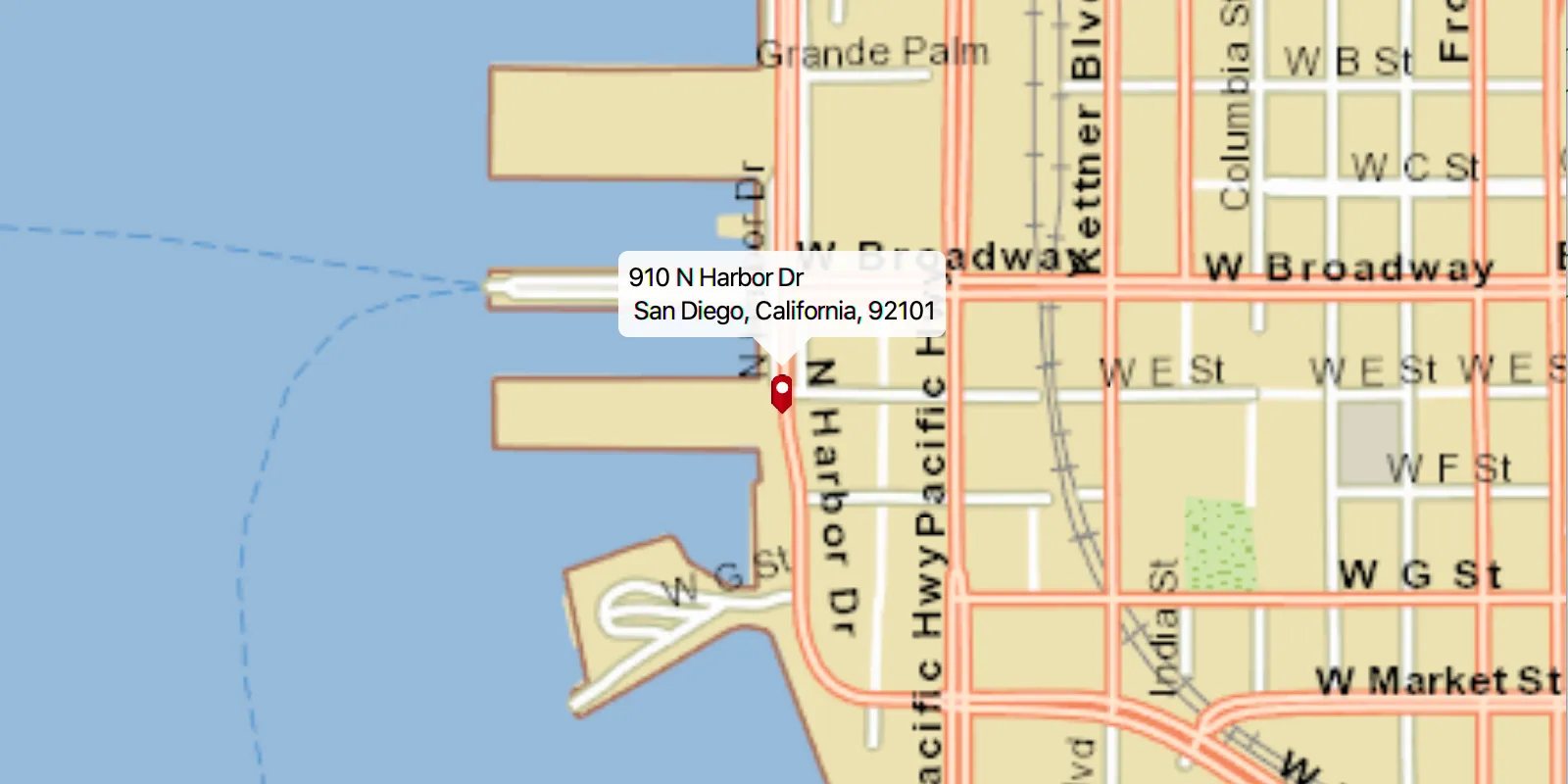
Use case
You can use an address locator file to geocode addresses and locations. For example, you could provide offline geocoding capabilities to field workers repairing critical infrastructure in a disaster when network availability is limited.
How to use the sample
Select an address from the drop-down list to geocode the address and view the result on the map. Click the location you want to reverse geocode. Click on the pin to highlight it and then move the mouse to perform reverse geocoding in real-time.
How it works
- Use the path of a .loc file to create a
LocatorTaskobject. - Set up
GeocodeParametersand callGeocodeAsyncto get geocode results.
Relevant API
- GeocodeParameters
- GeocodeResult
- LocatorTask
- ReverseGeocodeParameters
Additional information
This sample uses the San Diego Streets Tile Package and the San Diego Offline Locator.
Tags
geocode, geocoder, locator, offline, package, query, search
Sample code
OfflineGeocodeSample.java
/* * Copyright 2017 Esri. * * Licensed under the Apache License, Version 2.0 (the "License"); you may not * use this file except in compliance with the License. You may obtain a copy of * the License at * * http://www.apache.org/licenses/LICENSE-2.0 * * Unless required by applicable law or agreed to in writing, software * distributed under the License is distributed on an "AS IS" BASIS, WITHOUT * WARRANTIES OR CONDITIONS OF ANY KIND, either express or implied. See the * License for the specific language governing permissions and limitations under * the License. */
package com.esri.samples.offline_geocode;
import java.io.File;import java.util.List;
import javafx.application.Application;import javafx.application.Platform;import javafx.event.EventHandler;import javafx.geometry.Insets;import javafx.geometry.Point2D;import javafx.geometry.Pos;import javafx.scene.Scene;import javafx.scene.control.Alert;import javafx.scene.control.ComboBox;import javafx.scene.image.Image;import javafx.scene.input.MouseButton;import javafx.scene.input.MouseEvent;import javafx.scene.layout.StackPane;import javafx.stage.Stage;import javafx.util.Duration;
import com.esri.arcgisruntime.concurrent.ListenableFuture;import com.esri.arcgisruntime.data.TileCache;import com.esri.arcgisruntime.geometry.Point;import com.esri.arcgisruntime.layers.ArcGISTiledLayer;import com.esri.arcgisruntime.loadable.LoadStatus;import com.esri.arcgisruntime.mapping.ArcGISMap;import com.esri.arcgisruntime.mapping.Basemap;import com.esri.arcgisruntime.mapping.view.Callout;import com.esri.arcgisruntime.mapping.view.Callout.LeaderPosition;import com.esri.arcgisruntime.mapping.view.Graphic;import com.esri.arcgisruntime.mapping.view.GraphicsOverlay;import com.esri.arcgisruntime.mapping.view.IdentifyGraphicsOverlayResult;import com.esri.arcgisruntime.mapping.view.MapView;import com.esri.arcgisruntime.symbology.PictureMarkerSymbol;import com.esri.arcgisruntime.tasks.geocode.GeocodeParameters;import com.esri.arcgisruntime.tasks.geocode.GeocodeResult;import com.esri.arcgisruntime.tasks.geocode.LocatorTask;import com.esri.arcgisruntime.tasks.geocode.ReverseGeocodeParameters;
public class OfflineGeocodeSample extends Application {
  private MapView mapView;  private ArcGISTiledLayer tiledLayer;  private LocatorTask locatorTask;  private GeocodeParameters geocodeParameters;  private ReverseGeocodeParameters reverseGeocodeParameters;  private GraphicsOverlay graphicsOverlay;  private PictureMarkerSymbol pinSymbol;  private ComboBox<String> searchBox;  private ListenableFuture<IdentifyGraphicsOverlayResult> identifyResults;  private boolean realtimeMode = false;
  @Override  public void start(Stage stage) {
    try {      // create stack pane and application scene      StackPane stackPane = new StackPane();      Scene scene = new Scene(stackPane);
      // set title, size, and add scene to stage      stage.setTitle("Offline Geocode Sample");      stage.setWidth(800);      stage.setHeight(700);      stage.setScene(scene);      stage.show();
      // create search box      searchBox = new ComboBox<>();      searchBox.setPromptText("Search");      searchBox.setEditable(true);      searchBox.setMaxWidth(260.0);
      // add example address suggestions      String[] recent = {        "910 N Harbor Dr, San Diego, CA 92101",        "2920 Zoo Dr, San Diego, CA 92101",        "111 W Harbor Dr, San Diego, CA 92101",        "868 4th Ave, San Diego, CA 92101",        "750 A St, San Diego, CA 92101"      };      searchBox.getItems().addAll(recent);
      // event to get geocode when query is submitted      searchBox.setOnAction((e) -> {
        // get the user's query        String query;        if (searchBox.getSelectionModel().getSelectedIndex() == -1) {          // user supplied their own query          query = searchBox.getEditor().getText();        } else {          // user chose a suggested query          query = searchBox.getSelectionModel().getSelectedItem();        }
        if (!query.equals("")) {          // hide callout if showing          mapView.getCallout().dismiss();
          // run the locatorTask geocode task          ListenableFuture<List<GeocodeResult>> results = locatorTask.geocodeAsync(query, geocodeParameters);
          // add a listener to display the result when loaded          results.addDoneListener(new ResultsLoadedListener(results));        }      });
      // create a basemap from a local tile package      File tpkxFile = new File(System.getProperty("data.dir"), "./samples-data/sandiego/streetmap_SD.tpkx");      TileCache tileCache = new TileCache(tpkxFile.getAbsolutePath());      tiledLayer = new ArcGISTiledLayer(tileCache);      Basemap basemap = new Basemap(tiledLayer);
      // create ArcGISMap with imagery basemap      ArcGISMap map = new ArcGISMap(basemap);
      // create a view and set ArcGISMap to it      mapView = new MapView();      mapView.setMap(map);
      // add a graphics overlay      graphicsOverlay = new GraphicsOverlay();      mapView.getGraphicsOverlays().add(graphicsOverlay);
      // create a pin graphic      Image img = new Image(getClass().getResourceAsStream("/pin.png"), 0, 80, true, true);      pinSymbol = new PictureMarkerSymbol(img);      pinSymbol.loadAsync();
      tiledLayer.addDoneLoadingListener(() -> {        if (tiledLayer.getLoadStatus() == LoadStatus.LOADED) {          Platform.runLater(() -> {            // center the view over the tiled layer's extent            mapView.setViewpointGeometryAsync(tiledLayer.getFullExtent());          });        } else {          Alert alert = new Alert(Alert.AlertType.ERROR, "Tiled Layer Failed to Load!");          alert.show();        }      });
      // set the callout's default style      Callout callout = mapView.getCallout();      callout.setLeaderPosition(LeaderPosition.BOTTOM);
      // create a locator task      final String locatorPath =              new File(System.getProperty("data.dir"), "./samples-data/sandiego/SanDiego_StreetAddress.loc").getAbsolutePath();      locatorTask = new LocatorTask(locatorPath);
      // set geocode task parameters      geocodeParameters = new GeocodeParameters();      geocodeParameters.getResultAttributeNames().add("*"); // return all attributes      geocodeParameters.setMaxResults(1); // get closest match
      // set reverse geocode task parameters      reverseGeocodeParameters = new ReverseGeocodeParameters();      reverseGeocodeParameters.getResultAttributeNames().add("*");      reverseGeocodeParameters.setOutputSpatialReference(mapView.getSpatialReference());
      // create mouse moved event handler      MouseMovedHandler handler = new MouseMovedHandler();
      // start or stop real-time geocoding mode      mapView.setOnMouseClicked(event -> {
        if (event.isStillSincePress() && event.getButton() == MouseButton.PRIMARY) {          Point2D clickLocation = new Point2D(event.getX(), event.getY());          Point point = mapView.screenToLocation(clickLocation);
          if (realtimeMode) {            // disable the real-time geocoding mode            realtimeMode = false;            // clear graphic selections            graphicsOverlay.clearSelection();            // remove the mouse moved handler            mapView.setOnMouseMoved(null);          } else {            // identify the selected graphic            identifyResults = mapView.identifyGraphicsOverlayAsync(graphicsOverlay, clickLocation, 10, false);            identifyResults.addDoneListener(() -> {              try {                List<Graphic> graphics = identifyResults.get().getGraphics();                if (graphics.size() > 0) {                  // set the graphic as selected                  Graphic graphic = graphics.get(0);                  graphic.setSelected(true);                  // start real-time mode                  realtimeMode = true;                  // add a mouse move event handler to get real-time geocodes                  mapView.setOnMouseMoved(handler);                } else {                  // reverse geocode the selected point                  ListenableFuture<List<GeocodeResult>> results = locatorTask.reverseGeocodeAsync(point,                      reverseGeocodeParameters);                  results.addDoneListener(new ResultsLoadedListener(results));                }              } catch (Exception e) {                e.printStackTrace();              }            });          }        }      });
      // add map view and searchBox to stack pane      stackPane.getChildren().addAll(mapView, searchBox);      StackPane.setAlignment(searchBox, Pos.TOP_LEFT);      StackPane.setMargin(searchBox, new Insets(10, 0, 0, 10));
    } catch (Exception e) {      // on any error, print the stack trace      e.printStackTrace();    }  }
  /**   * Performs reverse geocode based on mouse location and display the result in   * real-time.   */  private class MouseMovedHandler implements EventHandler<MouseEvent> {
    @Override    public void handle(MouseEvent event) {
      // get the mouse location coordinates      Point point = mapView.screenToLocation(new Point2D(event.getX(), event.getY()));
      // disable the move event listener to reduce unnecessary geocode calls      mapView.setOnMouseMoved(null);
      // run the locator task      ListenableFuture<List<GeocodeResult>> results = locatorTask.reverseGeocodeAsync(point, reverseGeocodeParameters);      results.addDoneListener(() -> {        try {          // get the geocode from the result          List<GeocodeResult> geocodes = results.get();          GeocodeResult geocodeResult = geocodes.get(0);
          // update the marker's position and display result of the geocode result in a callout          graphicsOverlay.getGraphics().get(0).setGeometry(geocodeResult.getDisplayLocation());          displayCallout(geocodeResult);
        } catch (Exception e) {          // mouse is out of bounds          e.printStackTrace();        }        // re-enable the mouse move listener        mapView.setOnMouseMoved(this);      });    }  }
  /**   * Updates marker and callout when new results are loaded.   */  private class ResultsLoadedListener implements Runnable {
    private final ListenableFuture<List<GeocodeResult>> results;
    /**     * Constructs a runnable listener for the geocode results.     *     * @param results results from a {@link LocatorTask#geocodeAsync} task     */    ResultsLoadedListener(ListenableFuture<List<GeocodeResult>> results) {      this.results = results;    }
    @Override    public void run() {
      try {        List<GeocodeResult> geocodes = results.get();        if (geocodes.size() > 0) {          // get the top result          GeocodeResult geocodeResult = geocodes.get(0);
          // set the viewpoint to the marker          Point location = geocodeResult.getDisplayLocation();          mapView.setViewpointCenterAsync(location, 10000);
          // create the marker and display result of the geocode result in a callout          Graphic marker = new Graphic(location, pinSymbol);          displayCallout(geocodeResult);
          // remove marker from previous query          graphicsOverlay.getGraphics().clear();          // add the marker showing the location of the current geocode query to the graphics overlay          graphicsOverlay.getGraphics().add(marker);        }      } catch (Exception e) {        e.printStackTrace();      }    }  }
  /**   * Displays the address from the geocode result in a callout.   *   * @param geocodeResult the geocode result to get attributes from   */  private void displayCallout(GeocodeResult geocodeResult) {
    // get attributes from the result for the callout    Object matchAddr = geocodeResult.getAttributes().get("Match_addr");    String title = matchAddr.toString().split(",")[0];    String detail = matchAddr.toString().substring(matchAddr.toString().indexOf(",") + 1);
    // update the callout    Callout callout = mapView.getCallout();    callout.setTitle(title);    callout.setDetail(detail);    callout.showCalloutAt(geocodeResult.getDisplayLocation(), new Point2D(0, -24), Duration.ZERO);  }
  /**   * Stops and releases all resources used in application.   */  @Override  public void stop() {
    // release resources when the application closes    if (mapView != null) {      mapView.dispose();    }  }
  /**   * Opens and runs application.   *   * @param args arguments passed to this application   */  public static void main(String[] args) {
    Application.launch(args);  }
}