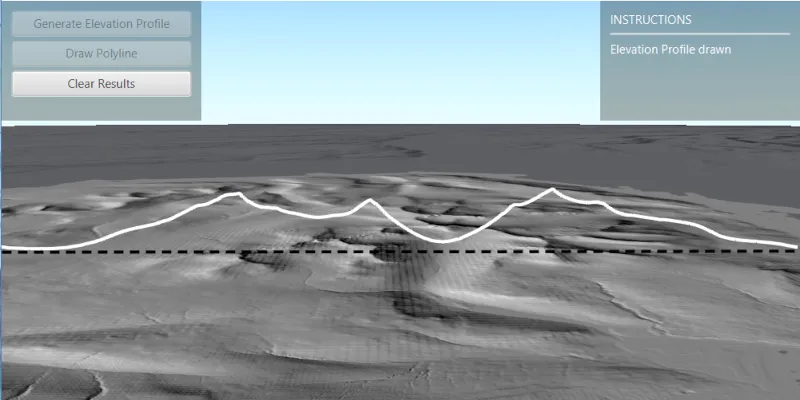
Create an elevation profile using a geoprocessing package executed with ArcGIS Maps SDK for Local Server.
Use case
Applications that include ArcGIS Maps SDK for Local Server are valuable in offline workflows that require advanced spatial analysis or data manipulation. This sample uses a geoprocessing package (.gpkx) created in ArcGIS Pro involving a custom geoprocessing model that includes the Interpolate Shape (3D Analyst) geoprocessing tool. The geoprocessing package is executed with ArcGIS Maps SDK for Local Server.
You can generate elevation profiles to carry out topographical analysis of valley profiles, or visualize a hiking, cycling, or road trip over varied topography.
How to use the sample
The sample loads at the full extent of the raster dataset. Click the “Draw Polyline” button and sketch a polyline along where you’d like the elevation profile to be calculated (the polyline can be any shape). Right-click to save the sketch and draw the polyline. Click “Generate Elevation Profile” to interpolate the sketched polyline onto the raster surface in 3D. Once ready, the view will automatically zoom onto the newly drawn elevation profile. Click “Clear Results” to reset the sample.
How it works
- Create a
Rasterfrom a raster dataset, and apply a series ofRasterFunctions to mask any data at or below sea level. - Start the Local Server instance with
LocalServer.INSTANCE. - Start the server asynchronously with
Server.startAsync(). - Wait for the server to be in the
LocalServerStatus.STARTEDstate.- Callbacks attached to
Server.addStatusChangedListener()will invoke whenever the status of the local server has changed.
- Callbacks attached to
- Start a
LocalGeoprocessingServiceand create aGeoprocessingTask.- Instantiate
LocalGeoprocessingService(Url, ServiceType)to create a local geoprocessing service. - Invoke
LocalGeoprocessingService.start()to start the service asynchronously. - Instantiate
GeoprocessingTask(LocalGeoprocessingService.url() + "/CreateElevationProfileModel")to create a geoprocessing task that uses the elevation profile tool.
- Instantiate
- Create an instance of
GeoprocessingParametersand get its list of inputs withgpParameters.getInputs(). - Add
GeoprocessingFeatureswith aFeatureCollectionTablepointing to a polyline geometry, andGeoprocessingStringwith a path to the raster data on disk to the list of inputs. - Create and start a
GeoprocessingJobusing the input parameters.- Create a geoprocessing job with
GeoprocessingTask.createJob(GeoprocessingParameters). - Start the job with
GeoprocessingJob.start().
- Create a geoprocessing job with
- Add generated elevation profile as a
FeatureLayerto the scene.- Get the url from the local geoprocessing service using
LocalGeoprocessingService.getUrl(). - Get the server job id of the geoprocessing job using
GeoprocessingJob.getServerJobId(). - Replace
GPServerfrom the url withMapServer/jobs/jobId, to get generate elevation profile data. - Create a
ServiceGeodatabasefrom the derived url and create aFeatureLayerfrom the firstFeatureTable. - Set the surface placement mode and add a renderer to the feature layer, then add the new layer to the scene’s list of operational layers.
- Get the url from the local geoprocessing service using
Relevant API
- GeoprocessingFeatures
- GeoprocessingJob
- GeoprocessingParameter
- GeoprocessingParameters
- GeoprocessingTask
- LocalGeoprocessingService
- LocalGeoprocessingService.ServiceType
- LocalServer
- LocalServerStatus
- Raster
- RasterFunction
About the data
This sample loads with a 10m resolution digital terrain elevation model of the Island of Arran, Scotland (data Copyright Scottish Government and Sepa 2014).
Three raster functions (json format) are applied to the raster data to mask out data at or below sea level.
The geoprocessing task is started with a gpkx. This Create elevation profile geoprocessing package was authored in ArcGIS Pro using ModelBuilder, and the Interpolate Shape (3D Analyst) tool.
Additional information
Local Server can be downloaded for Windows and Linux platforms from your ArcGIS Developers dashboard. Local Server is not supported on macOS.
The Package Result tool in ArcGIS Pro is used to author ArcGIS Maps SDKs for Native Apps compatible geoprocessing packages (.gpkx files). For more information on running powerful offline geoprocessing tasks to provide advanced spatial analysis to your applications, see ArcGIS Maps SDK for Local Server.
The results of the geoprocessing tasks executed with ArcGIS Maps SDK for Local Server can be accessed with code, persisted, and shared, for example as a feature collection portal item. This contrasts with the Scene visibility analyses, viewshed and line of sight, which are calculated dynamically at render-time and are displayed only in analysis overlays.
Tags
elevation profile, geoprocessing, interpolate shape, local server, offline, parameters, processing, raster, raster function, scene, service, terrain
Sample code
/* * Copyright 2022 Esri. * * Licensed under the Apache License, Version 2.0 (the "License"); you may not * use this file except in compliance with the License. You may obtain a copy of * the License at * * http://www.apache.org/licenses/LICENSE-2.0 * * Unless required by applicable law or agreed to in writing, software * distributed under the License is distributed on an "AS IS" BASIS, WITHOUT * WARRANTIES OR CONDITIONS OF ANY KIND, either express or implied. See the * License for the specific language governing permissions and limitations under * the License. */
package com.esri.samples.local_server_generate_elevation_profile;
import java.io.File;import java.io.FileNotFoundException;import java.util.ArrayList;import java.util.HashMap;import java.util.List;import java.util.Map;import java.util.Scanner;import java.util.concurrent.CountDownLatch;import java.util.concurrent.ExecutionException;import java.util.concurrent.TimeUnit;
import javafx.application.Platform;import javafx.fxml.FXML;import javafx.geometry.Point2D;import javafx.scene.control.Alert;import javafx.scene.control.Alert.AlertType;import javafx.scene.control.Button;import javafx.scene.control.Label;import javafx.scene.control.ProgressBar;import javafx.scene.input.MouseButton;import javafx.scene.layout.VBox;import javafx.scene.paint.Color;
import com.esri.arcgisruntime.ArcGISRuntimeEnvironment;import com.esri.arcgisruntime.concurrent.Job;import com.esri.arcgisruntime.concurrent.ListenableFuture;import com.esri.arcgisruntime.data.Feature;import com.esri.arcgisruntime.data.FeatureCollection;import com.esri.arcgisruntime.data.FeatureCollectionTable;import com.esri.arcgisruntime.data.FeatureTable;import com.esri.arcgisruntime.data.Field;import com.esri.arcgisruntime.data.ServiceGeodatabase;import com.esri.arcgisruntime.geometry.GeometryEngine;import com.esri.arcgisruntime.geometry.GeometryType;import com.esri.arcgisruntime.geometry.Point;import com.esri.arcgisruntime.geometry.PointCollection;import com.esri.arcgisruntime.geometry.Polyline;import com.esri.arcgisruntime.geometry.SpatialReferences;import com.esri.arcgisruntime.layers.FeatureLayer;import com.esri.arcgisruntime.layers.RasterLayer;import com.esri.arcgisruntime.loadable.LoadStatus;import com.esri.arcgisruntime.localserver.LocalGeoprocessingService;import com.esri.arcgisruntime.localserver.LocalGeoprocessingService.ServiceType;import com.esri.arcgisruntime.localserver.LocalServer;import com.esri.arcgisruntime.localserver.LocalServerStatus;import com.esri.arcgisruntime.mapping.ArcGISScene;import com.esri.arcgisruntime.mapping.BasemapStyle;import com.esri.arcgisruntime.mapping.Viewpoint;import com.esri.arcgisruntime.mapping.view.Camera;import com.esri.arcgisruntime.mapping.view.Graphic;import com.esri.arcgisruntime.mapping.view.GraphicsOverlay;import com.esri.arcgisruntime.mapping.view.LayerSceneProperties;import com.esri.arcgisruntime.mapping.view.SceneView;import com.esri.arcgisruntime.raster.HillshadeRenderer;import com.esri.arcgisruntime.raster.Raster;import com.esri.arcgisruntime.raster.RasterFunction;import com.esri.arcgisruntime.raster.RasterFunctionArguments;import com.esri.arcgisruntime.symbology.SimpleLineSymbol;import com.esri.arcgisruntime.symbology.SimpleMarkerSymbol;import com.esri.arcgisruntime.symbology.SimpleRenderer;import com.esri.arcgisruntime.tasks.geoprocessing.GeoprocessingFeatures;import com.esri.arcgisruntime.tasks.geoprocessing.GeoprocessingJob;import com.esri.arcgisruntime.tasks.geoprocessing.GeoprocessingString;import com.esri.arcgisruntime.tasks.geoprocessing.GeoprocessingTask;
public class LocalServerGenerateElevationProfileController {
  @FXML private Button drawPolylineButton;  @FXML private Button generateProfileButton;  @FXML private Button clearResultsButton;  @FXML private Label instructionsLabel;  @FXML private ProgressBar progressBar;  @FXML private SceneView sceneView;  @FXML private VBox vBox;
  private ArcGISScene scene;  private FeatureCollection featureCollection;  private FeatureLayer featureLayer;  private GeoprocessingTask gpTask;  private GraphicsOverlay graphicsOverlay;  private LocalGeoprocessingService localGPService;  private Polyline polyline;  private Raster arranRaster;  private RasterLayer rasterLayer;  private Viewpoint rasterExtentViewPoint;
  private static LocalServer server;
  /**   * Called after FXML loads. Sets up scene.   */  public void initialize() {
    try {
      // authentication with an API key or named user is required to access basemaps and other location services      String yourAPIKey = System.getProperty("apiKey");      ArcGISRuntimeEnvironment.setApiKey(yourAPIKey);
      // create a scene with a topographic basemap style      scene = new ArcGISScene(BasemapStyle.ARCGIS_HILLSHADE_DARK);
      // create a new raster from local file and display it on the scene      arranRaster = new Raster(new File        (System.getProperty("data.dir"), "./samples-data/local_server/Arran_10m_raster.tif").getAbsolutePath());
      // when the scene has loaded, display the raster      scene.addDoneLoadingListener(() -> {        if (scene.getLoadStatus() == LoadStatus.LOADED) {          displayRaster(arranRaster);        } else if (scene.getLoadStatus() == LoadStatus.FAILED_TO_LOAD) {          new Alert(AlertType.ERROR, "Scene failed to load").show();        }      });
      // set up a new feature collection      featureCollection = new FeatureCollection();
      // create a graphics overlay for displaying the sketched polyline and add it to the scene view's list of      // graphics overlays      graphicsOverlay = new GraphicsOverlay();      SimpleLineSymbol lineSymbol = new SimpleLineSymbol(SimpleLineSymbol.Style.DASH, Color.BLACK, 3);      graphicsOverlay.setRenderer(new SimpleRenderer(lineSymbol));      sceneView.getGraphicsOverlays().add(graphicsOverlay);
      // start the local server instance      startLocalServer();
      // set the scene to the scene view      sceneView.setArcGISScene(scene);
    } catch (Exception e) {      // on any exception, print the stack trace      e.printStackTrace();    }  }
  /**   * Creates a new raster, applies various raster functions to mask the data to only show data above sea level, and adds   * it to a raster layer. Applies a hillshade renderer to the raster layer, and adds the raster layer to the scene's   * list of operational layers.   */  private void displayRaster(Raster raster) {

    // raster function on raster data    try {      Raster maskedRaster = applyMaskingRasterFunction(raster);      // create a raster layer from the raster      rasterLayer = new RasterLayer(maskedRaster);      // set a hillshade renderer to the raster layer      rasterLayer.setRasterRenderer(new HillshadeRenderer(30, 210, 1));    } catch (FileNotFoundException e) {      e.printStackTrace();    }
    // once the raster layer has loaded, set the viewpoint of the scene view to the raster layer's full extent    rasterLayer.addDoneLoadingListener(() -> {      if (rasterLayer.getLoadStatus() == LoadStatus.LOADED && rasterLayer.getFullExtent() != null) {        // centered on the raster covering the Isle of Arran, Scotland        rasterExtentViewPoint = new Viewpoint(rasterLayer.getFullExtent());        sceneView.setViewpointAsync(rasterExtentViewPoint);      } else {        new Alert(AlertType.ERROR, "Raster layer failed to load.").show();      }    });    // add the raster layer to the scene's operational layers    scene.getOperationalLayers().add(rasterLayer);  }
  /**   * Checks that there is a valid install of Local Server, and if so starts the Local Server, and then starts a local   * geoprocessing service from the create_elevation_profile_model geoprocessing package.   */  private void startLocalServer() {
    // check that there is a valid install on user machine    if (LocalServer.INSTANCE.checkInstallValid()) {      progressBar.setVisible(true);      server = LocalServer.INSTANCE;
      // check the local server instance status      server.addStatusChangedListener(serverStatus -> {        if (serverStatus.getNewStatus() == LocalServerStatus.STARTED) {          try {            // get the path to the geoprocessing package (created in ArcGIS Pro) that creates elevation profile from            // raster data            String geoprocessingPackagePath = new File(System.getProperty("data.dir"), "./samples-data/local_server" +              "/create_elevation_profile_model.gpkx").getAbsolutePath();
            // create new local geoprocessing service with map server result to display elevation profile on scene            localGPService =              new LocalGeoprocessingService(geoprocessingPackagePath, ServiceType.ASYNCHRONOUS_SUBMIT_WITH_MAP_SERVER_RESULT);          } catch (Exception e) {            e.printStackTrace();          }
          localGPService.addStatusChangedListener(serviceStatus -> {            // create geoprocessing task once local geoprocessing service is started            if (serviceStatus.getNewStatus() == LocalServerStatus.STARTED) {              // add the name of the model used to create the gpkx in ArcGIS Pro to the Url of the local geoprocessing task              // e.g. the model name in this sample's gpkx created in ArcGIS Pro is CreateElevationProfileModel              gpTask = new GeoprocessingTask(localGPService.getUrl() + "/CreateElevationProfileModel");
              // handle UI behaviour              instructionsLabel.setText("Draw a polyline on the scene with the 'Draw Polyline' button");              drawPolylineButton.setDisable(false);              progressBar.setVisible(false);            } else if (localGPService.getStatus() == LocalServerStatus.FAILED) {              // display an information alert and close the application if the geoprocessing service failed to start              showMessage("Local Server Status Error", "Local Geoprocessing Service failed to start.");            }          });          localGPService.startAsync();
        } else if (server.getStatus() == LocalServerStatus.FAILED) {          // display an information alert and close the application if the server failed to start          showMessage("Local Server Status Error", "Local Server failed to start.");        }      });      // start the local server      server.startAsync();
    } else {      // display an information alert and close the application if a local server install path couldn't be located      showMessage("Local Server Install Error", "Local Server install path couldn't be located.");    }  }
  /**   * Generates an elevation profile when the "Generate Elevation Profile" button is clicked. The elevation profile is   * generated from an input raster (Isle of Arran Lidar data) and a polyline sketched by the user.   */  @FXML  protected void handleGenerateElevationProfile() {
    generateProfileButton.setDisable(true);    // tracking progress of generating elevation profile    progressBar.setVisible(true);
    // create the feature collection table from sketched polyline    createFeatureCollectionTableWithPolylineFeature();
    // create default parameters and get their inputs    var defaultParamsListener = gpTask.createDefaultParametersAsync();    defaultParamsListener.addDoneListener(() -> {      try {        var params = defaultParamsListener.get();        var inputParams = params.getInputs();
        // input polyline path        // name of input parameter, input type (geoprocessing feature, pointing to polyline)        inputParams.put("Input_Polyline", new GeoprocessingFeatures(featureCollection.getTables().get(0)));
        // input raster data        // name of input parameter, input type (geoprocessing string pointing to raster file)        inputParams.put("Input_Raster", new GeoprocessingString(arranRaster.getPath()));
        // create geoprocessing job from the geoprocessing parameters to show elevation profile on the scene        GeoprocessingJob gpJob = gpTask.createJob(params);        gpJob.addJobDoneListener(() -> {          if (gpJob.getStatus() == Job.Status.SUCCEEDED) {
            // convert geoprocesser server url to that of a map server, and get the job id            var serviceUrl = localGPService.getUrl();            var mapServerUrl = serviceUrl.replace("GPServer", "MapServer/jobs/" + gpJob.getServerJobId());
            // create a service geodatabase from the map server url            var serviceGeodatabase = new ServiceGeodatabase(mapServerUrl);            serviceGeodatabase.addDoneLoadingListener(() -> {
              FeatureTable featureTable = serviceGeodatabase.getTable(0);              featureLayer = new FeatureLayer(featureTable);
              featureLayer.addDoneLoadingListener(() -> {
                featureLayer.getSceneProperties().setSurfacePlacement(LayerSceneProperties.SurfacePlacement.ABSOLUTE);                featureLayer.setRenderer(new SimpleRenderer(                  new SimpleLineSymbol(SimpleLineSymbol.Style.SOLID, Color.WHITE, 3)));
                sceneView.setViewpointCameraAsync(createCameraFacingElevationProfile(), 2);                instructionsLabel.setText("Elevation Profile drawn");              });              scene.getOperationalLayers().add(featureLayer);
              // handle UI              generateProfileButton.setDisable(true);              clearResultsButton.setDisable(false);
            });            serviceGeodatabase.loadAsync();
          } else {            new Alert(AlertType.ERROR, "Geoprocess Job Fail. Error: " +              gpJob.getError().getMessage()).showAndWait();          }          progressBar.setVisible(false);
        });        gpJob.start();
      } catch (InterruptedException | ExecutionException e) {        e.printStackTrace();      }    });  }
  /**   * Creates a feature collection table, and adds a feature to it constructed from the sketched polyline. A feature   * collection table is the parameter type required for the GeoprocessingFeatures constructor in this sample.   */  @FXML  private void createFeatureCollectionTableWithPolylineFeature() {
    // create name field for polyline    List<Field> polylineField = new ArrayList<>();    polylineField.add(Field.createString("Name", "Name of feature", 20));
    // create a feature collection table    FeatureCollectionTable featureCollectionTable = new FeatureCollectionTable(polylineField, GeometryType.POLYLINE,      SpatialReferences.getWebMercator(), true, false);
    // add the feature collection table to the feature collection and load it    featureCollection.addDoneLoadingListener(() -> {      if (featureCollection.getLoadStatus() == LoadStatus.LOADED) {
        // add the feature collection table to the feature collection, and create a feature from it, using the polyline        // sketched by the user        featureCollection.getTables().add(featureCollectionTable);        Map<String, Object> attributes = new HashMap<>();        attributes.put(polylineField.get(0).getName(), "ElevationSection");        Feature addedFeature = featureCollectionTable.createFeature(attributes, polyline);
        // add feature to collection table        featureCollectionTable.addFeatureAsync(addedFeature);
      } else {        new Alert(AlertType.ERROR, "Feature collection failed to load").show();      }    });    featureCollection.loadAsync();
  }
  /**   * Handles "Draw Polyline" button. Creates a temporary graphics overlay and adds points clicked on the scene   * to a point collection. On right click of the mouse button, the points are used to construct a polyline which is   * returned.   */  @FXML  private void handleDrawPolyline() {
    vBox.setDisable(true);    instructionsLabel.setText("Click on the map to draw polyline path, then right click to save it");    drawPolylineButton.setDisable(true);
    // create a temporary graphics overlay to display point collection on map    var tempGraphicsOverlay = new GraphicsOverlay();    sceneView.getGraphicsOverlays().add(tempGraphicsOverlay);    var simpleMarkerSymbol = new SimpleMarkerSymbol(SimpleMarkerSymbol.Style.CROSS, Color.BLACK, 10);    tempGraphicsOverlay.setRenderer(new SimpleRenderer(simpleMarkerSymbol));
    // create a point collection with the same spatial reference as the raster layer    var rasterLayerSpatialReference = rasterLayer.getSpatialReference();    PointCollection pointCollection = new PointCollection(rasterLayerSpatialReference);
    sceneView.setOnMouseClicked(event -> {      if (event.isStillSincePress() && event.getButton() == MouseButton.PRIMARY && vBox.isDisabled()) {
        // get the clicked location        var point2D = new Point2D(event.getX(), event.getY());        ListenableFuture<Point> pointFuture = sceneView.screenToLocationAsync(point2D);        pointFuture.addDoneListener(() -> {          // project the clicked location point, and add it to the point collection and temporarily display the clicked          // location on the map          try {            Point point = pointFuture.get();            Point projectedPoint = (Point) GeometryEngine.project(point, rasterLayerSpatialReference);
            // check that the user has clicked within the extent of the raster            if (GeometryEngine.intersects(projectedPoint, rasterLayer.getFullExtent())) {              pointCollection.add(projectedPoint);              tempGraphicsOverlay.getGraphics().add(new Graphic(projectedPoint));            } else {              new Alert(AlertType.ERROR, "Clicked point must be within raster layer extent").show();              drawPolylineButton.setDisable(false);            }          } catch (Exception e) {            e.printStackTrace();          }        });
      } else if (event.getButton() == MouseButton.SECONDARY && tempGraphicsOverlay.getGraphics().size() > 1) {        // clear the temporary graphics overlay displaying clicked points        tempGraphicsOverlay.getGraphics().clear();
        // create a polyline from the clicked points on the scene and add it as a graphic to the graphics overlay        polyline = new Polyline(pointCollection);        Graphic graphic = new Graphic(polyline);        graphicsOverlay.getGraphics().add(graphic);        new Alert(AlertType.INFORMATION, "Polyline sketched").show();
        // handle UI        vBox.setDisable(false);        drawPolylineButton.setDisable(true);        generateProfileButton.setDisable(false);        instructionsLabel.setText("Generate an elevation profile along the polyline using the Generate Elevation " +          "Profile button");        // clear point collection        pointCollection.clear();      } else if (event.getButton() == MouseButton.SECONDARY && tempGraphicsOverlay.getGraphics().size() == 1) {        new Alert(AlertType.WARNING, "More than one point required to draw polyline").show();      }    });  }
  /**   * Remove feature layer from list of operational layers (retains the raster layer), and graphics from the scene.   */  @FXML  protected void handleClearResults() {
    // remove all graphics    graphicsOverlay.getGraphics().clear();
    // remove last operational layer added to the scene (feature layer), retains the raster layer    scene.getOperationalLayers().remove(1);
    // handle UI after checking there is still an operational layer in the scene (raster layer)    generateProfileButton.setDisable(true);    drawPolylineButton.setDisable(false);    clearResultsButton.setDisable(true);    sceneView.setViewpointAsync(rasterExtentViewPoint);    featureCollection.getTables().clear();    instructionsLabel.setVisible(true);    instructionsLabel.setText("Draw a polyline on the scene with the 'Draw Polyline' button");  }
  /**   * Performs a sequence of raster functions to the original raster data that finds data with a value above 0m (sea   * level) and masks the data to only show that data above sea level. The data is masked for visual purposes to show   * only the island extent, and also masks out the edge effects from the original data.   *   * @param originalRaster the initial raster to perform raster function on   * @return masked raster (hides data at or below sea level (0m))   * @throws FileNotFoundException if the json raster functions are not found   */  private Raster applyMaskingRasterFunction(Raster originalRaster) throws FileNotFoundException {
    // initiate raster for output    Raster maskedRaster;
    // raster function to get pixels above 0m (above sea level)    var aboveSeaLevelJsonFile = new File(System.getProperty("data.dir"), "./samples-data/local_server" +      "/raster_functions/above_sea_level_raster_calculation.json");    String aboveSeaLevelRasterFunctionScanner = new Scanner(aboveSeaLevelJsonFile).useDelimiter("\\A").next();    var aboveSeaLevelRasterFunction = RasterFunction.fromJson(aboveSeaLevelRasterFunctionScanner);    RasterFunctionArguments aboveSeaLevelArguments = aboveSeaLevelRasterFunction.getArguments();    // apply the raster function to the input raster    aboveSeaLevelArguments.setRaster(aboveSeaLevelArguments.getRasterNames().get(0), originalRaster);    Raster aboveSeaLevelRaster = new Raster(aboveSeaLevelRasterFunction); // gets raster composed of 1s and 0s, 1    // represents data above sea level
    // raster function to restore elevation profiles post above sea level calculations    var restoreElevationJsonFile = new File(System.getProperty("data.dir"), "./samples-data/local_server" +      "/raster_functions/restore_elevation_raster_calculation.json");    String restoreElevationRasterFunctionScanner = new Scanner(restoreElevationJsonFile).useDelimiter("\\A").next();    var restoreElevationRasterFunction = RasterFunction.fromJson(restoreElevationRasterFunctionScanner);    RasterFunctionArguments restoreElevationArguments = restoreElevationRasterFunction.getArguments();    // set the rasters to the raster function arguments    restoreElevationArguments.setRaster(restoreElevationArguments.getRasterNames().get(0), originalRaster);    restoreElevationArguments.setRaster(restoreElevationArguments.getRasterNames().get(1), aboveSeaLevelRaster);    Raster restoredElevationRaster = new Raster(restoreElevationRasterFunction); // creates new raster with elevation    // values restored above 0
    // raster function to mask out values below sea level (pixels with value of 0)    var maskJsonFile = new File(System.getProperty("data.dir"), "./samples-data/local_server/raster_functions/mask.json");    String maskScanner = new Scanner(maskJsonFile).useDelimiter("\\A").next();    var maskRasterFunction = RasterFunction.fromJson(maskScanner);    RasterFunctionArguments maskArguments = maskRasterFunction.getArguments();    // apply the raster function to the restored elevation raster    maskArguments.setRaster(maskArguments.getRasterNames().get(0), restoredElevationRaster);    maskedRaster = new Raster(maskRasterFunction); // creates new raster with values equal to 0 masked out
    return maskedRaster;  }
  /**   * Calculates a camera position and heading angle that is placed perpendicularly to the polyline sketch.   * @return camera with calculated camera position and heading angle   */  private Camera createCameraFacingElevationProfile() {
    // get the polyline's end point coordinates    var endPoint = polyline.getParts().get(0).getEndPoint();    var endPointX = endPoint.getX();    var endPointY = endPoint.getY();    // get the polyline's center point coordinates    var centerPoint = polyline.getExtent().getCenter();    var centerX = centerPoint.getX();    var centerY = centerPoint.getY();    // calculate the position of a point perpendicular to the centre of the polyline    double lengthX = endPointX - centerX;    double lengthY = endPointY - centerY;    var cameraPositionPoint = new Point(centerX + lengthY * 2, centerY - lengthX * 2, 1200,      SpatialReferences.getWebMercator());
    // calculate the heading for the camera position so that it points perpendicularly towards the elevation profile    double theta;    double cameraHeadingPerpToProfile;    // account for switching opposite and adjacent depending on angle direction from drawn line    if (lengthY < 0) { // accounts for a downwards angle      theta = Math.toDegrees(Math.atan((centerX - endPointX) / (centerY - endPointY)));      cameraHeadingPerpToProfile = theta + 90;    } else { // accounts for an upwards angle      theta = Math.toDegrees(Math.atan((centerY - endPointY) / (centerX - endPointX)));      // determine if theta is positive or negative, then account accordingly for calculating the angle back from north      // and then rotate that value by + or - 90 to get the angle perpendicular to the drawn line      double angleFromNorth = (90 - theta);      // if theta is positive, rotate angle anticlockwise by 90 degrees, else, clockwise by 90 degrees      if (theta > 0) {        cameraHeadingPerpToProfile = angleFromNorth - 90;      } else {        cameraHeadingPerpToProfile = angleFromNorth + 90;      }    }    // create a new camera from the calculated camera position point and camera angle perpendicular to profile    return new Camera(cameraPositionPoint, cameraHeadingPerpToProfile, 80, 0);
  }
  /**   * Displays an information alert and closes the application when dialog is closed.   *   * @param title header text of the dialog   * @param message content text of the dialog   */  private void showMessage(String title, String message) {
    Platform.runLater(() -> {      Alert dialog = new Alert(AlertType.INFORMATION);      dialog.initOwner(sceneView.getScene().getWindow());      dialog.setHeaderText(title);      dialog.setContentText(message);      dialog.showAndWait();
      Platform.exit();    });  }
  /**   * Stops and releases all resources used in application.   */  void terminate() throws InterruptedException {
    if (sceneView != null) {      sceneView.dispose();
      CountDownLatch latch = new CountDownLatch(1);      server.stopAsync().addDoneListener(latch::countDown);      if (!latch.await(2, TimeUnit.SECONDS)) {        System.err.println("Local server failed to shutdown in 2 seconds");      }    }  }}
/* * Copyright 2017 Esri. * * Licensed under the Apache License, Version 2.0 (the "License"); you may not * use this file except in compliance with the License. You may obtain a copy of * the License at * * http://www.apache.org/licenses/LICENSE-2.0 * * Unless required by applicable law or agreed to in writing, software * distributed under the License is distributed on an "AS IS" BASIS, WITHOUT * WARRANTIES OR CONDITIONS OF ANY KIND, either express or implied. See the * License for the specific language governing permissions and limitations under * the License. */
package com.esri.samples.local_server_generate_elevation_profile;
import java.io.IOException;
import javafx.application.Application;import javafx.fxml.FXMLLoader;import javafx.scene.Parent;import javafx.scene.Scene;import javafx.stage.Stage;
public class LocalServerGenerateElevationProfileSample extends Application {
private static LocalServerGenerateElevationProfileController controller;
@Override public void start(Stage stage) throws IOException { // set up the scene FXMLLoader loader = new FXMLLoader(getClass().getResource("/local_server_generate_elevation_profile/main.fxml")); Parent root = loader.load(); controller = loader.getController(); Scene scene = new Scene(root);
// set up the stage stage.setTitle("Local Server Generate Elevation Profile"); stage.setWidth(800); stage.setHeight(700); stage.setScene(scene); stage.show(); }
/** * Stops and releases all resources used in application. */ @Override public void stop() throws InterruptedException { controller.terminate(); }
/** * Opens and runs application. * * @param args arguments passed to this application */ public static void main(String[] args) {
Application.launch(args); }}