Create contour lines from local raster data using a local geoprocessing package .gpkx and the contour geoprocessing tool.
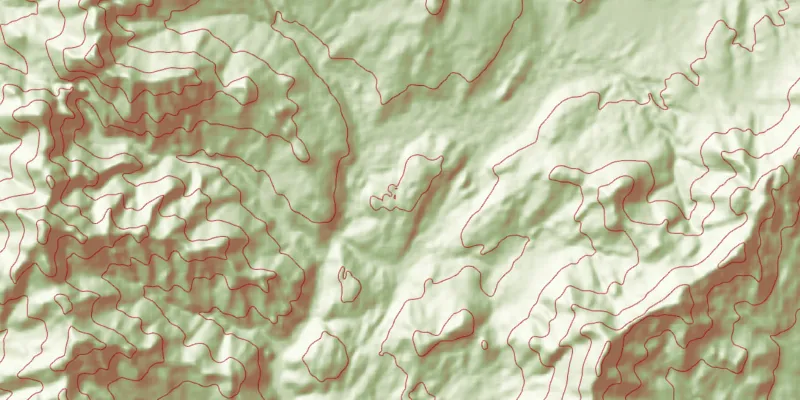
Use case
For executing offline geoprocessing tasks in your ArcGIS Maps SDK for Java apps via an offline (local) server.
How to use the sample
Contour Line Controls (Top Left):
- Interval - Specifies the spacing between contour lines.
- Generate Contours - Adds contour lines to map using interval.
- Clear Results - Removes contour lines from map.
How it works
- Create and run a local server with
LocalServer.INSTANCE. - Start the server asynchronously with
Server.startAsync(). - Wait for server to be in the
LocalServerStatus.STARTEDstate.- Callbacks attached to
Server.addStatusChangedListener()will invoke whenever the status of the local server has changed.
- Callbacks attached to
- Start a
LocalGeoprocessingServiceand run aGeoprocessingTask.- Instantiate
LocalGeoprocessingService(Url, ServiceType)to create a local geoprocessing service. - Invoke
LocalGeoprocessingService.start()to start the service asynchronously. - Instantiate
GeoprocessingTask(LocalGeoprocessingService.url() + "/Contour")to create a geoprocessing task that uses the contour lines tool.
- Instantiate
- Create an instance of
GeoprocessingParametersand add aGeoprocessingDoubleas a parameter usingsetInterval.- Instantiate
GeoprocessingParameters(ExecutionType)creates geoprocessing parameters. - Create a parameter using
GeoprocessingParameters.getInputs().put("Interval", new GeoprocessingDouble(double))with name “Interval” and with the interval set as its value.
- Instantiate
- Create and start a
GeoprocessingJobusing the previous parameters.- Create a geoprocessing job with
GeoprocessingTask.createJob(GeoprocessingParameters). - Start the job with
GeoprocessingJob.start().
- Create a geoprocessing job with
- Add contour lines as an
ArcGISMapImageLayerto the map.- Get url from local geoprocessing service using
LocalGeoprocessingService.getUrl(). - Get server job id of geoprocessing job using
GeoprocessingJob.getServerJobId(). - Replace
GPServerfrom url withMapServer/jobs/jobId, to get generate contour lines data. - Create a map image layer from that new url and add that layer to the map.
- Get url from local geoprocessing service using
Relevant API
- GeoprocessingDouble
- GeoprocessingJob
- GeoprocessingParameter
- GeoprocessingParameters
- GeoprocessingTask
- LocalGeoprocessingService
- LocalGeoprocessingService.ServiceType
- LocalServer
- LocalServerStatus
Additional information
Local Server can be downloaded for Windows and Linux platforms from your ArcGIS Developers dashboard. Local Server is not supported on macOS.
Specific versions of ArcGIS Maps SDK for Local Server are compatible with the version of ArcGIS Pro you use to create geoprocessing and map packages. For example, the ArcGIS Maps SDK for Java v100.11.0 is configured for Local Server v100.10.0 which provides compatibility for packages created with ArcGIS Pro 2.7.x. For more information see the ArcGIS Developers guide.
To configure the ArcGIS Maps SDK for Java v100.11.0 to work with ArcGIS Maps SDK for Local Server 100.9.0:
- Development machine:
- Locate the Local Server installation directory and rename the folder from
LocalServer100.9toLocalServer100.10. - Update the environment variable from
RUNTIME_LOCAL_SERVER_100_9toRUNTIME_LOCAL_SERVER_100_10.
- Locate the Local Server installation directory and rename the folder from
- Deployment machine(s): Rename the deployment folder included with your application (or referenced by the LocalServerEnvironment.InstallPath property) from
LocalServer100.9toLocalServer100.10.
Tags
geoprocessing, local, offline, parameters, processing, service
Sample code
/* * Copyright 2017 Esri. * * Licensed under the Apache License, Version 2.0 (the "License"); you may not * use this file except in compliance with the License. You may obtain a copy of * the License at * * http://www.apache.org/licenses/LICENSE-2.0 * * Unless required by applicable law or agreed to in writing, software * distributed under the License is distributed on an "AS IS" BASIS, WITHOUT * WARRANTIES OR CONDITIONS OF ANY KIND, either express or implied. See the * License for the specific language governing permissions and limitations under * the License. */
package com.esri.samples.local_server_geoprocessing;
import java.io.File;import java.util.Map;
import javafx.application.Platform;import javafx.fxml.FXML;import javafx.scene.control.Alert;import javafx.scene.control.Alert.AlertType;import javafx.scene.control.Button;import javafx.scene.control.ProgressBar;import javafx.scene.control.TextField;
import com.esri.arcgisruntime.ArcGISRuntimeEnvironment;import com.esri.arcgisruntime.concurrent.Job;import com.esri.arcgisruntime.data.TileCache;import com.esri.arcgisruntime.layers.ArcGISMapImageLayer;import com.esri.arcgisruntime.layers.ArcGISTiledLayer;import com.esri.arcgisruntime.loadable.LoadStatus;import com.esri.arcgisruntime.localserver.LocalGeoprocessingService;import com.esri.arcgisruntime.localserver.LocalGeoprocessingService.ServiceType;import com.esri.arcgisruntime.localserver.LocalServer;import com.esri.arcgisruntime.localserver.LocalServerStatus;import com.esri.arcgisruntime.mapping.ArcGISMap;import com.esri.arcgisruntime.mapping.BasemapStyle;import com.esri.arcgisruntime.mapping.view.MapView;import com.esri.arcgisruntime.tasks.geoprocessing.GeoprocessingDouble;import com.esri.arcgisruntime.tasks.geoprocessing.GeoprocessingJob;import com.esri.arcgisruntime.tasks.geoprocessing.GeoprocessingParameter;import com.esri.arcgisruntime.tasks.geoprocessing.GeoprocessingParameters;import com.esri.arcgisruntime.tasks.geoprocessing.GeoprocessingTask;
public class LocalServerGeoprocessingController {
  @FXML private TextField txtInterval;  @FXML private Button btnGenerate;  @FXML private Button btnClear;  @FXML private ProgressBar progressBar;  @FXML private MapView mapView;
  private ArcGISTiledLayer tiledLayer; // keep loadable in scope to avoid garbage collection  private GeoprocessingTask gpTask;  private LocalGeoprocessingService localGPService;
  private static LocalServer server;
  /**   * Called after FXML loads. Sets up scene and map and configures property bindings.   */  public void initialize() {
    try {      // authentication with an API key or named user is required to access basemaps and other location services      String yourAPIKey = System.getProperty("apiKey");      ArcGISRuntimeEnvironment.setApiKey(yourAPIKey);
      // create a map with the light gray basemap style      ArcGISMap map = new ArcGISMap(BasemapStyle.ARCGIS_LIGHT_GRAY);
      // set the map to the map view      mapView.setMap(map);
      // load tiled layer and zoom to location      String rasterURL = new File(System.getProperty("data.dir"), "./samples-data/local_server/RasterHillshade.tpkx").getAbsolutePath();      TileCache tileCache = new TileCache(rasterURL);      tiledLayer = new ArcGISTiledLayer(tileCache);      tiledLayer.loadAsync();      tiledLayer.addDoneLoadingListener(() -> {        if (tiledLayer.getLoadStatus() == LoadStatus.LOADED) {          mapView.setViewpointGeometryAsync(tiledLayer.getFullExtent());        } else {          Alert alert = new Alert(Alert.AlertType.ERROR, "Tiled Layer Failed to Load!");          alert.show();        }      });      map.getOperationalLayers().add(tiledLayer);
      // check that local server install path can be accessed      if (LocalServer.INSTANCE.checkInstallValid()) {        progressBar.setVisible(true);        server = LocalServer.INSTANCE;        // start the local server        server.addStatusChangedListener(status -> {          if (server.getStatus() == LocalServerStatus.STARTED) {            try {              String gpServiceURL = new File(System.getProperty("data.dir"), "./samples-data/local_server/Contour.gpkx").getAbsolutePath();              // need map server result to add contour lines to map              localGPService =                  new LocalGeoprocessingService(gpServiceURL, ServiceType.ASYNCHRONOUS_SUBMIT_WITH_MAP_SERVER_RESULT);            } catch (Exception e) {              e.printStackTrace();            }
            localGPService.addStatusChangedListener(s -> {              // create geoprocessing task once local geoprocessing service is started              if (s.getNewStatus() == LocalServerStatus.STARTED) {                // add `/Contour` to use contour geoprocessing tool                gpTask = new GeoprocessingTask(localGPService.getUrl() + "/Contour");                btnClear.disableProperty().bind(btnGenerate.disabledProperty().not());                btnGenerate.setDisable(false);                progressBar.setVisible(false);              }            });            localGPService.startAsync();          } else if (server.getStatus() == LocalServerStatus.FAILED) {            showMessage("Local Geoprocessing Load Error", "Local Geoprocessing Failed to load.");          }        });        server.startAsync();      } else {        showMessage("Local Server Load Error", "Local Server install path couldn't be located.");      }
    } catch (Exception e) {      // on any exception, print the stack trace      e.printStackTrace();    }  }
  /**   * Creates a Map Image Layer that displays contour lines on the map using the interval the that is set.   */  @FXML  protected void handleGenerateContours() {
    // tracking progress of creating contour map    progressBar.setVisible(true);    // create parameter using interval set    GeoprocessingParameters gpParameters = new GeoprocessingParameters(        GeoprocessingParameters.ExecutionType.ASYNCHRONOUS_SUBMIT);
    final Map<String, GeoprocessingParameter> inputs = gpParameters.getInputs();    double interval = Double.parseDouble(txtInterval.getText());    inputs.put("Interval", new GeoprocessingDouble(interval));
    // adds contour lines to map    GeoprocessingJob gpJob = gpTask.createJob(gpParameters);
    gpJob.addProgressChangedListener(() -> progressBar.setProgress(((double) gpJob.getProgress()) / 100));
    gpJob.addJobDoneListener(() -> {      if (gpJob.getStatus() == Job.Status.SUCCEEDED) {        // creating map image url from local geoprocessing service url        String serviceUrl = localGPService.getUrl();        String mapServerUrl = serviceUrl.replace("GPServer", "MapServer/jobs/" + gpJob.getServerJobId());        ArcGISMapImageLayer mapImageLayer = new ArcGISMapImageLayer(mapServerUrl);        mapImageLayer.loadAsync();        mapView.getMap().getOperationalLayers().add(mapImageLayer);        btnGenerate.setDisable(true);      } else {        Alert dialog = new Alert(AlertType.ERROR);        dialog.setHeaderText("Geoprocess Job Fail");        dialog.setContentText("Error: " + gpJob.getError().getMessage());        dialog.showAndWait();      }      progressBar.setVisible(false);    });    gpJob.start();  }
  /**   * Removes contour lines from map if any are applied.   */  @FXML  protected void handleClearResults() {
    if (mapView.getMap().getOperationalLayers().size() > 1) {      mapView.getMap().getOperationalLayers().remove(1);      btnGenerate.setDisable(false);    }  }
  private void showMessage(String title, String message) {
    Platform.runLater(() -> {      Alert dialog = new Alert(AlertType.INFORMATION);      dialog.initOwner(mapView.getScene().getWindow());      dialog.setHeaderText(title);      dialog.setContentText(message);      dialog.showAndWait();
      Platform.exit();    });  }
  /**   * Stops and releases all resources used in application.   */  void terminate() {
    if (mapView != null) {      mapView.dispose();    }  }}
/* * Copyright 2017 Esri. * * Licensed under the Apache License, Version 2.0 (the "License"); you may not * use this file except in compliance with the License. You may obtain a copy of * the License at * * http://www.apache.org/licenses/LICENSE-2.0 * * Unless required by applicable law or agreed to in writing, software * distributed under the License is distributed on an "AS IS" BASIS, WITHOUT * WARRANTIES OR CONDITIONS OF ANY KIND, either express or implied. See the * License for the specific language governing permissions and limitations under * the License. */
package com.esri.samples.local_server_geoprocessing;
import java.io.IOException;
import javafx.application.Application;import javafx.fxml.FXMLLoader;import javafx.scene.Parent;import javafx.scene.Scene;import javafx.stage.Stage;
public class LocalServerGeoprocessingSample extends Application {
private static LocalServerGeoprocessingController controller;
@Override public void start(Stage stage) throws IOException { // set up the scene FXMLLoader loader = new FXMLLoader(getClass().getResource("/local_server_geoprocessing/main.fxml")); Parent root = loader.load(); controller = loader.getController(); Scene scene = new Scene(root);
// set up the stage stage.setTitle("Local Server Geoprocessing Sample"); stage.setWidth(800); stage.setHeight(700); stage.setScene(scene); stage.show(); }
/** * Stops and releases all resources used in application. */ @Override public void stop() { controller.terminate(); }
/** * Opens and runs application. * * @param args arguments passed to this application */ public static void main(String[] args) {
Application.launch(args); }}