Change the visibility of sublayers.
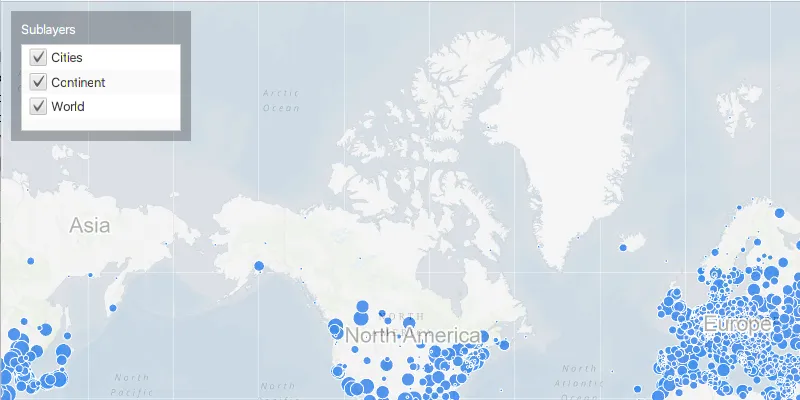
Use case
A map image layer may contain many sublayers such as different types of roads in a road network or city, county, and state borders in a US map. The user may only be interested in a subset of these sublayers. Or, perhaps showing all of the sublayers would show too much detail. In these cases, you can hide certain sublayers by changing their visibility.
How to use the sample
Each sublayer has a check box which can be used to toggle the visibility of the sublayer.
How it works
- Create an
ArcGISMapImageLayerobject with the URL to a map image service. - Get the
SubLayerListwithmapImageLayer.getSubLayers(). - For each layer in the sublayer list, set its visible property to true or false using
.setVisible().
Relevant API
- ArcGISMapImageLayer
- SubLayerList
Tags
layer, sublayer, visibility
Sample code
MapImageLayerSublayerVisibilitySample.java
/* * Copyright 2017 Esri. * * Licensed under the Apache License, Version 2.0 (the "License"); you may not * use this file except in compliance with the License. You may obtain a copy of * the License at * * http://www.apache.org/licenses/LICENSE-2.0 * * Unless required by applicable law or agreed to in writing, software * distributed under the License is distributed on an "AS IS" BASIS, WITHOUT * WARRANTIES OR CONDITIONS OF ANY KIND, either express or implied. See the * License for the specific language governing permissions and limitations under * the License. */
package com.esri.samples.map_image_layer_sublayer_visibility;
import javafx.application.Application;import javafx.beans.property.SimpleBooleanProperty;import javafx.geometry.Insets;import javafx.geometry.Pos;import javafx.scene.Scene;import javafx.scene.control.Alert;import javafx.scene.control.Label;import javafx.scene.control.ListView;import javafx.scene.control.cell.CheckBoxListCell;import javafx.scene.layout.Background;import javafx.scene.layout.BackgroundFill;import javafx.scene.layout.CornerRadii;import javafx.scene.layout.StackPane;import javafx.scene.layout.VBox;import javafx.scene.paint.Paint;import javafx.stage.Stage;import javafx.util.StringConverter;
import com.esri.arcgisruntime.ArcGISRuntimeEnvironment;import com.esri.arcgisruntime.layers.ArcGISMapImageLayer;import com.esri.arcgisruntime.layers.ArcGISSublayer;import com.esri.arcgisruntime.loadable.LoadStatus;import com.esri.arcgisruntime.mapping.ArcGISMap;import com.esri.arcgisruntime.mapping.BasemapStyle;import com.esri.arcgisruntime.mapping.Viewpoint;import com.esri.arcgisruntime.mapping.view.MapView;
public class MapImageLayerSublayerVisibilitySample extends Application {
  private MapView mapView;
  @Override  public void start(Stage stage) {
    try {      // create a border pane and application scene      StackPane stackPane = new StackPane();      Scene scene = new Scene(stackPane);      scene.getStylesheets().add(getClass().getResource("/map_image_layer_sublayer_visibility/style.css").toExternalForm());
      // size the stage and add a title      stage.setTitle("Map Image Layer Sublayer Visibility Sample");      stage.setWidth(800);      stage.setHeight(700);      stage.setScene(scene);      stage.show();
      // authentication with an API key or named user is required to access basemaps and other location services      String yourAPIKey = System.getProperty("apiKey");      ArcGISRuntimeEnvironment.setApiKey(yourAPIKey);
      // create a control panel      VBox controlsVBox = new VBox(6);      controlsVBox.setBackground(new Background(new BackgroundFill(Paint.valueOf("rgba(0,0,0,0.3)"), CornerRadii.EMPTY,              Insets.EMPTY)));      controlsVBox.setPadding(new Insets(10.0));      controlsVBox.setMaxSize(180, 130);      controlsVBox.getStyleClass().add("panel-region");
      // create a ListView containing a CheckBox for the visibility of each sublayer      var sublayersLabel = new Label("Sublayers");      ListView<ArcGISSublayer> sublayersList = new ListView<>();      sublayersList.setCellFactory(CheckBoxListCell.forListView(          sublayer -> {            // set visibility of sublayer when checkbox is clicked            var visibleProperty = new SimpleBooleanProperty(sublayer.isVisible());            visibleProperty.addListener((observable, oldValue, newValue) -> sublayer.setVisible(newValue));            return visibleProperty;          },          new ArcGISSublayerStringConverter()));      controlsVBox.getChildren().addAll(sublayersLabel, sublayersList);
      // create a map with the topographic basemap style      ArcGISMap map = new ArcGISMap(BasemapStyle.ARCGIS_TOPOGRAPHIC);
      // create a map view and set the map to it      mapView = new MapView();      mapView.setMap(map);
      // set a viewpoint on the map view      mapView.setViewpoint(new Viewpoint(48.354406, -99.998267, 147914382));
      // create an image Layer with dynamically generated ArcGISMap images      ArcGISMapImageLayer imageLayer = new ArcGISMapImageLayer("https://sampleserver6.arcgisonline.com/arcgis/rest/services/SampleWorldCities/MapServer");
      // add the image layer to the map's operational layers      map.getOperationalLayers().add(imageLayer);
      // set the image layer's opacity so that the basemap is visible behind it      imageLayer.setOpacity(0.7f);
      // set a done-loading listener on the layer      imageLayer.addDoneLoadingListener(() -> {        if (imageLayer.getLoadStatus() == LoadStatus.LOADED) {          // set the layer's sublayers on the ListView          sublayersList.setItems(imageLayer.getSublayers());        } else {          // show alert if layer fails to load          new Alert(Alert.AlertType.ERROR, "Error loading Image Layer.").show();        }      });
      // add the map view and controls to the stack pane      stackPane.getChildren().addAll(mapView, controlsVBox);      StackPane.setAlignment(controlsVBox, Pos.TOP_LEFT);      StackPane.setMargin(controlsVBox, new Insets(10, 0, 0, 10));
    } catch (Exception e) {      // on any error, display the stack trace.      e.printStackTrace();    }  }
  @Override  public void stop() {
    // releases resources when the application closes    if (mapView != null) {      mapView.dispose();    }  }
  /**   * Starting point of this application.   *   * @param args arguments to this application.   */  public static void main(String[] args) {
    Application.launch(args);  }
  /**   * A StringConverter for displaying ArcGISSublayers. Simply displays the ArcGISSublayer's name.   */  private static class ArcGISSublayerStringConverter extends StringConverter<ArcGISSublayer> {    @Override public String toString(ArcGISSublayer sublayer) {      return sublayer.getName();    }
    @Override public ArcGISSublayer fromString(String string) {      return null;    }  }}