Find features in a sublayer based on attributes and location.
Use case
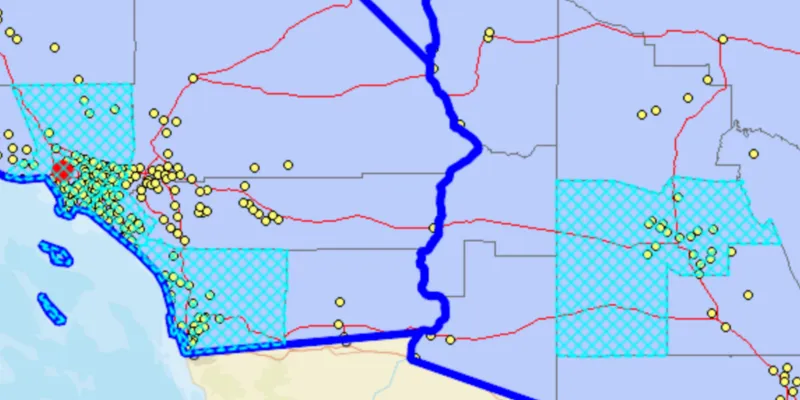
Sublayers of an ArcGISMapImageLayer may expose a ServiceFeatureTable through a table property. This allows you to perform the same queries available when working with a table from a FeatureLayer: attribute query, spatial query, statistics query, query for related features, etc. An image layer with a sublayer of counties can be queried by population to only show those above a minimum population.
How to use the sample
Specify a minimum population in the input field (values under 1810000 will produce a selection in all layers) and click the ‘Query’ button to query the sublayers in the current view extent. After a short time, the results for each sublayer will appear as graphics.
How it works
- Create an
ArcGISMapImageLayerobject using the URL of an image service. - After loading the layer, get the sublayer you want to query with
(ArcGISMapImageSublayer) layer.getSubLayers().get(index). - Load the sublayer, and then get its
ServiceFeatureTablewithsublayer.getTable(). - Create
QueryParameters. You can usequeryParameters.setWhereClause(sqlQueryString)to query against a table attribute and/or setqueryParameters.setGeometry(extent)to limit the results to an area of the map. - Call
sublayerTable.queryFeaturesAsync(queryParameters)to get aFeatureQueryResultwith features matching the query. The result is an iterable of features.
About the data
The ArcGISMapImageLayer in the map uses the “USA” map service as its data source. This service is hosted by ArcGIS Online, and is composed of four sublayers: “states”, “counties”, “cities”, and “highways”.
Since the cities, counties, and states tables all have a POP2000 field, they can all execute a query against that attribute and a map extent.
Relevant API
- ArcGISMapImageLayer
- ArcGISMapImageSublayer
- QueryParameters
- ServiceFeatureTable
Tags
search, query
Sample code
/* * Copyright 2018 Esri. * * Licensed under the Apache License, Version 2.0 (the "License"); you may not * use this file except in compliance with the License. You may obtain a copy of * the License at * * http://www.apache.org/licenses/LICENSE-2.0 * * Unless required by applicable law or agreed to in writing, software * distributed under the License is distributed on an "AS IS" BASIS, WITHOUT * WARRANTIES OR CONDITIONS OF ANY KIND, either express or implied. See the * License for the specific language governing permissions and limitations under * the License. */
package com.esri.samples.query_map_image_sublayer;
import javafx.application.Application;import javafx.geometry.Insets;import javafx.geometry.Pos;import javafx.scene.Scene;import javafx.scene.control.Alert;import javafx.scene.control.Button;import javafx.scene.control.Label;import javafx.scene.control.Spinner;import javafx.scene.layout.Background;import javafx.scene.layout.BackgroundFill;import javafx.scene.layout.CornerRadii;import javafx.scene.layout.StackPane;import javafx.scene.layout.VBox;import javafx.scene.paint.Color;import javafx.scene.paint.Paint;import javafx.stage.Stage;
import com.esri.arcgisruntime.ArcGISRuntimeEnvironment;import com.esri.arcgisruntime.concurrent.ListenableFuture;import com.esri.arcgisruntime.data.Feature;import com.esri.arcgisruntime.data.FeatureQueryResult;import com.esri.arcgisruntime.data.QueryParameters;import com.esri.arcgisruntime.data.ServiceFeatureTable;import com.esri.arcgisruntime.layers.ArcGISMapImageLayer;import com.esri.arcgisruntime.layers.ArcGISMapImageSublayer;import com.esri.arcgisruntime.loadable.LoadStatus;import com.esri.arcgisruntime.mapping.ArcGISMap;import com.esri.arcgisruntime.mapping.BasemapStyle;import com.esri.arcgisruntime.mapping.Viewpoint;import com.esri.arcgisruntime.mapping.view.Graphic;import com.esri.arcgisruntime.mapping.view.GraphicsOverlay;import com.esri.arcgisruntime.mapping.view.MapView;import com.esri.arcgisruntime.symbology.SimpleFillSymbol;import com.esri.arcgisruntime.symbology.SimpleLineSymbol;import com.esri.arcgisruntime.symbology.SimpleMarkerSymbol;
public class QueryMapImageSublayerSample extends Application {
  private MapView mapView;
  @Override  public void start(Stage stage) {
    try {      // create a stack pane and application scene      StackPane stackPane = new StackPane();      Scene scene = new Scene(stackPane);      scene.getStylesheets().add(getClass().getResource("/query_map_image_sublayer/style.css").toExternalForm());
      // size the stage and add a title      stage.setTitle("Query Map Image Sublayer Sample");      stage.setWidth(800);      stage.setHeight(700);      stage.setScene(scene);      stage.show();
      // authentication with an API key or named user is required to access basemaps and other location services      String yourAPIKey = System.getProperty("apiKey");      ArcGISRuntimeEnvironment.setApiKey(yourAPIKey);
      // create a map with the streets basemap style      ArcGISMap map = new ArcGISMap(BasemapStyle.ARCGIS_STREETS);
      // create and add a map image layer to the map's operational layers      ArcGISMapImageLayer imageLayer = new ArcGISMapImageLayer("https://sampleserver6.arcgisonline.com/arcgis/rest/services/USA/MapServer");      map.getOperationalLayers().add(imageLayer);
      // create a map view and set the map to it      mapView = new MapView();      mapView.setMap(map);
      // set a viewpoint on the map view      mapView.setViewpoint(new Viewpoint(36.75056, -115.44154, 6000000));
      // create a graphics overlay to show the results in      GraphicsOverlay graphicsOverlay = new GraphicsOverlay();      mapView.getGraphicsOverlays().add(graphicsOverlay);
      // create symbols for showing the results of each sublayer      SimpleMarkerSymbol citySymbol = new SimpleMarkerSymbol(SimpleMarkerSymbol.Style.CIRCLE, Color.RED, 16);      SimpleLineSymbol stateSymbol = new SimpleLineSymbol(SimpleLineSymbol.Style.SOLID, Color.BLUE, 6);      SimpleLineSymbol countyLineSymbol = new SimpleLineSymbol(SimpleLineSymbol.Style.DASH, Color.CYAN, 2);      SimpleFillSymbol countySymbol = new SimpleFillSymbol(SimpleFillSymbol.Style.DIAGONAL_CROSS, Color.CYAN,          countyLineSymbol);
      // create a VBox to hold the controls      VBox controlsVBox = new VBox(6);      controlsVBox.setBackground(new Background(new BackgroundFill(Paint.valueOf("rgba(0,0,0,0.3)"), CornerRadii.EMPTY,          Insets.EMPTY)));      controlsVBox.setPadding(new Insets(10.0));      controlsVBox.setMaxSize(170, 100);      controlsVBox.getStyleClass().add("panel-region");
      // create a spinner to input the population filter      Label label = new Label("Population greater than");      Spinner<Integer> populationSpinner = new Spinner<>(0, 100000000, 1800000);      populationSpinner.setEditable(true);
      // create a button to execute the query, disable initially      Button queryButton = new Button("Query");      queryButton.setDisable(true);
      // add the controls to the VBox      controlsVBox.getChildren().addAll(label, populationSpinner, queryButton);
      // wait until the layer is loaded before enabling the query button      imageLayer.addDoneLoadingListener(() -> {        if (imageLayer.getLoadStatus() == LoadStatus.LOADED) {          queryButton.setDisable(false);
          // get and load each sublayer to query          ArcGISMapImageSublayer citiesSublayer = (ArcGISMapImageSublayer) imageLayer.getSublayers().get(0);          ArcGISMapImageSublayer statesSublayer = (ArcGISMapImageSublayer) imageLayer.getSublayers().get(2);          ArcGISMapImageSublayer countiesSublayer = (ArcGISMapImageSublayer) imageLayer.getSublayers().get(3);          citiesSublayer.loadAsync();          statesSublayer.loadAsync();          countiesSublayer.loadAsync();
          // query the sublayers when the button is clicked          queryButton.setOnAction(e -> {
            // clear any previous results            graphicsOverlay.getGraphics().clear();
            // create query parameters filtering based on population and the map view's current viewpoint            QueryParameters populationQuery = new QueryParameters();            populationQuery.setWhereClause("POP2000 > " + populationSpinner.getValue());            populationQuery.setGeometry(mapView.getCurrentViewpoint(Viewpoint.Type.BOUNDING_GEOMETRY)                .getTargetGeometry());
            // query each sublayer's feature table with the query parameters and display the result features as graphics            if (citiesSublayer.getLoadStatus() == LoadStatus.LOADED) {              ServiceFeatureTable citiesTable = citiesSublayer.getTable();              ListenableFuture<FeatureQueryResult> citiesQuery = citiesTable.queryFeaturesAsync(populationQuery);              citiesQuery.addDoneListener(() -> {                try {                  FeatureQueryResult result = citiesQuery.get();                  for (Feature feature : result) {                    Graphic cityGraphic = new Graphic(feature.getGeometry(), citySymbol);                    graphicsOverlay.getGraphics().add(cityGraphic);                  }                } catch (Exception ex) {                  new Alert(Alert.AlertType.ERROR, "Failed to query cities").show();                }              });            }
            if (statesSublayer.getLoadStatus() == LoadStatus.LOADED) {              ServiceFeatureTable statesTable = statesSublayer.getTable();              ListenableFuture<FeatureQueryResult> statesQuery = statesTable.queryFeaturesAsync(populationQuery);              statesQuery.addDoneListener(() -> {                try {                  FeatureQueryResult result = statesQuery.get();                  for (Feature feature : result) {                    Graphic stateGraphic = new Graphic(feature.getGeometry(), stateSymbol);                    graphicsOverlay.getGraphics().add(stateGraphic);                  }                } catch (Exception ex) {                  new Alert(Alert.AlertType.ERROR, "Failed to query states").show();                }              });            }
            if (countiesSublayer.getLoadStatus() == LoadStatus.LOADED) {              ServiceFeatureTable countiesTable = countiesSublayer.getTable();              ListenableFuture<FeatureQueryResult> countiesQuery = countiesTable.queryFeaturesAsync(populationQuery);              countiesQuery.addDoneListener(() -> {                try {                  FeatureQueryResult result = countiesQuery.get();                  for (Feature feature : result) {                    Graphic countyGraphic = new Graphic(feature.getGeometry(), countySymbol);                    graphicsOverlay.getGraphics().add(countyGraphic);                  }                } catch (Exception ex) {                  new Alert(Alert.AlertType.ERROR, "Failed to query counties").show();                }              });            }
          });        } else {          new Alert(Alert.AlertType.ERROR,  imageLayer.getLoadError().getMessage()).show();        }      });
      // add the mapview and controls to the stack pane      stackPane.getChildren().addAll(mapView, controlsVBox);      StackPane.setAlignment(controlsVBox, Pos.TOP_LEFT);      StackPane.setMargin(controlsVBox, new Insets(10, 0, 0, 10));
    } catch (Exception e) {      // on any error, display the stack trace.      e.printStackTrace();    }  }
  @Override  public void stop() {
    // releases resources when the application closes    if (mapView != null) {      mapView.dispose();    }  }
  /**   * Starting point of this application.   *   * @param args arguments to this application.   */  public static void main(String[] args) {
    Application.launch(args);  }}